Inspiration
While working on a project called OpenSight, I had a conversation with Andrew Johnson, a blind technologist at the Blind Institute of Technology, about one of the biggest accessibility gaps in digital workspaces. He explained that while modern screen readers excel at reading text and navigating DOM structure, they're essentially blind to visual diagrams, flowcharts, Lucidchart maps, and Figma designs are opaque black boxes to blind and low-vision users. In collaborative workspaces like Slack, this creates a real exclusion: sighted teammates share diagrams for alignment, and blind teammates can't access that information.
That gap felt worth closing.
What it does
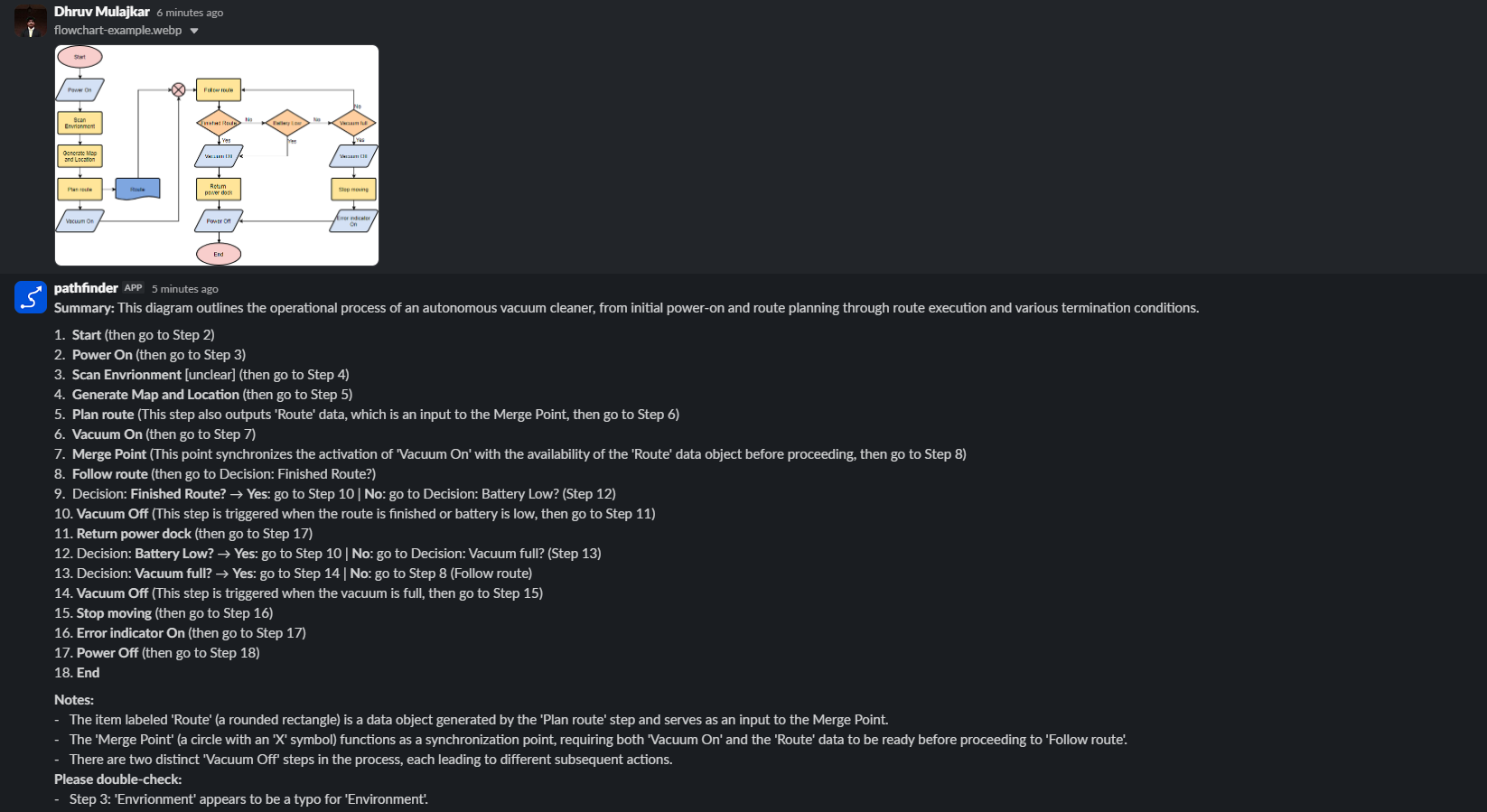
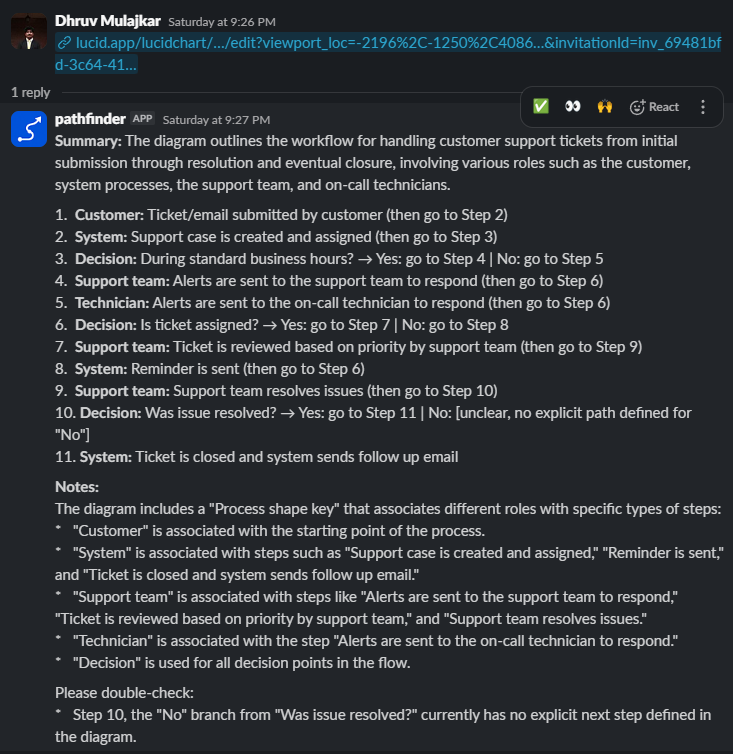
PathFinder makes diagrams accessible by turning visual representations into structured text descriptions that screen readers can navigate. Post a diagram (image, Figma link, or Lucidchart link) in Slack, and it replies in-thread with a one-line summary, numbered steps in flow order, decision branches with explicit notation, and a Notes section for uncertain transcriptions. Blind/low-vision teammates can reply in the same thread to ask follow-up questions ("what happens if approval fails?") and get answers grounded in that diagram's actual structure. Output is customizable via keywords: summary or detailed controls depth, plain language de-jargons for non-technical readers, and mermaid appends a re-editable flowchart code block. It works as a Slack bot in any channel or as a dedicated Slack AI Assistant pane with greeting, suggested prompts, and status indicators.
How we built it
The architecture is a single route_diagram() function shared by both the channel handler and the Slack Assistant, routing files to Gemini vision, Figma URLs to structured node data (MCP or REST API, with PNG render fallback when rate-limited), Lucidchart URLs to the Lucid MCP (or REST PNG export), and plain text to a follow-up Q&A handler that re-fetches the thread and re-queries the diagram. Descriptions flow through composable style suffixes (verbosity + reading level), Gemini with 5xx retry logic, and fence-aware mrkdwn conversion (so Mermaid --> edges survive the arrow rewrite). The Slack Agents & AI Apps framework provides the assistant pane, threading, and status indicators. Resilience comes from fallback tiers (MCP → REST → PNG render), proactive token refresh for Lucid (the SDK doesn't persist expiry), and graceful error messages. All state lives in Slack threads.
Challenges we ran into
- Figma MCP allowlist policy: Spent time building correct OAuth/MCP plumbing only to hit Figma's "only catalog clients can register" wall (403 on DCR). The workaround (REST API) works but is rate-limited and less accurate. Documented the limitation and kept the code so it's ready if Figma's policy changes.
- Gemini description accuracy drift: Early outputs dropped nodes, misrouted branches, or implied false sequential flow. Fixed by rewriting the prompt with explicit "Accuracy rules" account for every node, trace every arrow to its real destination, mark non-sequential steps with "(then go to Step N)". The tighter prompt paid off.
- MCP token refresh across restarts: The mcp SDK doesn't persist token expiry, so on a fresh process it treats expired access tokens as valid, skips refresh, hits a 401, then attempts interactive re-auth (which fails in a bot). Worked around by recording the token's issue time and proactively refreshing via the refresh_token grant before each call.
- Figma's rate limit during testing: The free-tier /v1/files endpoint has a low quota. Solved by discovering the /v1/images render endpoint is a separate quota bucket, when files is throttled, the bot silently falls back to rendering a high-res PNG and using Gemini vision instead.
- Mermaid arrow corruption: The arrow-to-unicode rewrite (-> → →) was breaking Mermaid's --> edges. Fixed by making to_slack_mrkdwn fence-aware, only rewrites prose, not code blocks.
- Slack Assistant framework learning curve: The Agents & AI Apps platform is newer. Took time to understand the threading model, status indicators, and how to wire the same diagram-routing logic into both channel messages and assistant thread contexts.
What we learned
- Multimodal AI is powerful, feeding both images and structured data (Figma node outlines, Lucid document JSON) to Gemini produces far more accurate descriptions than vision alone. The structured data acts as ground truth for what's actually in the diagram, while vision catches visual nuances.
- Accessibility isn't a feature, it's a platform requirement — the rigor of screen-reader-safe output (no tables, no emoji, explicit branch notation) forced cleaner, more structured descriptions that benefit everyone.
- MCP is a game-changer for integrations, the ability to pull structured diagram data (not screenshots) via the Model Context Protocol opened a new accuracy frontier. Figma's allowlist blocked us, but Lucid's open DCR (Dynamic Client Registration) proved the concept works.
- Single-account access patterns fit the use case, I initially worried about per-user OAuth, but the real pattern is simpler: a team's shared Figma/Lucid account makes all team diagrams accessible to all teammates, including blind ones.
What's next for PathFinder
Screen readers excel at DOM structure and prose; they fail at visual communication. PathFinder solves this for Slack diagrams, but the core idea, multimodal AI + structured data extraction → accessible text, applies to design handoffs, meeting recordings with slides, even real-time video collaboration. A blind engineer should never miss a whiteboard moment or a visual decision. The infrastructure is here; the next frontiers are API exposure (so other tools can call the description engine) and real-time collaboration (describing diagrams as teammates draw them).
Built With
- figma
- gemini
- lucidchart
- mermaid
- oauth
- oracle-cloud
- python
- slack-bolt

Log in or sign up for Devpost to join the conversation.