Inspiration
As someone dealing with carpal tunnel syndrome, I found myself increasingly frustrated with the repetitive motions of copying text, switching tabs, and pasting into AI platforms dozens of times per day. With less than 12 hours left in the hackathon, I wanted to complete a reasonably scoped project that would not only reduce my daily hand strain but also serve a practical purpose in my workflow. The idea for pastePrompt; was born from this personal need - a tool that could turn any highlighted text into an instant AI query with minimal keyboard interaction. The semicolon in the name is both a nod to coding syntax and a reminder that sometimes the best solutions come from addressing our own daily struggles.
What it does
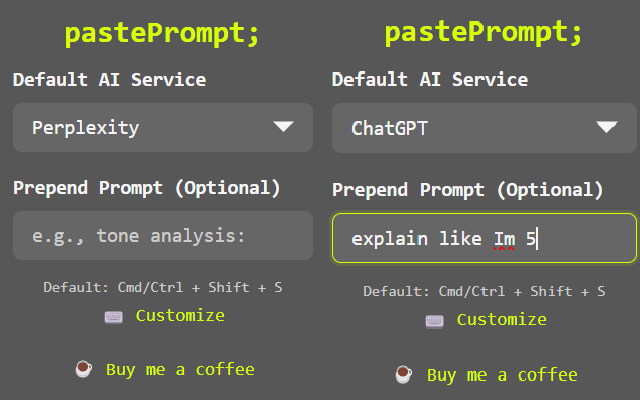
I built pastePrompt; to streamline my AI-powered research by turning any highlighted text into an instant query. With a single keyboard shortcut (Cmd/Ctrl + Shift + S) or right-click, I can send selected text directly to ChatGPT or Perplexity. I added customizable prepended prompts, allowing me to automatically format queries for specific types of analysis like sentiment, translation, and code explanation.
How I built it
I developed pastePrompt; using:
- Chrome Extension Manifest V3
- JavaScript for core functionality
- Chrome APIs (contextMenus, storage, tabs, commands)
- Custom CSS with CSS variables for theming
- Fira Mono font for a clean, technical aesthetic
Challenges I ran into
- Implementing cross-platform keyboard shortcuts that work consistently
- Managing state between popup and background scripts
- Handling different AI platform URL structures
- Creating a minimal yet intuitive UI
- Optimizing performance for instant response
Accomplishments that I'm proud of
- Created an extension that saves me significant time in research workflows
- Implemented a clean, dark-themed UI that matches Chrome's aesthetic
- Developed a flexible prepend system for customizable prompts
- Achieved seamless integration with multiple AI platforms
- Maintained a lightweight and efficient codebase
What I learned
- Chrome Extension API best practices
- State management in extension architecture
- UX design for productivity tools
- Cross-platform compatibility considerations
What's next for pastePrompt;
- Support for additional AI platforms
- Context-aware prompt suggestions
- Save prompt prepends to a personal library
- Browser sync for settings and prompts
- Advanced prompt templates
- Integration with local AI models
- Export and share prompt collections
- Analytics for productivity insights

Log in or sign up for Devpost to join the conversation.