-
-
workable application
Inspiration
Password Strength Checker
Inspiration
In today's digital world, weak passwords remain one of the biggest security risks. Many users create passwords that are easy to remember but also easy to crack, leading to compromised accounts and data breaches. I wanted to build a simple yet effective tool that could help users understand the importance of strong passwords and encourage better cybersecurity practices. This project was inspired by the growing need for online security and my interest in web development and cybersecurity.
What It Does
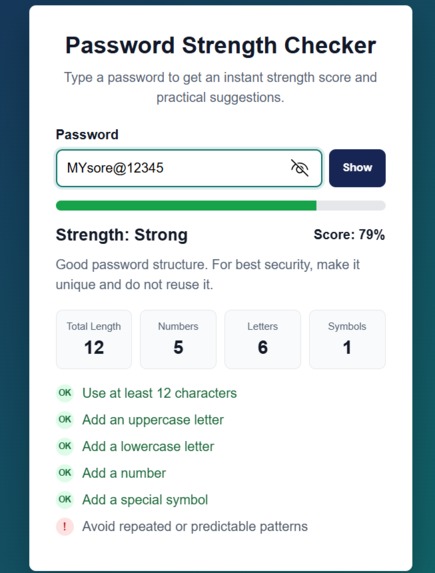
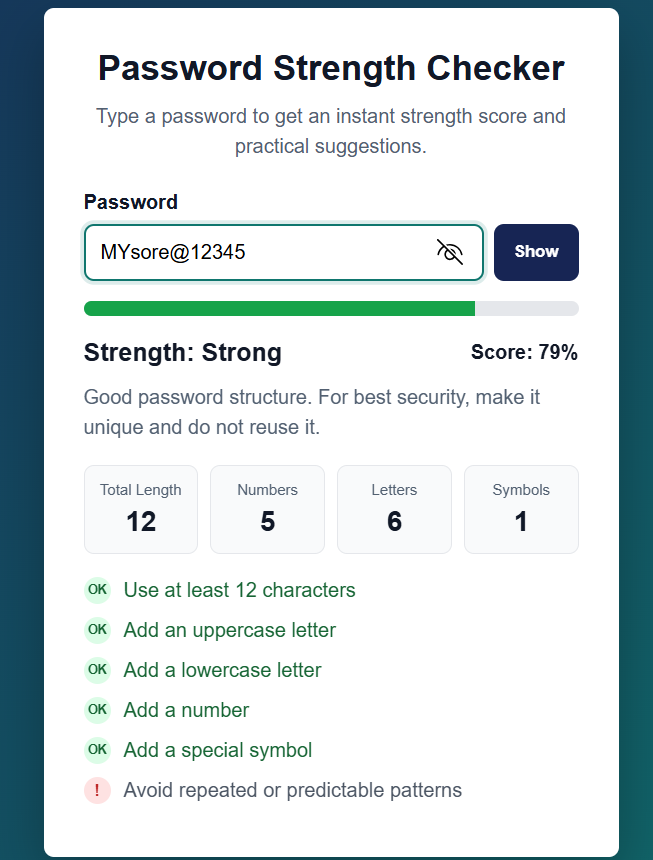
Password Strength Checker is an interactive cybersecurity tool that analyzes user-entered passwords in real time. The application evaluates several factors, including:
- Password length
- Uppercase letters
- Lowercase letters
- Numbers
- Special characters
- Predictable or repeated patterns
Based on these criteria, it calculates a strength score and categorizes the password as Weak, Medium, or Strong. The tool also provides practical suggestions to help users improve their password security.
How I Built It
I developed the project using:
- HTML5 for the structure
- CSS3 for modern styling and responsive design
- JavaScript for real-time password analysis and interactivity
The application continuously monitors user input and dynamically updates the strength meter, score, character statistics, and security recommendations. JavaScript regular expressions were used to detect different character types and evaluate password complexity.
Challenges I Faced
One of the biggest challenges was creating a balanced scoring algorithm that accurately reflects password strength. A password should not be considered strong simply because it is long; it also needs a combination of uppercase letters, lowercase letters, numbers, and special characters.
Another challenge was implementing real-time feedback without affecting performance or user experience. I had to carefully structure the JavaScript logic to ensure smooth updates while the user typed.
Designing an intuitive and visually appealing user interface was also important. I spent time refining the layout, progress indicators, and feedback system to make the tool both informative and easy to use.
What I Learned
Through this project, I gained hands-on experience in:
- Front-end web development
- DOM manipulation using JavaScript
- Real-time form validation
- Cybersecurity best practices
- Responsive UI design
- User experience optimization
I also improved my understanding of password security standards and how modern applications assess password strength.
Future Improvements
In future versions, I plan to add:
- Password entropy calculation
- Password breach detection using security APIs
- Strong password generator
- AI-powered security recommendations
- Dark and light theme support
- Password history analysis
- Multi-language support
Conclusion
This project demonstrates how simple tools can make a meaningful impact on cybersecurity awareness. By providing instant feedback and actionable recommendations, the Password Strength Checker helps users create stronger passwords and improve their overall online security while showcasing practical web development and problem-solving skills.


Log in or sign up for Devpost to join the conversation.