-
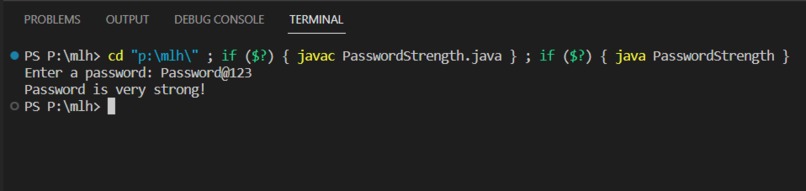
Output

Inspiration
The inspiration for creating the password strength evaluation script came from the importance of having strong and secure passwords in today's digital world. Weak passwords can make user accounts vulnerable to various types of attacks, including brute force attacks and dictionary attacks. By building a script to evaluate password strength, we can encourage users to create stronger passwords and enhance their overall security online.
What it does
The password strength evaluation script takes a user-input password and analyzes it based on certain criteria to determine its strength. The criteria used in this script include:
Password length: The script checks if the password is at least 8 characters long. Presence of uppercase and lowercase letters: It verifies if the password contains both uppercase and lowercase letters. Presence of digits: It checks if the password includes at least one digit. Presence of special characters: It examines whether the password contains at least one special character (non-alphanumeric). Based on these criteria, the script assigns a strength rating to the password and provides an output indicating the strength level, such as "weak," "moderate," "strong," or "very strong."
How we built it
The project was built using the Java programming language. Here's an overview of the steps involved in building the password strength evaluation script:
Input: The script uses a Scanner object to read the user's password input from the console. Evaluation: It checks various conditions, such as password length and the presence of uppercase letters, lowercase letters, digits, and special characters. Strength rating: The script assigns a strength rating based on the criteria met. It increments a strength variable for each condition that is satisfied. Output: Depending on the strength rating, the script displays an appropriate message indicating the strength level of the password.
Challenges we ran into
During the development of the script, we encountered a few challenges:
Condition evaluation: Ensuring that the script correctly evaluates each condition and assigns the appropriate strength rating required careful attention to detail. String manipulation: Verifying the presence of uppercase letters, lowercase letters, and special characters in the password involved string manipulation and regular expressions, which required some additional research and testing. User input handling: Properly handling user input, including handling errors and validating the input format, was essential to ensure the script functions correctly.
Accomplishments that we're proud of
We are proud of successfully implementing a password strength evaluation script that can provide users with feedback on the strength of their passwords. By taking into account various criteria, we can help users understand the importance of creating strong passwords and encourage them to follow best practices for password security.
What we learned
Through building this project, we gained the following learnings:
String manipulation in Java: We learned different techniques for manipulating strings in Java, such as checking for uppercase and lowercase letters, digits, and special characters. Regular expressions: We explored the use of regular expressions in Java for pattern matching, which allowed us to check for specific characters in the password. User input handling: We learned how to handle user input using the Scanner class, ensuring proper validation and error handling.
What's next for Password Strength
While the current script provides a basic evaluation of password strength, there are several potential enhancements and additions that could be considered for future iterations:
Advanced strength evaluation: Introduce more complex criteria for password strength, such as enforcing a mix of character types (e.g., letters, digits, special characters) at specific positions within the password. Integration with password policies: Incorporate the script into larger systems or applications where it can be used as part of enforcing password policies and guiding users to create stronger passwords.


Log in or sign up for Devpost to join the conversation.