-
keywise
Inspiration
Password strength checkers are everywhere, but almost all of them ask you to trust a server with something you're specifically trying to keep secret. That contradiction was the seed: what if a strength checker could prove its privacy instead of just claiming it? Not "we don't log your password" in a privacy policy nobody reads, but a codebase with no network call at all — so the guarantee is structural, not promised.
The second spark was more playful: strength meters are almost always silent and purely visual. We wanted to hear a password get stronger — a weak password should sound tense, a strong one should sound resolved. That idea shaped almost every other design decision in the project.
What it does
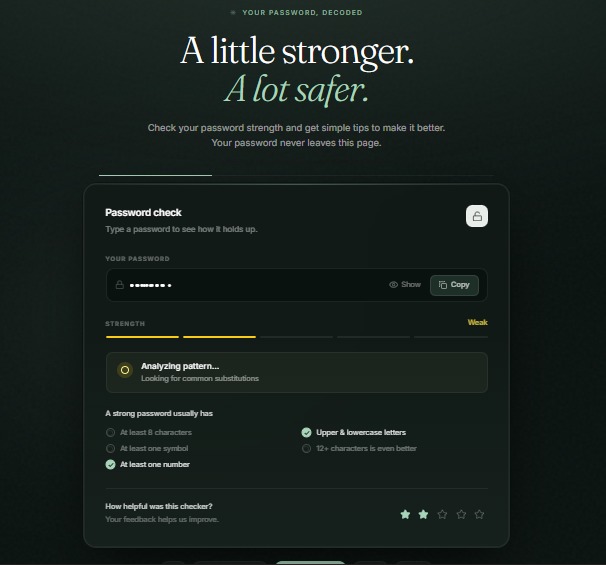
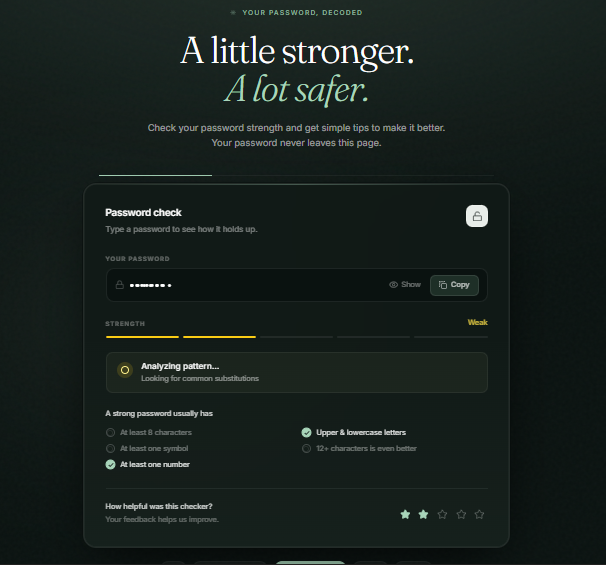
Type a password and it's scored live, entirely in your browser, across five binary checks: length ≥ 8, length ≥ 12, mixed case, has a number, has a symbol. The score (0–5) fans out to three simultaneous feedback channels:
- Visual — a five-segment SVG gauge, each segment keeping its own color, so a strong password reads as a red-to-green progression rather than one flat block. It's a real
role="meter"witharia-valuenowandaria-valuetext, so a screen reader announces "Excellent, 5 of 5" rather than skipping a picture. - Textual — up to three specific missing checks ("Try adding: a number, a symbol"), deliberately capped, since a list of every failure is scannable but not actionable.
- Audible — each score level has its own chord and filter cutoff, so the sound gets literally more "open" as the password gets stronger, and more muffled/tense when it's weak.
The password is never sent anywhere. There's no server, no API, no analytics — only theme and sound preferences ever touch localStorage.
How we built it
The one architectural decision everything else follows from: the password never leaves the page. That single constraint ruled out calling a Python or Node scoring service, so the scoring logic exists twice — once in Python, once as a hand-written TypeScript port — kept honest by a parity test harness that runs both implementations over 24 shared fixtures and fails the build on any divergence:
npm run parity
From there:
- Request flow: keystroke →
setPassword→useMemore-scores viaevaluatePassword(memoised so hovering a rating star doesn't rescore) → score fans out to the gauge, feedback panel, checklist, and sound. - Sound — oscillators and envelopes are built at play time rather than downloaded audio, which also keeps a
file://build working. The audio context is created lazily and unlocked on the first keystroke. - Routing is hash-based, not the History API, because
pushStateis rejected onfile://documents in Chrome — and the whole point was to ship a build that opens as a local file with no server at all. - Verification spans a parity suite (Python vs. TypeScript), an end-to-end suite in real headless Chrome (masking, copy behavior, sound persistence, theme, toast timers, responsive checks), a Python unit test suite, a contrast audit across both themes, and a dist check confirming the build is a self-contained folder that opens over
file://.
Challenges we ran into
- Cross-language parity is harder than it looks. Porting the scoring logic from Python to TypeScript surfaced two subtle traps: Python's
len()counts code points while JavaScript's.lengthcounts UTF-16 code units (so five emoji are 5 characters in Python but 10 in naive JS), and Python's\dmatches any Unicode decimal digit while JavaScript's\dis ASCII-only. Both had to be fixed explicitly:
[...password].length   // code-point-aware length
/\p{Nd}/u               // Unicode-aware digit match
- Masking and state are not the same thing. An earlier version bound
'*'.repeat(password.length)as the input's value to mask it visually — which meant the app's real state was asterisks, and "Copy" silently copied stars instead of the password. The fix was to keep the real value in state always and mask purely at the CSS/type="password"layer. We left a note in the file header so that bug can't quietly come back. - Deciding what to leave alone. The five-option rating control is a
role="radio"group without arrow-key roving tabindex — a real spec violation. We chose not to fix it mid-refactor because doing so would change interaction behavior, which felt riskier than shipping a known, documented gap. - Keeping two implementations honest without making them free. The parity suite makes divergence safe to catch, but it doesn't make adding a new rule free — every rule still has to be written twice, correctly, in two languages with different Unicode semantics.
Accomplishments that we're proud of
- A privacy guarantee enforced structurally, not promised. There's no
fetch, no analytics, no storage of the password anywhere in the codebase — the strongest claim here is an absence, not a policy. - A real accessibility implementation, not a decorative one: a genuine
role="meter"with correct ARIA attributes, so assistive tech gets the same information sighted users do. - A three-channel feedback system that actually agrees with itself — visual, textual, and audible feedback all derive from one score, so nothing can drift out of sync.
- A test suite that treats a duplicated implementation as a manageable risk rather than a hidden liability — parity fixtures, end-to-end checks, a Python unit test suite, and a contrast audit all gating the build.
- Being honest about limits in the product itself. The FAQ says plainly that this is "a simple guide, not a security guarantee" — no dictionary checks, no breach-corpus lookup, no entropy estimate — because we'd rather ship an honest, limited tool than an overreaching one.
What we learned
- Unicode is where "identical" logic quietly diverges. Two languages implementing "the same" string check can disagree in ways that only show up on real-world input like emoji or accented characters.
- The Web Audio API is a design material, not just a utility. Building oscillators, envelopes, and a low-pass filter that opens as the score rises turned "muffled" and "open" into audible metaphors for weak and strong.
- A deliberately loose rule is still a rule worth pinning. Non-ASCII characters (like umlauts) count as symbols, so
"Pässwörd1"scores higher than"Passw0rd1"purely because of accented characters. It looks like a bug at first glance; it's actually intentional in both implementations — and we learned it's worth writing a fixture that pins that choice rather than "fixing" something that wasn't broken. - Some interaction bugs are safer to document than to fix mid-project. Knowing when not to touch working-but-imperfect code (like the radiogroup) was as valuable a lesson as any refactor.
What's next for Password Checker and Strengthener App
- Give the star rating a real backend. Right now it's memory-only and discarded on reload — honest in the FAQ, but a product-shaped feature with no data behind it yet.
- Fix the radiogroup properly, with arrow-key roving tabindex and full keyboard selection, as a standalone accessibility pass rather than a side effect of another refactor.
- Optional, opt-in depth for people who want it — such as a local (still-offline) dictionary or common-password check — without breaking the "naive by design" promise for people who just want the simple guide.
- Expand the sound design into more granular feedback, potentially letting users choose between different "moods" of audio feedback.


Log in or sign up for Devpost to join the conversation.