Inspiration
The growing number of accounts and passwords we manage daily inspired us to create PassGen. We wanted a solution that simplifies password management without compromising security. Our goal was to create a tool that generates strong, personalized passwords, eliminating the need to remember multiple passwords.
What it does
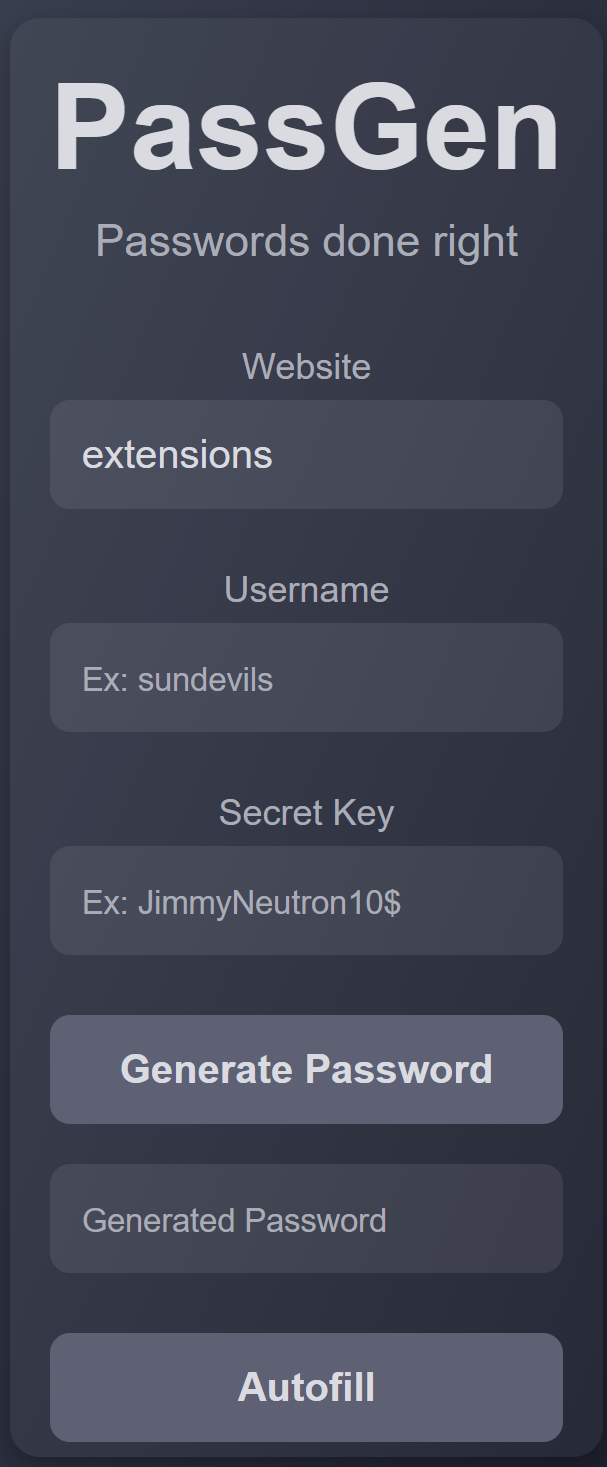
PassGen is a chrome browser extension that generates unique, strong passwords for each of your accounts by combining your website name, username, and a secret key. The user only needs to remember the secret key. This personalized approach ensures that your passwords are constant and only retrievable by you, making it secure and hassle-free.
PassGen Algorithm - Step-by-Step Explanation
Input Data: Collect website, username, and secret key from the user.
Initial Hashing: Hash the input data using SHA3-512.
Secondary Hashing: Hash the SHA3-512 output using the scrypt algorithm for enhanced security.
Seed CSPRNG: Use the scrypt output to seed SHAKE-256, a cryptographically secure pseudorandom number generator (CSPRNG).
Generate Indices: Create a 256-bit random number to generate indices for each character in the password.
Character Selection: Ensure the password contains: -- Symbols -- Lowercase letters -- Uppercase letters -- Numbers
Construct Password: Select characters based on the generated indices from predefined character sets.
Display Password: Construct and display the password, ensuring all processes happen locally and securely on the user's device.
Security Highlights:
- No Data Storage: User data is not stored or sent to any server.
- Real-time Processing: All computations are done in real-time and discarded after use.
- High Entropy: Ensures maximum security against brute force and dictionary attacks.
How we built it
We built PassGen using a combination of modern encryption algorithms and local computation. By ensuring all processes run on the user’s browser, we avoid storing any data or connecting to external servers. This keeps your passwords secure and private.
Challenges we ran into
One of the main challenges we faced was integrating a complex hashing algorithm and getting it to run efficiently in the browser. Ensuring that the algorithm provided strong security while maintaining optimal performance across different devices and browsers required significant effort and testing.
Accomplishments that we're proud of
We are proud to have created a secure password generator that doesn't rely on external servers or store user data. PassGen's ability to generate strong, personalized passwords while maintaining simplicity and security is a significant accomplishment.
What we learned
Throughout the development of PassGen, we learned the importance of balancing security and usability. We gained valuable insights into encryption algorithms and the challenges of creating a secure yet user-friendly application.
What's next for PassGen
We plan to integrate two-factor authentication (2FA) for added security and develop a custom server-based web application that will allow the user to use the phone's biometrics instead of remembering the secret key. These enhancements will provide users with more robust protection and a seamless experience across multiple platforms.
Built With
- chrome
- encryption
- javascript


Log in or sign up for Devpost to join the conversation.