-
-
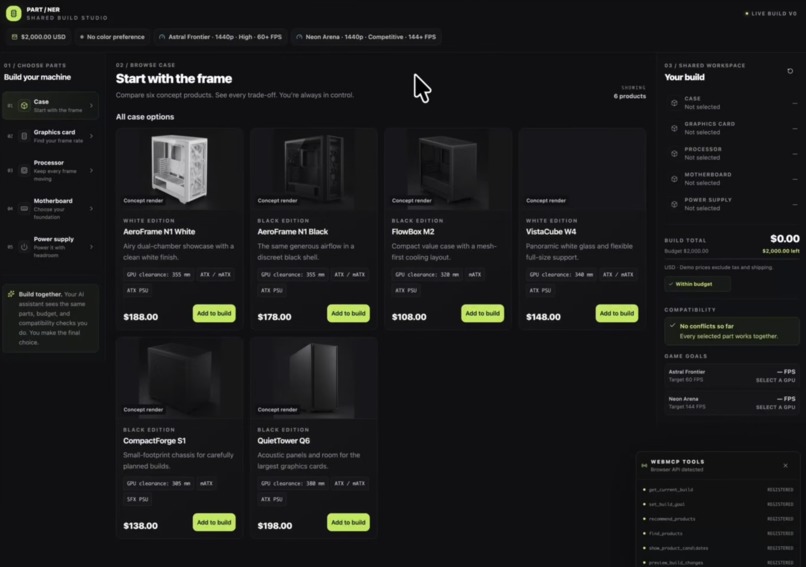
Browse PC parts while the shopper and AI assistant share the same live build and goals.
-
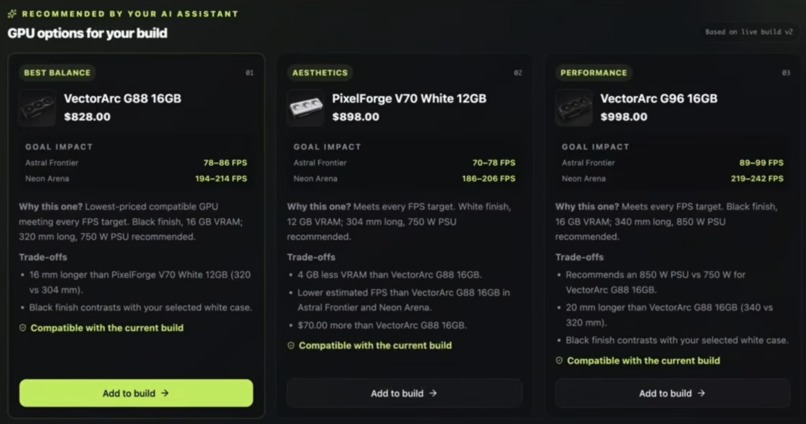
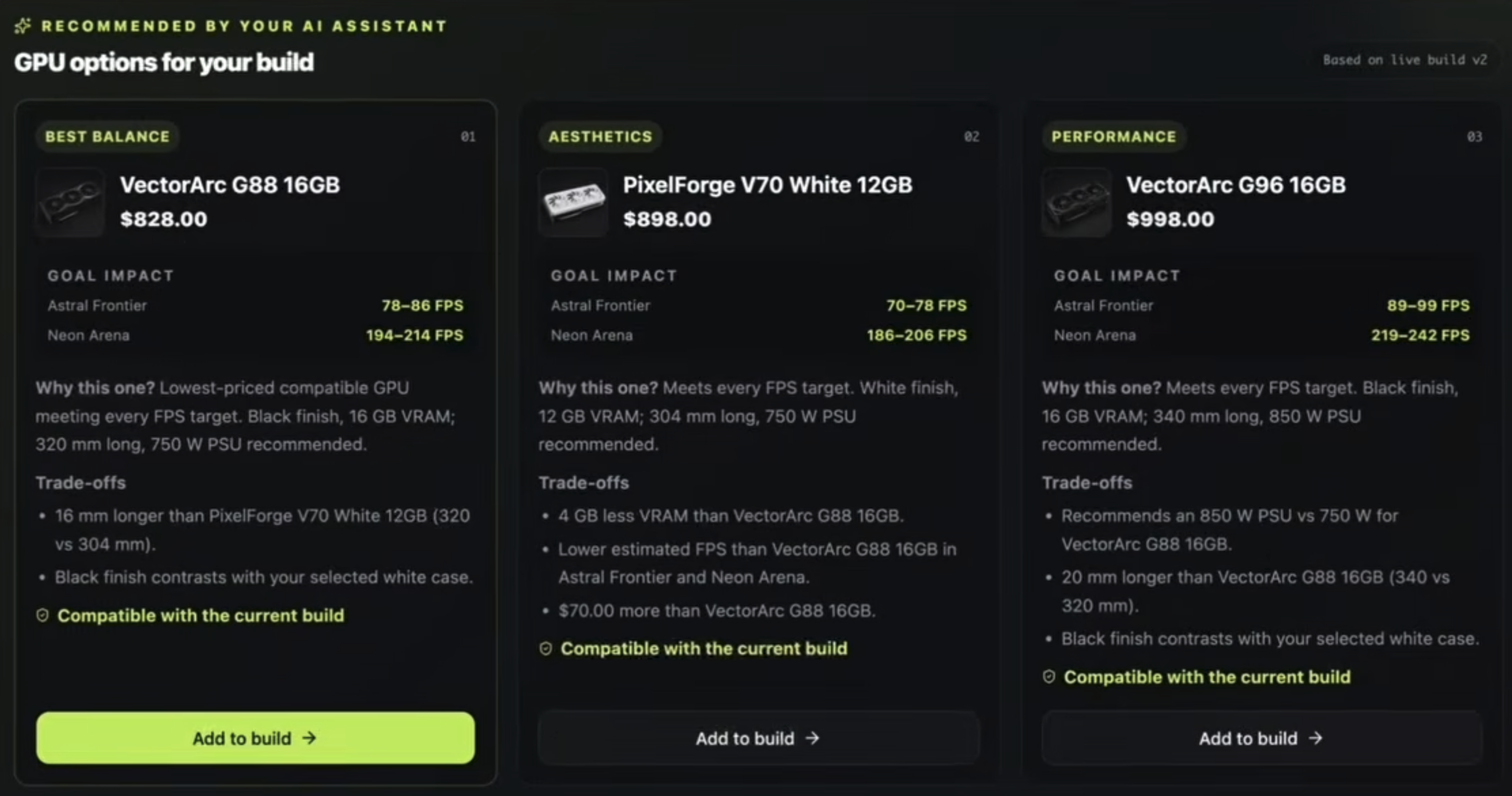
AI recommendations appear directly in the storefront with goal impact, compatibility, and trade-offs.
-
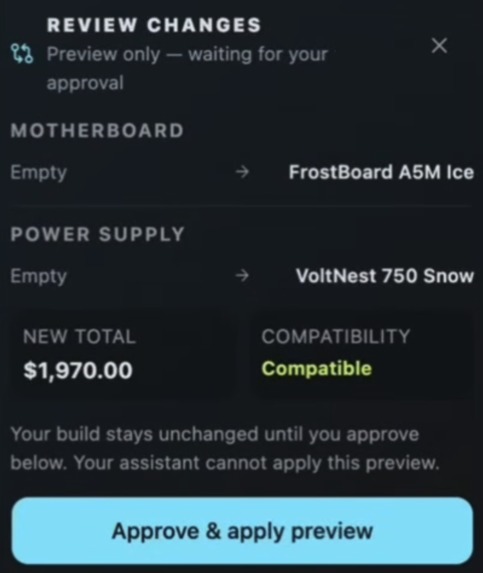
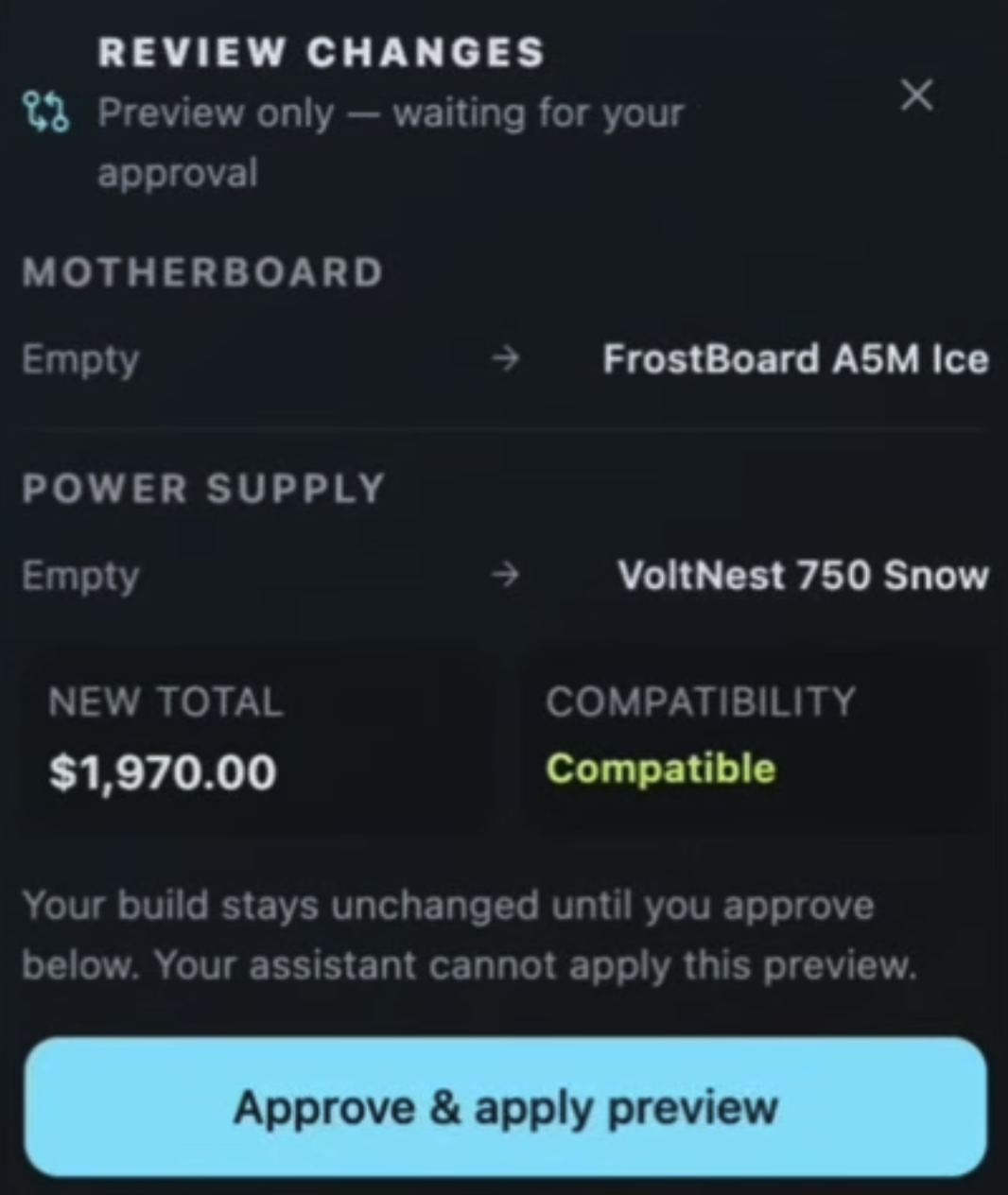
Agent-proposed changes are staged as a preview. Only the shopper can approve and apply them.
Inspiration
Choosing PC parts is difficult, especially for people who do not already understand hardware.
There are three problems at the same time:
- Compatibility: Will this CPU work with this motherboard? Will this GPU fit in the case? Is the power supply sufficient?
- Understanding specs: Numbers like VRAM, wattage, clock speed, and dimensions do not directly tell a shopper what they mean for the games they want to play.
- Trade-offs: Every choice affects performance, budget, aesthetics, and the parts that can be selected next.
Traditional compatibility checkers can tell you whether parts work together, but they do not feel like shopping with a knowledgeable person who understands what you are trying to achieve.
We wanted to explore a different experience: what if the AI assistant you already use could shop with you, directly inside the storefront?
What it does
PART / NER is a PC parts storefront where a shopper and their AI assistant work on the same live build.
The shopper can browse and select products normally. The AI assistant can:
- understand the current PC build and the shopper's goals
- recommend products directly inside the storefront
- explain expected game performance in terms of the shopper's FPS targets
- explain compatibility problems and trade-offs
- compare options based on performance, budget, and aesthetics
- prepare multi-part build changes as a preview
The shopper always remains in control.
The AI cannot directly apply a staged build change. Agent-proposed changes appear as a before/after preview, and only the shopper can apply them by clicking Approve & apply preview on the page.
A key WebMCP interaction is that the shopper can ignore the AI's recommendation, manually choose a different part, and the assistant can continue from that updated live build on the next turn.
This is not an AI that shops for you.
It is an AI that shops with you.
How we built it
PART / NER is a frontend-only React application.
The React UI and WebMCP tools operate on the same shared Zustand store, so human actions and agent actions always refer to the same build state.
The app exposes WebMCP tools for:
- reading the current build
- setting shopping goals
- finding products
- displaying recommendations in the storefront
- staging build changes
- resolving compatibility issues
For example, recommend_products ranks and renders product candidates without selecting anything, preview_build_changes stages multi-part changes for human review, and resolve_build_issues is dynamically registered only while a compatibility error exists.
The application owns deterministic domain logic for:
- compatibility rules
- budget calculations
- fictional benchmark estimates
- goal evaluation
- recommendation ranking
The AI does not invent prices, compatibility facts, or FPS numbers. Those values come from the application.
There is no backend, database, authentication system, retailer API, or model API in the app itself.
The catalog contains 30 fictional PC products and fictional games so the demo is reproducible and does not depend on third-party product data.
Challenges we ran into
One of the biggest challenges was deciding where the boundary between the AI and the application should be.
It would have been easy to let the model reason about compatibility or generate performance claims, but that would make the experience unreliable. Instead, the application owns the facts and deterministic rules, while the AI focuses on understanding intent, comparing options, and explaining trade-offs.
Another challenge was making WebMCP visibly useful rather than simply exposing CRUD-style tools.
The key was treating the live build and storefront UI as a shared workspace between the shopper and the assistant.
We also deliberately removed the agent's ability to apply build changes directly. An assistant can stage a preview, but only the shopper can approve it on the page. This made the human-agent boundary much clearer.
Accomplishments that we're proud of
We are especially proud that the demo shows a genuine collaborative loop between a person and an AI assistant.
The AI can recommend the best-value GPU, but the shopper can choose a different GPU for aesthetic reasons. On the next turn, the assistant reads the updated build and continues naturally from the shopper's decision.
Recommendations are rendered directly in the storefront instead of existing only as chat text.
Compatibility, game-performance goals, budget impact, and trade-offs are presented together so the shopper can make the final decision with useful context.
We also implemented versioned previews so an old agent proposal cannot overwrite a newer human choice.
What we learned
The most interesting part of WebMCP is not automating a website.
It is enabling a human and an agent to collaborate through the same interface while each uses what they are good at.
The AI can process constraints and explain options quickly.
The human can make subjective decisions about appearance, priorities, and preferences.
The web application becomes the shared workspace connecting the two.
We also learned that meaningful WebMCP tools should expose semantic actions and live application state, rather than reproducing low-level UI automation.
What's next for PART / NER
A real version could connect to retailer catalogs and verified benchmark sources, support more PC component categories, and incorporate live inventory and pricing.
It could also use the shopper's existing AI context and preferences, when available, to make the experience more personalized without requiring the user to start from scratch in every shopping session.
The same interaction model could extend beyond PC parts to other purchases where products depend on one another, such as cameras and lenses, home networking equipment, audio systems, or DIY electronics.
Build together. Choose with confidence.
Built With
- ai
- chatgpt
- chatgpt-sites
- e-commerce
- human-ai-collaboration
- pc-builder
- react
- tailwindcss
- typescript
- vinext
- vite
- webmcp
- zustand

Log in or sign up for Devpost to join the conversation.