-
-
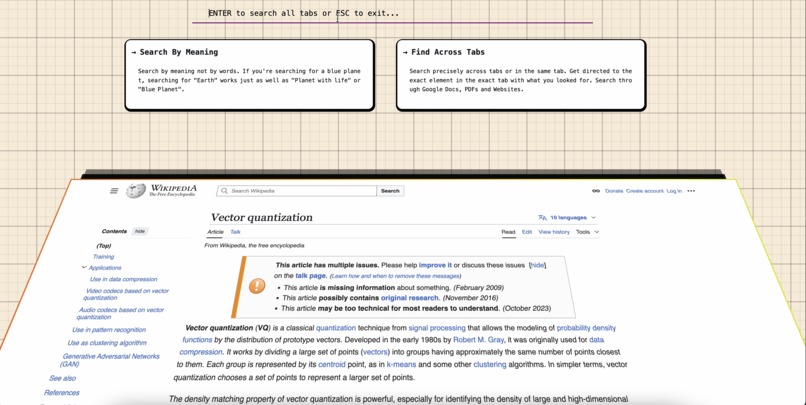
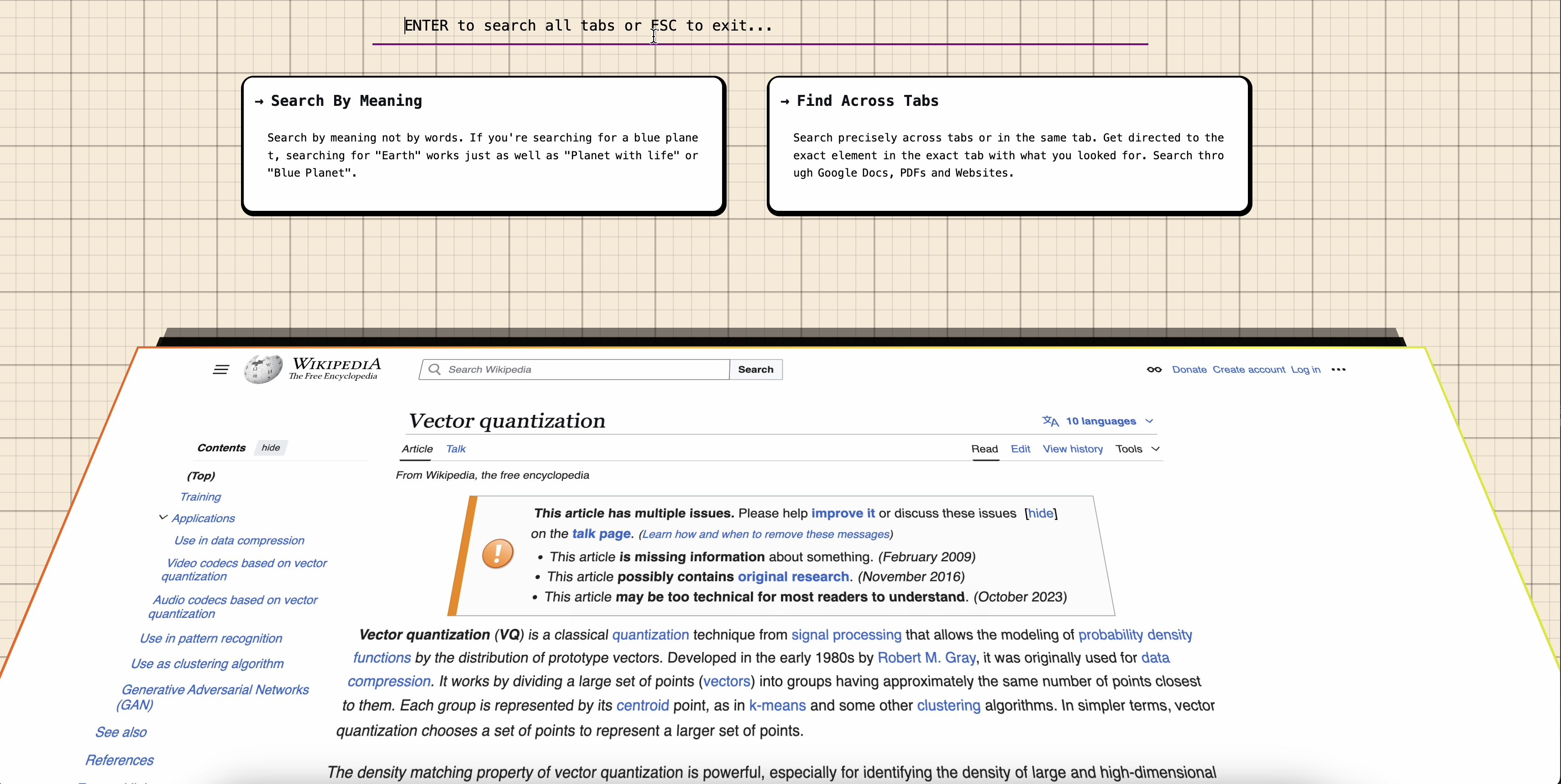
Shift + Alt + F to search across all tabs from any webpage
-
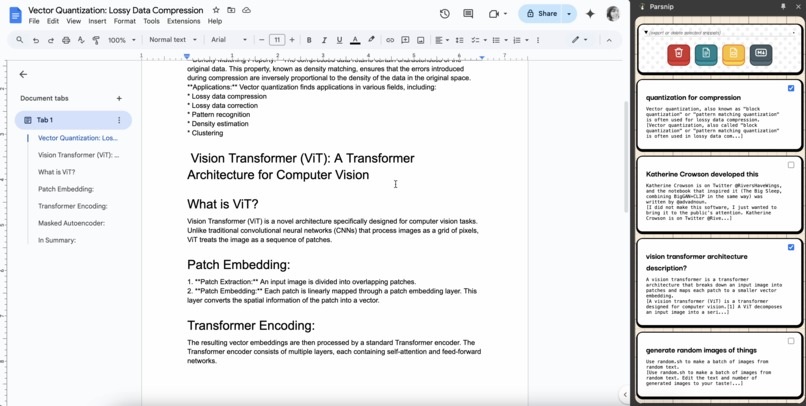
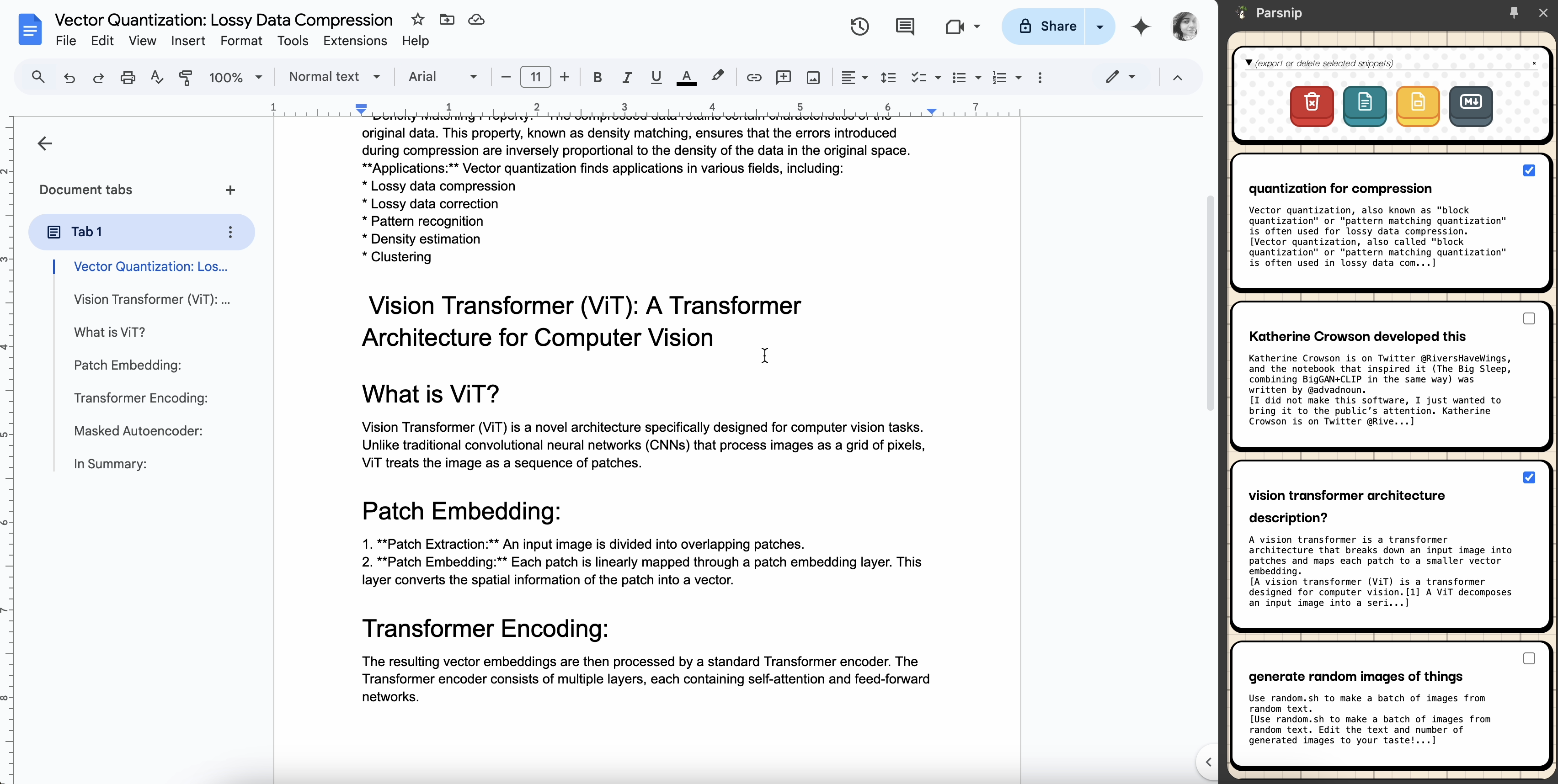
Sidebar Panel to store snippets and Export to Google Docs or Slides
-
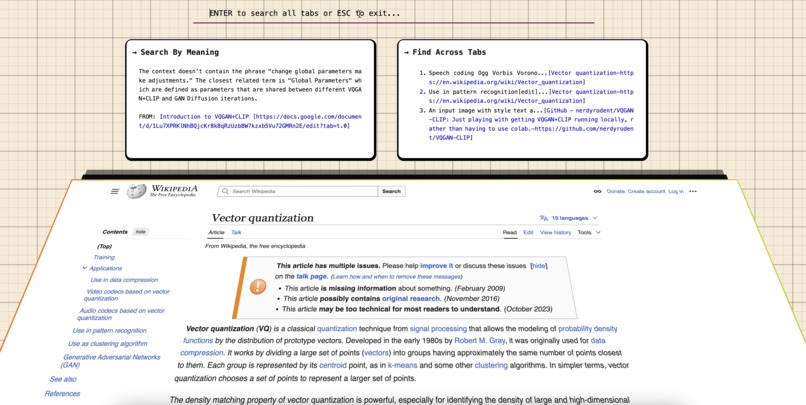
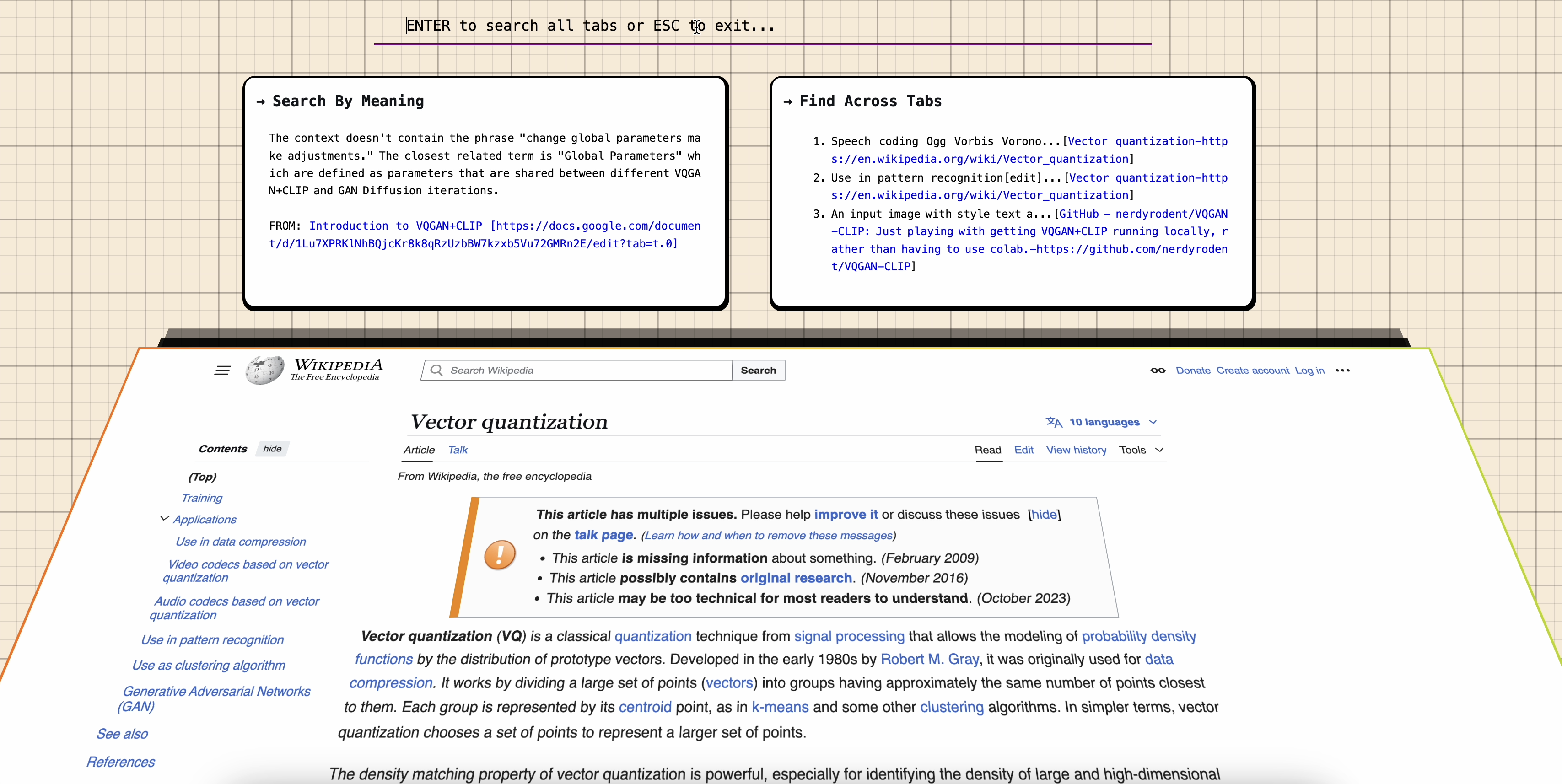
Get answers and pointed to the tab where the answer lies
-
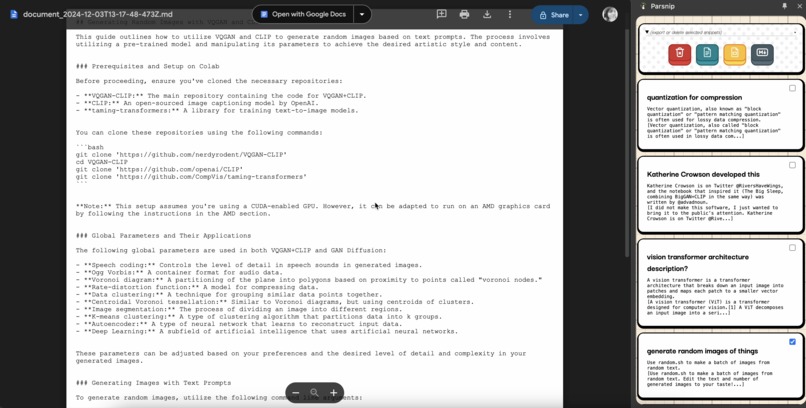
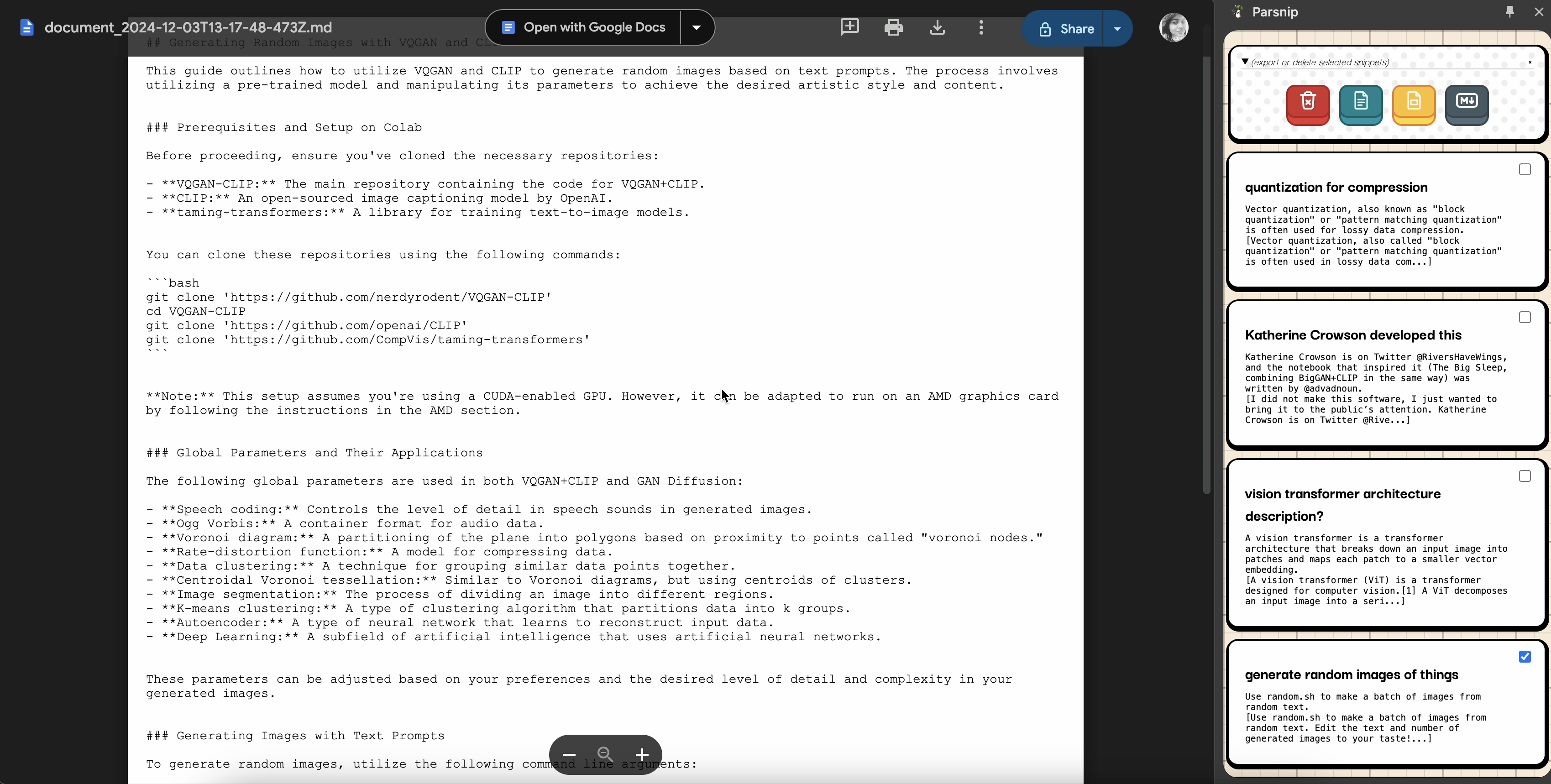
Export to Snippets Markdown as file in your Google Drive directly from the Extension
Inspiration
Parsnip is a simple fully local Chrome extension that uses local Vector Search to Snippetize and Search Across Tabs using Gemini Nano Prompt API. It helps you research semantically across text and code, saves costs and ensures privacy since it doesn't have any external api calls at all. It's also super fast and reliable since it uses local RAG across your current session's webpages to generate results. It also works in Incognito mode but does not preserve search history. It also exports Summarised snippets to Google Docs and Slides, or to Google Drive as Markdown.
We only use local processing, no server calls at all. We bundle embedding model with TF.js in serialised form, customised text parsers like Readability.js (we added returning DOM query selectors with text content as a feature) and PDF.js (we added automatic heading parsing as a feature), and ensure no dependencies in our code. Our UI is completely modular with custom HTML elements. We use chrome extension session storage for embedding vector db since the embedding vectors are ephemeral to the session and chrome extension local storage for persistence of snippets searched.
The open source nature combined with local processing is sure to give an end user confidence to allow parsing and indexing of browsed content.
Code is MIT licensed here: https://github.com/bitanath/parsnip
Quick Note before Installation
The working of this extension depends on the AI Gemini Nano Model being downloaded through trial_tokens for this extension with key trial_tokens in manifest.json.
- In case the extension ID changes, this trial token will expire, and a new one needs to be generated from here
- In case the version of Chrome does not support local Gemini Nano, the extension will NOT work
- This Extension was only tested on Version 133.0.6847.2 (Official Build) dev (arm64) and MacOS Sequoia
Please note this code is NOT intended as a production solution and is a POC for the purposes of this hackathon alone. We haven't tested across a large number of open tabs
What it does
Uses the Gemini Nano Prompt API accessed through chrome.aiOriginTrial.languageModel to summarize, vectorise and hash snippets of text and code. Scrapes text and code using a modified version of the Readability API, generates text embedding vectors using a modified version of Tensorflow JS Sentence Encoder, and uses the Prompt API to convert raw text to JSON objects. chrome.storage.session was used for short term vector storage for the generated embeddings, and chrome.storage.local was used for long term history storage.
Uses Shift + Alt + F on any open Chrome Tab to semantically search across all tabs. Uses Alt+F on any open Chrome Tab to semantically search only on that tab.
How we built it
We used the language model with system instructions to ensure the given outputs were always in JSON. Here's an example of the prompt used for RAG. This is one of many prompts depending on the task, tasks ranged across summarisation, code snippetization, title generation and more.
let session = await chrome.aiOriginTrial.languageModel.create({
        systemPrompt:
            `Limit yourself to only the context provided below to answer the question given by the user. Output should be in JSON only. The output JSON should contain two fields, answer and index. The answer should contain at maximum 20 words. The index field contains the index of the list element contributing most to the answer. Context: \n${JSON.stringify(sorted_candidates.slice(0, 5))}`,
    });
The candidates to answer or summarize were scraped from the webpage and vectored for retrieval through locality hashing.
Webpages were scraped using a modified version of the Readability API that also returns the CSS query selectors of the text scraped line-wise. So from a single readability parsed document we would get the following structure of parsed text:
{
   "textContent" : "...",
   "content": [
        {"text":"...", "querySelector":"html>body>div>p:nth-child(2)"}
     ]
    ...
}
Vectors were stored using a self coded vector DB api based on chrome.storage . Vectors were generated using serialised tensor flow js models loaded dynamically on the chrome extension itself without any other dependencies. This was essential for high speed and totally local vector generation for RAG. The Prompt API was used for fine grained question answering and summarisation with inputs and outputs formatted as JSON. Here's the simplified code used to create a vector db within the chrome extension itself.
export class VectorDB {
    //...constructor and utility methods here
    async storeVector( obj = {}) {
               //Store vectors within browsing session using the Chrome Session Storage API
        try{
            const {id, vector, metadata} = obj
            if (vector.length !== this.dimensions) {
                throw new Error(`Vector must have ${this.dimensions} dimensions`);
            }

            const vectors = await this._getVectors();
            vectors[id] = {
                vector: vector,
                metadata: metadata
            };

            await chrome.storage.session.set({ vectors });
            return true
        }catch(e){
            return false
        }
    }

    async getVector(id) {
        const vectors = await this._getVectors();
        const vector = vectors[id];
        return vector;
    }

    async findSimilar(queryVector, limit = 5, target = 0.33) {
      const vectors = await this._getVectors();
      const scores = [];
      //... cosine similarity here
    }

    async deleteVector(id) {
      const vectors = await this._getVectors();
      delete vectors[id];
      await chrome.storage.session.set({ vectors });
    }
}
We used oAuth and Tabs permissions directly in the Manifest v3 file. These permissions are actively requested from the user the moment he loads the Chrome browser, and is required to process effectively.
"oauth2": {
        "client_id": "...,
        "scopes": [
            "https://www.googleapis.com/auth/documents",
            "https://www.googleapis.com/auth/presentations",
            "https://www.googleapis.com/auth/drive"
        ]
},
"permissions": [
        "tabs",
        "storage",
        "identity",
        "scripting",
        "activeTab",
        "sidePanel",
        "aiLanguageModelOriginTrial"
]
Challenges we ran into
I have submitted actual bugs that we faced in the feedback form, however the actual javascript api for Gemini Nano Prompts was pretty well documented and very easy to follow. Most of the challenges were on speeding up the tensor flow model to generate vectors, and storage and retrieval of vectors for local RAG without any external dependencies. I also managed to export some to Google Docs, and this makes me think a local solution to generate complete docs from browsed webpages is not that far away in the future at all.. maybe another hackathon!
Accomplishments that we're proud of
- Gemini Nano Prompt API returning JSON outputs with a very low failure rate
- Tensorflow js serialisation and inclusion directly into the Chrome Extension manifest
- NO external dependencies whatsoever
- Readability modified with query selectors and special cased for code snippets and Google Docs
What we learned
This was a fantastic opportunity to work with Gemini Nano, and it is amazing what this small local model can accomplish compared to some larger models. Local models are excellent alternatives since they preserve costs and privacy, I personally love using local models over any API calls!!
What's next for Parsnip - Semantically Search or Save Snippets of Text/Code
So.. once the API is GA I fully plan on publishing the extension for free. It's a really useful tool that works with no external dependencies and has no associated costs to run like API calls or storage. It's absolutely fantastic the stuff we can do with Gemini Nano embedded models, and we believe this is the future of personal computing.
Built With
- chrome
- gemini
- javascript
- tensorflow


Log in or sign up for Devpost to join the conversation.