-
-
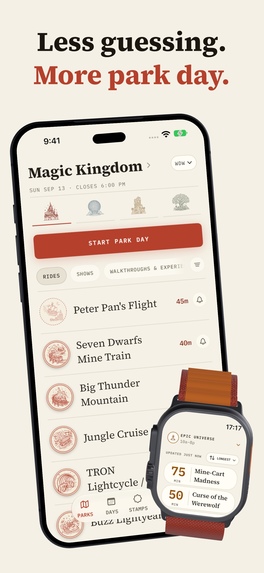
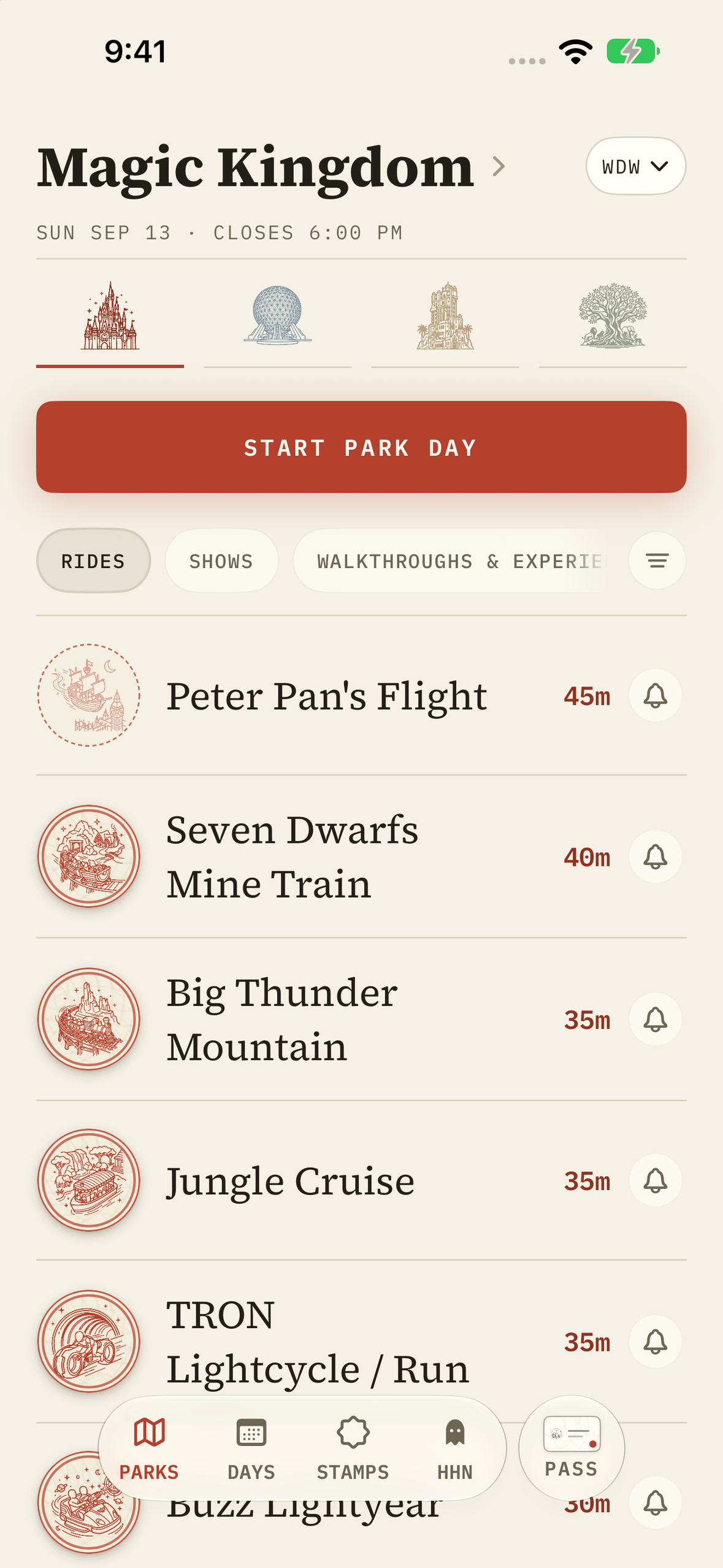
Magic Kingdom live board: every ride with its live wait, plus the Apple Watch board.
-
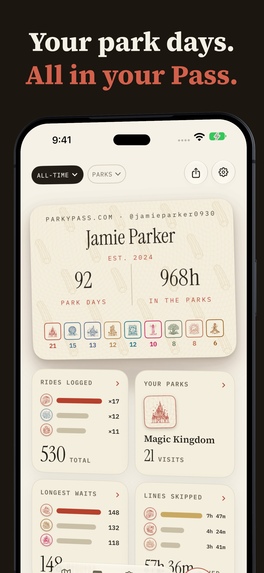
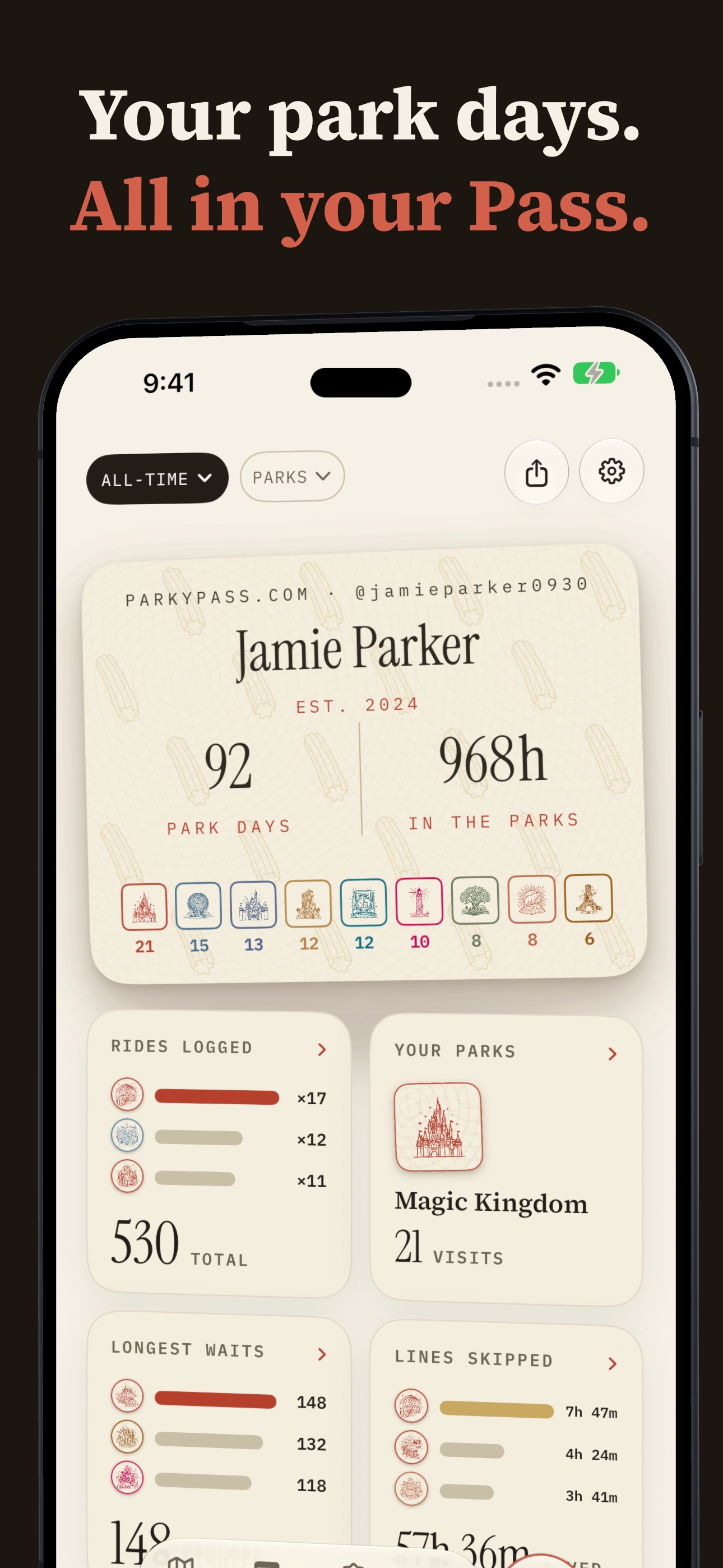
Your Pass: every park day, ride and hour in the parks, printed like a real park passport.
-
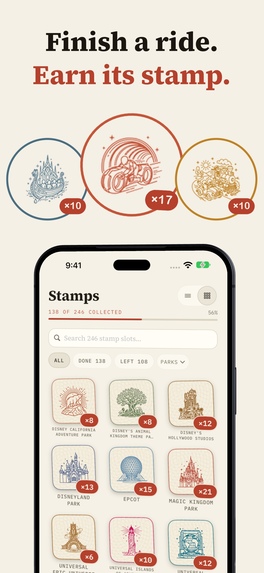
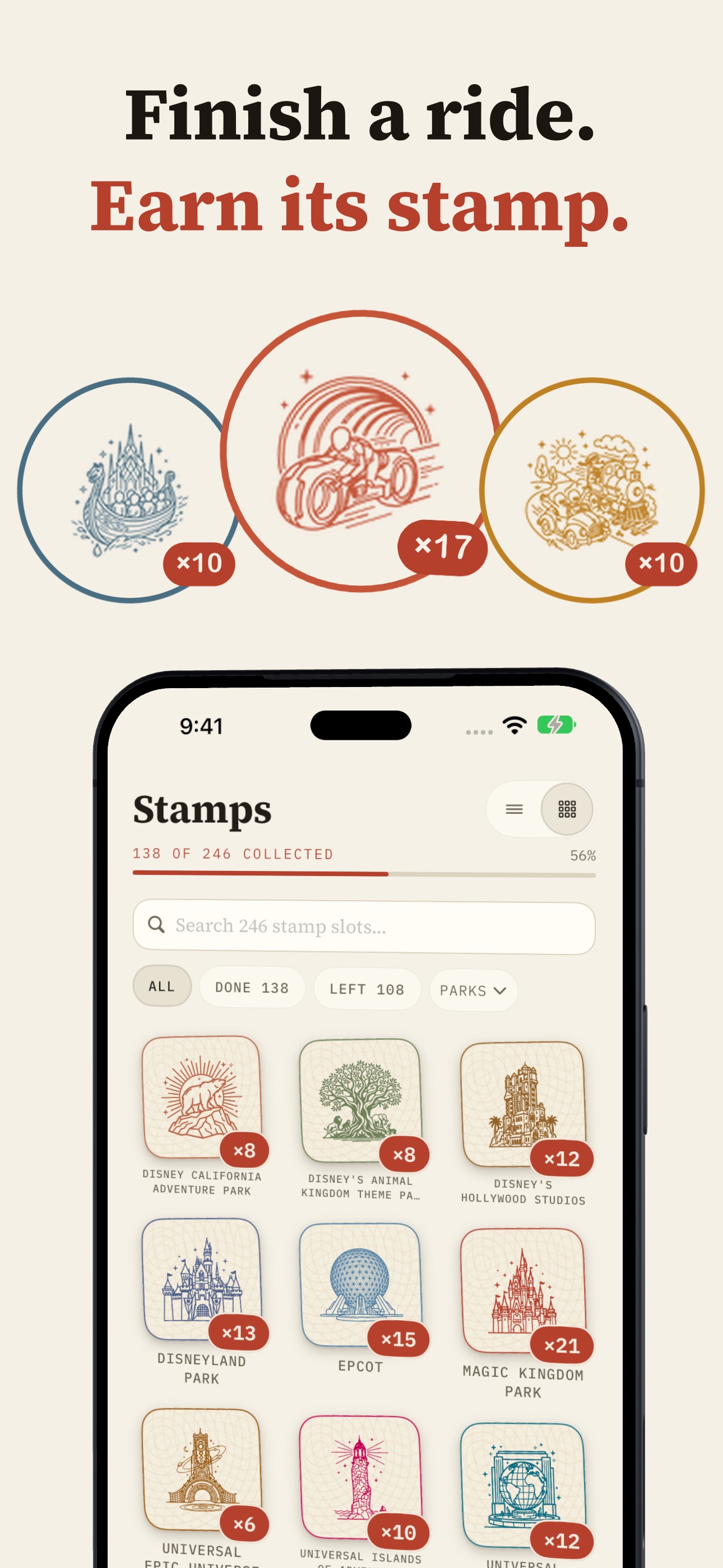
Finish a ride, earn its stamp: 436 custom icons, every park in its own ink.
-
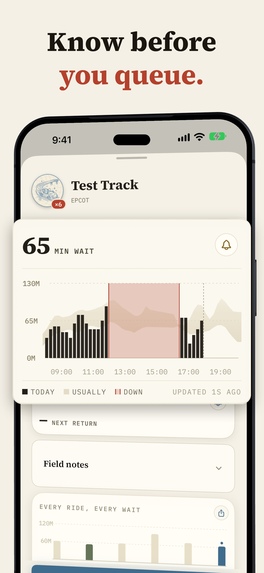
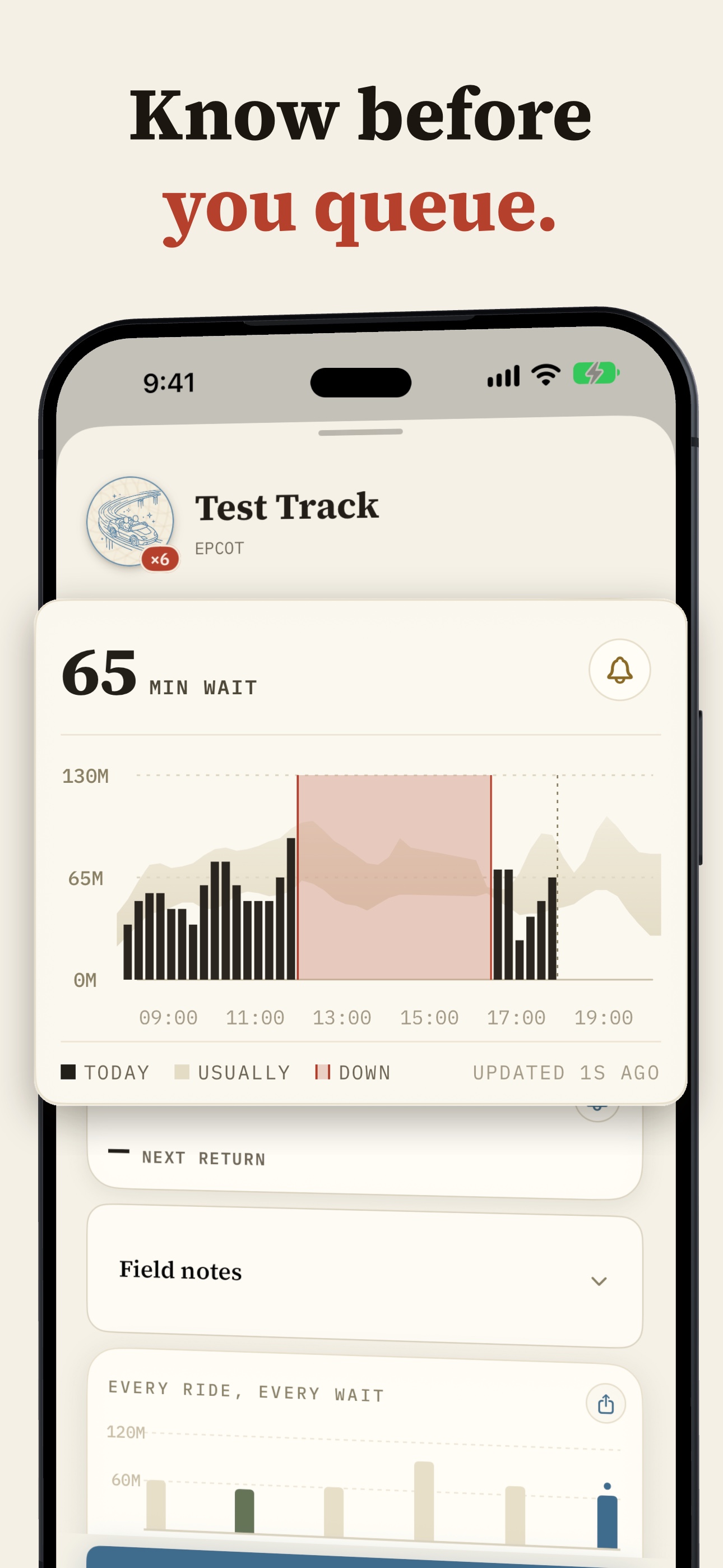
Know before you queue: a ride's whole day charted, posting now vs. what it usually posts at this hour.
-
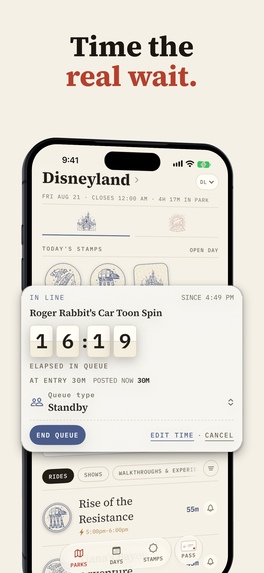
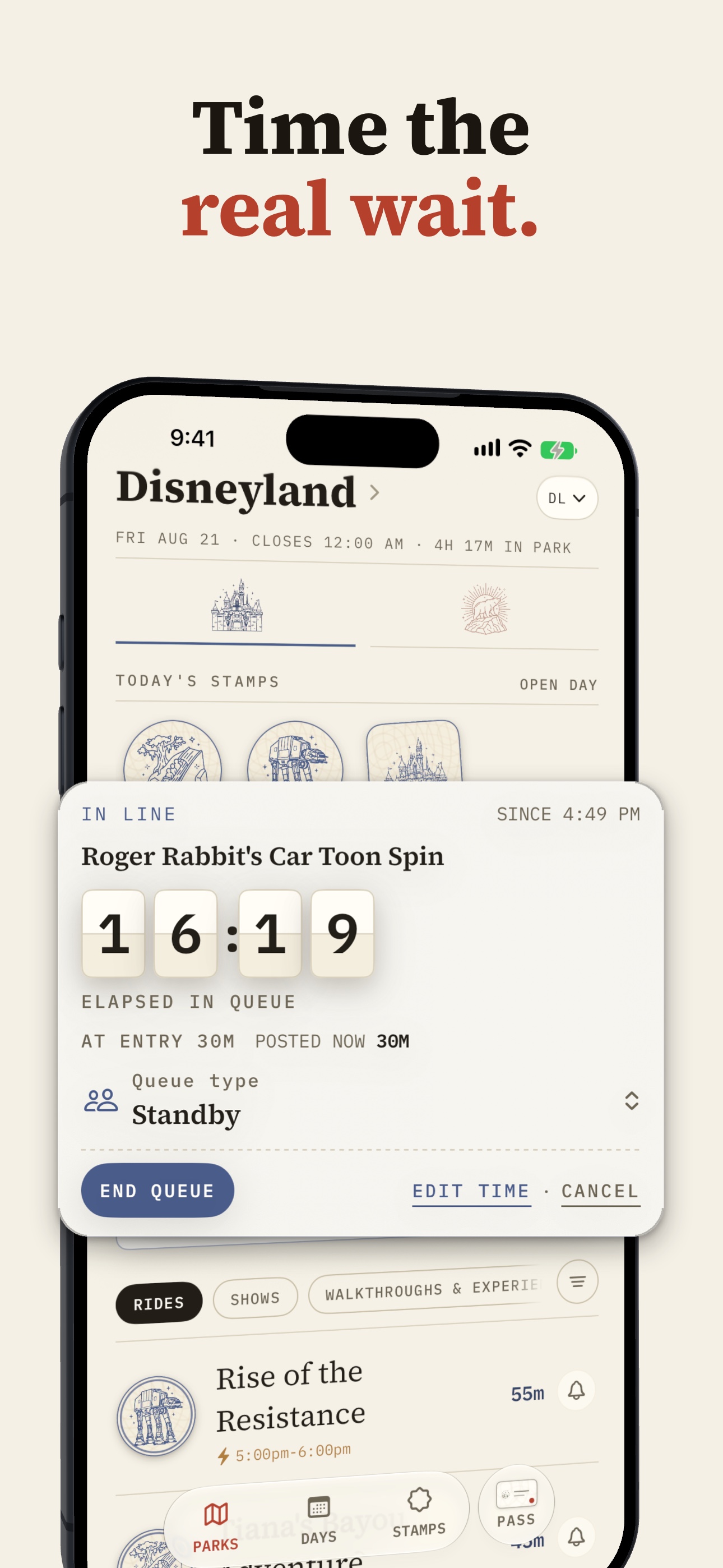
Time the real wait: the queue timer, also on the Lock Screen and in the Dynamic Island.
-
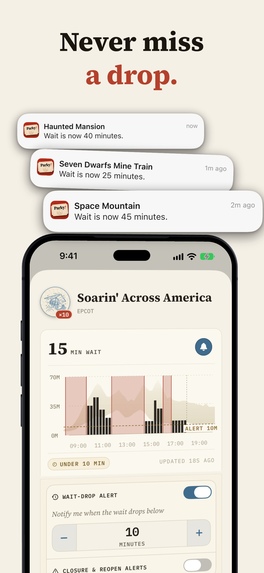
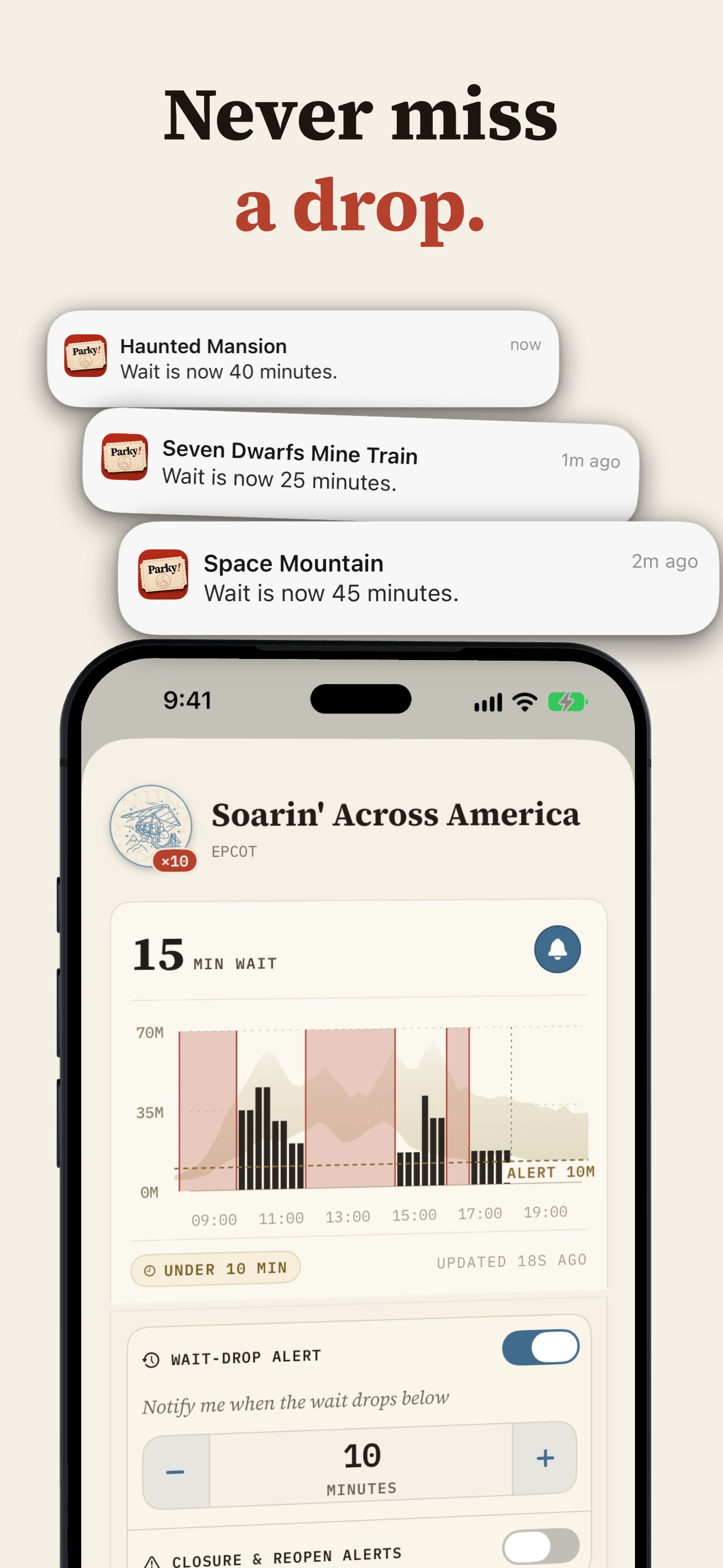
Never miss a drop: wait-drop alerts sent through OneSignal, deep-linked to the exact ride.
-
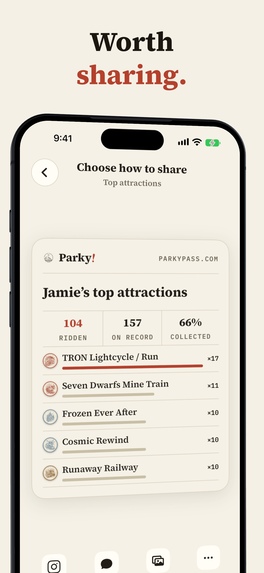
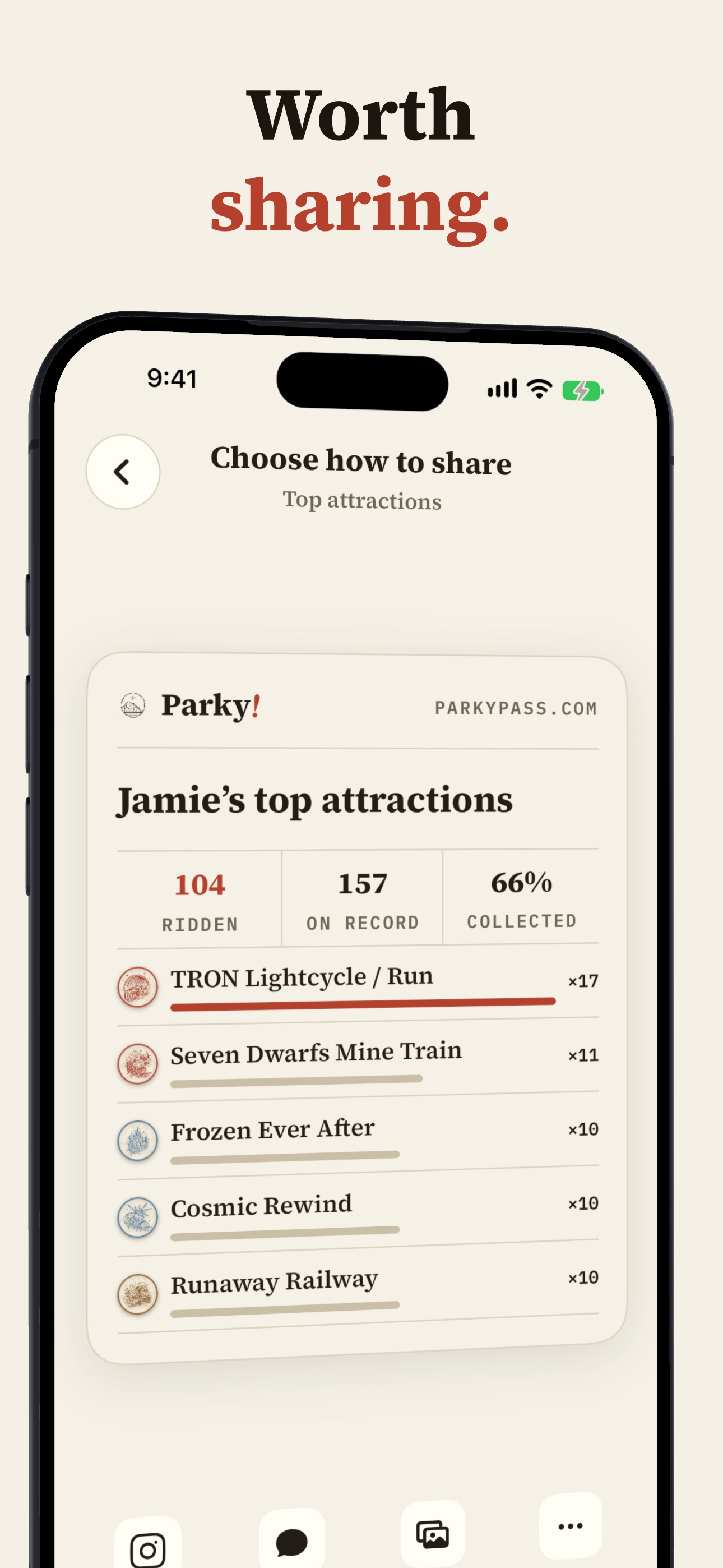
Worth sharing: printed-style cards of your park history, ready to post.
-
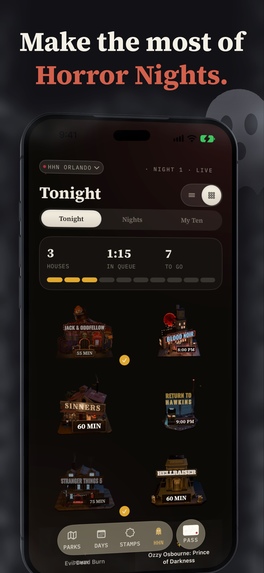
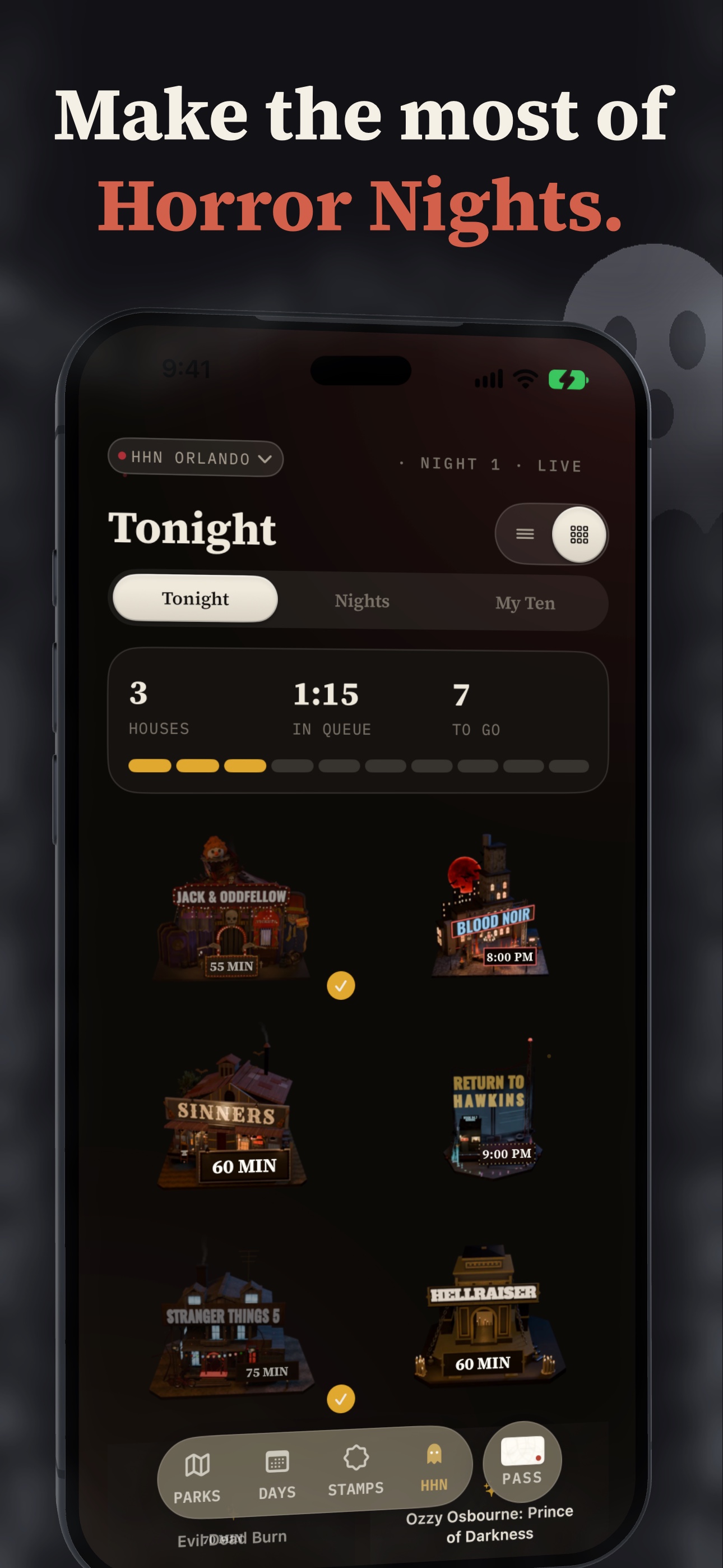
Halloween Horror Nights: all 17 houses as animated 3D models built in Blender, with live waits.
-
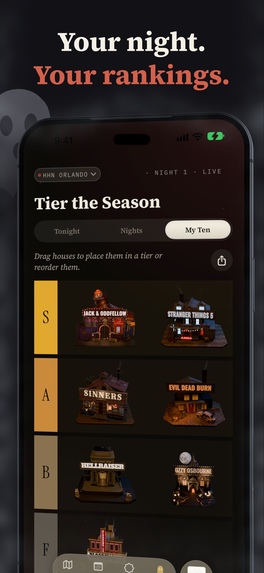
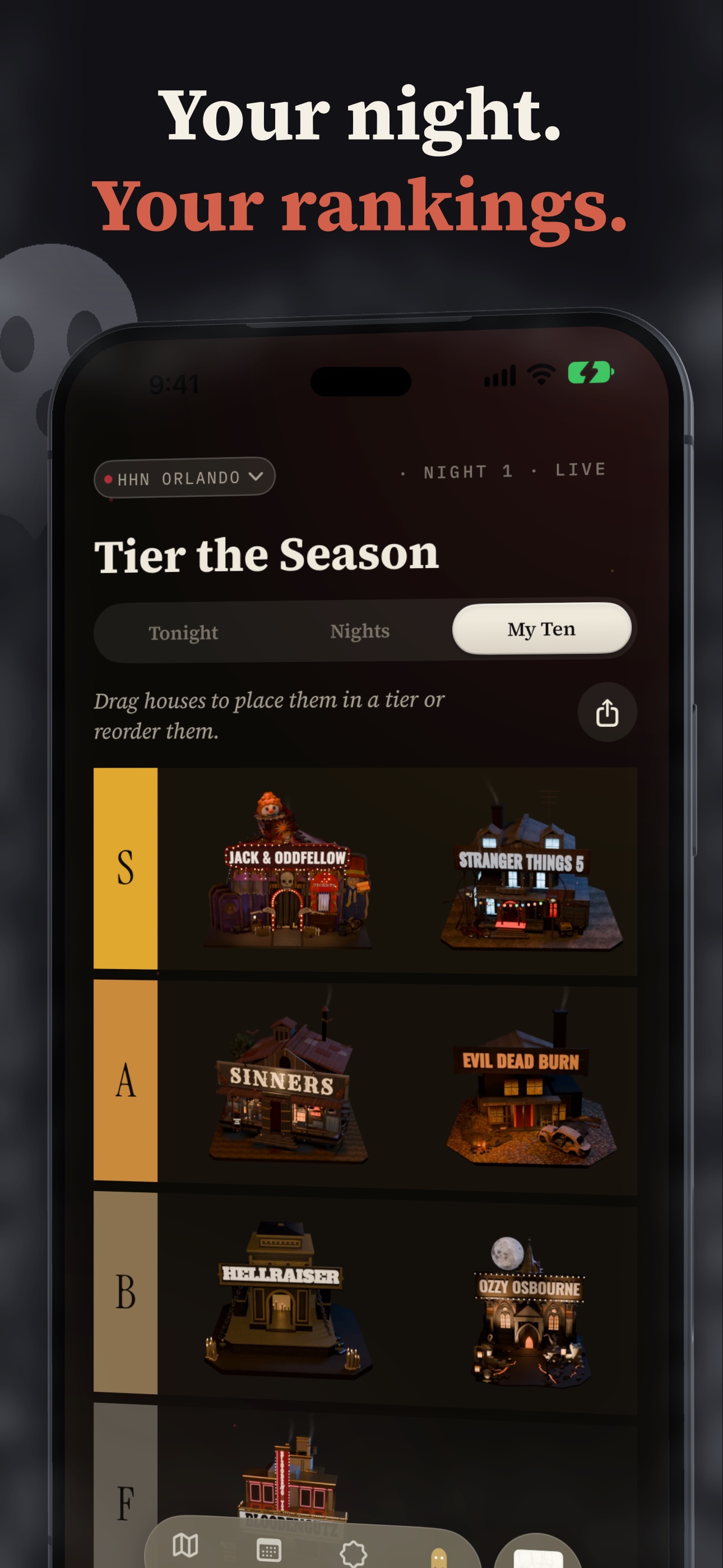
Tier the season: drag Horror Nights houses into your own tier list.
-
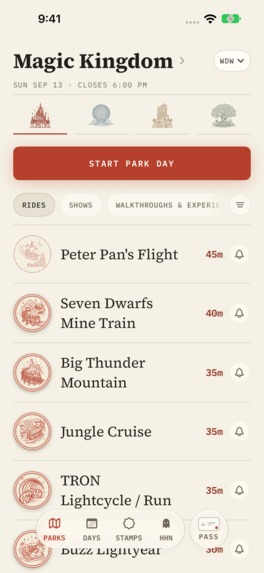
Magic Kingdom live board, straight from the app (1179 × 2556, no device frame).
-
The Parky! app icon (1024 × 1024).
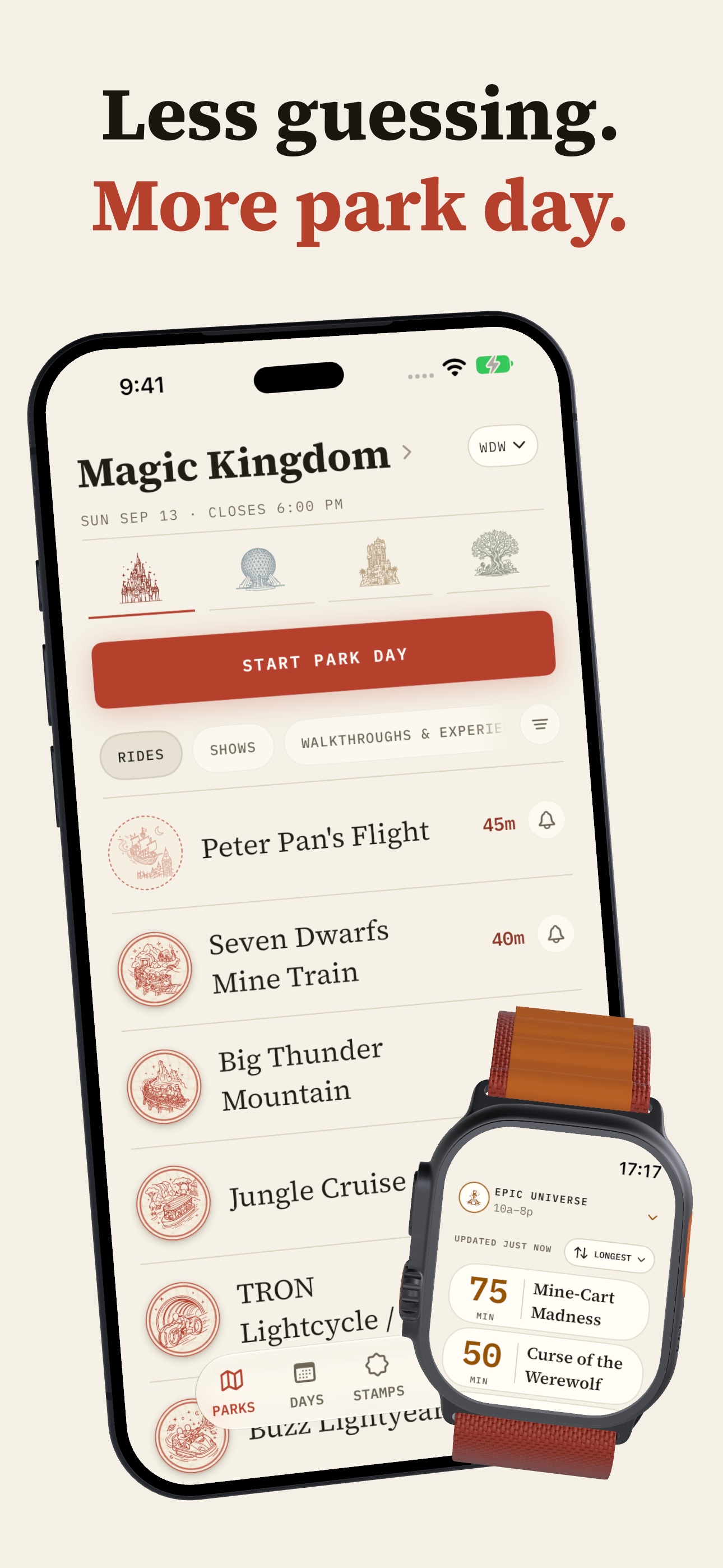
🎟️ Less guessing. More park day.
Parky is a theme park app for the US Disney and Universal parks, built by a former Disney Cast Member.
🏰 Inspiration
In October 2021, I joined the Disney College Program and worked the Front Desk at Walt Disney World. Over nine months I picked up shifts at more than 20 resorts. Every one meant a new costume, a new layout to learn fast, and guests who expected me to know everything.
The question I heard most wasn't about the resort. It was about the My Disney Experience app. Genie+ and Lightning Lane launched the month I started, and I spent shift after shift standing next to a guest, looking at their phone, walking them through submenus for a day they had spent months planning.
I realized the most useful thing I gave guests wasn't an answer. It was the feeling that someone who knew the place had their back.
Parky is the app I wish I could have handed every guest at that desk: simple, easy to use, and delightful. Just your park day: your waits, your tables, and everything you did.
🎢 What it does
Parky covers all 10 US Disney and Universal parks on iPhone and Apple Watch, and it answers three questions.
⏱️ What's the wait? Live waits for every ride, with a chart of the whole day: what it's posting now, what it usually posts at this hour, and every time it went down. Tap a ride to start a queue timer. It lives on your Lock Screen and in the Dynamic Island, so the phone goes back in your pocket. Set an alert, and Parky pushes you when the line drops to your number or a ride comes back up.
🍽️ Can we get a table? Live reservation times across Walt Disney World and Disneyland. If a restaurant is booked solid, Parky watches for cancellations and pushes you the moment a table opens. You can book from the notification, or reply to it and ask Parky's dining agent for something else. It answers with another notification. You never have to open the app.
📸 What did we do? Parky finds every park day already in your camera roll, and you stamp them in one swipe at a time. Every ride you take earns a custom stamp. At 8:30 pm park time, Parky sends your recap: every ride, every show and your time in line. It all adds up in your Pass, with printed-style cards ready to share.
Parky also covers Halloween Horror Nights, Universal's special event, in Orlando and Hollywood: live house waits, the houses you've done, and a tier list. I built all 17 houses as custom 3D models in Blender, each one animated.
Parky is free. Parky Gold adds hour-by-hour wait forecasts, unlimited ride alerts, up to ten dining watches and Apple Watch boards, and the paywall shows up right where you hit the free limit.
🛠️ How I built it
I built Parky solo. Here's the stack:
- 📱 App: SwiftUI on iOS 26, with an Apple Watch app, Live Activities and widgets.
- 🗄️ Backend: Supabase (Postgres, Edge Functions, pg_cron and Realtime) plus Hetzner servers for the long-running workers. A new wait reaches open apps within seconds.
- ⏱️ Live waits: Parky's own wait API, built for this, refreshing every 20 to 60 seconds across every park.
- 🍽️ Dining: a fleet of 20 Playwright workers on Hetzner keeps all 60 bookable days fresh, refreshing the whole window in under 60 seconds.
- 🤖 Dining agent: OpenAI.
- 🔔 Messaging: OneSignal (more below).
- 💳 Subscriptions: RevenueCat runs Parky Gold.
- 📊 Analytics: PostHog.
- 🌐 Web: parkypass.com is Next.js on Vercel.
- 🔌 API and MCP: a public Parky API and an MCP server, so the app, the website and AI assistants all read from one place.
- 🎃 3D: the Halloween Horror Nights houses, built and animated in Blender.
- 🚨 Ops alerts: Telegram, so I hear about problems before guests do.
🔔 How Parky uses OneSignal
OneSignal is how Parky reaches you when something you care about changes. Every push is one a guest asked for. There's no marketing blast.
The loop, end to end
Guest saves an alert ─► ride_alert_saved
        │                (permission is asked here, never at launch)
        ▼
dispatch-wait-alerts  (every minute)
  wait at your number? reading under 3 min old?
        │
        ▼
notification_deliveries  (durable queue: idempotency key, TTL, collapse ID)
        │
        ▼
dispatch-notification-deliveries ─► OneSignal REST API
        │
        ▼
Push, deep-linked to the ride ─► tap ─► ride_alert_opened
        │
        ▼
Queue starts within 30 min ─► queue_started_after_alert
        │                     + Live Activity through OneSignal
        ▼
queue_boarded ─► queue_completed
        │
        ▼
Journey "First Parky Win"  +  Conversion Metrics
        │
        ▼
Event Stream ─► onesignal-event-stream ─► Supabase ─► PostHog
The Edge Functions behind it (Supabase)
dispatch-wait-alertsruns every minute. A wait-drop fires only when the line reaches your number and the reading is under three minutes old, so "just dropped" is true. It also handles reopenings and Lightning Lane returns.dispatch-notification-deliveriesdrains the durable queue to the OneSignal REST API. Each delivery's UUID is its OneSignal idempotency key, so a retry or an overlapping run can never double-send. Every push carries a TTL, a collapse ID and a typed deep link.dispatch-retention-notificationsruns every five minutes: the 8:30 pm park-day recap, "ride is back" after a refurbishment, and "Booking just opened" when Disney's 60-day window opens on a date you're watching. Each one is re-checked right before it sends.track-onesignal-eventrelays the app's Custom Events from an on-device outbox. It derives the external ID from the verified session, so the API key never ships in the app, and a dropped connection just means a later retry.onesignal-event-streamreceives OneSignal's Event Stream (sent, clicked, Live Activity updates), andflush-onesignal-event-stream-outboxforwards each event to PostHog.
Custom Events (schema v1, ride and session IDs only, never names, locations or notes)
ride_alert_saved · ride_alert_opened · queue_started · queue_started_after_alert · queue_boarded · queue_completed · first_timer_completed · come_back_push_sent
Journey: "Parky · First Parky Win" (live since September 21)
Enter on queue_started → Wait Until queue_completed → check the "First Win Unseen" segment → Yes: set tag first_parky_win_shown = true → Exit.
It's headless: OneSignal handles the orchestration and tracking, and Parky's own completion screen does the celebrating. A custom-event Journey starts a new instance on every queue, so the tag-backed segment makes the milestone fire exactly once.
Conversion Metrics: 13 tracked, including Alert Saved → Alert Opened → Queue Started After Alert → Queue Completed. That's how I measure alerts by rides people actually took, not opens.
And the rest
- Dining pushes carry Book, Reply and Stop buttons. A reply goes to Parky's dining agent, and its answer comes back as another push.
- Stable iOS threads and Android channels, with
activeinterruption for things you asked to watch andpassivefor account and release notices. - Segments for Gold guests (through RevenueCat's native OneSignal integration) and for your active park.
🧗 Challenges I ran into
App Review. Parky sat in review for two and a half weeks and was rejected 10 times. Each review took about two business days, and each one found a new reason. The most common was trademark. I take that as a compliment: it looked polished enough that they thought it might be pretending to be Disney.
Dining at scale. Live tables for every restaurant at Walt Disney World and Disneyland, for every party size, across all 60 bookable days, is a lot of data that changes constantly. Parky runs a fleet of 20 workers on Hetzner that pull jobs from one shared queue in Supabase, so whichever worker is free takes the next most urgent date. Dates in the next few days refresh most often, the whole 60-day window refreshes in under 60 seconds, and a supervisor, a stuck-worker watchdog and Telegram pages keep it running around the clock.
Live data without drowning the database. My first versions wrote everything, every time: a full snapshot of every park every 20 seconds, and every dining slot on every refresh. Most of those writes changed nothing, and the database paid for it. I learned to write only when something changes, and dining slot rows dropped from about 44,900 a minute to 1,460. I also cut down Edge Function calls and fixed queries that hit timeouts I didn't know existed.
436 icons in one style. Every ride, restaurant and park has its own icon. Keeping hundreds of them looking like one consistent set, in the same style and the same ink, was a project on its own.
Design, twice. I kept iterating on the design, making it more polished and adding more animations, until it was basically a whole revamped design, with the old one still everywhere. The revamp is much simpler and reuses pages: a ride gets one page, whether it's on today's park day or part of your history, so Parky doesn't have a million different screens. Keeping everything that simple and consolidated was really hard, and getting the old design out was a struggle. I played whack-a-mole with old fonts, spacing, colors, and square corners that should have been rounded. Once the new direction was set, I wish I had just gutted the front end and started over.
🏆 Accomplishments that I'm proud of
I'm proudest of the design and the animations. I obsessed over little details that few people may ever see. That may be a fault, but I'm really proud of how polished it looks and how it all turned out.
I'm proud of how Parky uses notifications, too. You can reply to a table alert and Parky's dining agent answers right in the notification, so you can find and book a table without ever opening the app. And every push is one a guest asked for, measured by whether it got them on the ride, not just whether they opened it.
I'm also proud of the foundation. Parky has a design system I can easily build new things on, which is exactly what I need to keep working toward making Parky the theme park platform: a super app for everyone.
🎨 The design
Parky is designed like a real park passport, and it's simple on purpose. Paper, ink, and one red button per screen. It's simple, easy to use, and delightful: everything for your park day is a tap away.
The simplicity is what lets the motion matter. Every animation is earned by something you did, and each one runs off a single clock, so it plays the same way every time.
- Finding your park days. While Parky reads your camera roll, a grid of photo tiles lights up in a fresh random sweep, with an echo trailing behind each one. Then the count lands: it rolls up, slows down, and the final number drops in and punches past its size before an ink ring blows out past the margins.
- Stamping in a day. Your park days come back as a deck of tickets with your own photos on them, and you go through them like Tinder: swipe right to stamp a day onto your Pass, swipe left if it wasn't a trip. Keep one, and the park's real stamp comes down on the ticket. The die falls, the ink bleeds a hair past the edge, the die over-rotates and settles, and the mark stays in the paper. At the free limit, the eleventh card reaches for the top of the deck and gets stopped, with the refusal stamped across it like a ledger.
- Issuing your Pass. Press It lifts the Pass off the table and spins it on its vertical axis. As it lands, the seal presses into the paper with a heavy haptic, paper scraps fall, and the Pass settles in with a greeting your own park days earned.
- Earning a stamp in the park. When you ride, the stamp takes over the screen, then shrinks and flies into the Stamps icon in the tab bar, which pulses as it lands.
- Buttons you can feel. The filter buttons, like switching between rides and shows, are skeuomorphic, in the style of Airbnb's: they look like physical buttons you could press. Every button fires a haptic the instant your finger lands, and the deck's buttons sink under your thumb.
- 436 custom icons. Every ride, restaurant and park has its own, and every park has its own ink.
- Halloween Horror Nights. All 17 houses on both coasts as animated 3D models, each in two versions: one with a wait board rendered into the model showing live waits and showtimes, and a clean one without.
💡 What I learned
📲 Submit a bad MVP to App Review early. The first submission is the hardest one to get through. Once you're approved, later reviewers have that as social proof, and updates go through much more easily. My first submission sat in review for two and a half weeks.
📣 Distribution and marketing are hard. I should have brought in stakeholders much earlier, before the app was complete.
🧭 Core features and onboarding first. I spent way too much time on mature features that only surface once someone uses Parky consistently for an entire park trip. I should have kicked the can on those and focused on the core features and a great onboarding.
💸 Price for where you are. I launched Gold at $99.99 a year with no platform and no social proof. It's now $49.99 a year, with a $24.99 offer for theme park employees and travel agents.
🚀 What's next for Parky! - Theme Park Tracker
Parky started as the app I wish I could have handed every guest. Next, it becomes a platform.
Already built, and I'm polishing them now:
🎮 Something to do in line. A library of queue games to play while you wait.
👯 People. A social feed, like Instagram meets Yik Yak, where guests post from the parks and plan days with friends.
📌 Pin trading. Snap a photo of dozens of pins, and Parky crops each one and adds it as a 3D pin on your virtual pin board.
Then, the people who already have an audience:
🎥 Content creators. Creators bring their followers onto Parky, and Parky gives them ways to earn from it.
🧳 Travel agents. I'm working with travel agents on Pro tools: 100+ dining watches they can book for their clients, and a way to bring their own first-timer guide into Parky. Every agent already has their own PDF of tips, so their clients get the agent's advice right inside the app.
✍️ Theme park blogs. Article builders that let writers drop Parky's live wait charts into their posts, plus a feed of dining openings and menu changes to write about.
I believe that's how Parky finds real success: creators, travel agents and blogs bringing their people onto Parky as a marketing funnel, and earning money with it. Along the way, Parky becomes the trusted source of theme park data.


Log in or sign up for Devpost to join the conversation.