Inspiration
About 21% of US undergraduates report a disability (NCES via PNPI). For blind and low-vision students using screen readers, and students with dyslexia using text-to-speech, many course files are simply unusable: scanned pages read as nothing, diagrams are skipped, and equations disappear.
STEM is the worst. A screen reader that meets this equation in a typical LaTeX-generated lecture PDF often says nothing at all:
$$ x = \frac{-b \pm \sqrt{b^2 - 4ac}}{2a} $$
Public universities now have a legal deadline: the DOJ's ADA Title II rule requires WCAG 2.1 AA compliance by April 26, 2027 for large public entities (EDUCAUSE). Existing tools help with the basics: Ally scores files and drafts alt text, and Canvas checks content typed into Canvas. But Canvas's checker doesn't scan uploaded files at all (Cidi Labs), and fixing STEM PDFs is still slow manual work that "can't scale" (ALT). Outsourcing costs about $5–$25 per page (Venngage).
We wanted every student to be able to use every course file on day one, without having to ask.
What it does
ParityDocs makes course files accessible for students with disabilities. It offers everything universities use Ally for, plus the STEM content Ally and Canvas can't fix.
Parity with Ally:
- Accessibility score and issue list for each PDF
- One-click basic fixes: title, language, tags, headings, reading order
- AI-drafted alt text for images
- Alternative formats for students
Beyond Ally:
- Equations → speakable math (MathML) that screen readers read aloud and Braille displays can show
- Charts → full description plus the data table behind them, not one-line alt text
- Diagrams → descriptions that use the lecture's own text as context
- Accessible web version that reflows for low-vision students
- Approval log of who approved each AI fix and when, as compliance evidence
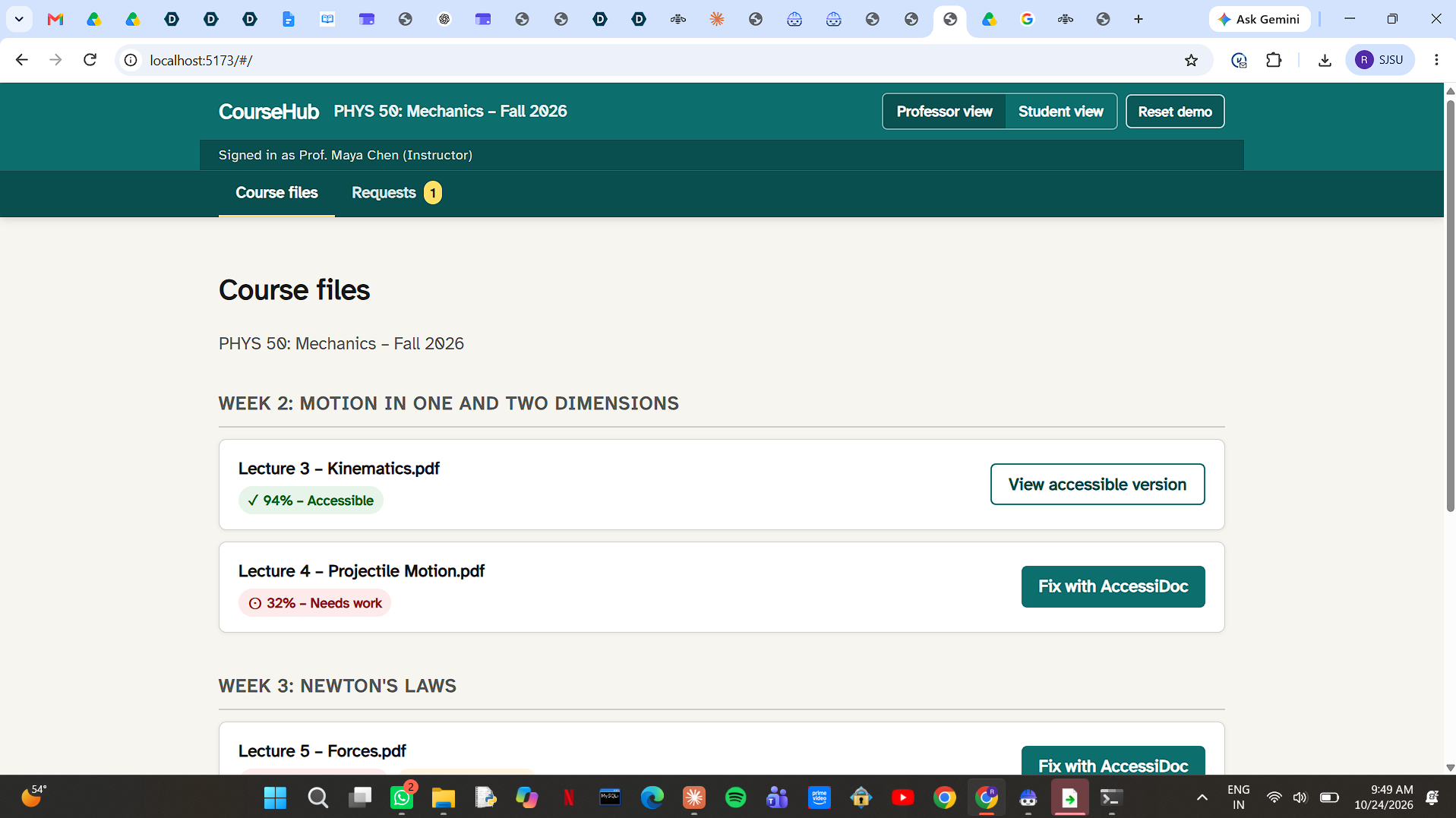
How students receive it: the accessible version appears in Canvas next to the original. Students don't have to request accommodations or disclose a disability. For files not fixed yet, a "Request accessible version" button moves the file up the professor's queue.
How we built it
Rules find the problems, IBM AI drafts the fixes, and a professor approves every change.
- Detect: a rule-based checker tests each PDF against WCAG 2.1 AA and produces a score and issue list.
- Understand: IBM Docling parses the layout, classifies figures (chart vs. diagram) and converts formulas to LaTeX, which we turn into MathML.
- Draft fixes: IBM Granite Vision on watsonx.ai drafts alt text, chart descriptions and data tables, using the surrounding lecture text as context.
- Review: the professor approves, edits or rejects each fix on a side-by-side screen.
- Export and re-check: ParityDocs outputs a tagged PDF and an accessible web page, re-runs the checker to show before/after results, and saves the approval log.
Tools: HTML,CSS, JavaScript, IBM Docling, IBM Granite / Granite Vision (watsonx.ai), veraPDF, OCRmyPDF, HTML/JavaScript, NVDA with MathCAT for screen reader testing.
We used IBM Bob to plan the project structure, explain the code to our team, fix errors while running it, and help write our documentation. We also used Claude to help design the architecture and draft the initial prototype code, which our team reviewed and tested.
Responsible AI
- Human in the loop: nothing is published without professor approval; low-confidence drafts are flagged first.
- Transparency: every fix names the WCAG rule it addresses and is labeled "AI-drafted, approved by" followed by the professor's name.
- Accountability: the approval log doubles as compliance evidence.
- Privacy: ParityDocs processes course materials only, never student records, and can run on the university's own cloud.
- Dignity: accessible versions are available to everyone by default, so no one has to disclose a disability.
Challenges we ran into
- Existing tools: we found that Ally, YuJa and UDOIT already handle basic fixes, so we focused on what they leave behind: STEM content.
- Math in PDFs: screen reader support for math inside PDFs is still uneven, so we made the accessible web version the primary format for equations.
- AI accuracy: AI can misread equations and chart values, which is why professor approval and confidence flags are built in.
- No coding background: most of our team had never built software, so we used AI development tools to build and debug, and focused on learning how each part works.
- Getting IBM access: we signed up for the watsonx.ai and IBM Bob trials during the hackathon and had to learn the platform quickly.
- Time: with under 48 hours, we limited the prototype to PDFs and a mock Canvas page, and left live Canvas integration for later.
Accomplishments that we're proud of
- A clickable prototype showing the full workflow: score a PDF, apply basic and STEM fixes, approve them, and deliver the accessible version to students in Canvas.
- A design that offers full parity with Ally and fills real gaps, instead of duplicating existing tools.
- Responsible AI built into the workflow, not added at the end.
What we learned
- Accessibility is about whether a student can learn from the file, not just whether alt text exists.
- The hardest accessibility problems, in STEM, are the least served by current tools.
- Good AI design means knowing where AI should draft and where humans must decide.
What's next for ParityDocs
- Canvas integration as an LTI app, so professors fix files without leaving Canvas
- More formats: PowerPoint, Word and LaTeX source files
- More STEM: chemistry structures and circuit diagrams
- Testing with students through SJSU's Accessible Education Center
- Scale: pilot at SJSU, then a CSU system contract (22 campuses, about 465,000 students, EdSource), then public institutions nationwide under the same federal deadline
Built With
- canvas-lm
- claude
- css3
- docling
- fastapi
- granite-vision
- ibm-bob
- ibm-granite
- ibm-watson
- javascript
- latex
- python
- verapdf
- wcag

Log in or sign up for Devpost to join the conversation.