-
-
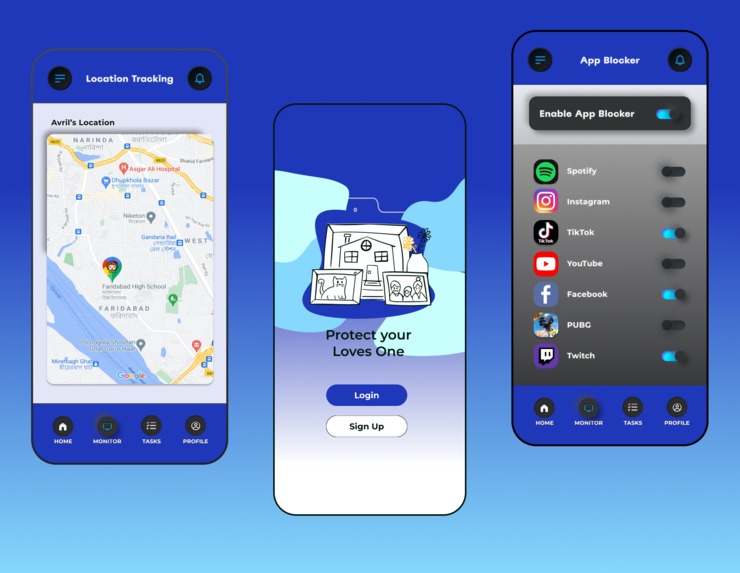
Parental Control

Background
At this time of pandemic everything is moved to online is no exception in the field of Education therefore a lot of children who have been given mobile phones and access to internet is easy. According to the Indonesian Statistics Agency, at least 88.9% of children aged 5 years and over can already access the internet. In addition to social media, 66.13% of children aged 5 years and over can access news / information. There are also those who access the internet for entertainment as much as 63.08%. The results of the study also showed that there are 56.6% of parents have high attention, accompanying when children play mobile phone. Moreover, there are 86.8% of parents also remind children when playing too long on mobile phone. Therefore, parental control applications that can monitor the activity of mobile phone use and internet access to children will be very helpful. Parents can control what can be accessed and the time of use of mobile phones in children remotely through a personal mobile phone.
Purpose of the Project
- Overcome problems that often occur in children aged 5-10 years and are experienced by parents who have children at that age.
- Overcoming gadget addiction in early childhood (especially those still in elementary school) due to side effects of the online learning system.
- Ensure that children receive age-appropriate content.
- Provide reminders of time to study.
- Keep track of kids' acting on their gadgets.
Goal Achievement Methods
- Qualitative In depth Interview for gather the information needed
- Design Thinking
- Empathise The first stage of the Design Thinking process is to gain an empathic understanding of the problem we are trying to solve. In here we gather all the information by interviewing all the users target to develop the best possible understanding of the users, their needs, and the problems that underlie the development of the product. We arrange the data using emphaty diagram to make it easier.
Define During the Define stage, we put together the information we have created and gathered during the Empathise stage. In here we analyse our observations and synthesise them in order to define the core problems that our team have identified up to this point. We should seek to define the problem as a problem statement in a human-centred manner.
Ideate In ideate we arranging all of our information that we got from the user, we use miro to help us gather the information. After we arrange it, next we discuss about the problem that relevant to the topic we discuss and make it as priority to solve. We gather all of the ideas and information from the interview with user. We create a persona to help us define the user needs, personality and problems their faced.
Prototyping In here we start with a low-fidelity version of the intended solution and improve it over time based on feedback. The prototype should be a realistic representation of the solution that allows you to gain an understanding of what works and doesn’t work. After that we create the high fidelity one to help us on prototyping.
Testing In here we use thinking aloud test to conduct the testing. Testing is essential because everything, ultimately, should be about the people who will use your products.
User Target
- Parents who have early childhood (about 5-10 years old or still in elementary school).
- Children - early childhood addicted to gadgets.
Product Limitations
- Users who are not too familiar with technology will have a little difficulty with the flow of applications.
- This app is too big a storage
- Need internet access
Platform That We Used
- Figma -> For Design
- Miro -> For Brainstorming
Product Design Usage Scenario
Tina and Bimo are a married couple who are busy with their respective jobs so they don't have much time to monitor their children while using smartphones. So they decided to use the Parental Control app so they could monitor their children's activities. Because of the new account they have to create the best account first by registering and logging in. After that Tina and Bimo want to see the various features contained in the Monitor menu,by pressing the user parent button they will bedirected to the home and after that choose the monitor feature. After successfully logging into the monitoring app Tina and Bimo wanted to monitor what apps their children often opened and set how long they could play with their smartphones. They can choose from several features available in the application such as timer, application blocker, website blocker, map tracking, focus plant, and task activity. Here they can choose the features according to their needs. To change profile photos and see many children monitored can be seen through the profile feature.
Method and Result of User Testing
Method : Think Aloud Test
The implementation plan of Usability Testing Parental Control Application, namely:
- Implementation date: December 19th 2021
- Duration: (±) 60 minutes/participant
- Where: Online
- Meeting Tools: Recorded Google Meet
- Meeting participants: Moderator, note taker, and 1 participant
Activities to be carried out:
- Introduction to the background of usability testing that will be done.
- Giving a pre-test to find out the background of each participant.
- Explanation of the scenario and the provision of each task in sequence to the participants.
- Post-test to find out the experience of participants during testing of the Parental Control Application.
Result For participants around 40 and not familiar with the technology the whole application is quite complicated but for participants around 20 and mid 30 all the scenarios are fine for them. Some suggestions from the participant is to add two languages indonesia and english, add form input to detail task, add more detail in the interface, add schedule feature, add specific site list.
Conclusion
Parental Control is made to help parents control their kids phone accessibility and screen time. We need to develop our application more so it can help the problems faced by the users. To objectify those goals we use a design thinking method. After testing there are some suggestions from participants that can be discussed again to improve the application, there are added two languages indonesia and english, add form input to detail task, add more detail in the interface, add schedule feature, add specific site list.
Built With
- figma


Log in or sign up for Devpost to join the conversation.