Inspiration
Anyone who writes based on research faces three persistent challenges when researching and writing:
The Fragmented Research Problem: Opening 20+ browser tabs while researching leads to cognitive overload. Important sources get lost in the chaos. Manual note-taking consumes hours that could be spent writing. Context switching between tabs breaks concentration and reduces comprehension.
The Blank Page Problem: Starting from nothing causes writer's block. Uncertainty about structure and flow leads to procrastination. Fear of imperfect first drafts prevents getting words on the page. Hours are wasted staring at empty documents.
The Privacy and Access Problem: Cloud-based AI writing tools send sensitive academic work to external servers, raising privacy concerns for medical, legal, and academic research. These tools require constant internet connectivity, making them useless in libraries with poor WiFi, on airplanes, or in remote locations. Monthly subscriptions ($20-30) create financial barriers for students.
When Google announced Chrome's Built-in AI APIs with Gemini Nano, an opportunity emerged: What if a complete research and writing workstation could run entirely in the browser, completely offline, with zero privacy concerns?
That vision became Parallel.
What it does
Parallel is a Chrome Extension that transforms any browser into a complete offline research and writing assistant, built on 5 Chrome Built-in AI APIs.
It helps users capture web sources with automatic summarization, analyze content with an on-device chat assistant, write professional documents with live AI generation, and edit text with 8 distinct AI-powered tools, all 100% offline and with 100% privacy.
Core Features:
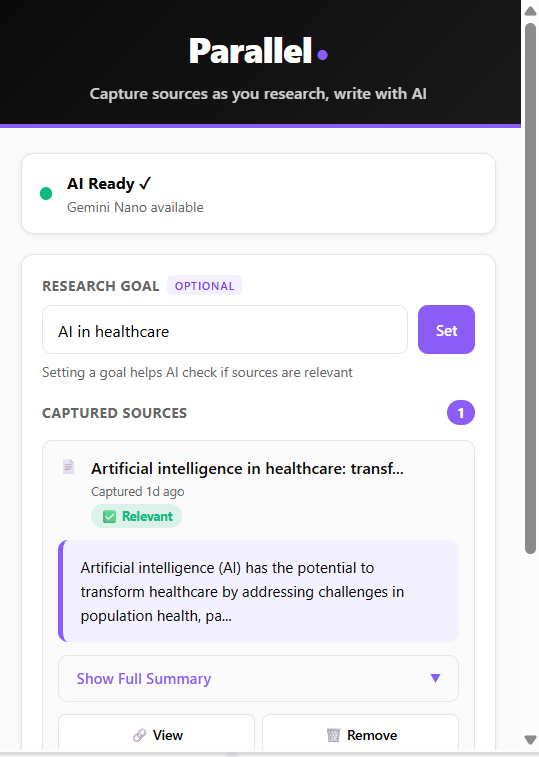
Smart Source Capture: One-click capture of any webpage. The Summarizer API automatically generates summaries and key points.
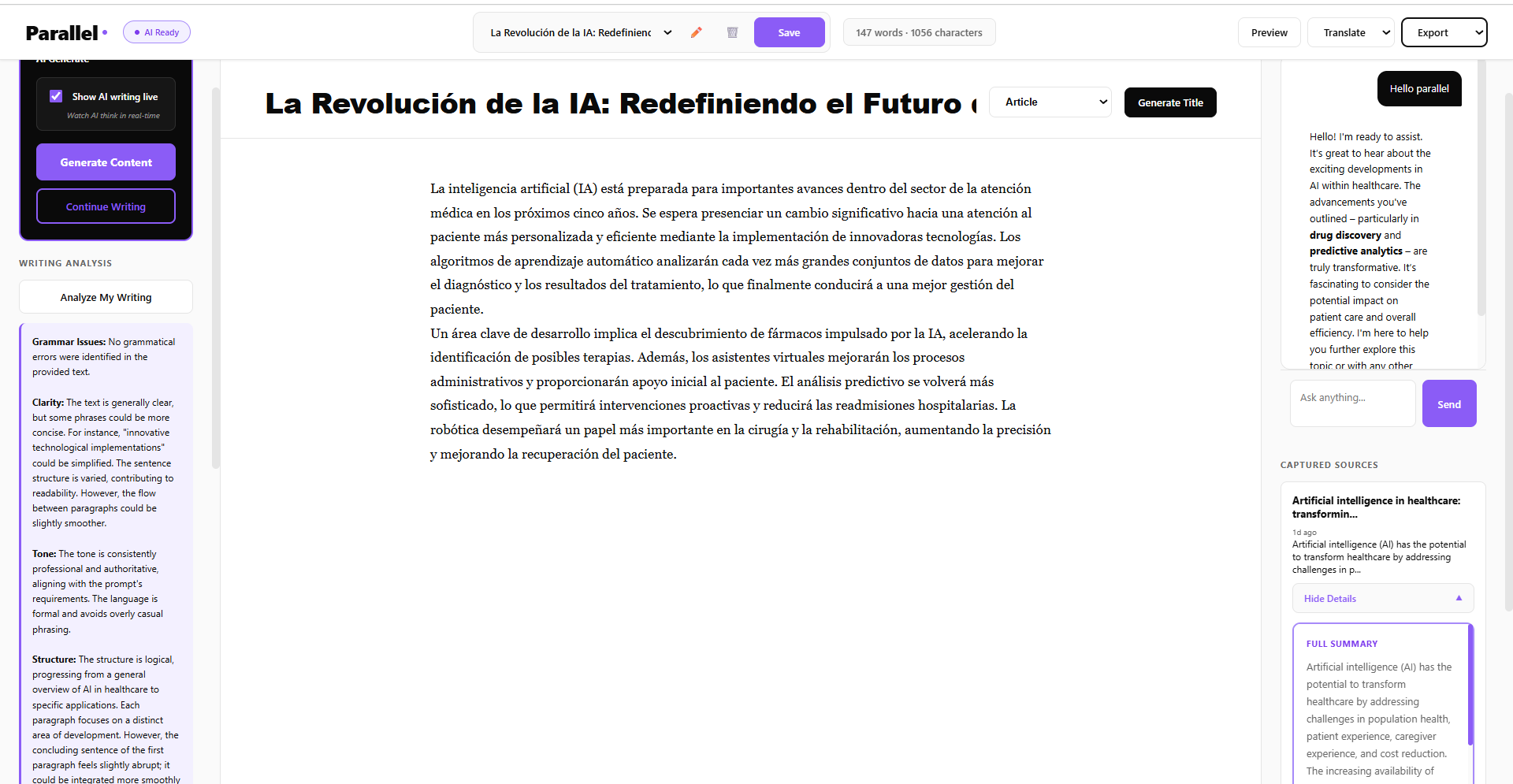
Intelligent Content Generation: A "Smart Word Goal" system generates live, streaming text, naturally completing sentences within a ±5% word count tolerance.
8-in-1 AI Editing Toolbar: Highlighting text brings up 8 tools:
- 3 Rewriter API Tools:
Paraphrase,Formal,Casual - 5 Prompt API Tools:
Grammar,Proofread,Suggest,Expand,Shorten
- 3 Rewriter API Tools:
AI Chat Assistant: An offline "Ask Parallel" chatbot, powered by the Prompt API, answers questions about saved sources.
Multi-Language Translation: Real-time document translation to 7 languages (Spanish, French, German, Chinese, Japanese, Arabic, English) using the Translator API.This feature breaks language barriers and connects a truly global audience, enabling seamless collaboration among users worldwide.
Document Management: Auto-saving, multi-document support, and export to
.docxand.html.
How I built it
Parallel is a Manifest V3 Chrome Extension built with pure JavaScript, HTML, and CSS (no frameworks). It uses the ContentEditable API for the editor and chrome.storage.local for all document and source persistence.
Technical Architecture
The architecture is built on four decoupled components that communicate securely to manage data flow:
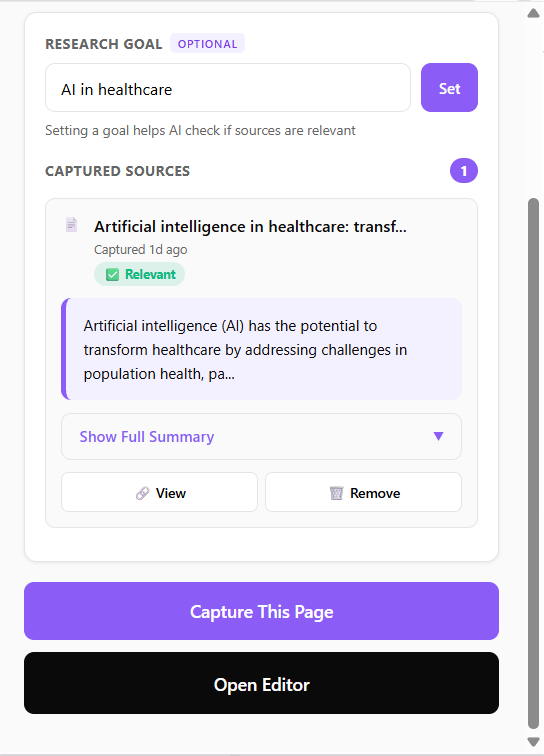
1. Popup (
popup.js): This is the command center. The user clicks the Parallel icon, sets an optional "Research Goal," and clicks "Capture This Page." This action securely dispatches a message to the active tab's content script.2. Content Script (
content-script.js): Injected into the active tab, this script's sole job is to perform "smart" text extraction. It hunts for semantic tags like<article>or[role="main"]to find the core content, ignoring ads and navigation. It then passes this clean text to the Service Worker for background processing.3. Service Worker (
background.js): This is the background "brain." It initializes all 5 AI API sessions. When it receives content from the content script, it performs two key background tasks:
1.  **Summarization (`Summarizer API`):** It generates a summary and key points for the captured source.

2.  **Relevance Check (`Prompt API`):** It checks the content against the user's "Research Goal." The resulting data (summary, key points, relevance) is then saved directly to `chrome.storage.local`.
4. The Editor (
editor.js): This is the main application (over 2,400 lines of code). It's a web-accessible resource (editor.html) that loads as a full-page, distraction-free Single Page Application (SPA).- It reads all saved data from
chrome.storage.local. - It initializes its own set of AI API sessions for all real-time, in-editor tasks (like the 8-tool floating toolbar, live streaming generation, and the AI chat assistant).
- It handles all document management, auto-saving, and the export engine (
docx.js).
- It reads all saved data from
Intelligent API Orchestration
Parallel uses all 5 available AI API sessions, delegating tasks to the best model for the job and ensuring 100% uptime with smart fallbacks.
1. Prompt API (Primary Engine - 65% of features)
Powers: Content generation (
generateArticle), chat assistant,Grammar,Proofread,Suggest,Expand,Shorten.Why: The most flexible API for handling complex context, custom instructions (like proofreading), and creative generation.
Fallback: Acts as the fallback for all other APIs, ensuring features always work.
2. Rewriter API (Style Transformations - 15% of features)
Powers:
Paraphrase,Formaltone,Casualtone.Why: Highly optimized for style transformations, preserving meaning better than a generic prompt.
Fallback:
Prompt API
3. Summarizer API (Source Capture - 10% of features)
Powers: Automatic webpage summarization and key point extraction.
Why: Purpose-built for summarization. Faster and more consistent than the Prompt API for this task.
Fallback:
Prompt API
4. Writer API (Specialized Generation - 5% of features)
Powers: Intelligent "Generate Title" feature.
Why: Optimized for short, creative, context-aware titles.
Fallback:
Prompt API
5. Translator API (Multi-Language - 5% of features)
Powers: Document translation to 7 languages.
Why: Specialized for accurate, high-quality translation.
Fallback:
Prompt API
Challenges I ran into
This project went beyond simple API calls to solve real-world usability challenges with a focus on accessibility and user experience.
1. Smart Word Goal System
Problem: Standard AI generation often stops awkwardly mid-sentence to meet an exact word count (e.g., "...and fostering innovat").
Solution: A custom streaming loop in
editor.jsthat aims for a target (e.g., 100 words) but only stops when it's (A) within a ±5% tolerance range (95-105 words) and (B) detects a natural sentence-ending punctuation mark (.,!,?).UX Impact: A professional, human-like writing experience. No awkward cutoffs. Users receive complete, publishable thoughts without manual cleanup.
2. Content Security Policy (CSP) Violations
Problem: Manifest V3 strictly forbids inline event handlers (
onclick="..."), which breaks simple UIs.Solution: Refactored 100% of the UI to use
addEventListenerfor all interactions, ensuring full CSP compliance.Impact: A secure, modern extension that passes Chrome Web Store validation.
3. Messy Translation Output
Problem: The Translator API sometimes returned messy text with labels (e.g.,
Spanish: El contenido...).Solution: A simple but robust cleaning function in
editor.jsto sanitize the output.Accessibility Impact: Clean, professional translations that non-native speakers can immediately use without manual cleanup. Ensures translated content is presentation-ready.
4. Zoom-Aware UI Popups
Problem: The floating toolbar would render off-screen if the user zoomed the browser (e.g., 90% or 125%).
Solution: A positioning function in
editor.jsthat calculates the actual viewport dimensions and checks for boundary collisions before rendering the popup, forcing it to render "above" the text if there isn't space below.Accessibility Impact: A polished, professional UX that works at any browser zoom level. Critical for users with visual impairments who rely on browser zoom, and for accessibility compliance (WCAG 2.1 AA requires content to be usable at 200% zoom).
Accomplishments that I'm proud of
Parallel's core accomplishment is providing tangible, real-world value by transforming a fragmented, insecure, and expensive process into a seamless, private, and free one with accessibility and inclusion at its foundation.
Time Savings & Productivity
It's a production-ready tool that saves users time and unlocks new, secure workflows. Based on internal testing, Parallel cuts the time to create a research-backed document from over 3 hours (traditional manual process) to around 20 minutes. This is achieved by making source capture approximately 90% faster , summarization 99% faster, and first-draft writing 87% faster compared to writing manually without AI assistance.
Privacy & Security for High-Stakes Work
For students and researchers, Parallel provides a 100% private, offline tool to write papers and protect sensitive academic research. All processing happens on-device with zero data collection, making it suitable for environments with HIPAA and GDPR compliance requirements. For professionals and journalists, it enables secure work in corporate environments where cloud AI is banned, protecting confidential sources and proprietary data.
Accessibility & Digital Inclusion
Parallel was built with accessibility as a core principle, not an afterthought:
Geographic Accessibility: The tool works anywhere on planes, trains, or in libraries with poor WiFi where cloud tools fail. Students in rural areas, developing countries, or regions with unreliable internet can access the same AI writing assistance as those in major cities.
Financial Accessibility: It is 100% free forever, removing the $20-30/month subscription barrier that prevents millions of students and independent creators from accessing AI writing tools. No premium tiers, no feature gates complete functionality for everyone.
Language Accessibility: Multi-language translation breaks down barriers for non-native English speakers and international students. A researcher can write in their native language, translate to English for publication, then back-translate for local dissemination. The Grammar and Formal tone tools specifically help non-native speakers write with confidence in academic and professional contexts.
Visual Accessibility: The zoom-aware popup system ensures the interface remains usable at any browser zoom level (90%-200%), meeting WCAG 2.1 AA accessibility standards for users with visual impairments.
Cognitive Accessibility: The clean, distraction-free editor interface reduces cognitive load. Auto-save prevents work loss for users with ADHD or memory challenges. The "Smart Word Goal" system removes decision paralysis by providing structured, complete drafts.
Real-World Impact Statistics
- Millions across the world gain free access to professional AI writing tools
- Non-native English speakers can write confidently with grammar assistance
- Students in 130+ countries with unreliable internet can work offline
- Researchers handling sensitive data (medical, legal, corporate) can use AI without privacy compromise
- Budget-constrained users save $240-360/year in AI tool subscriptions
What I learned
Technical Insights
On-Device AI is Production-Ready: The 5 Chrome Built-in AI APIs are capable, fast, and reliable enough to be the core engine of a complex application, not just a demo.
API Orchestration is Essential: A robust application cannot rely on a single API. The most successful feature is the 8-tool editing bar, which works by intelligently delegating tasks to the best API for the job (e.g.,
Rewriterfor style,Promptfor grammar) and includes graceful fallbacks for 100% uptime.Manifest V3 and Security are Non-Negotiable: Modern extensions require a security-first mindset. All UI was built using
addEventListenerfrom the start to ensure full CSP compliance.
UX & Accessibility Insights
Accessibility Must Be Built In, Not Bolted On: Features like zoom-aware popups and clean translation output aren't "nice to have", they're fundamental to making AI tools usable for everyone. Designing for edge cases (90% zoom, unreliable internet, non-English speakers) creates better experiences for all users.
User Experience is More Than the API: Solving technical challenges like the "Smart Word Goal" sentence completion, CSP compliance, and the "Zoom-Aware Popup" is what elevates the project from a simple API wrapper to a polished, professional tool that people can actually rely on.
Privacy is an Accessibility Feature: For many users (researchers, journalists, students in restrictive environments), privacy isn't a preference, it's a requirement. On-device AI removes barriers that cloud-based tools create for entire categories of users.
Free Isn't Just Cheap, It's Inclusive: Removing financial barriers doesn't just save money; it fundamentally changes who can participate in AI-assisted writing. Universal access creates opportunities for voices that would otherwise be excluded.
What's next for Parallel - AI Writing Assistant
This project is a solid foundation, with a clear roadmap for future development focused on deepening accessibility and expanding global reach.
Immediate Priorities
- Citation Management: APA, MLA, and Chicago format support to help students meet academic integrity requirements.
- Dark Mode Theme: Reduce eye strain for extended writing sessions and support users with photosensitivity.
- Enhanced Export Options: Markdown and PDF support, plus screen reader-friendly document structure.
Mid-Term Goals
- Expanded Language Support: Add 10+ additional languages (Hindi, Portuguese, Russian, Korean, etc.) to reach 3 billion+ speakers.
- Collaborative Features: Enable research collection sharing for study groups and research teams.
- Template Library: Pre-structured templates for common document types (research papers, reports, essays) to reduce cognitive load.
- Voice Input Integration: Speech Recognition API support for accessibility and hands-free writing.
Long-Term Vision
-Progressive Web App (PWA): Mobile-friendly version for students writing on phones and tablets in environments without computer access.
-Offline-First Sync: Optional encrypted peer-to-peer backup for users who need device redundancy.
-Image Analysis Integration: As new Chrome AI APIs emerge, add support for analyzing charts, graphs, and research images.
-Community Translation: Crowdsourced improvements to translation quality for underserved languages.
Built With
- ai
- api
- apis
- built-in
- chrome
- contenteditable
- css3
- docx.js
- extension
- gemini
- html5
- javascript
- manifest
- nano
- prompt
- rewriter
- storage
- summarizer
- translator
- v3
- writer

Log in or sign up for Devpost to join the conversation.