-
-
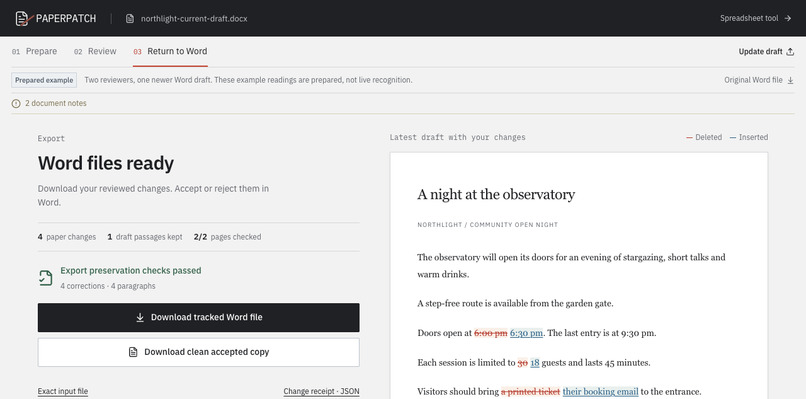
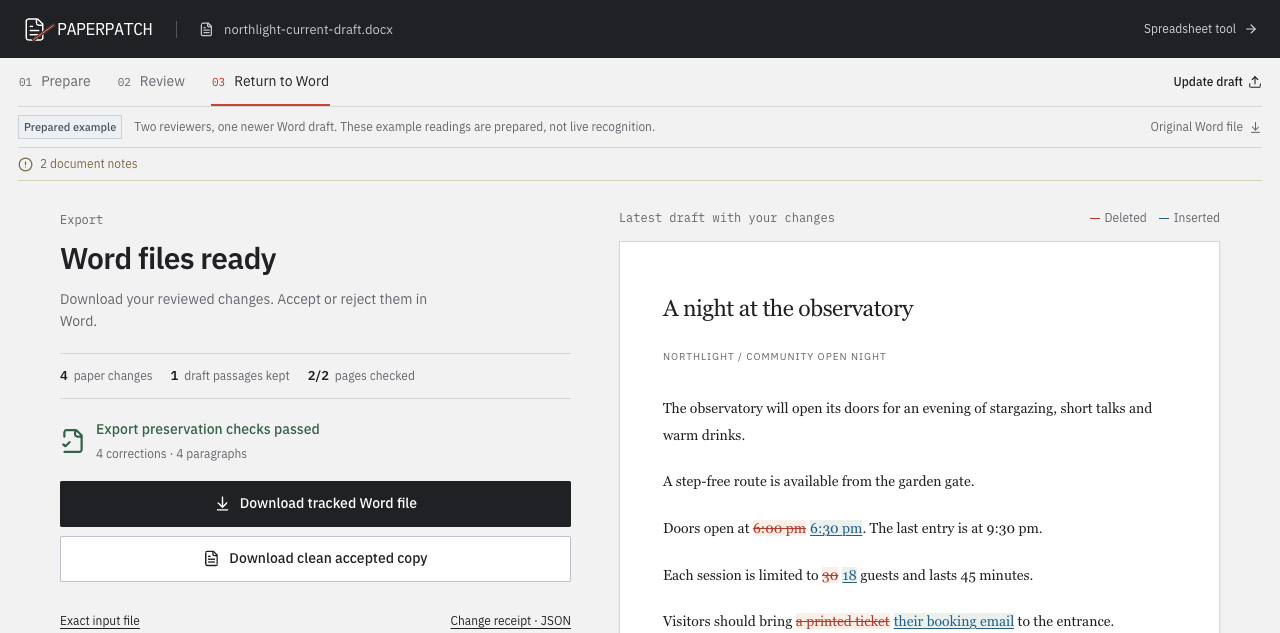
Four reviewed corrections exported to Word while preserving the newer schedule and accessibility paragraph.
-
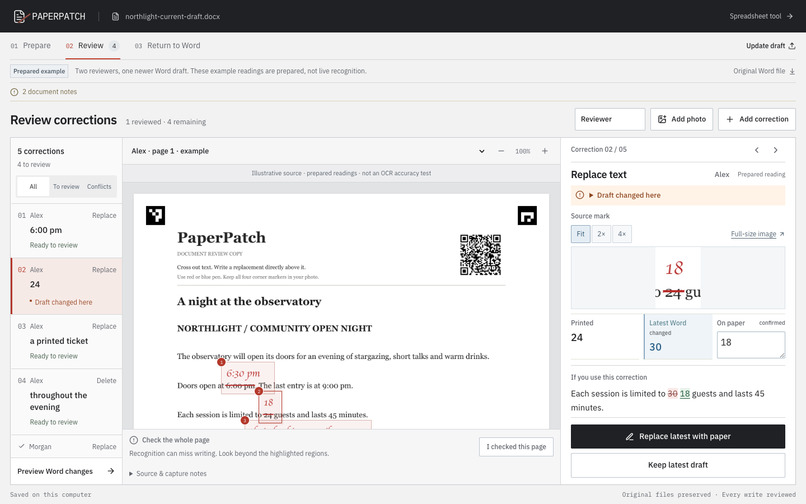
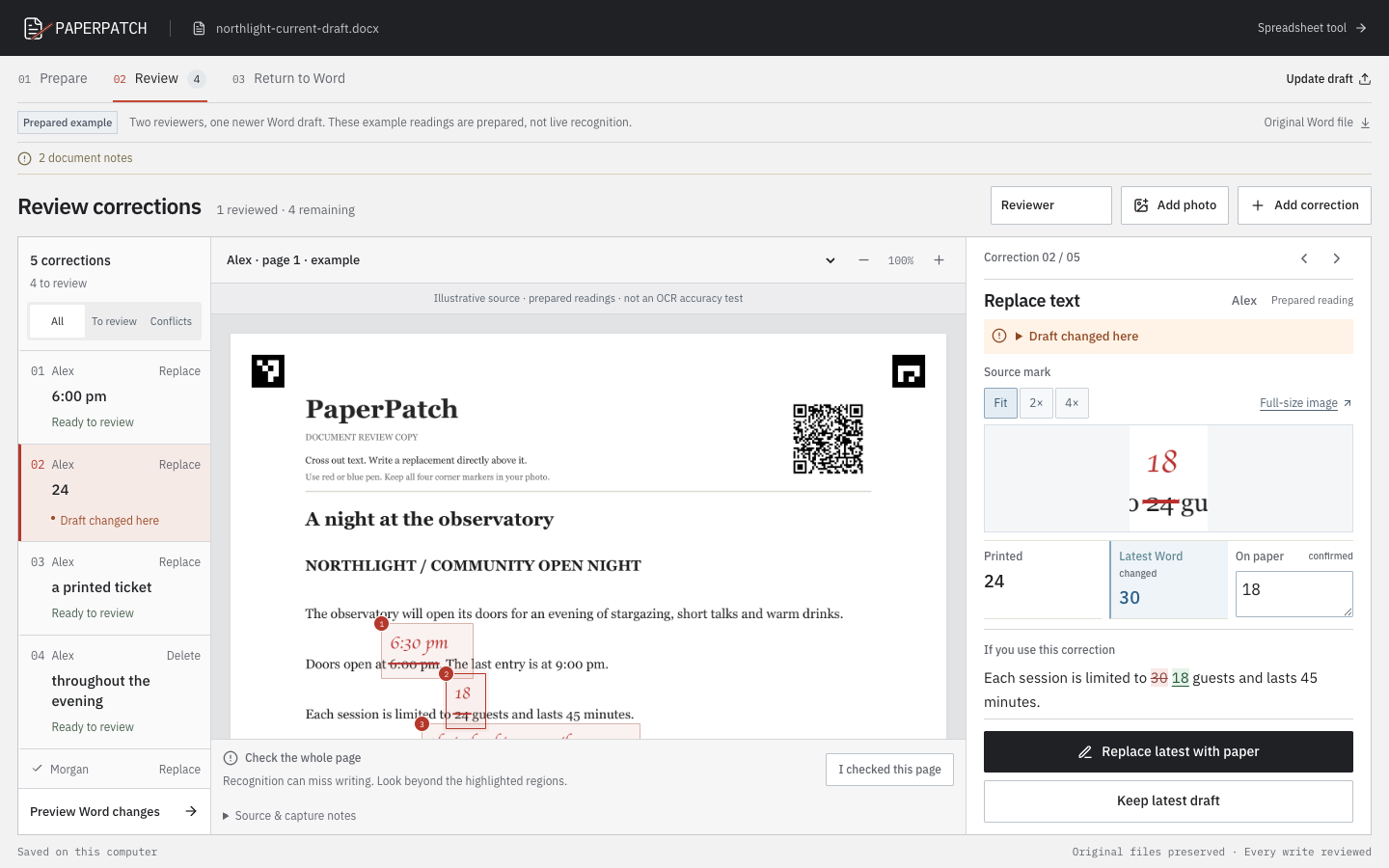
Printed 24, latest Word 30, paper 18: review the conflict before changing the document. Prepared example.
Inspiration
A printed draft says 24 guests. Someone crosses that out and writes 18. Meanwhile, another editor changes the Word document to 30. Typing the paper correction into the latest file would silently overwrite someone else's work.
PaperPatch makes that conflict visible before anything changes.
What it does
Upload a fully handwritten page to create a new Word document. Rotate, straighten, and crop the reading copy while retaining the original upload. Auto straighten suggests an angle to check in the preview; manual adjustment stays available. Check each detected line against its image crop, correct the reading, add missed text, and confirm the whole page before exporting. If a line is poorly selected, adjust its crop and read it again; a new suggestion only replaces your wording after you choose it.
Open a Word document and print its review copy. Mark short replacements in red or blue pen, then upload photographs of the pages. If the digital draft has changed, load that version too.
The review workspace puts the printed text, the latest Word text, and the paper reading together. Confirm or correct the reading, see the resulting sentence, and choose what to keep. Competing reviewers, unexplained marks, and missing targets stay visible until they are resolved.
Export a Word file with native tracked changes attributed to each reviewer, a clean copy, and a record of the decisions. Unrelated changes in the latest draft stay intact.
How I built it
React and TypeScript handle the review workspace. A local FastAPI backend manages documents and decisions. OpenCV aligns the photographed page using its corner markers and uses the QR code to identify the correct print run and page. It then finds colored pen corrections. Two pinned PP-OCRv6 models suggest replacement text locally.
The Word engine matches the printed text against the latest draft, identifies conflicting edits, and changes the document XML directly. Export verification checks the accepted text, verifies that rejecting the revisions restores the input text and formatting, and compares unchanged package parts.
Frankenstein fits the project because it combines paper markup, computer vision, three-way version reconciliation, and native Word revisions into one working tool.
How I used Kiro
Kiro CLI implemented the initial Word inspection, three-way matching, and tracked-revision engine in backend/docx_engine.py. It also contributed the earlier workbook merge modules and export verifier. The actual session records are included in .kiro/evidence/, and the current requirements, design, and tasks are in .kiro/specs/paperpatch/.
For v0.2.0, a new scoped Kiro CLI session implemented the line-selection retry API, candidate history, and review gates. Codex independently corrected synchronization and failure handling, built the photo preparation and interface, and verified the result. The repository includes the task, session receipt, and contribution record. The backend passed 44 isolated checks, including one genuine handwriting crop through the pinned local reader; that is a functional check, not an accuracy benchmark.
Codex also built the capture pipeline, OCR integration, API, and interface, then hardened matching, protected-content handling, and export verification. The Kiro records distinguish its contributions from the later Codex work.
Challenges
Finding a correction and reading it are different problems. A crossed-out word, replacement, and margin note can share ink. The app keeps ambiguous marks visible, requires a decision on every reading, and blocks export until corrections and page checks are resolved. It also supports manual corrections when recognition misses the writing.
Handwriting is still the weakest part. In the latest development audit, the pipeline located all 48 intended targets, but the primary reading was exact on 23; the correct wording appeared in either candidate on 27. Those were known, digitally composited handwriting examples, not photographs of physically marked printouts. I have not validated a physical print-to-phone round trip yet.
What the demo shows
A continuous recording of the handwritten-page workflow, narrated by me. I upload a real scan with two handwriting styles, inspect the local OCR readings beside the original page, correct the text, review the whole page, and download an editable Word document.
The reader finds 28 lines; 20 are visibly edited, including punctuation. This is a record of one reviewed page, not an accuracy benchmark. The original scan and machine readings remain available alongside the corrected text.
The source is a dialogue-journal example by Joy Kreeft Peyton and Jana Staton, shared under CC BY-SA 4.0 via Wikimedia Commons. The video credits the source on screen.
Current scope
The v0.2.1 test build includes the handwritten-page workflow shown in the video, optional automatic straightening, line retries, and the earlier paper-correction workflow. It also fixes rotated photos of colored paper losing detected text because of the added white border. Download the release ZIP and follow its launcher instructions, or use the repository Quick Start. The gallery screenshots show the paper-correction workflow.
PaperPatch runs locally without an API key or cloud OCR. It supports short Word documents and corrections to ordinary text paragraphs. Complex content is protected. The review PDF reflows the body text rather than reproducing Word's original page layout.
Built With
- fastapi
- kiro
- onnxruntime
- opencv
- pp-ocrv6
- python
- react
- typescript
- vite
