-
-
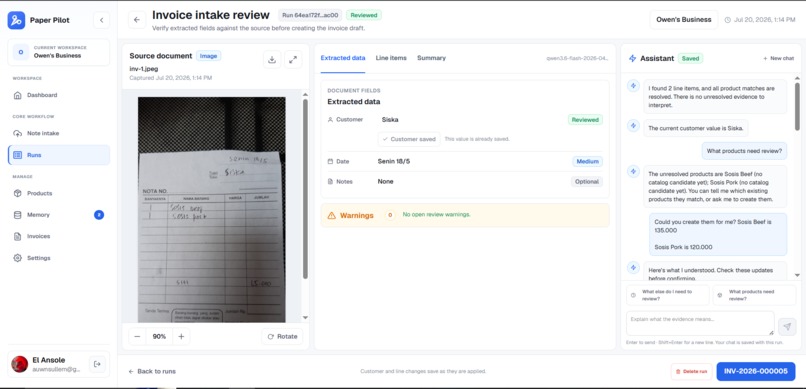
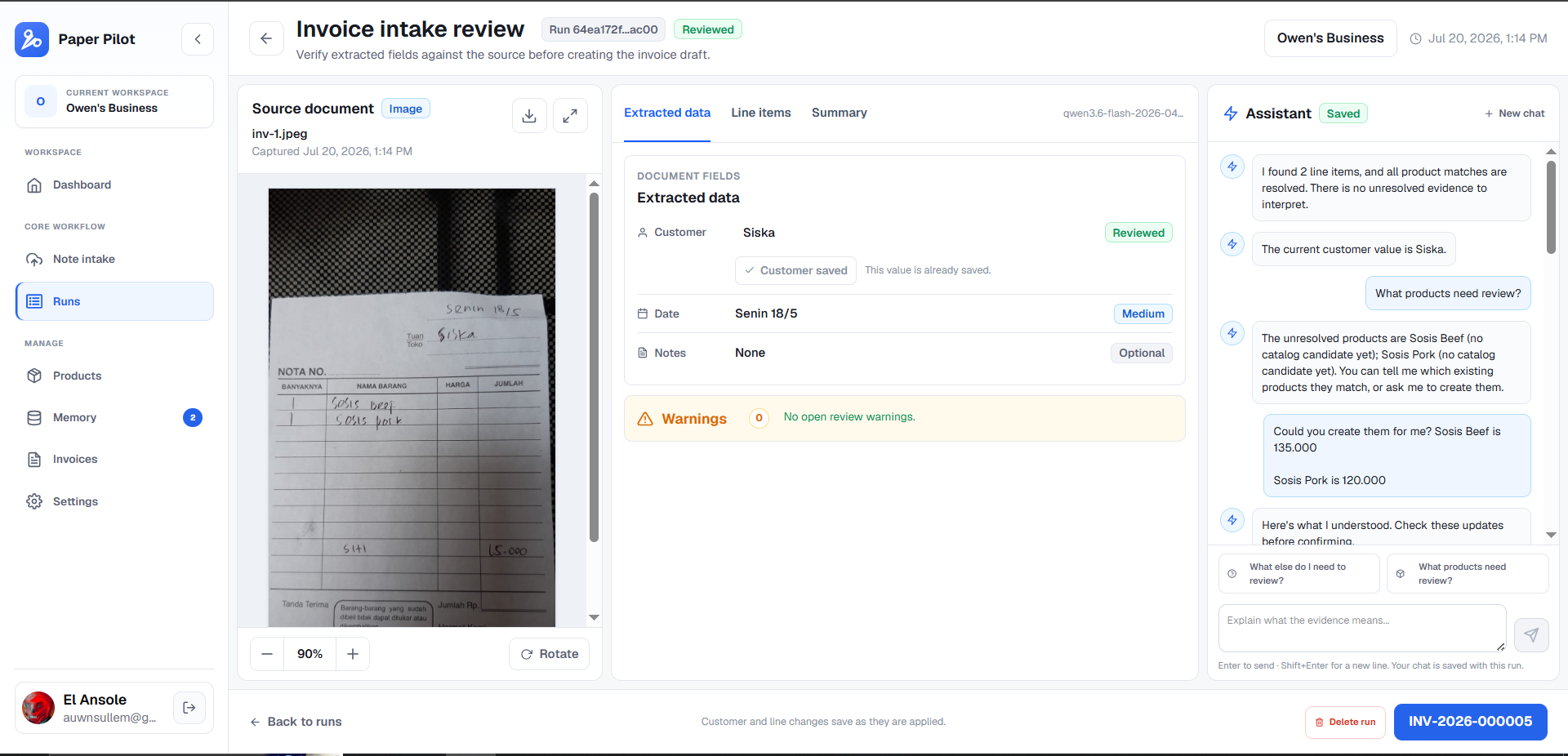
Review Page
-
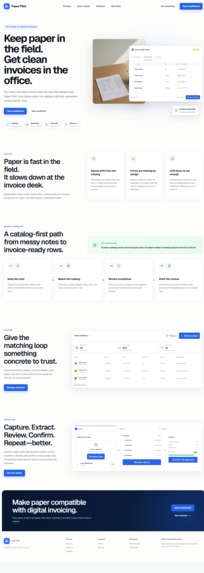
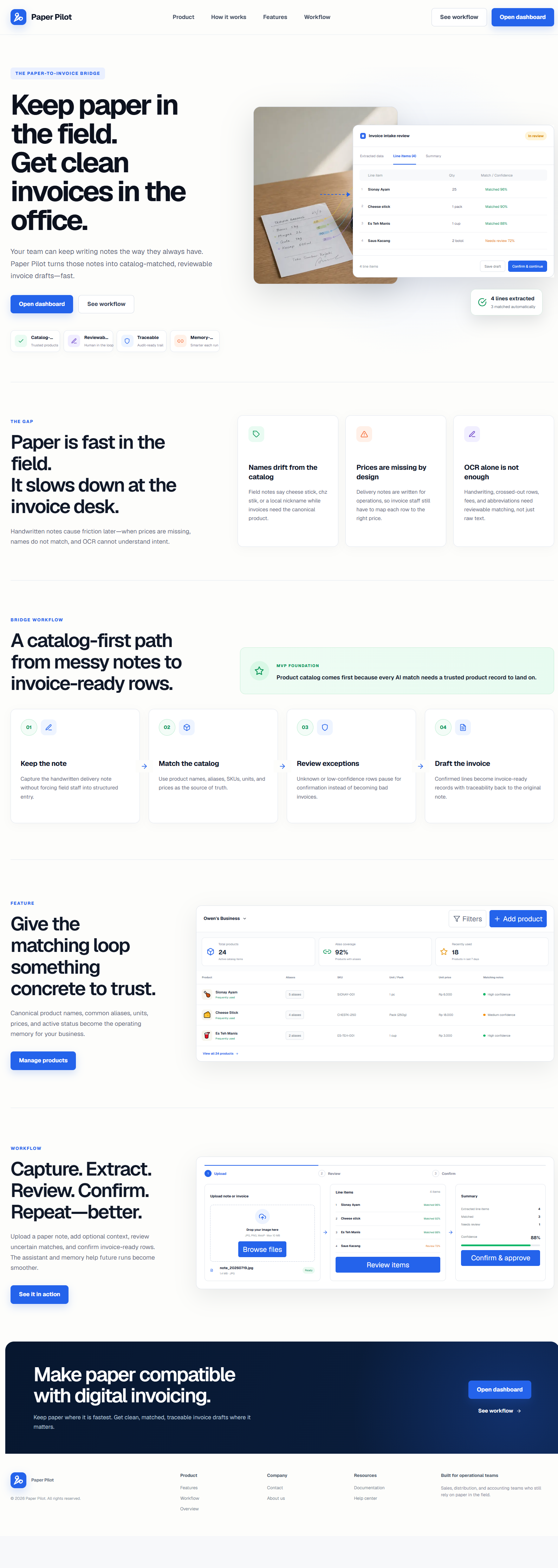
Home Page
-
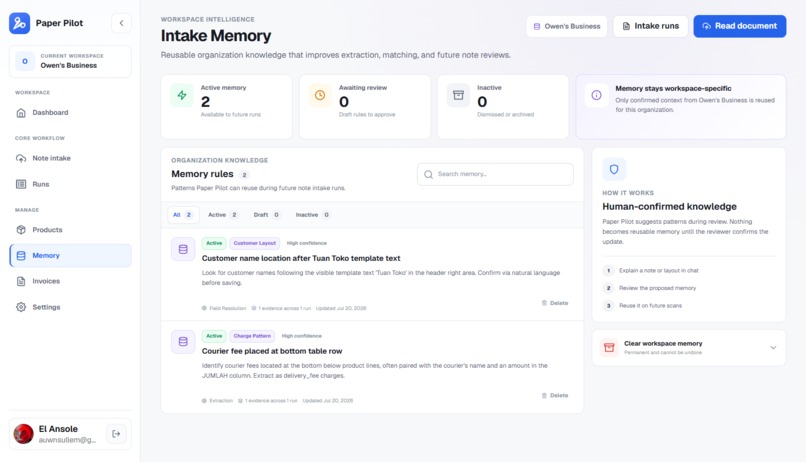
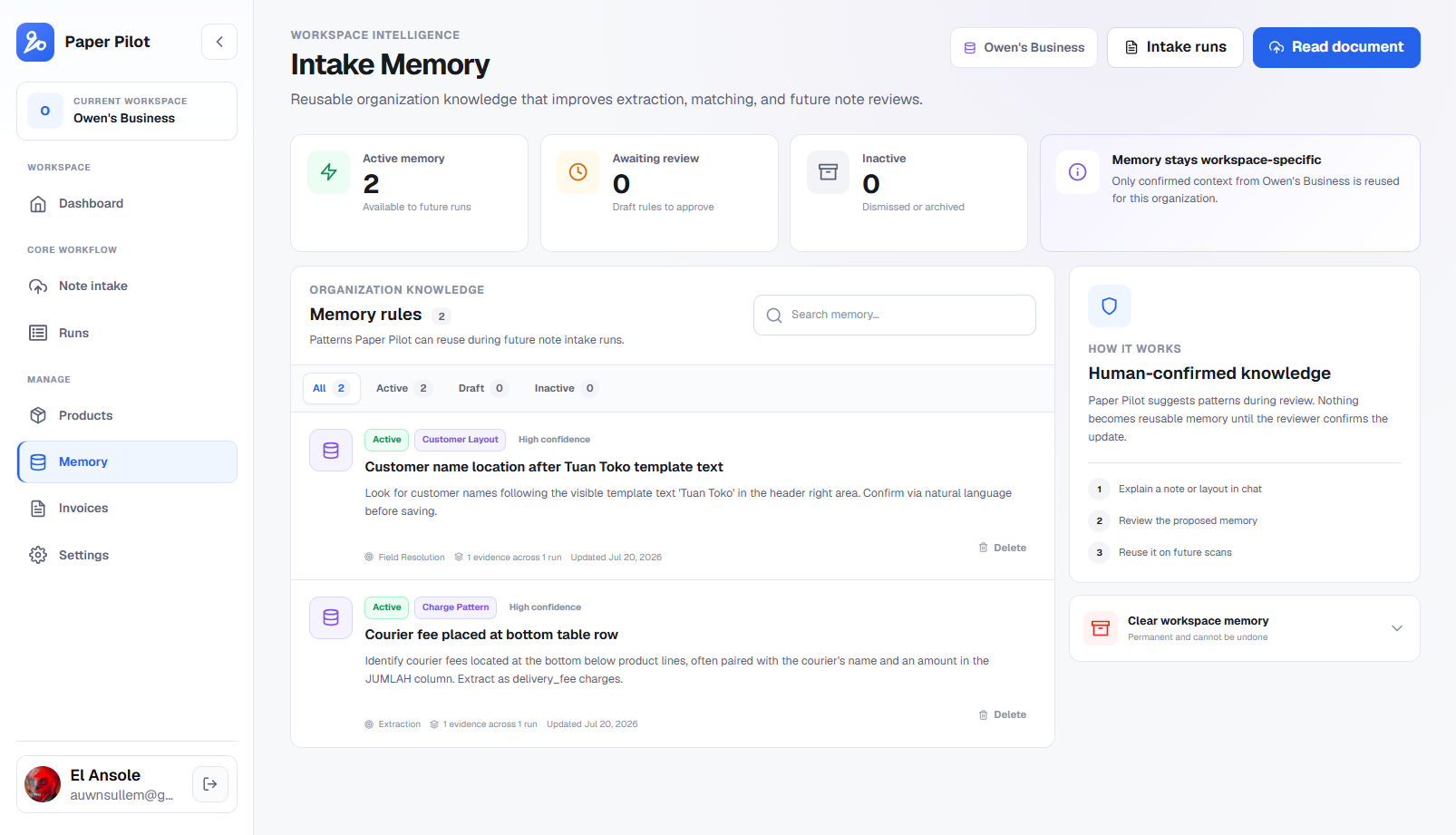
Memory Page
-
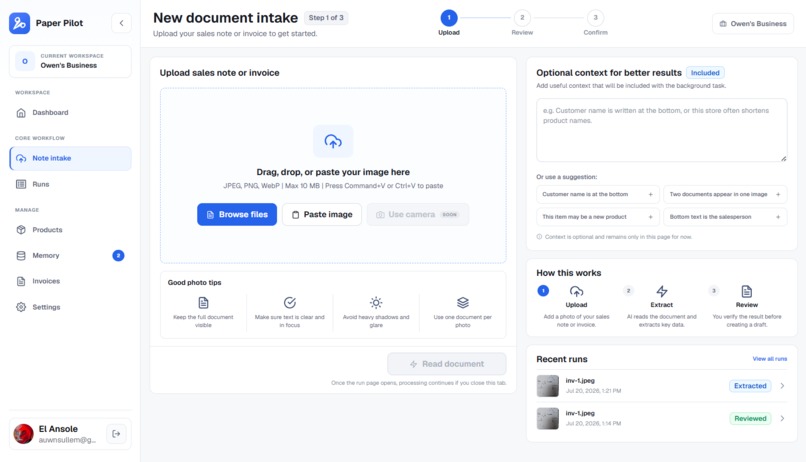
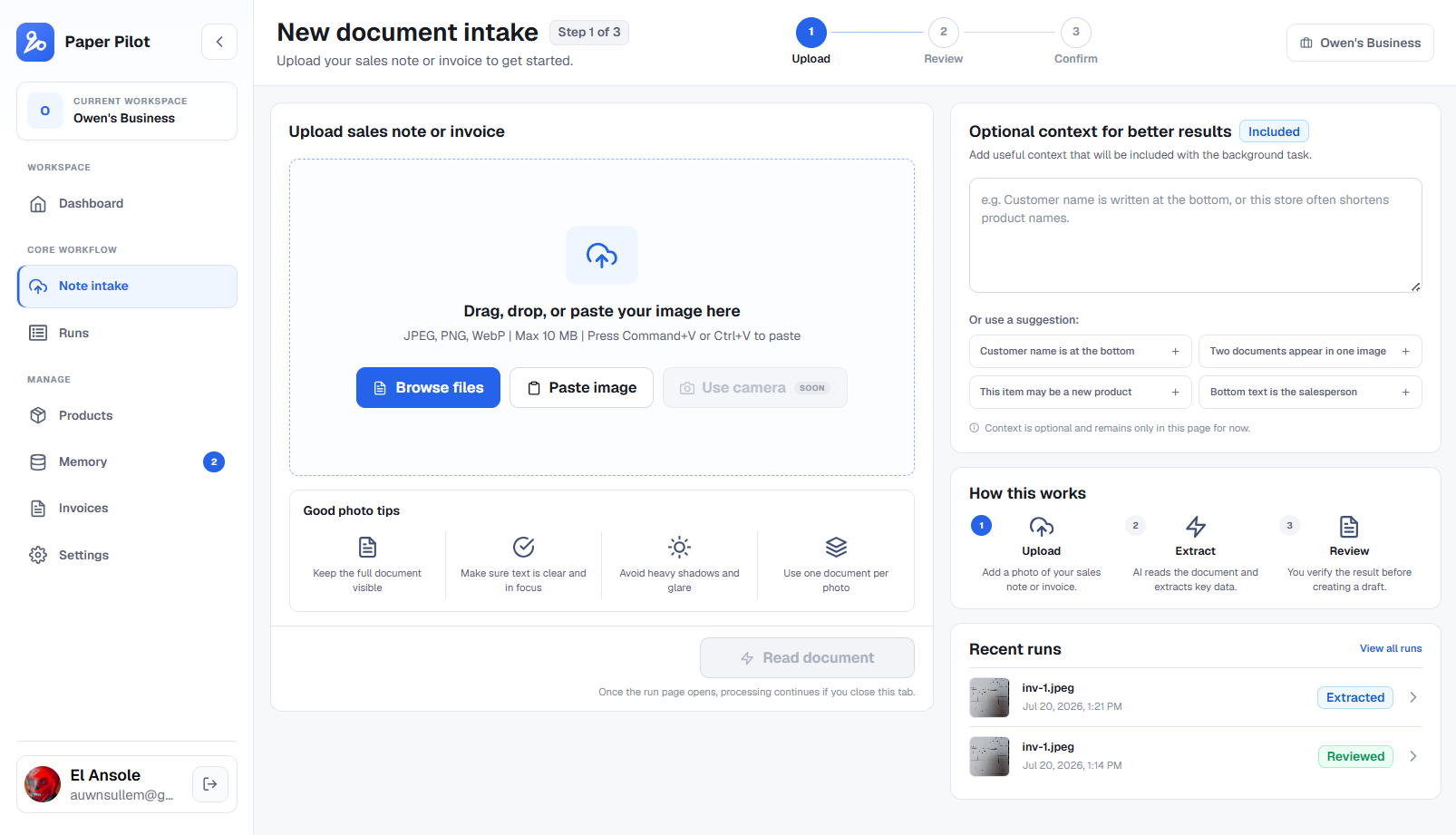
Scan Page
Inspiration
I've had many family members and friends ask me to build them sales applications for their small business after finding out I was a programmer. Typical computerization request; they want to move from completely relying on paper and be rid of all the problems that come with it: human error, delayed insights, etc.
Without fail, though, a common operational hurdle shows up every time: their reluctance to fully adapt with a fully computer system and abandon paper:
Maybe staff is stubborn and too set in their ways. They still want to record invoices using pen and paper because it's easy to scribble and correct.
It's understandable. Once you've done something one way for so long it can seem impossible that another way is faster/easier.
But they still want all the benefits of a computerized system! Easy data aggregation, search functions, etc.
So what do you do? Rarely do existing solutions meet you halfway. So that's why I made Paper Pilot. For my own benefit, first and foremost, and for other people in the same boat.
What if you could still have your traditional ways of recording data while also raking in the benefits of computerization.
What it does
Paper Pilot turns a photo of a handwritten sales note or invoice into structured, reviewed invoice data. Qwen reads the image and extracts information such as the customer, date, product lines, quantities, notes, and other visible observations.
It is not just an image-to-text converter, though. Each extracted product line from the image is checked against YOUR business's real product catalog. Paper Pilot compares it with product names, aliases, SKUs, units, and prices, then either matches it automatically or shows the most likely candidates for review. Uncertain information is intelligently kept visible instead of being silently added to an invoice, just in case you're not paying attention.
The review workspace keeps the source image beside the extracted result. You can match a line to an existing product, create a new product, mark it as an extra charge, or ignore it. You can also talk to the Review Assistant in normal human natural language. The assistant can explain what still needs attention and propose actions such as correcting the customer or date, resolving an observation, matching or creating a product, and recording a charge. You review and confirm a proposal filled with actions before Paper Pilot changes business data.
The Review Assistant chat is interactive, not just text bubbles. Proposed actions can appear in a specialized interactive chat bubble where you can confirm those actions or ask the Review Agent to change things.
Once the uncertain lines have been resolved, Paper Pilot creates an editable invoice draft. You can complete any missing information and finalize it, which assigns a permanent invoice number and locks the invoice. The original image, extraction, review decisions, and invoice remain connected for traceability.
Persistent memory agent
Paper Pilot is designed to get better at understanding one business over time, not to treat every uploaded document as an unrelated OCR request. During review, the assistant can recognize that a user's explanation is useful beyond the current invoice and propose it as organization memory. For example, it can learn:
- that a handwritten abbreviation is an alias for a catalog product;
- where a particular business usually writes the customer or date;
- that a recurring name and amount represents a delivery or packing charge;
- that phrases such as a payment confirmation or staff note should not become an invoice line; or
- a business-specific condition that helps choose between similar products.
These memories stay/persist between conversations, browser sessions, and future document uploads. Review conversations are also saved, so you can return to a run and continue where you left off. On the next scan, Paper Pilot retrieves the most relevant memories for that particular organization and uses them during extraction, review, or product matching. Product aliases and matching rules can improve the next decision without retraining Qwen.
Memory creation is human-approved on purpose. The agent identifies and drafts the reusable lesson, but the reviewer confirms it before it can affect future invoices. This lets the system accumulate experience while preventing one model mistake from becoming a permanent business rule.
Paper Pilot also avoids placing every old memory into every prompt. It intelligently ranks active memories using confidence, supporting evidence, the number of runs that support them, recency, and relevance to the current stage. Vision and review memories are limited to 25 items and a ~2500-token budget. Product matching memory is applied separately by deterministic application logic, so it doesn't consume the vision model's context window.
Older, weakly supported memories naturally rank below newer or more confident ones. When active memory becomes large, Paper Pilot uses Qwen again conservatively detects near-duplicates, keeps the strongest version with its combined evidence, and archives redundant copies. It does not merge merely related rules because losing an important distinction could produce a wrong invoice.
How we built it
Paper Pilot is a Next.js application written in TypeScript. It uses Better Auth with Google sign-in, stores application data in Neon Postgres through Drizzle ORM, and keeps source images in private Vercel Blob storage.
I separated the AI workflow into two Qwen tasks, identified by a task/job ID. The vision task reads the document and returns a versioned structured JSON response. The Review Assistant is a separate text call that receives the current run, unresolved evidence, catalog products, recent conversation, and selected organization memories. The current deployment uses qwen3.6-flash-2026-04-16 for vision extraction and qwen3.6-flash with thinking enabled for review. Both are accessed through Alibaba Cloud Model Studio's DashScope API.
The document flow works like this:
- The authenticated browser uploads an image directly to a private Vercel Blob.
- The Next.js backend verifies the user and organization, then creates a durable intake run and AI job in Neon before starting inference.
- It retrieves the highest-ranked organization memories within the context budget and builds the extraction request.
- It submits an asynchronous task to Alibaba Cloud Function Compute.
- The worker downloads the single image through a short-lived signed URL and calls Qwen through DashScope.
- The worker sends the structured result back through an HMAC-signed callback.
- The application validates the response, runs catalog matching, stores the lines and evidence, and updates the durable run so the review UI can open.
How we use Alibaba Cloud
The production vision workload runs as a Node.js 20 Task Function on Alibaba Cloud Function Compute in the Singapore region. Function Compute gives the long-running visual extraction its own asynchronous lifecycle and task history. The user can close the browser after uploading because the durable job and the cloud task continue independently.
The Function Compute worker is intentionally small. It validates and downloads the image, sends it to Qwen using DashScope, validates the bounded response, and calls Paper Pilot back. It never receives user authentication credentials or database access. It only gets a temporary read-only URL for one private image, and callback requests are signed so the application can reject expired or forged results. The Review Assistant also uses Qwen through DashScope, but it runs from the Next.js backend because it is an interactive request rather than a long-running image task.
How memory works internally
I store organization memory, its confidence, evidence counts, scope, status, and structured matching configuration in Postgres. Product spellings are stored as catalog aliases, while more contextual rules become organization memories. Review conversations and structured proposals are persisted separately, which allows multi-turn conversations to continue across sessions.
Before each AI call, memory is isolated by organization and filtered by the stage that can use it. Extraction only receives extraction and field-resolution memories. Review receives memories relevant to understanding the current run. Product-matching rules are not sent to the vision prompt; they are applied after extraction by local matching code.
The retrieval score combines confidence, supporting evidence, evidence from multiple runs, approval, recency, and the type of task. A hard item limit and token budget keep context predictable. When memory crosses the maintenance threshold of 25 active entries or roughly 2,500 rendered tokens, a deterministic consolidation pass archives only very close duplicates and carries their evidence forward to the strongest memory.
After Qwen extracts product text, Paper Pilot performs catalog reconciliation in application code. It compares normalized names, aliases, SKUs, units, prices, token overlap, and trigram similarity. It stores the best candidates and their reasons, then uses conservative thresholds to decide whether a line is an automatic match, suggestion, ambiguous result, or unknown product.
The Review Assistant follows a proposal-and-confirmation design. Qwen can answer questions or return structured proposed actions, but it cannot write directly to the database. The server validates referenced run, evidence, product, and memory data, then applies confirmed actions in a database transaction. This is important for a memory agent used in invoicing: it can learn and assist across sessions, while users remain in control of the facts and rules that affect financial records.
Challenges we ran into
Funny enough I started by using qwen3.5-flash, and it ended up working way too way even though 3.7 was already here. So I got carried away and benchmarked everything on that model and ended up having to readjust for the newer and better models. Wasn't that hard though.
After some tinkering, I ended up using 3.6-flash and it works great!
Also! This might've been too personal but I had to develop everything on Next.js first because I was still waiting on getting my Alibaba account verified, and I had to migrate to Task Function near the deadline.
Ended up working out for the better though, I really needed what Task Function provided on Alibaba Cloud, which is the ability for users to close Paper Pilot while Qwen works in the background. You know... like the typical LLM chat application.
Accomplishments that we're proud of
Really proud of the way it looks. I had to redesign a bunch of times going back and forth between a simplified look or a technical one, but I ended up going with a hybrid. And I think it looks awesome.
Also, I think I'm just generally satisfied and excited to use this tool for myself.
What's next for Paper Pilot
Despite the extended deadline there's a lot of features I wish I could've included:
- Batch processing, which Task Function will make easy
- Reading documents beyond invoices, like bill of lading, etc.
- Stock
- Better dashboard with more informative charts
Built With
- ai
- alibaba
- llm
- qwen
- typescript


Log in or sign up for Devpost to join the conversation.