-
-
Diagram
-
Website after image upload
Inspiration
The fastest way to think about how something behaves is to draw it — states, arrows, what happens next. But that drawing is a dead end. To find out whether the logic is actually right, you have to retype it into a modelling tool or just build the thing, and both are slow enough that nobody bothers.
The bugs in these sketches are almost always missing arrows: a state you can get into and never out of. You cannot see that by staring at the page. You can only see it by trying to use it. So we wanted the paper itself to be runnable.
What it does
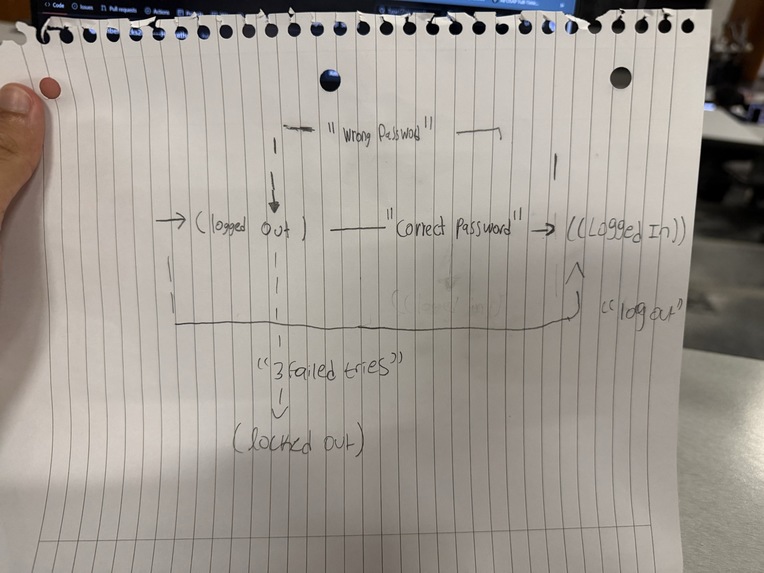
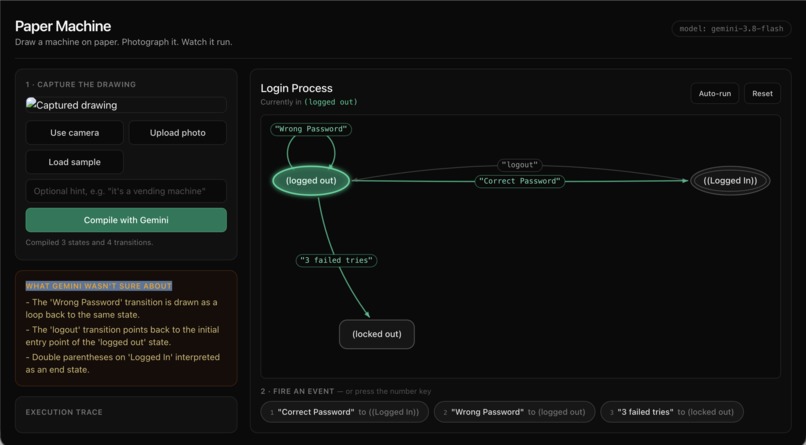
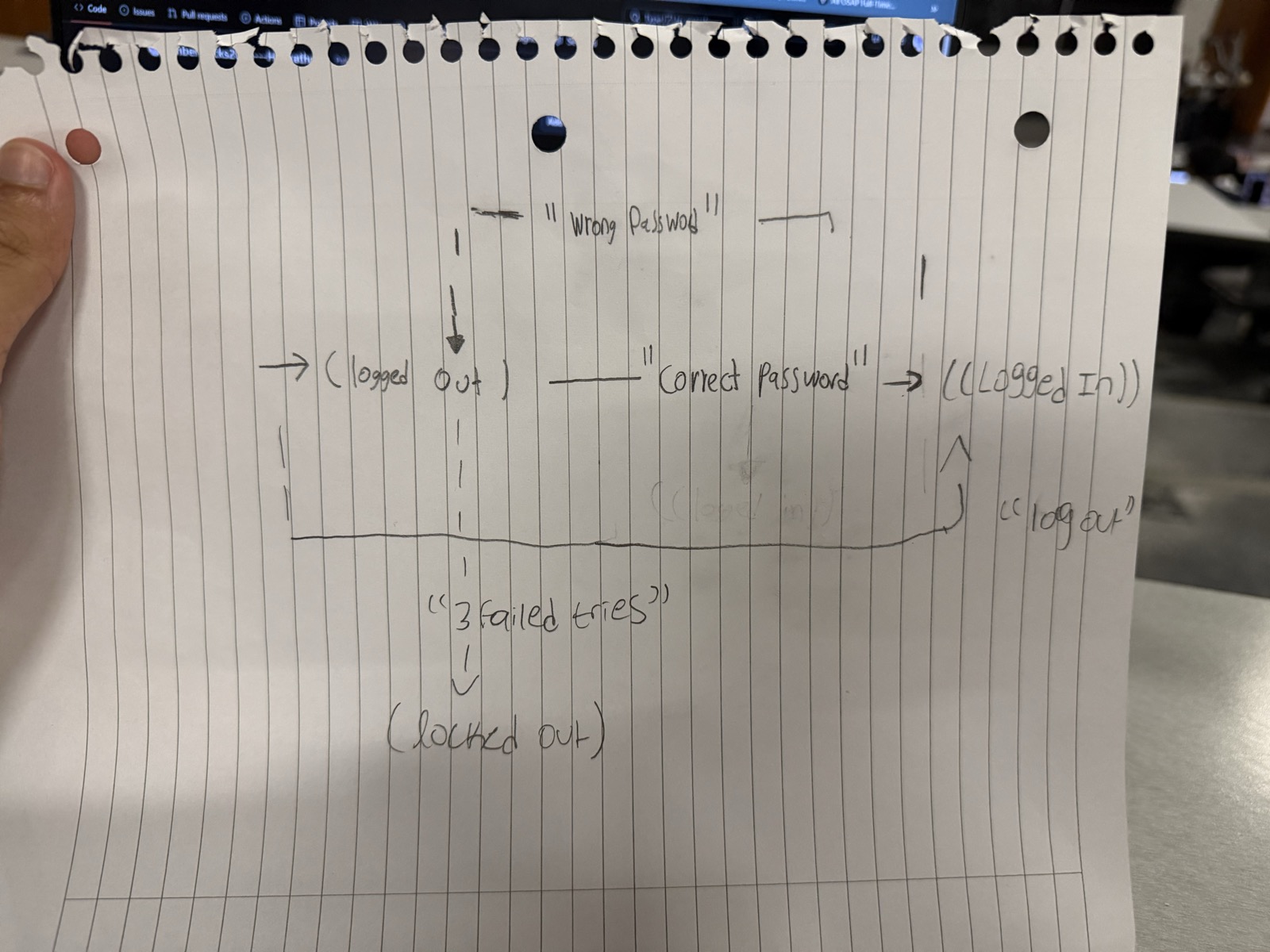
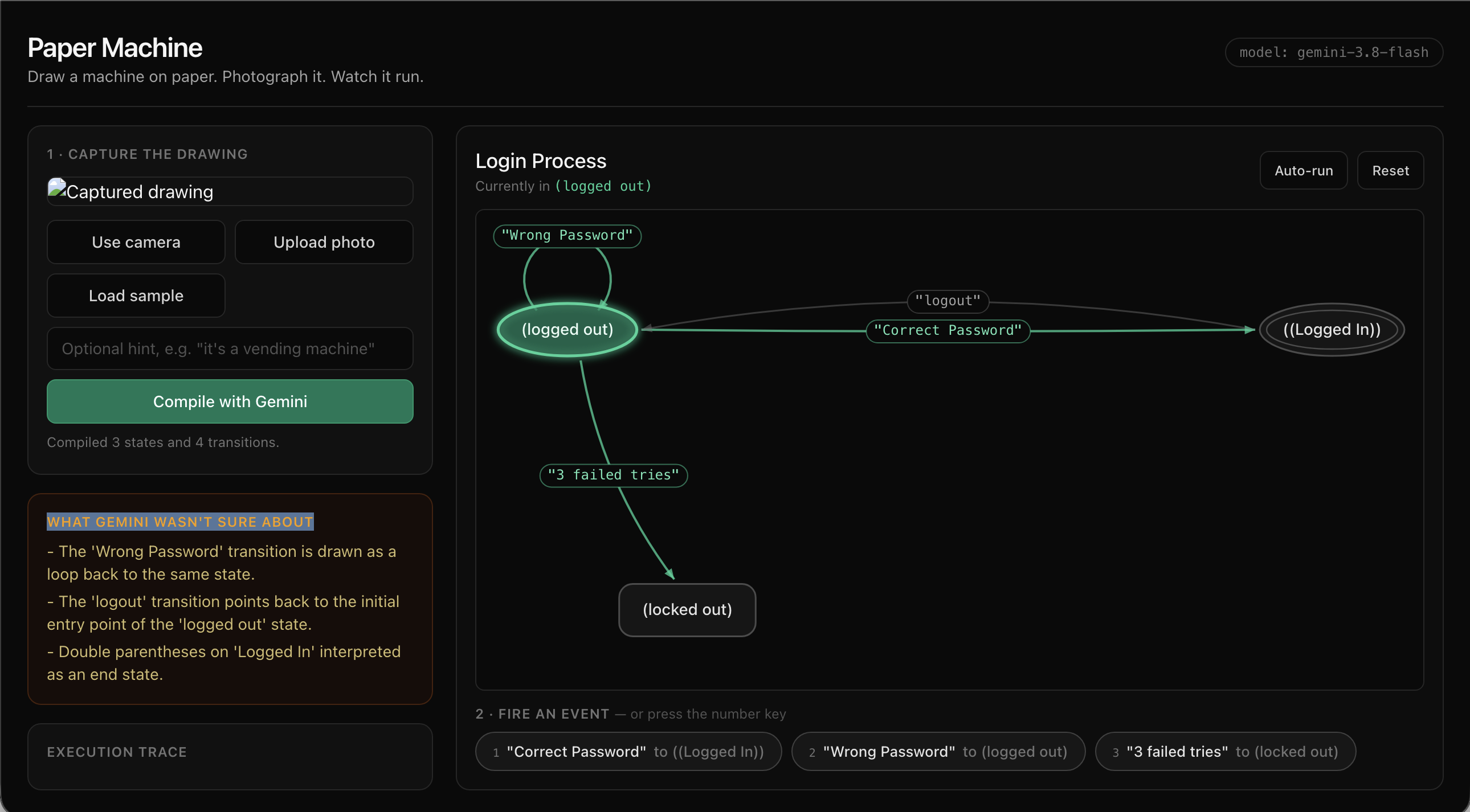
Draw a state machine on paper — circles for states, arrows for events, a double circle for an end state, a stray arrow marking where you start. Photograph it. Gemini compiles the photo into a structured graph, and the browser executes it: the current state glows, every arrow leaving it becomes a button, and firing one animates a token along the arrow you drew. The rendered machine is laid out to match your page, because Gemini returns normalized coordinates for every shape.
Then you use it, and the design bugs surface immediately.
Our demo is a login flow: Logged Out, Logged In, Locked Out. Wrong password loops back on itself. Three failed tries puts you in Locked Out — and the event row goes empty: "No arrows lead out of this state — the machine has halted." We had trapped our users and hadn't noticed, in a diagram we drew a minute earlier. Drawing one more arrow on the paper and re-photographing fixes the program.
How we built it
Flask backend with a single endpoint, vanilla JS and Canvas 2D on the front. No database, no build step. Scaffolded and iterated in Google Antigravity, with a SKILL.md describing our Gemini call pattern so the agent stopped reinventing it on every edit.
Gemini is called exactly once per scan: the photo bytes plus a schema-constrained prompt at temperature=0.1. It returns nodes (id, label, shape type, x/y position) and edges (from, to, the word written on the arrow), plus a warnings array for anything it had to guess. Everything after that is deterministic local code — layout with a separation pass, bezier edge routing with parallel-edge fanning and self-loops, token animation, and the executor itself.
The piece that matters most is normalize(), the contract boundary. Model output feeds straight into an executor, so it has to be structurally safe: ids slugified and de-duplicated, edges pointing at undetected shapes dropped and reported rather than crashing, exactly one start state guaranteed.
Challenges we ran into
Listing a model is not permission to call it. gemini-2.5-flash appears in models.list() and then returns "no longer available to new users" on the first real call. We resolve the model at runtime against the live list and fall through on failure, which is how we ended up on gemini-3.8-flash rather than anything we would have hardcoded.
The API was saturated for most of the afternoon — 503 high demand, in bursts. Naively walking a fallback list one model at a time took 52 seconds per compile, which is unusable with someone watching. Two observations fixed it: congestion is bursty, and it is uncorrelated across models — a parallel probe found 3.8-flash and 3.6-flash answering in seconds while 3.7 and 3.5 were saturated. So generate() hedges: start the best model, start the next one alongside it if the first has not answered in two seconds, let each worker retry its own model with exponential backoff, first success wins and the losers are abandoned. That took us from one-in-three compiles succeeding to five-in-five.
We also tried disabling the SDK's own internal retries so our hedging could fail fast and switch models. Under real congestion that was worse — calls legitimately take 30s+ when the service is loaded, so a short client timeout was killing requests that would have succeeded. We measured it, saw it fail, and reverted.
Our own UI misrepresented the model. We labelled the panel showing Gemini's notes "What Gemini wasn't sure about" — but most of what lands there are correct, confident readings, like "double parentheses on 'Logged In' interpreted as an end state." It made the app look unsure when it wasn't. Renamed to "How Gemini read it."
Accomplishments that we're proud of
The moment that convinced us this works: we drew the logout arrow with an ambiguous arrowhead, closer to the wrong end. Gemini returned the edge in the semantically correct direction and told us why — "the arrow for 'logout' is drawn with an arrowhead near 'Logged In', but structurally represents the transition from 'Logged In' to 'Logged Out'." In the same pass it spotted and deliberately ignored a faintly erased label in the middle of the page.
That is reasoning about a drawing, not transcription of one. No OCR-plus-heuristics pipeline recovers a transition direction the drawing itself got wrong.
We are also proud that the loop genuinely closes. Edit the paper, re-photograph, the running program changes. Self-loops, bidirectional arrow pairs, start markers and double-circle end states all survive the round trip from a phone photo of messy handwriting on lined paper.
What we learned
The interesting engineering in an AI project lives at the boundaries, not in the prompt. The prompt was good quickly. What took the day was making model output safe to execute, making a saturated API reliable, and making the interface honest about what the model actually said.
We also learned to treat the model's uncertainty as a product feature rather than something to hide. Surfacing what Gemini guessed is what makes the output trustworthy enough to act on — and it turned out to be the most convincing part of the demo.
What's next for Paper Machine
- Export — emit the compiled machine as XState, Mermaid or SCXML, so a paper sketch becomes real source code in one step.
- Live re-scan — keep the camera running and recompile on change, so editing the paper continuously edits the running program instead of requiring a new photo.
- Variables and guards — make
count < 3written on an arrow actually evaluate, turning paper into a real programming surface rather than just a diagramming one. - Whiteboard mode — the same loop in a meeting room, where the diagram on the wall is the prototype everyone is already arguing about.
Built With
- computer-vision
- flask
- gemini-api
- getusermedia
- google-ai-studio
- google-antigravity
- html5
- javascript
- python
- tailwindcss


Log in or sign up for Devpost to join the conversation.