Inspiration
We both work at the CMU Student Food Pantry, and we see the same thing every week.
The pantry runs on donations, so what's on the shelf changes all the time. Certain items only come in on certain days. The best items go fast. Some things last the whole week, others are gone in an hour. If you know the pantry, you know when to come. Most students don't.
So a student walks across campus, comes in, and the one thing they needed is gone. Or they come on the wrong day. Or they never come at all, because they have no idea what's there.
The frustrating part is that we already count everything. Stock is tracked by hand in PantrySoft, but only supervisors see those counts, and they're kept for donor reports. Nothing is visible to the student deciding whether to make the trip. Staff count by typing, item by item, at the end of a busy shift.
We wanted to flip that around: make the shelf visible before you walk over, and make counting faster for the people doing it.
What it does
Pantry Live is a live shelf for the Student Food Pantry in Robinson Hall.
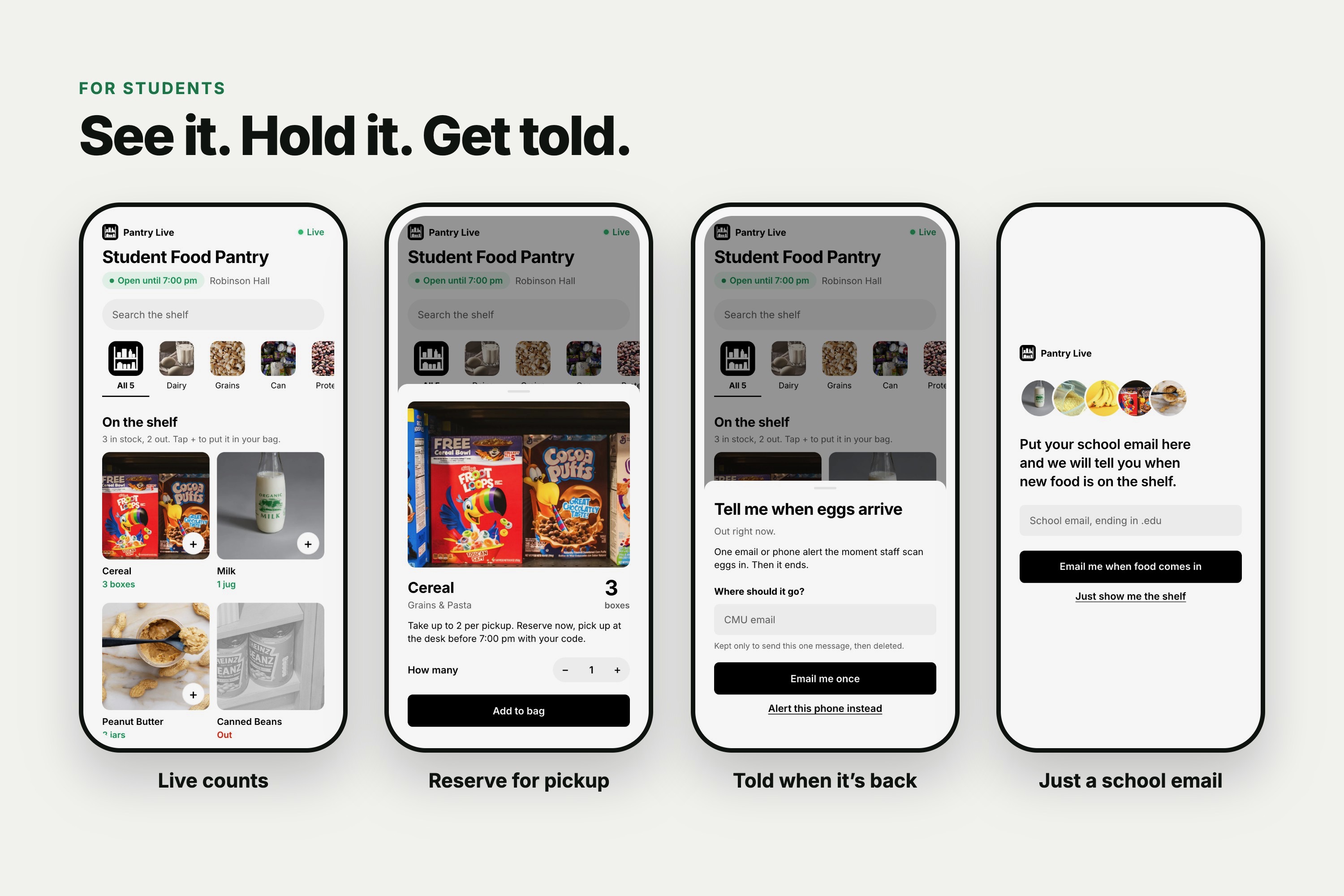
For students
- The board: open it on any phone and see every item on the shelf right now, with a real count like "3 boxes" or "Out".
- Reserve: add items to a bag and reserve them for pickup. The count drops the moment you reserve, so nobody else can claim the same food.
- Pick up: walk in, give your name and a four-letter code (or show the QR), and the desk hands it over. Reserving online also helps students who can't easily make the trip, since someone they trust can come in with the code (where pantry policy allows).
- Tell me: if something is out, tap Tell me and get an email or phone alert the moment staff scan it back in.
- Sign up: enter your school email once, and the pantry can let you know when new food arrives.
For staff
- Scan in: take one photo of what just came in. Pantry Live reads it and fills in each item, how many there are, and any best-by date printed on the pack.
- Smart categories: new items automatically get a category and a card. Items already on the board just add to their existing count, so rice goes onto Rice.
- Review: staff check the counts, type in anything the camera couldn't see (like cans behind the front row), and tap Put on the board. Nothing goes live without a person confirming it.
- Pickups: search by code or name, tick off what was handed over, and release anyone who didn't come.
- Email students: message everyone signed up, today's pickups, or students waiting on an item.
For the pantry
- The log: every step is logged with who did it and when, so donor numbers come straight from the log instead of a spreadsheet.
- No-shows: anything reserved but not picked up goes back on the shelf by itself.
How we built it
- Cloudflare Workers with Hono in TypeScript: one Worker serves the pages and the API. A cron trigger every 15 minutes releases pickups nobody came for.
- Supabase (Postgres, Realtime, Storage): the board updates live on every open phone the second staff publish. Row-level security means the public key can only read; every write goes through the Worker.
- Postgres functions for scan-in, reserve, release and hand-over, so stock math happens in one place and a retried request never adds stock twice.
- Claude (Anthropic SDK) reads each photo and returns item names, counts, a box around each unit and printed best-by dates as structured JSON.
- Gmail SMTP for pickup and restock emails, and Web Push (with a service worker and web app manifest) for phone alerts.
- Front end: plain HTML, CSS and JavaScript with no framework, phone-first, with a five-column board on a laptop.
- A projector page at /system that lights up each step (scan, read, board, reserve, hand over, log) as it happens.
Challenges we ran into
- Counting what the camera can't see. Real shelves are stocked deep: cans stacked three back only show their front row. Instead of guessing, the reader leaves those counts blank and asks staff to type the real number.
- Messy real-world photos. Blurry, dark and angled shots threw off our first AI model. Switching to Claude made reading the items much more reliable, and the staff review step catches the rest.
- Keeping counts honest under pressure. Two students reserving the last box of cereal at the same moment, or staff tapping publish twice on slow Wi-Fi, could both break the count. We moved all stock math into the database, with locks and request IDs.
- One photo, many items. A single shot of bananas, rice and sauce was showing the same group photo on all three cards. Now the photo is only read for the data, and each card shows a clear picture of its own item.
- Security for a public demo. The repo is public, so we locked it down: the staff PIN lives only on the server and locks out after 10 misses, students can't write to the database at all, emails only go to school addresses, and every page ships strict security headers.
- Infrastructure surprises. Mid-hackathon, the AI model we started with stopped being available to new users. We also changed databases and hosts along the way before landing on Cloudflare Workers and Supabase.
- Picking the idea. We went through several ideas before choosing the problem we see every week at work.
Accomplishments that we're proud of
- It's real, not a mockup. Real photos are read, real emails arrive, and the board updates live.
- Staff do less work, not more. One photo replaces typing every item by hand.
- Students know before they walk over. That was the whole point.
- It checks itself: 35 unit tests, plus a 74-check walk through the live site as an attacker, a staff member and a student.
What we learned
- The hard part is trust, not reading the photo. Students only trust a number that's always right, so every count goes through a person and through one place in the database.
- Simple words matter. "3 boxes" or "Out", never "about 3". The board can speak with confidence because the count is real.
- The best idea was the problem right in front of us.
What's next for Pantry Live
- A page for pantry leadership: donor totals, items in and out by month, and no-shows, all from the log we already keep.
- Running it at the CMU Student Food Pantry on real shifts, with staff who have never seen it before.
- Opening it up to other campus and community pantries.
Built With
- claude
- cloudflare-workers
- css
- gmail
- hono
- html
- javascript
- postgresql
- supabase
- typescript
- wrangler
