Inspiration
I loved cooking but hated food waste—too often I’d stare at random ingredients and have no idea what to make. I saw an opportunity to turn leftovers into gourmet meals using AI.
What it does
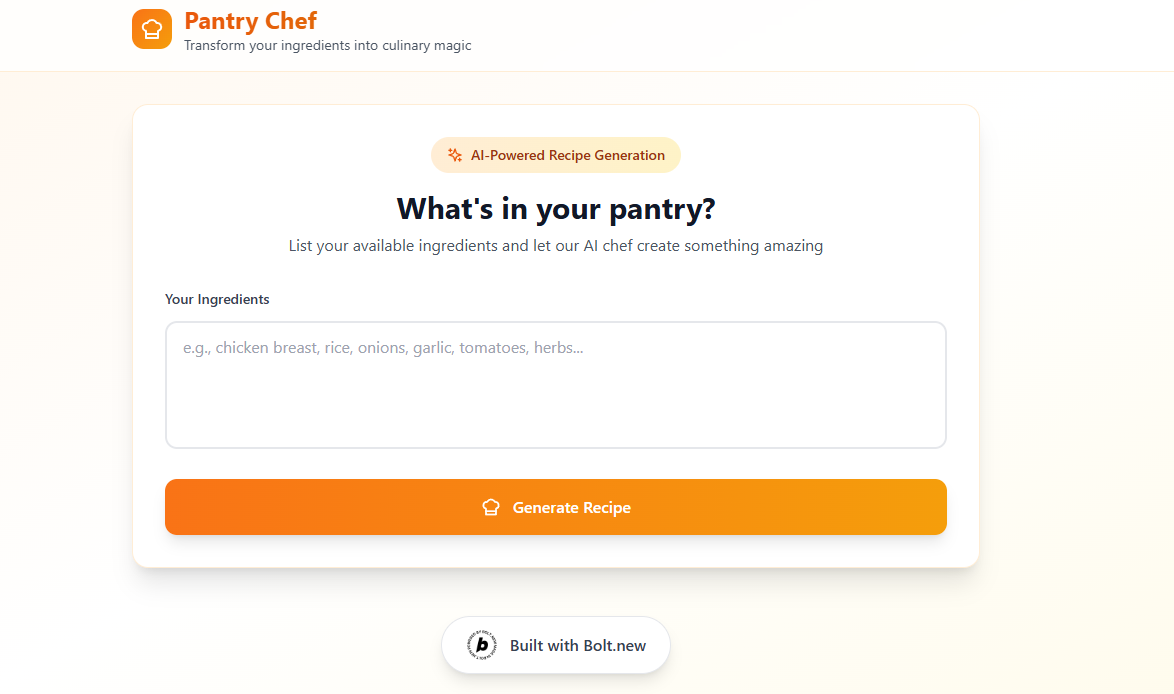
Pantry Chef lets you list whatever’s in your pantry (e.g. “chicken, spinach, goat cheese”) and instantly generates a chef-style recipe: title, ingredients with quantities, and step-by-step instructions. No signup, just cook!
How we built it
I used Bolt.new’s single-prompt feature to scaffold a one-page Tailwind UI with a text input and “Generate Recipe” button. Behind the scenes, it calls Gemini Chat API with a system prompt to create a custom recipe, then renders it as a styled recipe card—with the “Built with Bolt.new” badge included.
Challenges we ran into
- Prompt tuning: Getting the API to output consistent quantities and formatting
- UI layout: Styling dynamic recipe cards in a responsive, mobile-friendly way
- Error handling: Ensuring clear feedback if ingredients are ambiguous or missing
Accomplishments that we’re proud of
- One-prompt build: Entire app spun up from a single Bolt.new instruction
- Seamless AI integration: Instant, reliable recipe generation via OpenAI
- Polished UX: Clean, distraction-free design that users love
What we learned
- How powerful Bolt.new is for rapid prototyping with minimal code
- Best practices for crafting system prompts to guide AI output
- Techniques for handling dynamic content in Tailwind and Bolt.new
What’s next for Pantry Chef
- Add nutritional info and calorie counts
- Support recipe scaling (e.g. double servings)
- Enable user accounts to save favorite recipes
- Expand to voice input and multilingual support
Built With
- bolt.new
- gemini
- react-typescript

Log in or sign up for Devpost to join the conversation.