-
-
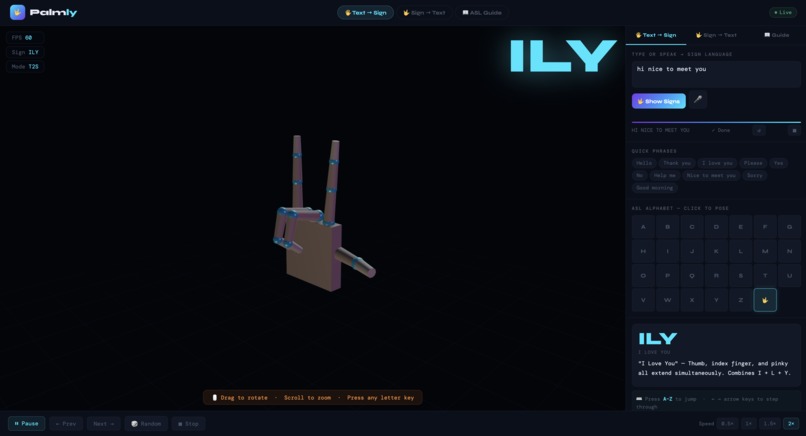
Text/Audio→Sign
-
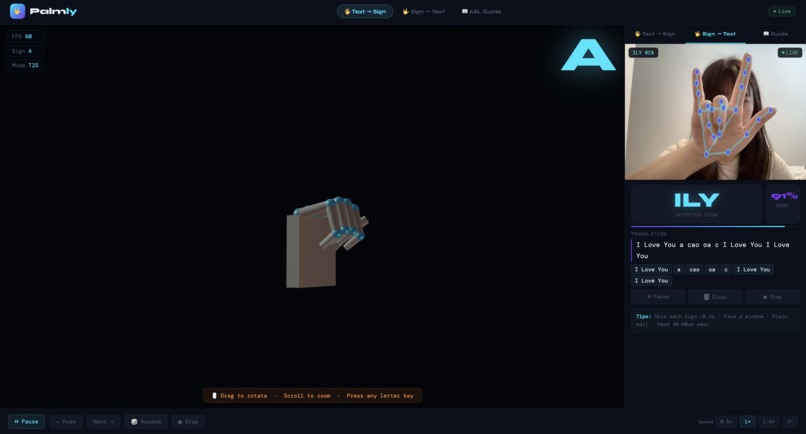
Sign→Text
Palmly — Project Story
Inspiration
In high school, I joined a sign language club.
Not because it was required. Not because it looked good on a résumé. Because I genuinely believed that if I learned the language, I could reach people — people who the world too often leaves behind.
I practiced. I learned the alphabet, the common signs, the expressions. And then I sat across from a deaf classmate, ready to finally have a real conversation.
And I froze.
They signed back to me faster than I could read. Their hands moved with a fluency I hadn't earned yet, and I couldn't follow. I smiled and nodded — the universal cover for I have no idea what you just said — and I felt something that stayed with me for years: frustration, not at them, but at the gap between my passion and my ability to act on it.
That moment planted a question I never stopped asking: why does this gap still exist?
Deaf and hard-of-hearing people are not a minority in some abstract statistical sense. They are classmates, parents, coworkers, strangers in waiting rooms who have something to say and deserve to be heard. They are not less. They are not silent by choice. The world just never built the right bridge.
Palmly is that bridge. And it is personal.
What It Does
Palmly is a real-time, bidirectional ASL translation platform that runs entirely in the browser — no app download, no account, no cost.
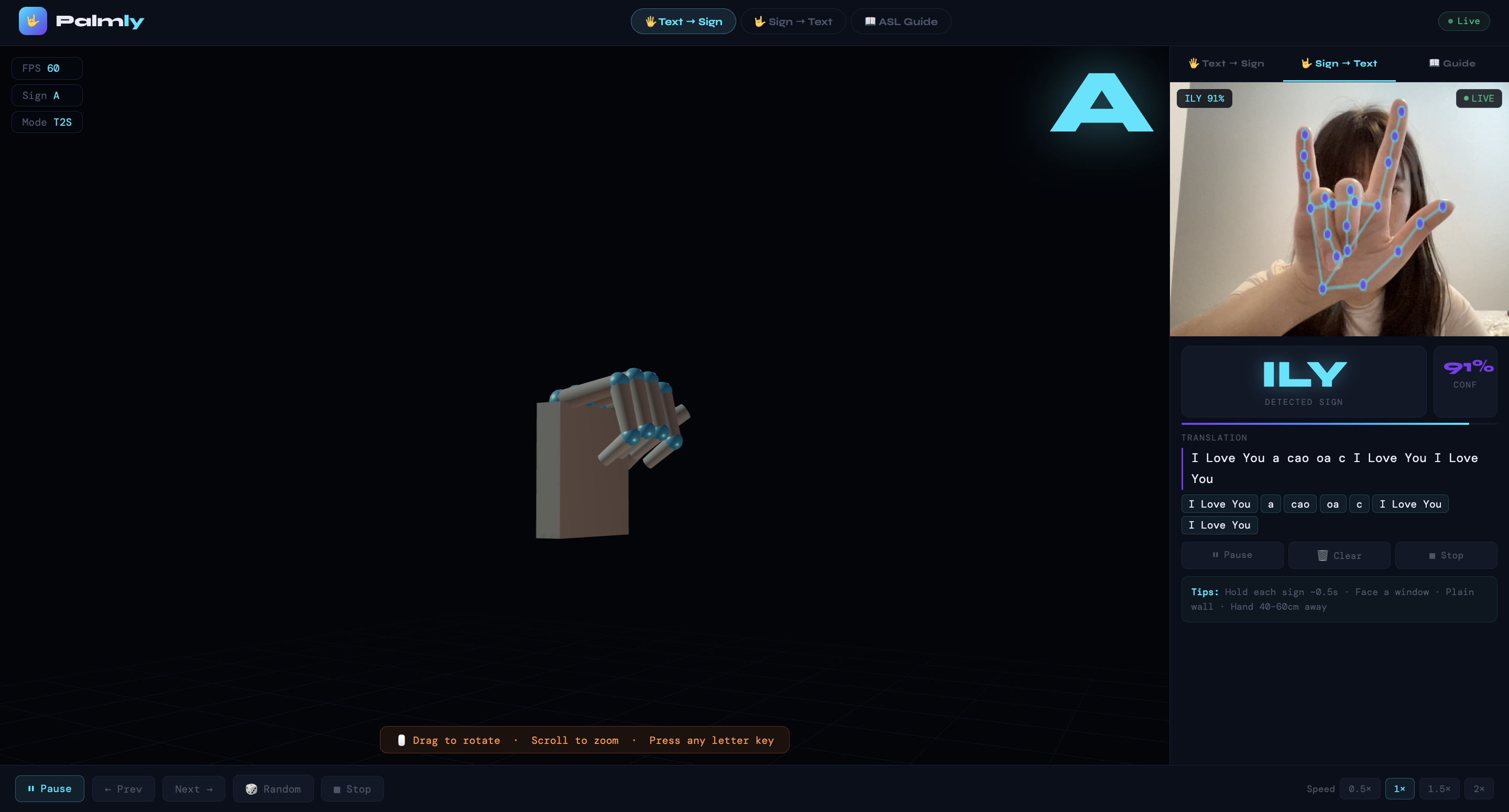
Sign → Text Point your phone camera at someone signing. Palmly's computer vision pipeline detects your hand in real time, reads the geometry of each pose, and converts ASL fingerspelling into English text — letter by letter, word by word.
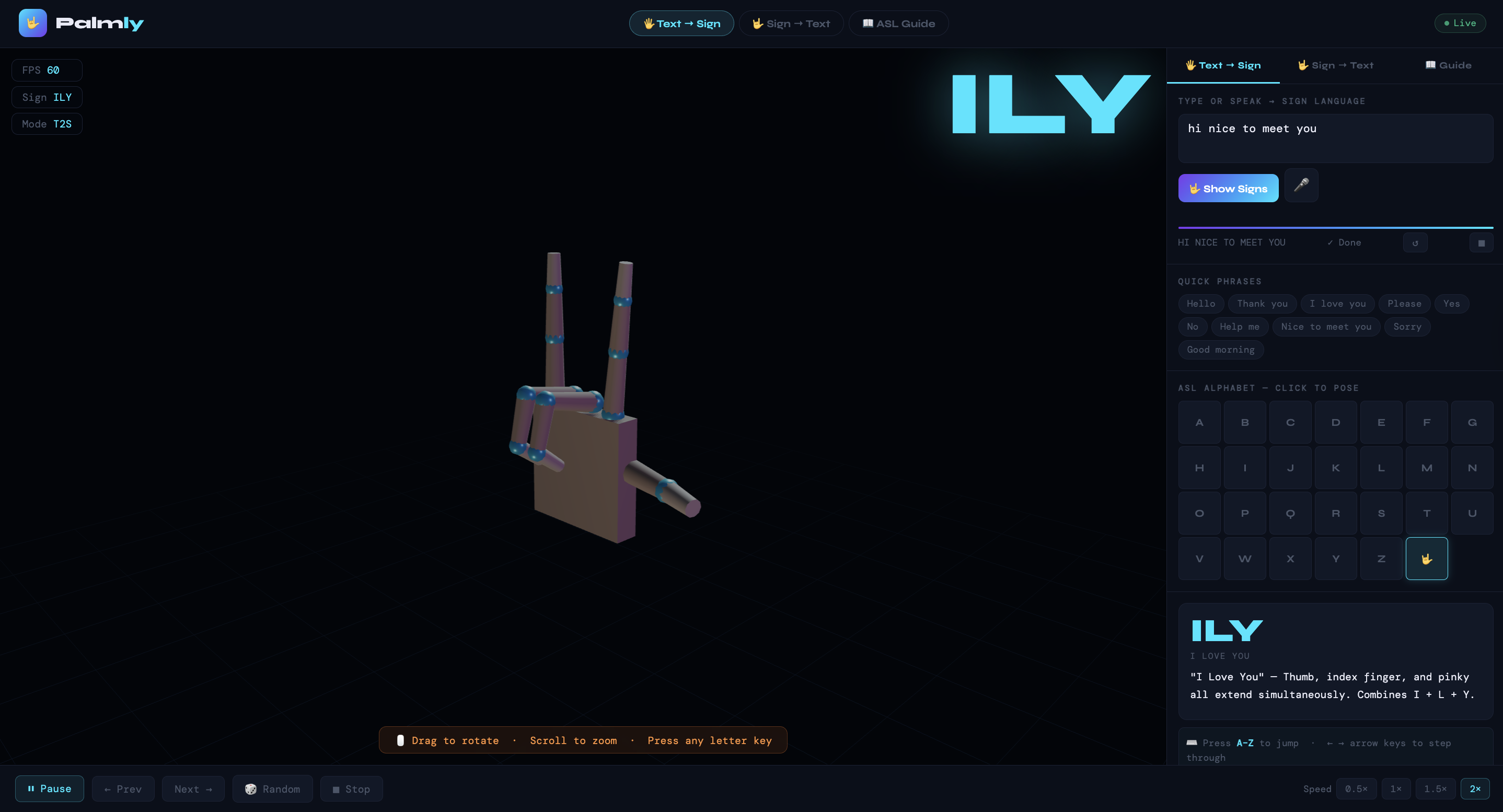
Text → Sign Type any English word or sentence. Palmly's 3D articulated hand avatar animates each sign frame by frame. You can rotate the hand from any angle, slow it down, and learn the sign while the translation happens. Communication becomes a two-way education.
Privacy First Every frame is processed on your device. No video is ever transmitted to a server. This matters deeply for the healthcare, legal, and educational settings where Palmly is most needed.
Zero Friction The entire application is a single HTML file. Open a link — that's it. No install, no login, no permissions beyond the camera.
How I Built It
The pipeline from hand gesture to English text involves four layers working in real time:
Layer 1 — Hand Landmark Detection
Google's MediaPipe Hands model tracks 21 3D landmarks on the hand at up to 30 fps, running entirely in WebAssembly inside the browser. Each landmark gives us an $(x, y, z)$ coordinate normalized to the frame.
$$ L = {(x_i, y_i, z_i) \mid i = 0, 1, \ldots, 20} $$
Layer 2 — Gesture Classification
Rather than raw pixel classification, Palmly classifies based on the geometry of the landmark configuration. For each finger, we compute extension state by comparing tip and PIP joint positions:
$$ \text{extended}(f) = \begin{cases} 1 & \text{if } y_{\text{tip}} < y_{\text{PIP}} \ 0 & \text{otherwise} \end{cases} $$
For pinch gestures (F, O, D), we use Euclidean distance between fingertips:
$$ d(i, j) = \sqrt{(x_i - x_j)^2 + (y_i - y_j)^2} $$
Signs are classified by a priority-ordered heuristic matching the geometric signature of each ASL handshape. A sign is registered only after being held consistently for $\geq 10$ consecutive frames (~0.5 seconds at 20 fps), preventing noise from accidental flickers.
Layer 3 — 3D Avatar Rendering
The Text → Sign avatar is built in Three.js with a fully articulated 21-joint hand rig. Each finger has three rotation pivots (MCP, PIP, DIP joints). Pose transitions use cubic ease-out interpolation:
$$ f(t) = 1 - (1-t)^3, \quad t \in [0, 1] $$
This gives the animation a natural, organic deceleration rather than a mechanical snap between poses.
Layer 4 — Natural Language Cleanup
Raw fingerspelling output accumulates into a letter buffer. After a 2.2-second pause, the buffer is flushed as a word. Claude AI then corrects recognition errors into coherent natural language — turning HELO into hello, handling ambiguous letters like U/V, and assembling words into readable sentences.
Design & UX
The full interface was designed in Figma with a mobile-first approach: bottom tab bar, large touch targets, a live camera HUD, and a high-contrast dark color system audited for WCAG AA accessibility using the Stark plugin.
Challenges We Ran Into
1. The closed-fist problem
ASL letters A, S, M, N, T, and E are all closed-fist variants that differ only in subtle thumb placement. Pure extension-state classification cannot distinguish them. We addressed this with additional landmark distance checks and thumb spread angles, but it remains the hardest unsolved edge case. We document this limitation openly in the UI.
2. Three.js on mobile
The initial 3D avatar implementation used CapsuleGeometry, which was introduced in Three.js r142. We were running r128 for CDN compatibility, causing a silent crash that left the entire canvas non-interactive. Tracing a silent geometry failure with no console output on a minified CDN build was a multi-hour debugging session.
3. Camera access on mobile browsers
Mobile browsers enforce that getUserMedia() — the API that accesses the camera — only works over HTTPS. Opening the HTML file directly (file://) silently blocks camera access. The fix was deploying to Vercel for automatic HTTPS, but discovering why the camera wasn't initializing took significant time.
4. Dynamic signs
ASL letters J and Z are motion signs — they require tracking movement over time, not just reading a static pose. Our current frame-by-frame classifier has no temporal memory, so J and Z are unsupported. The next version uses a sliding window of landmark trajectories to detect motion paths.
5. Latency vs. accuracy tradeoff
Increasing modelComplexity to 1 in MediaPipe improved detection accuracy but dropped frame rate on older phones. We expose this as a user-configurable setting so users can tune the tradeoff for their device.
Accomplishments That I'm Proud Of
It works on a phone. Open a URL, grant camera access, hold up your hand — it detects ASL signs in real time with no install, no backend, no cost. Watching it work for the first time on a phone felt like closing the loop on something I started in high school.
The 3D avatar is fully interactive. Every finger joint is individually controlled, transitions are smoothly interpolated, and the hand can be rotated in 3D space. You don't just see a translation — you learn how to sign back.
Zero data leaves the device. In a world where every "AI" product routes your data through someone's server, Palmly processes every frame locally. That privacy guarantee matters in the settings where sign language translation is most urgently needed.
Built in 24 hours. The full pipeline — computer vision, gesture classification, 3D rendering, natural language processing, mobile UX, and a deployment — assembled from scratch inside one hackathon.
What I Learned
I learned that the hardest part of building accessibility technology is not the engineering — it is the humility to admit what you cannot yet do.
Our gesture classifier is imperfect. Some signs it confuses. Some letters it cannot detect at all. A lesser version of this project would hide that. We chose to show it openly, explain why, and describe exactly what it would take to fix it.
I also learned that empathy is a design constraint. Every decision — the speed of the animation, the size of the touch targets, the color contrast of the interface, whether video leaves the device — was made by asking: what does the person who needs this most actually need?
Technically, I learned more about WebAssembly-based ML inference, 3D joint rigging, and browser security models (HTTPS enforcement for camera APIs) in 24 hours than I had in months of reading.
But the most lasting lesson is the one that started in high school: learning someone's language is an act of respect. Palmly is an attempt to give people who want to show that respect a tool that is finally fast enough, free enough, and frictionless enough to matter.
What's Next for Palmly
Month 1 — Model upgrade Replace the heuristic classifier with a TensorFlow.js model trained on the Kaggle ASL Alphabet dataset (87,000 labeled images, 29 classes). Target: $\geq 95\%$ letter accuracy across all lighting conditions.
Month 2 — Full vocabulary Expand from fingerspelling to a 500-sign vocabulary using MediaPipe Holistic, which tracks hands, face, and full body pose simultaneously for whole-word ASL signs.
Month 3 — Photorealistic avatar Integrate a ReadyPlayerMe full-body avatar to replace the geometric hand model, making the signing output feel human and expressive rather than mechanical.
Month 6 — Mobile app + offline A React Native wrapper with a bundled on-device model. No internet required. Full functionality in hospitals, courtrooms, and schools with restricted networks.
Year 1 — Institutional API A lightweight API for healthcare providers, school districts, and court systems. An interpreter co-pilot mode that assists human interpreters in high-stakes settings rather than replacing them.
The vision is not to replace human connection. It is to remove the technical barrier that stands between people who want to connect and the moment they actually can.
They are not a minority. They are not silent by choice. I want to use their language to know them.
Built at HackAI @ UTD · 2025 · palmly.io
Built With
- anthropic
- claude-api
- css3
- figma
- html5
- javascript
- mediapipe
- tensorflow.js
- three.js
- vercel
- webassembly

Log in or sign up for Devpost to join the conversation.