-
-
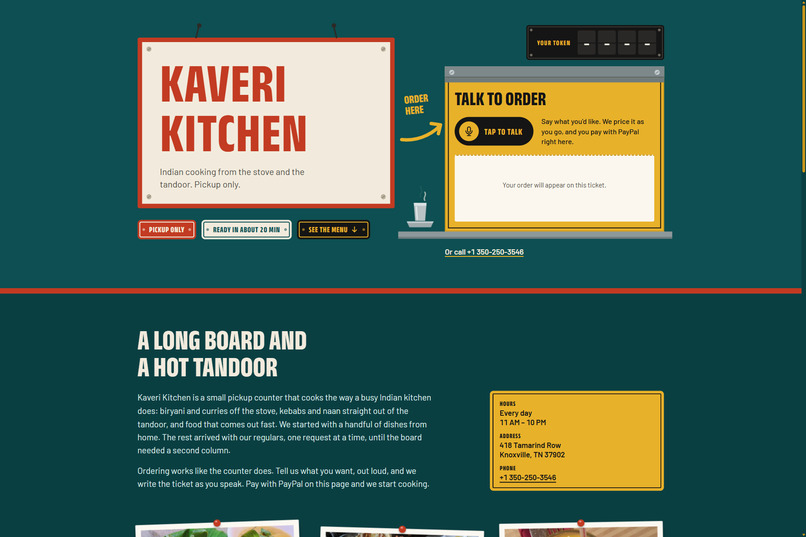
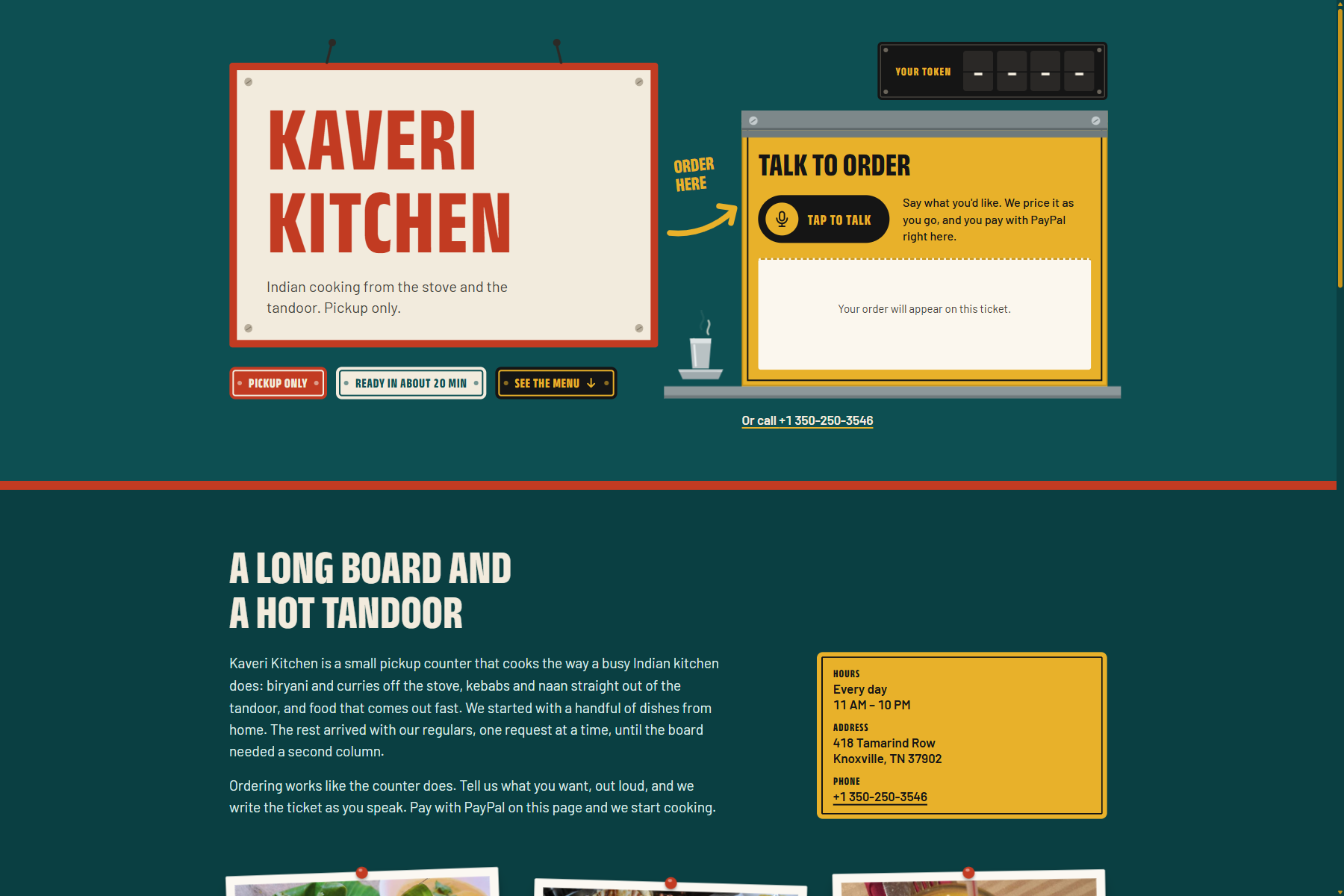
Main page
-
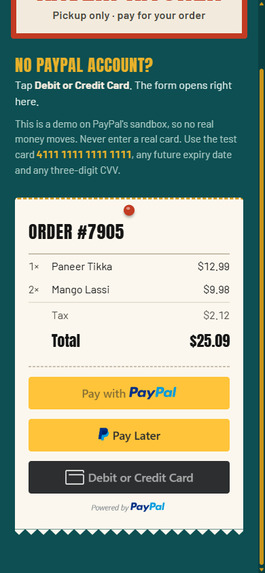
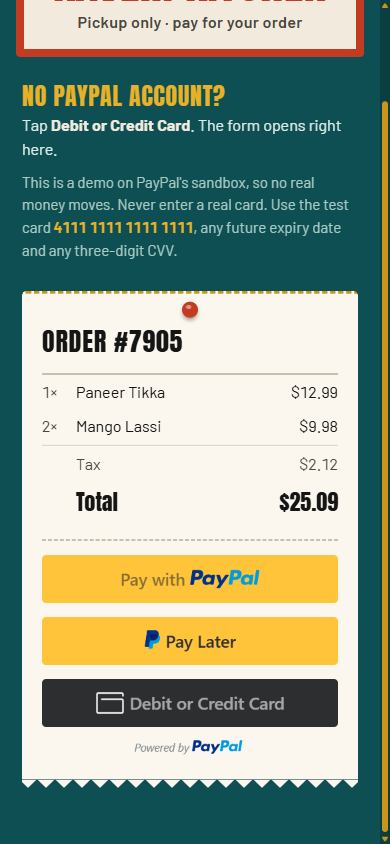
Payment page
-
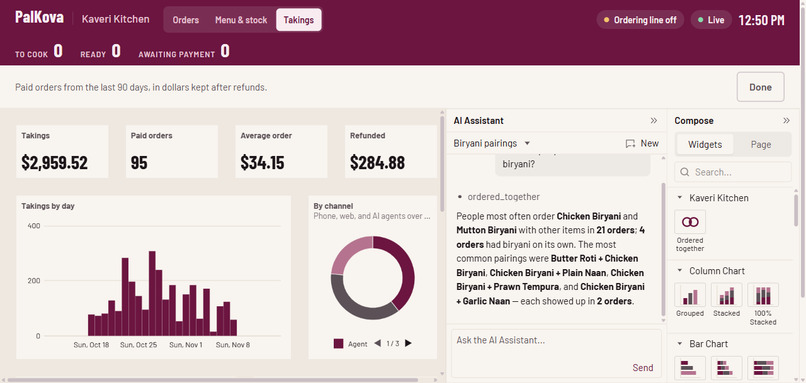
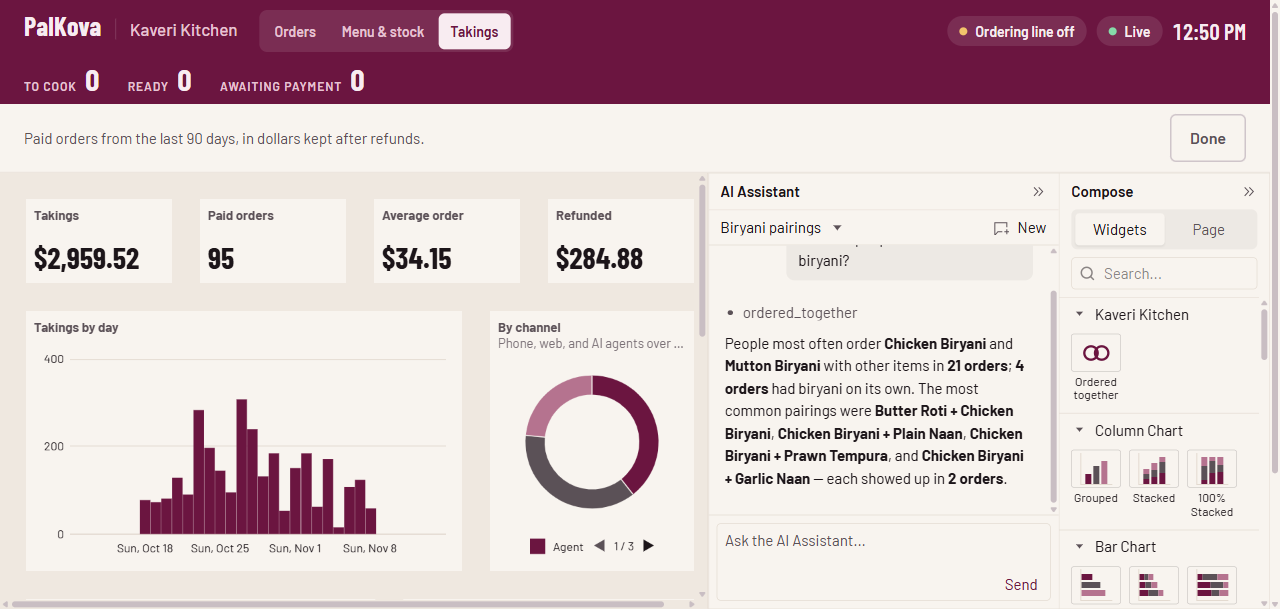
AG Grid Takings
-
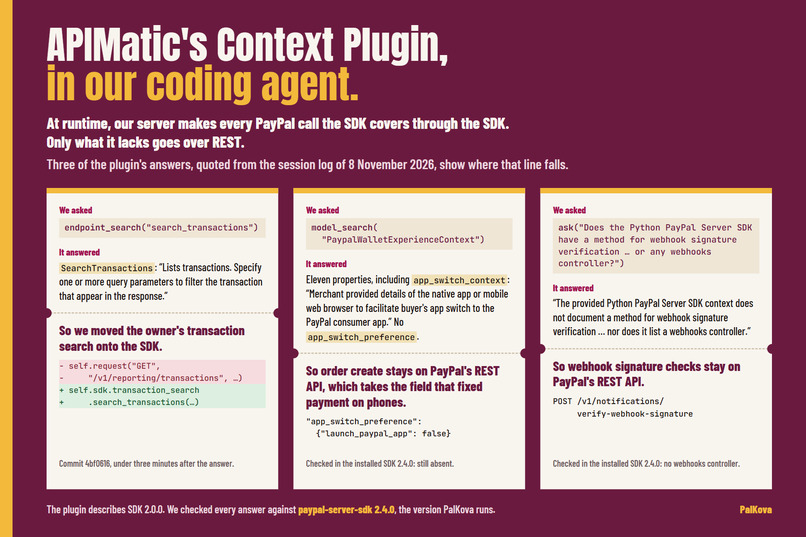
APIMatic Context Plugin
-
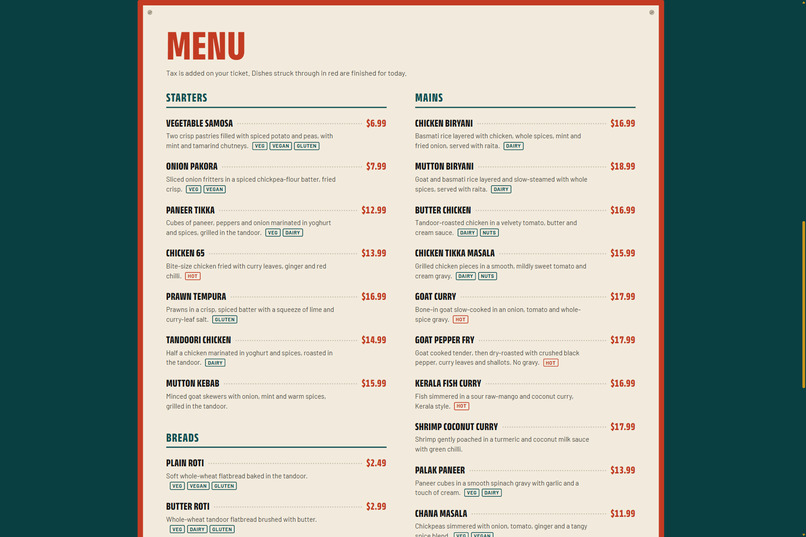
Menu
Inspiration
I use agents all the time, and I wanted one for a daily struggle in our house: what to get at meal times, and from where. So I built an AI assistant with all the bells and whistles, rotating through my favorite dishes. It hit two walls:
- The restaurants. The dishes I order often come from restaurants that take orders by phone, from a person. No assistant could reach them.
- My payment card. I was not willing to hand a card number to an AI agent. I wanted to pay the way I already pay online, through PayPal, and see each order before my money was touched.
We tried the big AI assistants next. We asked one for Mutton Pepper Fry near a Knoxville zip code. It guessed restaurants from the web, contradicted itself, and could not order or pay. We asked another for Lucknowi goat biryani, and it sent us to delivery apps in another country.
Neither assistant was at fault: the restaurant had no door an agent could walk through. So we built one. My assistant became Meal Buddy: it messages me on Discord at meal times, suggests dishes with their prices, places the order through PalKova, and sends me a link to pay with PayPal.
My second wall turned out to be a common one. Paying for a phone order today means reading a card number aloud to whoever answers, or paying at the counter. That only works for someone who has a card and is willing to read it out. About one in five American adults has no credit card at all,¹ and under 21 a credit card needs a co-signer or an income of your own.² A lot of people would rather pay with PayPal, so the restaurant never sees their card.
An unpaid order is a promise, and the kitchen cooks it on trust. And an agent that can pay can overpay: a misheard quantity, a stale price, a link to an order that has since changed.
So PalKova had to do four things:
- Let callers, web visitors and AI agents order.
- Let them pay without a credit card, and without reading a card number to anyone.
- Take payment before the kitchen starts cooking.
- Stop any agent from charging more than the order owes.
What it does
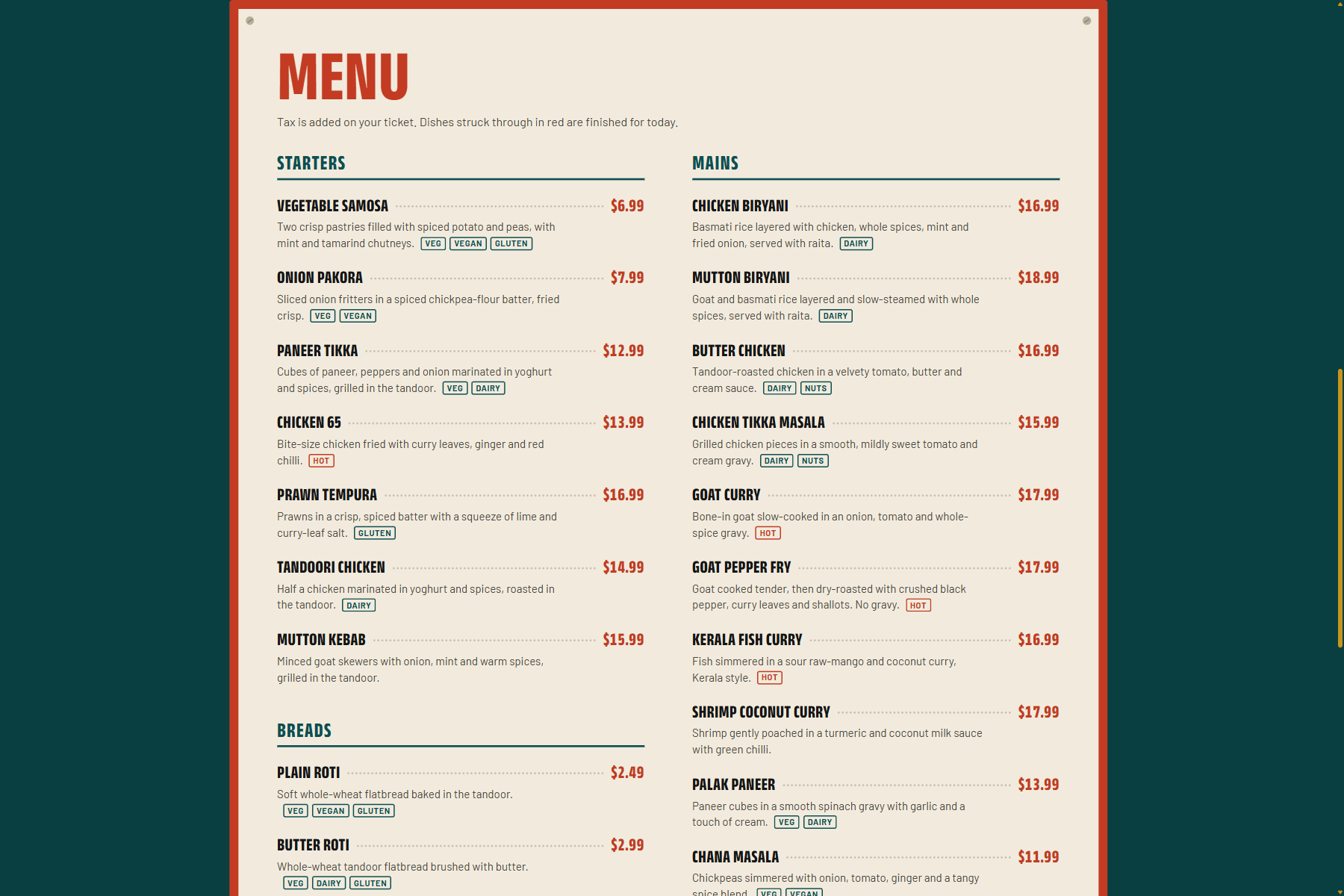
PalKova is an ordering line for one restaurant: Kaveri Kitchen, a fictional Indian place in Knoxville, pickup only, 31 dishes. One order engine sits behind three doors.
- Phone. Call the number and order by voice. The agent reads the order back with the total from the server. With your permission it texts you a link to the restaurant's pay page. Pay while you are still on the call, and the agent tells you the payment arrived.
- Browser. Press Tap to talk on the restaurant's page for the same conversation. The PayPal buttons appear on the order ticket the moment the order is placed.
- AI agents. Any AI assistant that speaks MCP can search the menu, place an order, and give its user a payment link. In our demo it is Grok's chat on grok.com: add our MCP address as a connector, ask for a dish in plain words, and Grok finds it on the menu, places the order and hands you the pay link. The agent sees no card and no login.
Meal Buddy, from our story, does the same from Discord, and starts the conversation itself. Its code is in examples/meal_buddy in our repo.
All three end on the same pay page, and the phone agent does not ask for a card number. On that page you can pay with a PayPal account, funded by a bank account or a PayPal balance, or with a debit or credit card through PayPal's own card form, with no PayPal account at all. A credit card is not required. Card details go to PayPal, never to the restaurant.
Paid orders land live on the owner's kitchen board. A second grid tracks what each dish has sold against its daily par. When a dish runs out, it drops off the phone menu, the web page and agent searches at once. The owner can ask either grid in plain English, such as paid orders over $40 or what's running low?, and can ask for a refund the same way. The AI finds the refund, but only the owner can approve it, with a tap.
The restaurant pays for the line with a PayPal subscription. Cancel it, and the phone line declines politely, the web page says so, and agents are refused.
PayPal on both ends: diners pay the restaurant, and the restaurant pays for the line. The name comes from palkova, a Tamil milk sweet. We kept the Pal.
How we built it
1. PayPal: no money moves until the server has checked it. PayPal is on both ends of PalKova, and every way of paying ends in one checked capture.
Approve, then capture. A payment link that takes the money first and checks afterwards turns a mismatch into a refund. PayPal Orders v2 separates the buyer's approval from the merchant's capture, and PalKova does its checks in between. One function, capture_if_current, is the only code that captures money. All three triggers go through it: the pay page's button, the CHECKOUT.ORDER.APPROVED webhook and a background poll. Before it captures, it checks three things:
- The PayPal order is the order's current one, so a link from a changed order cannot be charged.
- PayPal's approved amount equals the server's total, to the cent.
- The dishes are still in stock. If one sold out in the meantime, the order is cancelled before anyone pays.
Then it captures with an idempotency key, and a conditional database update decides which trigger won, so the kitchen and the caller hear about it once. If the amount changes between the check and the capture, the server checks the captured amount too. The order is not marked paid, and the owner is told to refund it.
We attacked it ourselves in sandbox: placed a $41.11 order, rewrote its amount at PayPal to $1.00, once before approval and once after, and approved it with a test card. Both times the server refused to capture, and no money moved.
One pay page. The texted link and the agent's link both open the restaurant's own page, built on PayPal's JavaScript SDK: PayPal's buttons, and its card form for guest checkout. One PayPal order serves both ways to pay. Change the order, and the old link says it was replaced.
Subscriptions. The restaurant pays for the line on a PayPal subscription plan with a trial cycle. Billing webhooks are signature-verified and deduplicated, and feed one gate checked at the start of each call, browser session and agent order.
The owner's PayPal. The owner's Ask bar reads PayPal transactions through PayPal's Server SDK and disputes through the PayPal Agent Toolkit. A refund goes back through PayPal only after the owner taps to confirm it.
2. AG Grid: the kitchen board, and Takings on AG Studio. The kitchen board is an AG Grid with master/detail rows for line items, fed by Server-Sent Events applied as async transactions, so orders flash in without a refresh. The menu and stock grid has editable par levels, availability and spice, with AG Charts sparklines. One command bar drives both: through the AG Grid AI Toolkit, the grid's schema and current state go to the server, the model returns a new state constrained to that schema, the server validates it, and the grid applies it. The same bar answers sales questions from our own data and proposes refunds the owner must confirm.
A third screen, Takings, is an AG Studio dashboard over the last 90 days of paid orders: takings, paid orders, average order and refunds; takings by day and by channel; dish sales; and the orders themselves. Beyond those, the agents can chart each dish by course, diet (vegan, vegetarian, non-veg, from the menu's tags) and spice level, and each order by hour, minutes until the kitchen marked it ready, and turnaround to pickup. It is themed from the board's own tokens, so it reads as part of the board rather than an embedded component. It has one widget of our own, Ordered together, which shows the dish pairs that turn up in the same order most often. Studio's built-in widgets total one field at a time, and pairs need each order's whole basket, so the widget asks Studio for order-and-dish rows, with the page's filters applied, and counts the pairs itself. The assistant runs on the Studio Agent Framework: our own agent, the kitchen analyst, knows the restaurant, answers questions from the data, and hands any change to the page to Studio's built-in lead agent, which plans it and adds the widget. Asked which dishes go together, it calls a tool of our own, ordered_together, which runs the widget's own counting, so the two always agree. Every turn goes through our server, by an adapter of our own for OpenAI's Responses API. The server holds the key and picks the model, and the data the agents read carries no customer names.
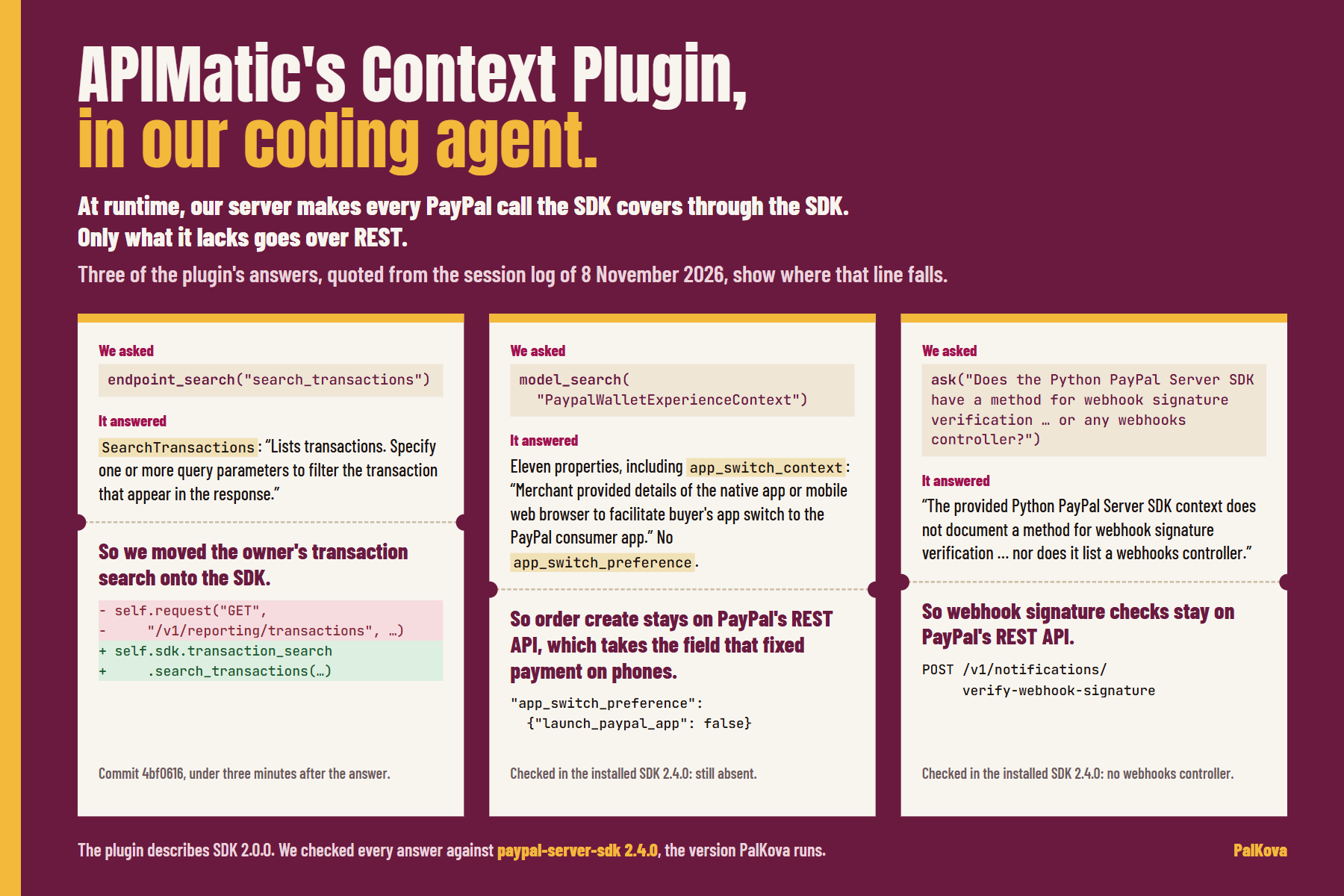
3. APIMatic: PayPal's Server SDK for Python, and the Context Plugin. APIMatic generates PayPal's Server SDK for Python (paypal-server-sdk 2.4.0), and our PayPal class is built on it: reading and capturing orders, refunds, reading and cancelling subscriptions, the subscription plan our setup script creates, and the owner's transaction search. We connected APIMatic's Context Plugin for PayPal to our AI coding agent and asked it what the SDK covers that we still did by hand. It found a Transaction Search controller, so the Ask bar's transaction lookups, written as plain REST calls, moved onto the SDK. It also confirmed two gaps. The order's experience context has app_switch_context but no app_switch_preference, the field that fixed payments on phones (see Challenges, 1), so creating an order stays plain REST with the same idempotency key. The SDK has no webhooks controller either, so webhook signature checks call PayPal's REST API directly. The plugin describes SDK 2.0.0, so we checked each answer against the 2.4.0 package we install, and they held. At runtime, our server makes every PayPal call the SDK covers through the SDK. Only what it lacks goes over REST.
4. One order engine. FastAPI and SQLite, money in integer cents, totals computed on the server. The model never handles money: the menu goes into its prompt as data, it builds a cart with set_order and places it with place_order, and the prices it speaks come back from tool results. The phone, the browser and the MCP server are three thin adapters over the same functions.
5. The voice. Vapi runs the call. When a call comes in, Vapi asks our server for an assistant. The server checks the subscription and the call limits, then returns the prompt, the tools and a speech-to-text setup (Deepgram nova-3) that carries the dish names as key terms. Tool calls come back to our webhook, which checks a shared secret, and go into the same order engine. In the browser, the server creates the web call itself, so no voice key reaches the page. Limits keep a public demo affordable: three live calls at once, five calls per number in five hours, six minutes per call, and a cap on texts.
6. The MCP server. An MCP server (official Python SDK, streamable HTTP) exposes search_menu, create_order and get_order_status. Orders are looked up by a random id, not the four-digit number, so a guessed number cannot open another person's order. In the demo, Grok's chat calls it as a connector. Meal Buddy calls the same endpoint through xAI's API, in under 200 lines.
7. Hosting. One Docker image on Railway: the API, the voice webhooks, the board's live events, /mcp and the React app, with SQLite on a persistent volume.
Challenges we ran into
- PayPal on a phone. The texted link kept failing on one of our phones: Something isn't working right now. First we checked our own code. $1 orders made straight against PayPal, without our code, failed the same way. We moved our links to our own pay page. PayPal's card form worked there, but PayPal's own button still failed. So we traced it over USB, with the phone's system log beside Chrome's DevTools. The sandbox checkout was handing the order to the PayPal app installed on the phone. That was the live app, and it cannot open a sandbox order. One field on the order,
app_switch_preference: {launch_paypal_app: false}, keeps the payer in the browser. The next order texted to that phone was paid on it. A judge on a phone no longer needs to know any of this. We have sent the trace to PayPal's developer team. - Three triggers, one payment. Our first real browser order was paid, but the page said the payment had failed. The button, the webhook and the poll had raced. The webhook won the capture, and the button reported its own loss as a decline. The money was safe, but the message was wrong. The page now waits while a capture is in flight and shows the real result.
- A chat can't be interrupted. A chat assistant such as Grok calls our tools only when its user sends a message, so we cannot tell it that a payment has arrived. The pay page confirms the payment on the spot, and the user can say "paid" to have the assistant check. Meal Buddy runs on its own, so it checks the order until it is paid and then messages the user.
- Being found is a second problem. An assistant calls only the connectors its user adds. PalKova makes a restaurant orderable by agents today. Being found by assistants, through app directories and MCP registries, is the next step, and the same
/mcpendpoint serves it.
Accomplishments that we're proud of
- End to end simplicity: Our workflow, although involving multiple channels, real telephony, SMS, etc., is still a very simple implementation.
- The call that closed the loop. On our go/no-go call, order 1014 was paid while the caller was still on the line, and the agent said so before the call ended: "Got your payment for order 10 14. It'll be ready in about 20 minutes."
- The attack that failed. We rewrote a $41.11 order to $1.00 at PayPal, with merchant credentials, which can do more than any browser can. The server refused to capture, before approval and after.
- Ordering from Grok with one URL. Add our MCP address as a connector in Grok, and it can order and hand you a pay link. Nothing else to install on either side.
- An AI that can find a refund, and cannot make one. We intentionally built a human-in-the-loop for all refunds. No amount of caller persuasion or AI hallucination can initiate cash movement out of the restaurant.
What we learned
- Check before capture. A wrong amount caught before capture is refused. Caught after, it has to be refunded.
- Find whose fault it is before fixing it. A $1 order made without our code was the cheapest test we ran, and twice it showed us the fault was not ours.
- The losing trigger needs care too. Three triggers raced to capture one payment. The webhook won, the button lost, and the button's message was the one the customer saw.
What's next for PalKova
- Venmo on the pay page, so teenagers with Venmo Teen accounts can pay.
- More than one restaurant on the same engine, each its own PayPal merchant: PayPal partner onboarding and per-restaurant routing.
- Being found: listing
/mcpin assistant app directories and MCP registries. - Handing paid orders to the restaurant's own point-of-sale system.
Sources
- Federal Reserve Board, Economic Well-Being of U.S. Households in 2025 (May 2026): 82% of adults had a credit card. https://www.federalreserve.gov/publications/2026-economic-well-being-of-us-households-in-2025-executive-summary.htm
- Consumer Financial Protection Bureau, CARD Act Report (October 2013), on the Act's rules for consumers under 21. https://files.consumerfinance.gov/f/201309_cfpb_card-act-report.pdf
Try it out
- Restaurant page: https://palkova.hariths.com
- Call the line: (350) 250-3546 (sandbox, with the limits above)
- Pay: on the pay page, Debit or Credit Card, with the test card shown there. No PayPal account needed.
- Owner board: https://palkova.hariths.com/owner — password in the private notes for judges
- Takings dashboard: on the owner board, open Takings and press Ask the analyst or edit. Ask for a chart in plain words, such as add a donut of dish sales by diet, average turnaround minutes by day or which hour is busiest?
- Order from an AI assistant: add https://palkova.hariths.com/mcp as an MCP connector in Grok (grok.com), then ask for a dish.
- Code: https://github.com/NanaHarith/PalKova
- Video: https://youtu.be/tz1vN9L14JE
