-
-
QR Code
-
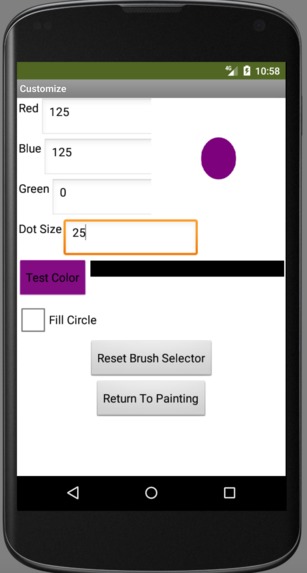
Screenshot of Customization Screen
-
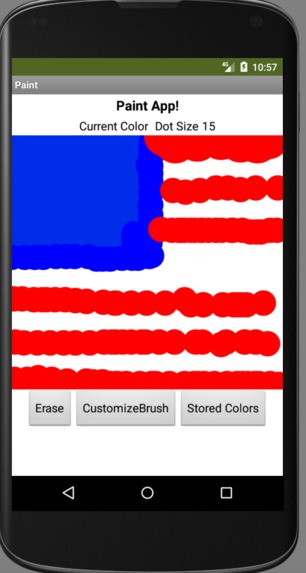
Screenshot of Painting Screen


Inspiration
What inspired me to create this app was a project I was working on in a mobile apps programming class last semester. Our goal of that project was to be able to draw in 3 different colors and be able to download the app onto android devices.
What it does
This app is just a fun easily usable app that can be used on all android devices. What it does is it allows the user to draw on a canvas and be able to create new colors and sizes of paintbrushes to paint with. You can easily store and name these new paintbrushes and access them at any time while painting.
How I built it
I built this app through the MIT app inventor, which is a very user-friendly website that allows the design of android apps with either block or word coding. I built my app using block coding mostly because I am new to coding and I found the word coding to be a bit difficult. To test how my app worked I had to install an emulator for androids because I do not own an android. Using this emulator I was able to debug my code and test it.
Challenges I ran into
One of the main challenges I ran into during the creation of this app was the lack of an android device. When I have made MIT-app inventor apps before I used my school's android tablets to test and debug my app. Due to COVID-19, I am unable to go to school and am therefore lacking an android device. To get around this challenge I had to research additional options and eventually, I found an emulator that allowed me to effectively test my app.
Accomplishments that I'm proud of
The main accomplishments I'm proud of is just signing up for this hackathon. I have never done a hackathon or anything like this in the past and just being able to create something new and be able to submit it is a truly great experience.
What I learned
One thing that I had to learn while making this app was how to store data while switching screens in the app inventor. The app I made has 2 different screens that the user can switch between, 1 for painting, and the other for customizing the brush. A strange issue that I ran into was that the screens can't just share data and variables. A variable you create on one screen can not be accessed on the other. To fix this error you have to use a TinyDB to store the data while you switch between screens and then access the variables from the TinyDB.
What's next for Painting App
My next step for this app is to be able to allow the user to make the paintbrush different shapes such as a square or a triangle. At the moment the painting can only be done in circles and that seems a bit limiting so I am working on adding more shapes.

Log in or sign up for Devpost to join the conversation.