Inspiration
Have you ever struggled to understand a complex research paper, foreign language article, or technical documentation while browsing the web? Have you ever found that the constant context switching between tabs, opening Google Translate, summarization tools, or asking AI chat interfaces for explanations, breaks your flow and wastes precious time?
With Chrome's built-in AI APIs entering Early Preview in 2025, I saw an opportunity to solve this universal problem by bringing AI-powered reading assistance directly into the browser. I wanted to create a seamless experience where anyone could understand any webpage content without ever leaving their current tab.
What it does
PageClarity: Learn, Simplify, Translate - Without Leaving the Page
PageClarity is a Chrome extension that transforms web reading with AI-powered assistance. It uses Chrome's built-in AI (Gemini Nano) and Gemini 2.5 Pro to provide five core features:
Key Features
- Smart Summarization: Get concise summaries of entire pages or selected text
- Text Simplification: Rewrite complex content in Plain English, Friendly tone, or Shorter format
- Multi-language Translation: Translate selected text into 6 languages (Spanish, French, German, Hindi, Chinese, Japanese)
- Grammar & Spell Check: Proofread and correct writing errors instantly
- Intelligent Q&A: Ask natural language questions about webpage content
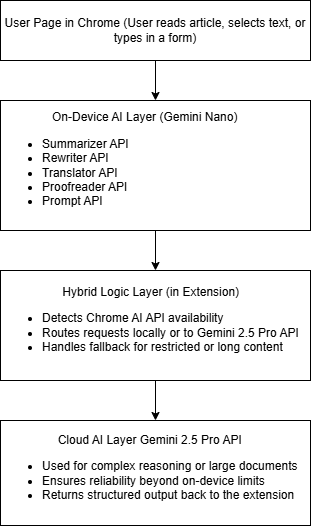
Four-Tier Hybrid Architecture
- Chrome AI First: On-device processing with Gemini Nano (private and fast)
- Smart Routing Layer: Automatically switches between AI providers
- Gemini API Fallback: Cloud-based Gemini 2.5 Pro for reliable functionality
- Demo Mode: Works without any configuration for testing
How I built it
Built as a Manifest V3 Chrome extension with a four-tier hybrid AI architecture that prioritizes Chrome's built-in AI while providing intelligent fallbacks to ensure reliability.
Technology Stack:
- Chrome AI APIs: Summarizer, Rewriter, Translator, Proofreader, and Prompt APIs
- Gemini 2.5 Pro API: Cloud-based fallback via Generative Language API
- Manifest V3: Modern Chrome extension architecture
- Content Security Policy: Graceful handling of restricted sites
- JavaScript ES6+: Modern web development practices
Architecture Design:
- Content Script: Extracts text from webpages and handles CSP restrictions
- Service Worker: Background processing and API management
- Popup Interface: Clean, Google Material Design-inspired UI
- AI Wrapper Modules: Abstracted API calls for each AI feature
Challenges I ran into
Challenge 1: Chrome AI API Early Preview Limitations
Problem: Chrome AI APIs are in Early Preview, requiring Chrome Canary with special flags and limited device compatibility.
Solution: Built a robust fallback system using Gemini 2.5 Pro API to ensure the extension works for all users while being future-ready for Chrome AI's evolution.
Challenge 2: Content Security Policy (CSP) Restrictions
Problem: Many websites block content script injection, preventing text extraction.
Solution: Implemented graceful fallbacks with user prompts when automatic extraction fails, maintaining functionality even on secure sites.
Challenge 3: API Namespace Migration
Problem: Chrome AI APIs moved from deprecated window.ai to self.ai namespace during development.
Solution: Updated all API calls to use the new namespace and implemented proper error handling for API availability detection.
Challenge 4: Hybrid AI Routing Logic
Problem: Seamlessly switching between on-device Chrome AI and cloud-based Gemini API based on availability.
Solution: Created an intelligent routing layer that automatically detects Chrome AI availability and falls back to Gemini API with consistent user experience.
Accomplishments that I'm proud of
Technical Achievements:
- Four-tier hybrid architecture ensuring 100% reliability
- Real Chrome AI integration using five different APIs
- Seamless fallback system from on-device to cloud processing
- CSP-compliant design working on secure websites
User Experience:
- Zero context switching - all features within current tab
- Rich text formatting preserved in copy operations
- Intuitive interface with Google Material Design
- Instant processing with visual feedback
Business Impact Analysis:
For students and professionals who read 10+ articles per week:
- Time saved per article: 5-10 minutes of manual processing
- Weekly time savings: 50-100 minutes
- Annual productivity gain: 40-80+ hours of focused reading time
Key Benefits:
- Eliminate language barriers for global content consumption
- Reduce cognitive load when processing complex information
- Improve comprehension through AI-powered explanations
- Maintain reading flow without tab switching
What I learned
This project taught me how to build production-ready Chrome extensions that leverage cutting-edge AI technology:
1. Chrome AI API Integration
- Working with Early Preview APIs and handling compatibility issues
- Understanding on-device vs. cloud AI processing trade-offs
- Implementing proper error handling for experimental features
2. Hybrid Architecture Design
- Building resilient systems with multiple fallback layers
- Balancing on-device processing with cloud reliability
- Creating seamless user experiences across different AI providers
3. Chrome Extension Development
- Manifest V3 best practices and security considerations
- Content Security Policy handling and graceful degradation
- Modern extension architecture with service workers
4. AI-Powered User Experience
Moving beyond simple AI demos to create tools that genuinely enhance daily workflows with measurable productivity benefits.
What's next for PageClarity
Immediate Roadmap:
- Chrome Web Store Publication: Make PageClarity available to all Chrome users
- Additional Languages: Expand translation support to 20+ languages
- Custom Prompts: Allow users to create personalized AI interactions
Advanced Features:
- Reading Analytics: Track comprehension improvements and time savings
- Team Collaboration: Share summaries and translations with colleagues
- Offline Mode: Enhanced on-device processing capabilities
Long-term Vision:
- Cross-browser Support: Extend to Firefox and Safari
- Mobile Integration: Bring AI reading assistance to mobile browsers
- Enterprise Features: Team management and usage analytics
Links
Demo Video: 3-minute walkthrough
Source Code: GitHub Repository
Hackathon Requirements Met
- Chrome Built-in AI: Uses five Chrome AI APIs (Summarizer, Rewriter, Translator, Proofreader, Prompt)
- Hybrid Implementation: Combines on-device Chrome AI with cloud Gemini 2.5 Pro
- Real-world Application: Solves genuine productivity challenges for web reading
- Future-ready Design: Prepared for Chrome AI's evolution from Early Preview to stable release
- Public Repository: Complete source code with comprehensive documentation
- Working Extension: Fully functional Chrome extension ready for installation
PageClarity demonstrates the transformative potential of Chrome's built-in AI APIs, creating a seamless reading experience that makes the web more accessible to everyone. This project showcases how hybrid AI architectures can deliver both on-device processing capabilities and cloud reliability in real-world applications.
Built With
- browser-extension
- chrome
- chrome-ai
- css3
- gemini-ai
- html5
- javascript
- manifest-v3
- web-apis


Log in or sign up for Devpost to join the conversation.