-
-
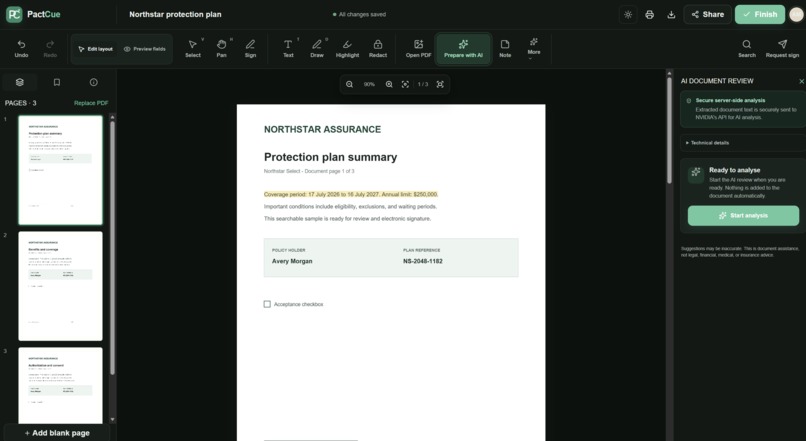
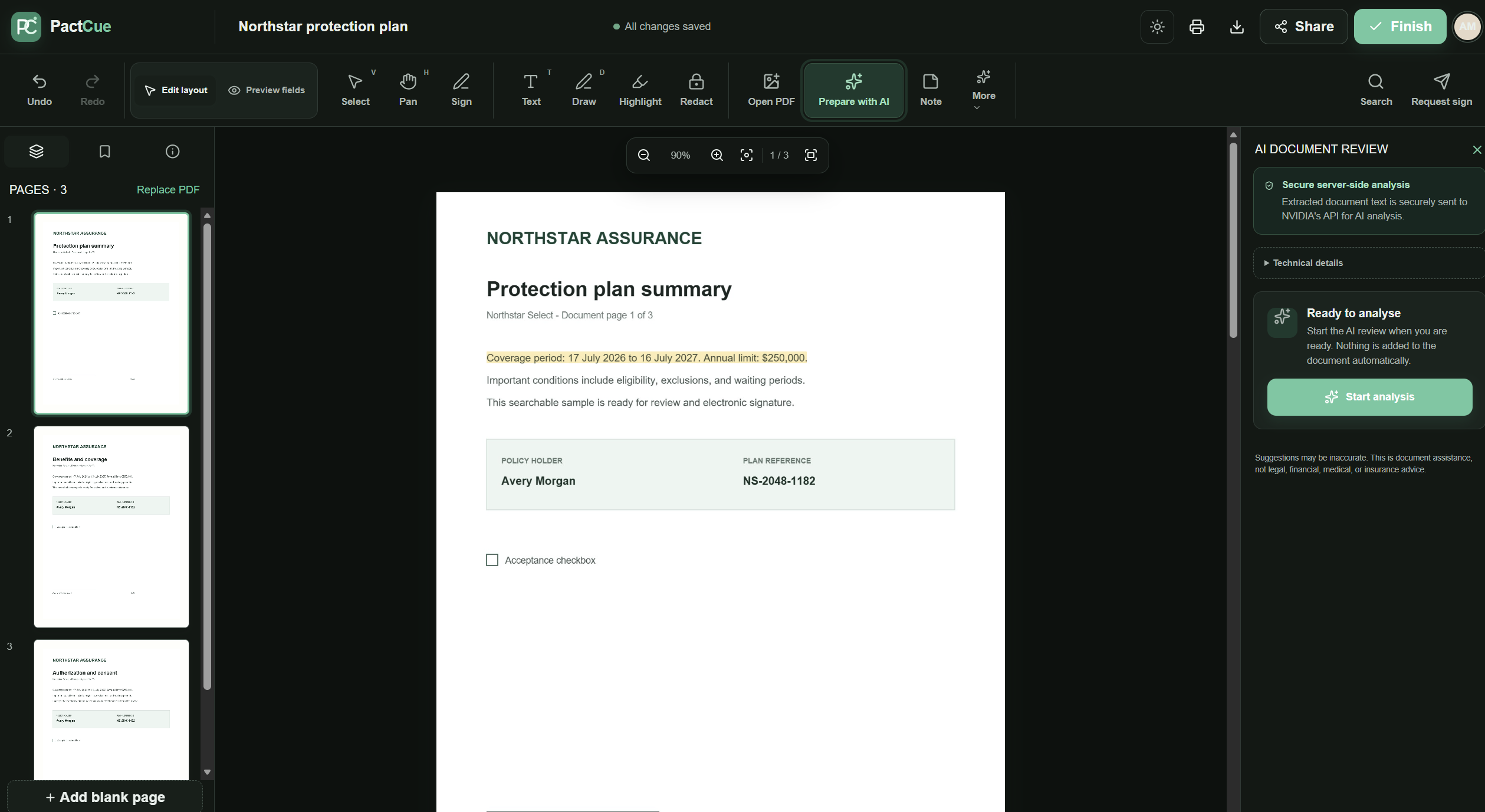
MAIN PAGE
-
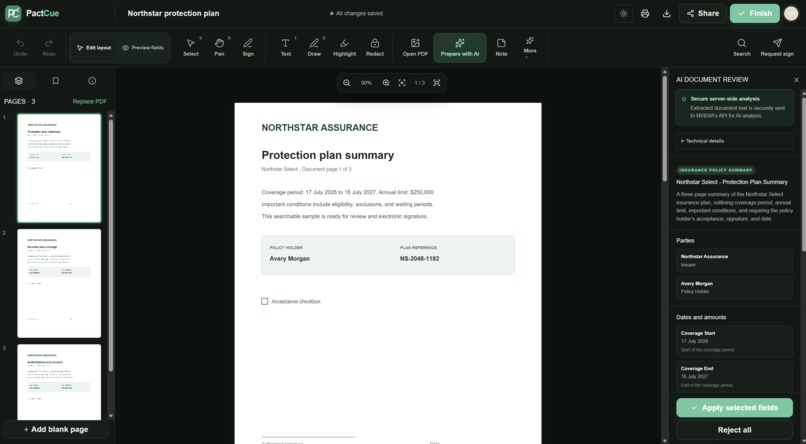
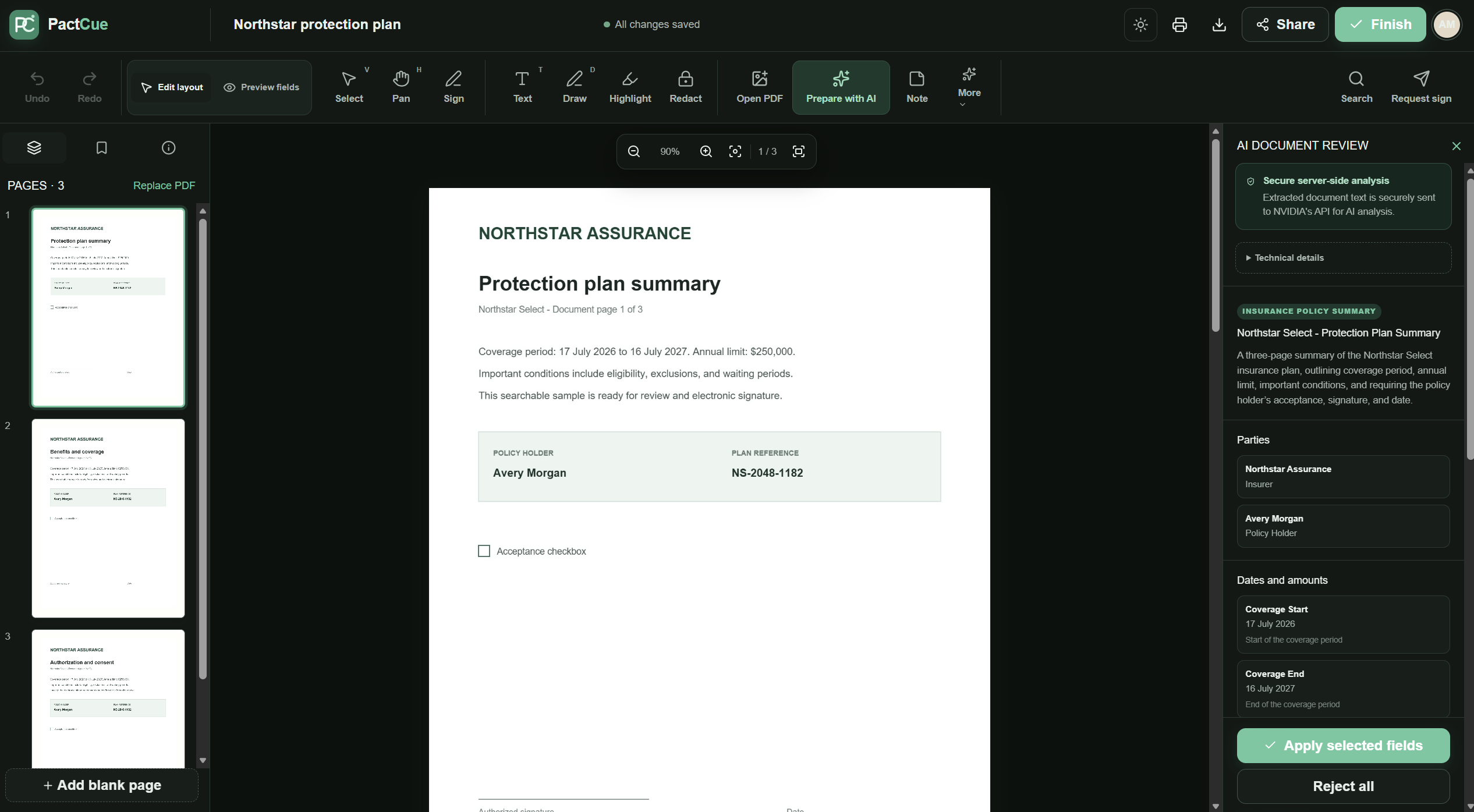
RUNNING AI ANALYSIS
-
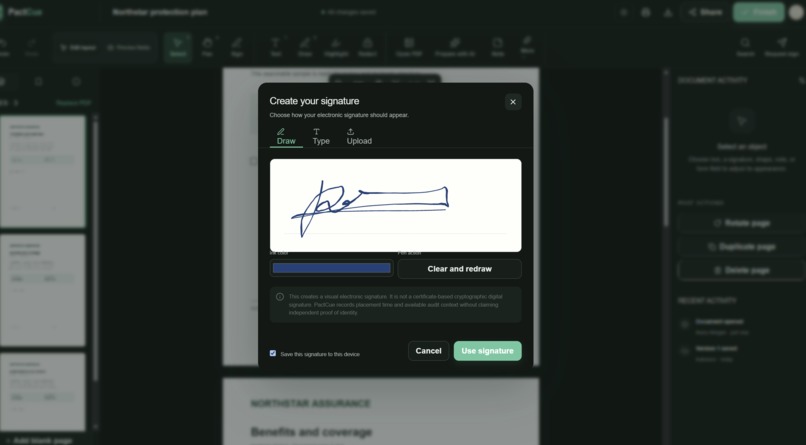
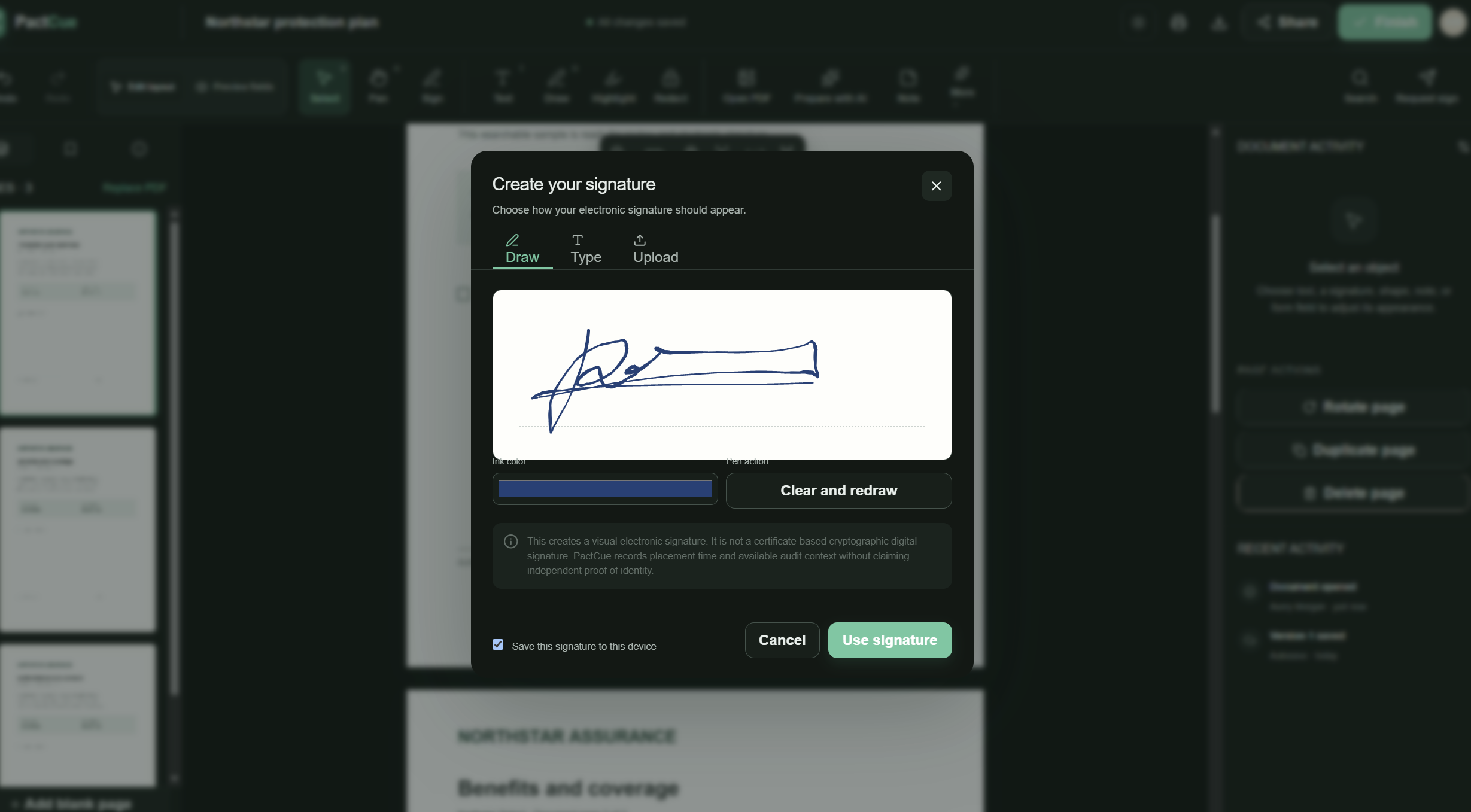
SIGNATURE FEATURE
-
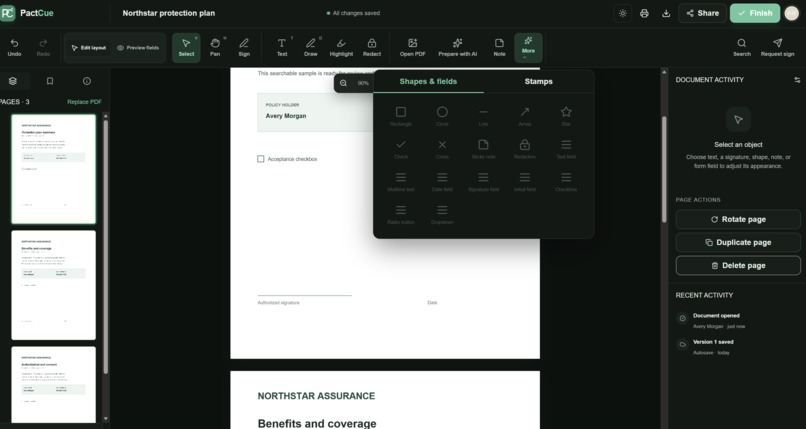
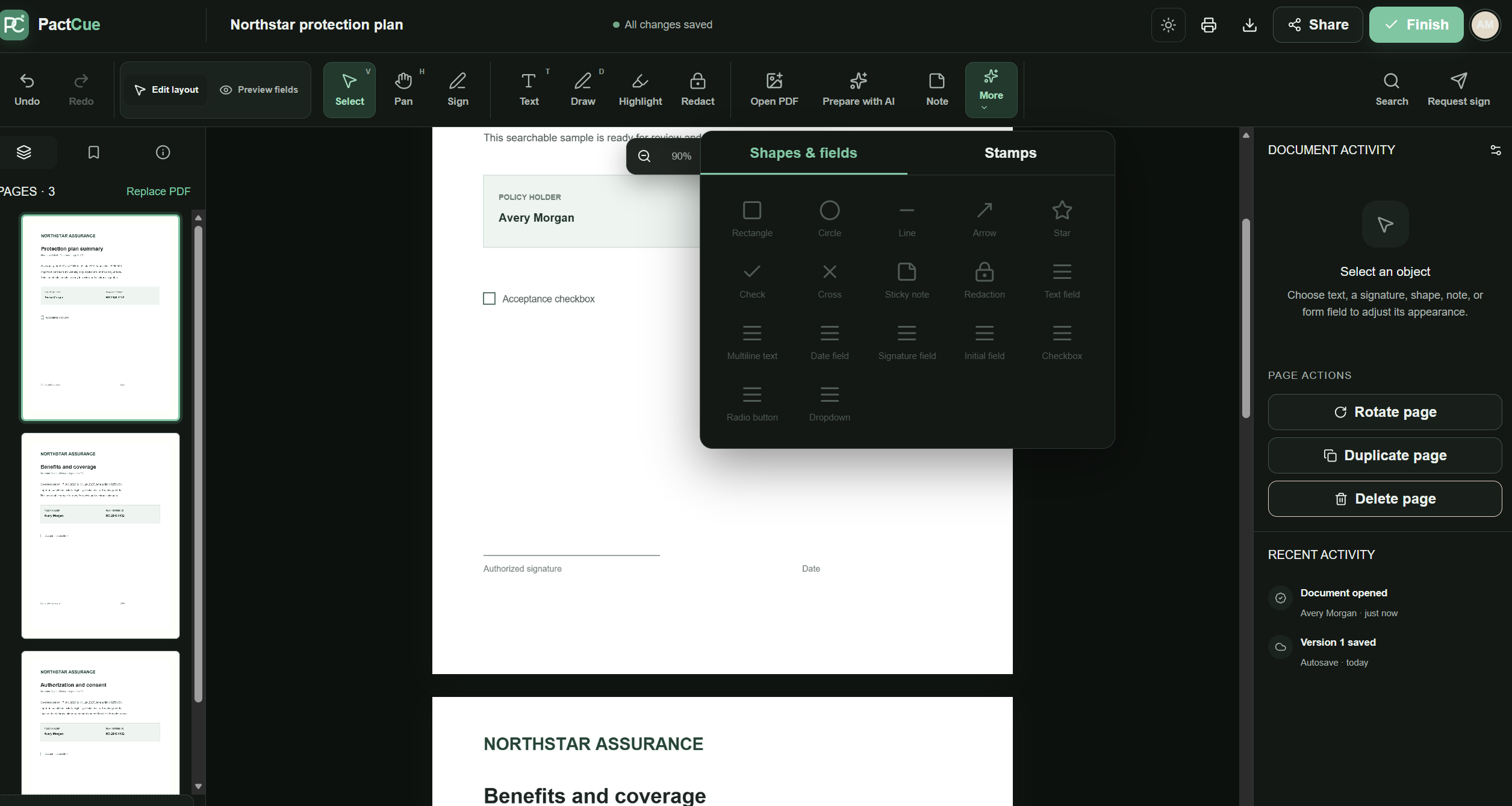
DIFFERENT ELEMENTS
Inspiration
Important PDFs are often difficult to act on. Insurance policies, consent forms, contracts, and application documents may contain deadlines, obligations, signature lines, and required fields spread across multiple pages.
Most PDF tools provide editing controls but still leave the user to determine what matters and where action is required.
We built PactCue to bridge that gap: transforming a static PDF into a clear, guided, ready-to-sign workflow while keeping the user in control.
What It Does
PactCue is an AI-assisted PDF review, annotation, form preparation, and signing workspace.
Users can:
- Upload and view searchable PDFs.
- Select and copy PDF text accurately.
- Highlight exact text or rectangular areas.
- Add freehand drawings, notes, shapes, arrows, checks, and redactions.
- Insert text, dates, signatures, initials, dropdowns, checkboxes, and radio groups.
- Move and resize elements, including across document pages.
- Preview the document as a recipient.
- Undo, redo, autosave, and reopen their work.
- Export the completed document as a PDF.
- Switch between light and dark themes.
Prepare with AI
The Prepare with AI workflow extracts searchable PDF text and sends it through a secure server-side analysis route.
PactCue then presents:
- A concise document summary.
- Important parties and dates.
- Items requiring attention.
- Suggested form and signature fields.
- Confidence and reasoning for each suggestion.
AI recommendations are never inserted automatically. Users must review and approve each proposed field before it becomes part of the document.
How We Built It
PactCue is built with:
- Next.js
- React
- TypeScript
- PDF.js
- pdf-lib
- Zod
- Server-side AI integration
PDF.js renders each page and its selectable text layer using the same viewport, zoom, and rotation settings.
A custom annotation layer handles:
- Text
- Signatures
- Form fields
- Highlights
- Drawings
- Shapes
- Movement
- Resizing
- Cross-page drag-and-drop
Document and annotation geometry is stored relative to the original PDF page dimensions. This keeps elements aligned across:
- Zoom levels
- Different screen sizes
- Scrolling
- Saving
- Reopening
- PDF export
AI Pipeline
The AI pipeline:
- Extracts text blocks from searchable PDF pages.
- Assigns stable identifiers to those blocks.
- Sends the structured text to a Next.js server route.
- Requests structured JSON from the configured AI model.
- Validates every response with Zod.
- Rejects suggestions containing unknown source anchors.
- Converts approved suggestions into editable fields only after user confirmation.
The API key remains on the server and is never included in browser bundles or client-side logs.
How We Used Codex
We used OpenAI Codex as our primary engineering collaborator throughout development.
Codex helped us:
- Inspect the existing architecture.
- Diagnose interaction bugs.
- Implement new features.
- Refactor complex event handling.
- Validate changes while preserving existing functionality.
- Improve accessibility and production behavior.
Challenges We Ran Into
The most difficult part was making browser interactions feel like a professional PDF editor.
PDF pages contain several overlapping layers:
- Rendered canvas
- Selectable text
- Highlights
- Form controls
- Annotations
- Resize handles
- Temporary drawing previews
Incorrect pointer-event routing caused text selection, dragging, typing, and drawing to interfere with one another.
Accurate PDF text selection was especially challenging. PDF text is often stored as independently positioned fragments rather than normal paragraphs or table cells. We had to preserve native browser selection while ensuring annotation overlays did not intercept the pointer.
Other significant challenges included:
- Keeping coordinates accurate across zoom, page rotation, and scrolling.
- Moving annotations between pages during a continuous drag.
- Implementing smooth edge-based automatic scrolling.
- Making form fields editable without accidentally starting a drag.
- Scaling signatures and text when fields are resized.
- Rendering freehand strokes from normalized PDF coordinates.
- Preserving annotations across autosave, refresh, and export.
- Handling malformed AI responses, timeouts, unavailable models, and quota errors safely.
- Preventing AI-generated coordinates from becoming trusted document geometry.
Accomplishments That We’re Proud Of
We are proud that PactCue combines document intelligence with a genuinely interactive editor rather than presenting AI output as a separate chat response.
Some highlights include:
- Accurate selectable PDF text with contextual actions.
- Separate text-highlight and area-highlight modes.
- Real semantic form controls instead of decorative placeholders.
- Smooth freehand drawing with persistent PDF-coordinate paths.
- Cross-page annotation movement with drag-edge auto-scrolling.
- Recipient preview and field-completion workflows.
- Human-reviewed AI field suggestions tied to verified text anchors.
- Secure server-side AI requests and schema-validated responses.
- Persistent editing with autosave, undo, redo, and PDF export.
- A polished, responsive interface with light and dark themes.
Most importantly, PactCue never silently changes a document based on an AI response. The user remains the final decision-maker.
What We Learned
We learned that building a reliable document editor is primarily a coordination problem.
Text selection, annotations, inputs, pointer capture, zoom, scrolling, and export must all share one consistent coordinate and interaction model.
We also learned that trustworthy AI integration requires more than a good prompt. Model output must be:
- Validated
- Traceable to known document content
- Constrained by application rules
- Reviewed by a human before affecting the document
Working with Codex showed us how an AI coding agent can contribute across the entire development cycle—from investigating subtle pointer-event bugs to implementing features, improving accessibility, and checking production behavior.
What’s Next for PactCue
Next, we plan to add:
- OCR support for scanned and image-only PDFs.
- Configurable signing workflows with multiple recipients.
- Secure authentication and encrypted cloud document storage.
- Real-time collaboration and reviewer comments.
- Reusable document and field templates.
- Audit trails and document version history.
- More advanced accessibility and keyboard navigation.
- Additional export and electronic-signature integrations.
- Faster cached AI analysis for unchanged documents.
- Organization-level policies for AI providers and data retention.
Our long-term goal is to make PactCue a trusted workspace where any important PDF can explain itself, guide the user toward the required actions, and become ready for signing without sacrificing human oversight.
Built With
- ai
- api
- artificial
- codex
- document
- electronic
- generative
- gpt-oss
- html
- intelligence
- minimax
- next.js
- node.js
- nvidia
- openai
- pdf-lib
- pdf.js
- playwright
- react
- signatures
- typescript
- vitest
- zod

Log in or sign up for Devpost to join the conversation.