
Inspiration
Remote teams spend countless hours switching between tools - editing a Confluence page, then jumping to Zoom, then back to Confluence to update notes. We asked: what if the meeting could happen right where the work lives?
Huddle was born from the frustration of context-switching during collaborative work. When you're deep in a Confluence document and need to quickly discuss something with your team, you shouldn't need to leave the page, schedule a meeting, share a link, and wait for everyone to join.
What it does
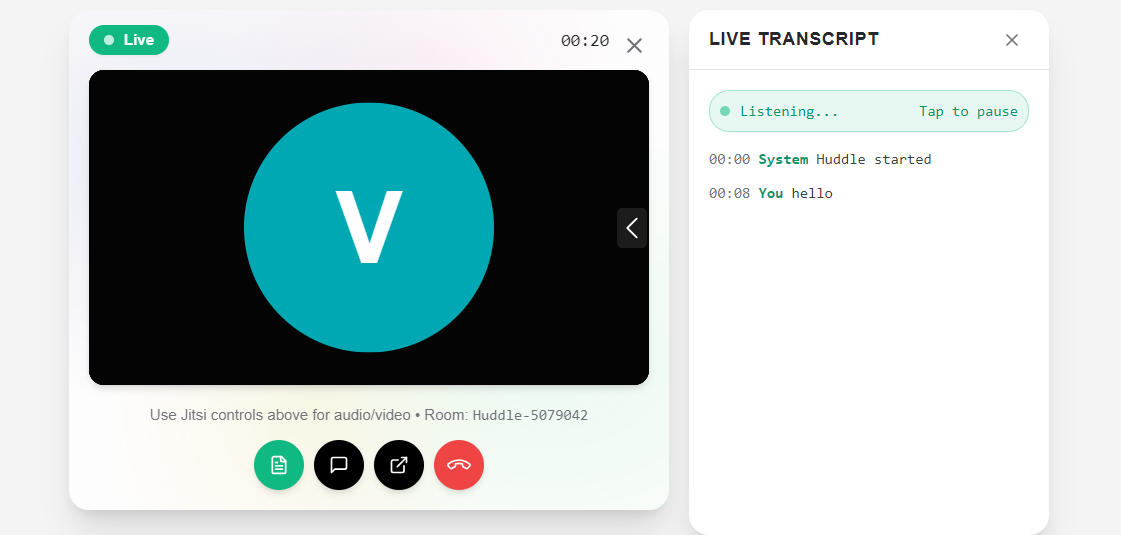
Huddle is a Forge-powered Confluence macro that brings instant video conferencing directly into your Confluence pages:
🎥 One-Click Video Meetings - Start a huddle instantly from any Confluence page. No scheduling, no links to share.
📝 Live Transcription - Real-time speech-to-text captures everything discussed, so you never miss a detail.
💬 In-Meeting Chat - Send messages during the huddle without disrupting the conversation.
👥 Join Existing Huddles - See when a teammate has started a huddle on a page and join with one click.
⏱️ Meeting Timer - Track how long you've been in the huddle.
🔗 External Link - Pop out to a full-featured meeting when needed.
How we built it
Architecture
Huddle uses a Forge Custom UI architecture:
- Frontend: React 18 with TypeScript, styled with Tailwind CSS
- Backend: Forge serverless functions for meeting state management
- Video: Jitsi Meet embedded via secure iframe
- Transcription: Web Speech API for browser-native speech recognition
- Storage: Forge Storage for persisting meeting state across users
Key Technical Decisions
Jitsi via iframe - Forge's CSP blocks external scripts, so we embed Jitsi directly rather than using their External API.
jitsi.riot.im - We use Matrix's Jitsi server as it allows direct join without lobby pages.
Browser Speech API - Live transcription runs entirely in the browser using the native Web Speech Recognition API - no external services, no data leaving the browser.
Forge Storage - Meeting state is stored server-side so all page visitors can see when a huddle is active.
Tech Stack
- React 18 + TypeScript
- Vite (build tool)
- Tailwind CSS + Framer Motion
- Atlassian Forge (Custom UI)
- Jitsi Meet (WebRTC video)
- Web Speech API (transcription)
Challenges we ran into
1. Content Security Policy (CSP)
Forge enforces strict CSP that blocks external scripts. We couldn't use Jitsi's External API which provides programmatic control. Solution: Embed Jitsi via iframe with URL parameters for configuration.
2. Jitsi Lobby Enforcement
The main Jitsi server (meet.jit.si) enforces a pre-join lobby that can't be disabled via URL. Solution: Switched to jitsi.riot.im which allows direct meeting joins.
3. Transcription Independence
Since we can't access Jitsi's audio stream (iframe isolation) or events (no External API), transcription runs on a separate microphone stream. Solution: Added manual pause/resume toggle so users can control transcription independently.
4. Stale Closures in React
Timestamps were showing "00:00" for all transcript entries due to React closure capturing initial state. Solution: Used useRef to track current timer value.
Accomplishments that we're proud of
✨ Zero Configuration - Users just type /Huddle and start a meeting. No setup required.
✨ Real-time Transcription - Live speech-to-text with interim results as users speak.
✨ Clean, Modern UI - Glassmorphism design with aurora background, smooth animations, and a polished experience.
✨ Works Within Forge Constraints - Successfully navigated Forge's CSP limitations to deliver a fully functional video solution.
✨ Production Ready - Deployed to production and working on live Confluence sites.
What we learned
Forge CSP is strict but manageable - With creative solutions like iframe embedding, you can integrate external services.
Browser APIs are powerful - The Web Speech API provides surprisingly good transcription without any external services.
React refs save the day - When dealing with callbacks and timers, refs prevent stale closure issues.
Not all Jitsi servers are equal - Different Jitsi deployments have different configurations for lobbies and pre-join pages.
What's next for Huddle
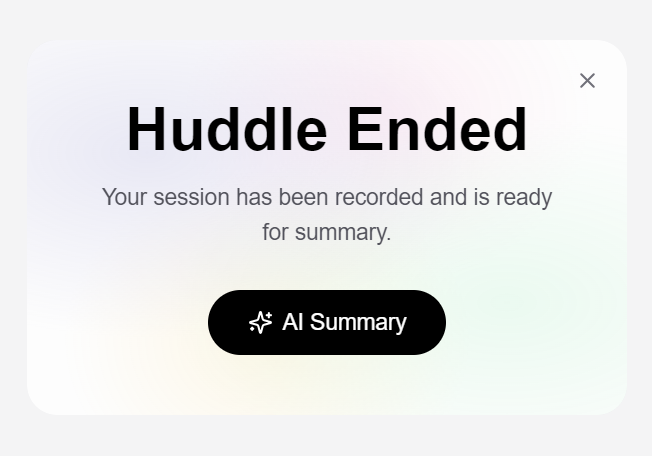
🔮 Rovo AI Integration - Use Atlassian's Rovo AI to automatically summarize meeting transcripts and add them to the page.
🔮 Multi-user Transcription - Identify different speakers in the transcript using Jitsi's participant events.
🔮 Meeting Recording - Save video recordings with Jitsi JWT authentication.
🔮 Self-hosted Jitsi - Deploy our own Jitsi server for full External API access and custom branding.
🔮 Calendar Integration - Schedule huddles and sync with Google Calendar / Outlook.
Built With
- atlassian-forge
- framer-motion
- jitsi
- tailwindcss
- typescript
- vite
- web-speech-api
- webrtc


Log in or sign up for Devpost to join the conversation.