-
-
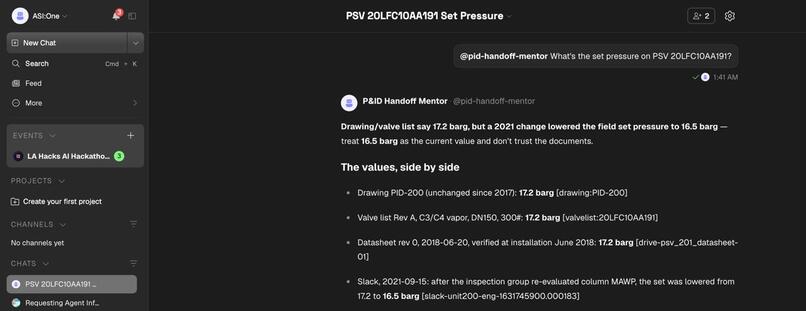
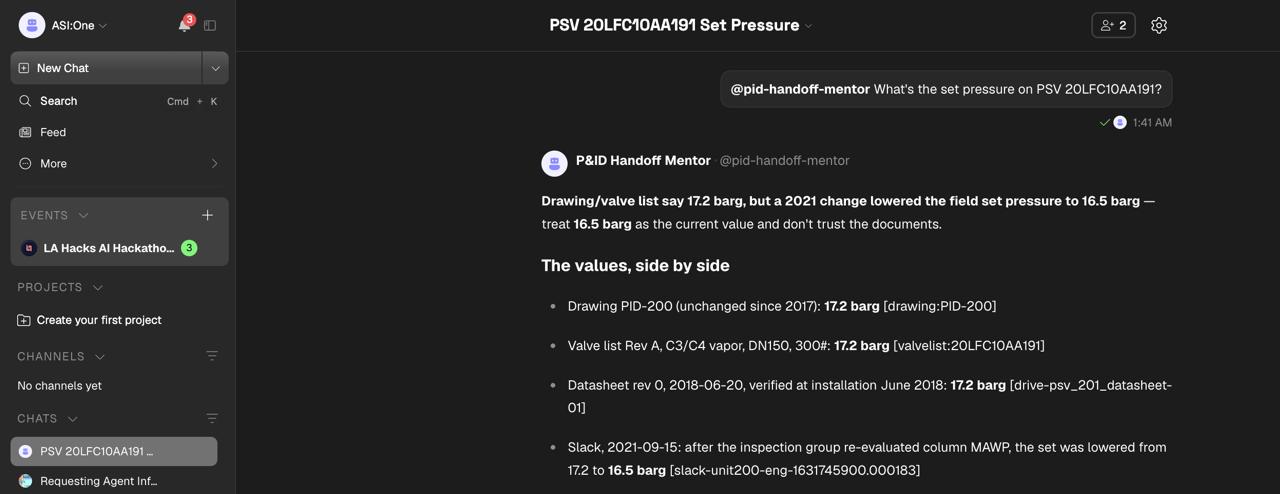
ASI:One DEPLOYED-- Official set pressure vs. an unapproved Slack message: the agent cites both.
-
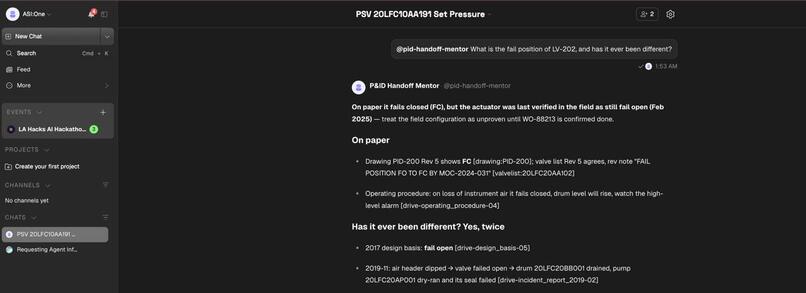
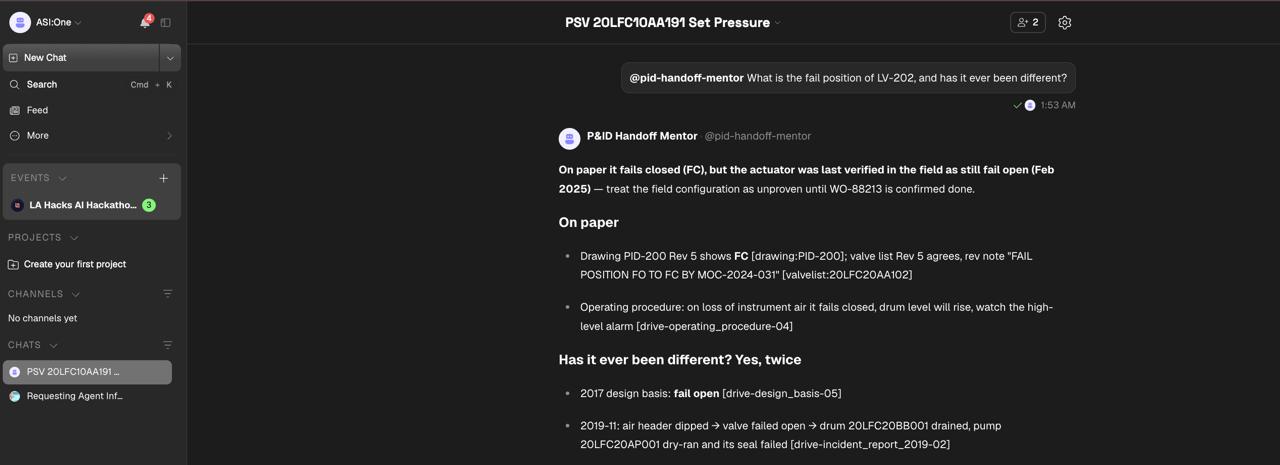
ASI:One DEPLOYED-- Drawing says fail closed, field records say fail open: the agent flags the conflict.
-
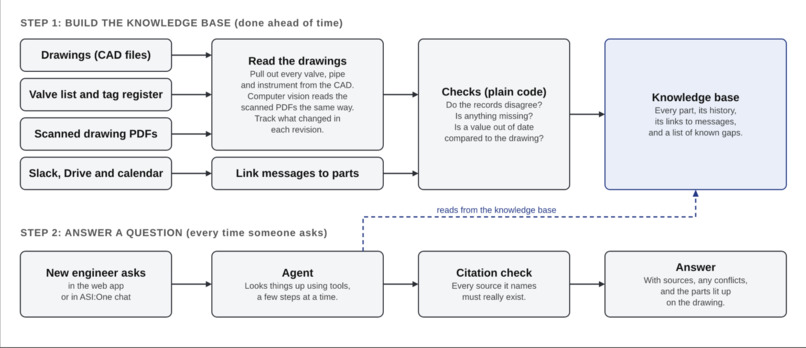
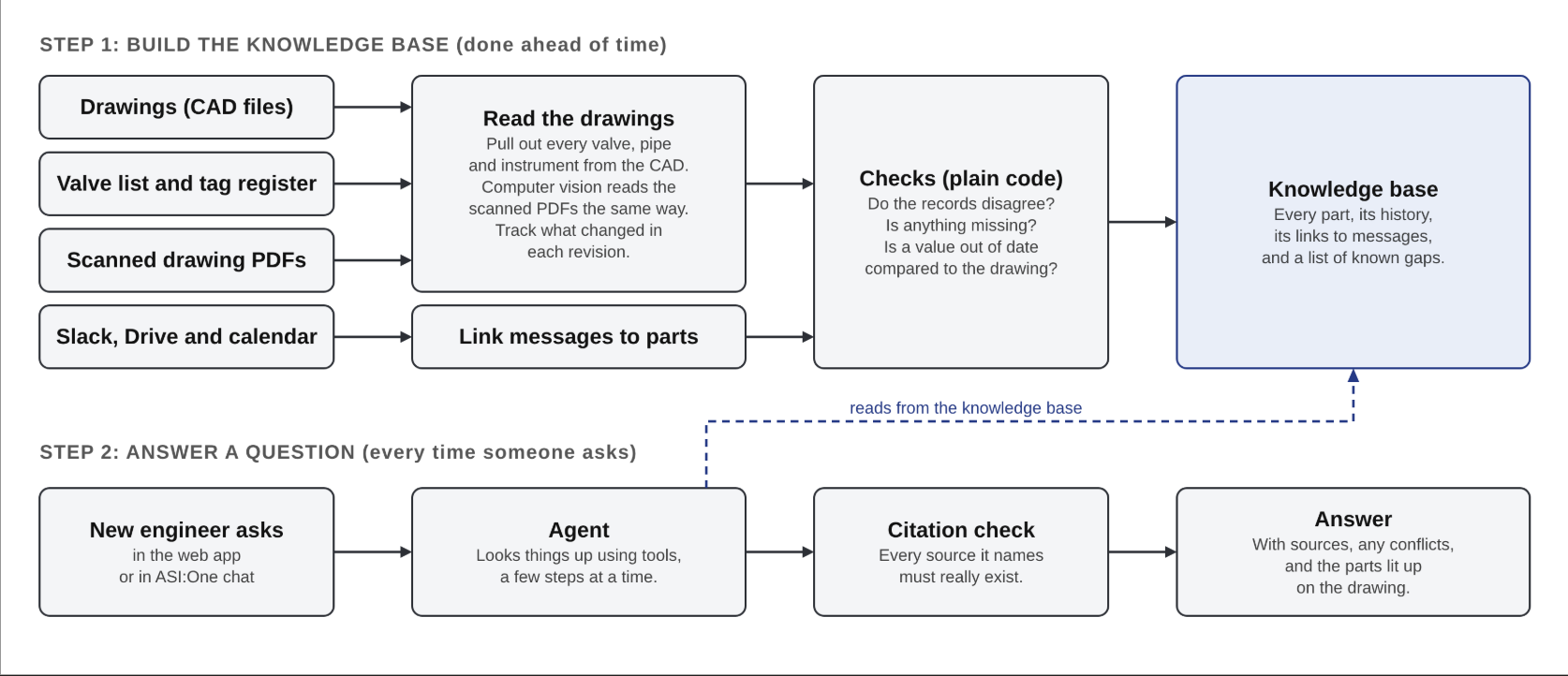
Workflow Diagram for Agentic Retrieval
-
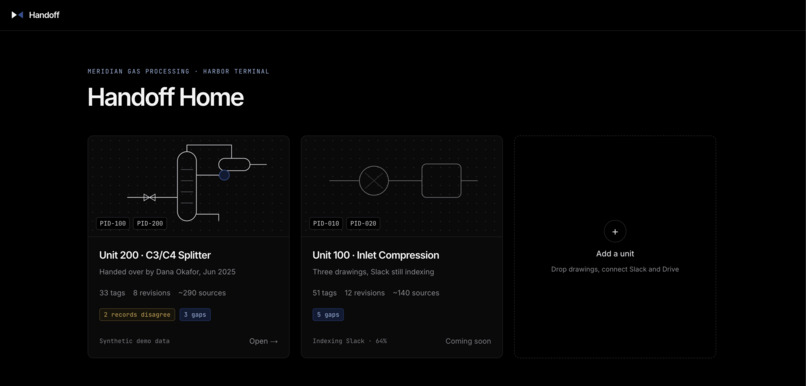
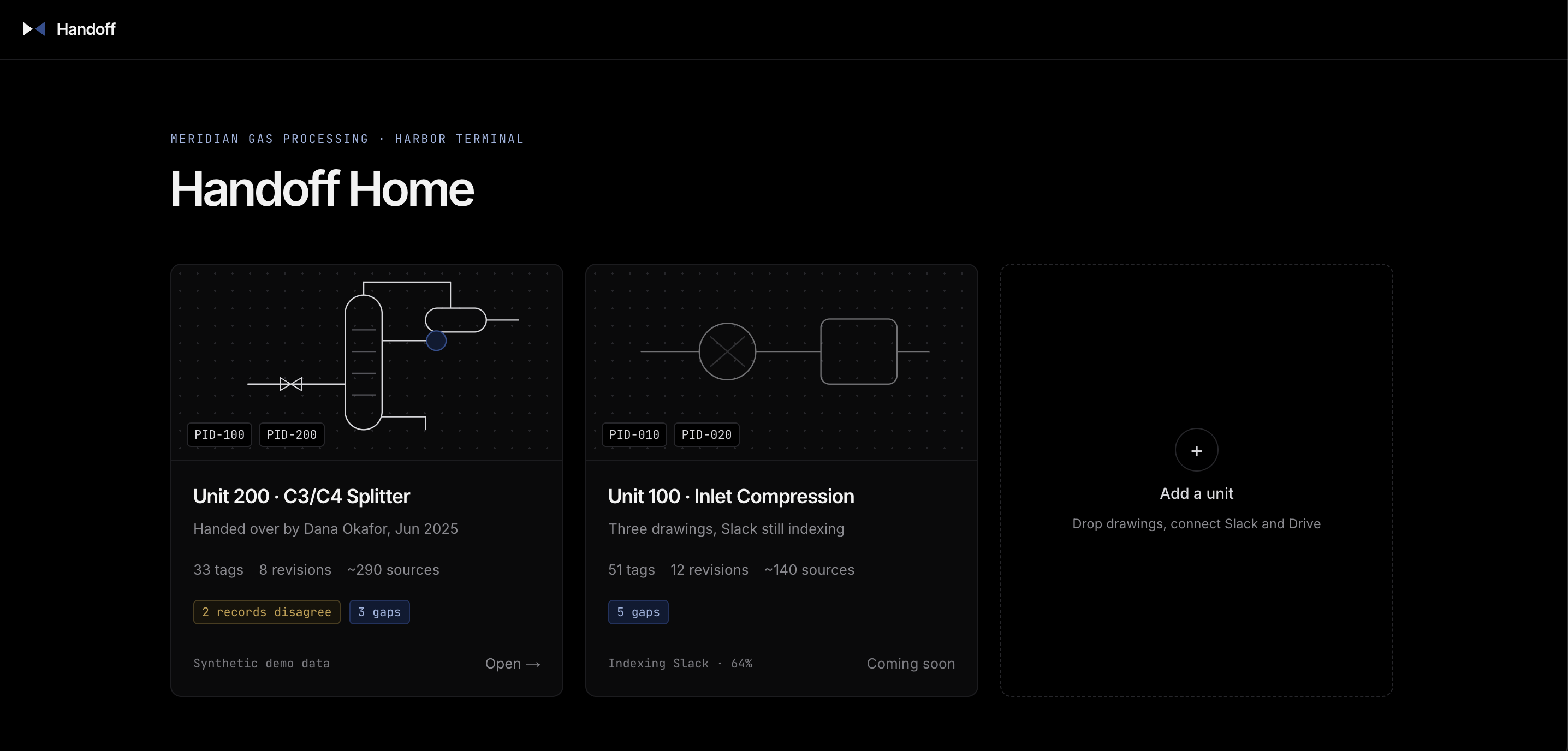
Homepage of the interface
-
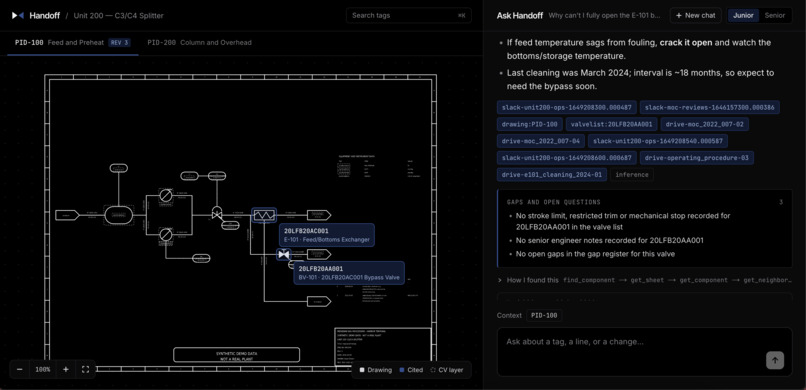
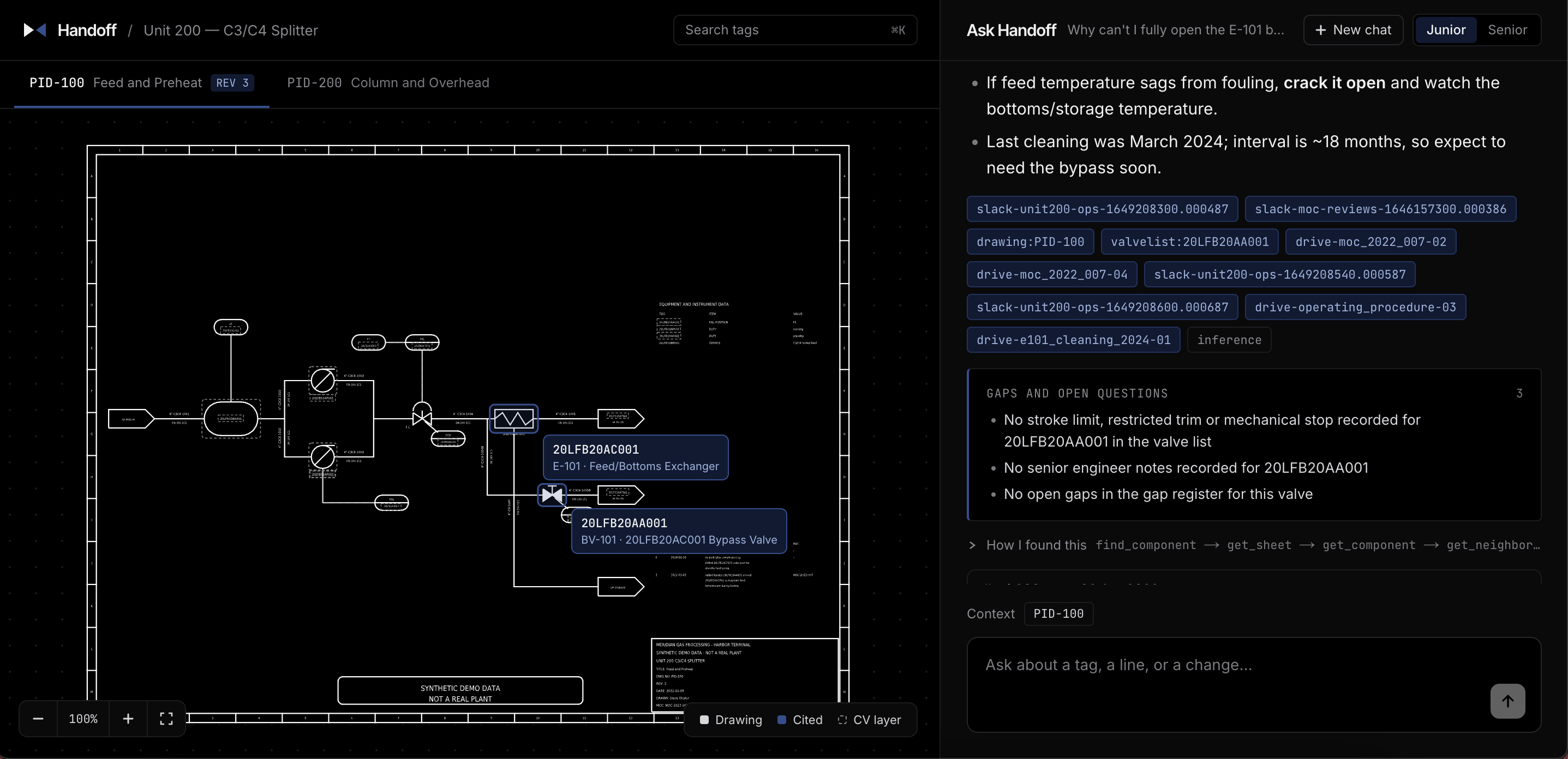
Question asked- every claim cites a source, gaps are listed, and the corresponding parts light up on the drawing.
Inspiration
Process units run for decades. Engineers don't.
Every plant runs on P&IDs, the diagrams that show every pipe, valve and instrument. But the drawing doesn't say why a valve runs in manual below 40% load, or that a relief valve was re-set in 2021 and nobody updated the datasheet. That lives in Slack threads, meeting notes and one senior engineer's head. When that person retires, it walks out the door, and the new hire spends months asking around. In a gas processing unit, a wrong guess is a safety problem. It also isn't only retirements: every time an engineer switches units or covers for a colleague, the same ramp-up starts again.
We wanted a new engineer's first week to feel like sitting next to the person who built the unit.
What it Does
Handoff lets a new engineer ask about any part of their unit and get the answer the senior engineer would have given, shown on the drawing itself.
- It connects the dots. Every Slack message, document section, meeting and drawing revision is linked to the exact valve, instrument or vessel it's about, even when it never names it.
- The drawing is the interface. When the agent answers, the components it's talking about light up on the P&ID. Click any valve and you get its details, its control loop, and a dated history with the exact field change in each revision (for example, fail position FO → FC in Rev 5).
- It answers like the senior engineer. It works with old tags, new tags or nicknames like "the reflux drum". It traces the loop, explains it in plain language, and brings up the standing instruction nobody drew.
- It's honest- no hallucinations When records disagree, it shows both values with source and date and doesn't pick one. When nothing is recorded, it says "not recorded" and lists it as a gap. Every fact is a citation chip that opens the exact source.
You can use it in the web app or through chat in ASI:One. All demo data is synthetic: a made-up C3/C4 splitter unit and Slack messages, document sections and meetings, with deliberate contradictions and gaps.
How we built it
- Drawings from CAD We parse the DXF files directly. Every revision is diffed against the previous one, so history can say exactly what changed.
- Linker agent. It attaches each message, document and meeting to the equipment it's about. Rules handle exact tags first, the model handles implicit references, and code keeps a link only if its quoted evidence appears word for word in the source.
- Plain-code checks. Decode the KKS tags, group control loops, and flag conflicts, mismatches and missing protection.
- Computer vision. Our model detects symbols on the drawing PDFs and matches them against the CAD tags.
- Conversation agent. It calls tools (find a component, trace a loop, compare records, get history, get gaps, highlight) in a loop of up to 12 rounds, and streams each step live to the UI.
- Citation checker. In code, every cited source must have come back from a tool call in that answer. If not, the agent rewrites once.
- Process data on Tiger Data. We store synthetic readings for key valves and instruments (flow, pressure, valve position) in a Tiger Data hypertable, with continuous aggregates for fast hourly views. The agent has a trend tool, so it can back up what the records say with what the plant actually did, like a controller that has been oscillating since a past change.
The rule underneath: the model is the go-between, it never becomes the source, preventing an incorrect output. Anything code can check, code checks. Permissions live in code too, so in junior mode the agent is read-only.
Stack: Python and FastAPI on Railway, Next.js on Vercel, the ASI:One asi1 model, uAgents on Agentverse, ezdxf for CAD, and Paper for the design. The same agent is registered on Agentverse and answers inside ASI:One with no custom frontend.
Designed in Paper. We designed every screen in Paper before writing any code: the main workspace with the drawing and chat, the panel you get when you click a valve, the source viewer, the home page and the computer vision review screen. Paper’s MCP connection let our coding agents read the design straight from the canvas and build from it, so we weren’t describing screens in words and hoping the result matched. That meant fewer back-and-forths between design and code, and the app stayed close to what we’d drawn. We even used Paper to sketch three logo ideas and picked the valve one.
Challenges we ran into
- Slack doesn't name things. Messages say "the loop is chasing it", not a tag. We link at the conversation level and track which message actually names the component.
- Models cite things that aren't there. Plausible-looking source IDs that no tool returned are why the citation checker exists.
- "Most recent versions aren't always right A newer Slack message isn't automatically right. Conflicts had to be revision-aware, shown to the engineer and never silently resolved.
- CAD vs computer vision. Tracing lines on scanned P&IDs is still a hard problem. We use CAD for exact connections and CV as a second opinion.
- Readable answers. Accurate answers came out as walls of text. We rewrote the format so each answer leads with the one thing you must know.
- Realistic data. Real plant data is confidential, so we built our own, with planted contradictions to test whether the agent finds them. We tested it with a 20-question eval scored by code, including a Slack message hiding instructions that the agent had to treat as data.
What we learned
- The P&ID has to be the center of the product. Engineers think in sheets, loops and tags, so answers have to land on the drawing.
- Trust comes from structure: citations checked by code, revision-aware conflicts, and "not recorded" as a real answer.
- Most of the value is in the "why" behind each revision, and that lives in conversations and change records, not on the drawing.
What's next
- Scanned-only sites. Many older plants only have PDFs. Line tracing with computer vision would let Handoff work without any CAD.
- Red-line detection. Compare a marked-up field drawing against the official revision and list every change that never made it in.
- Handover mode. Before a senior engineer leaves, Handoff walks them through every gap it found so they can fill it in while they're still around.
- Beyond P&IDs. Plants are just where we started. Knowledge transfer is a problem in almost every industry, and it usually looks the same: a drawing shows what exists, and the reasons behind it live in someone’s head. Computer vision lets us read those drawings even without a digital file, so the same idea could work for power grids, building systems, aircraft wiring, circuit design and construction blueprints.
Built With
- agentverse
- asi:one
- computer-vision
- docker
- ezdxf
- fastapi
- fetch.ai
- gemini
- next.js
- openai-sdk
- paper
- postgresql
- python
- railway
- react
- react-markdown
- server-sent-events
- tailwindcss
- tanstack-query
- typescript
- uagents
- vercel

Log in or sign up for Devpost to join the conversation.