-
-
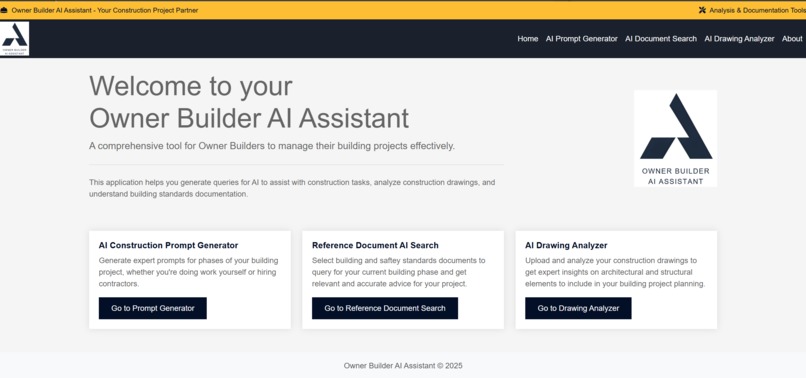
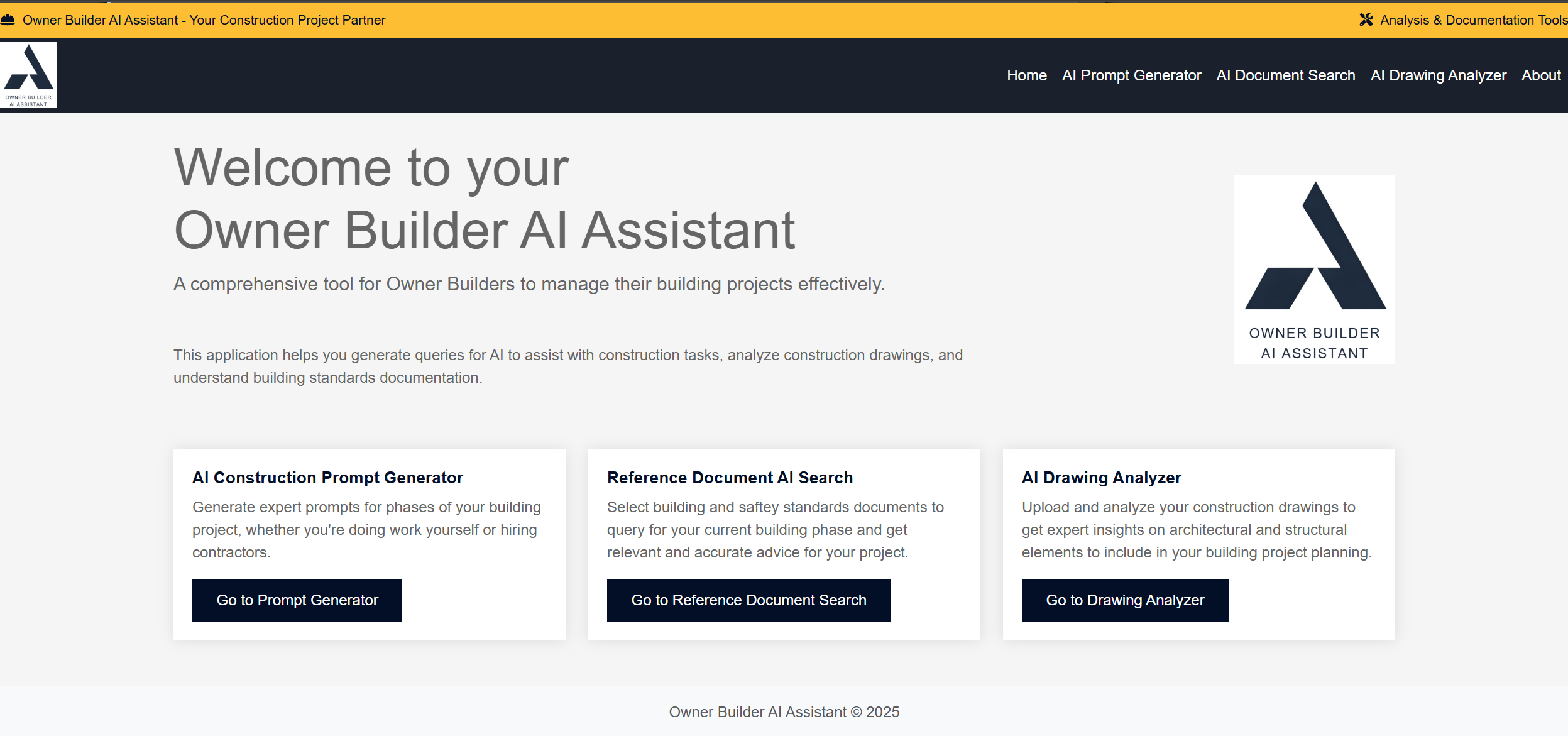
Owner Builder AI Assistant
-
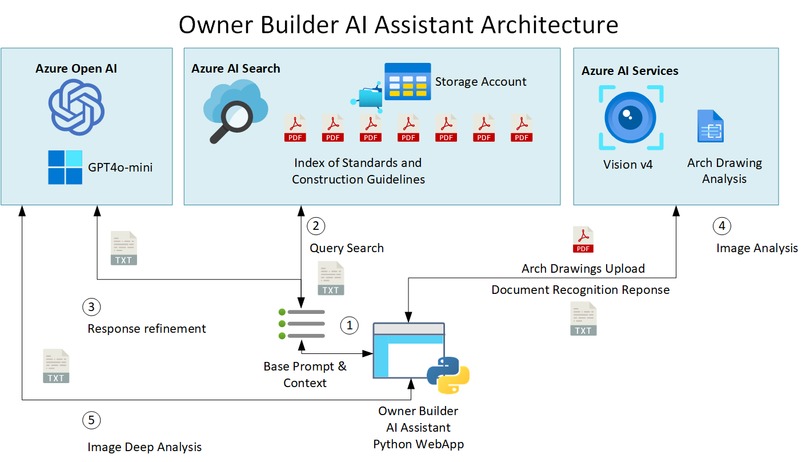
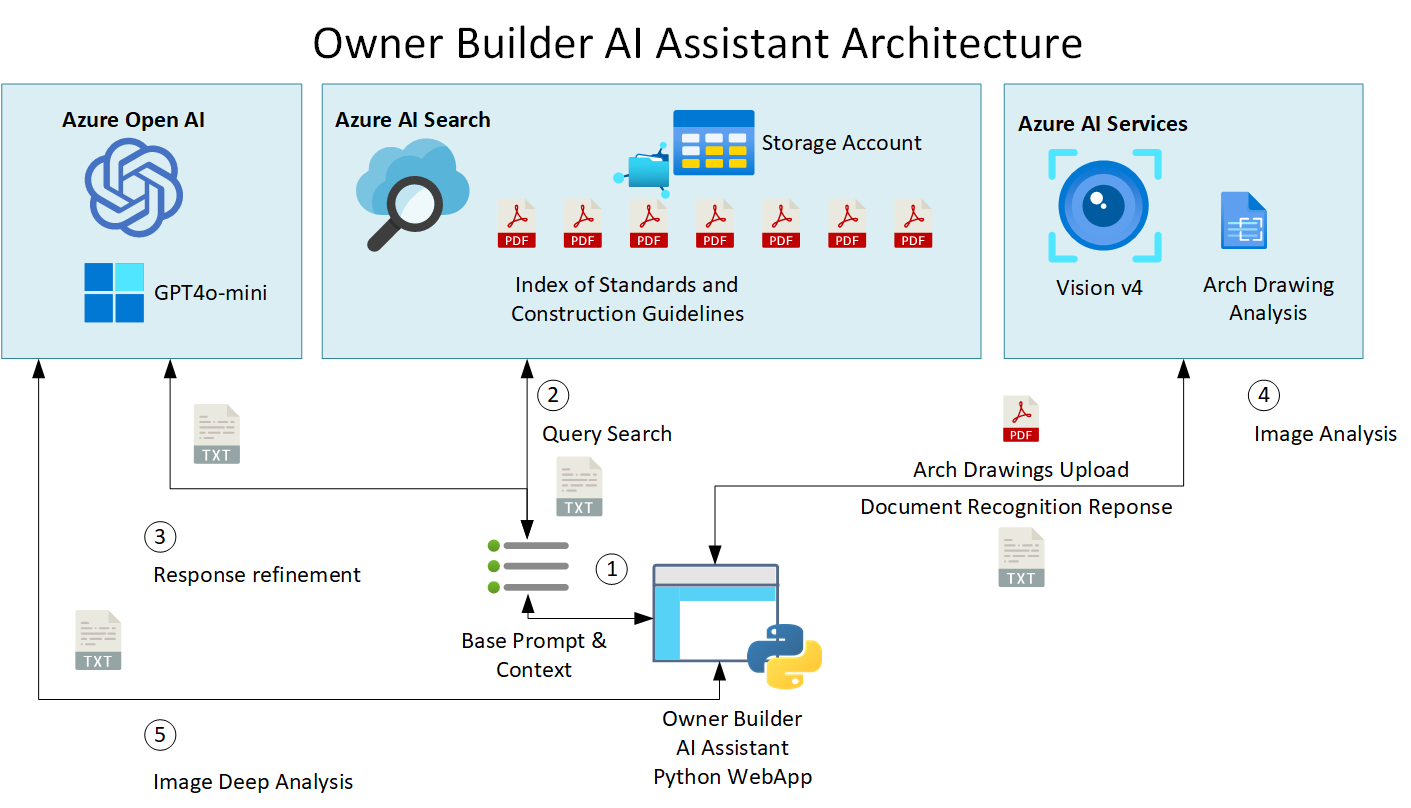
Owner Builder AI Assistant Architecture
-
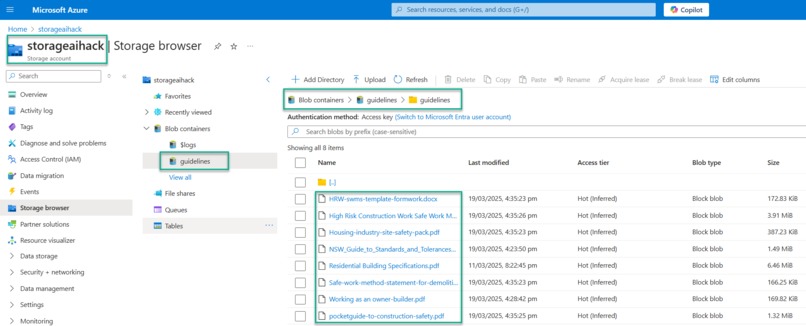
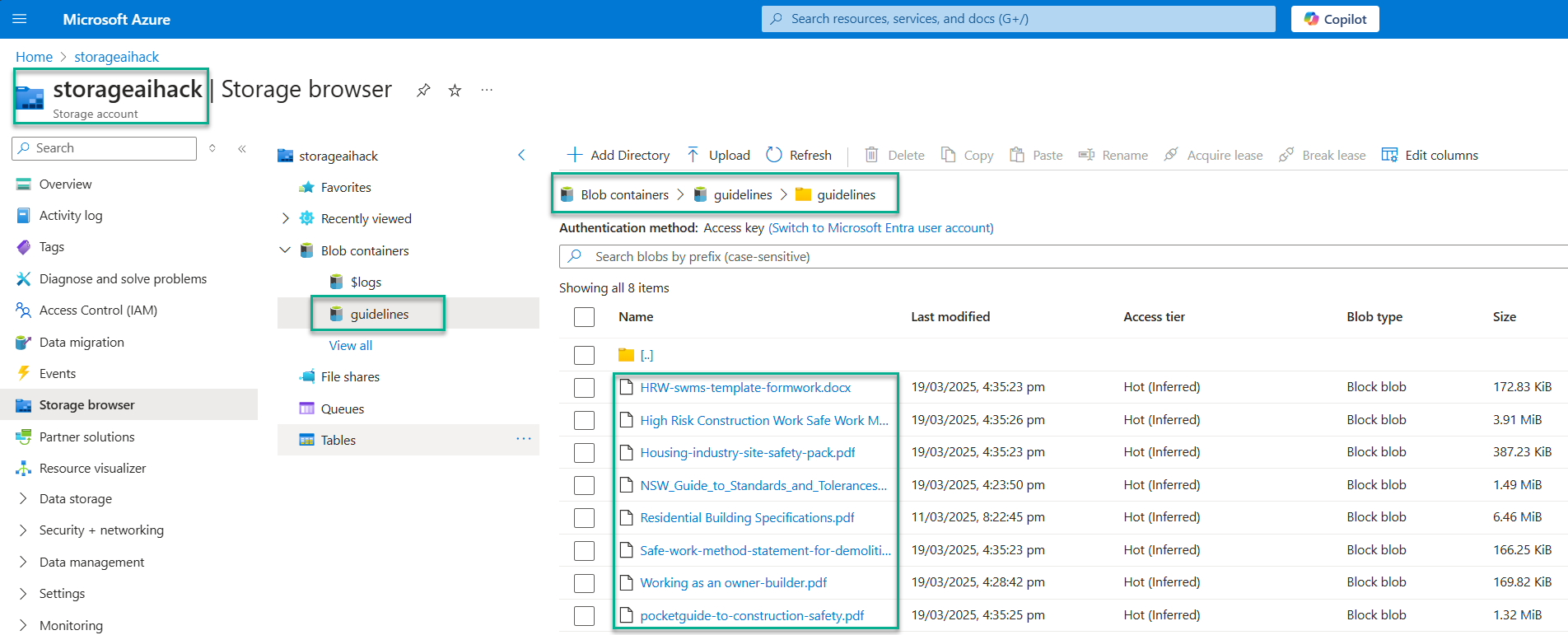
Reference standards compliance health & safety documents
-
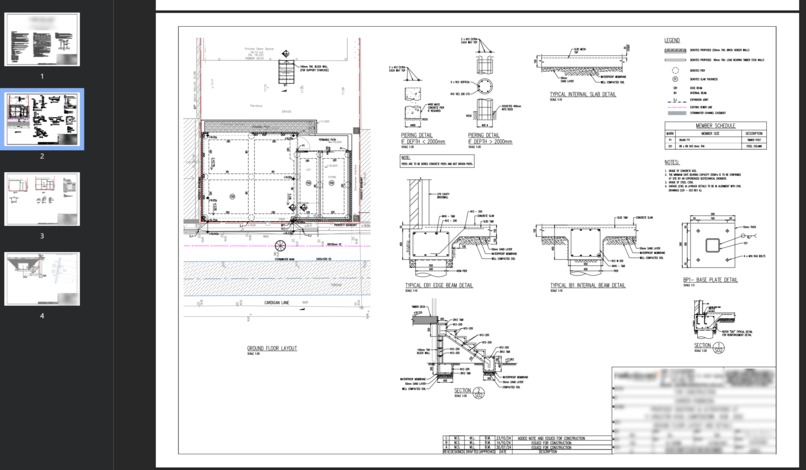
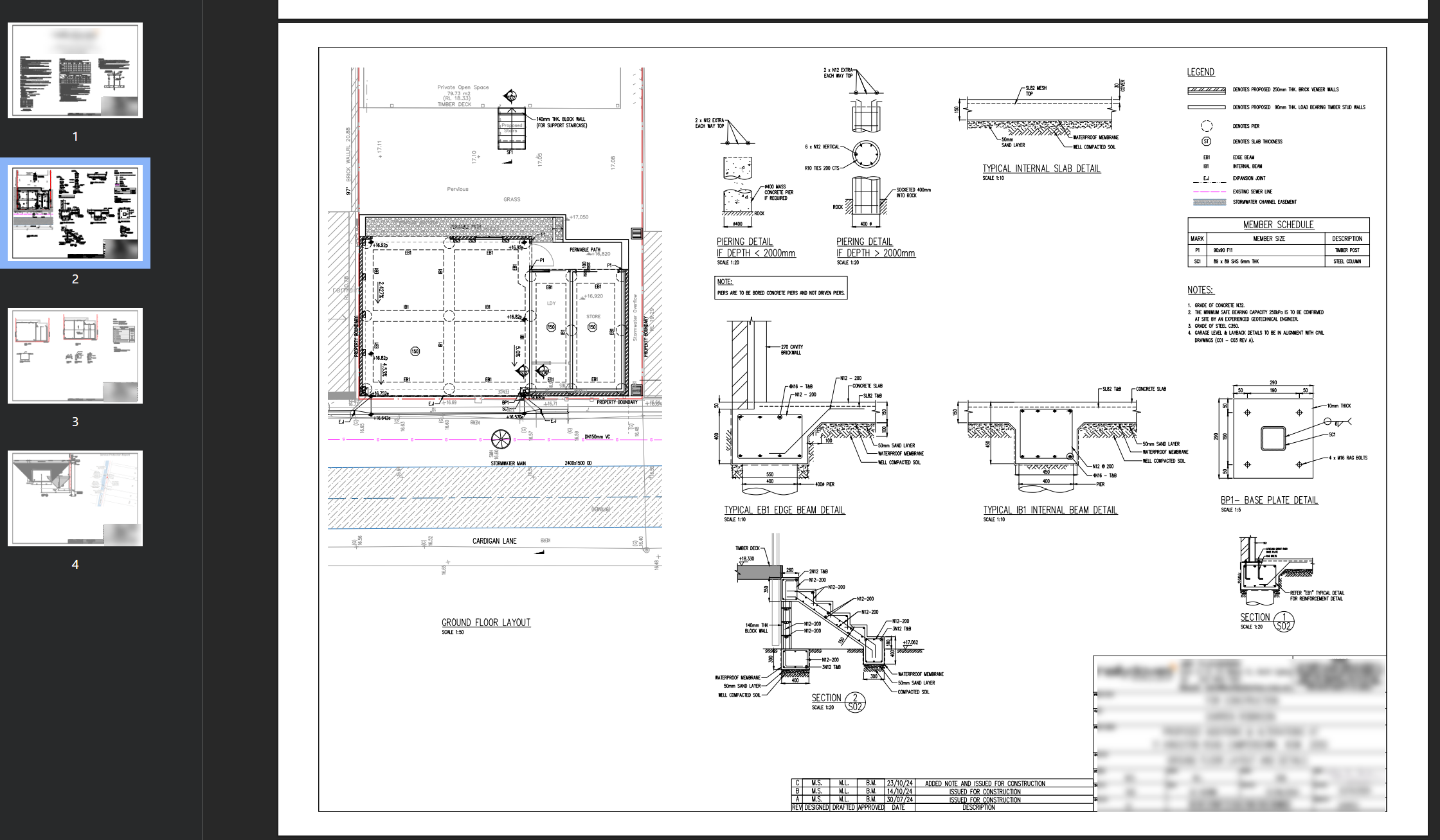
My structual drawings for my project
The Owner Builder AI Assistant: My Azure AI Hackathon Journey
Hackathon Category: Best Use of Azure AI
Inspiration:
The inspiration for the Owner Builder AI Assistant stemmed directly from my own experience as a first-time owner builder. I'm currently embarking on the journey of building my own home, and the reality of managing the project myself quickly became apparent. One of the most time-consuming and often frustrating aspects has been the process of requesting quotes from various trades. Ensuring these quotes are accurate, comprehensive, and aligned with building standards feels like a constant uphill battle, especially with limited prior experience. I envisioned a tool that could act as a digital assistant, guiding me through these complexities and empowering me to manage my construction project with greater confidence and efficiency.
The Owner Builder AI Assistant assists by generating prompts for AI based on your project phase and tasks that are then used in conjunction with building standards to generate either how to do the job yourself or what to ask for from a contractor. It then allows you to upload your approved drawings and gives you insight to them and what is required and why to align with building standards and to achieve building sign-off.
Accomplishments that I'm proud of:
As a non-developer, building a functional web application like the Owner Builder AI Assistant was a significant achievement made possible by the power of AI and GitHub Copilot. Leveraging these tools allowed me to translate my vision into a tangible solution, demonstrating the potential of AI to simplify software development and empower individuals with limited coding experience to create innovative solutions for real-world problems.
What I Learned:
This hackathon project was a fantastic learning opportunity, pushing me to explore and implement several new Azure services and development techniques. Key learnings include:
- Azure AI Search: I gained hands-on experience with Azure AI Search, specifically learning how to create indexers and define skillsets to efficiently ingest and process large volumes of reference documents, such as building codes and safety standards. This was crucial for the "Reference Document Search" feature.
- Latest Azure AI Vision APIs: I delved into the latest Azure AI Vision APIs (v4) to develop the "Drawing Analyzer" capability. Understanding how to leverage these APIs to analyze PDF drawings, extract relevant architectural and structural information, and provide actionable recommendations was a significant learning curve.
- GitHub Copilot for Accelerated Development: A major highlight was learning how to effectively utilize GitHub Copilot. It significantly accelerated the process of transitioning my initial prototypes from Jupyter Notebooks into a fully functional Flask web application. Copilot's intelligent code suggestions and autocompletion proved invaluable in streamlining the development workflow, especially given my non-developer background.
How I Built It:
The development process followed a structured approach:
- Prototyping in Azure ML Studio: I began by building the core AI capabilities as individual components within Azure Machine Learning Studio using Jupyter Notebooks and with the Azure AI Foundry Playground. This allowed me to experiment with different models and approaches for prompt generation, document analysis, and drawing interpretation in a focused environment.
- Transition to Flask WebApp with VSCode: Once the individual components were functioning as desired, I moved the functional blocks of code to Visual Studio Code. This is where GitHub Copilot played a crucial role. I leveraged Copilot's assistance to structure the code into a Flask web application framework, create the necessary routes, and build the user interface elements.
- Integration of Azure Services: I integrated the Azure AI Search service to handle the querying of building standards documents in conjunction with Azure Open AI and the 4o-mini model as well as the Azure AI Vision APIs for the drawing analysis functionality. This involved setting up the necessary Azure resources and configuring the application to interact with these services.
AI Document Search
The Document Search component demonstrates effective integration of Azure AI services:
Azure AI Search
- Indexes and semantically searches construction reference documents
- Handles complex natural language queries about building standards
- Retrieves the most relevant documents based on user queries
- Returns confidence-ranked document matches with summaries
Azure OpenAI
- Processes selected documents as context for generating responses
- Synthesizes information across multiple reference sources
- Follows specialized system instructions for construction knowledge
- Generates comprehensive, well-formatted recommendations
Multi-stage AI Processing
- Search Phase: Semantic search identifies relevant documents
- Selection Phase: User reviews and selects contextual documents
- Generation Phase: OpenAI creates recommendations using selected documents
- Presentation: Results formatted with markdown for readability
This implementation demonstrates Azure's document intelligence capabilities where AI Search finds relevant information that OpenAI then processes to create actionable construction guidance.
The GitHub Repo contains the reference, standards and workplace health and safety documents I used for New South Wales and Australia. All are available online from the respective government agencies. A screenshot of the documents in the storage account is included in the media section at the top of this page.
AI Drawing Analyzer
The Drawing Analyzer component demonstrates sophisticated Azure AI service integration:
Azure Computer Vision
- Processes multiple file formats (JPG, PNG, PDF, TIFF)
- Generates descriptive captions of construction drawings
- Creates confidence-scored tags identifying key drawing elements
- Analyzes multi-page PDFs page-by-page
Azure OpenAI
- Powers the "Deep Analysis" functionality
- Takes Computer Vision output as contextual input
- Performs detailed construction-specific interpretation
- Returns rich markdown-formatted technical insights
Progressive AI Analysis Flow
- First-level: Basic visual understanding via Computer Vision
- Second-level: Detailed construction interpretation via OpenAI
- Presentation: Results with confidence scores and formatted highlights
This demonstrates effective AI service chaining where output from one Azure service becomes input for another, creating a comprehensive drawing analysis system.
The Github repo contains a screenshot of my structual engineering drawings that was shown in the demo. This is also included in the media section at the top of this page.
Challenges I Faced:
Despite the exciting learning experience, I encountered several challenges during the development process:
- Integrating Diverse AI Capabilities: Combining the different AI components (prompt generation, document search, response analysis and drawing analysis) into a cohesive and user-friendly web application required careful planning and execution. Ensuring seamless transition flow and interaction between these features presented a technical hurdle.
- Handling Complex PDF Drawings: Analyzing complex and sometimes poorly formatted PDF drawings with the Azure AI Vision APIs proved to be more challenging than initially anticipated. Fine-tuning the API calls and implementing error handling to accommodate various drawing formats required significant effort.
- Time Constraints: As with any hackathon, time was a significant constraint. Balancing the development of all the planned features within the limited timeframe required prioritizing tasks and making strategic decisions about scope.
What's Next for Owner Builder AI Assistant: The Owner Builder AI Assistant has the potential for significant future development. I'm now looking forward to using it on my building project.
Here are some of my thoughts for next steps with it:
- Enhanced Quote Management: Expand the "Prompt Generator" to include features for organizing and comparing quotes from different contractors, potentially even incorporating AI to analyze the quotes for completeness and potential hidden costs.
- Project Scheduling and Task Management: Integrate features for creating and managing project schedules, assigning tasks, and tracking progress, further streamlining the owner builder's workflow.
- Cost Tracking and Budget Management: Implement tools for tracking project expenses, managing budgets, and providing insights into potential cost overruns.


Log in or sign up for Devpost to join the conversation.