-
-
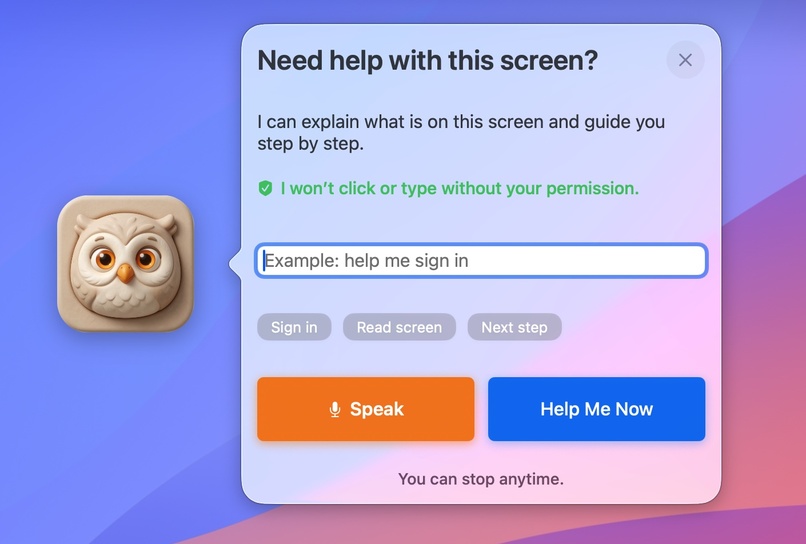
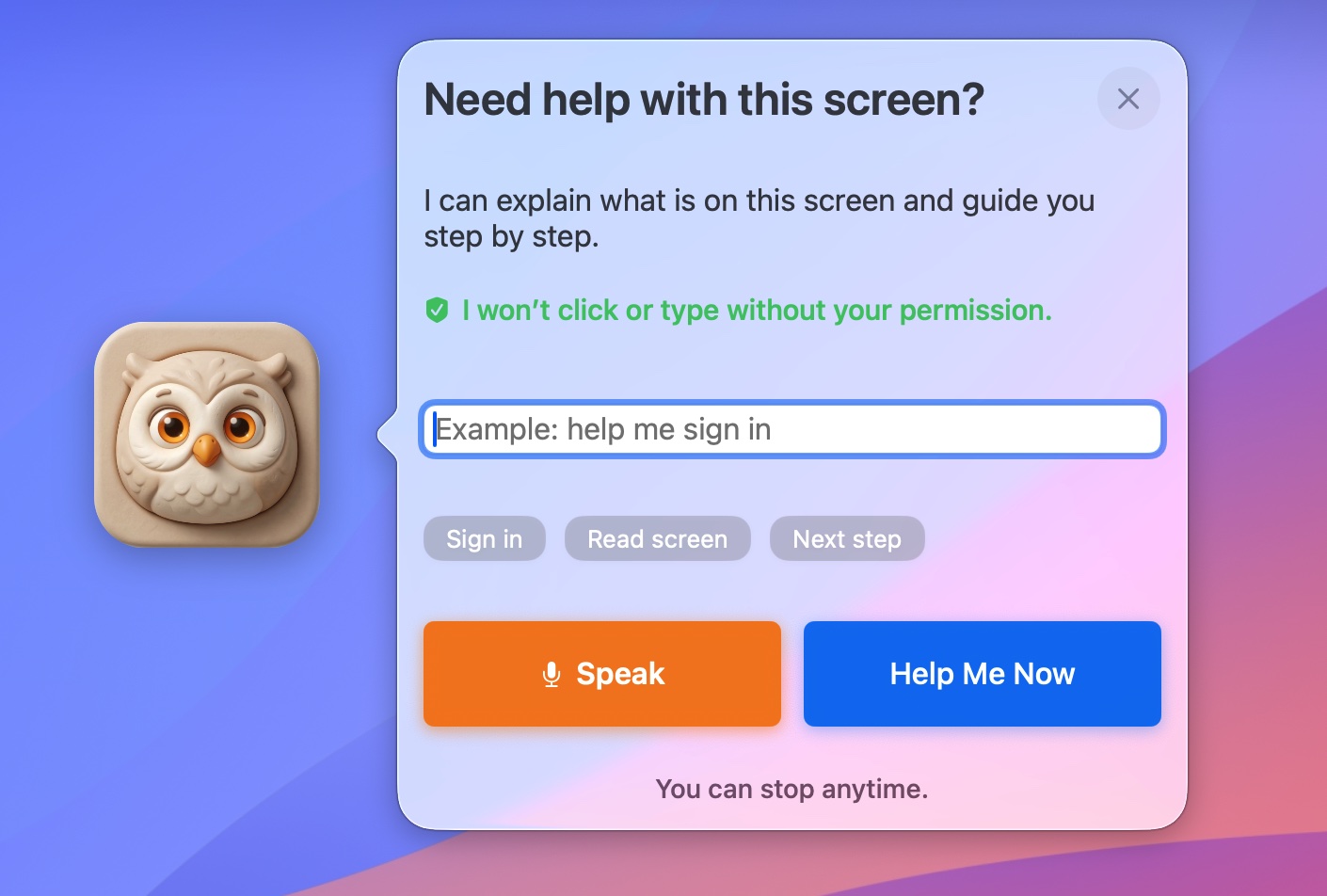
OwlGuide Click to Open
-
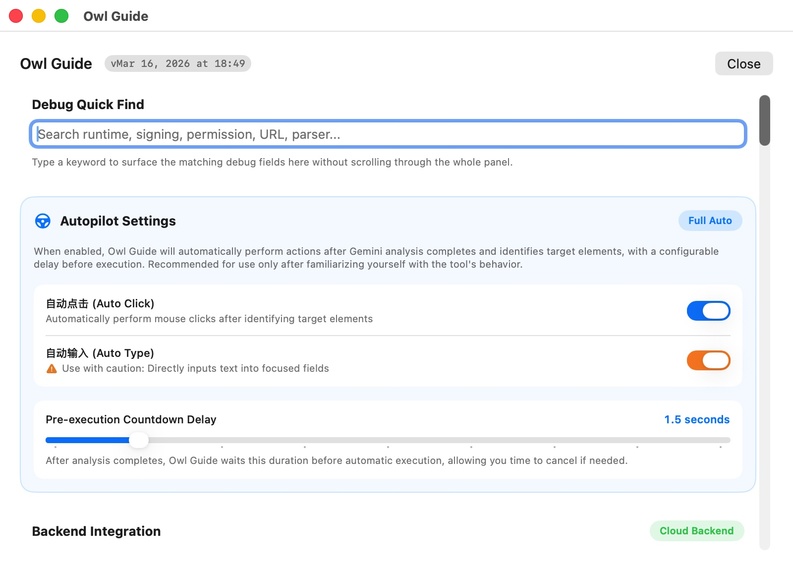
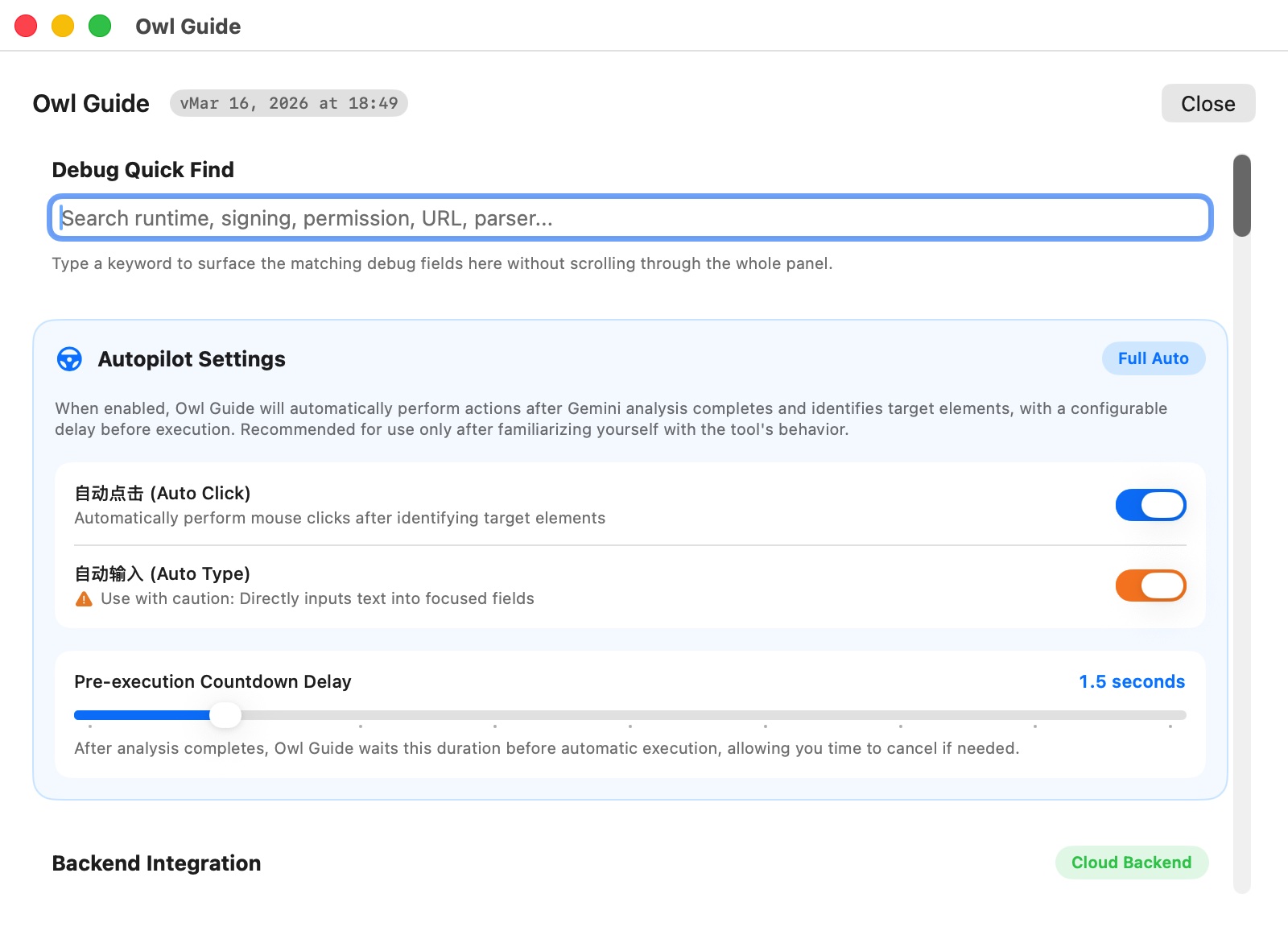
Click three times to enter Settings
-
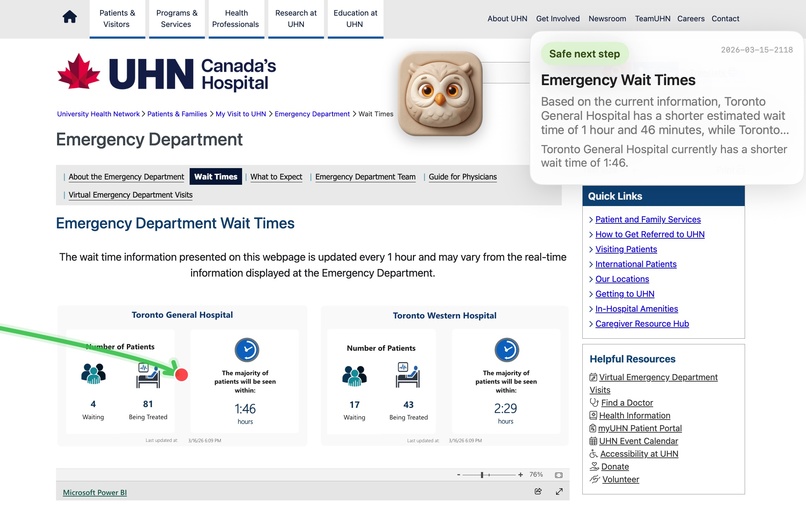
help seniors make the right choices
-
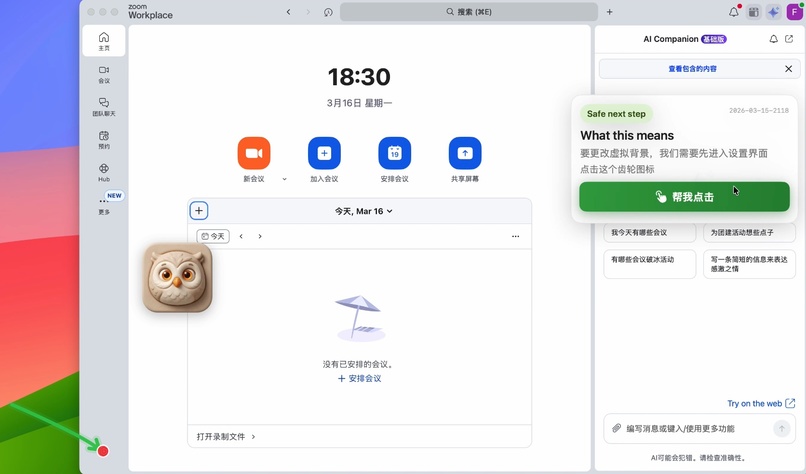
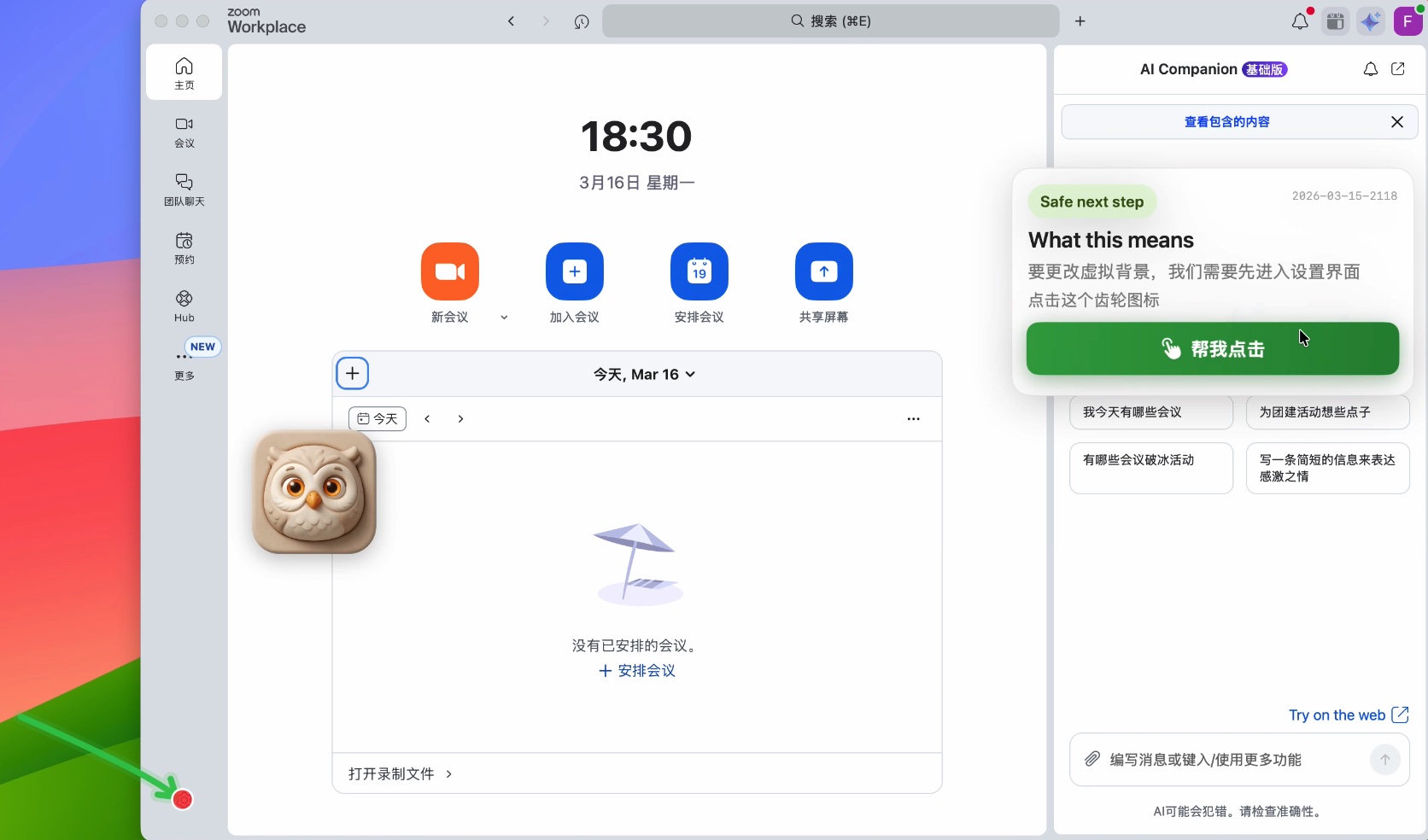
Help seniors use the computer
-

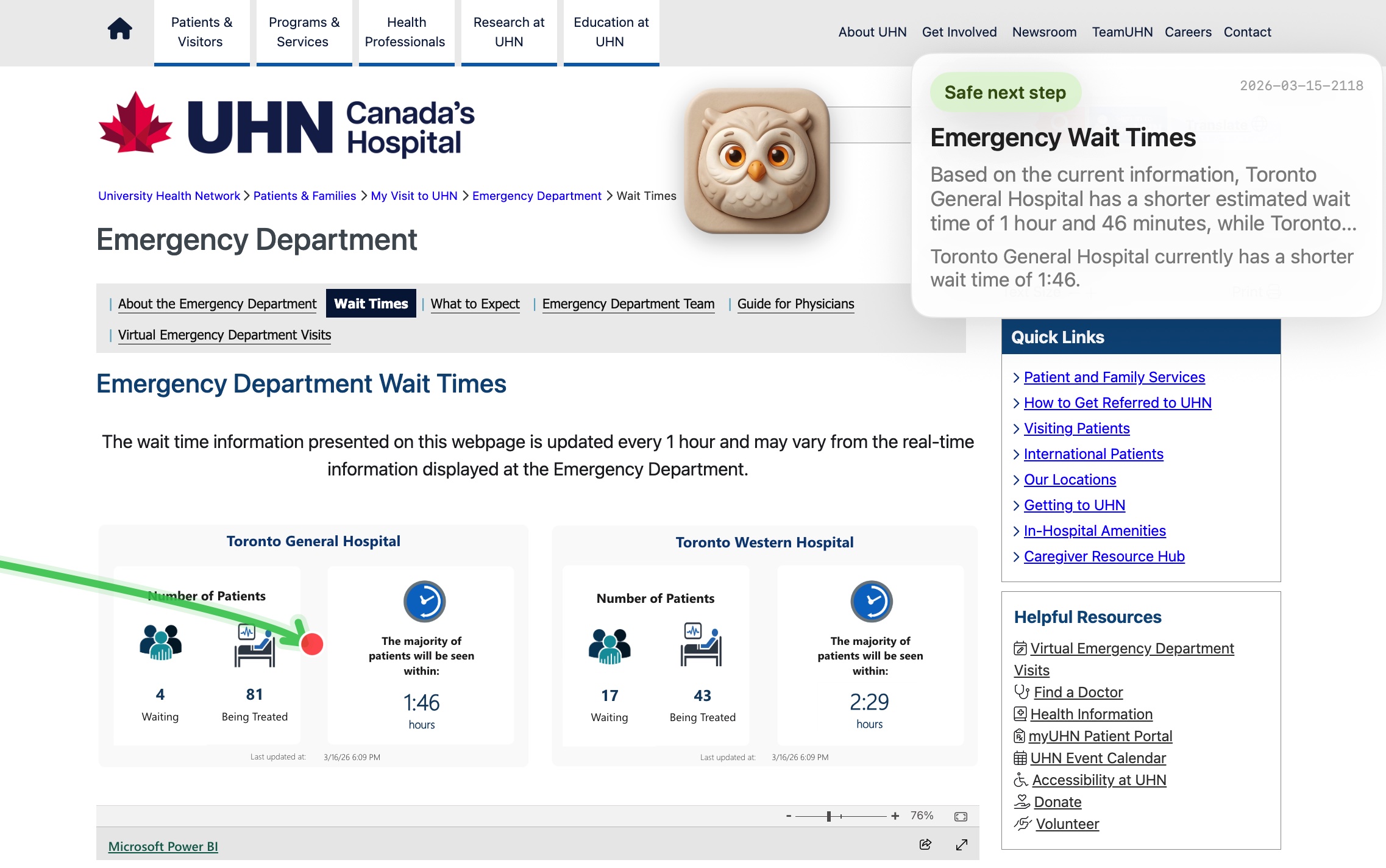
Help seniors fill out complicated forms

Inspiration
OwlGuide began with a very personal problem. I watched my parents hesitate in front of a computer, not because they lacked goals, but because they were afraid of making mistakes. They often knew what they wanted to do, yet a confusing interface or one wrong click could stop them completely.
Coming from a liberal arts background, I had always seen software engineering as something distant from my own skill set. But this project gave me a reason to cross that boundary. I did not want to build another manual or another complicated tool. I wanted to build a calm, trustworthy desktop companion that could help older adults understand what is on their screen, guide them step by step, and give them confidence to use technology again.
In many ways, OwlGuide started as something built for my parents, but it quickly became a broader idea: how can we make computers feel less intimidating for seniors and other digitally vulnerable users?
How I built it
OwlGuide was built through a close collaboration between product vision, human-centered design, and AI-assisted development. I led the product direction, user experience, interaction model, and decision-making around trust and accessibility. AI tools helped me translate those ideas into working software and iterate much faster than I could alone.
The project is a native macOS desktop assistant designed to stay lightweight, approachable, and visible without being intrusive.
Frontend and native UI: Built with Swift and SwiftUI, including a floating desktop presence designed to feel friendly and reassuring rather than technical.
Voice interaction: Integrated speech input so users can ask for help in natural language instead of relying on menus or complex instructions.
Screen understanding: Combined multimodal AI capabilities with screen context so OwlGuide can interpret what the user is looking at and provide relevant help.
Action layer: Used macOS accessibility and input APIs to support guided interaction and, with user permission, assist with clicks or typing when appropriate.
Trust model: Designed the experience so help is step by step, permission-based, and focused on reducing fear rather than maximizing automation.
Challenges I ran into
The biggest challenge was the gap between product intuition and system-level implementation. As a non-technical founder, I was not only learning new programming concepts, but also learning how desktop operating systems actually work under the hood.
Some of the hardest parts included:
Permissions and system trust
Building an assistant that can help with screen-level interaction on macOS means working carefully with accessibility permissions, input control, and user consent. Understanding how to make that experience reliable, transparent, and safe was one of the hardest parts of the project.Designing for trust, not just capability
It is easy to make an assistant sound powerful. It is much harder to make it feel safe for older adults. A major challenge was deciding when OwlGuide should guide, when it should wait, and how to communicate clearly that it will not act without permission.Native UI polish
Building a floating assistant that feels warm and approachable on macOS involved many rounds of iteration in layout, styling, window behavior, and visual polish. Small details made a big difference in whether the product felt helpful or intimidating.Learning while building
I was developing the product while also developing my own technical literacy. That meant every engineering obstacle was also a learning curve, which made the process slower but also much more meaningful.
Accomplishments that I’m proud of
What I am most proud of is not just that I built a working macOS application, but that I built something rooted in empathy. OwlGuide began as an attempt to help my parents feel less afraid of using a computer, and it evolved into a product with a much wider mission.
I am also proud that, despite coming from a non-engineering background, I was able to turn an idea into a functional native desktop product, learn how to break down technical problems, and collaborate effectively with AI tools without losing sight of the user experience.
Most of all, I am proud of the moments when the product made technology feel less scary and more approachable for the people it was designed for.
What’s next for OwlGuide
The next step is to expand OwlGuide from single-screen help into richer multi-step assistance for everyday tasks. That includes scenarios like finding a file, sending a photo, navigating unfamiliar websites, or helping a user complete a process they would otherwise abandon out of uncertainty.
Longer term, I want OwlGuide to become a trustworthy desktop guide for seniors and other digitally vulnerable users — not by replacing human judgment, but by giving people more confidence, more clarity, and more independence when using technology.## Inspiration
OwlGuide began with a very personal problem. I watched my parents hesitate in front of a computer, not because they lacked goals, but because they were afraid of making mistakes. They often knew what they wanted to do, yet a confusing interface or one wrong click could stop them completely.
Coming from a liberal arts background, I had always seen software engineering as something distant from my own skill set. But this project gave me a reason to cross that boundary. I did not want to build another manual or another complicated tool. I wanted to build a calm, trustworthy desktop companion that could help older adults understand what is on their screen, guide them step by step, and give them confidence to use technology again.
In many ways, OwlGuide started as something built for my parents, but it quickly became a broader idea: how can we make computers feel less intimidating for seniors and other digitally vulnerable users?
How I built it
OwlGuide was built through a close collaboration between product vision, human-centered design, and AI-assisted development. I led the product direction, user experience, interaction model, and decision-making around trust and accessibility. AI tools helped me translate those ideas into working software and iterate much faster than I could alone.
The project is a native macOS desktop assistant designed to stay lightweight, approachable, and visible without being intrusive.
Frontend and native UI: Built with Swift and SwiftUI, including a floating desktop presence designed to feel friendly and reassuring rather than technical.
Voice interaction: Integrated speech input so users can ask for help in natural language instead of relying on menus or complex instructions.
Screen understanding: Combined multimodal AI capabilities with screen context so OwlGuide can interpret what the user is looking at and provide relevant help.
Action layer: Used macOS accessibility and input APIs to support guided interaction and, with user permission, assist with clicks or typing when appropriate.
Trust model: Designed the experience so help is step by step, permission-based, and focused on reducing fear rather than maximizing automation.
Challenges I ran into
The biggest challenge was the gap between product intuition and system-level implementation. As a non-technical founder, I was not only learning new programming concepts, but also learning how desktop operating systems actually work under the hood.
Some of the hardest parts included:
Permissions and system trust
Building an assistant that can help with screen-level interaction on macOS means working carefully with accessibility permissions, input control, and user consent. Understanding how to make that experience reliable, transparent, and safe was one of the hardest parts of the project.Designing for trust, not just capability
It is easy to make an assistant sound powerful. It is much harder to make it feel safe for older adults. A major challenge was deciding when OwlGuide should guide, when it should wait, and how to communicate clearly that it will not act without permission.Native UI polish
Building a floating assistant that feels warm and approachable on macOS involved many rounds of iteration in layout, styling, window behavior, and visual polish. Small details made a big difference in whether the product felt helpful or intimidating.Learning while building
I was developing the product while also developing my own technical literacy. That meant every engineering obstacle was also a learning curve, which made the process slower but also much more meaningful.
Accomplishments that I’m proud of
What I am most proud of is not just that I built a working macOS application, but that I built something rooted in empathy. OwlGuide began as an attempt to help my parents feel less afraid of using a computer, and it evolved into a product with a much wider mission.
I am also proud that, despite coming from a non-engineering background, I was able to turn an idea into a functional native desktop product, learn how to break down technical problems, and collaborate effectively with AI tools without losing sight of the user experience.
Most of all, I am proud of the moments when the product made technology feel less scary and more approachable for the people it was designed for.
What’s next for OwlGuide
The next step is to expand OwlGuide from single-screen help into richer multi-step assistance for everyday tasks. That includes scenarios like finding a file, sending a photo, navigating unfamiliar websites, or helping a user complete a process they would otherwise abandon out of uncertainty.
Longer term, I want OwlGuide to become a trustworthy desktop guide for seniors and other digitally vulnerable users — not by replacing human judgment, but by giving people more confidence, more clarity, and more independence when using technology.


Log in or sign up for Devpost to join the conversation.