-
-
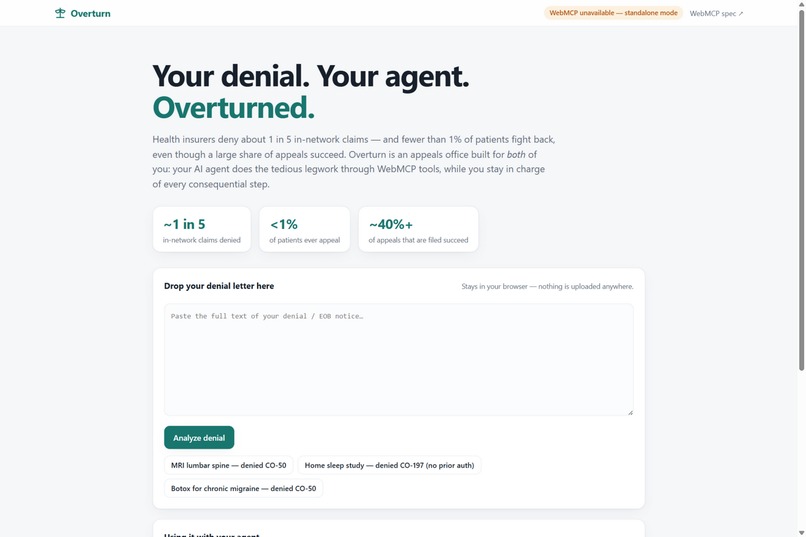
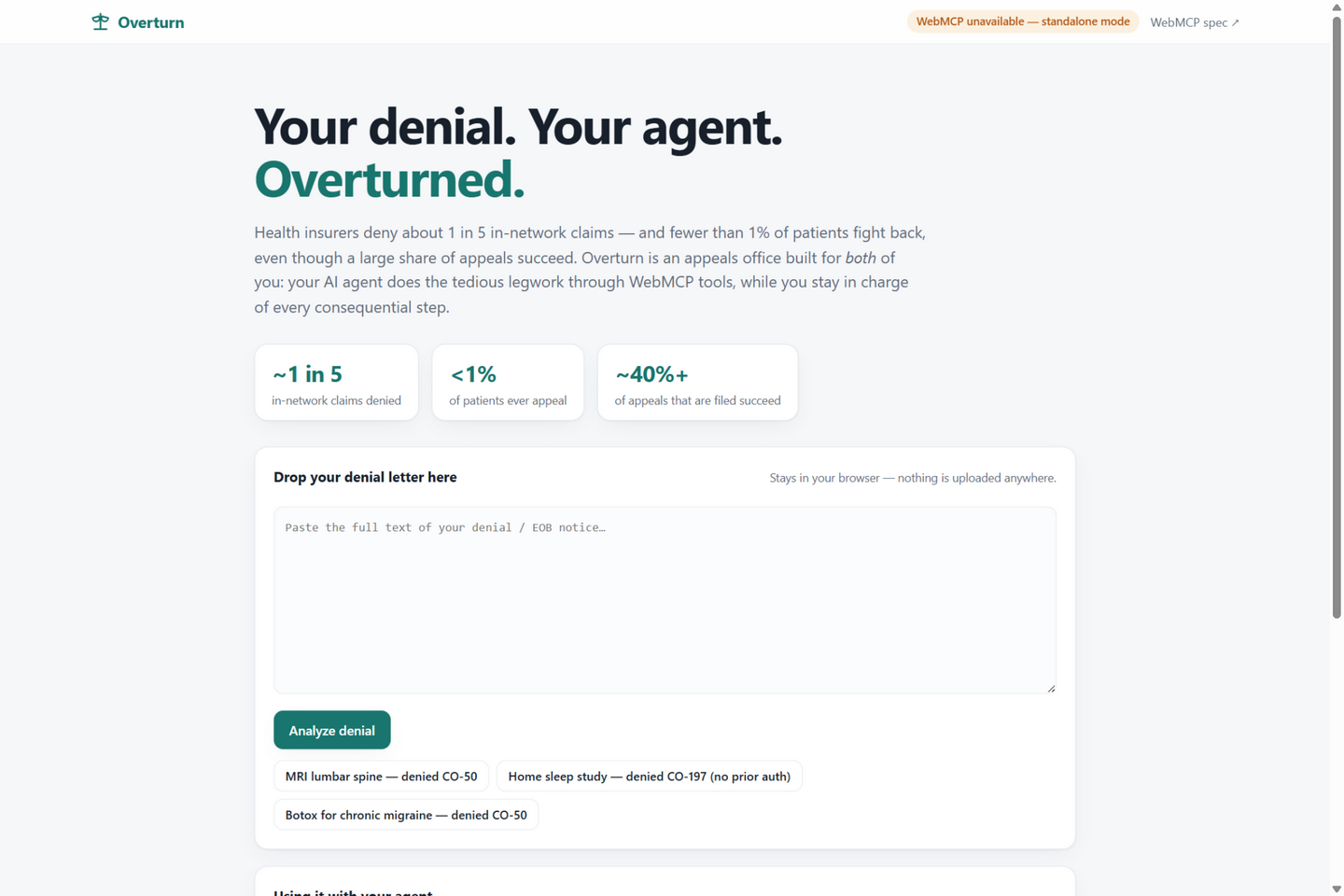
landing page with the problem stats
-
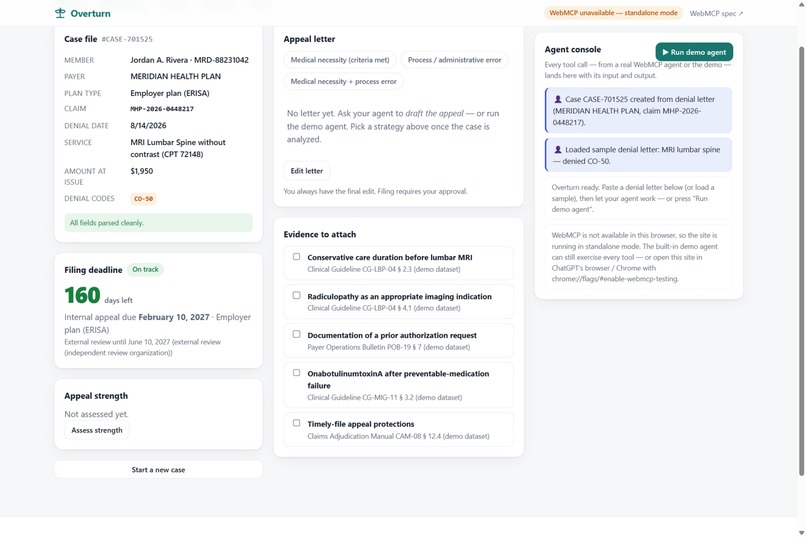
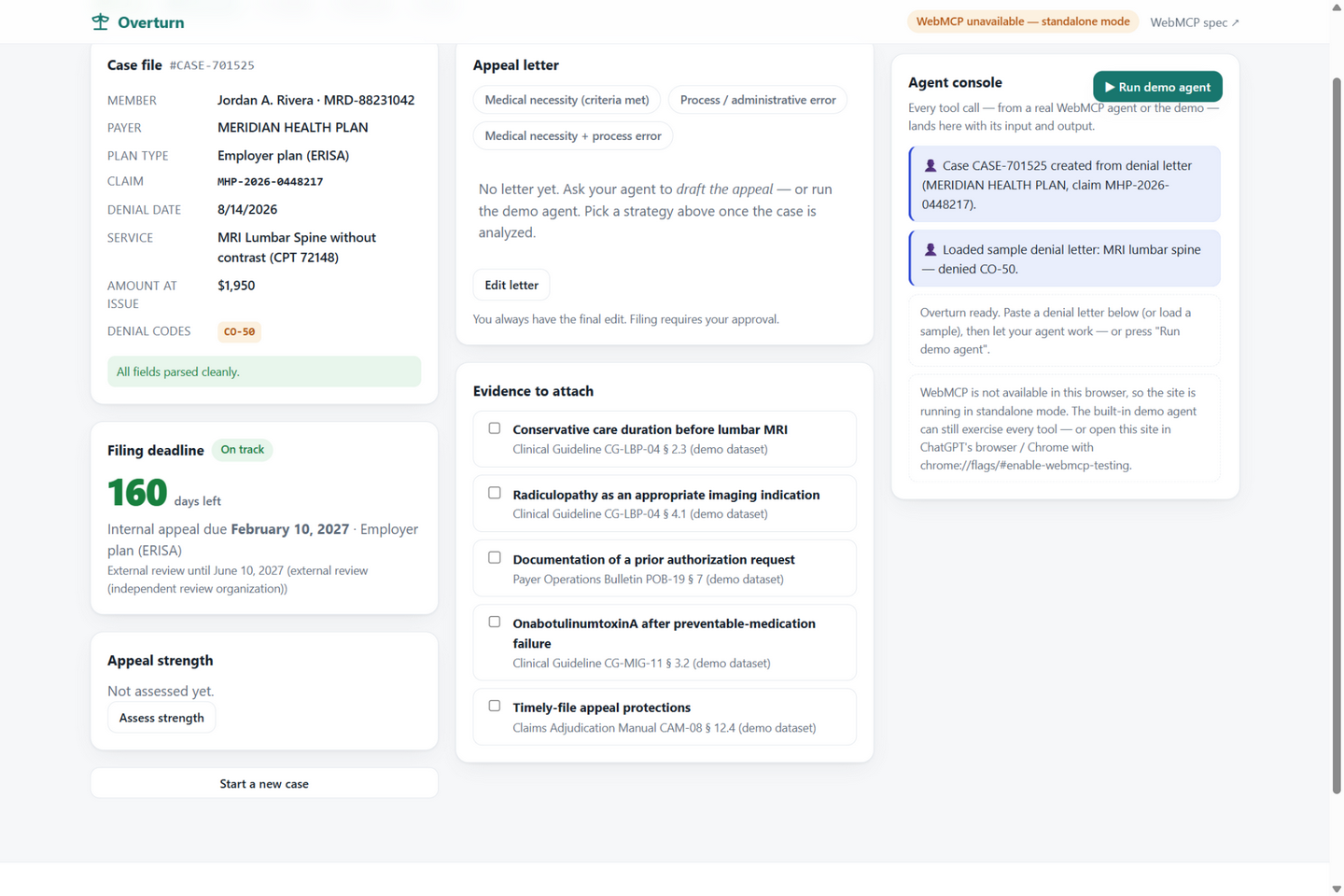
parsed case file, 160-day deadline, evidence checklist
-
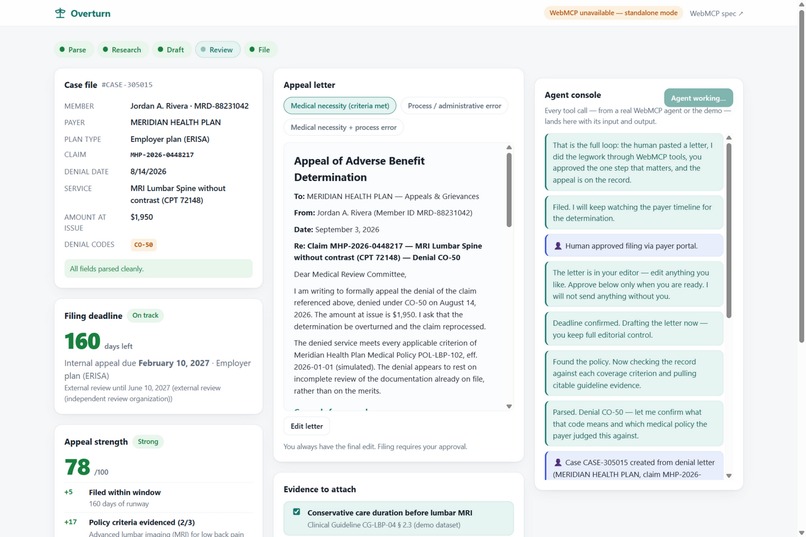
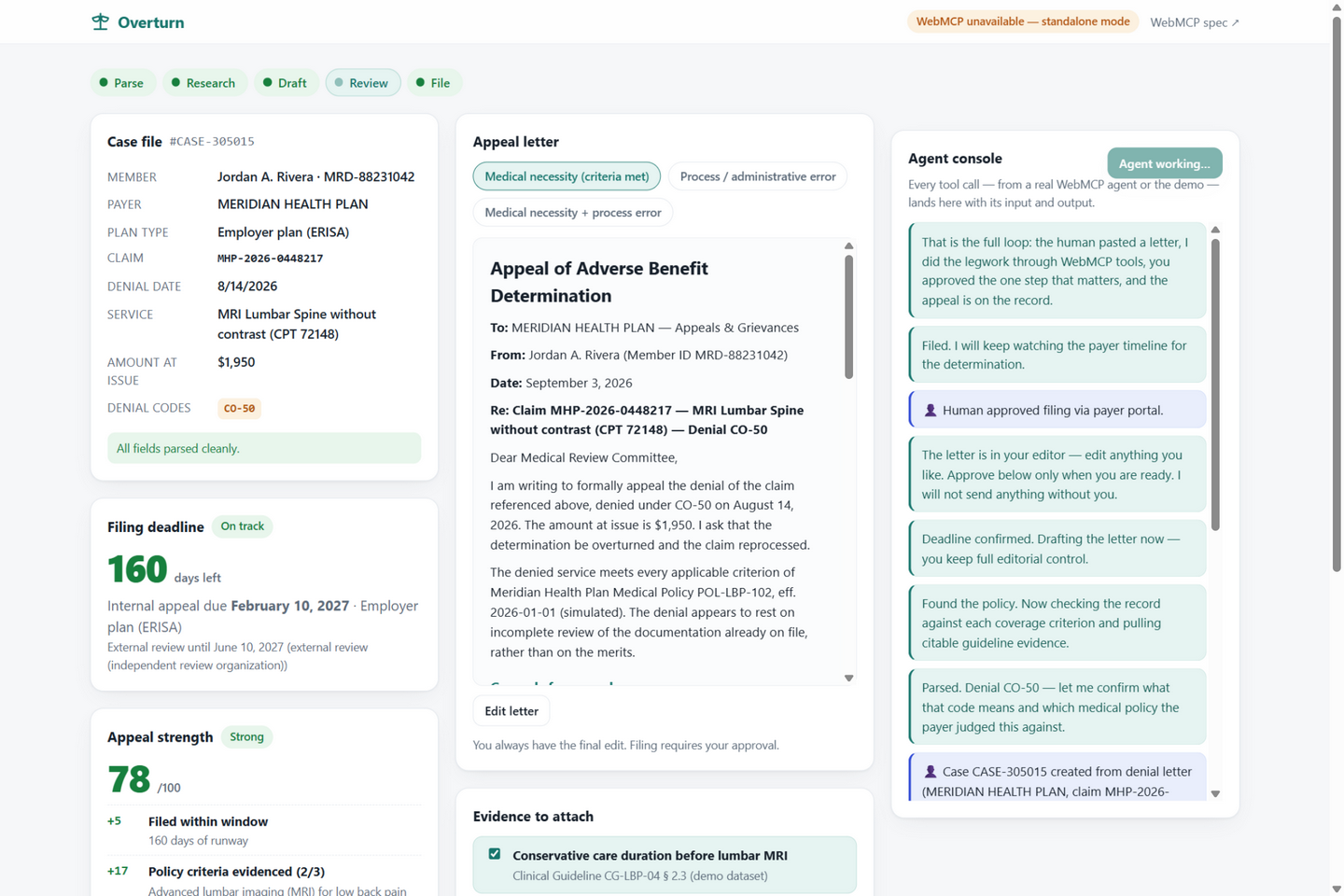
after approval, confirmation and payer timeline in the console
-
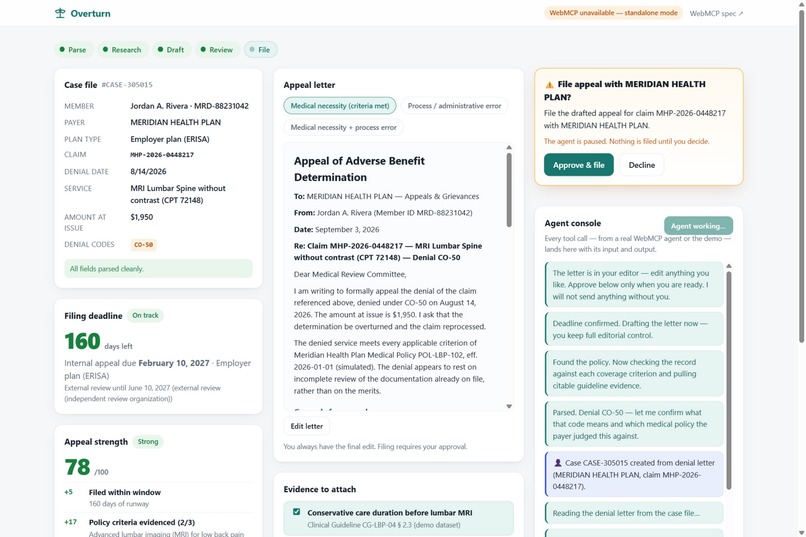
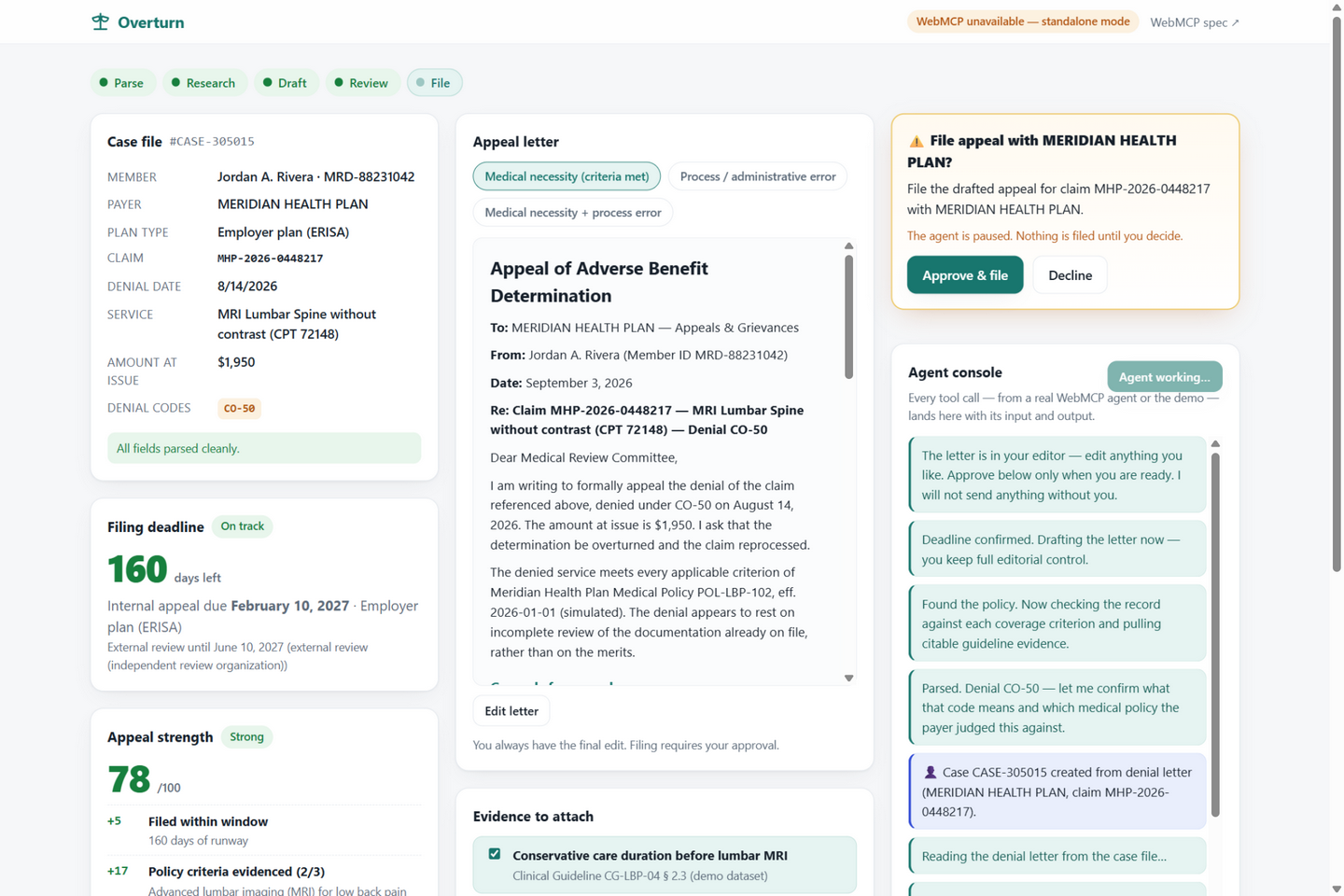
use this one first: the agent paused mid-tool with the drafted letter, strength score 78/Strong, and the "Approve & file / Decline" card
Inspiration
Health insurers deny about 1 in 5 in-network claims, and fewer than 1% of patients ever appeal — even though a large share of appeals that get filed succeed. The fight isn't hard because it's complicated; it's hard because it's tedious: decode the denial codes, find the payer's medical policy, match your facts to its criteria, cite guidelines, compute the deadline, draft the letter, file on time.
That tedium is exactly what an agent should do. The judgment, the consent, and the signature are exactly what a human must do. The WebMCP Challenge asked for an app that gets meaningfully better when people and agents use it together — an appeals office is that, almost literally: two workers, one case file, a clear division of labor.
What it does
Paste a denial letter into Overturn (it stays in your browser — nothing is uploaded). The agent then works through 13 WebMCP tools: it parses the letter into a structured case, decodes the claim-adjustment codes, finds the payer medical policy that justified the denial, checks each coverage criterion against the record, attaches citable guideline evidence, computes the filing deadline by plan type, drafts a full appeal letter, and scores its strength with a factor-by-factor breakdown.
Then the part the product exists for: when the agent calls submit_appeal, the tool pauses and an approval card appears. Nothing is filed until the human clicks Approve & file. After filing, human and agent watch the payer timeline together. No WebMCP available? A built-in "Run demo agent" walks the identical tool implementations — including the approval pause — so anyone can see the loop.
How we built it
A zero-dependency, zero-build static page (GitHub Pages), with a strict separation between pure logic and the WebMCP layer:
js/tools.jsregisters 13 tools viadocument.modelContext.registerTool({ name, description, inputSchema, execute }), each returning MCP-style{ content: [{ type: "text" }] }envelopes withisErroron failure.- Following Chrome's WebMCP security guidance:
annotations.readOnlyHinton every state-preserving tool,annotations.untrustedContentHinton every tool whose output embeds the (untrusted) denial letter, and Chrome's design budgets — ≤500-char tool descriptions, ≤150-char parameter descriptions, ~1.4K-char outputs. - Tool descriptions teach workflow ("Call
draft_appeal_letterfirst — the human must be able to read what will be filed"). - The human's UI and the agent's tools are two surfaces over one shared pipeline: the app's own buttons call the same tool implementations with
actor: "human", so the console shows exactly who did what. - The approval gate is a tool promise that only resolves when the human clicks — defense in depth on top of whatever the agent's host requires — with a 3-minute timeout that declines by default.
- Pure pipeline logic (parsing, criteria matching, deadline math, drafting, scoring) is unit-tested in Node: 25 assertions, all passing.
Challenges we ran into
- Consent inside a tool call.
submit_appealhas to stop mid-execution and wait for a human. We resolved it by parking the tool's promise on an approval card in the UI — which raised real questions (what if nobody answers? default-deny after a timeout) that most apps never have to think about. - Parsing adversarial prose without a server. Extracting payer, claim, codes, and plan type from a letter using only regex and keyword rules — including a negation guard so "no red flags" doesn't count as evidence for red flags.
- The 1.5K output budget forced us to design tool results as agent-oriented summaries with pointers ("the full letter is in the human's editor") instead of dumping state.
- A delightful DST off-by-one: computing "days left to file" across a time-change boundary needs calendar arithmetic, not millisecond diffs. A unit test caught it.
Accomplishments that we're proud of
- The full loop works end-to-end: paste → agent legwork → human edit → approval → confirmation and payer timeline — verified in a real browser against the deployed site.
- The approval moment is genuinely good product design, not a checkbox: the agent can do everything except the one step that matters, alone.
- Graceful degradation: feature-detecting
document.modelContextmeans the app is fully usable everywhere, and the demo agent gives judges without WebMCP the exact same story.
What we learned
- Tool descriptions are prompts. Writing them as workflow guidance (what to call next, what to do when data is missing) mattered more than any schema detail.
- Annotations are a design language. Marking untrusted content and read-only tools forced us to think about trust boundaries the way a security reviewer would.
- Output budgets are a feature. Constraining tool results made the agent interface better — small, pointed results with pointers beat dumps.
- Building for two users at once (human + agent) makes the product simpler, not more complex, when the state is genuinely shared.
What's next for OVERTURN
- Real-world ingestion: PDF/photo import of denial letters and EOBs (still on-device).
- A payer-connector layer so
submit_appealcan target real portals behind explicit per-payer consent, plus certified-mail and fax fallbacks. - Multi-appeal dashboard with deadline tracking across a household's claims, and an exportable audit log of every agent action for regulators and advocates.
- Delegated review: let a family member or patient advocate be the approval authority.
- Keep contributing to the WebMCP conversation: this project is a strong argument for app-level consent gates as a standard annotation.
Built With
- css
- document.modelcontext
- es-modules
- github
- html
- javascript
- json-schema
- model-context-protocol
- node.js
- webmcp


Log in or sign up for Devpost to join the conversation.