-
-
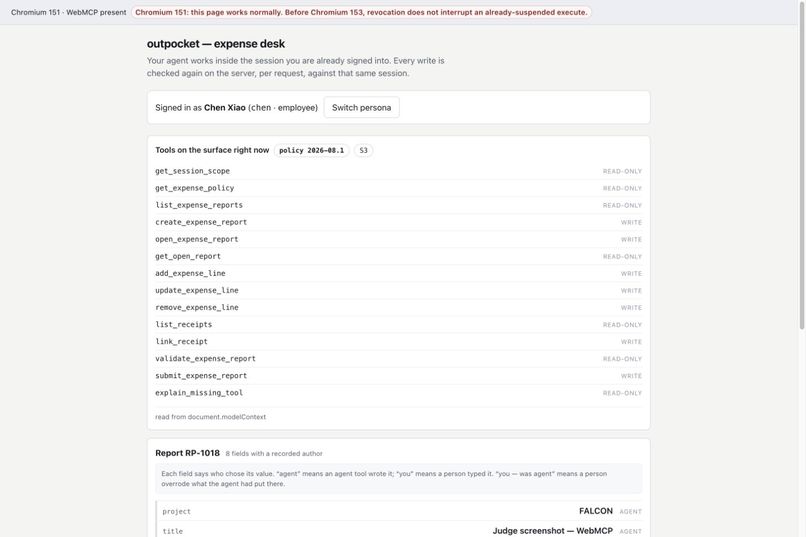
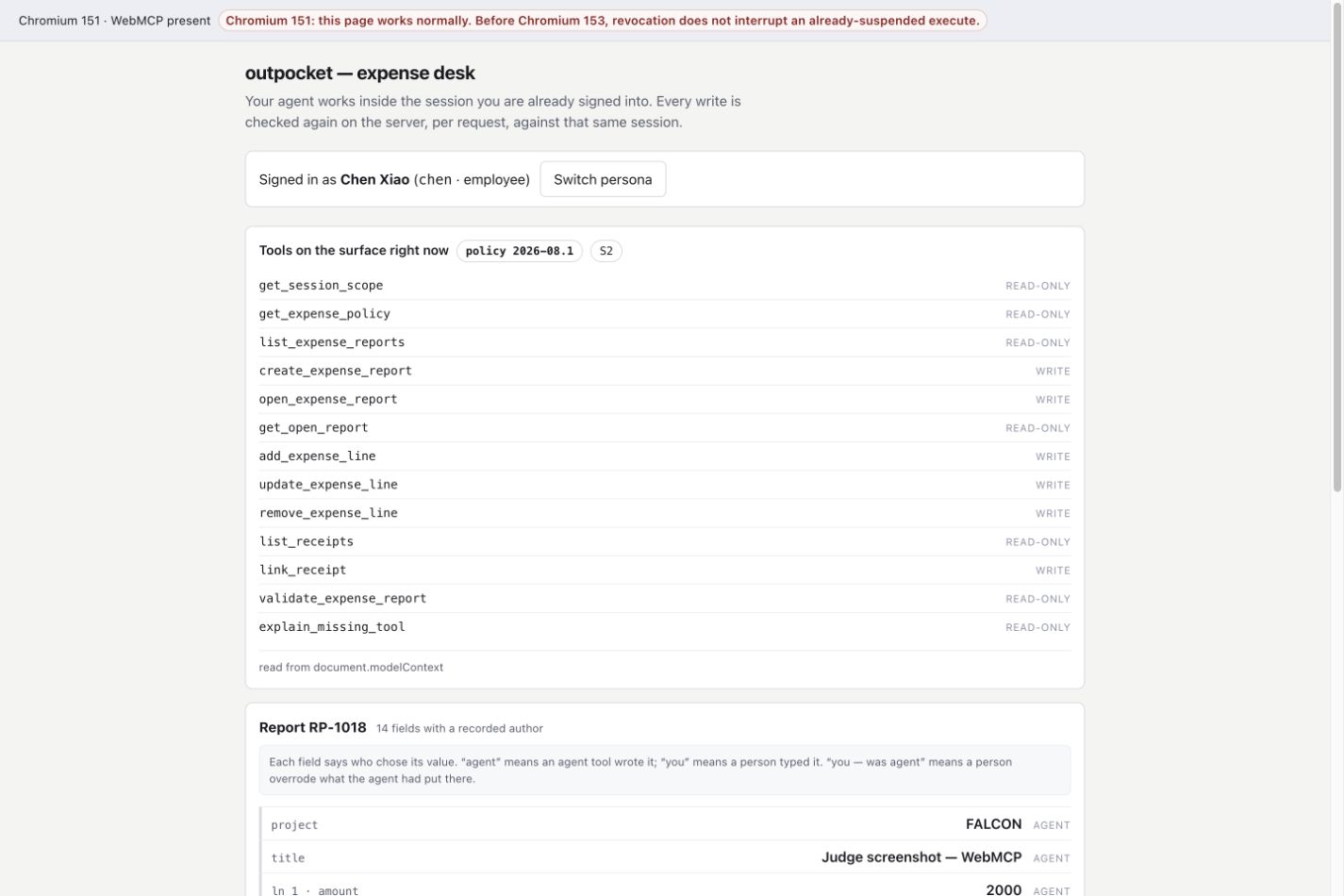
Employee chen, clean draft (S3): the inspector lists all 14 registered WebMCP tools, including submit_expense_report.
-
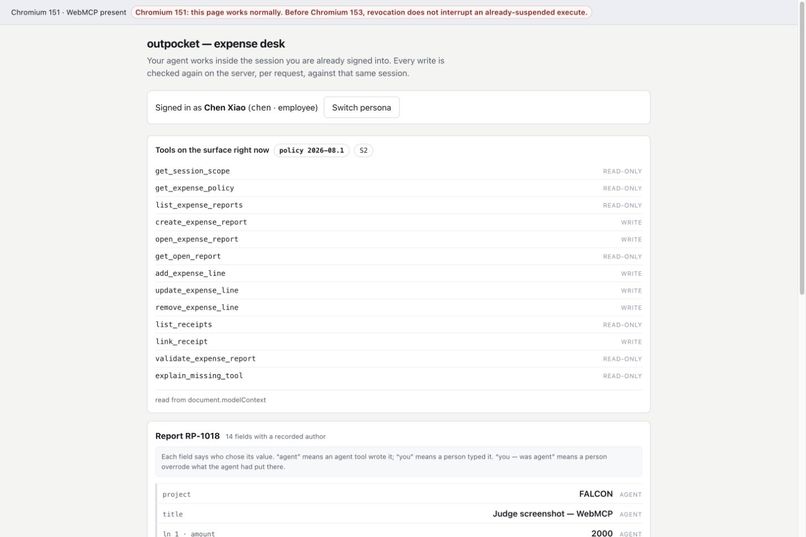
Same report with a blocking policy finding (S2): submit_expense_report is absent from the 13-tool surface until the draft is clean.
-
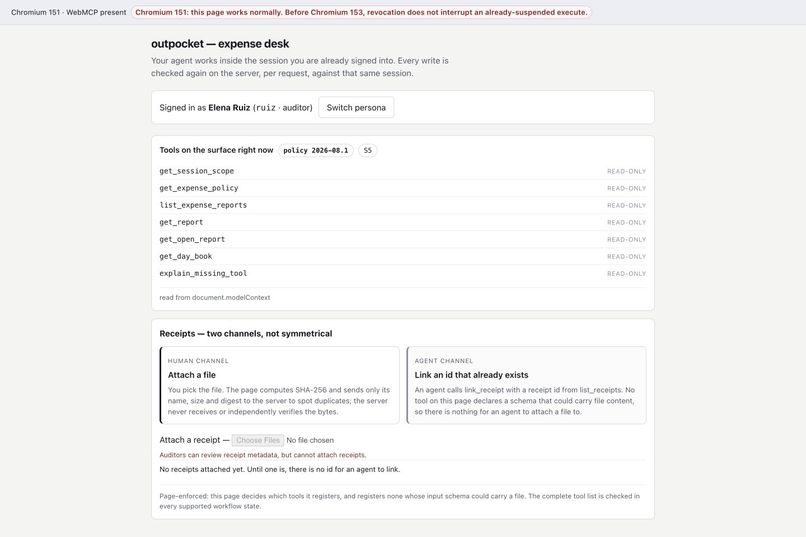
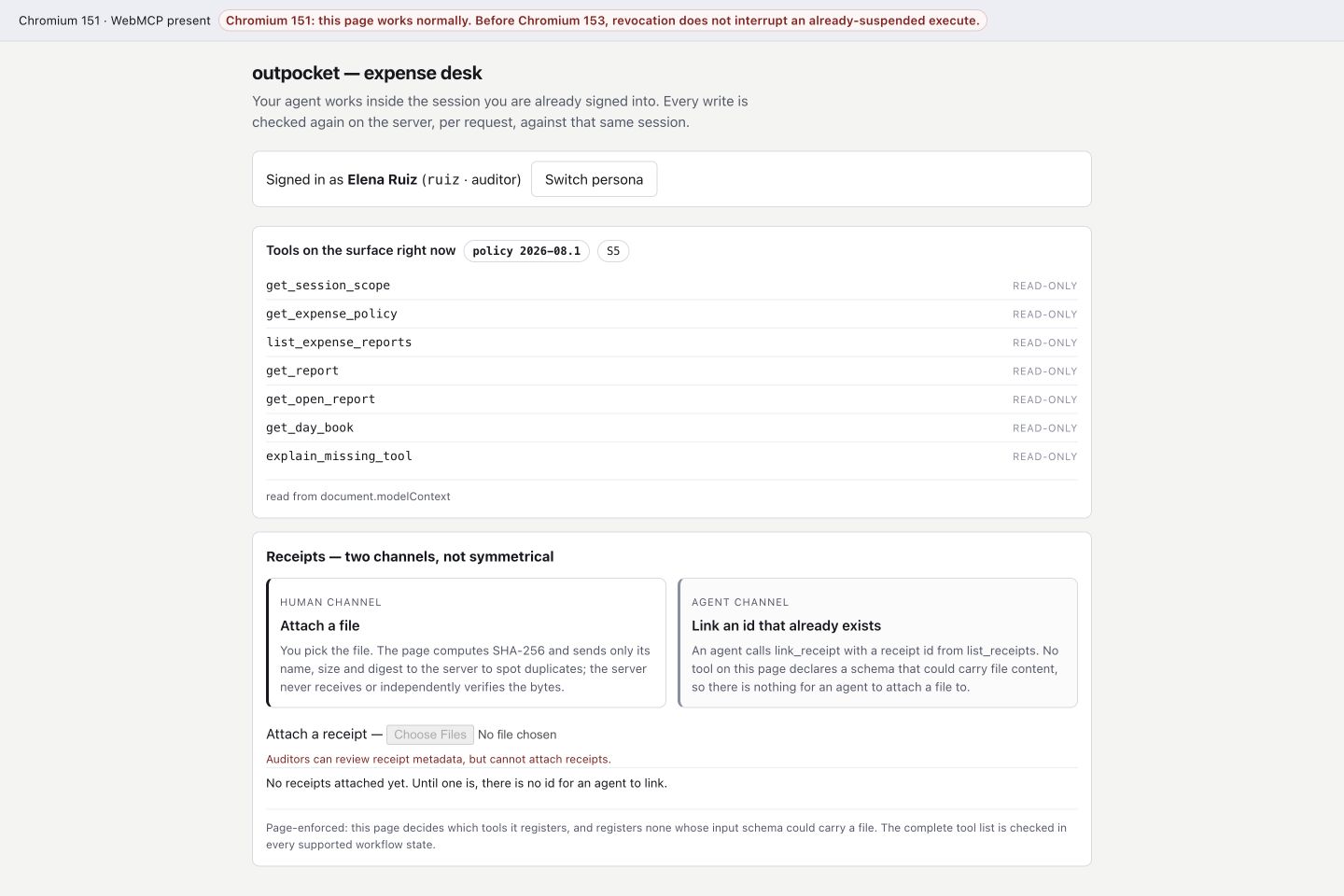
Auditor ruiz (S5): 7 tools, all read-only. Attaching a receipt file is a human-only channel that auditors do not get.
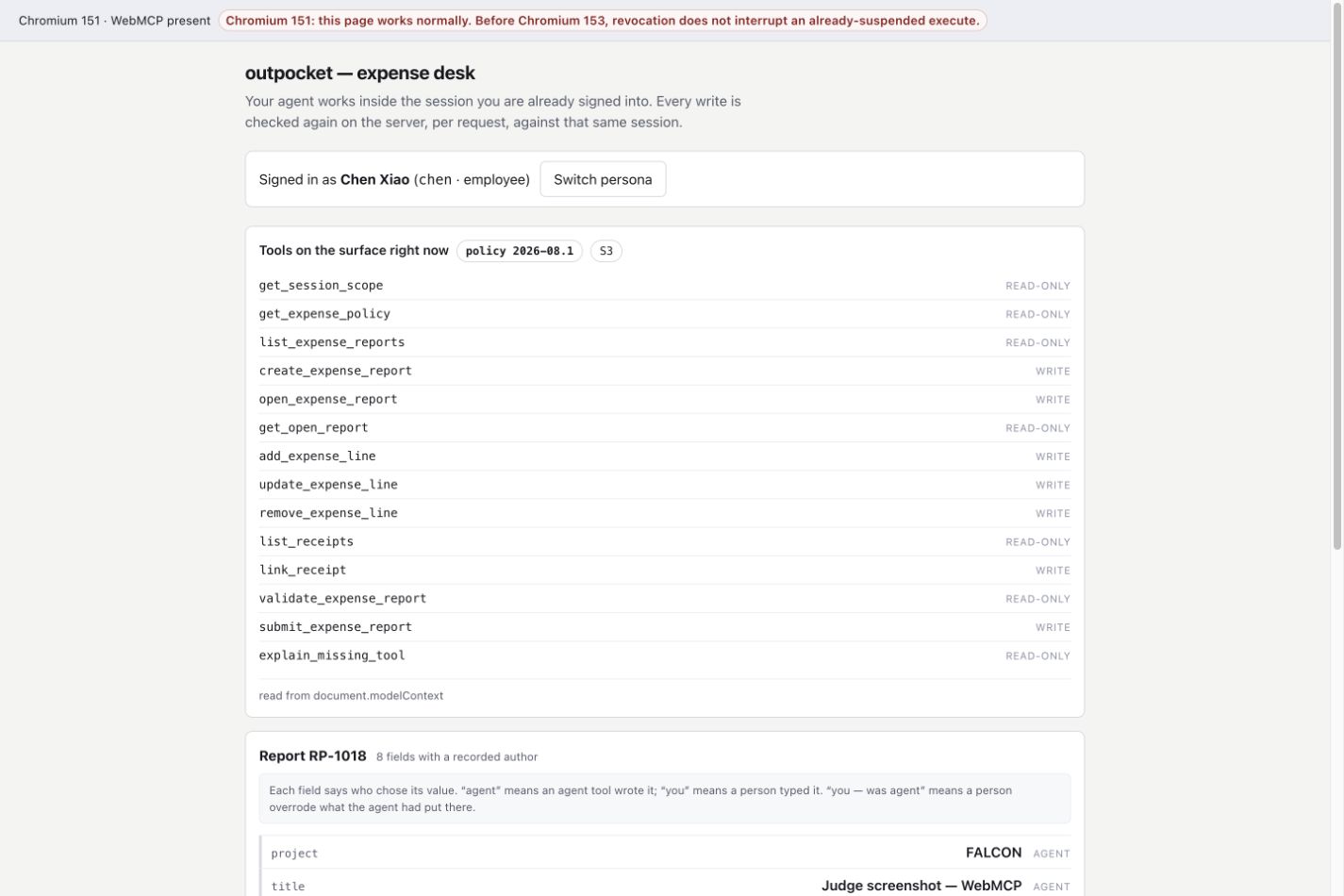
Live app · Seed-7 demo (a deterministic preview that runs in a few seconds and deliberately stops before signature) · Source · Five-minute judge walkthrough
Outpocket is a browser-based expense desk. It lets an employee's existing agent prepare reimbursement paperwork inside the web session where the employee is already signed in. The page exposes its tools through WebMCP, the server checks every write, and the employee still attaches the receipts and signs the report.
Why this use case is a strong fit for WebMCP
An expense report begins when an employee spends personal money and ends when that employee signs a claim against company policy. Most of the work in between is structured but tedious: transcribing receipts, checking policy limits, fixing rejected fields, and assembling an audit record. The signature is different. It is a personal act and should remain one.
The employee signs in to the expense page normally. The page registers tools through document.modelContext, so the agent's calls run in the same authenticated, same-origin session. Authorization comes from the employee's login rather than a long-lived token held by an integration service.
For Outpocket, the important part of WebMCP is runtime registration. The page compiles six different tool surfaces from live state: the user's role, whether a report is open, whether it is a draft or has been submitted, and the latest validation verdict. Whenever that state changes, the page replaces the registered tool set. The employee path moves from 6 → 13 → 14 tools: six after sign-in, thirteen when the draft has blocking findings, and fourteen when it is clean. On a dirty draft, submit_expense_report is absent rather than merely disabled.
How it creates a better user experience
The demo provides one-click personas for
chen(employee) andruiz(auditor). The agent never receives a password, API key, or OAuth grant.Every tool result includes the current policy verdict and a concrete fix hint, so the agent can correct the draft instead of guessing.
explain_missing_toolremains available in every state. If another tool is missing, the agent can ask why and receive both the violated rule and the required repair.Receipt files can enter only through a page control that no tool can invoke. The agent may link an existing receipt ID, but it cannot attach the file. Submission also begins as a request:
submit_expense_reportimmediately returns anawaiting_signatureticket, and the page shows the exact report snapshot, its digest, and the worst-case consequence. The employee makes the decision by clicking in the page. While that review is open, the server rejects every mutation with HTTP 423.The same visible report remains intact through agent entry, human review, the second-call commit, a page reload, and the auditor's read-back. The auditor receives a separate seven-tool surface, and every one of those tools has
readOnlyHint: true.
What people and agents can do together that was hard before
An employee can delegate policy lookup, repetitive data entry, and correction loops to their own agent without giving a separate integration service a reusable credential. They then inspect and sign the exact report in the same page where they are already authenticated.
Finance receives a submitted artifact containing the policy version, per-field provenance (agent-filled, person-edited, or seeded), receipt-digest references, and a linked day-book entry. An auditor reads that artifact through a persona with no write tools.
The first practical audience is finance teams whose employees already use a browser-based expense desk. Outpocket can reduce duplicate entry and policy rework without requiring a new standing ERP credential. We have not measured the time saved, so we do not claim a percentage.
How we implemented WebMCP
Registration. The top-level page, never an iframe or Worker, calls
document.modelContext.registerToolfor the current compiled set. Each generation has its ownAbortController; a state change aborts that generation and registers the next one. A live surface inspector rendersgetTools()on the page so the transitions are visible.Catalog. There are 17 tools across six states: anonymous 2, employee home 6, dirty draft 13, clean draft 14, submitted 7, and auditor 7. We use only
readOnlyHintanduntrustedContentHintannotations. The set of write tools is derived from those annotations instead of being maintained as a second list. Every state-specific surface is under 8 KB.Two-call submission. A suspended tool call times out in the client we tested. For that reason,
submit_expense_reportfirst returns{status:"awaiting_signature", ticket, next}without waiting. After the employee decides, a second call to the same tool reads the server's decision. It either returns a confirmation with who signed, how and when they signed, and the day-book entry, or it returns the reason the report was sent back.Server authority. The Node.js server re-authorizes every write against the current session role. An auditor write returns 403, an unknown report returns 404, opening signature review with blocking findings returns 422, and editing during an open review returns 423. The review snapshot is canonically digested, then canonicalized again at commit. A successful commit is appended to a SHA-256-linked day book that the auditor can verify.
Clients. We tested the native WebMCP flow in the ChatGPT desktop app's in-app browser and in Chrome 151 and 152 with the WebMCP flag. Chrome DevTools Protocol is used only for regression checks of the page itself.
What we verified
The repository has 304 automated tests covering the state machine, policy, signing, provenance, receipt boundary, and browser surface. We also ran its evaluation kit against the deployed site. All six canonical tool surfaces match the committed export, all 11 negative cases are enforced, and all 10 must-fail controls flip when their guard is removed. The expected surfaces and tool export are committed to the repository and regenerated from source.
Honest limits
The signature binds the authenticated session to the snapshot shown for review, but it does not prove which person clicked. Someone with that session and DOM read access could answer the dialog. We state this limitation instead of treating the click as identity proof.
The deployment is a single in-memory Node.js process. A restart clears its state, and the two demo personas share the same store.
Receipt bytes never reach the server. It receives only receipt metadata and a SHA-256 computed in the browser.
The seeded demo is a labelled, deterministic driver that uses the same dispatcher as the product. It demonstrates the product path, but it is not evidence of a native WebMCP client.
What we learned
Our first signature flow trusted approval context supplied by the client. We replaced it with server-issued signature requests, frozen snapshots, replay protection, mutation locks, and commit-time revalidation.
The broader lesson was that tool absence matters as much as tool presence. When an action would be unsafe in the current state, leaving the tool unregistered is clearer than exposing it and relying on a prompt to prevent its use.
Built With
- chatgpt
- chrome
- javascript
- node.js
- render
- webmcp

Log in or sign up for Devpost to join the conversation.