-
-
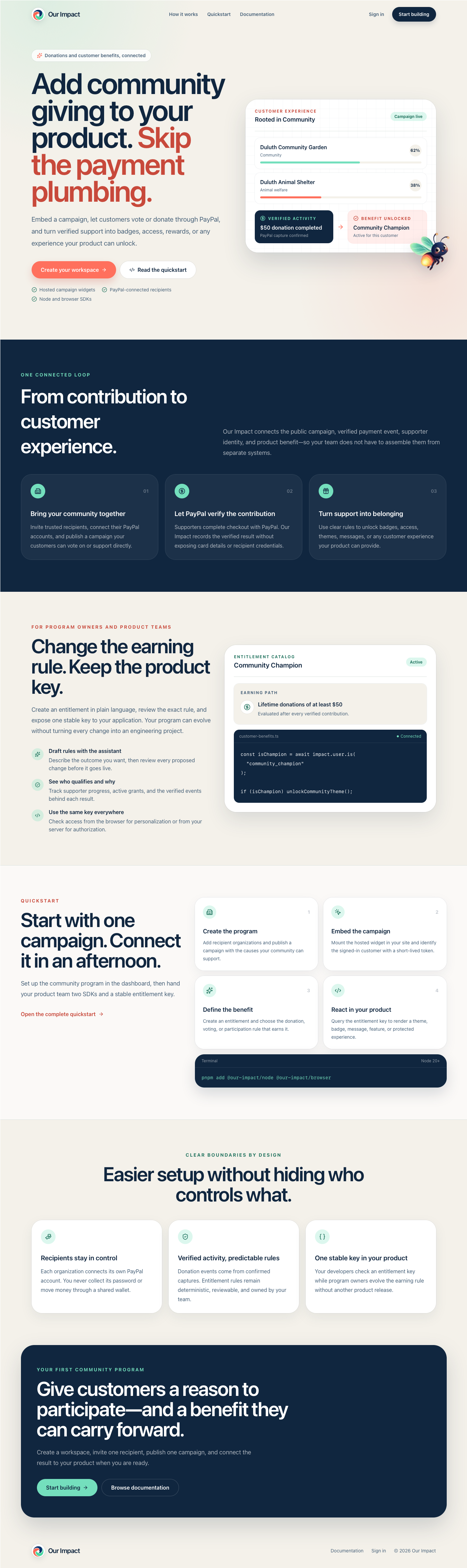
Landing page
-
Workspace
-
Widget in action
-
Confetti using entitlement
-
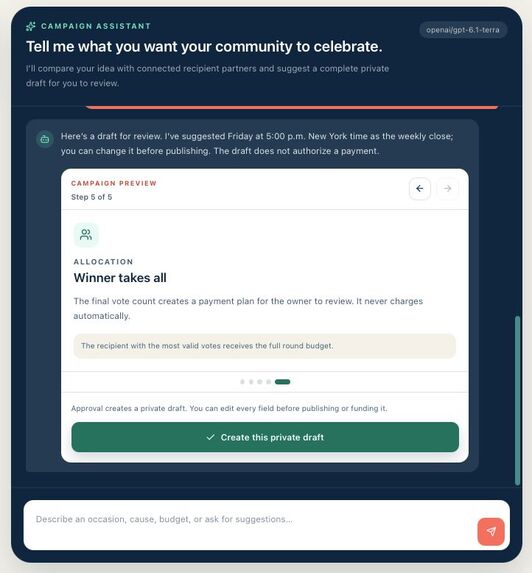
Campaign assistant
-
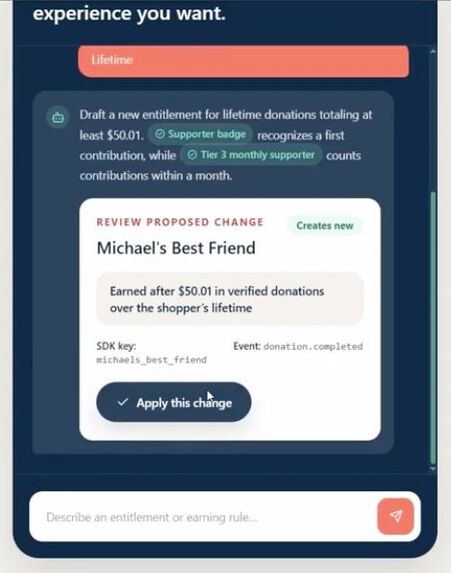
Entitlement assistant
-
Inspiration
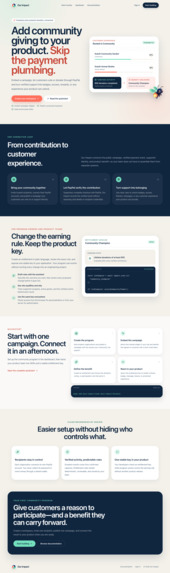
I wanted to focus on utilizing PayPal not as a direct wallet manager for my account where it pays or receives payment for me. Rather I wanted to use PayPal to make Our Impact an integration platform.
And I centered the platform around one thing: donations. Our Impact is for businesses, organizations, or small community groups that want to integrate and showcase some Corporate Social Responsibility or just perform general philanthropy without all the hassle of setting up and implementing their own donation systems.
I wanted to test the viability of PayPal in facilitating this type of platform that involves payments / donations across multiple parties and a general user base.
Our Impact is plug and play, with the flexibility to let its users use it more deeply if they choose to. You simply visit Our Impact, do a little form filling, and you can embed a widget on your own website without setting up your own payment/donation integration.
What it does
Our Impact has two main functionalities: Voting/Donation Widgets and Entitlement Management
To better demonstrate to you how Our Impact works, I'll frame this in a super realistic hypothetical scenario (if you wanted to check out an example of how a host website would embed and use Our Impact, look at the Michael Scott Paper Company example. I've grouped adding widgets and entitlements into different branches)
Michael Scott just got fired and started his own company: The Michael Scott Paper Company. Everything is set up. He even has a website where he can sell his paper online.
Donation Widget
The company is successful enough, but Michael, being Michael, decides it's not enough. He needs to show some Corporate Social Responsibility and that he cares about his community and his friends.
Pam coincidentally just started her own art company; Dwight has his beet farm; and Kevin finally learned to stop dropping his pot of chilis and started selling them.
This is perfect for Michael. He can donate to his friends, local community members/businesses, and be known as a "philanderer". However, Michael doesn't know anything about setting up a donation system on his website.
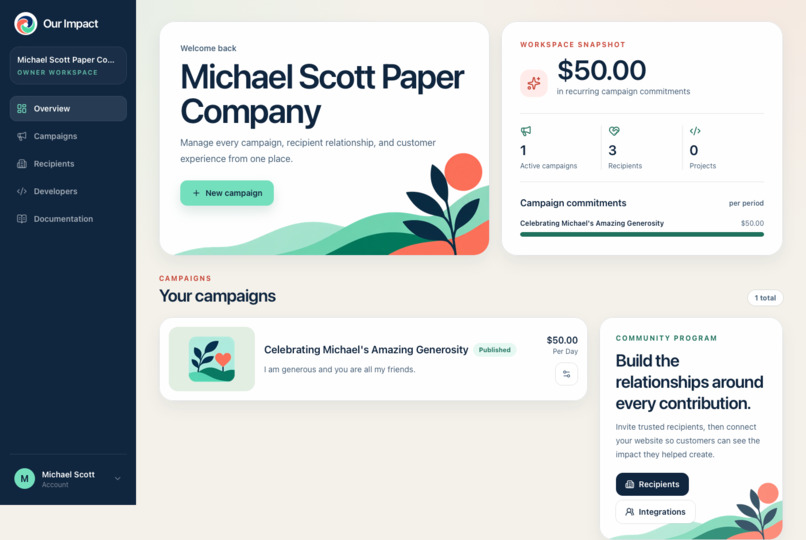
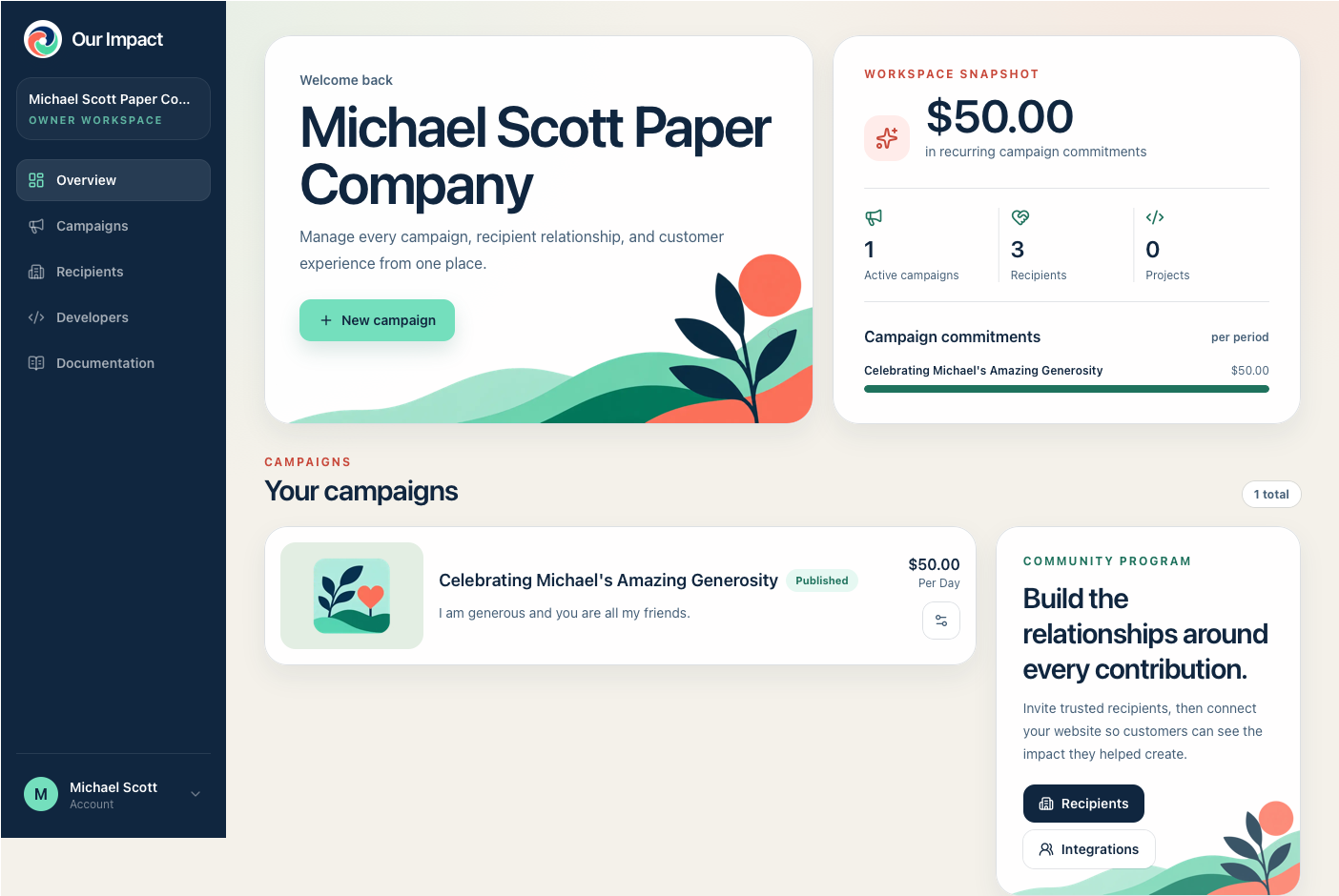
So, he goes to Our Impact, signs in, and creates a workspace.

He then creates a campaign, fills up the necessary details, donation commitment amount, and voting model (weekly, daily, etc.). Let's say Michael pledges 50 bucks a day because he is cheap.
After this, all he has to do over on his website is install the @our-impact/browser package and embed the campaign's widget on his website.
import { mountCampaign } from "@our-impact/browser";

// Add <div id="our-impact-campaign"></div> to your page.

const campaign = mountCampaign({
  target: "#our-impact-campaign",
  publicId: "celebrating-michael-s-amazing-generosity-68fd6a57",
  height: "auto",
});

// When this view is removed:
campaign.destroy();
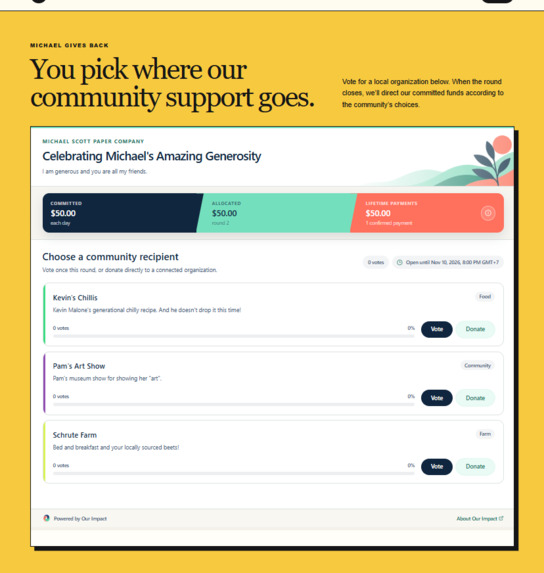
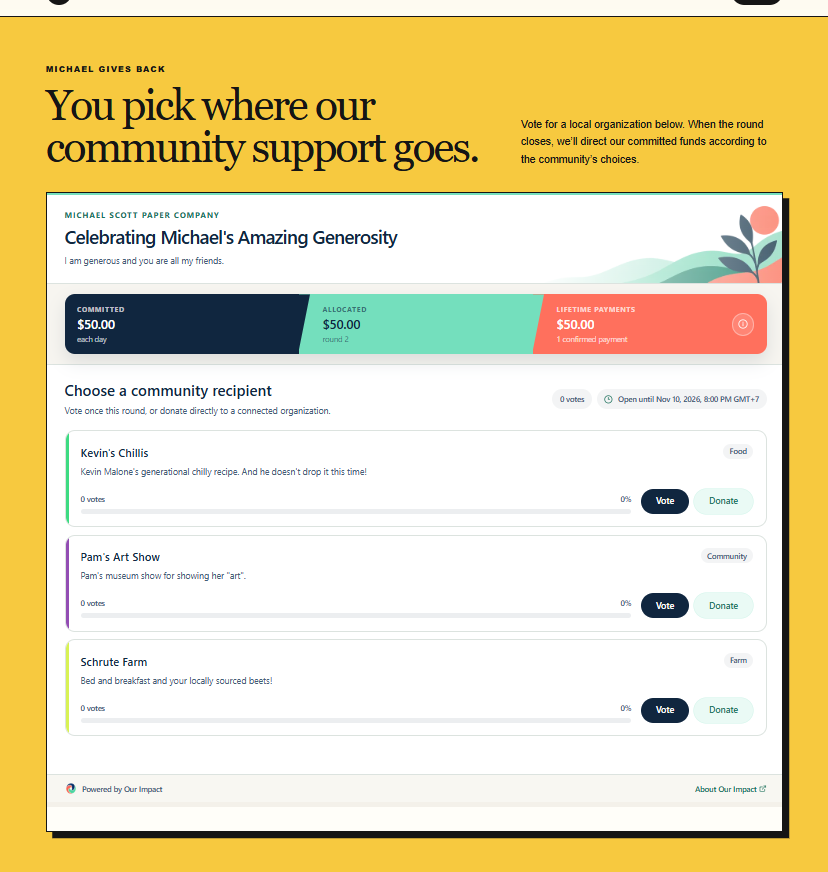
Michael can embed this any way he likes. As you can see below, it's well integrated with the style of Michael's website:

Now Michael's website visitors can see his campaign, what he has pledged to the local Scranton community, and which specific recipients he is planning to support. His visitors and users could also vote on which organizations Michael's company donate to. Standard spam protections were applied.
This makes donation even more reflective to what Michael's user base wants. This is perfect for community based companies or businesses.
Once a voting round ends, Michael can go to the dashboard and finally make good on his pledge. Importantly, this is not automatic. PayPal integrates smoothly as a payment gateway where Michael still actively authorizes the donation.

Back over on the widget, the users can clearly see how good on his word Michael is and check if he has fulfilled his pledge.
Michael's users can also donate directly to the recipients listed on the widget.
Direct Donations and Entitlements
Let's say after integrating the widget for a while, Michael wants to take Our Impact a bit further. His users, like Jim, Oscar, and Phyllis have been voting BUT also directly donating.
Michael wants to encourage this as well as reward it. So he creates a developer project over at Our Impact.

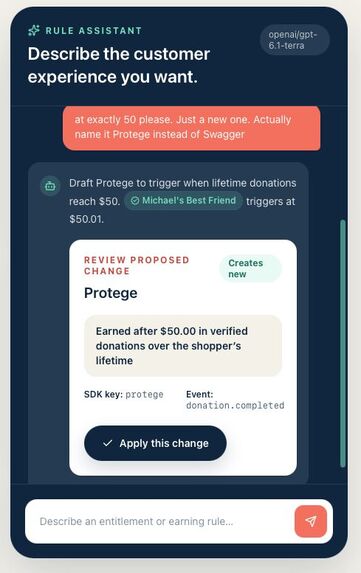
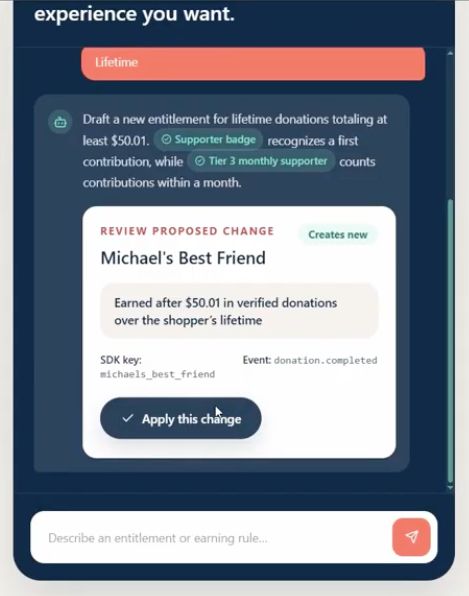
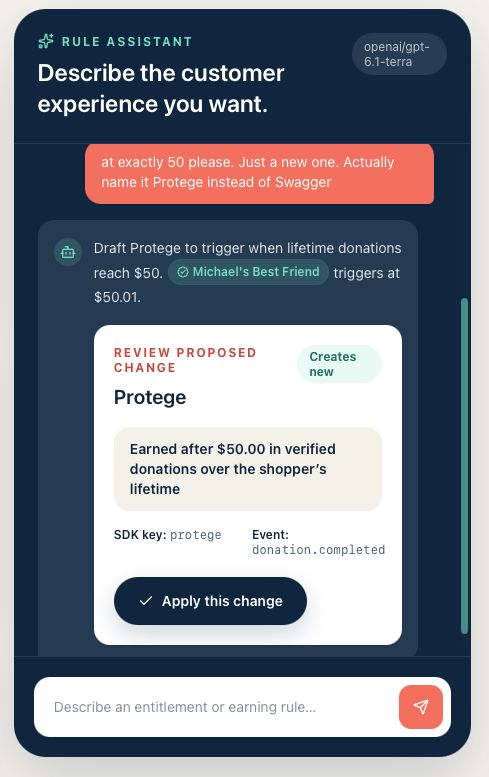
Michael is lazy and doesn't feel like setting up entitlements himself. So he uses the AI assistant and asks it: "Hey, create an entitlement called 'Michael's Best Friend' for people who donate more than 50 dollars a month. After some back and forth, the AI assistant finally suggests a concrete entitlement. As you can see the AI correctly suggested a threshold of 50.01 since I said "more than 50".

Michael approves and that entitlement gets created. Michael can then download @our-impact/node, created using APIMatic, to start granting special privileges to his users that meet certain criteria, in this case if they have donated over 50 dollars in their lifetime as a user.
He can check the entitlement over at Our Impact and copy the code:

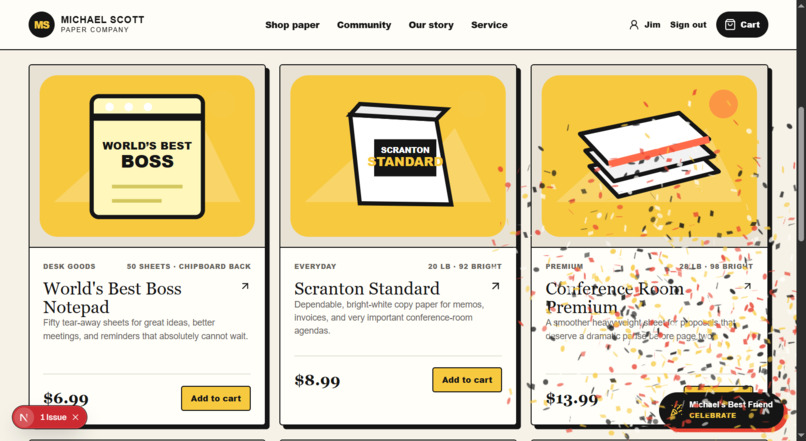
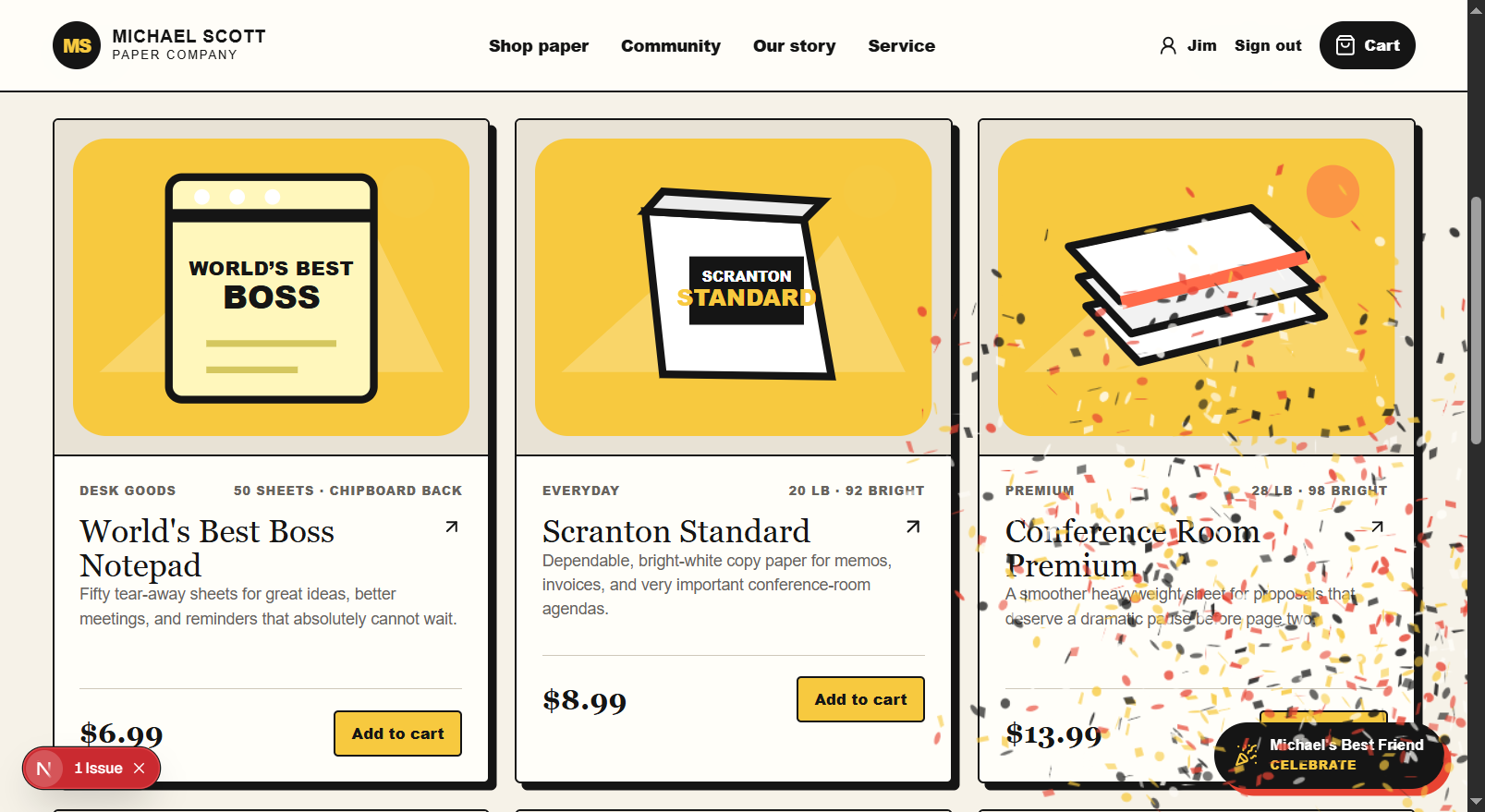
Let's say Michael, cheap as he is, simply wants to grant the special privilege of a confetti button for people who have this entitlement.

Michael can go as simple as a little UI change to something complex as granting discounts on his paper sales. Our Impact provides for any level integration since all you have to do is perform a check:
const unlocked = await impact.user.is(
  "michaels_best_friend",
);
Our Impact will do the rest.
How we built it
More detailed implementation details can be found at the repository docs
PayPal
PayPal was used in three different user-facing ways:
Recipient PayPal Onboarding
After a workspace owner (Michael) has invited a recipient and that recipient has subsequently claimed the recipient membership, we call PayPal's /v2/customer/partner-referrals to request a third-party API integration with the PAYMENT and REFUND features, the EXPRESS_CHECKOUT product, and finally SHARE_DATA_CONSENT.
After a successful call, we redirect the recipient to the claim page and update the status. In order to make onboarding more robust, we do not trust the PayPal callback alone; instead, we call:
GET /v1/customer/partners/{partner_id}/merchant-integrations/{merchant_id}
Then we check for things such as OAuth integration, payment_recievable being true, etc. Only then does the connection becomes active/approved.
Direct Donation From Widget
We use the PayPal JavaScript SDK for this with the stored recipient merchant ID. We then call the Orders V2 API and set the payee.merchant_id to the selected recipient. And finally we return the order ID to PayPal's button SDK. After PayPal's approval we capture its capture ID and completion status.
This allows the host app (Michael's website) to identify its own users by suppling their own stable external_user_id using the identity-token API from @our-impact/node, after which Our Impact will upsert the relevant record (project_id, external_user_id). Then the campaign widget can be given the resulting token.
This resulting identity will be attached when the corresponding user donates through the widget, so we can capture who did what. A verified payment/donation completion becomes a developer event. Our Impact captures it and inserts the event (containing information such as amount, capture ID, etc).
The database can then evaluate entitlement rules based on user identity and their captured events to see if they qualify. The host website can then gate certain functionalities based on a check using the @our-impact/node package.
Campaign Funding / Fulfillment
This is where the workspace owner like Michael would fulfill his donation pledge once a voting round has completed and produced a frozen allocation. For example, let's say a voting round created an even split between Pam's Art Show and Schrute Farm for 50$.
We then create another Orders V2 order. And in contrast to direct donation earlier, it can contain multiple purchase units. We supply the PayPal SDK with merchant-id=* plus a data-merchant-id list for a multi-seller checkout.
After Michael approves the order, just like before, we capture the event and the necessary information to display back in the widget / campaign dashboard.
PayPal Webhook
One webhook was registered on the PayPal developer dashboard and was used to capture all the events such as:
PAYMENT.CAPTURE.COMPLETEDPAYMENT.CAPTURE.DENIEDPAYMENT.CAPTURE.REFUNDEDPAYMENT.CAPTURE.REVERSEDMERCHANT.ONBOARDING.COMPLETEDMERCHANT.PARTNER-CONSENT.REVOKED
Full PayPal API Inventory
- POST /v1/oauth2/token
Server-to-server OAuth client credentials. Tokens are cached in memory until shortly before expiration.
- PayPal JavaScript SDK: https://www.paypal.com/sdk/js
Renders PayPal buttons and handles payer approval. Direct checkout uses one merchant ID; campaign funding uses multi-seller configuration.
- POST /v2/customer/partner-referrals
Starts recipient seller onboarding.
- GET /v1/customer/partners/{partner_id}/merchant-integrations/{merchant_id}
Verifies recipient permissions, email confirmation, receivability, products, and capabilities.
- POST /v2/checkout/orders
Creates both direct-donation and campaign-funding orders.
- POST /v2/checkout/orders/{order_id}/capture
Captures both order types after approval.
- POST /v1/notifications/verify-webhook-signature
Verifies incoming PayPal webhooks using PayPal’s postback verification method.
AI Assistant
Since a central motto of Our Impact is to reduce the headaches of the host website owner from all the complications of setting up payment/donation systems, I thought I'd extend that to every aspect of the application. That's why I added the AI assistant. It's used primarily in two ways:
Campaign Creation
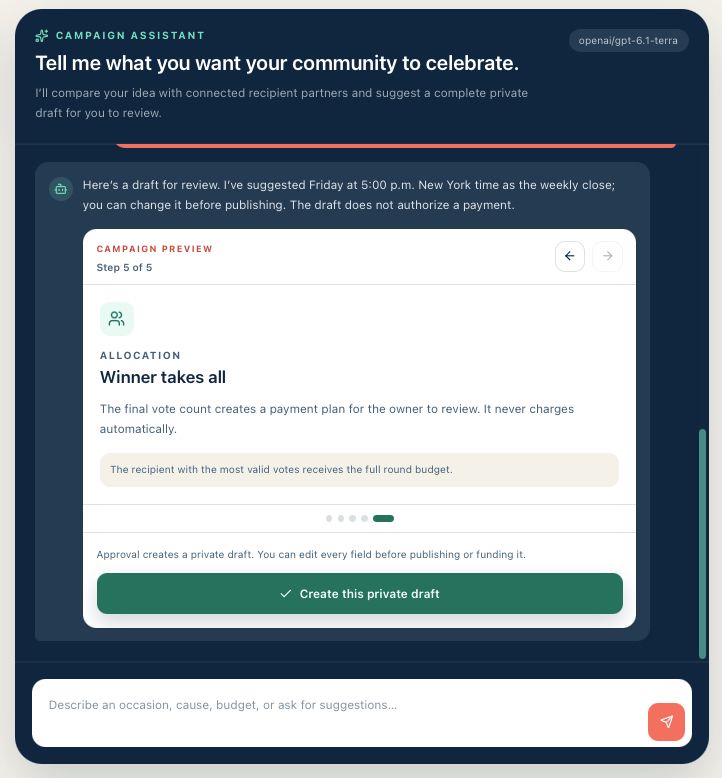
I didn't mention it above nor in the video, but campaign creation also has its own AI assistant. This is arguably more important to have an assistant for because you can use it to discuss titles and description, which will be user facing in the widget. It will be good if a non-marketing user can get help from the AI assistant with vocabulary or marketing language.
The assistant has read access to your recipient details so you can check whether a campaign with a certain theme is ready based on who will be receiving the donations.

Entitlement Creation
The assistant here is used as a natural-language, system-aware authoring assistant. It has access to your project's current entitlement catalog and their earning paths.
It can reference existing entitlements in conversations such that you can prevent yourself from creating redundant entitlements. After agreeing, it will finally suggest an entitlement. If you like it, you can approve it right in the chat box.
Render
Render was used if the workspace owner would like to use Our Impact on a deeper level. In a developer project, they can register their own webhooks that will get called when certain events are called:
donation.completedentitlement.grantedentitlement.revoked
Render was used to deploy a cron job that runs every 5 minutes and send a signed POST request to the URL when every relevant activity occurs / has occurred.
For example, after an identified supporter completes a PayPal donation, the host might receive:
{
  "id": "developer-event-uuid",
  "type": "donation.completed",
  "created_at": "2026-11-10T08:00:00Z",
  "data": {
    "external_event_id": "paypal_capture:ABC123",
    "external_user_id": "customer_456",
    "occurred_at": "2026-11-10T08:00:00Z",
    "properties": {
      "amount_minor": 500,
      "currency": "USD",
      "recipient": "Example Charity"
    }
  }
}
APIMatic
APIMatic was used to generate and publish the @our-impact/node package. For a smoother integration with the host app, this was a necessary step in abstraction. I didn't want end users to go through the available API lists raw.
In development the APIMatic CLI was used to validate, generate, and publish it after the OpenAPI snapshot has been exported through a local script.
Here is the current published SDK APIMatic has generated for the current version of Our Impact:
POST /api/v1/events- SDK:
impact.events.createVerifiedEvent() - Server: Authenticates the project, stores an idempotent verified event, evaluates entitlements, and attempts immediate webhook delivery.
- SDK:
POST /api/v1/identity-tokens- SDK:
impact.identity.createIdentityToken() - Server: Authenticates the project, upserts the host-app supporter, and issues a short-lived signed identity token.
- SDK:
GET /api/v1/users/{externalUserId}/entitlements- SDK:
impact.entitlements.listUserEntitlements() - Server: Authenticates the project, finds the project-scoped supporter, and returns authoritative entitlement state.
- SDK:
GET /api/v1/me/entitlements- SDK:
impact.user.is(),get(),all(),profile()in@our-impact/browser - Server: Verifies the publishable key, user token, and allowed origin, then returns the identified supporter’s entitlements.
- SDK:
Tech Stack
Web application
- Technology: Next.js 16 App Router, React 19, TypeScript
- Responsibility: Server-rendered UI, Server Actions, public widget, Route Handlers, cron endpoints, and the developer API.
Styling
- Technology: Tailwind CSS 4, custom CSS, Lucide React
- Responsibility: Responsive dashboard, sheets, dialogs, campaign widget, and iconography.
Input contracts
- Technology: Zod 4
- Responsibility: Form, route body, external response, and AI response validation.
Authentication
- Technology: Supabase Auth +
@supabase/ssr - Responsibility: Email/password and email OTP sessions stored in cookies and refreshed by the Next.js proxy.
- Technology: Supabase Auth +
Database
- Technology: Supabase Postgres 17
- Responsibility: Tenant data, campaign state, immutable ledgers, PayPal state, developer identity, entitlements, and webhook queues.
Authorization
- Technology: Postgres RLS, grants, constraints, security-definer functions
- Responsibility: Workspace isolation and atomic business rules.
Scheduling
- Technology: Supabase Cron /
pg_cron, Vercel Cron, Render Cron - Responsibility: Period closure, fallback closure, legacy payout reconciliation, and outbound webhook delivery.
- Technology: Supabase Cron /
Payments
- Technology: PayPal REST APIs and PayPal JavaScript SDK
- Responsibility: OAuth, recipient onboarding, merchant status, Orders v2 approval/capture, verified webhooks, and historical Payouts status.
AI
- Technology: OpenRouter Chat Completions
- Responsibility: JSON-schema entitlement proposals and evidence-grounded report drafts.
Developer platform
- Technology: OpenAPI 3.0,
@our-impact/node,@our-impact/browser - Responsibility: Trusted server events and identity, browser entitlement checks, and campaign embedding.
- Technology: OpenAPI 3.0,
SDK generation
- Technology: APIMatic CLI and Publishing Center
- Responsibility: Validates the server OpenAPI contract, generates TypeScript, and publishes the Node SDK.
Test and quality
- Technology: Vitest, ESLint, TypeScript, APIMatic validation
- Responsibility: Unit tests, static analysis, package smoke tests, and API contract validation.
Hosting
- Technology: Vercel, Supabase, Render
- Responsibility: Web runtime, managed data/auth, and five-minute external schedulers.
Challenges we ran into
Did a lot of reading to figure out which pieces of the PayPal APIs I could use to have our impact act as a bridge for donations, looking at limitations and feasibility, but the docs were thorough enough and with the help of agents I finally got the base app working.
I thought about making Our Impact donate on behalf of end users at certain time intervals based on the campaign settings but realized how stupid that idea was and how correct PayPal was to restrict it.
Accomplishments that we're proud of
It was cool publishing a new package, something I rarely do. It's usually maintenance or adding features to an existing one.
I worked hard to make the widget not out of place and customizable enough through the package. As proven by the Michael Scott Paper Company website example, it allows enough styling to fit the look of the parent website.
What we learned
I learned what's possible with PayPal's developer platform and what rightly isn't; I also learned how to go from Nextjs API routes to published NPM packages using APIMatic.
What's next for Our Impact
- More entitlement earning path variations such as voting frequency, etc.
- Smoother onboarding experience for donation recipients
- Make widgets more customizable
Built With
- nextjs
- paypal
- supabase
