-
-
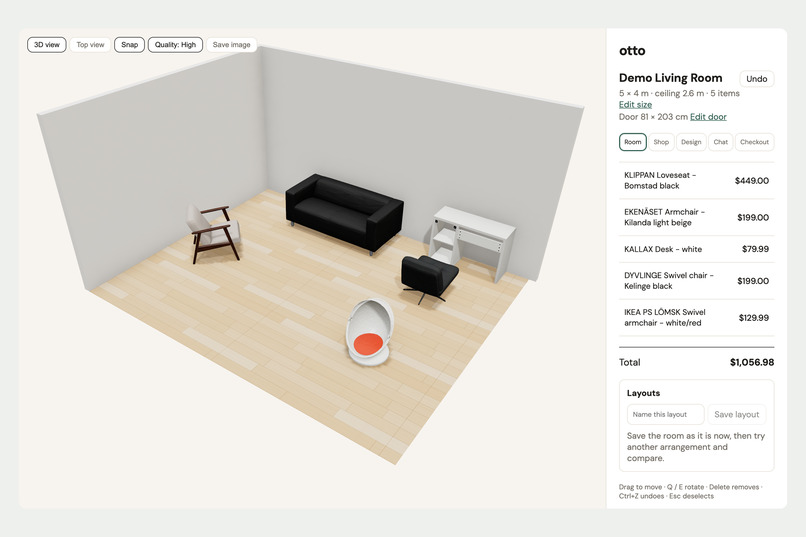
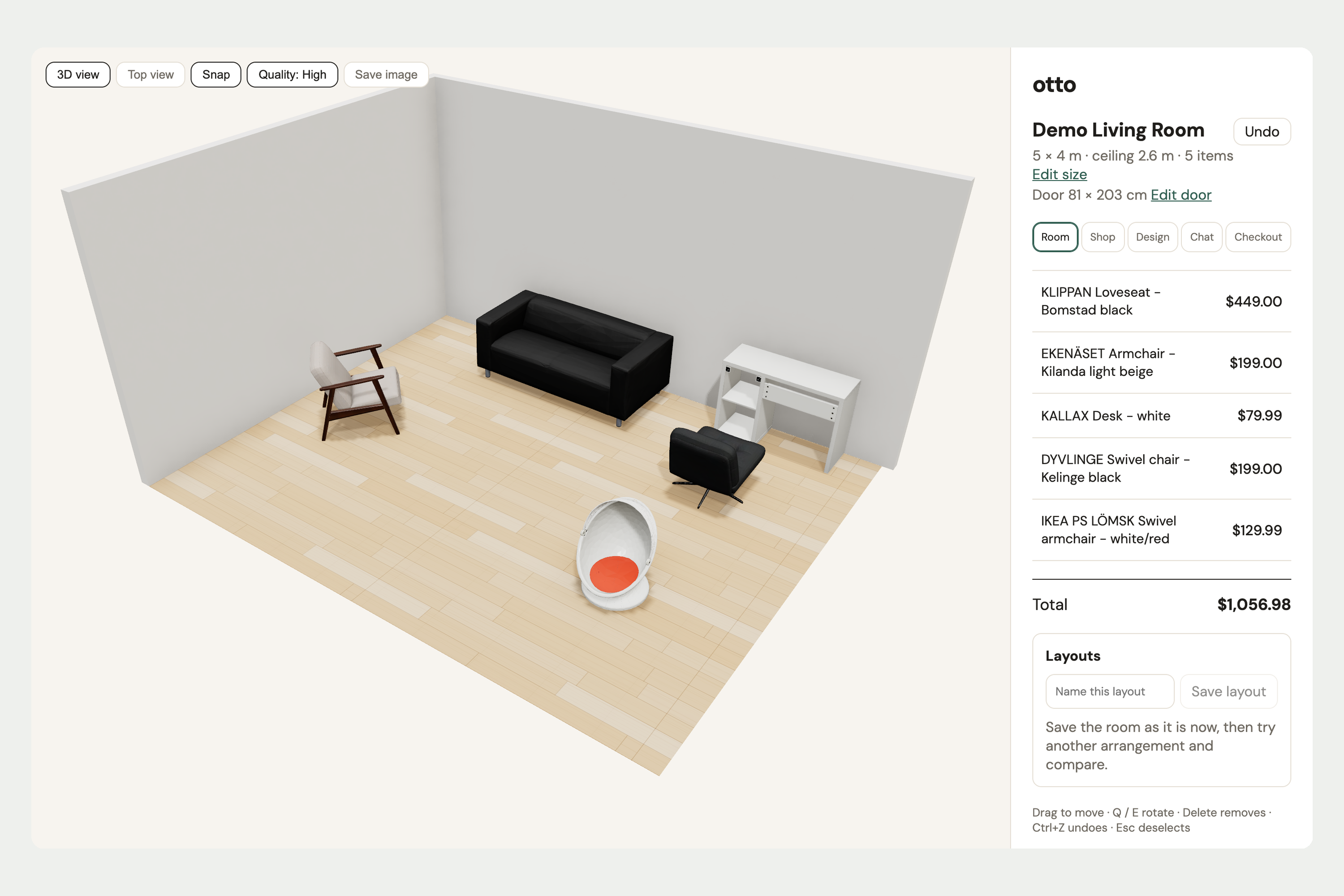
Your room in 3D at its real size. Drag and rotate pieces and watch the total update.
-
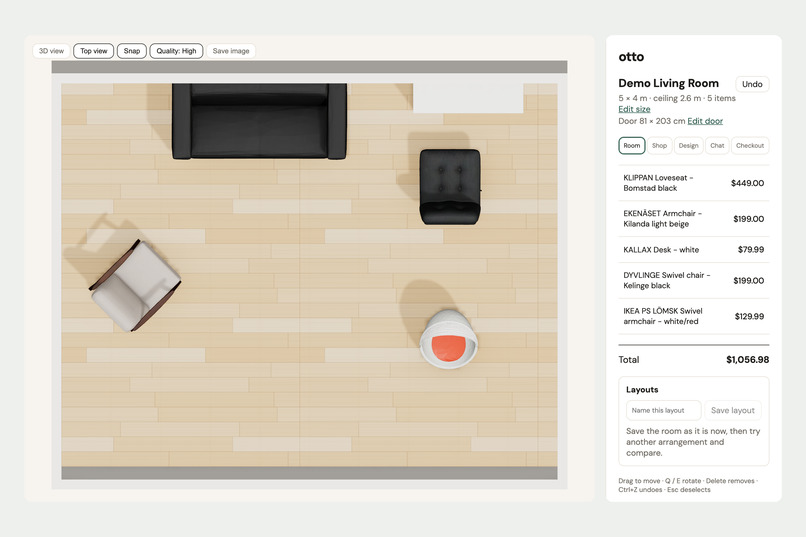
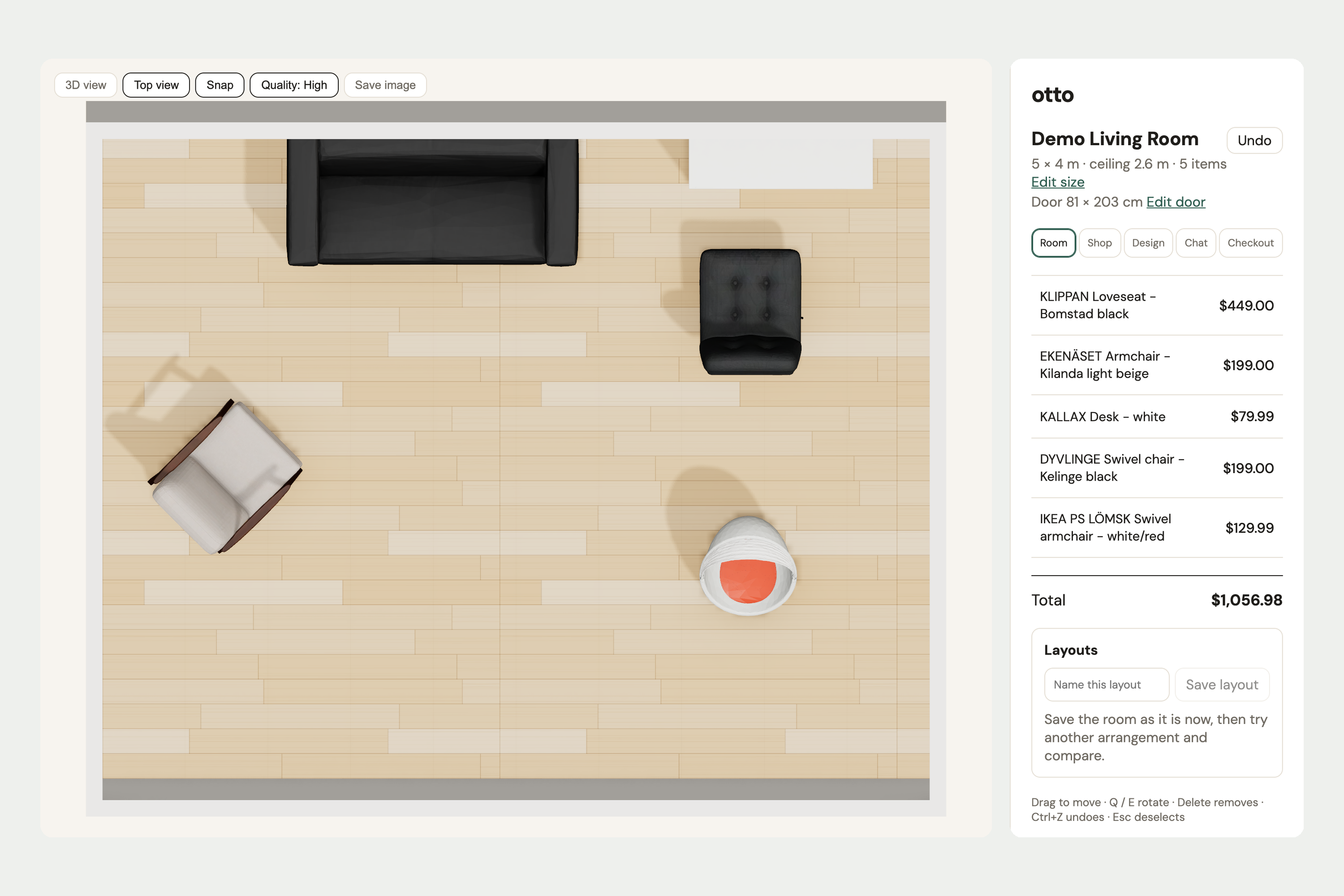
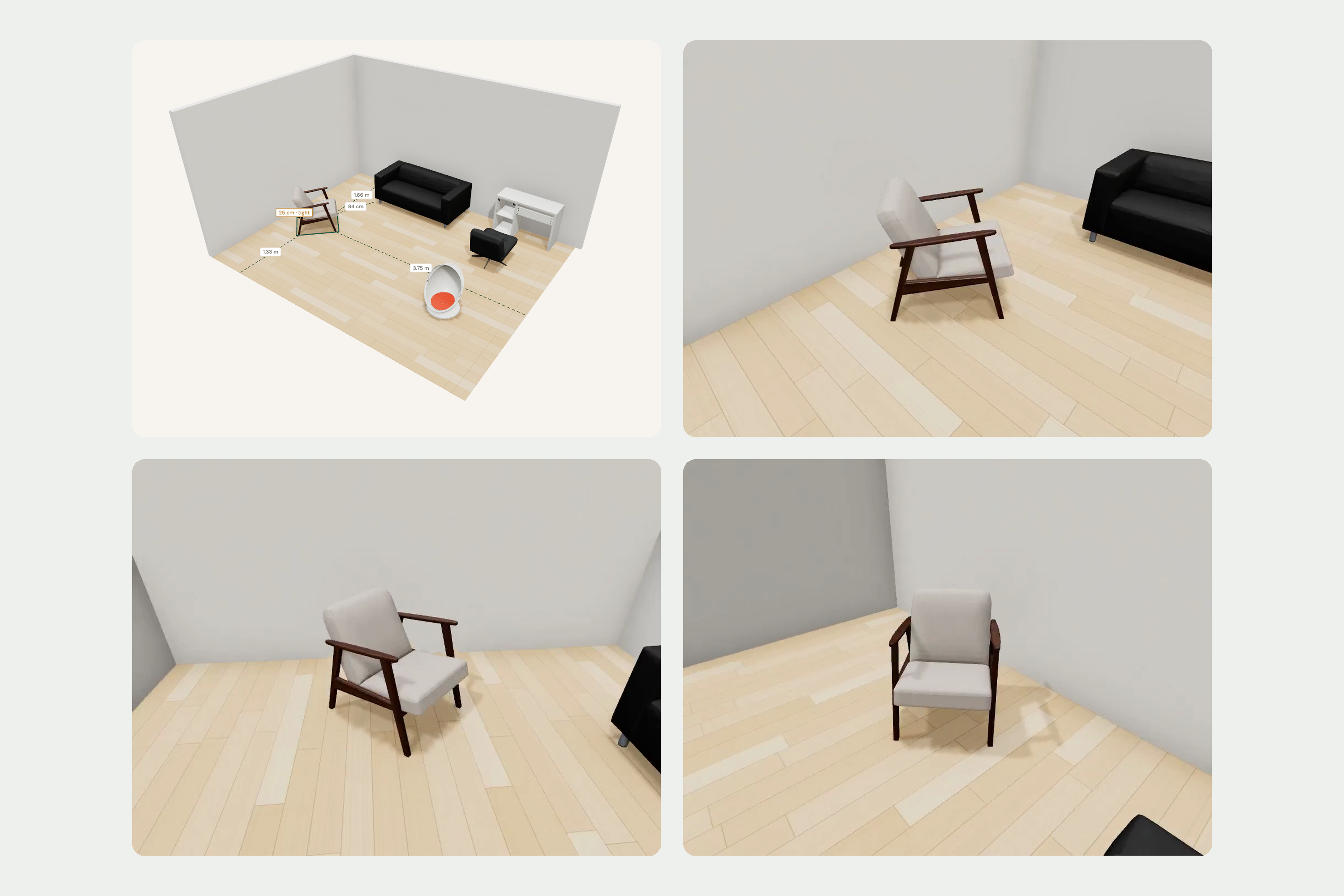
A top view for planning the layout. Save layouts and compare different arrangements.
-
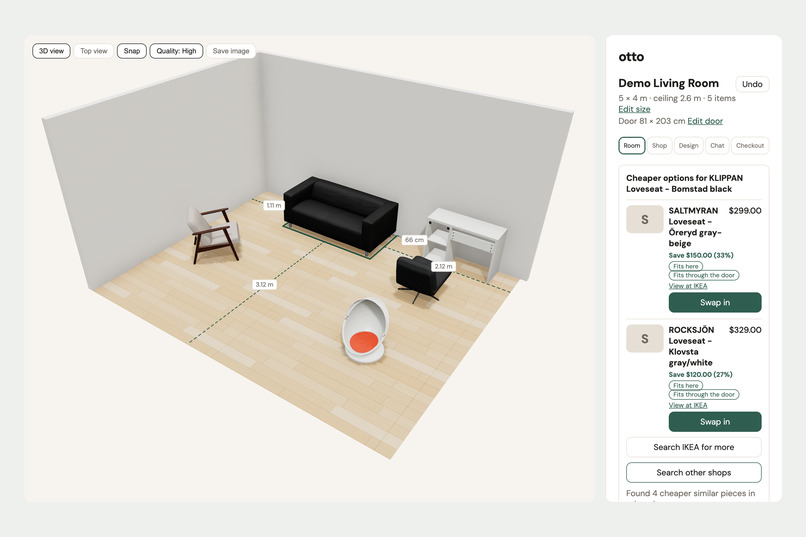
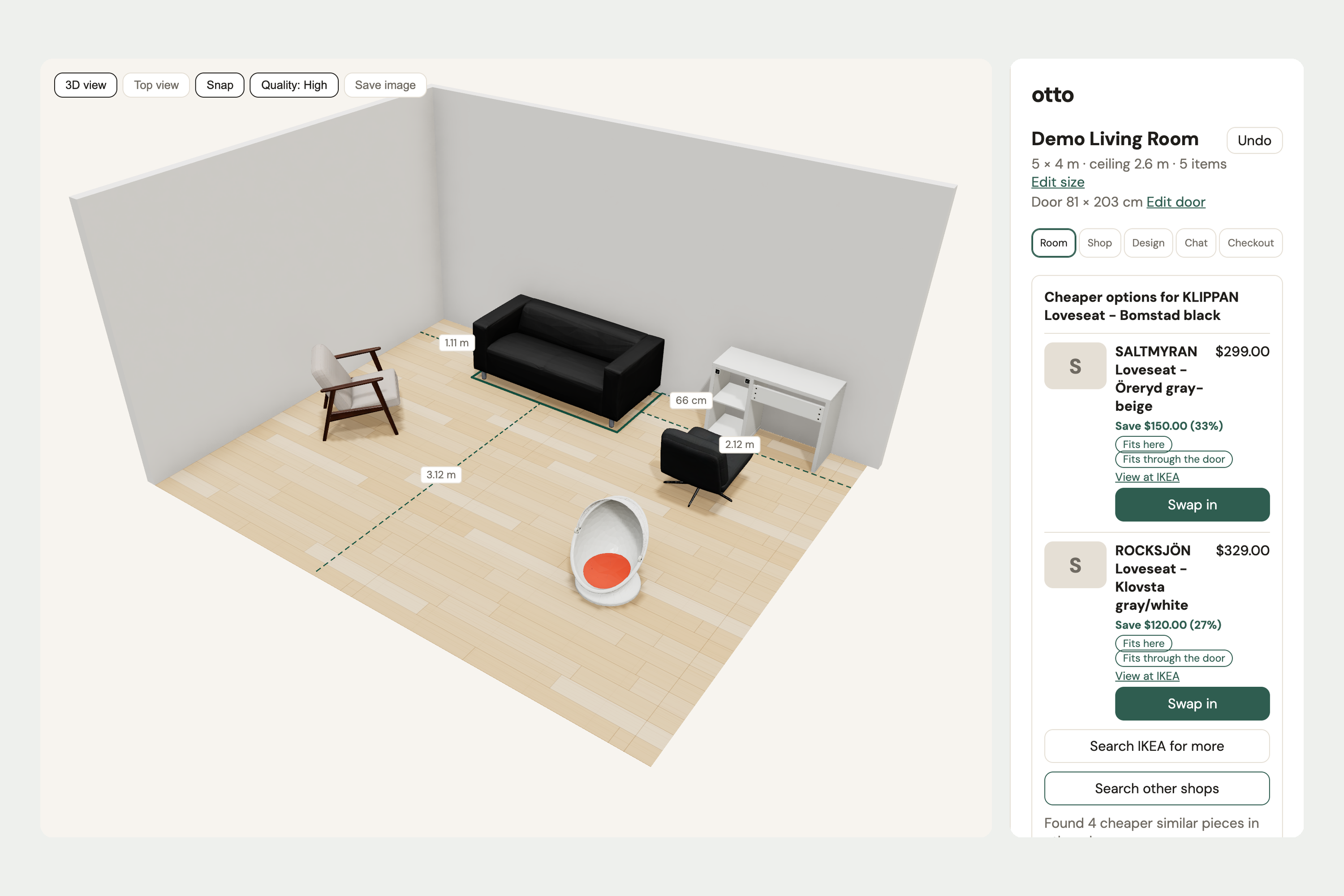
Select a piece to see its distance to walls and furniture, then find cheaper options that fit the space and the door.
-
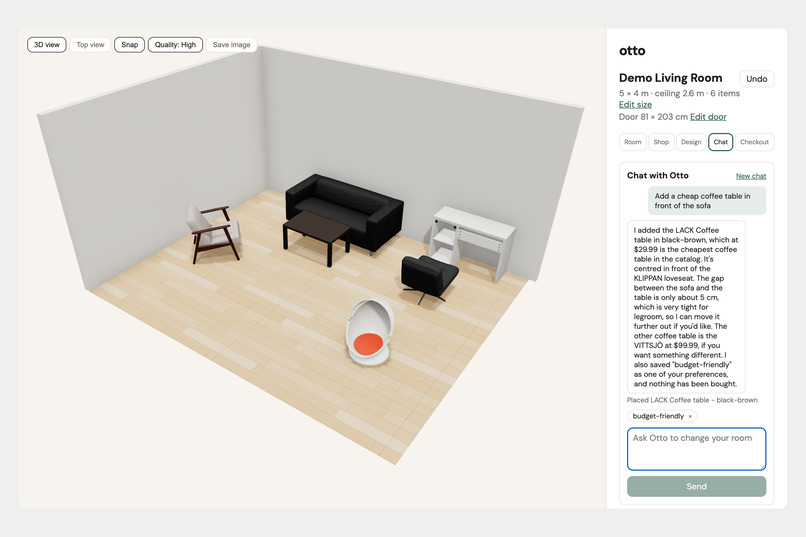
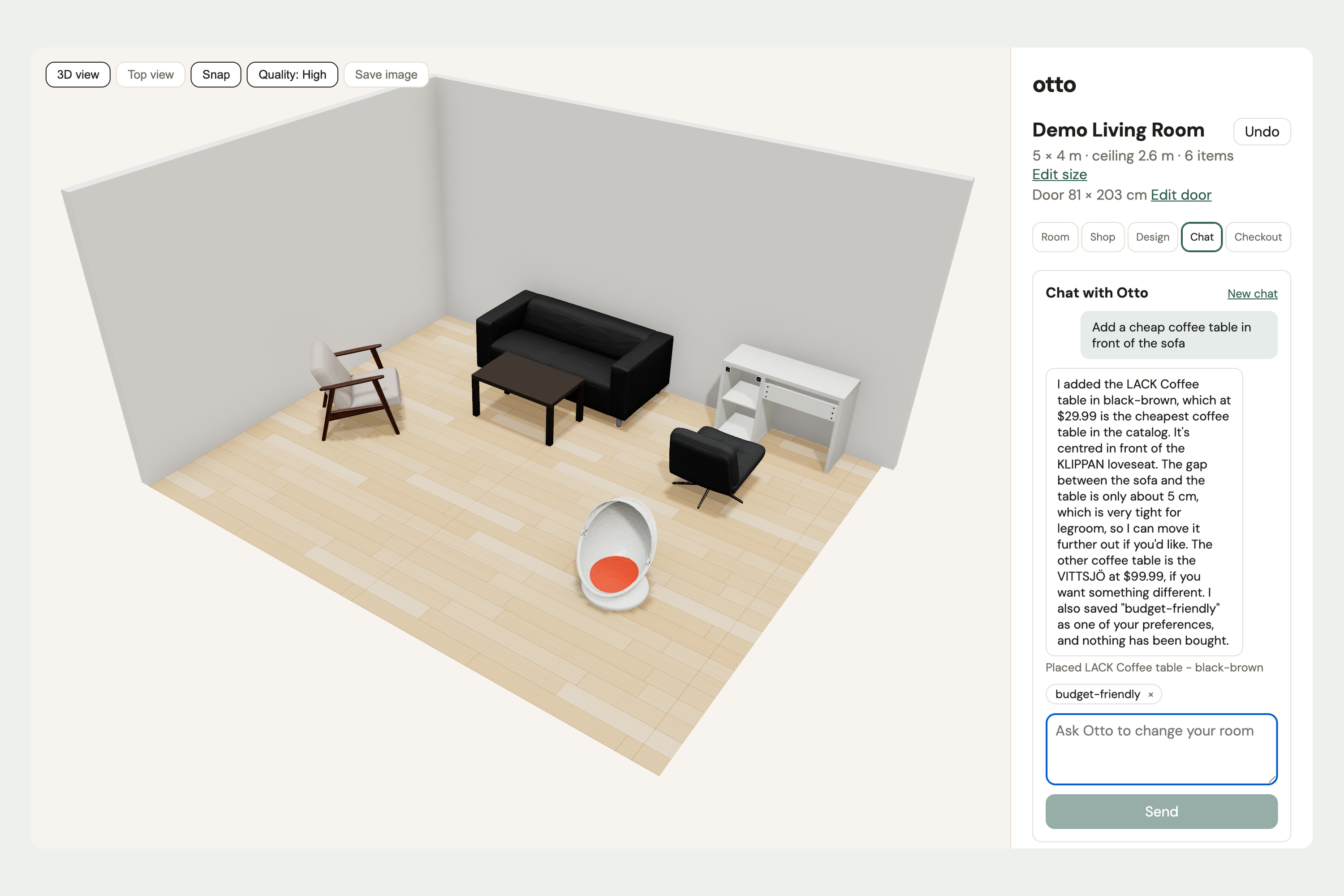
Ask otto in plain words. It adds the cheapest coffee table in front of the sofa and tells you how much legroom is left.
-
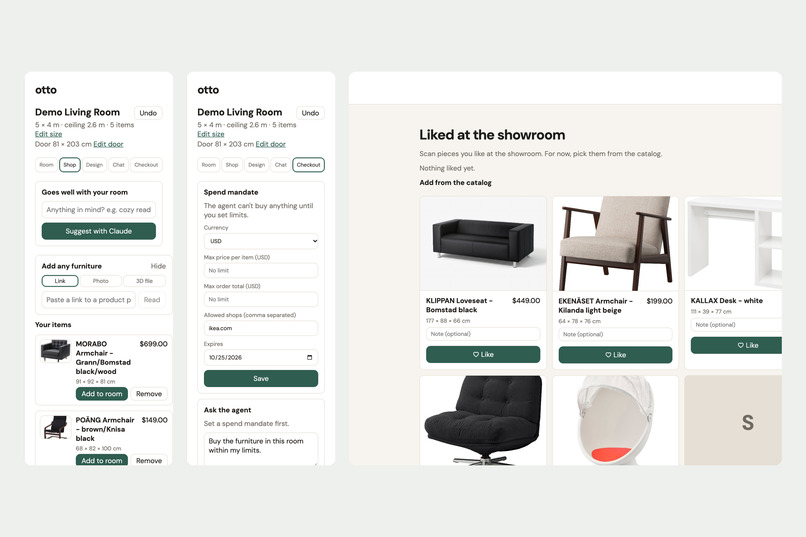
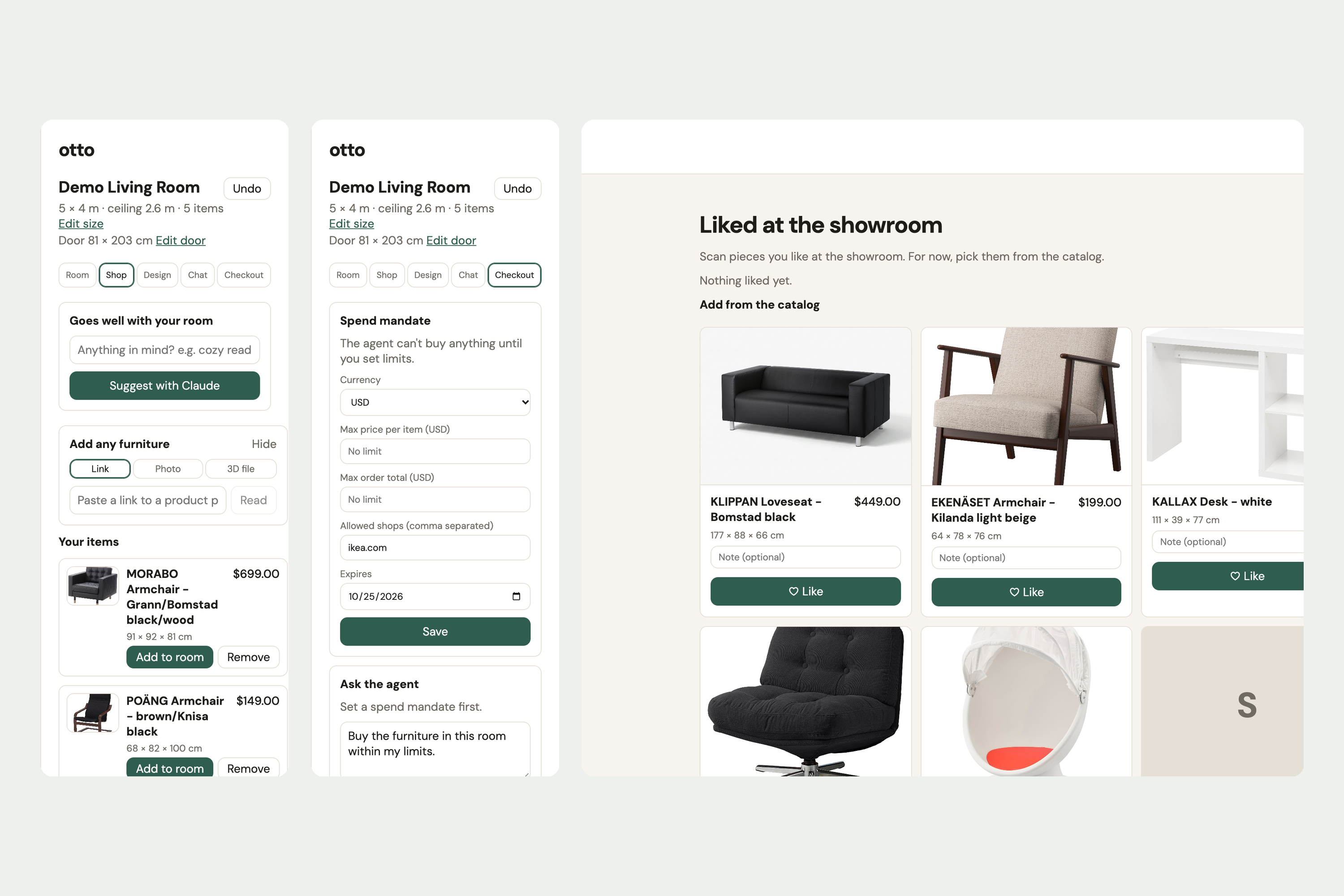
Add furniture from a link, photo or 3D file, like pieces at the showroom, and set a spending limit for the buying agent.
-
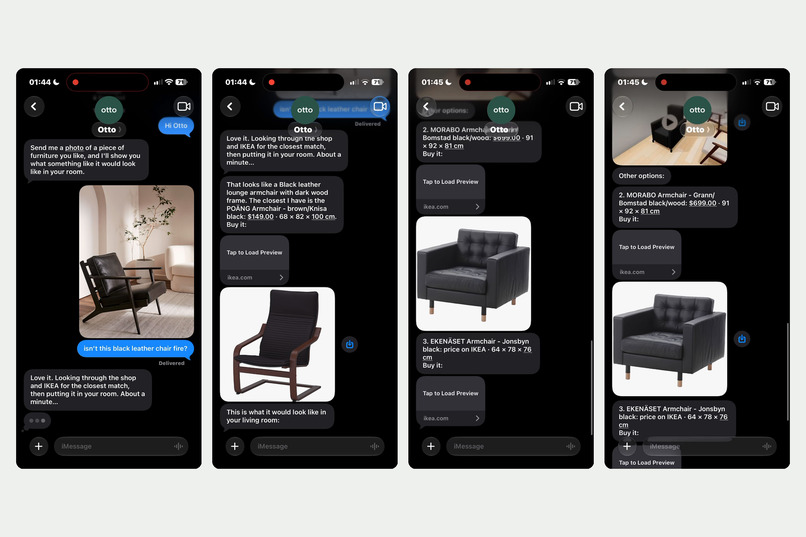
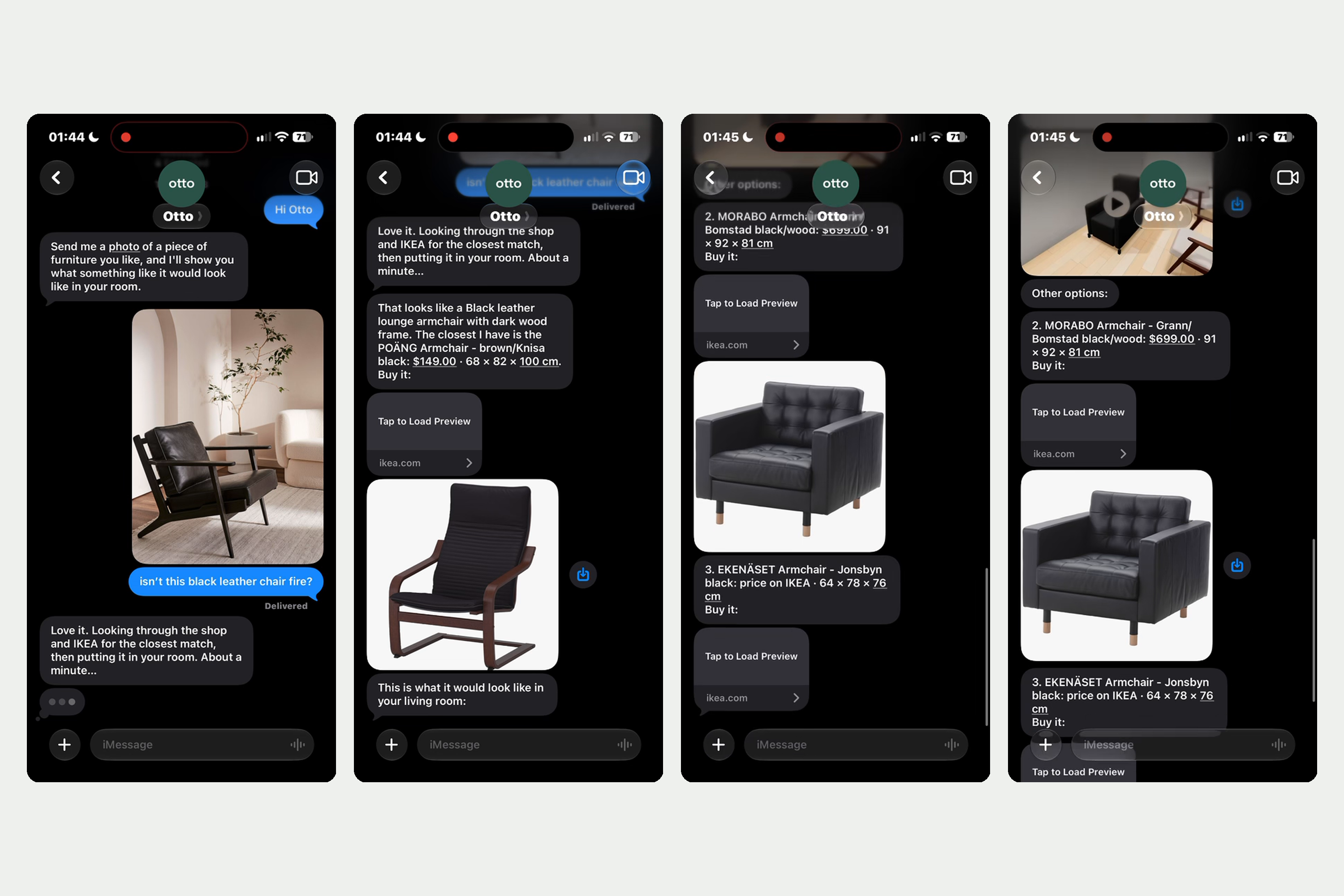
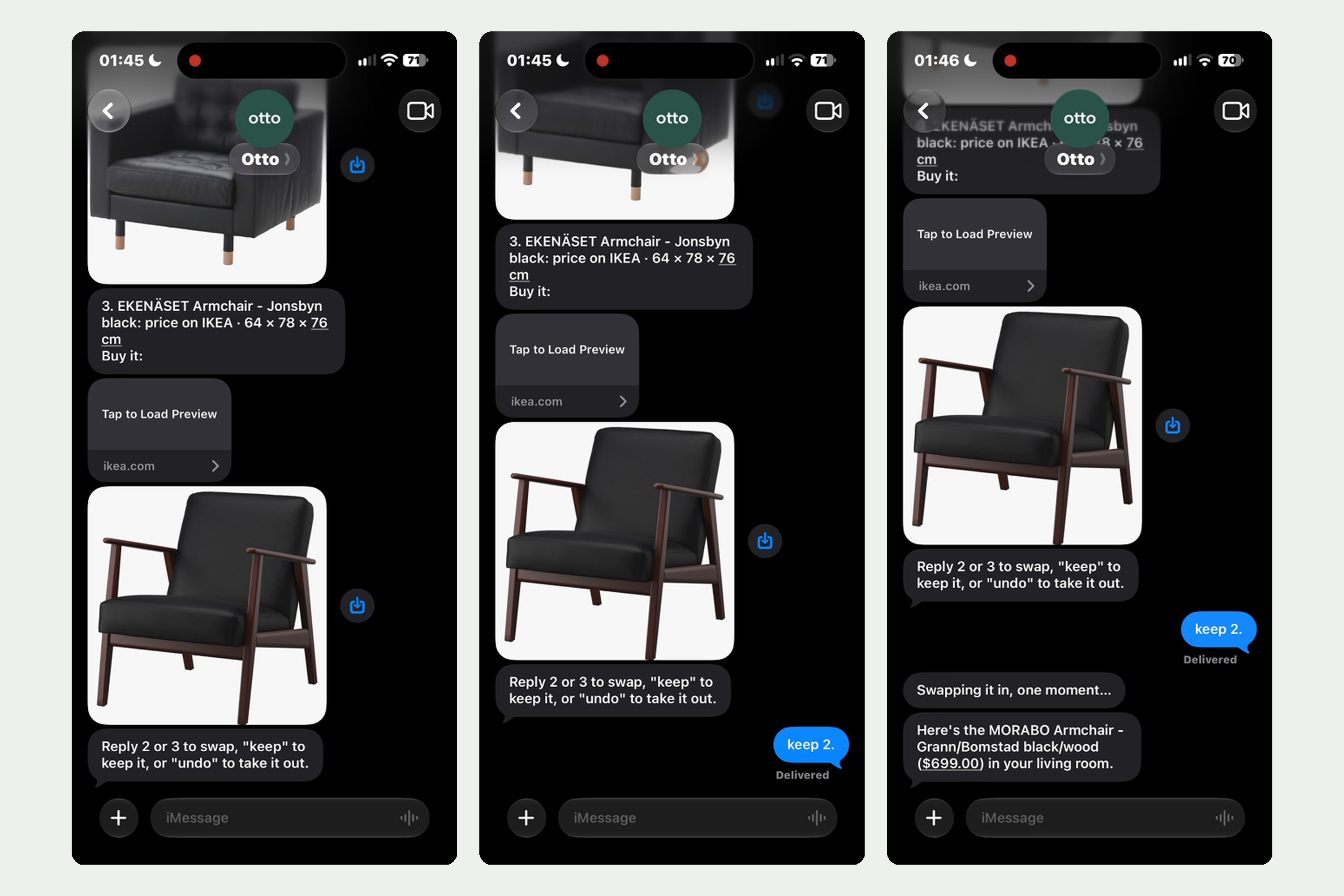
ext otto a photo of furniture you like. It finds the closest IKEA match, puts it in your room and sends the price and buy link.
-
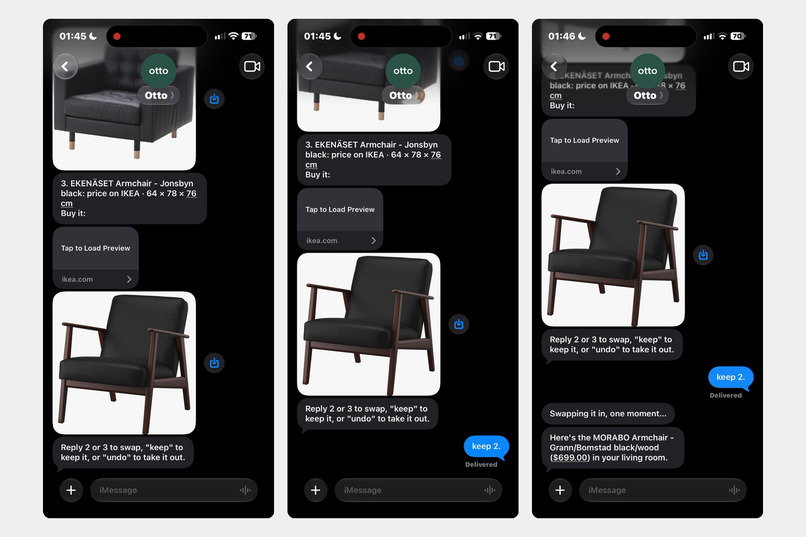
Not quite right? Reply 2 or 3 to swap in another option, "keep" to keep it, or "undo" to take it out.
-
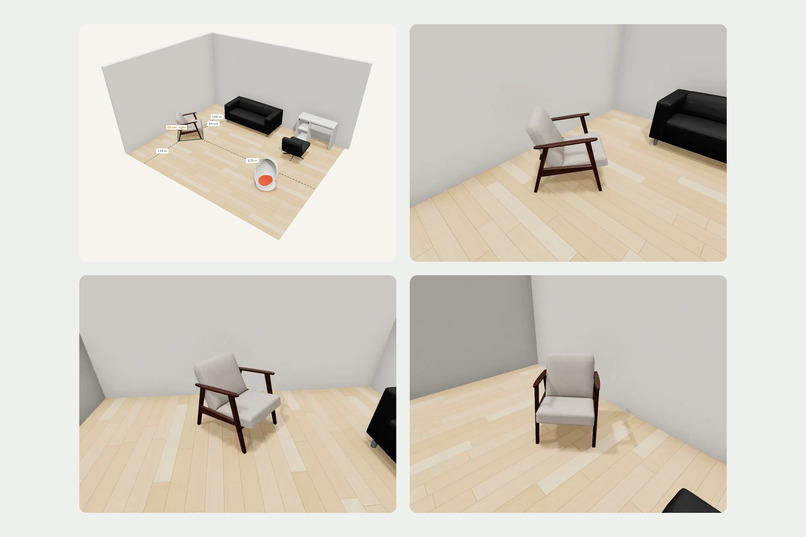
With every match, otto texts back a picture of your room and a short walk-around video of the new piece.
-
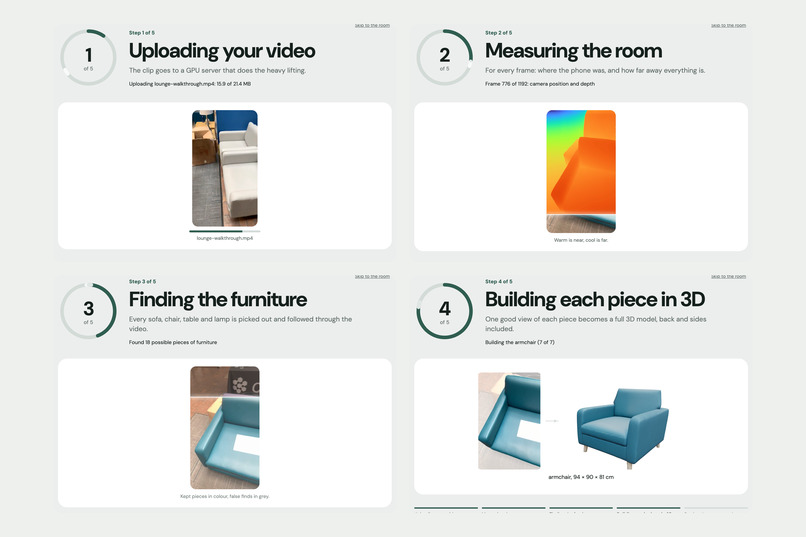
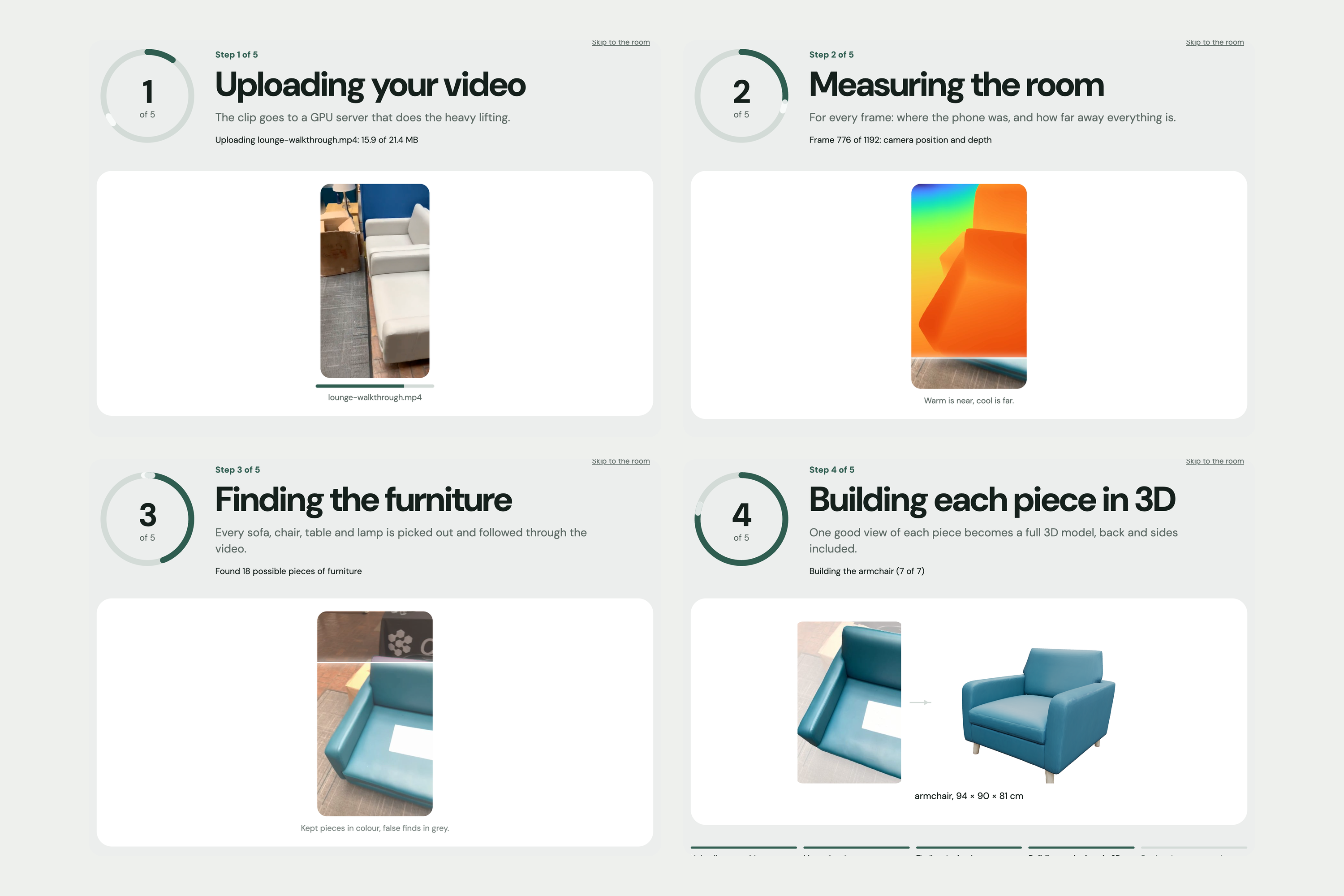
Phone video to 3D room: otto measures depth in every frame, finds each piece of furniture and rebuilds it as a 3D model.
-
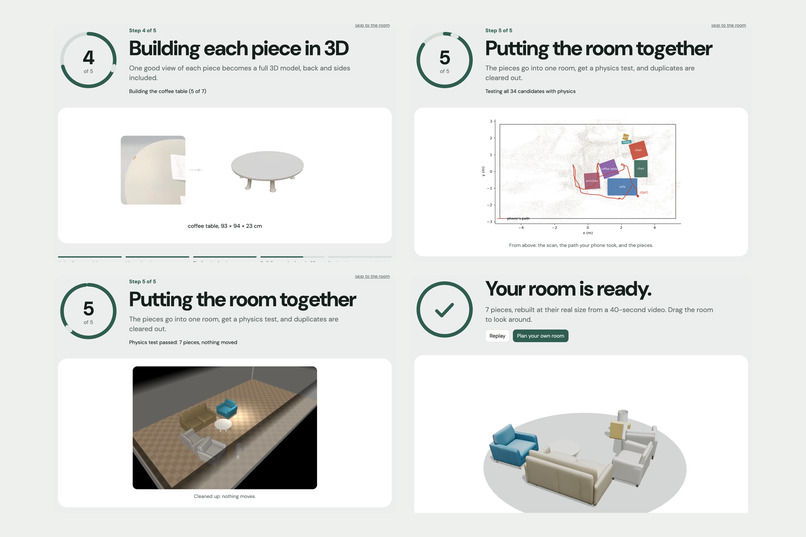
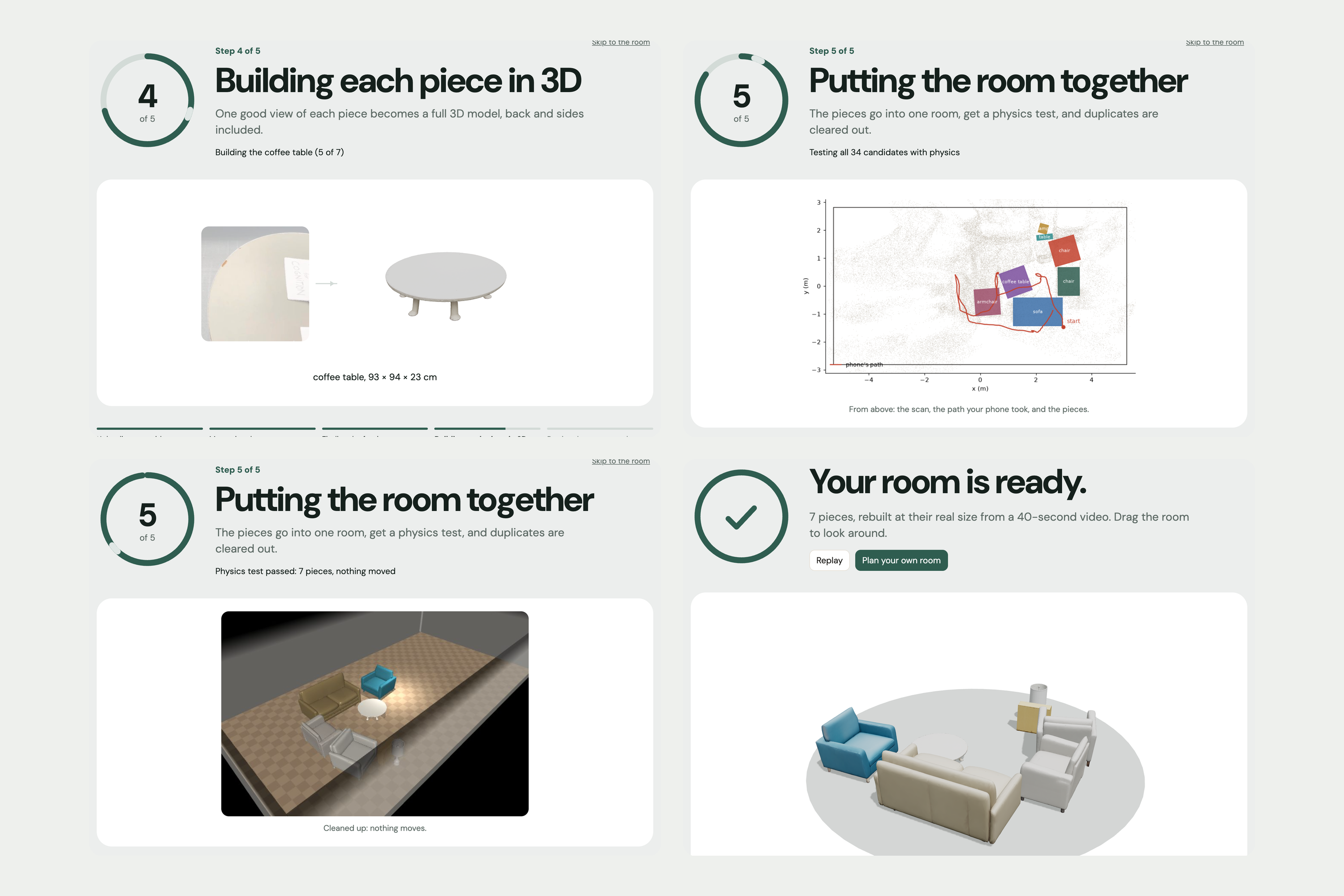
Pieces go into one room, get a physics check and lose duplicates: 7 pieces at real size from a 40-second video.
Inspiration
Buying furniture online is a guess. You stare at a product photo and a list of dimensions, then try to picture it in a room you can't see at the same time. Will it fit? Will it block the walkway? Is there a cheaper one that looks the same? Most people find out after it arrives.
AI shopping tools don't fix this. They can search and compare, but they have never seen your room. They don't know your sofa is 177 cm wide, or that the gap to your desk is already tight. And the agents that can "buy for you" mostly ask you to hand over your card and hope.
So we built otto. It gives AI the one thing shopping never had: your actual room. And it only buys what you approve.
What it does
Your room in 3D. Walk around a room with your phone. otto turns the video into a 3D copy of the room, with every piece of furniture at its real size. You can drag pieces around, rotate them, undo and redo. otto measures the gaps as you go and flags a walkway that gets too tight, and checks if a new piece will fit through the door.
Text otto a photo. See a chair you like in a store or a friend's place? Text a photo to otto on iMessage. Claude reads the photo, finds the closest pieces, and texts back the best match with its price and buy link, a picture of your room with the chair in it, and a short walk-around video. Reply "2" or "3" to try another one, or "keep".
Cheaper look-alikes. Click any piece and ask for cheaper options. otto searches IKEA and other shops (Target, Walmart, Wayfair, Lowe's and more). Claude compares each product photo against your piece, so it only keeps pieces in the same style, not just the same keyword. Every result is checked against your room: "Fits here" or "Overlaps the side table". One click swaps it in, and your total drops.
Chat with your room. Ask "we need a cheaper armchair" or "make room for a reading corner." The assistant can find, place, move and swap furniture. It can't buy anything.
Design with Claude. Start a new place from its width, depth and ceiling height, like the pieces you saw in a showroom, and let Claude lay them out: the sofa against a wall, chairs facing the desk, the walkway kept clear.
Checkout with limits. You set a spend mandate: max price per item, max order total, allowed shops, an expiry date. The agent gets a token for just those limits. Ask it to buy your room, and it proposes an order that fits. Then Claude rearranges the room around what you're actually buying, and asks if you want to keep the new layout or put it back. The agent can propose, but it can't pay. Only your tap approves, and the server re-checks every price first. (The payment is a demo, and the app says so.)
Add anything. Paste a product link, upload a photo or a 3D file, or use the Chrome extension to send the product page you're looking at straight into your room.
How we built it
There are five parts.
- Room capture. You take a slow 30–90 second phone video of the room. It goes to a CUDA GPU server:
- ViPE gives the camera pose, lens settings and metric depth for every frame.
- SAM 3.1 finds every instance of a furniture word ("sofa", "chair") and tracks it through the video, so a piece that comes into view later is still found. We run one pass per word, then merge duplicates across words. Grounded-SAM-2 is the fallback.
- SAM 3D Objects builds each piece as a full 3D model. We feed it ViPE's metric depth, so every piece comes out at its real size, in metres.
- Then the pieces go into one room, get a physics test, and duplicates are cleared out.
- The room website. React + TypeScript + Vite, with the 3D view in Three.js through React Three Fiber. Soft shadows, a wood floor, top view, snap to walls, live distance labels and walkway warnings. Fit checks are pure 2D footprint math, so they're fast and fully tested.
- The backend. Python + FastAPI. Rooms, layouts, undo history, orders and the spend mandate are plain JSON files on disk behind one lock. A safe fetcher reads product pages for the importer and refuses private network addresses.
- The agents. Claude Opus 5.5 runs every AI step through tool use, and each agent only gets the tools it needs. The checkout agent can read the room, the catalog and the mandate, check an order and propose it. It can't approve, cancel, pay or move furniture. The chat assistant can move furniture but can't buy. The design agent can place pieces but can't remove the ones you added yourself.
- Look-alike search. SerpApi's Google Shopping API lists products from other shops. Claude estimates each listing's type and size. Then we download every thumbnail at once, split the candidates into small batches, and have Claude judge each batch in its own call, all at the same time. A batch that fails only leaves its own results unscored. Each survivor gets a dry run of "swap in" against the room.
otto on iMessage runs on Photon. A small TypeScript service keeps the whole conversation as plain functions with otto's API passed in, so it's tested without a phone. Pictures of the room are made on the server: headless Chromium opens the room page in a capture mode, waits for every model to load, and takes a screenshot.
Challenges we ran into
"Looks similar" is hard. Our first cheaper-alternatives search matched by type, so a swivel shell chair came back with a barrel chair, because both are chairs. Keyword search on other shops was worse. Moving to photo comparison fixed the quality, but one Claude call per product was slow. Batching the photos and running every batch in parallel brought a full search down to about 15–25 seconds.
Giving an agent money, safely. We wanted the checkout agent to be useful but never able to spend on its own. We split it in code, not in a prompt. The agent's tools stop at "propose". Approve lives only in the UI, and the server re-checks the mandate and every price at approval time. A proposal that breaks a limit can't be approved.
Rearranging without making a mess. When checkout leaves pieces out, we take them out of the room and ask Claude to rearrange the rest. Swapped-in pieces hide the piece they replaced, so taking one out could bring back a ghost of the original. We had to walk that chain and remove both. We also save a "Before checkout" layout first, so "Put back" always works, and every change is undoable.
iMessage. Replies on shared lines went to the wrong place at first, and sending pictures needed a different upload path than text. We rebuilt the bridge on Photon 2.0 so it polls, replies and uploads attachments reliably.
Accomplishments that we're proud of
- A full loop from a phone in your hand to a 3D room you can shop in: scan, text a photo, find a cheaper look-alike, swap it in, and check out within limits.
- The agents have real power but hard edges. Every agent's tool list is the contract, and none of them can pay.
- Every result is grounded in the room. "Fits here" isn't a guess from the product title. It's a dry run against your actual floor plan, walls and door.
- Three ways in: the website, iMessage and a Chrome extension, all on the same rooms.
What we learned
The room is the context that makes AI shopping useful. The same model gives much better answers when it can see that your walkway is 60 cm and your sofa is black leather.
Safety for agents is easiest to get right in the tool list. A prompt that says "don't buy anything" is a request. An agent with no buy tool is a guarantee.
Photos beat keywords for furniture. People shop by look, and the listing titles from other shops are mostly noise.
What's next for otto
- Real checkout with shop partners, using the same mandate and approval flow.
- Scan a room live on the phone, instead of uploading a video.
- Real 3D models for pieces from other shops, instead of a sized box in the right colour.
- Shared rooms, so roommates or a partner can vote on a piece before anyone buys it.


Log in or sign up for Devpost to join the conversation.