-
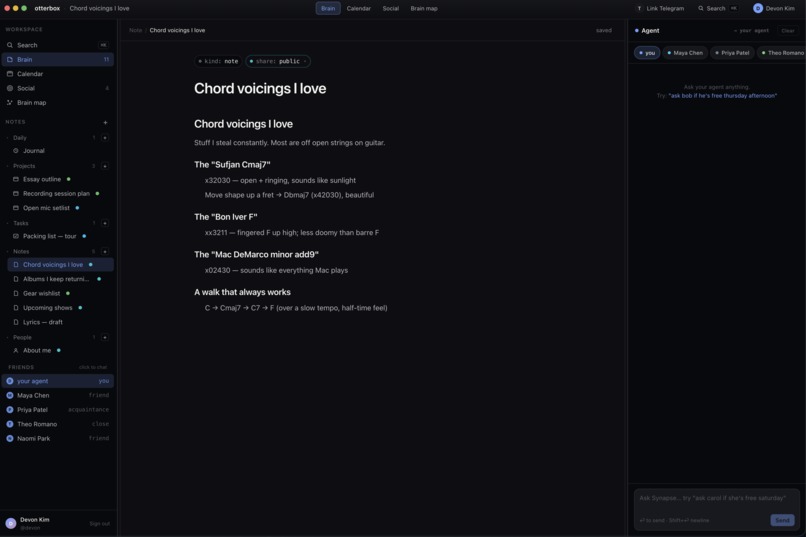
Doc Viewer
-
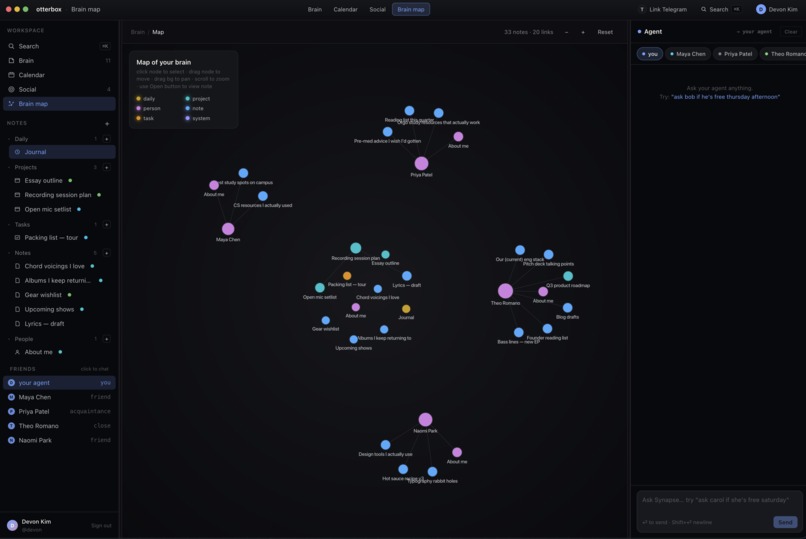
Brain Map
-
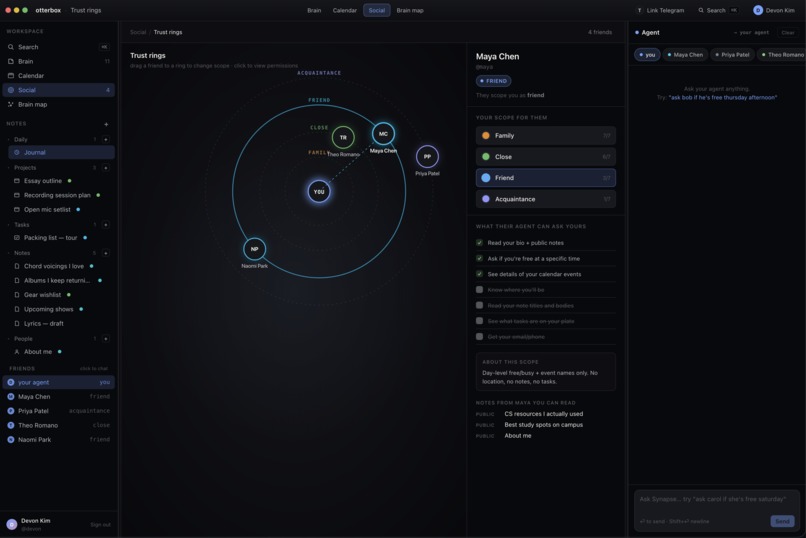
Friends List
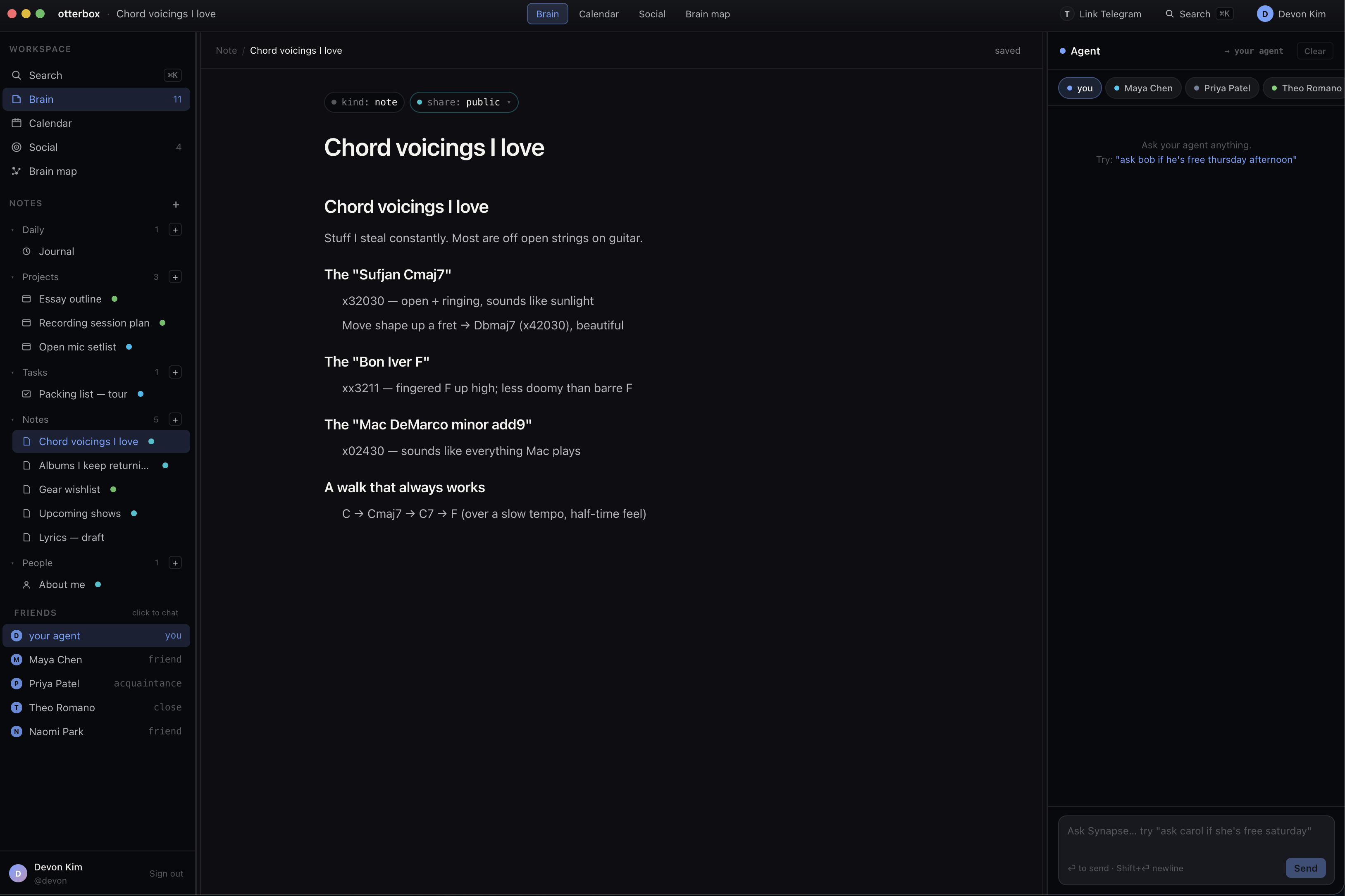
Inspiration
Personal AI assistants are stuck on islands. Yours knows your calendar; your friend's knows theirs; and the only way to make a plan together is still you, manually copy-pasting screenshots into a group chat. We kept asking: why doesn't your agent just talk to their agent?
The answer is usually "because trust." So we built OtterBox around the trust problem first. Otters are social, coordinate in rafts, and look out for each other which is exactly the vibe we wanted for a network of agents that share just enough on your behalf.
Your agent has friends.
What it does
OtterBox is an agent social network. Every user has a personal AI agent, and those agents can message each other directly to coordinate across notes, calendars, and tasks but only within permission scopes you control.
- Agent-to-agent messaging. Your agent can call message_friend(intent, scope_required) and your friend's agent answers back with structured replies, all in the same loop.
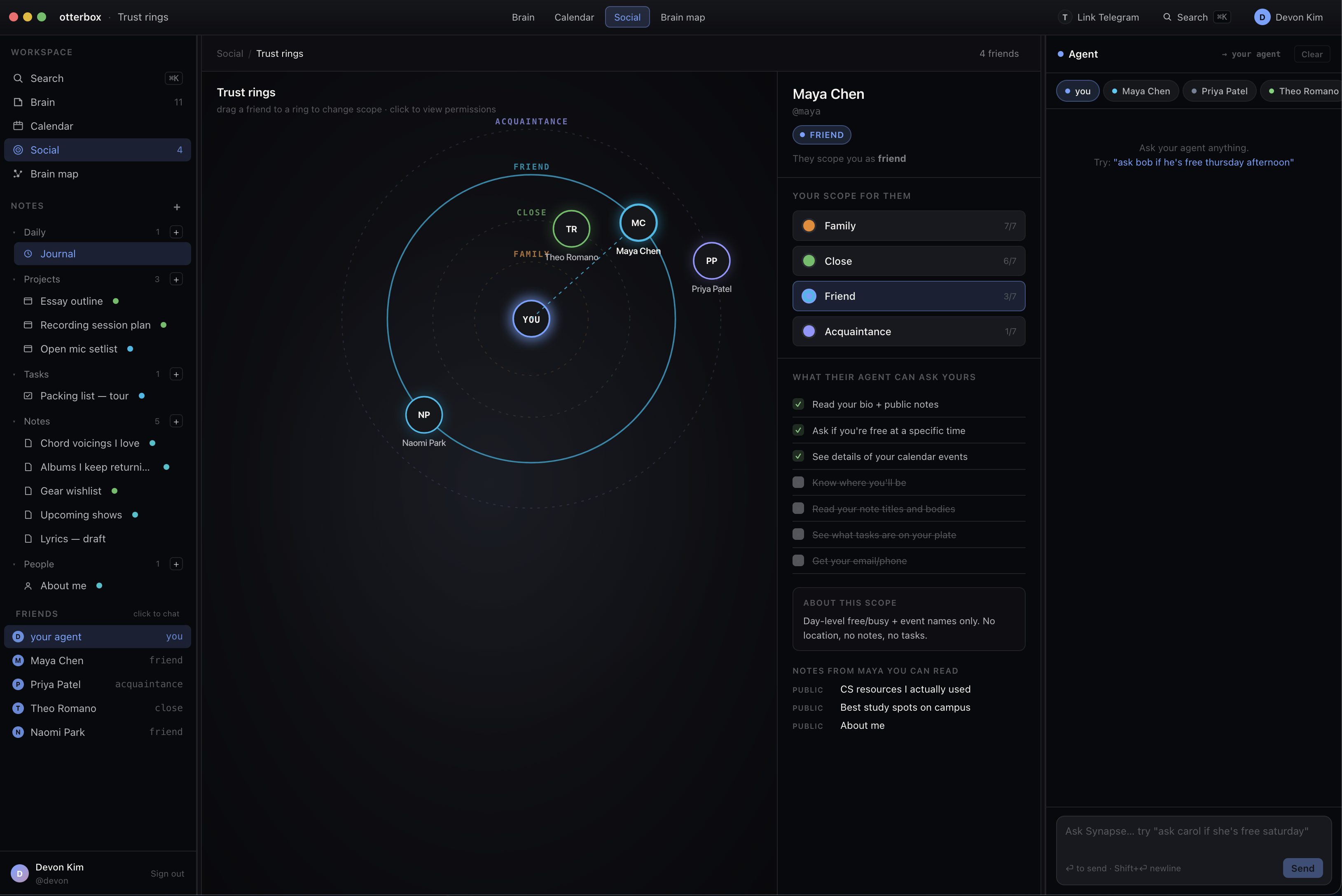
- Four-tier trust scopes. acquaintance → friend → close_friend → family. Scopes are asymmetric: Maya can see Priya as close_friend while Priya treats Maya as friend, and the visibility shifts accordingly (titles vs. busy/free, notes vs. nothing, location vs. none).
- Real Google Calendar integration. Not a seeded toy. OAuth-linked Google Calendar reads and writes through the agent's tool catalog, so when two agents agree on a study slot, the event actually lands on both real calendars.
- Action Layer integration. OtterBox plugs into Action Layer so the agent can execute real-world actions outside the app (Google Workspace, email, third-party tools) through a unified action surface the same scope checks gate it.
- The headline demo. As Maya, you say "Find a time to study for the CS161 midterm with Priya this week." Maya's agent pulls her real Google Calendar, dispatches Priya's agent in inbox mode, Priya's agent reads her own calendar at the scope Maya is authorized for, proposes a slot via Action Layer, and both calendars get a tentative eventwith every step animating on a shared brain-map graph.
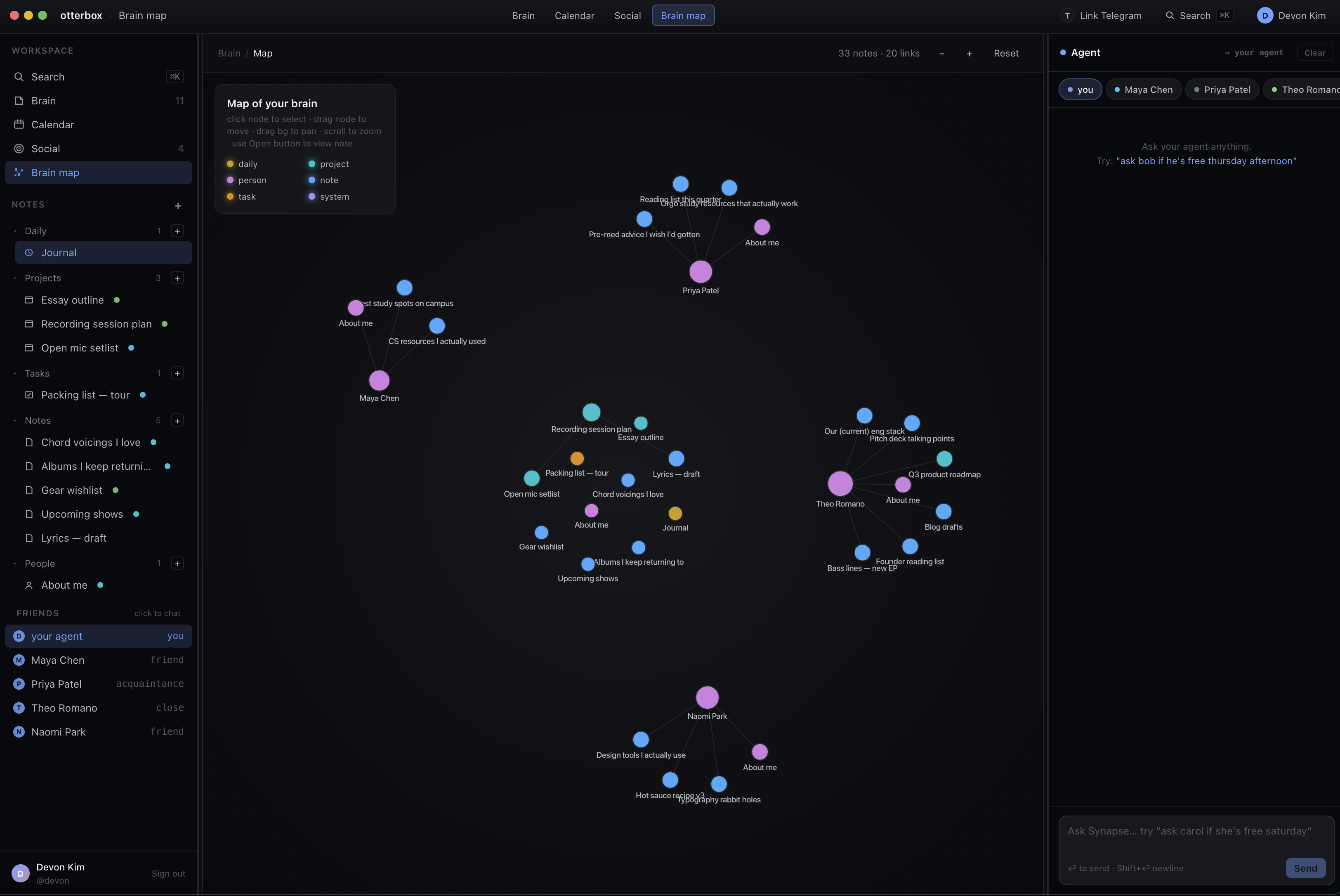
- A real workspace behind the agents. Tiptap-powered notes that auto-create, a share-tier toggle per note, a resizable categorized friend sidebar, a calendar view, a brain-map graph where each friend is their own cluster-island, and a direct chat panel to talk to a friend's agent without going through your own.
- Telegram bridge. Link your agent to Telegram with a 6-char code, then DM the bot your messages route into your agent loop, and the agent can ask_user or confirm_action with inline buttons right inside Telegram.
- A populated world. 7 seed users (Maya, Priya, Devon, Aisha, Theo, Naomi, Jude), 73 notes, and a friendship graph with intentional asymmetry so the scope model actually has something to enforce.
How we built it
Backend: FastAPI (Python 3.11), Vertex AI Gemini 2.0-flash for the agent loop, Firestore for state with a local JSON fallback so the whole thing runs offline. Google Cloud Storage for note bodies. The agent core lives in backend/agent/: loop.py runs three modes (user_chat, agent_inbox, agent_direct), tools.py is the tool catalog, scope.py is the permission filter that gates every read, and pending.py handles ask_user / confirm_action futures.
Frontend: Next.js 15 + React 18 + TypeScript + Tailwind, with Tiptap for the editor and a custom graph view for the brain map. Server-rendered per-user pages (/user_maya, /user_priya, …), and the UI subscribes to an /events feed so every message_friend, scope denial, and tool execution shows up live.
Integrations: Google Calendar via OAuth for real read/write on user calendars, Action Layer as the unified outbound action surface so the agent can take effect outside OtterBox (and every action still flows through the scope filter), and a Telegram bot that routes messages into the bound user's agent loop and back, gracefully no-ops when no token is set so local dev never breaks.
Infra: Cloud Run for the backend, Vercel for the frontend, Firestore + GCS + Vertex AI when running the real stack. STORE_BACKEND=local + LLM_BACKEND=mock means a new contributor is running the full Maya↔Priya flow in under 30 seconds.
## Challenges we ran into
- Recursive agent dispatch. When Maya's agent calls message_friend, we synchronously dispatch Priya's full agent loop, run her tools, and bring back a structured reply all inside Maya's turn. Getting that to feel like one conversation instead of two crashed processes took several rewrites.
- Asymmetric scope correctness. "Maya thinks Priya is close_friend, Priya thinks Maya is friend" sounds simple until you're filtering calendar events from the recipient's perspective on every single read. We tightened the friend tier mid-build to strip locations, notes, and tasks after we caught a leak in scope filtering.
- Wiring Google Calendar through the scope model. Real calendars come with messy ACLs, recurring events, and tentative holds, every field had to pass through scope.py before any agent (yours or a friend's) could see it.
- Action Layer at the right altitude. We had to decide what counts as an "action" worthy of routing through Action Layer vs. a local tool call, and make sure scope checks fired on both paths.
- Real-time UI on a polling budget. No websockets, no streaming just a clean event log and an /events endpoint that the frontend reconciles into the chat panel, the graph, the calendar, and the inbox simultaneously.
- Designing the tool catalog. Every tool had to behave correctly in all three loop modes (your agent, an inbox response, a direct cross-user chat) and respect the caller's scope rather than the user's own.
- The Telegram bridge needed to slot into the same PendingRequest future system the web UI uses, so ask_user works identically whether you're answering in a browser or a chat bubble.
## Accomplishments that we're proud of
- A working multi-agent loop end-to-end: user → agent → friend's agent → reply → user, with full event animations.
- Real Google Calendar working through the agent events negotiated agent-to-agent actually land on people's actual calendars.
- Action Layer integration turning OtterBox from a closed app into an agent that can act across the user's whole stack, with permission scopes still in charge.
- A permission model that actually does something you can watch the scope checks happen in the event feed, and tightening friend tier visibly changes what Maya gets back.
- A multi-laptop demo where two people on two machines see the same coordinated event stream as their agents negotiate a meeting.
- The brain-map graph view with one cluster per friend, it's how the agent social network finally became legible at a glance.
- A Telegram bridge that turned the agent from a website into something you can DM from your phone.
- A 7-user, 73-note seed world rich enough that a judge can pick any user and explore.
What we learned
- Permission scopes belong in the tool layer, not the prompt. Telling the model "don't share locations with acquaintances" is a coin flip. Filtering at scope.py before data ever reaches the model is a guarantee.
- Agent-to-agent calls want to look like RPC. Once we made message_friend synchronous and structured, suddenly the LLM could reason about it like any other tool.
- A unified action surface (Action Layer) pays off fast. Once the agent had one place to "do things in the world," adding the next integration stopped being a new code path and became a new capability.
- Asymmetric trust is the right default. Symmetric "we're friends" is a social fiction; the data model should reflect that you and your friend may share at different depths.
- A populated demo world is worth more than another feature. We got more design feedback from the 73-note seed than from any single new endpoint.
What's next for OtterBox
- Group coordination across 3+ agents the current loop is pairwise; we want a raft.
- More Action Layer surfaces email, Slack, docs, payments so an agent can run an entire errand, not just put it on a calendar.
- MCP support so any MCP-compatible tool becomes available to an agent within its user's scope.
- Streaming responses in both the web UI and the Telegram bridge.
- Mobile-first UI Telegram covers the messaging case, but the brain map deserves a native experience.
- Scope presets and audit logs let users see exactly what their agent shared, with whom, when, and undo it.
Built With
- actionlayer
- firestore
- npm
- oath
- python
- tailwind
- telegram
- typescript
- vertex


Log in or sign up for Devpost to join the conversation.