-
-
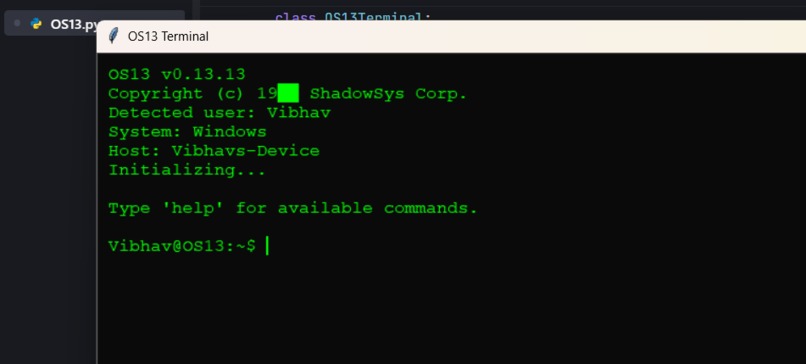
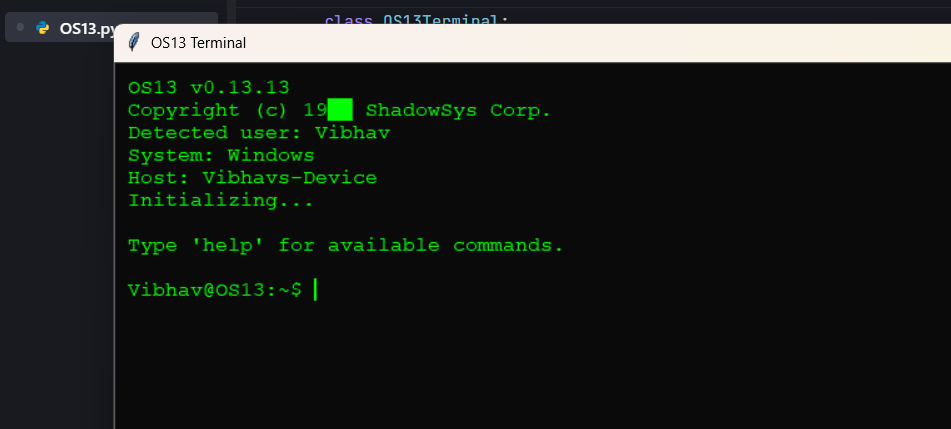
Opening Screen
-
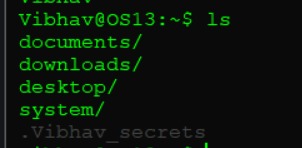
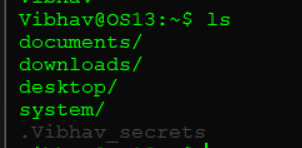
Weird File Creation
-
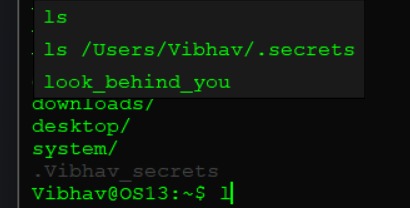
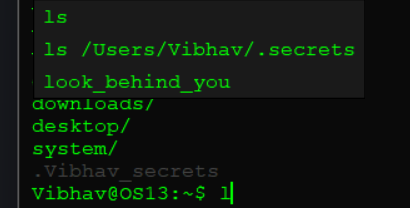
Scary Autocomplete
-
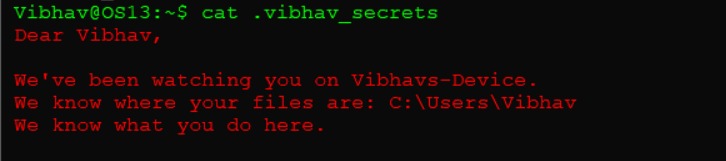
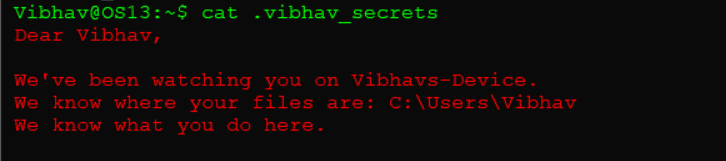
Inside one of the files
Inspiration
I've always been fascinated by psychological horror games like SOMA and Doki Doki Literature Club that break the fourth wall. I wondered: could a simple terminal create genuine psychological horror?
The idea hit me when I realized we trust our terminals blindly—typing commands without question. What if that trust was exploited? What if your terminal knew your name, watched your patterns, and made you question why you're still there?
I wanted to prove that horror doesn't need graphics or jump scares. Just text, timing, and psychology.
What it does
OS13 starts as a normal terminal. You type help, ls, whoami—everything works fine. Then things change.
The system uses your real username and hostname, making it uncomfortably personal. Phantom files appear with YOUR name on them. A fake webcam indicator flickers on. Commands start failing. The autocomplete suggests things like "list_all_dead_bodies?" instead of "ls".
At command 30, it breaks the "fifth wall"—acknowledging that I, the programmer, designed every uncomfortable moment specifically to manipulate you.
The system tracks your typing patterns and uses them against you. It remembers how many times you've tried to escape. It questions why you're still there when you could just close the window.
At command 50, cryptic hints appear: fr33d0m...freedom?...type it... An actual escape route unlocks—but only if you can find it.
The real horror isn't being trapped by code. It's being trapped by your own curiosity.
How I built it
```I built OS13 entirely in Python 3.8+ with Tkinter. No external dependencies. The architecture is straightforward:
A single OS13Terminal class manages everything
State tracking for anomaly levels (0-7), command counts, and user behavior
15+ command handlers that corrupt progressively
A glitch system that randomly injects visual corruption
Real-time system info integration (os.getlogin(), socket.gethostname())
A fake webcam indicator (just a red Tkinter label)
An escape system that unlocks based on command count
I used color-coded text tags for different "voices" (errors, whispers, ghost text, meta-commentary). The typing pattern analysis tracks keystroke timing to personalize responses like "You're typing fast. Scared?" The hardest part was making Tkinter—a boring GUI library—feel genuinely creepy through timing, color manipulation, and strategic text injection.```
Challenges I ran into
Making text scary: Too subtle and users ignore it. Too obvious and it becomes campy. I solved this with a progressive anomaly system that slowly escalates from normal → unsettling → horrifying.
Balancing fake vs. real: I needed surveillance to feel real without actually violating privacy. The solution was the fake webcam indicator and "logs" generated from system info that stays local.
The exit paradox: Users can always close the window, but I needed them to forget that option. I achieved this by making them focus on finding an in-universe escape (freedom command), so they don't think about the X button.
Tkinter limitations: It's not built for horror. I had to get creative with screen flashes (rapid color changes), glitches (Unicode corruption), and timed ghost text insertions.
Ethical boundaries: I had to ensure it's scary but not malicious—no file access, no network calls, no persistence. Just psychological theater with clear warnings.
Accomplishments that we're proud of
The fifth wall break at command 30 is my proudest achievement. When the system acknowledges that I designed this to manipulate you, it transforms from "spooky terminal" into genuine meta-horror.
Zero privacy violations while creating convincing surveillance theater. The webcam indicator is a colored label. The "logs" are generated text. It feels invasive without being invasive.
The escape mechanism is perfectly balanced—hidden enough to feel earned, hinted enough to be findable, dramatic enough to feel real.
Minimalist aesthetics: Green text on black. No graphics. No sound. Yet users report increased heart rate, actual paranoia, and reluctance to run it again.
I proved you don't need AAA graphics for psychological impact. Just good writing and timing.
What I learned
```Text can be terrifying when used right. The limitation became the strength.
Personalization breaks barriers. Using the player's real username transforms abstract horror into personal horror.```
Meta-horror is powerful. Acknowledging the designer's intent creates unique discomfort that traditional horror can't achieve.
Curiosity > fear. People stay because they're curious, not because they're trapped. The real hook is making the next command too interesting to resist.
Ethical design matters. Creating psychological discomfort requires responsibility—always provide a real exit, include warnings, and respect boundaries.
Python + Tkinter can do anything with creativity. I pushed a "boring" GUI library into creating genuinely unsettling experiences.
What's next for OS13
Short-term (v1.1):
Achievement system (fastest escape, most commands, easter eggs found) Multiple endings based on behavior (pacifist vs. aggressive vs. curious) More community-suggested easter eggs Difficulty modes (easy to nightmare)
Medium-term (v2.0):
Web version (run in browser, easier to share) Mobile port adapted for touch Localization for multiple languages Accessibility options for anxiety/photosensitivity
Long-term (v3.0+):
Fake "multiplayer" where other "users" are trapped with you AI-generated responses for infinite variety VR version for full immersion Research application studying digital horror psychology
Technicalities (Tech Stack)
Core:
Language: Python 3.8+ GUI: Tkinter (built-in, no dependencies) Architecture: Single-class OOP design
Key Libraries:
pythontkinter
random
datetime
os
platform
socket
Technical Highlights:
~1000 lines of code Progressive anomaly system (7 levels) Real-time typing pattern analysis Fake webcam indicator (UI only) Zero network calls, zero file writes 100% local, 100% auditable Cross-platform (Windows, macOS, Linux)
Built With
- os
- platform
- python
- socket
- tkinter


Log in or sign up for Devpost to join the conversation.