-
-
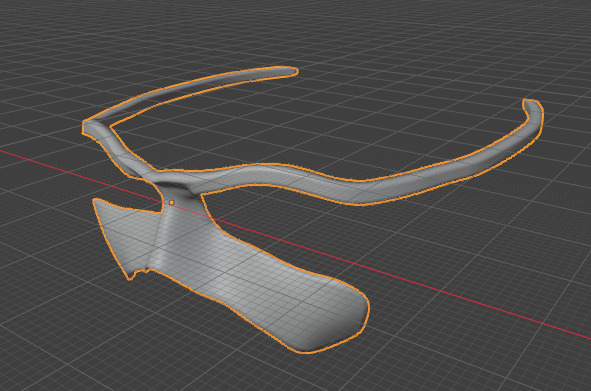
Future Mode/ Possibility
-
Sys Arch
Inspiration
People with spinal cord injuries, muscular dystrophy, MS, early ALS, or stroke often retain a clear voice but have limited use of their hands. While voice control is excellent for typing, pointing by voice usually relies on clunky number grids. Eye trackers solve the pointing problem, but they typically cost upwards of $1,249 and run on closed ecosystems.
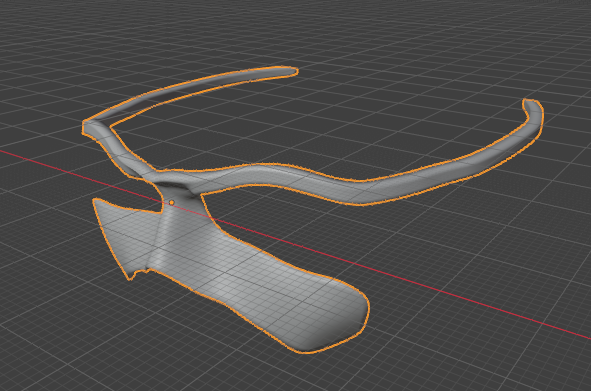
We were inspired to build an open, affordable alternative: a stack where your eyes do the pointing, two or three switches handle the clicking, and your voice does everything else. We aren't trying to beat commercial giants like Tobii; instead, we wanted to create an accessible, DIY build that anyone can adapt, personalize, and improve for a specific user.
How We Built It
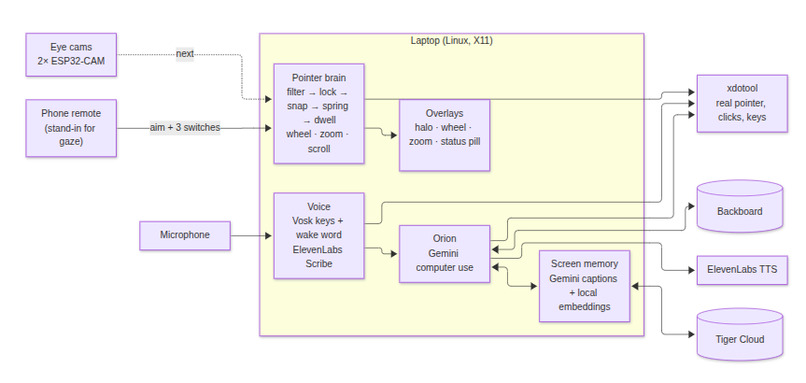
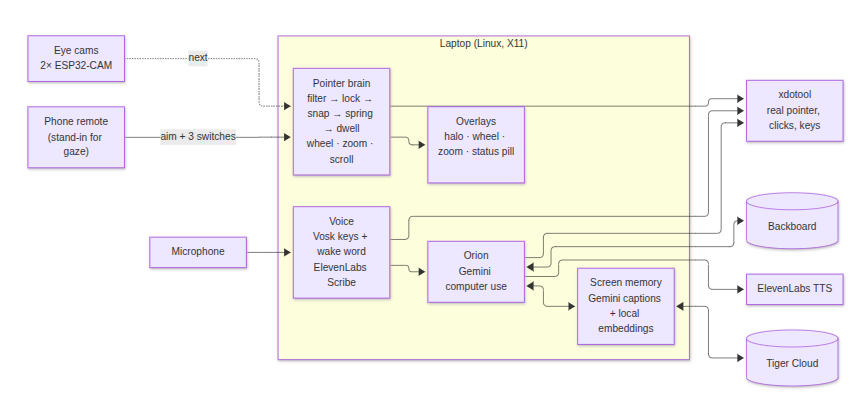
Gymote Desktop runs on Linux under X11, using a TypeScript (Node + Vite) server to handle the core logic and Python helpers to draw overlays and process offline speech. Because our custom eye-tracking hardware is still in development, we temporarily use a smartphone acting as a pointing remote over WebRTC. Everything downstream is built for genuine eye-gaze.
The core stack includes:
- Pointer Pipeline: We process raw aim data every 10ms using standard eye-tracking UX techniques: a One Euro filter to eliminate tremor, velocity-threshold (I-VT) fixation detection, and a critically damped spring that moves the real OS pointer via
xdotool. - Custom Overlays: Python, GTK, and Cairo generate click-through accessibility windows (like our zoom-click panel and radial menu) while XFixes hides the distracting OS cursor in favor of a soft halo.
- AI Agent (MARS): Powered by Claude Opus 5.5 and Anthropic's computer-use tools, MARS can navigate the desktop, execute commands, and converse with the user. When apps hide their accessibility tree (AT-SPI), Claude Sonnet 5.5 analyzes a screenshot to identify clickable targets.
- Voice Integration: Offline Vosk handles instantaneous game keys and the "Hey MARS" wake word. We integrated ElevenLabs for the heavy lifting: Scribe provides perfectly punctuated dictation and TTS speaks MARS's responses aloud.
- Screen Memory: We capture screen state every 10 seconds. Claude Haiku 5.5 captions the frames, and Ollama embeds them locally. This data is pushed to Tiger Data (Tiger Cloud) using a Postgres backend with TimescaleDB hypertables and
pgvector, allowing users to ask MARS things like, "What was that recipe I had open this morning?" - Semantic User Memory: We integrated Backboard to maintain a persistent identity across sessions. MARS remembers the person—like who their sister is or their preferred zoom settings—and injects these facts into every command context.
Challenges We Ran Into
- Hostile Networking: Campus Wi-Fi and Docker subnets completely swallowed our phone-to-laptop WebRTC traffic. We had to build a relay fallback through our dev server, adding custom ping verifications because the phone would claim it was "connected" even when packets were dropping.
- Tremor vs. Intent: Our fixation lock successfully killed hand tremor, but it also swallowed small, deliberate pointer corrections, leaving the cursor stuck just short of buttons. We engineered a "creep" offset to allow steady, deliberate glides toward a target without breaking the tremor lock.
- GTK Drag-and-Drop Failures: We discovered that if the pointer jumped more than 100 pixels instantly, GTK lost the drop target. We had to intercept and chunk large drag movements into micro-steps of 12 pixels or less.
- Trigger-Happy Wake Words: Our offline Vosk model woke up to sound-alikes like "Hey Ryan" or "Oreo." Because Vosk's confidence score defaults to 1.0 in grammar mode, we fixed this by filling the grammar dictionary with decoy words to catch false positives.
- Accidental Privacy Breaches: During early screen-memory testing, our screenshots captured a
.envfile and private Discord messages. We had to implement a strict title-matching blacklist to completely skip capturing password managers, chat apps, and banking windows.
What We Learned
We learned that designing for gaze requires abandoning traditional mouse paradigms. An arrow cursor exactly where you look actually pulls your eye away from your target, creating a frustrating chase loop—which is why we replaced it with a soft halo. We also learned that forced UI snapping is overwhelmingly "grabby" for users, leading us to pivot to a frozen 3x Zoom-Click interface for precision tasks. Ultimately, we discovered that building true accessibility requires a delicate fusion of deterministic physics (for smooth hardware control) and generative AI (to interpret screen context when traditional accessibility trees fail).
Built With
- accessibility
- ai
- anthropic
- assistivetechnology
- backboard
- claudeai
- computervision
- elevenlabs
- eyetracking
- generativeai
- hackathon
- humancomputerinteraction
- innovation
- machine-learning
- opensource
- python
- tigerdata
- typescript
- voicecontrol


Log in or sign up for Devpost to join the conversation.