Project ORION — The Agentic Orchestration Engine
Inspiration
The inspiration for Project ORION came from a simple yet powerful question:
“What if AI agents could collaborate intelligently, like a digital team — planning, reasoning, and acting together?”
While exploring AWS Bedrock and Nova foundation models, we realized that LLMs can think but not coordinate. Traditional systems are static — each model or API works in isolation. ORION was built to connect these pieces into a single orchestrated ecosystem, where intelligent agents can plan, reason, and act collaboratively.
What We Built
Project ORION is an agentic orchestration engine built on AWS Bedrock and Nova, allowing developers to:
- Create and register custom AI agents — each with its own tools (APIs, methods, or ML models).
- Automatically plan workflows using a foundation model that decides which agent acts next.
- Pause intelligently when human input is required and resume autonomously after.
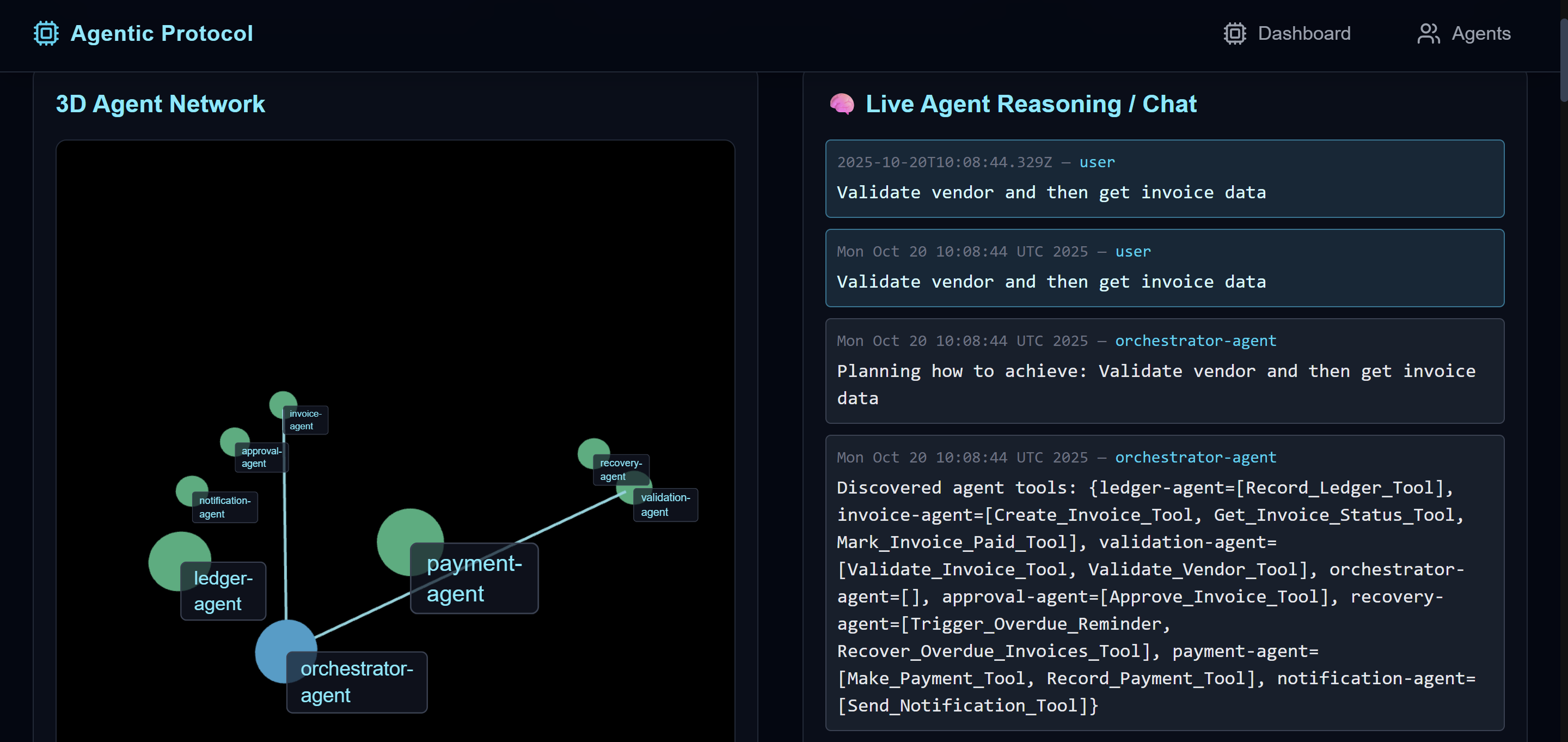
- Communicate through a real-time kernel, powered by async message passing and SSE.
- It aims to enable any working professionals or users to design their tools and merge with ORION,it takes care of intent classification .genrating agent seqeunce and pausing or resuming flow as per user.
Conceptually, ORION forms a **self-governing multi-agent ecosystem, where:
LLMOrchestrator=Brain,Agents=Muscles,Kernel=Nervous System.
How We Built It
- Backend: Java 21 + Spring Boot kernel handling orchestration, messaging, and SSE events.
- Agents: Independent Java microservices with JSON-based tool definitions and HTTP interfaces.
- Reasoning: AWS Bedrock / Nova foundation models for planning and reasoning steps.
- Flow Control: Event-driven orchestration using async futures (CompletableFuture) instead of blocking loops.
- Persistence: JSON-based session state to resume orchestration after user decisions.
- UI: Real-time SSE dashboard for orchestration visualization and human-in-the-loop control.
What We Learned
- How to design multi-agent orchestration that coordinates tasks dynamically.
- How to combine LLM reasoning with deterministic logic for reliable workflows.
- Importance of state management and idempotent message flow in distributed orchestration.
- How custom tool definitions make AI agents reusable and extensible.
Challenges Faced
- Handling recursive orchestration loops caused by multiple agent logs.
- Ensuring idempotency in reasoning to prevent duplicate user prompts.
- Managing distributed async states without deadlocks.
- Parsing LLM JSON outputs wrapped in markdown fences.
- Fine-tuning reasoning prompts to detect failures or user dependencies accurately.
Outcome
With ORION, anyone can deploy their own ecosystem of AI agents — each intelligent, autonomous, and capable of reasoning together.
“You don’t just automate workflows anymore — you build thinking systems that evolve with your goals.”
Agentic AI Protocol – AWS Architecture Diagram
Overview
ORION is an Agentic AI protocol that enables any microservice to be converted into an autonomous agent capable of reasoning, orchestrating, and executing actions through AI-driven workflows. It provides a kernel-centered architecture where services (agents) register, discover, and communicate via a discovery layer, enabling seamless interoperability between human, software, and AI agents.
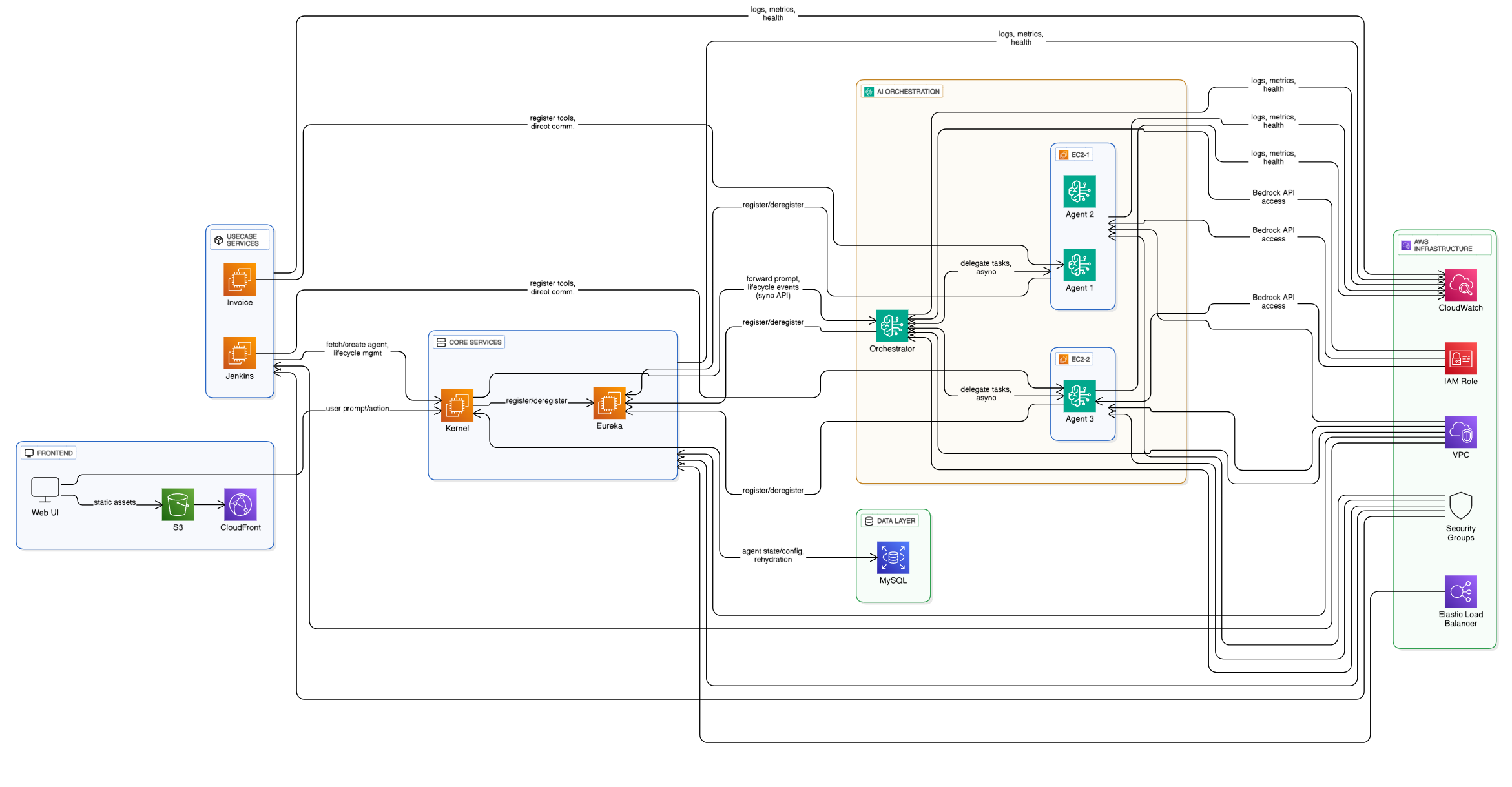
Architecture Diagram
High-level structure:
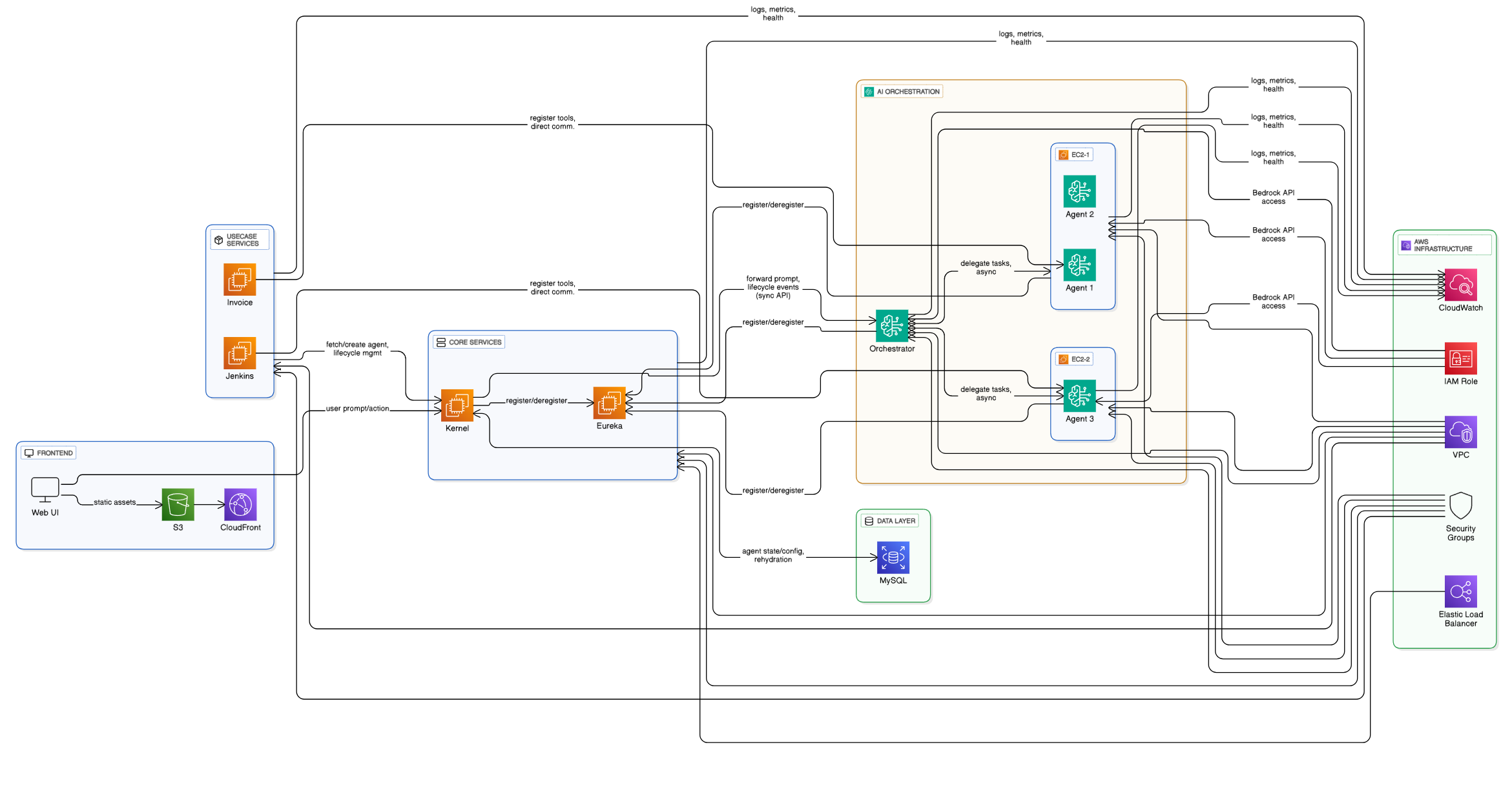
- Central Eureka Discovery Service
- Kernel Service as the protocol brain
- Orchestrator-Bedrock-Agent managing dynamic agent interactions
- N-Bedrock-Agents representing each specialized service
- Use Case Microservices (e.g., Jenkins Cloud Deployer, MSME Billing)
- UI hosted on EC2 for user interaction
- MySQL (RDS) as persistent agent and transaction store
System Components
1. Eureka Discovery Service
- Description: The central registry where all agents (microservices) self-register and discover each other dynamically.
Responsibilities:
- Maintain the service registry and heartbeat status
- Enable dynamic agent discovery and load balancing
- Facilitate inter-agent communication
Deployment Details:
Deployed as a standalone Spring Boot service on an EC2 instance within the same VPC.
2. Kernel Service
- Description: The core service of ORION that provides lifecycle management, Redis caching, and communication with the orchestrator.
Responsibilities:
- Manage agent registration, orchestration, and event routing
- Maintain Redis state for active agents
- Handle MySQL persistence for agent metadata
Deployment Details:
Deployed on EC2 with a local Redis instance and MySQL connection. Configured via
kernel.yml.
3. Orchestrator-Bedrock-Agent Service
- Description: The AI orchestration layer that leverages AWS Bedrock models to reason about tasks, delegate sub-tasks, and monitor outcomes.
Responsibilities:
- Interact with the Kernel to fetch task intents
- Invoke N-Bedrock-Agents or use case services
- Manage agentic delegation and decision-making
Deployment Details:
Deployed on EC2; connected to AWS Bedrock API via IAM Role with model invocation permissions.
4. N-Bedrock-Agent Service(s)
- Description: Specialized AI agents that represent individual capabilities or microservices (e.g., Jenkins, Billing, Monitoring).
Responsibilities:
- Translate natural-language goals into actionable microservice requests
- Communicate with the orchestrator for status and feedback
- Encapsulate microservice logic and response interpretation
Deployment Details:
Deployed as individual Spring Boot microservices on EC2; registered in Eureka and orchestrated dynamically.
5. Use Case Microservices
Examples:
- Jenkins Cloud Deployer: Interacts with Jenkins APIs to list, trigger, and monitor jobs.
- MSME Billing: Automates invoice generation and validation through agentic workflows.
Responsibilities:
- Provide specialized business capabilities
- Register themselves as agents in Eureka
- Support autonomous orchestration by Bedrock agents
Deployment Details:
Deployed on EC2, registered via Discovery, and accessible through internal network routing.
6. UI (Frontend Application)
- Description: ORION’s management and monitoring dashboard for viewing agents, orchestrations, and use case workflows.
Responsibilities:
- Display agent registry and orchestration states
- Provide control interface for deploying or invoking agents
- Enable testing and monitoring through browser
Deployment Details:
- Publicly accessible (Agentic-AI-UI) via
http://ec2-13-233-77-128.ap-south-1.compute.amazonaws.com:5173 - Publicly accessible (MSME-UI) via
http://ec2-13-233-77-128.ap-south-1.compute.amazonaws.com:5174 - Publicly accessible (Jenkins-UI) via
http://ec2-13-233-77-128.ap-south-1.compute.amazonaws.com:5175
Credentials(viewer/jenkins123)
- Publicly accessible (Agentic-AI-UI) via
7. MySQL Database
- Description: Central persistent store for agent states, orchestration logs, and transactions.
Usage:
- Store registered agent metadata
- Maintain orchestration audit trails and execution logs
- Provide data source for analytics and reporting
Deployment Details:
Hosted on EC2 (MySQL 8.4.0) or RDS for scalability; accessed by Kernel and Bedrock services.
AWS Infrastructure

| Component | Purpose | AWS Resource / Service |
|---|---|---|
| EC2 Instances | Host kernel, orchestrator, agents, UI | Amazon EC2 |
| VPC & Subnets | Isolated network for secure inter-agent communication | Amazon VPC |
| Security Groups | Allow controlled inbound/outbound traffic (5173, 8080, 3306, etc.) | AWS Security Group |
| Elastic Load Balancer | (Optional) Load balancing for microservices | AWS ALB |
| IAM Roles | Grant Bedrock and S3 access to orchestrator | AWS IAM |
| CloudWatch | Log aggregation, metrics, and health checks | Amazon CloudWatch |
| S3 + CloudFront | (Optional) Host static UI or configuration files | Amazon S3 + CloudFront |
| Bedrock API | LLM orchestration layer for intelligent agents | Amazon Bedrock |
| RDS (MySQL) | Persistent relational database | Amazon RDS (MySQL) |
Data Flow
Startup Phase:
- All microservices register with the Eureka Discovery Service.
- Kernel loads agent registry and initializes orchestration logic.
Use Case Start:
- User triggers a workflow (e.g., Jenkins Deploy or MSME Billing) through the UI.
- Kernel delegates task to Orchestrator-Bedrock-Agent.
User Request Flow:
- Orchestrator evaluates goal → delegates to appropriate N-Bedrock-Agent.
- Bedrock Agent calls corresponding use case microservice.
- Kernel updates Redis and MySQL with orchestration status.
- UI polls Kernel for updates.
Key Workflows
- Agent Registration: Agents announce themselves to Eureka and register metadata to MySQL via Kernel.
- Agent Lifecycle Management: Kernel monitors agent health and re-registers failed ones automatically.
- User Interaction: UI communicates with Kernel REST APIs to invoke orchestrations and monitor results. ---
Additional Notes
- All EC2 instances use Amazon Linux 2.
- Each service logs via
nohupfor persistent monitoring. - Kernel, Orchestrator, and Agents communicate using REST + Redis pub/sub.
- Bedrock integration enables true “agentic autonomy.”
- ORION’s goal: Enable anyone to convert their microservice into an AI-powered agent.
Video Demo
Automated Invoice Lifecycle Workflow
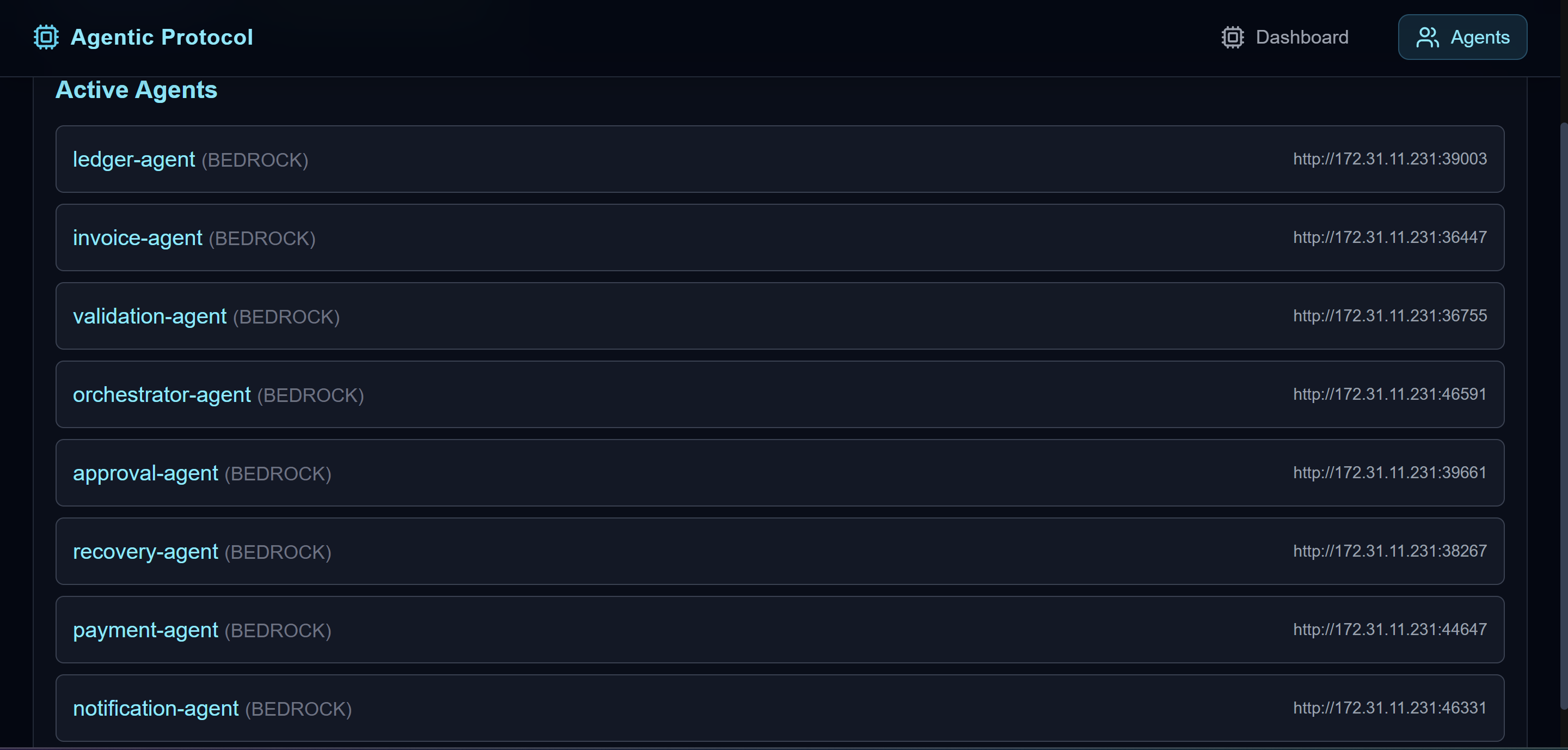
The MSME Protocol enables an automated, agent-driven financial workflow that manages invoices, approvals, payments, and ledger updates. Each microservice acts as an autonomous agent exposing tools that can be orchestrated through natural language instructions, ensuring a seamless and transparent invoice lifecycle.
| Agent | Description | Key Tools |
|---|---|---|
| Invoice Agent | Manages invoice creation and tracking. | Create_Invoice_Tool(vendor, amount) — Creates a new invoice.Get_Invoice_Tool(invoiceId) — Retrieves invoice details. |
| Approval Agent | Handles validation and authorization. | Approve_Invoice_Tool(invoiceId) — Approves an invoice.Reject_Invoice_Tool(invoiceId, reason) — Rejects invalid invoices. |
| Validation Agent | Ensures data correctness. | Validate_Invoice_Tool(invoiceId) — Validates invoice structure and business rules. |
| Payment Agent | Records payments for approved invoices. | Record_Payment_Tool(invoiceId, amount) — Marks invoice as PAID and records payment metadata. |
| Ledger Agent | Maintains accounting records and audit trail. | Record_Ledger_Tool(invoiceId, vendor, amount, type) — Posts credit/debit entries.Get_Ledger_Tool(invoiceId) — Fetches ledger entries and audit logs. |
| Notification Agent | Sends alerts to vendors and stakeholders. | Send_Notification_Tool(vendor, message) — Sends notifications (email/SMS/webhook) to stakeholders. |
| Recovery Agent | Handles overdue invoices and collections. | Trigger_Recovery_Tool(invoiceId) — Starts recovery/collections workflow.Send_Reminder_Tool(vendor, invoiceId) — Sends payment reminders and escalation notices. |
Example Use Case: Invoice Creation Workflow
Prompt:
“Create a new invoice for vendor 'Zenith Retailers' with amount ₹45,000 and notify the vendor.”
Workflow:
Invoice Agent → Create_Invoice_Tool(vendor="ABC Enterprises", amount=45000)
Creates a new invoice (INV-1042) with status CREATED.
Notification Agent → Send_Notification_Tool(vendor="ABC Enterprises", message="Invoice INV-1042 created successfully.")
Sends confirmation to the vendor.
This showcases autonomous orchestration — a high-level natural language command is decomposed into executable agent actions.
Chained Multi-Agent Workflow
For more complex operations (e.g., payment and ledger posting):
Approve_Invoice_Tool(invoiceId) – Approve invoice.
Record_Payment_Tool(invoiceId, amount) – Register payment, mark as PAID.
Record_Ledger_Tool(invoiceId, vendor, amount, "CREDIT") – Add ledger entry.
Send_Notification_Tool(vendor, "Payment recorded and ledger updated.") – Notify vendor.
These inter-agent workflows enable autonomous, verifiable financial operations with minimal human intervention — ensuring integrity, traceability, and transparency throughout the MSME financial process.
Jenkins Agentic Deployer Protocol
Automated CI/CD Orchestration Workflow
The Jenkins Agentic Deployer Protocol enables an automated, agent-driven DevOps workflow that manages CI/CD pipelines, build triggers, job monitoring, and deployment notifications. Each microservice acts as an autonomous agent exposing tools that can be orchestrated through natural language instructions, ensuring a seamless, transparent, and self-managed deployment lifecycle.
| Agent | Description | Key Tools |
|---|---|---|
| Jenkins Agent | Interfaces with the Jenkins server to manage build jobs and automate CI/CD pipelines. | Fetch_Jobs_Tool() — Lists all available Jenkins jobs.Trigger_Job_Tool(jobName, parameters) — Triggers a Jenkins job with optional parameters.Get_Job_Status_Tool(jobName, buildNumber) — Retrieves the current build status.Get_Job_Logs_Tool(jobName, buildNumber) — Fetches console logs for a specific build. |
| Build Monitor Agent | Tracks and observes Jenkins job execution to update orchestrators in real time. | Monitor_Build_Tool(jobName) — Continuously checks job progress and build result.Notify_Build_Status_Tool(jobName, status) — Sends real-time notifications on build completion or failure. |
| Deployment Agent | Automates the deployment of build artifacts to target environments post successful build. | Deploy_Build_Tool(jobName, targetEnv) — Deploys successful builds to staging or production.Rollback_Deploy_Tool(jobName, buildNumber) — Rolls back to a previous stable build if deployment fails. |
| Notification Agent | Sends deployment and build updates to stakeholders and systems. | Send_Build_Notification_Tool(jobName, status, message) — Notifies developers, DevOps, or monitoring systems (Slack, email, webhook). |
Example Use Case: Automated Build and Deployment Workflow
Prompt:
“Trigger the Jenkins job agentic-deployer with parameters { branch: 'main', env: 'staging' } and notify me when deployment completes.”
Workflow:
Jenkins Agent → Trigger_Job_Tool(jobName="agentic-deployer", parameters={"branch":"main","env":"staging"})
Triggers a new Jenkins build for the given branch and environment.
Build Monitor Agent → Monitor_Build_Tool(jobName="agentic-deployer")
Tracks the job until completion, checking the build status at intervals.
Deployment Agent → Deploy_Build_Tool(jobName="agentic-deployer", targetEnv="staging")
Automatically deploys the generated artifact to the staging environment.
Notification Agent → Send_Build_Notification_Tool(jobName="agentic-deployer", status="SUCCESS", message="Build #142 deployed successfully to staging.")
Sends a success notification to the developer or CI/CD orchestrator dashboard.
Chained Multi-Agent Workflow
For more advanced autonomous operations (e.g., continuous integration and deployment):
Fetch_Jobs_Tool() – Retrieve all jobs available on Jenkins.
Trigger_Job_Tool("orion-kernel-build", {"branch":"develop"}) – Initiate a new build.
Get_Job_Status_Tool("orion-kernel-build", buildNumber) – Monitor build result.
Get_Job_Logs_Tool("orion-kernel-build", buildNumber) – Fetch logs for debugging.
Deploy_Build_Tool("orion-kernel-build", "production") – Deploy to production environment.
Send_Build_Notification_Tool(jobName, status, message) – Notify team on deployment success/failure.
These interconnected agents allow the Jenkins Agentic Deployer to autonomously execute CI/CD workflows — from job initiation to deployment and reporting — ensuring reliability, traceability, and continuous automation within the Agentic AI Protocol.
Built With
- amazon-cloudwatch
- amazon-web-services
- bedrock
- java
- javascript
- mysql
- s3
- springboot

Log in or sign up for Devpost to join the conversation.