Inspiration
The idea for OrientoClock came from the common frustrations with juggling multiple standalone apps for alarm, timer, and weather while on the go. Additionally, the growing emphasis on mobile-first design and intuitive user interactions inspired the creation of a utility suite that leverages device orientation for natural, effortless switching between tools. The integration of real-time weather tied into this ecosystem adds everyday relevance and convenience.
What it does
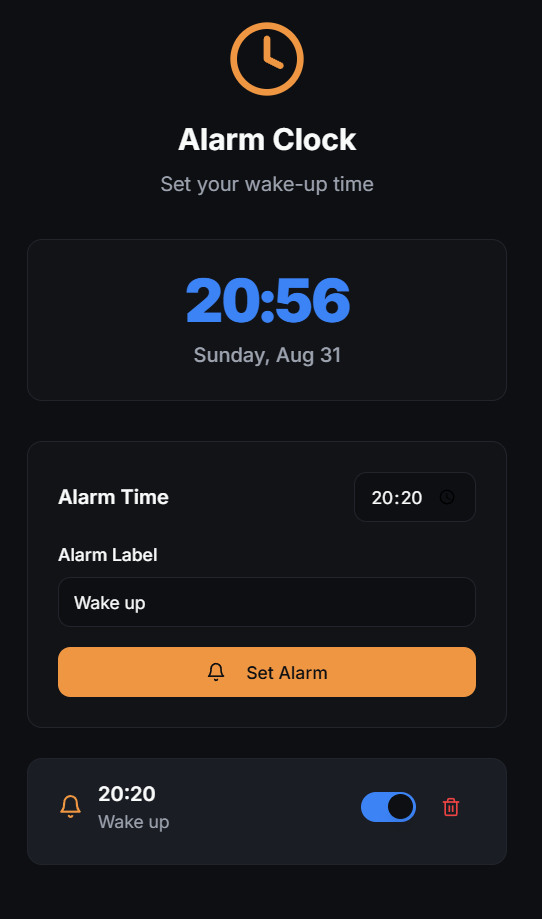
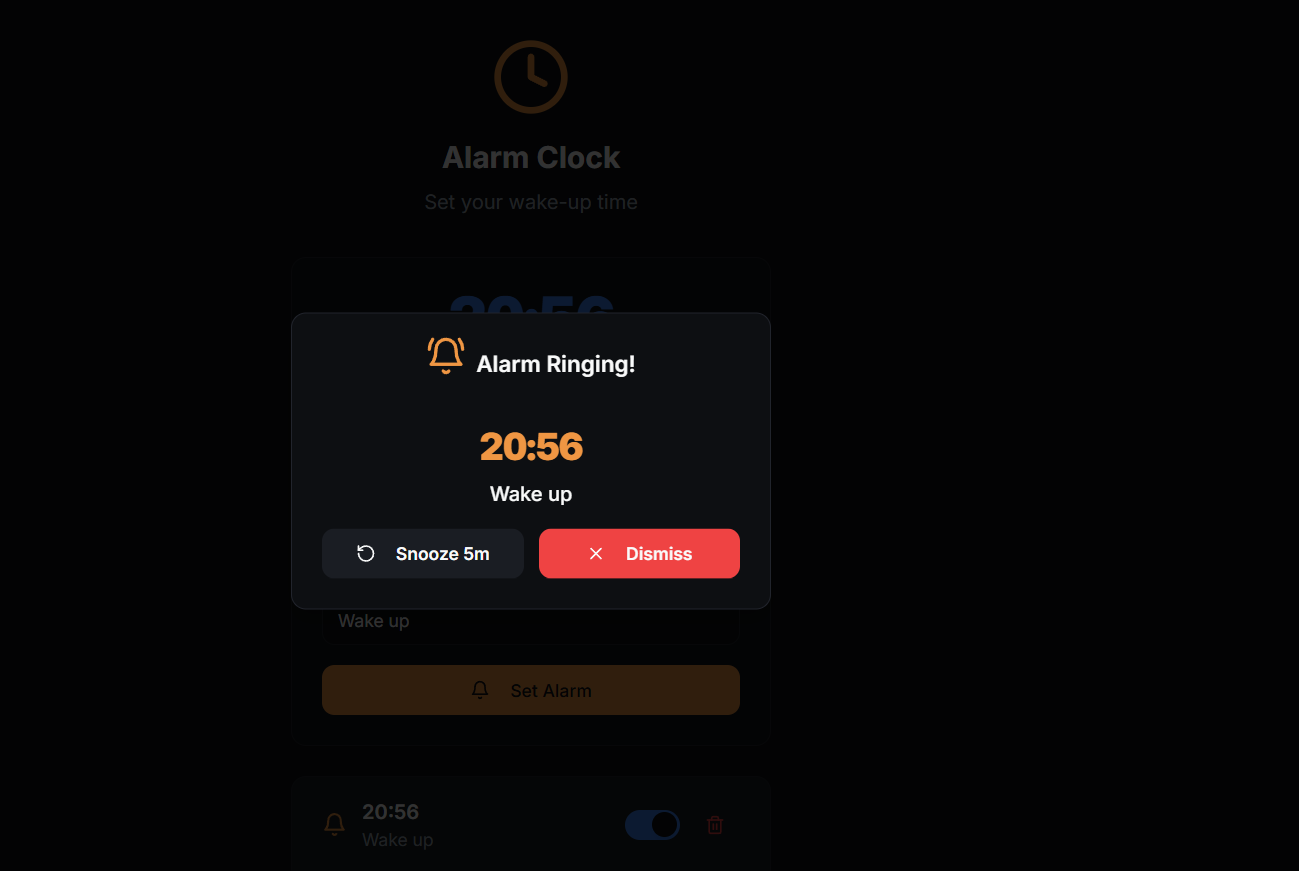
OrientoClock is a mobile-first, orientation-based web application that provides a suite of essential time utilities—alarm clock, stopwatch, timer—along with real-time weather updates. It uses the device's orientation to intuitively switch between these tools and provides features such as multiple alarms with custom labels and snooze, high precision stopwatch with lap records, countdown timer with visual progress, and accurate weather data based on GPS location.
The app is designed to be responsive and intuitive with audio and visual cues, dark theme support, and smooth transitions. It integrates seamlessly with APIs for weather and is optimized for mobile browsers like iOS Safari and Android Chrome while remaining functional on desktop browsers.
Technically, it is built using React 18 and TypeScript on the frontend, Express.js with TypeScript on the backend, and uses technologies like Tailwind CSS for styling, TanStack Query for state management, and OpenWeatherMap API for weather data.
Overall, OrientoClock combines essential daily utilities into a single, orientation-aware application tailored for mobile users, enhancing convenience and user experience.
How we built it
The project architecture was built around a core set of orientation-based utilities. Key components included:
Orientation Detection: A custom React hook continuously monitors device orientation to toggle between alarm, stopwatch, timer, and weather views.
Alarm Management: Users can set multiple alarms with custom labels, enable snooze, and manage them through an interactive UI.
Stopwatch & Timer: Includes high-precision timing, lap records, and visual progress indication for countdowns.
Weather Integration: Real-time weather fetched via the OpenWeatherMap API using user’s GPS location, refreshed dynamically.
UI/UX: Styled with Tailwind CSS and shadcn/ui accessible components, with support for dark theme and smooth transitions.
This was all integrated within a fast, modern build system provided by Vite for rapid development and iteration.
Challenges we ran into
Orientation Detection Robustness: Handling different orientation angles (0°, 90°, 180°, 270°) consistently across diverse devices and browsers was a major challenge due to varying support and sensor accuracy.
Real-time Updates: Ensuring the weather data refreshed correctly without causing performance issues or excessive API calls required careful state and effect management.
Cross-Platform Compatibility: Mobile browsers have quirks especially around audio playback and orientation events that needed tailored fixes.
User Experience: Balancing feature richness with an uncluttered UI, and designing intuitive controls for alarm snooze, lap recording, and timer progress visualization were iterative improvements.
Offline and Future Proofing: Planning Progressive Web App (PWA) features and offline support alongside multi-location weather forecasts for future versions.
Accomplishments that we're proud of
Innovative Orientation-Based Utility Switching: Successfully implemented a reliable and accurate device orientation detection system that allows seamless switching between alarm, stopwatch, timer, and weather tools, enhancing intuitive mobile usability.
Comprehensive Mobile-First Design: Delivered a fully responsive, mobile-optimized user interface that works smoothly on iOS Safari and Android Chrome, while remaining functional on desktop browsers.
Robust Feature Set: Developed multiple alarms with custom labels and snooze functionality, a high-precision stopwatch with lap timing and history, and a visually clear countdown timer with progress rings, all integrated within one cohesive app.
Real-Time Weather Integration: Integrated GPS-based, real-time weather data using the OpenWeatherMap API, providing users with current, accurate weather information alongside time utilities.
What we learned
Developing OrientoClock deepened my understanding of:
React and TypeScript: Building a fluid frontend with React 18 and managing state elegantly using TanStack Query.
Device Orientation APIs: Crafting custom hooks (use-orientation.tsx) to detect and respond to device rotation events accurately.
API Integration: Seamlessly fetching and updating weather data using OpenWeatherMap API with proper state and error handling.
Responsive Design: Implementing mobile-first layouts with Tailwind CSS while ensuring cross-platform compatibility.
Backend Development: Creating a robust backend using Express.js with TypeScript to manage alarms and scheduling logic.
What's next for OrientoClock
Enhanced Notifications: Implementation of push notifications for alarms and alerts to keep users promptly informed even when the app is in the background.
Multiple Timer Presets: Introduction of convenient, customizable timer presets for faster access and usability.
Comprehensive Weather Features: Expansion to full Progressive Web App (PWA) capabilities allowing offline use, detailed weather forecasts, and support for multiple locations to give users broader meteorological insights.
Built With
- css
- drizzle
- express.js
- openweathermap
- react
- vite


Log in or sign up for Devpost to join the conversation.