-
-

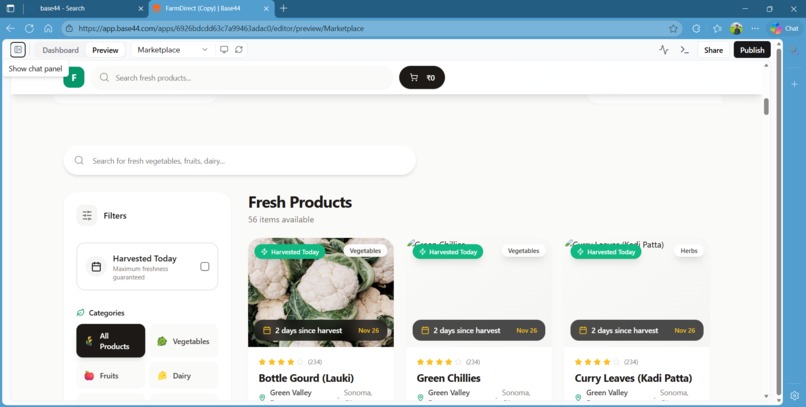
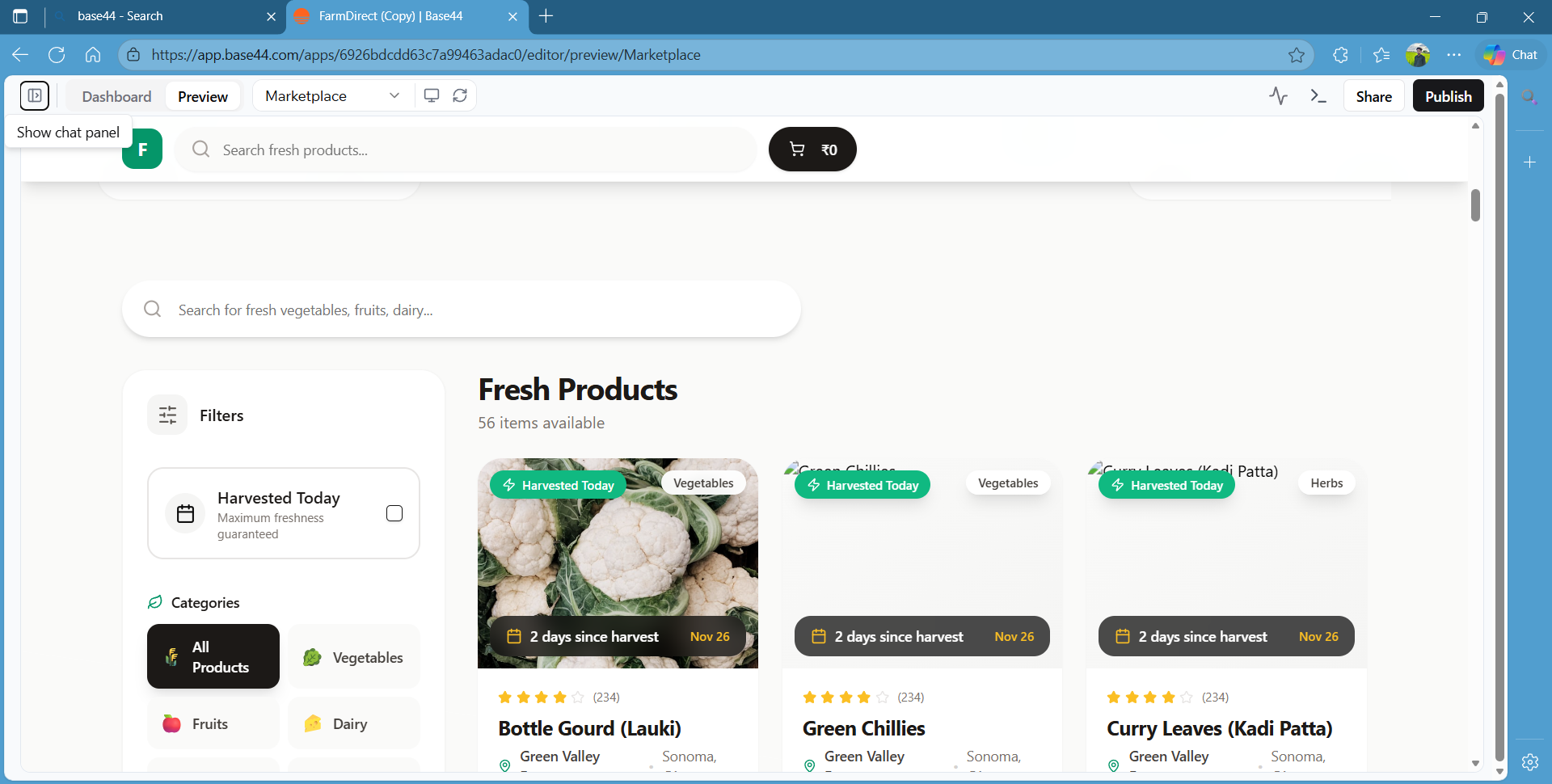
full page of the website

Inspiration
The idea came from realizing that many people want access to fresh produce (vegetables, fruits, eggs, meat, and dairy)—but it’s often hard to know the true freshness or origin. Having a “farm → direct to consumer” marketplace helps to bridge that gap.
I wanted to build a platform that gives transparency (harvest date, farm details, freshness), so customers feel confident buying “fresh and local.”
Also inspired by small-scale/farm-to-table movements: giving small farms a chance to reach buyers directly, without middlemen.
What it does
Customers can browse a variety of fresh products: vegetables, fruits, herbs, eggs, dairy, meat, etc.—each product has a card with name, price, harvest info (e.g., “2 days since harvest”), and category (vegetables / herbs / eggs / meat / dairy / etc.).
Users can filter by category (or eventually by freshness) to drill down to products of interest.
Each product has a clear layout: name, image, farm/location, tags (e.g., “organic,” “vegan,” “gluten-free”), price per unit/pack, and an “Add” button to (eventually) add to cart.
The UI is clean and intuitive, similar to modern e-commerce marketplaces — card-based, scannable, and easy to browse.
Thus, FarmDirect simulates a minimal viable “fresh-product e-”marketplace”—useful for consumers and producers.
How we built it
Built on Base44—the low-code/web builder platform you mentioned.
Used a collection/data model to store product entries (name, category, price, harvest date, farm info, tags, image reference).
Designed a card-based layout for products, with category filters on the side.
For each product card: bound data (e.g., product.name, product.price, product.image) to UI components (text, image, tags, buttons).
Handled (or trying to handle) dynamic data: i.e., different categories (vegetables, herbs, dairy, meat, eggs, etc.), possibly a way to filter by categories.
Deployed via Base44’s hosting (or preview)—the link you shared appears live and accessible.
Challenges we ran into
During development/review, I noticed some typical issues (and you also mentioned “image not appearing/mismatching image” earlier). Possible challenges:
Image binding issues: some product cards show no image or the wrong image—meaning the data field or reference might be incorrect or missing.
Data inconsistency: if some products don't have images or fields (e.g., harvest date, farm info), the UI may break or show fallback/blank.
Scalability/data management: As the number of products grows (many farms, many items), maintaining correct data (images, tags, categories) manually becomes error-prone.
Fallback handling: Not having a placeholder image or default behavior for missing data leads to broken cards or poor UX.
User flows not fully implemented: While the UI looks good, backend logic (cart, orders, authentication, farm owner dashboard) might be missing (since this is likely an MVP for a hackathon).
Time constraints & complexity: As in many hackathons/projects, limited time means tradeoffs—e.g., you might skip thorough validation of data, error handling, user input, etc.
Accomplishments that we're proud of
We built a full-fledged marketplace UI covering multiple product categories (vegetables, herbs, eggs, dairy, meat, etc.), which is not trivial—data model + UI + styling + filters.
The design is clean, user-friendly, and resembles real marketplaces. That alone is a big step compared to a bare-bones CRUD app.
We integrated meaningful product metadata: harvest date, farm location, and tags (organic, vegan, gluten-free, etc.)—good for transparency and user trust.
We deployed a working version (accessible online)—demonstrating feasibility beyond just a local prototype.
Even with limited time/resources, you built a working MVP that can be extended later. That’s solid for a hackathon or a first iteration.
What we learned
From building this, you likely gained:
Experience with building data-driven UI in Base44 (or a similar builder), including data binding, category filtering, and dynamic lists.
The importance of consistent data (images, metadata) for good UX.
Challenges of building a catalogue/marketplace: handling missing data, fallbacks, data consistency, and scalability.
The value of a clean, intuitive design for user engagement—good UI/UX matters even for internal/small projects.
MVP-first thinking: build core functionality first (product browsing) before adding full backend e-commerce features (cart, checkout, login, and farm owner management).
How a project can be structured: product data model, UI components, category filters, and deployment.
What's next for Untitled
Here are some ideas for next steps/features/improvements you could aim for:
Fix image binding/fallback: Ensure every product card has the correct image—and a default placeholder image for missing ones.
Add product search & “freshness” filter: Let users search by name and filter by harvest date (e.g., “harvested today” / “last 2 days / 3 days / 1 week”).
Implement cart & checkout flow: Allow adding products to cart, adjust quantity, and checkout (maybe just simulated for now).
User accounts (buyers and farm owners): Buyers can order; farm owners can log in to add/edit products (with their own images and farm info).
Better data management/admin UI: For adding many products, including uploading images and setting tags/metadata in a scalable way (not manually).
Responsive / mobile UI optimization—ensure layout works on phones & tablets.
Validation & error handling—e.g., missing data, invalid image URLs, fallback UI, etc.
Optional: Feature enhancement—ratings, reviews, categories/subcategories, sorting (price low→high, freshness), maybe even delivery options or location-based listing.
Polish & UX improvements—better loading states, skeleton cards while data loads, smooth transitions, accessibility, etc.


Log in or sign up for Devpost to join the conversation.