OrdexWallet
A custodial web wallet for OrdexNetwork - run your own self-hosted wallet for OrdexCoin (OXC) and OrdexGold (OXG).
Quick Setup
1. Clone the Repository
git clone https://github.com/rnts08/ordex-wallet.git
cd ordex-wallet
2. Start the Wallet (Daemons Auto-Download)
The daemon binaries are automatically downloaded during the Docker build if not present in the bin/ directory.
cd docker
docker compose up -d
The wallet will be available at http://localhost:15000
Deployment Options
Standalone Docker (Recommended for Local/Self-Hosted)
cd docker
docker compose up -d
Access at: http://localhost:15000
Umbriel App Store
See UMBREL.md for publishing instructions.
The codebase is shared between both deployment options - backend/, frontend/, and bin/ are used by both.
Features
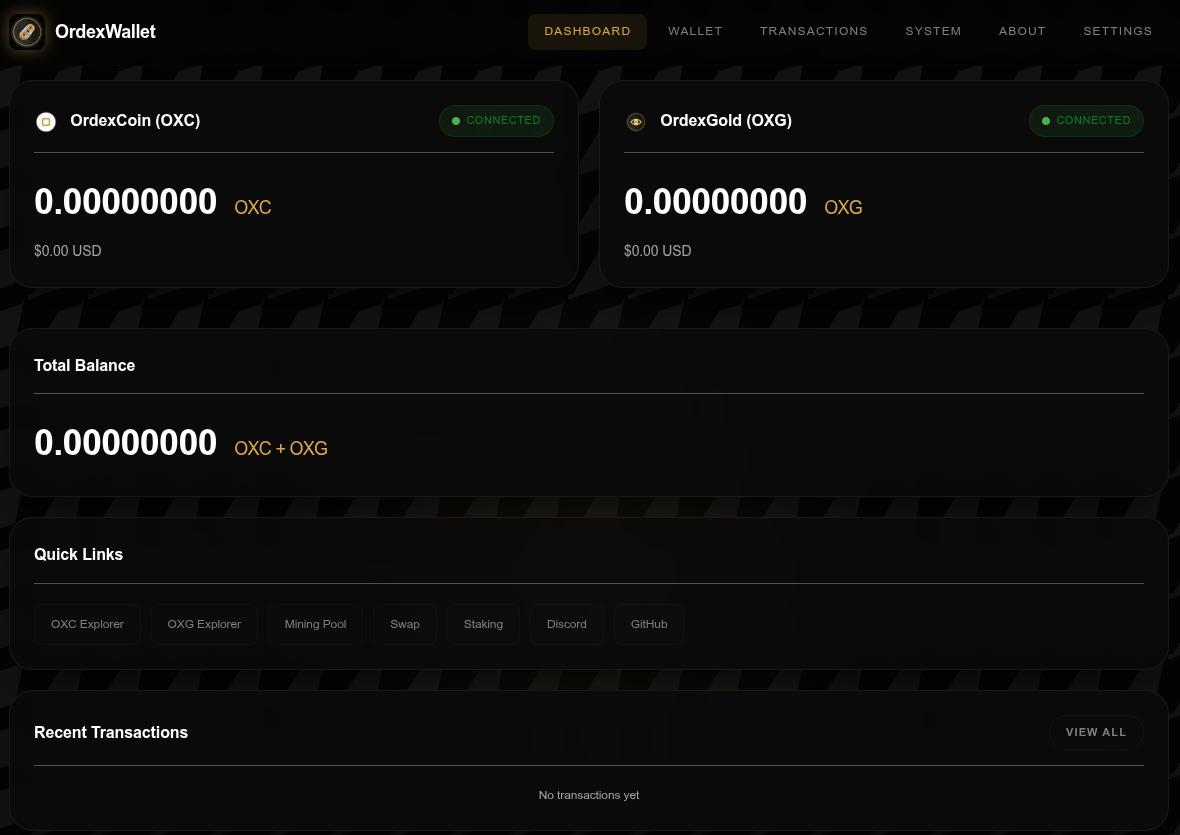
- Dashboard: Real-time balance display for OXC and OXG, network sync status, recent transactions
- Wallet Management: Create new wallets or import existing ones with private keys
- Transactions: Send OXC/OXG to any address, generate receive addresses, view transaction history
- Backup & Restore: Encrypted wallet backups with optional passphrase protection
- System Management: Daemon configuration, RPC console, system statistics, audit logging
- Message Signing: Sign and verify messages with wallet addresses
Screenshots
 Dashboard showing real-time balances and network status
 Wallet management interface with backup/restore functionality
Prerequisites
- Docker Engine 20.10+
- Docker Compose v2+
- 2GB+ RAM recommended
- 10GB+ storage for blockchain data
Daemon Binaries: Automatically downloaded during Docker build from:
- OrdexCoin: https://github.com/OrdexCoin/Ordexcoin-Core/releases/download/V.25.0/ordexcoin-25.0-linux.tar.gz
- OrdexGold: https://github.com/OrdexCoin/OrdexGold-Core/releases/download/V.0.21.04/ordexgold-0.21.4-linux.tar.gz
Configuration
Environment Variables
| Variable | Default | Description |
|---|---|---|
PORT |
5000 | Flask server port (internal) |
HOST |
0.0.0.0 | Flask server host |
CONFIG_DIR |
/data/config | Daemon config directory |
DATA_DIR |
/data | Data storage directory |
FLASK_ENV |
production | Flask environment |
RPC Ports
| Daemon | Default Port |
|---|---|
| ordexcoind | 25173 |
| ordexgoldd | 25466 |
Volumes
All data persists in the ordexwallet_data Docker volume:
/data/config- Daemon configuration files/data/blockchain/ordexcoin- OrdexCoin blockchain data/data/blockchain/ordexgold- OrdexGold blockchain data/data/ordexwallet.db- Application database/data/backups- Wallet backups/data/logs- Application logs/data/bin- Daemon binaries (mounted from host)
Operations
Starting the Wallet
cd docker
docker compose up -d
Stopping the Wallet
cd docker
docker compose down
Viewing Logs
docker compose logs -f
Rebuilding After Updates
docker compose down
docker compose build --no-cache
docker compose up -d
Accessing Shell
docker compose exec ordexwallet bash
Upgrading OrdexWallet
Checking for Updates
git fetch origin
git status
Upgrading Application Code
# Pull latest changes
git pull origin main

# Rebuild and restart
cd docker
docker compose down
docker compose build --no-cache
docker compose up -d
Upgrading Daemon Binaries
The Docker build automatically downloads the latest daemon versions. To force an upgrade:
cd docker
docker compose down

# Remove old daemons (build will re-download)
rm bin/ordexcoind bin/ordexgoldd

# Rebuild (daemons will be auto-downloaded)
docker compose build --no-cache
docker compose up -d
Creating Stable Releases
The project uses git tags for stable release management:
# Checkout the latest release
git checkout v1.1.0

# Or checkout the main branch for development
git checkout main
Release Versioning
- Tags format:
vX.Y.Z(e.g., v1.1.0) - Version meaning:
- X: Major version (breaking changes)
- Y: Minor version (new features)
- Z: Patch version (bug fixes)
Checking Current Versions
# Check application version (if tagged)
git describe --tags

# Check daemon versions in config
cat bin/ordexcoind --version
cat bin/ordexgoldd --version

# Or via RPC in the wallet UI (System > RPC Console)
getblockchaininfo
Wallet Management
Creating a New Wallet
- Open the wallet in your browser
- Navigate to the Wallet page
- Click "Create New Wallet"
- Optionally set a backup passphrase
- Save your addresses - the wallet is ready to receive OXC/OXG
Importing an Existing Wallet
- Navigate to Wallet > Backup/Restore
- Click "Import Wallet"
- Enter your private key (WIF format)
- Select the network (OrdexCoin or OrdexGold)
- Optionally set a backup passphrase
- The imported addresses will become available
Creating a Backup
- Navigate to Wallet > Backup/Restore
- Click "Create Backup"
- If you set a passphrase during wallet creation, enter it now
- A backup file will be downloaded - keep it safe
Restoring from Backup
- Navigate to Wallet > Backup/Restore
- Click "Restore Backup"
- Upload your backup file
- Enter the passphrase if the backup is encrypted
- Your wallet will be restored
Sending Transactions
- Navigate to Wallet > Send
- Select the network (OXC or OXG)
- Enter the recipient address
- Enter the amount
- Optionally customize the fee
- Click "Send Transaction"
- Confirm the transaction
Directory Structure
ordex-wallet/
├── backend/          # Python Flask application (shared)
├── frontend/         # Web UI files (shared)
├── bin/              # Daemon binaries (shared)
├── docker/           # Standalone Docker deployment
│   ├── Dockerfile
│   ├── docker-compose.yml
│   └── entrypoint.sh
├── ordex-wallet/     # Umbriel App Store format
│   ├── Dockerfile
│   ├── docker-compose.yml
│   ├── umbrel-app.yml
│   └── exports.sh
├── README.md         # This file
├── RELEASES.md       # Release notes
└── UMBREL.md         # Umbriel publishing guide
External Links
| Service | URL |
|---|---|
| Block Explorer (OXC) | https://explorer.ordexcoin.com |
| Block Explorer (OXG) | https://explorer.ordexgold.com |
| Swap | https://ordexswap.online |
| Network Site | https://ordexnetwork.org |
| OrdexCoin GitHub | https://github.com/OrdexCoin/Ordexcoin-Core |
| OrdexGold GitHub | https://github.com/OrdexCoin/OrdexGold-Core |
API Reference
Wallet Endpoints
POST /api/wallet/create - Create new wallet
POST /api/wallet/import - Import existing wallet
GET  /api/wallet/info - Get wallet information
POST /api/wallet/backup - Create wallet backup
POST /api/wallet/restore - Restore from backup
POST /api/wallet/sign-message - Sign a message
POST /api/wallet/verify-message - Verify signature
Asset Endpoints
GET /api/assets - Get all assets with balances
GET /api/assets/ordexcoin - Get OXC details
GET /api/assets/ordexgold - Get OXG details
Transaction Endpoints
GET  /api/transactions - List transactions
GET  /api/transactions/{txid} - Get transaction details
POST /api/transactions/send - Send transaction
GET  /api/transactions/receive - Get receive addresses
POST /api/transactions/receive/generate - Generate new address
System Endpoints
GET  /api/system/health - Health check
GET  /api/system/stats - System statistics
GET  /api/system/logs - Audit logs
GET  /api/system/config - Get daemon configuration
POST /api/system/config - Update daemon configuration
POST /api/system/rpc-console - Execute RPC command
Support
This is an open-source project maintained by the OrdexNetwork community. To support the development efforts donate to the following addresses:
* BTC: bc1qkmzc6d49fl0edyeynezwlrfqv486nmk6p5pmta
* ETH/ERC-20: 0xC13D012CdAae7978CAa0Ef5B1E30ac6e65e6b17F
* LTC: ltc1q0ahxru7nwgey64agffr7x89swekj7sz8stqc6x
* SOL: HB2o6q6vsW5796U5y7NxNqA7vYZW1vuQjpAHDo7FAMG8
* XRP: rUW7Q64vR4PwDM3F27etd6ipxK8MtuxsFs
To support tests and implementation with the ordexnetwork, you can help by donating tokens that will be used for testing and refining the system.
* OXC: oxc1q3psft0hvlslddyp8ktr3s737req7q8hrl0rkly
* OXG: oxg1q34apjkn2yc6rsvuua98432ctqdrjh9hdkhpx0t
For issues and contributions, visit the repository.
License
See LICENSE.md for details.
Copyright (c) 2026 ORDEX PROTOCOL. All rights reserved.
Built With
- css
- dockerfile
- html
- javascript
- python
- shell

Log in or sign up for Devpost to join the conversation.