-
-
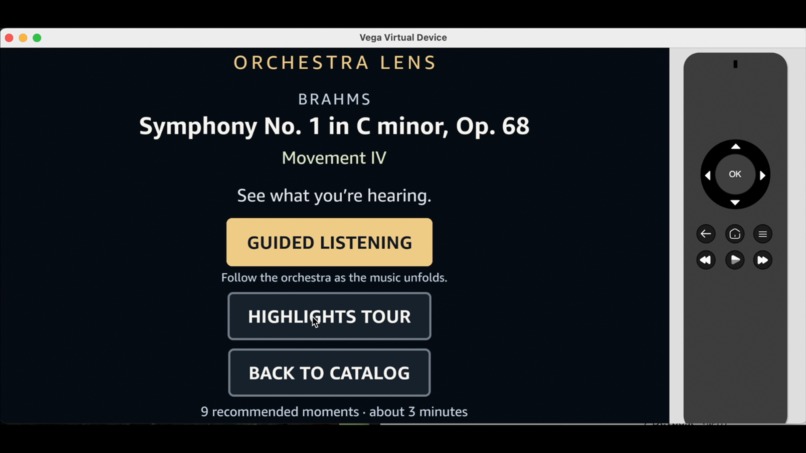
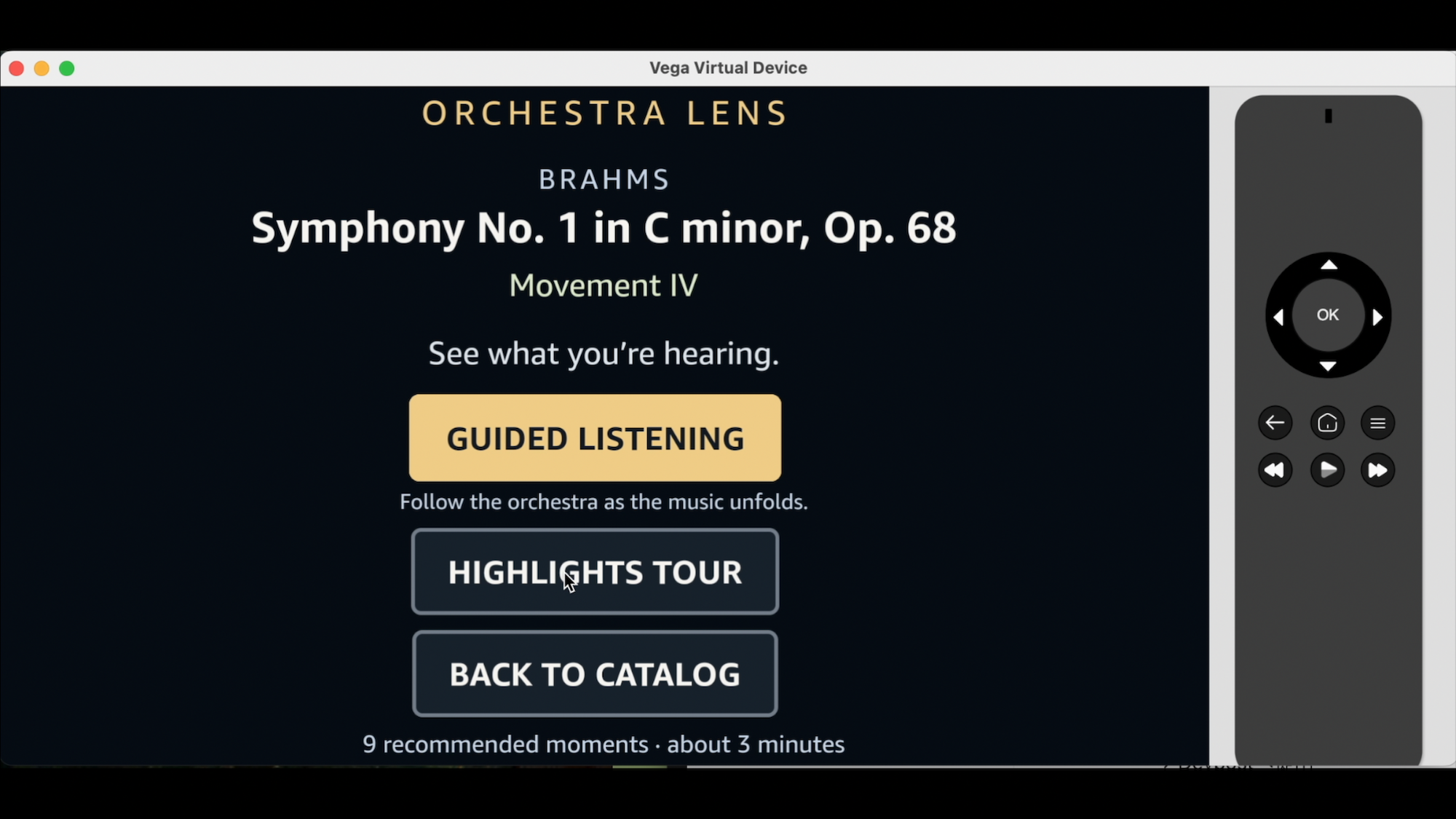
Choose how to explore the music — Guided Listening or an automatically generated Highlights Tour.
-
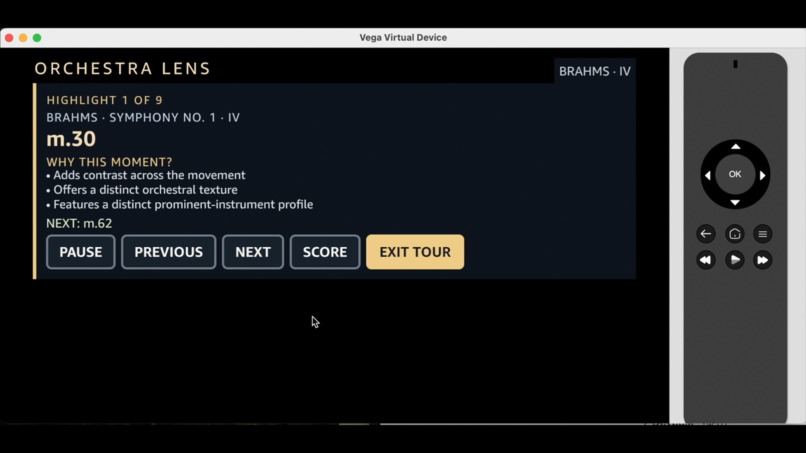
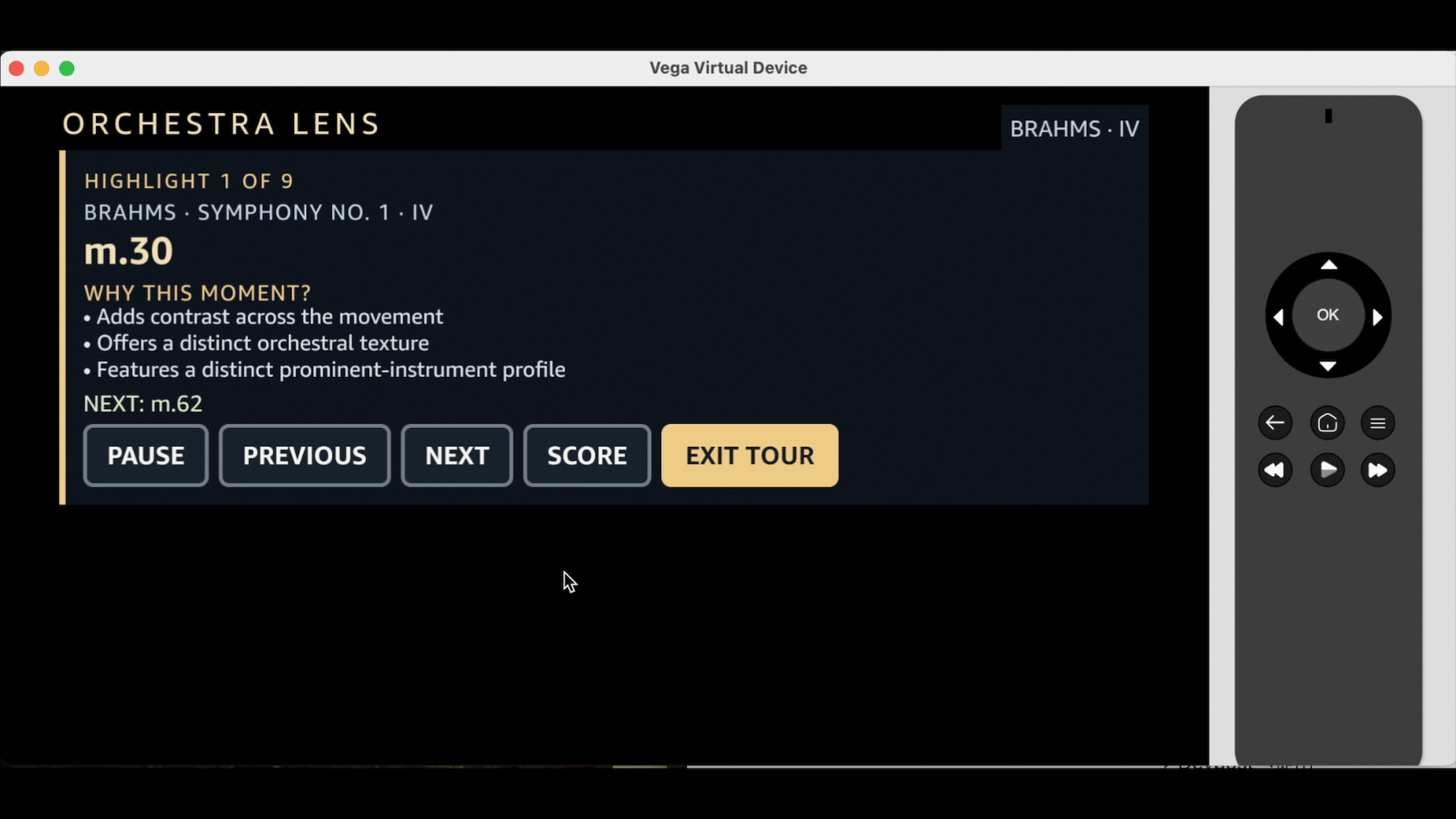
Highlights Tour automatically selects contrasting musical moments and guides listeners through them.
-
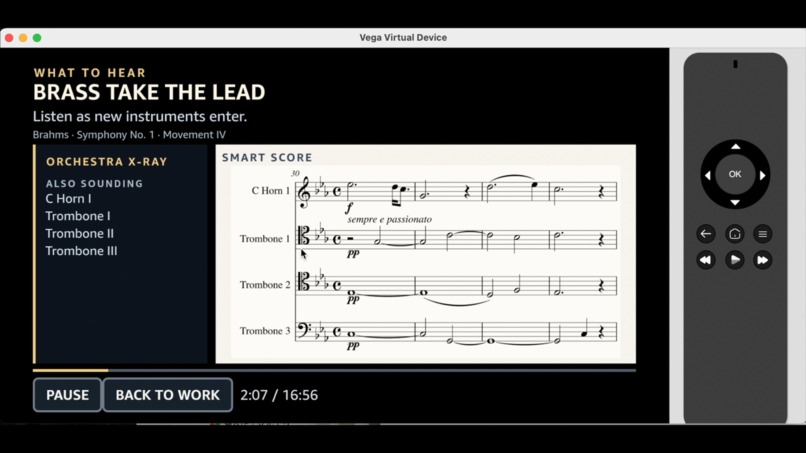
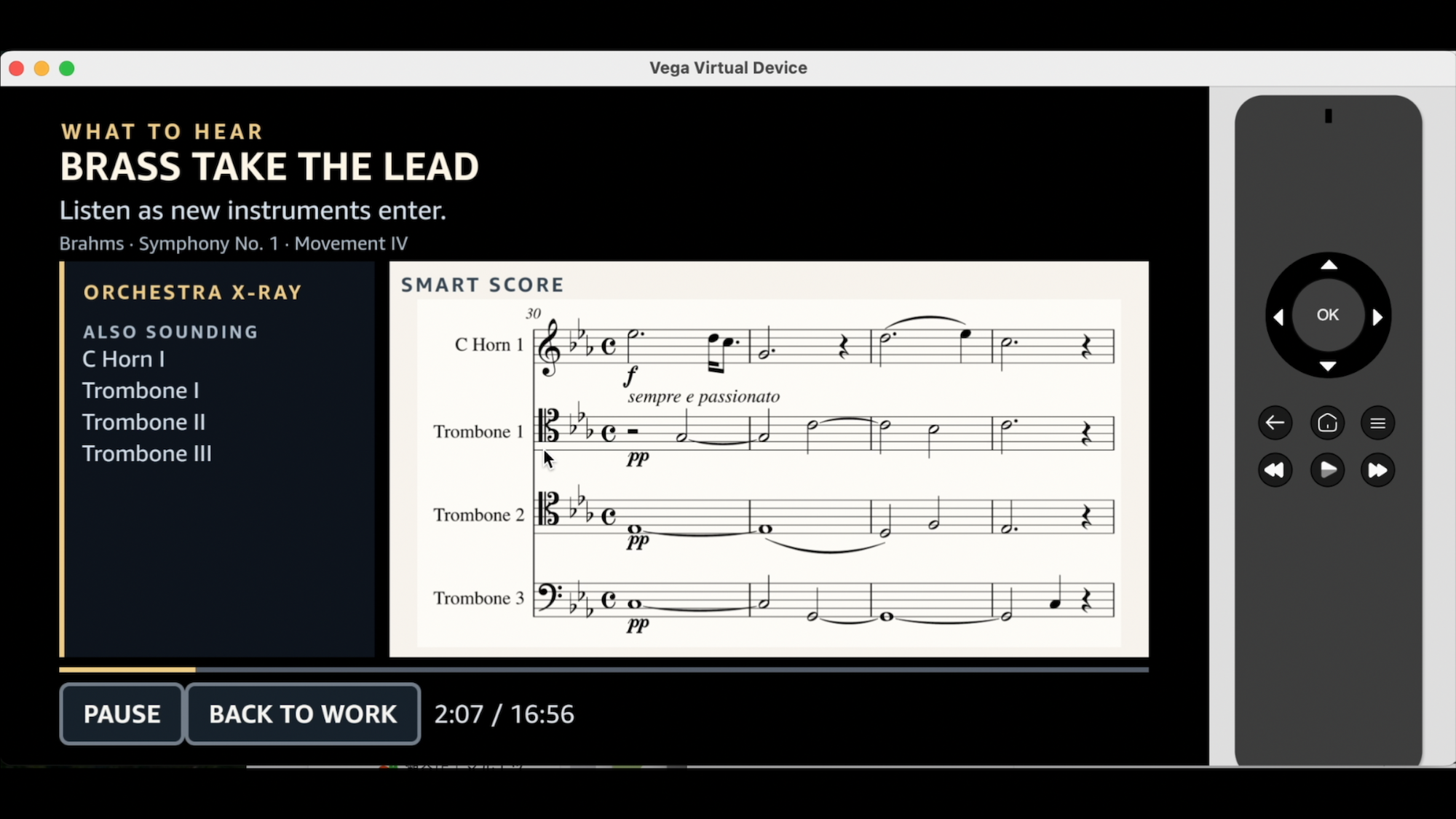
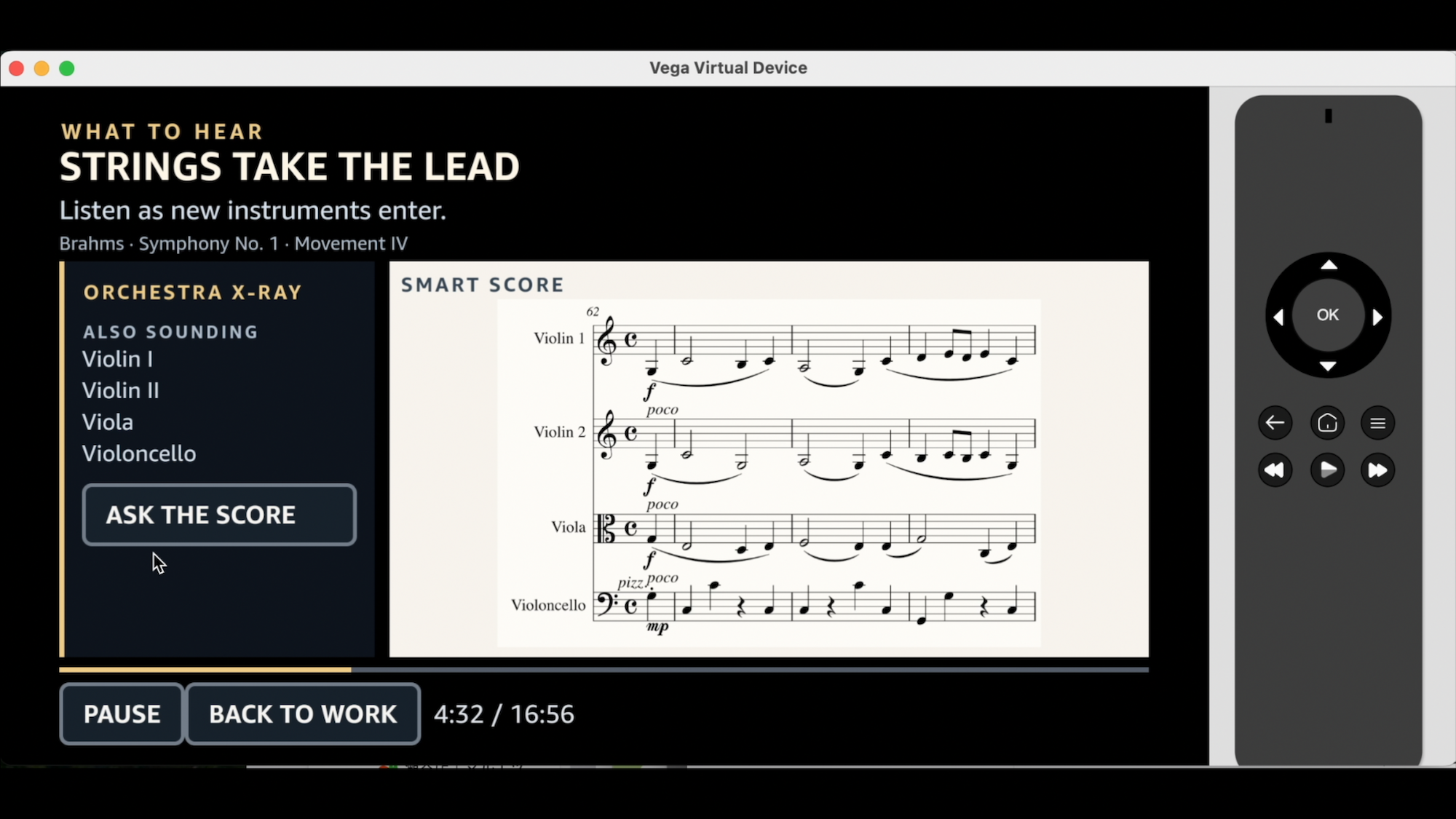
Guided Listening combines What to Hear, Orchestra X-Ray, and a focused Smart Score generated from MusicXML.
-
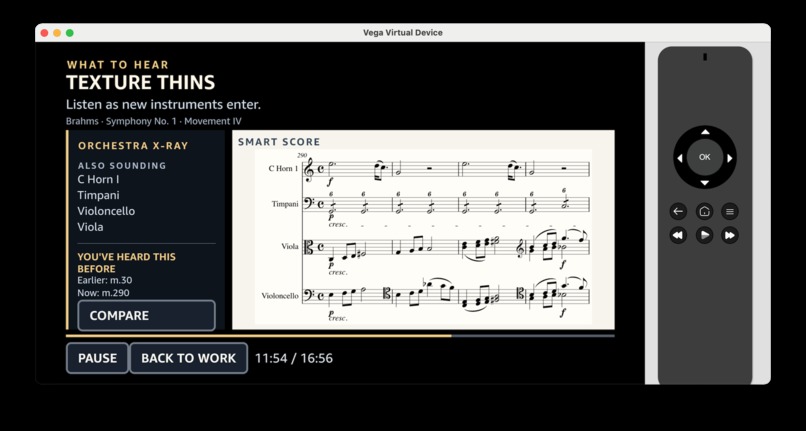
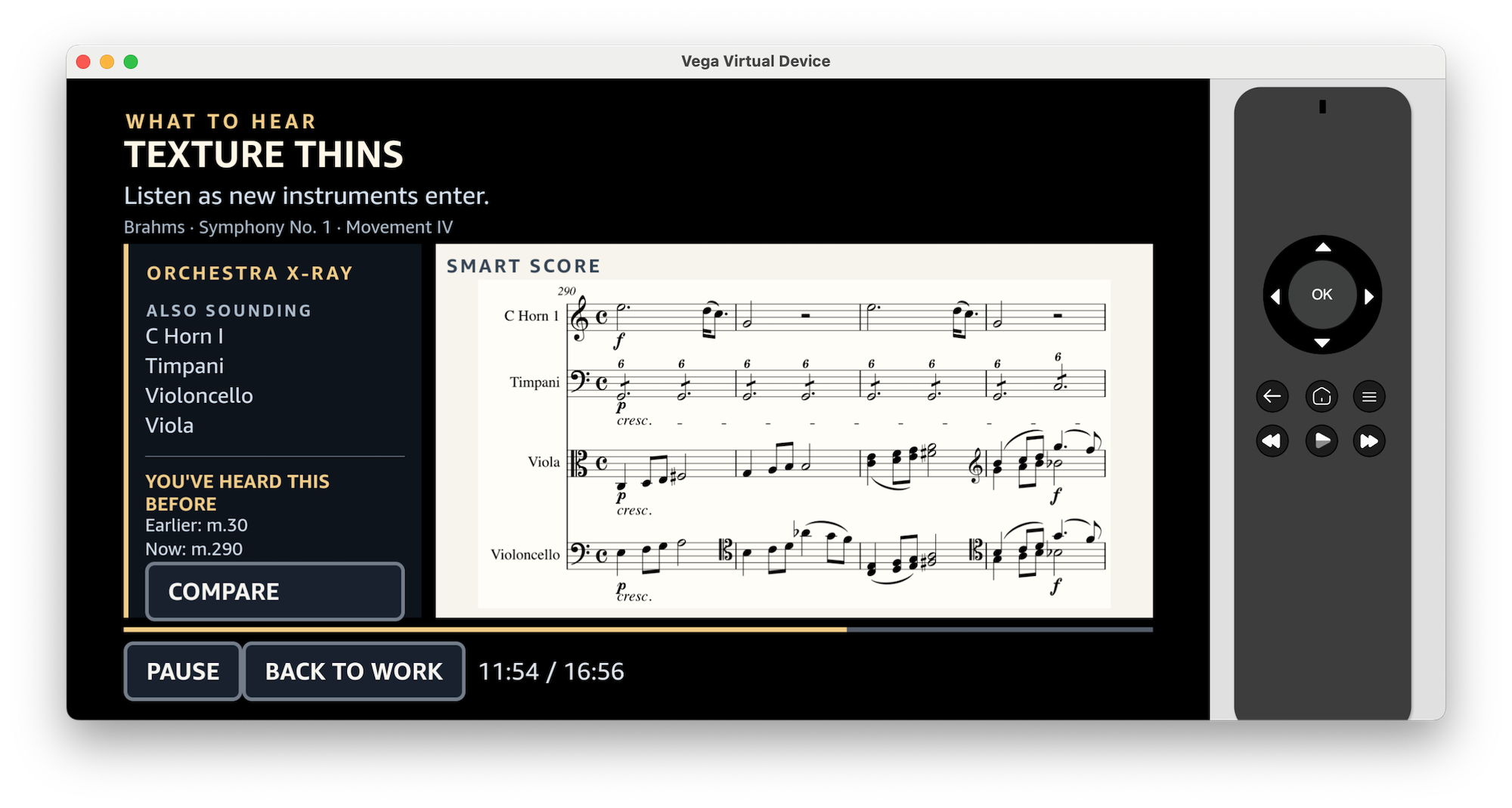
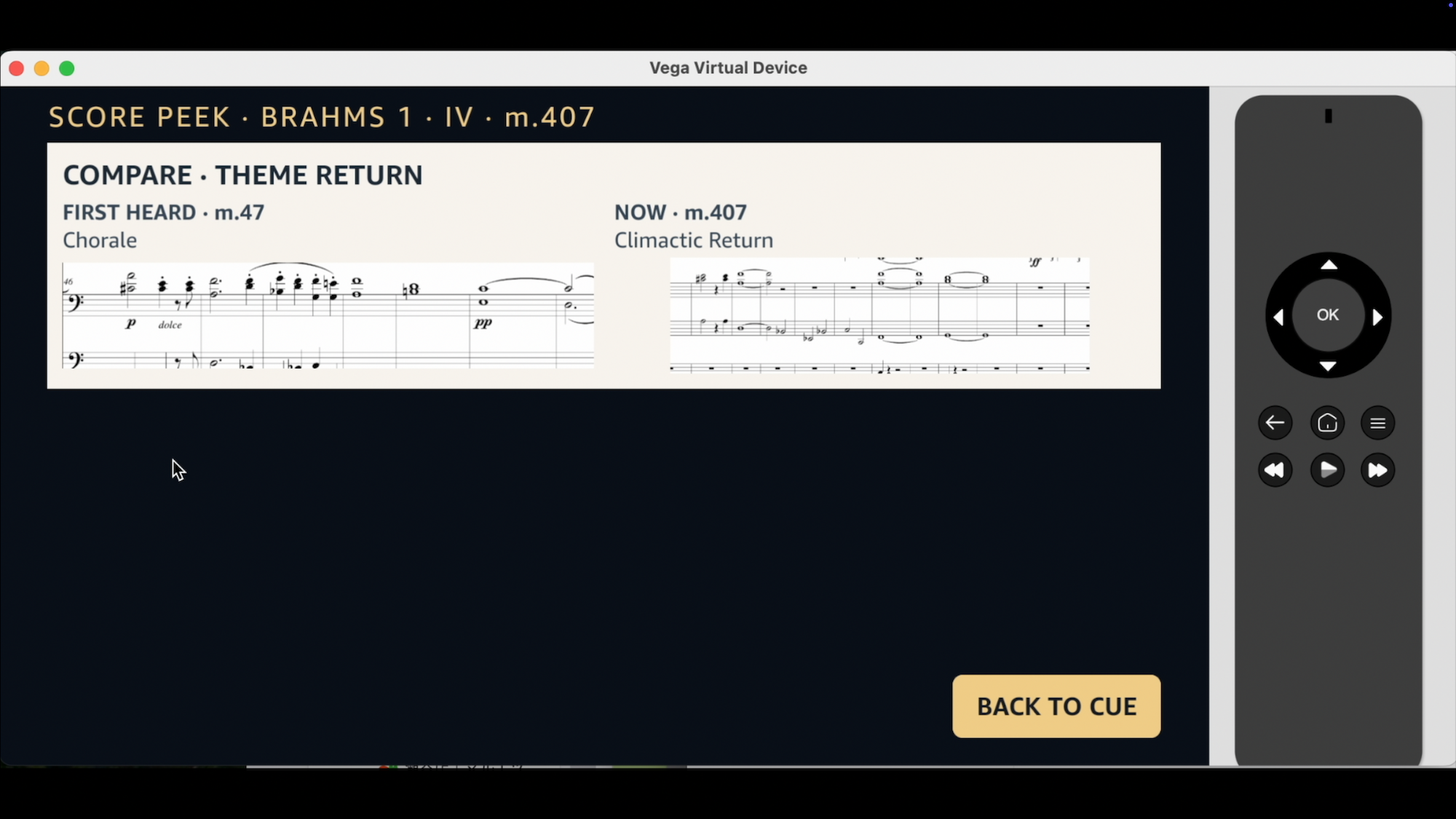
Theme Lens recognizes a returning musical idea and invites the listener to compare it with an earlier moment.
-
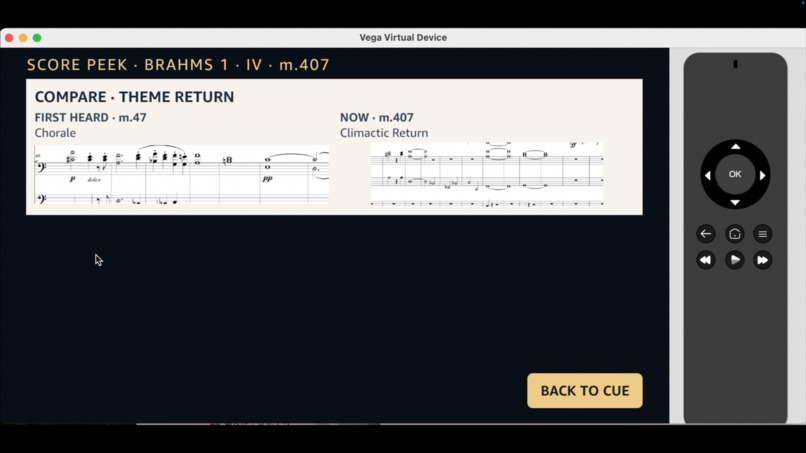
Theme Lens places related score passages side by side to reveal how a musical idea returns and transforms.
-
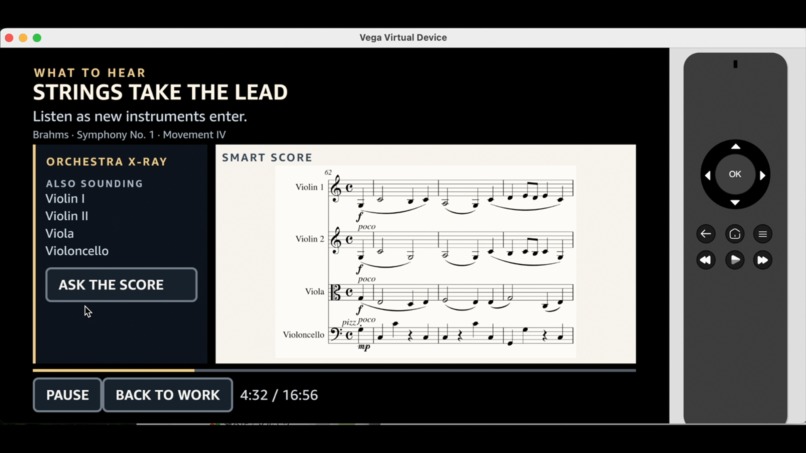
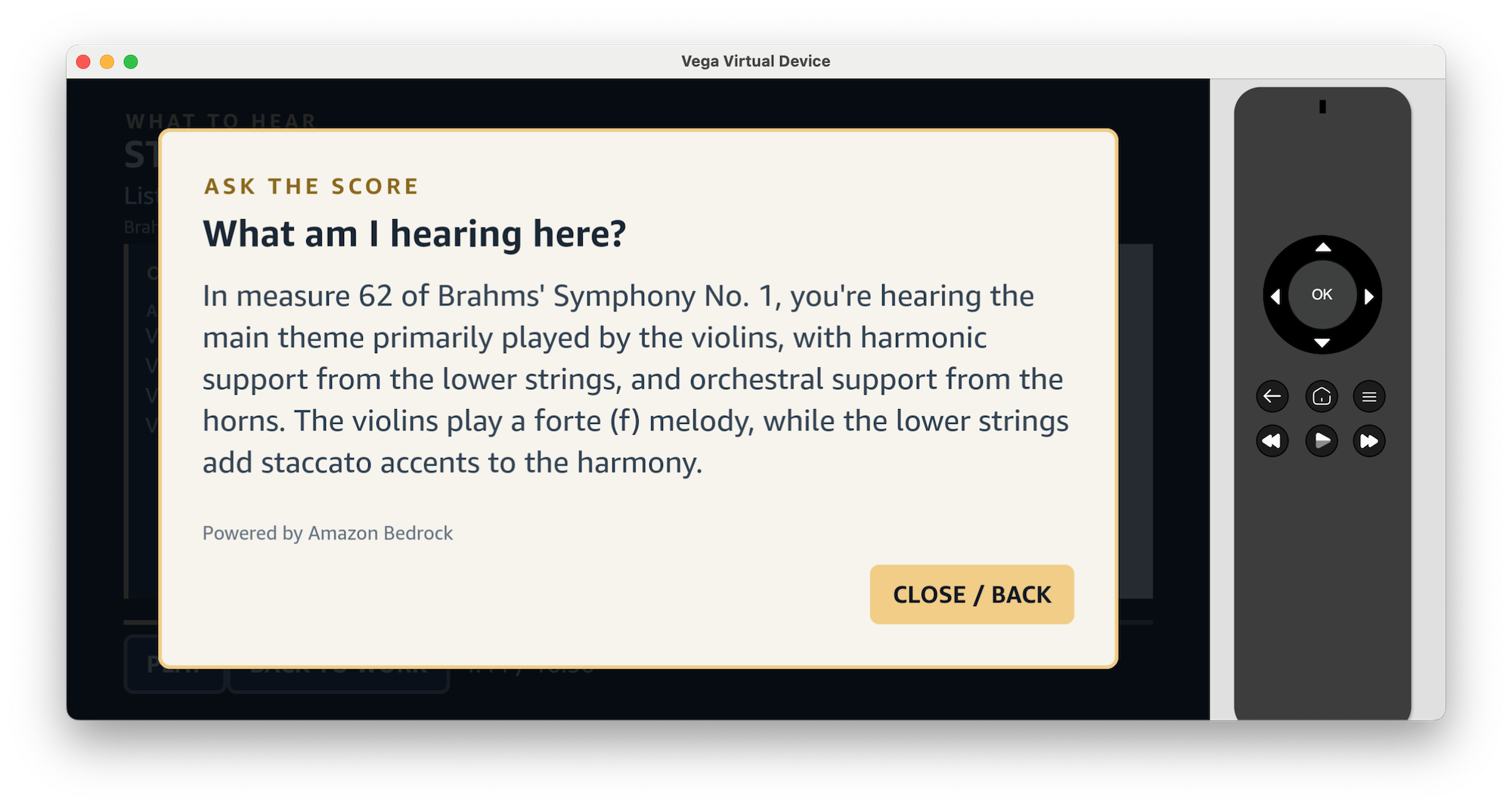
Ask the Score lets the listener request a grounded explanation of the current musical moment.
-
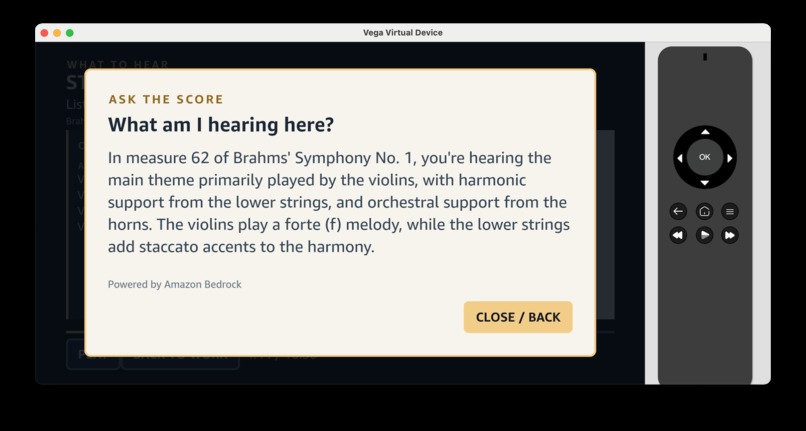
Amazon Bedrock explains the current passage using structured score analysis and musical evidence.
-
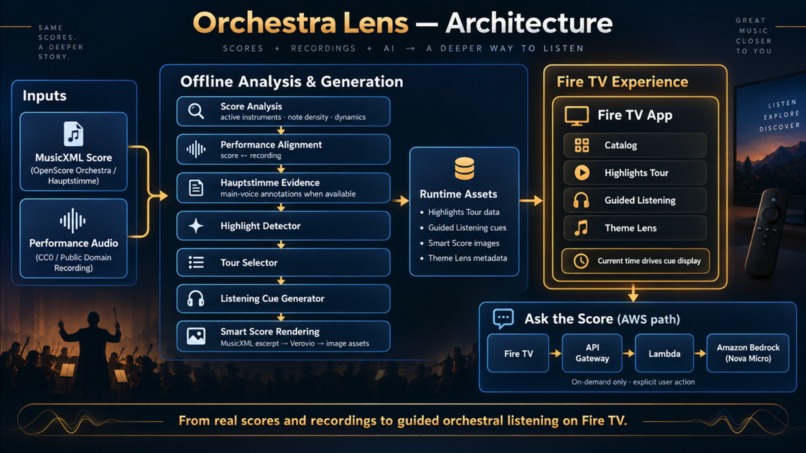
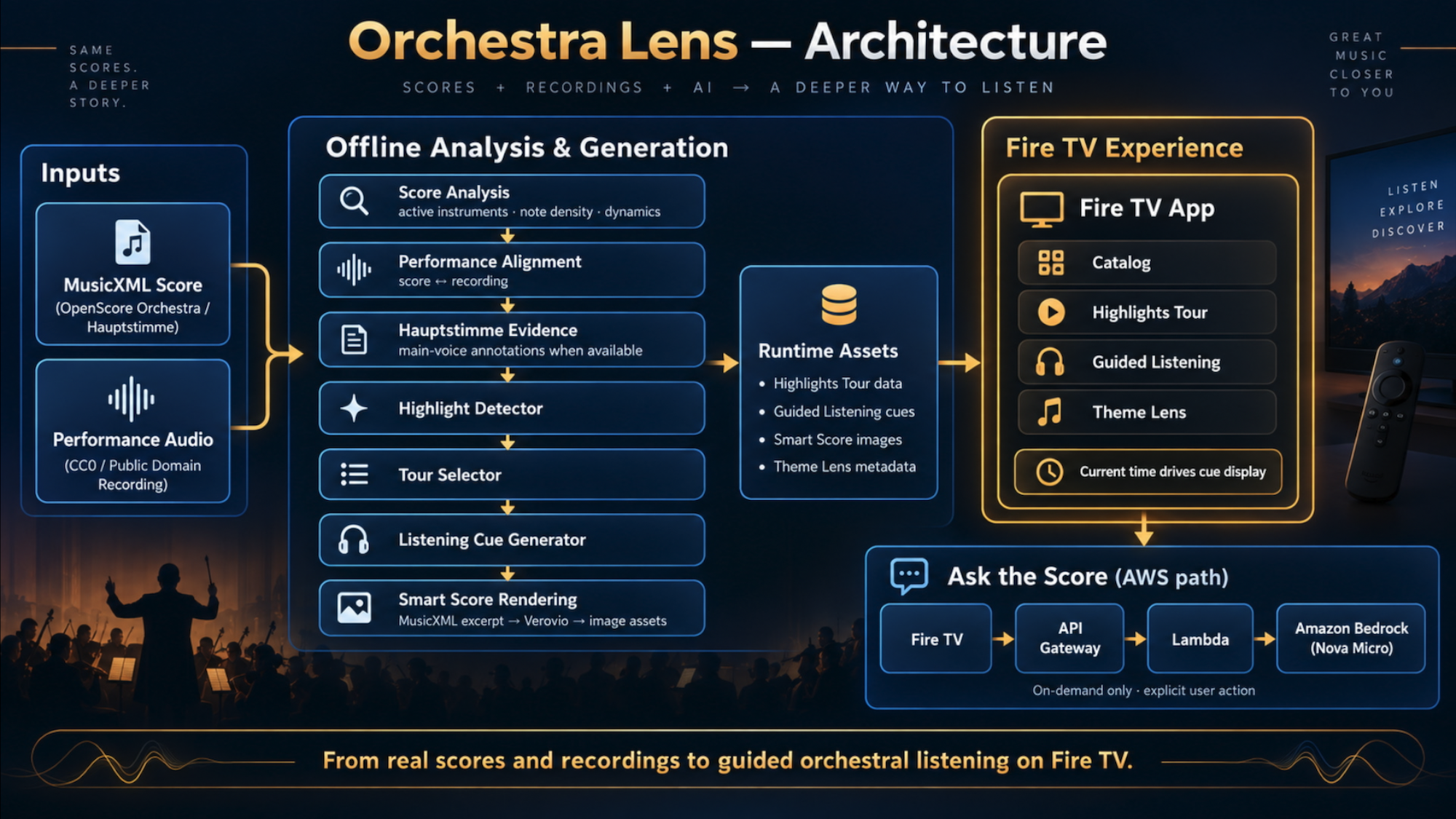
Orchestra Lens architecture — real scores and recordings are analyzed offline to generate highlights, listening cues, Smart Scores.
Inspiration
I have played and listened to classical music for many years, and I often have the same question while listening to an orchestra:
What does this moment actually look like in the score?
Full orchestral scores contain an enormous amount of information, and synchronized score videos are useful, but they still ask the listener to figure out where to look.
I wanted to build something different: a big-screen listening companion that helps the listener understand what to hear right now, then shows only the most relevant musical information for that moment.
That became Orchestra Lens.
What it does
Orchestra Lens is a Fire TV experience for exploring orchestral music.
It currently has two main listening modes:
Highlights Tour
Highlights Tour automatically detects musically distinctive moments in a work and removes redundant ones to create a short guided tour.
Instead of listening through an entire unfamiliar symphony movement, the listener can quickly sample a set of contrasting moments and discover what makes the piece interesting.
For example, Brahms Symphony No. 1, Movement IV is reduced to nine contrasting highlights.
Guided Listening
Guided Listening is designed for listening to a complete movement.
As the performance plays normally, Orchestra Lens follows the current playback time and automatically displays:
- What to Hear — a short listening cue
- Orchestra X-Ray — relevant active instruments
- Main Voice evidence, when supported by Hauptstimme annotations
- Smart Score — a compact score excerpt generated from the original MusicXML
Instead of showing the full orchestral score, Smart Score presents a focused set of relevant active parts so the listener can more easily connect the sound to the notation.
Theme Lens
Theme Lens connects related moments across the movement and helps show how an earlier musical idea can return in a transformed form later.
Ask the Score
At supported moments, the listener can explicitly ask:
“What am I hearing here?”
The Fire TV app sends structured musical evidence through API Gateway and Lambda to Amazon Bedrock, using Amazon Nova Micro.
The model is grounded with generated score facts, Hauptstimme evidence, and curated musical context rather than being asked to infer directly from the audio.
Designed for the 10-Foot TV Experience
Orchestra Lens is built specifically for a lean-back living-room environment using D-pad navigation (arrow keys and Select on the Fire TV remote):
Effortless mode and highlight switching: Listeners can step through contrasting moments in Highlights Tour or switch listening modes using simple directional focus and Select actions, without complex menus or timeline scrubbing.
Passive and active balance: During Guided Listening, the app works hands-free as the music plays, while keeping clear visual focus states ready whenever the listener chooses to trigger Ask the Score or explore Theme Lens connections.
TV-distance readability: Instead of overwhelming the screen with a tiny full conductor's score, the interface prioritizes high-contrast cards, concise listening cues, and focused Verovio score excerpts that remain legible from across the room.
How I built it
The frontend application is built with React Native for Vega OS and tested on the Vega Virtual Device, using a D-pad-friendly layout optimized for Fire TV.
The system starts from two real sources:
- a MusicXML orchestral score
- a performance recording
Most of the analysis happens offline.
The preprocessing pipeline includes:
Score analysis
- active instruments
- note density
- dynamics
- articulation
- pitch range
- texture changes
Performance alignment
- the written score is aligned to the recording
- the runtime can map score moments to performance time
Hauptstimme evidence
- when available, annotated Hauptstimme data provides evidence for a prominent or main voice
Highlight detection
- deterministic rules identify potentially interesting musical events such as changes in instrumentation, dynamics, density, texture, and Hauptstimme activity
Tour selection
- redundant highlights are removed so a short tour contains contrasting moments rather than repeated material
Listening cue generation
- denser cues are generated for Guided Listening
Smart Score generation
- the relevant MusicXML measures and parts are extracted
- Verovio renders the notation
- pre-generated score images are bundled into the Fire TV app
At runtime, Guided Listening is intentionally simple and reliable:
media currentTime → active cue → display the corresponding card
The Guided Listening UI never seeks, pauses, reloads, or changes the media source.
Generalizing beyond one piece
I did not want Orchestra Lens to be a manually authored Brahms demo.
To test whether the preprocessing pipeline could generalize, I also processed Beethoven Symphony No. 5, Movement I.
That work contains a repeated exposition, so a simple written-measure timeline is not enough.
The alignment pipeline expands the written score into performed occurrences and produced:
- 626 performance occurrences
- repeat-aware timing
- 0 manual timing anchors
The same highlight detector and tour selector can then operate on that performance-aware timeline.
This helped validate that the core pipeline is not tied only to Brahms.
Challenges I ran into
Synchronizing score and performance
A written score and a real performance do not progress at a perfectly uniform rate.
Repeat structures made this especially challenging in Beethoven, where written measures can occur more than once in performance time.
I had to move from simple measure-based timestamps to an occurrence-aware performance timeline.
Making scores readable on a TV
My first attempt was a custom SVG score renderer.
It quickly became clear that music engraving is much more complex than drawing noteheads and staff lines. Beams, tuplets, ties, voices, dynamics, articulations, transposition metadata, and layout all matter.
I replaced the custom renderer with Verovio, which produces far more accurate notation.
Validating generated score excerpts
During testing, I found cases where generated excerpts could include the wrong measure sequence or unsupported glyphs.
I added source-position provenance, note/rest fingerprints, and SVG validation to the generation pipeline.
All 26 current Brahms Guided Listening cards now pass source-integrity validation with zero fingerprint mismatches.
Vega media documentation
While implementing media playback, I found conflicting official examples using KeplerVideoView and KeplerVideoSurfaceView.
Amazon Developer Community support confirmed that the documentation currently shows two different patterns and said the inconsistency is being reviewed internally.
For this project, the final media is audio-only AAC-LC from an HTTPS CloudFront URL, so the working runtime uses URL-mode audio playback without a video surface.
Accomplishments that I'm proud of
- A working Fire TV application running on Vega
- An automatic Highlights Tour that produces musically useful results
- A full Guided Listening experience driven entirely by normal playback time
- 26 automatically generated Brahms listening cards
- Smart Score excerpts derived directly from MusicXML
- Repeat-aware Beethoven alignment with zero manual timing anchors
- A real Amazon Bedrock integration for Ask the Score
- A preprocessing pipeline that separates objective score evidence from curated interpretation
What I learned
The biggest lesson was that synchronizing music is only part of the problem.
A full score can already be synchronized with audio, but that does not automatically make it easier to understand.
The more interesting question is:
What information should the listener see at this exact moment?
That led Orchestra Lens away from simply displaying a full score and toward a focused listening interface built around selection, explanation, and visual hierarchy.
I also learned that musical interpretation needs to be conservative.
When the source provides clear evidence for a main voice, Orchestra Lens can show it. When it does not, the system avoids pretending to know more than the score evidence supports.
What's next
The current prototype supports Brahms Symphony No. 1, Movement IV most deeply, with Beethoven Symphony No. 5, Movement I used to validate the more general preprocessing pipeline.
Next steps would include:
- processing a larger catalog of orchestral works
- improving automatic selection of the most relevant score parts
- generating more Theme Lens relationships
- expanding grounded Ask the Score interactions
- validating the experience on physical Fire TV hardware
- improving accessibility and TV-distance readability
Beyond individual listeners, Orchestra Lens has strong potential for classical streaming platforms, symphony orchestras, and music education. Many arts organizations struggle to engage younger audiences and newcomers because orchestral works can feel long and intimidating. By turning the living-room TV into an interactive, shared discovery screen, Orchestra Lens makes orchestral music accessible for families, students, and first-time listeners without requiring them to read a full conductor's score.
The long-term goal is simple:
make great orchestral music easier to follow without simplifying the music itself.
Orchestra Lens — See what you're hearing.
Built With
- amazon-nova
- amazon-web-services
- api-gateway
- bedrock
- cloudfront
- fire-tv
- lambda
- musicxml
- python
- react-native
- s3
- typescript
- vega
- vega-os
- verovio

Log in or sign up for Devpost to join the conversation.