Codex-loop
Inspiration
Codex is an amazing tool, but I felt it was still missing a good implementation for turning multi-agent work into durable, reusable workflows.
Codex already has strong building blocks. It can delegate work to different agents, use different models and reasoning effort levels, run scheduled tasks, and use skills for procedural work. But there are many use cases where these individual solutions are not enough. I wanted a higher-level layer where the entire process—the agents, dependencies, context, verification, limits, and human decisions—can be defined, inspected, reused, and executed again.
Claude Code also inspired me with its configurable subagents and multi-agent workflows. But I wanted to approach the orchestration topic differently and build something simple enough to understand visually, while still being general enough for many different use cases.
So I thought: why not use this opportunity to present myself to the Codex team with what I believe could be one of the next big steps in agentic coding: Loops.
What this project defines as Loops
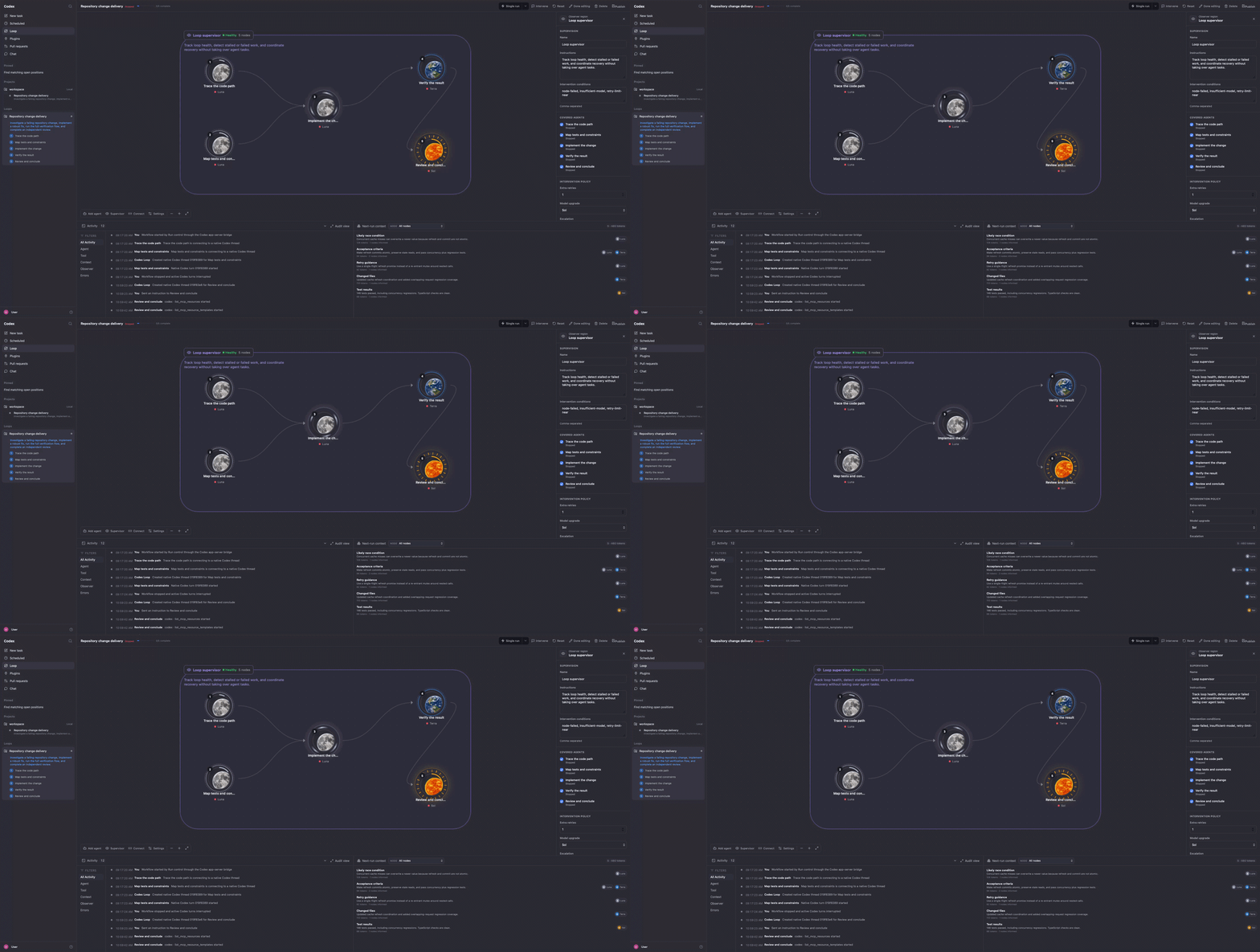
Loops are reusable, multi-step workflows. Each step is represented by a node, and the nodes are connected through edges.
- A node represents a unit of work or orchestration logic. It can be an Agent with a task to solve and an explicit definition of done, but it can also represent a condition, verification step, human approval gate, map, join, bounded loop, or subworkflow.
An Agent node defines which model and reasoning effort to use, which capabilities it needs, which Context Blocks it is allowed to read, and what should happen if it fails. A retry can even upgrade the model before trying again.
The output of a node becomes context and evidence that following nodes can use. This makes context propagation explicit instead of simply putting everything into one increasingly large conversation.
- A supervisor observes the health of the Loop. It can detect failed or stalled work, allow additional retries, upgrade the model used for recovery, or escalate the problem to the user.
The supervisor does not take over the Agents’ tasks. Its purpose is to watch the workflow and help it recover when the original execution plan is no longer progressing as expected.
- An edge defines the logic path between nodes: what must run before another step can begin and which outputs should be passed forward.
Edges can also define what should happen when a node fails, whether the next node should remain blocked, whether the workflow may continue with a warning, or whether the user needs to be asked.
The complete Loop also has limits for concurrency, total agents, iterations, tokens, wall-clock time, and repeated rounds without progress. This is important because a workflow called a “Loop” should probably also know when to stop looping :)
Why Loops
To keep it simple, Loops solve a combination of challenges that individual agents, scheduled prompts, or reusable skills do not completely solve on their own:
- Use different models and reasoning effort levels for different steps, depending on how difficult or important they are.
- Run independent work in parallel while keeping dependent work in the correct order.
- Give every Agent only the context it actually needs instead of sharing one giant conversation.
- Make the definition of done, verification, retries, approvals, and failure behavior explicit.
- Keep long-running workflows bounded through budgets, stop conditions, and no-progress detection.
- Pause, resume, inspect, and intervene in work without losing the history of what happened.
- Reuse the same workflow manually, on a schedule, or through a webhook.
What makes Codex Loop different is the combination of a chat-first experience and an inspectable visual graph.
The user does not need to understand graph orchestration before getting started. They can simply describe the outcome they want, and the Loop Designer creates the agents, dependencies, verification steps, integrations, and safety limits. The graph then becomes an explanation and an audit trail of what Codex plans to do—not a complicated form the user has to complete before anything can happen.
At the same time, users who want more control can open the visual editor and adjust the individual nodes, edges, models, effort levels, retries, context access, and execution rules themselves.
What it does
Codex Loop lets users describe, create, run, and reuse custom multi-agent workflows.
The user starts by describing an outcome in natural language. A persistent 5.6-Sol Loop Designer inspects the available capabilities and creates a schema-constrained workflow proposal. It records reasonable assumptions and asks only when missing information would materially change the safety, architecture, access, cost, or definition of done.
The result is a versioned draft that the user can continue refining through chat. Each change creates a new revision, and changes can be undone without silently rewriting the history. The user can also switch to the graphical editor for more precise manual adjustments.
Before real execution, the Loop can be simulated. Simulation validates the dependency plan, previews what each node would do, and checks workspace and capability availability without starting Agent threads or modifying files.
Once the Loop is ready, it can be published and:
- Run once with an optional additional prompt and project directory.
- Run automatically on a configurable schedule.
- Be triggered through a webhook with input parameters.
During execution, Codex Loop creates a native Codex thread for every Agent node. Independent nodes can run in parallel, while dependent nodes wait for their required inputs. Context Blocks control which information each Agent receives, and completed work can create checkpoints that are reused when the workflow definition and repository revision still match.
The interface streams the actual Agent messages, commands, tool calls, approvals, file changes, retries, failures, and final outputs. Previous runs keep frozen execution results, so a new run cannot overwrite the evidence from an older one.
The user can also pause scheduling, stop active turns, answer Agent questions, approve requested actions, steer an active Agent, queue a follow-up instruction, or share new context with selected future Agents.
So it is not just a graph that looks like agents are working. It is a local control plane running real Codex threads and keeping the entire execution inspectable.
How I built it
I built the frontend with React, TypeScript, Vite, and React Flow. The graph is used both as a visual editor and as a live representation of the execution state.
The backend is an Express server with local JSON persistence. For real execution, the backend communicates with codex app-server through its JSONL protocol over stdin and stdout. Each Agent node is mapped to a persistent native Codex thread, and the bridge handles starting and resuming threads, starting turns, streaming events, requesting approvals, answering questions, steering, interruption, and token usage.
The Loop Designer is itself a persistent, read-only Codex thread. It receives the current workflow, the user request, and the discovered capabilities, then returns a schema-constrained proposal that can safely be compiled into the next graph revision.
I also built an authenticated MCP interface and packaged design-loop and operate-loop skills. This means a user can create or operate a Loop from another Codex task without needing to begin in the visual application.
Challenges I ran into
My project is intended as inspiration for the Codex team: a cool feature that I think, if polished well, could become an amazing part of the app. But since I do not have access to the Codex source code itself, I had to work around that limitation.
That is why I built on top of the Codex CLI and app-server, and created a limited replica of the Codex interface around it. Thankfully, that was enough to build a functional prototype, but it also means I had to build a bridge instead of implementing the feature directly inside Codex.
Nevertheless, it was 5.6-Sol’s work to make it happen, so this is mainly a limitation I think you should take into account while assessing the project. Just close your eyes slightly and imagine it is actually Codex, and not a frontend running a copy of it :)
The other big challenge was that orchestration becomes much more complicated once the graph needs to do real work. Starting multiple agents is the easy part. The difficult part is deciding which context they receive, what completion means, how retries behave, when branches may continue independently, what pause and stop actually mean, how human questions are routed, how stale approvals are rejected, and how to prevent a repeating workflow from wasting unlimited time and tokens.
The final challenge was exposing all that power without making the user design a distributed system before fixing a bug. This is what led me to make chat the primary experience and the graph the secondary, more precise interface.
Accomplishments that I’m proud of
I love the concept of using an actual sun, moon, and Earth for the graph nodes. I think this was a clever idea and adds a polished, recognizable look to the graph.
The different effort levels also have their own visual hints, so the user can understand the expected intensity of a node just by looking at it. Although I think that already looks cool, with a little more time I could probably have made it as strong as the node-type visuals. You get the idea.
I am actually more of a backend developer, but I also think I have a lot of potential as a UX designer because I think I understand good the how to make the user experience as best as possible.
That is why I decided in the middle of the project to make the graphical interface the secondary interaction and the chat interface the first-class experience. A skill that helps users define what they want became a natural choice: users can describe their outcome first, and only go into the graphical interface when they want to inspect or manually refine the details.
I am also proud that the result is more than a visual mockup. The prototype runs native Codex threads, keeps durable execution history, scopes context, handles retries and attention, enforces budgets, and supports real reusable triggers. There is still plenty left to polish, but the important architectural idea is actually there and working.
What I learned
I learned a lot about agent-harness work during this project.
At first, I thought my Loop concept was easy, which was also why I thought it was such a unique and great idea. But halfway through the work and research, I started to understand why orchestration is genuinely challenging.
Building one shoe that fits every foot or one workflow abstraction that fits every use case was tough.
The hardest part is not asking several models to do several tasks. The hard part is designing the contracts between them: dependencies, context boundaries, definitions of done, verification, failure handling, budgets, and human intervention.
I also learned that the best orchestration interface may not look like orchestration at first. Most users should not need to think in nodes and edges. They should be able to explain what they want in chat, while the graph quietly gives them transparency, control, and confidence. The graph then can contain a lot of complexity but abstract the execution in a simple way that the user can easily extend and improve.
What’s next for Codex Loop
I would add automatic per-node Git worktrees, richer Observer policies, external notifications when a Loop needs attention, stronger authentication and permissions, better secret-provider bindings, and more production-ready execution storage.
The visual language could be developed further as well. I would love to make model strength, effort, cost, context flow, and risk readable almost entirely from the graph.
And now, I hope you find this funny. I had a lot of fun building the project, so basically, here comes my résumé for you xD. I’ll keep it super short:
I started working with chatbots and NLP at university many years ago, doing classical intent ranking and scoring with a Solr database and similar technologies. Since then, I have always been involved with the application side of language models.
I worked at Telekom as an AI Engineer, building a coding agent before today’s coding harnesses existed, as well as an AI Operator intended to work as a first-level support system. Now I am an AI Engineer at Würth IT, building an orchestration system with voice as the first-class experience.
So I have seen the application side of language models from before the current boom. I was actually an early fan of GPT-2 because I was born in Bolivia, and one of its example texts examples was about a scientist in Bolivia and the Andes region. The YouTube channel Computerphile made an explanation video about it, and I was amazed.
If you are interested in my idea, or simply want to chat about why I think you should build a V2 of this project, feel free to contact me.
I have a full-time job, so this project was built during a few hours of work each day. But I am open to starting a new challenge if you would like me to join you.
I hope you had as much fun reading this as I had building it, and hope you find inspiration in it for codex.
Built With
- codex
- codex-cli
- gpt-5.6
- json
- react
- typescript
- vite

Log in or sign up for Devpost to join the conversation.