-
-
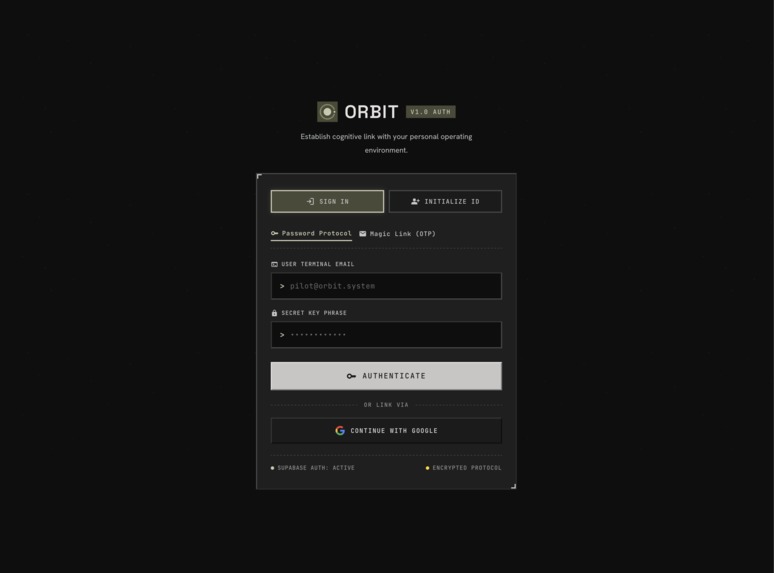
login
-
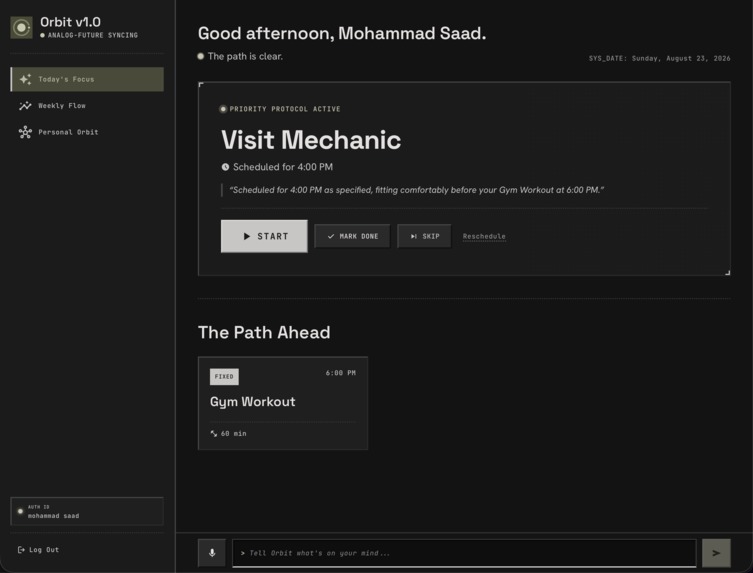
dashboard
-
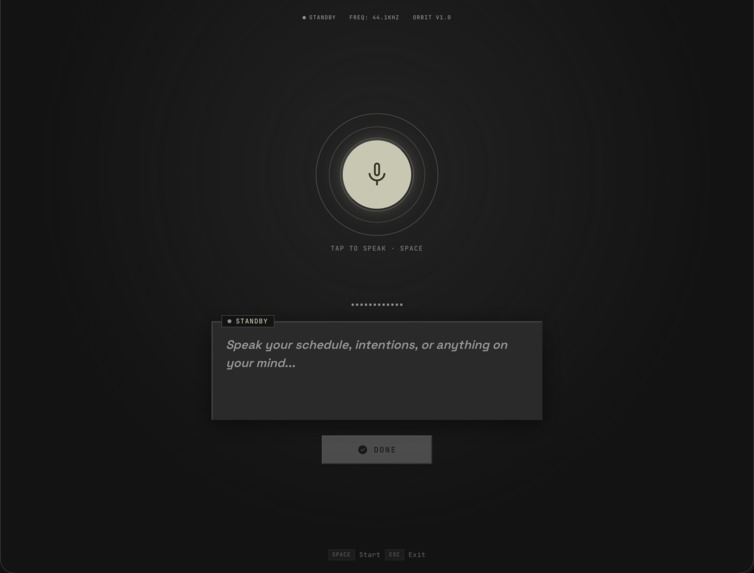
speech-recognition
-
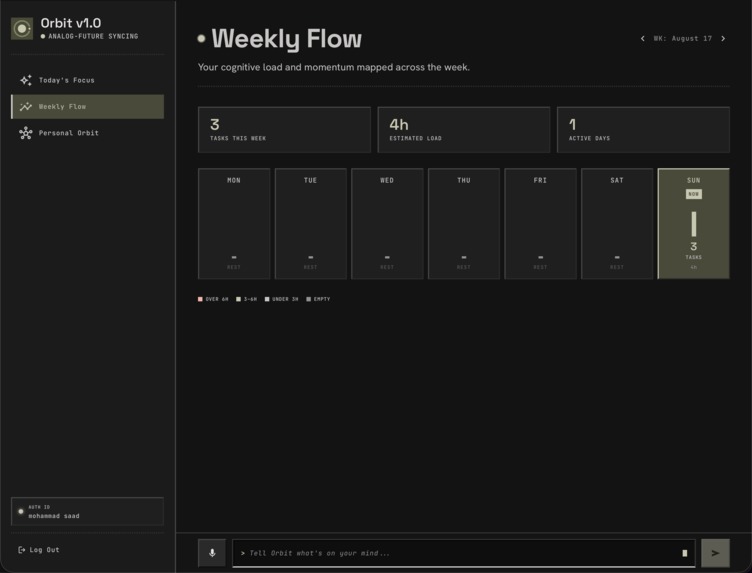
statistics
-
personal-context
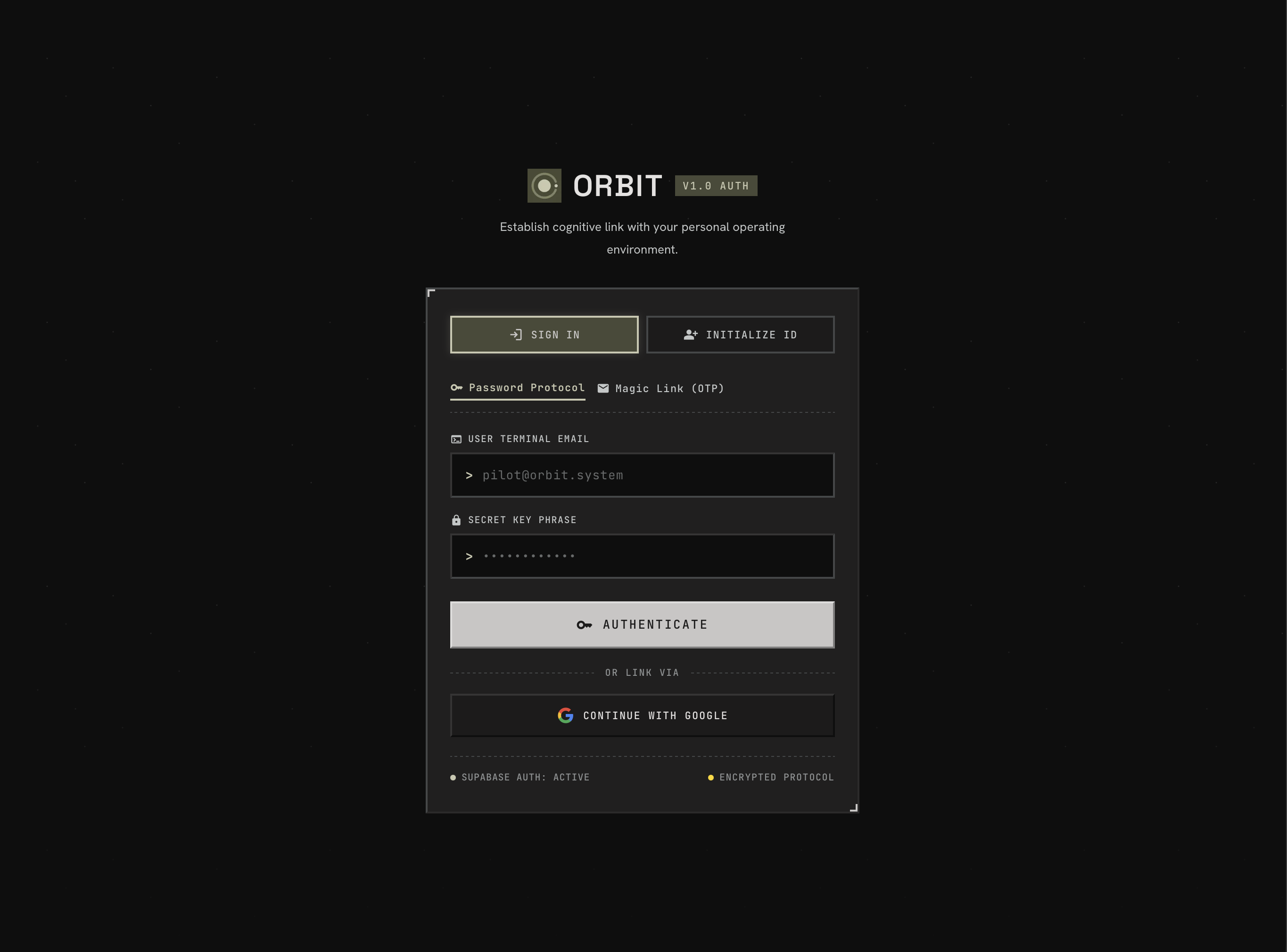
Orbit is an analog-future personal operating environment that learns your daily rhythms and figures out what to do next. Traditional to-do apps leave you with overwhelming lists of unranked checkboxes, while digital calendars force you to manually plan every half-hour block. When real life gets messy, those plans fall apart and you spend more time managing tools than doing actual work.
We built Orbit to solve that problem. Instead of asking you to schedule every task by hand, Orbit lets you brain-dump your thoughts through voice or a quick terminal prompt. It checks your personal habits, active commitments, and current time, then surfaces one clear recommendation for what to work on right now.
What makes Orbit different is that it treats your day as a fluid stream of focus rather than a rigid calendar grid. It separates fixed appointments from flexible goals, gives you a distraction-free focus cockpit to get work done, and recalculates your path as your day moves forward.
Inspiration
The idea started from our own frustration during busy college semesters and heavy development sprints. We would find ourselves juggling classes, workouts, team syncs, and project deadlines. We would write down natural thoughts like: "Review chapter 4 after lunch, workout before the 4 PM team sync, prep presentation slides."
Existing tools failed us on this simple way of thinking:
- To-do apps stripped away time context. They treated an urgent paper due at 5 PM with the exact same weight as a book we wanted to read someday.
- Calendar apps demanded exact start times, end times, and manual block placement before we even knew how long our morning work would take.
- Smart schedulers felt sterile and complex, designed for corporate meetings rather than real students and developers balancing energy and habits.
We realized people do not think in calendar grid coordinates. We think in relative anchors and routines: "I want to study after my nap," or "I need to workout before standup."
We designed Orbit around that mental model. Give the user a terminal prompt and an open microphone, capture natural thoughts, resolve relative phrases against personal context, and let deterministic logic guide the day forward.
What it does
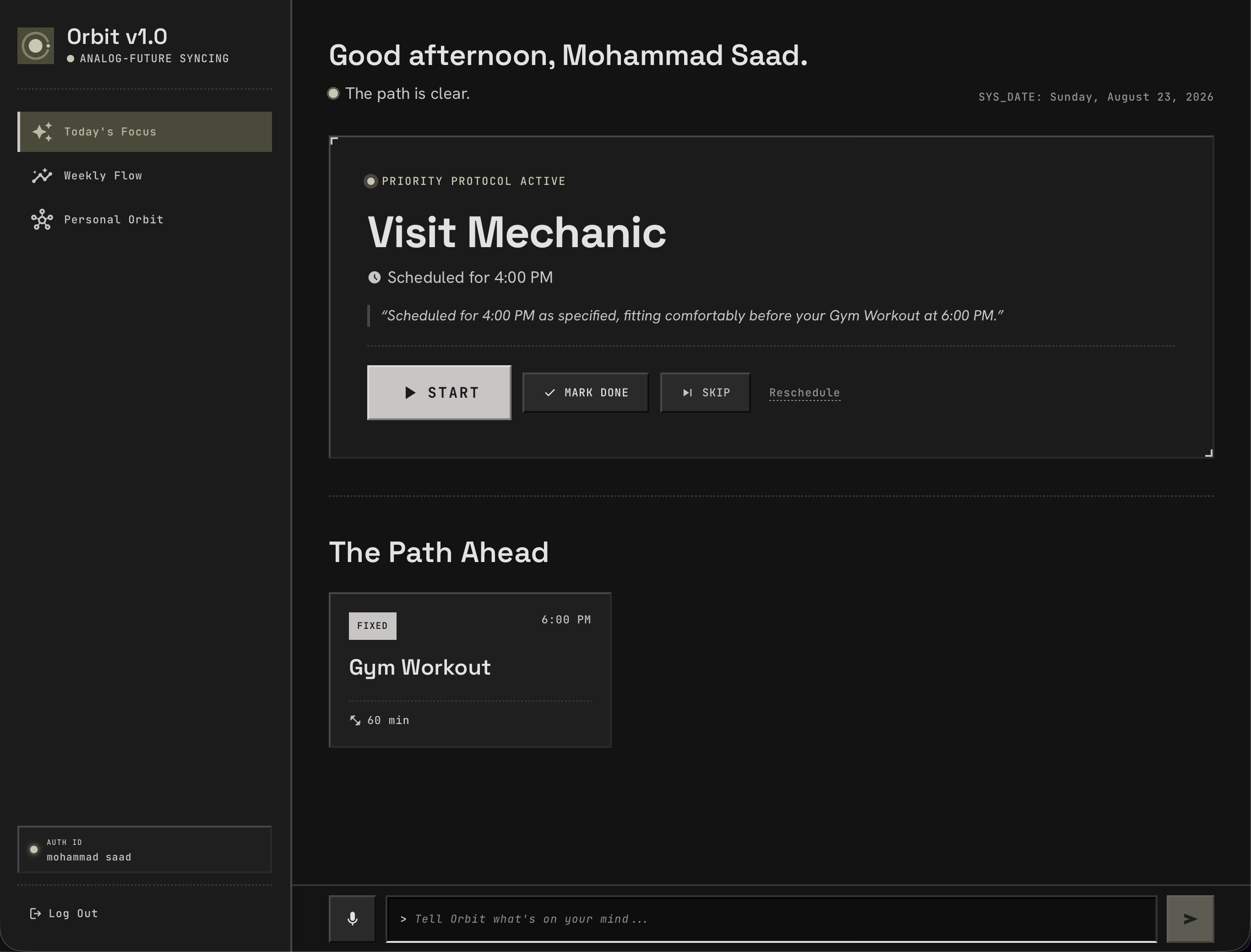
When you open Orbit, you are greeted by Today’s Focus, anchored by the "What's Next" Hero Card.
+-------------------------------------------------------------------------+
| [O] ORBIT // ACTIVE OBJECTIVE                            SYS_DATE: TODAY|
|                                                                         |
|  Finish Operating Systems Lab                      [ 45 MIN ] [ 2:00 PM]|
|  "Scheduled for 2:00 PM right after your lecture (1:00 PM - 2:00 PM)."  |
|                                                                         |
|  [ > START MISSION ]     [ MARK DONE ]     [ SKIP ]     [ LOCK TIME ]   |
+-------------------------------------------------------------------------+
Here is how the complete user experience works:
Capturing Intent (Voice or Terminal): At the bottom of the screen sits a terminal input bar (
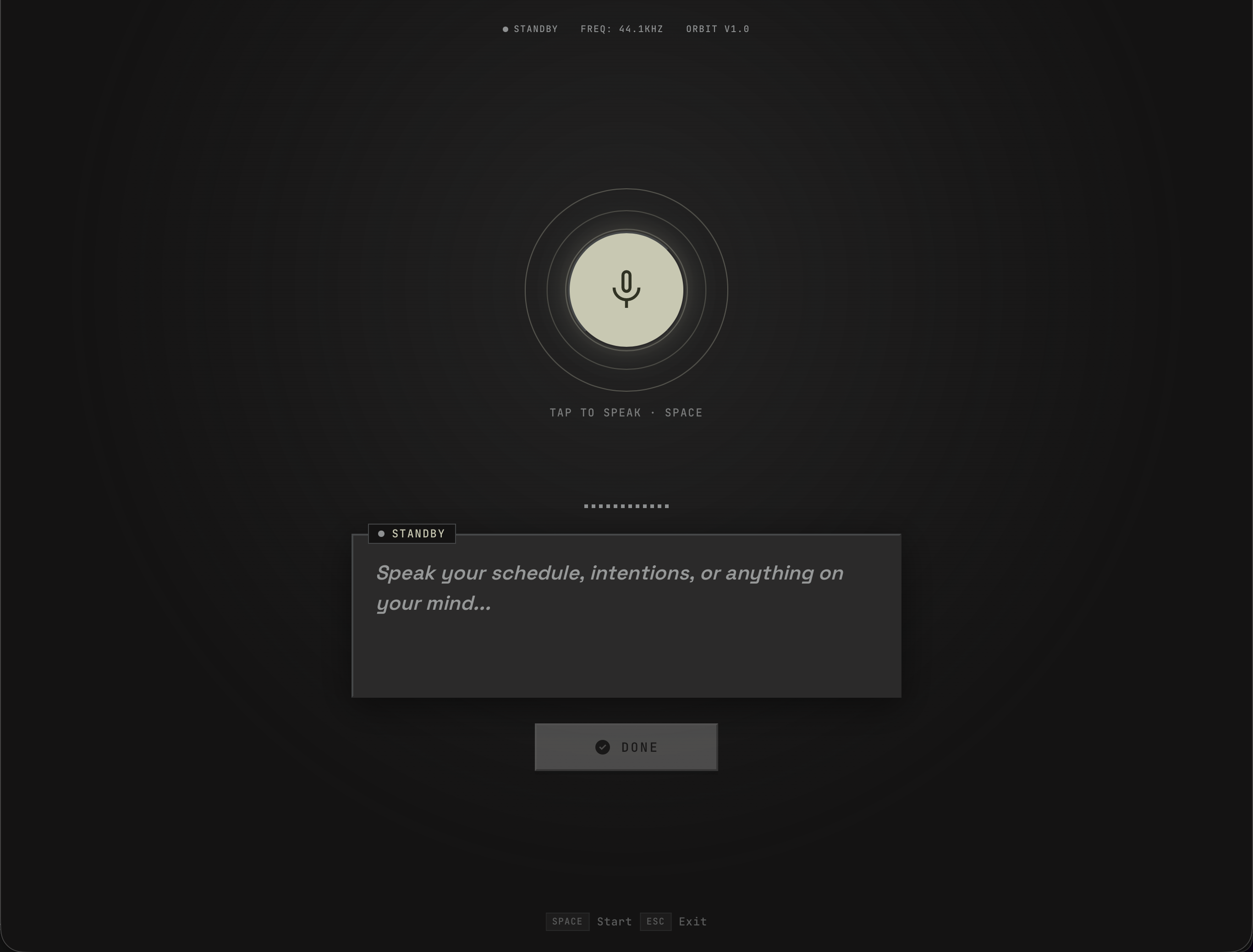
>) and a microphone button. You can type or speak naturally: "I have an OS lab meeting at 2pm, need to review pull requests for an hour after my afternoon workout, and pick up groceries." If you open Listening Mode (/listen), an audio-reactive visualizer pulses to your voice while the browser transcribes your speech in real time.Context and Constraint Reasoning: Orbit sends your input along with your timezone, wall clock, and stored personal profile to our extraction pipeline. In Personal Orbit (
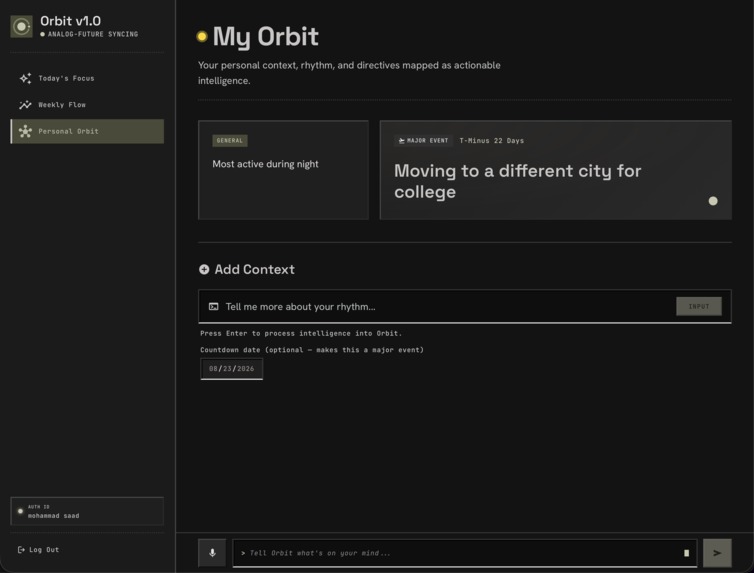
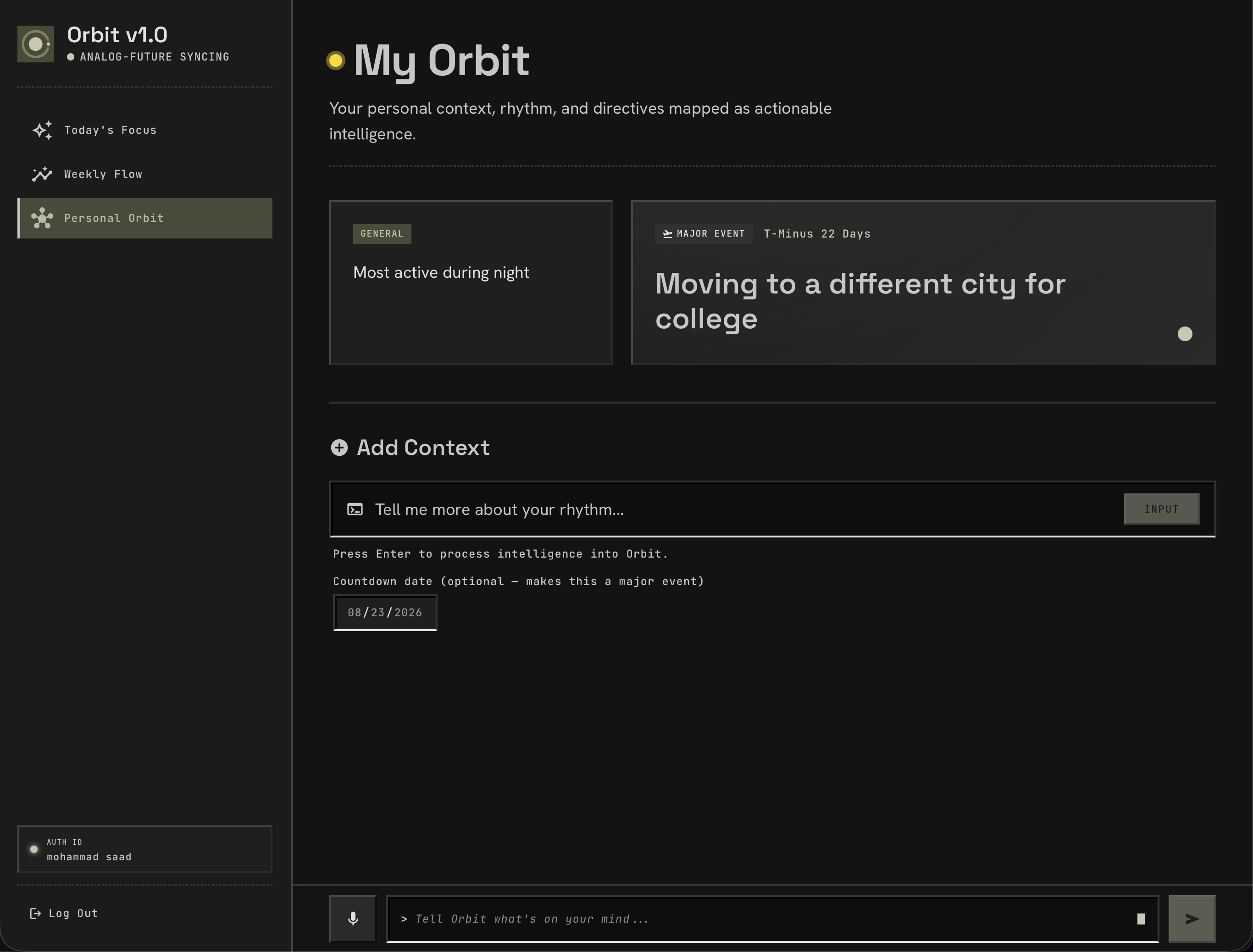
/orbit), you maintain a bento grid of personal context, including workout routines, class times, deep-work habits, and major countdown milestones (like "Moving to Malaysia in 18 days"). Orbit cross-references your input against these directives. If you say "review PRs after my workout", and your context records your workout from 3:00 PM to 4:00 PM, Orbit locks the task to 4:00 PM.Curating "The Path Ahead": Tasks are grouped into three distinct types:
- Fixed: Hard commitments with set clock times (classes, meetings, scheduled calls).
- Flexible: Action items with estimated durations that Orbit fits into open windows between your fixed commitments.
- Informational: Passive notes and reminders that do not block your calendar.
Executing in Focused Mode (
/focus): Clicking START on the Hero Card opens a fullscreen, distraction-free environment with an animated starfield. Orbit tracks your active session with an SVG circular progress ring, keyboard shortcuts (Spaceto pause and resume,Escto exit), and accurate timekeeping. When you finish, Orbit logs your session, calculates your efficiency score: $$\text{Efficiency} = \min\left(\text{round}\left(\frac{t_{\text{estimated}}}{t_{\text{actual}}} \times 100\right), 200\right)\%$$ calculates your daily streak based on distinct calendar days, marks the task complete in the database, and recalculates the next mission for your day.Tracking Cognitive Load in Weekly Flow (
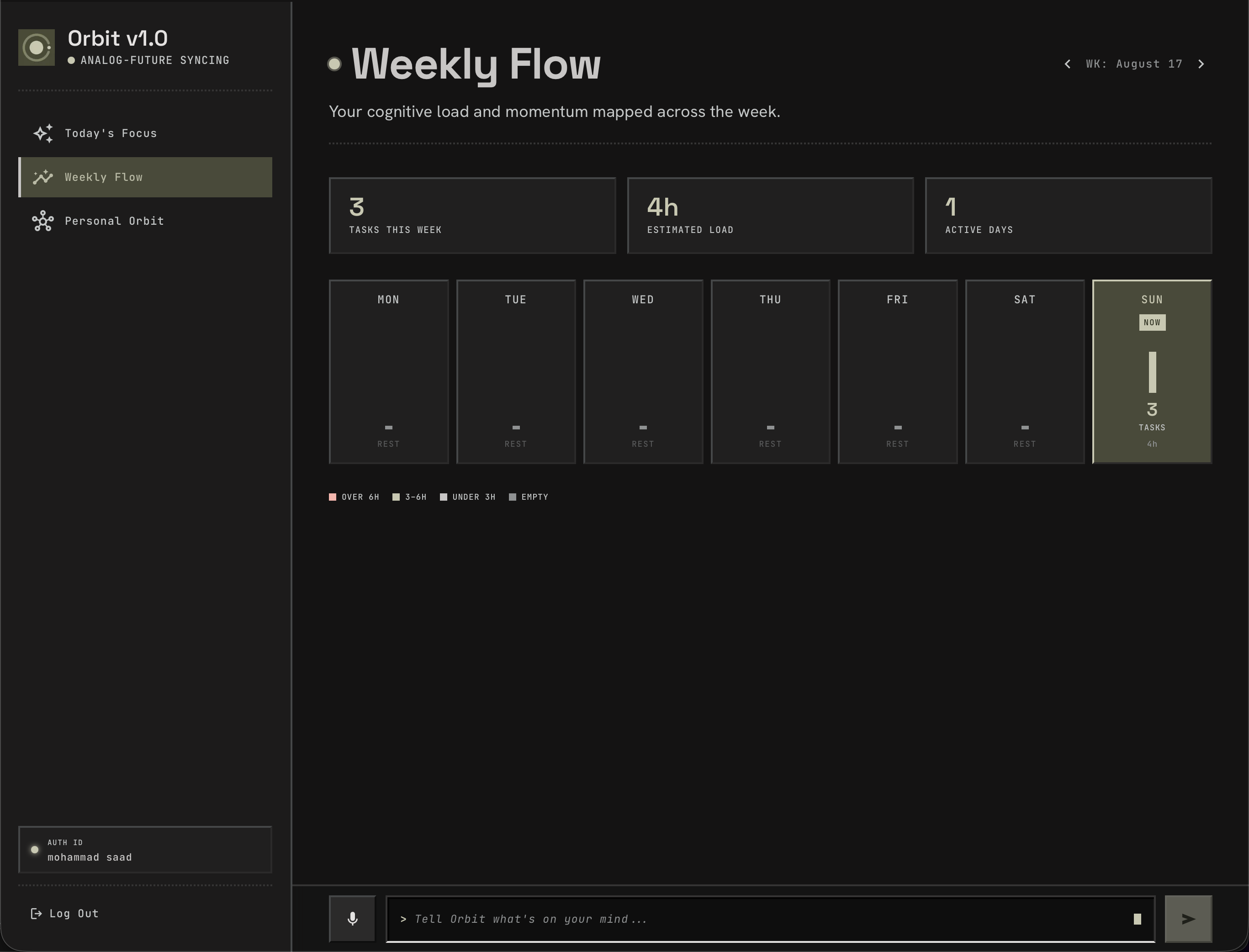
/week): The weekly view groups tasks across the current ISO week (Monday through Sunday), totals your daily hours, and renders a color-coded bar chart scaled to your heaviest day. Clicking any day opens an inspection drawer showing the exact task breakdown and completion status for that date.
How we built it
Orbit is built as a fast Next.js application that connects browser interactions, persistent relational storage, and AI reasoning.
graph LR
    subgraph Client ["Client (Next.js 16 + React 19)"]
        UI["Today / Week / Orbit Views"]
        Focus["Focus Mode & Starfield Engine"]
        Listen["Web Speech API & AudioContext"]
        Input["Persistent Terminal Input"]
    end

    subgraph Middleware ["Next.js Proxy Layer"]
        AuthMid["Cookie Auth & Token Refresh"]
        RouteGuard["safeNextPath Guard"]
    end

    subgraph API ["Next.js Route Handlers"]
        AIExtract["/api/ai/extract"]
        WhatsNext["/api/ai/whats-next"]
        TaskRoutes["/api/tasks & /api/tasks/week"]
        CtxRoutes["/api/context"]
        SessRoutes["/api/sessions"]
    end

    subgraph External ["Services & Storage"]
        Gemini["Google Gemini Model Chain"]
        Supabase["Supabase Postgres (ap-south-1)"]
    end

    Input -->|POST text, timeZone| AIExtract
    Listen -->|Audio Stream| Listen
    Listen -->|POST transcript| AIExtract
    UI -->|GET tz=Area/City| WhatsNext
    UI -->|GET / PATCH| TaskRoutes

    AIExtract -->|Fetch Context & Tasks| Supabase
    AIExtract -->|Prompt + Fallback Chain| Gemini
    AIExtract -->|Insert Tasks & Transcripts| Supabase
    WhatsNext -->|Query Pending Tasks| Supabase
    TaskRoutes -->|RLS-Scoped Queries| Supabase
    SessRoutes -->|Log Session & Update Task| Supabase

    AuthMid --> UI
1. Frontend and Custom Design System
- Framework: Next.js 16.3.1 (App Router) with React 19.2.8 and TypeScript.
- Styling and Tokens: We built a custom design system using CSS Custom Properties and CSS Modules (
globals.css,pixel-effects.css,animations.css). We created 3-layer beveled pixel borders, dithered gradients, inset terminal inputs, CRT scanline overlays, and responsive step-based animations. - Typography: Self-hosted via
next/font/googlefor Space Grotesk (headers), Hanken Grotesk (body copy), and JetBrains Mono (labels and telemetry).
2. Speech Processing and Voice Visualization
- On
/listen, we combined the browser Web Speech API (continuous: true,interimResults: true) with the Web Audio API (AudioContext+createAnalyser). - We sample frequency data from the microphone, calculate an audio level ($0.0 \dots 1.0$), and dynamically scale the concentric rings of the
VoiceCorevisualizer (scale(1 + audioLevel * 0.15)) alongside a 12-column pixel audio bar animation.
3. AI Extraction and Model Fallback Chain
- When text or speech is submitted,
/api/ai/extractinjects the current wall clock, personal context directives, and existing tasks into a system prompt with a strict JSON schema. - We query the Gemini API using native HTTP
fetchwith anAbortSignaltimeout. Rather than relying on a single model, we built a sequential fallback chain: $$\text{gemini-3.6-flash} \longrightarrow \text{gemini-3.7-flash} \longrightarrow \text{gemini-flash-latest} \longrightarrow \text{gemini-pro-latest}$$ - A 25-second budget ceiling (
GEMINI_BUDGET_MS) ensures that slow upstream responses fall back to our local regex parser (localFallback) before the host serverless timeout kills the request.
4. Deterministic "What's Next" Ranking Engine
In /api/ai/whats-next, we evaluate pending tasks for the user's local date using a clock-aware scoring algorithm:
- Base Score: $\text{Priority} \times 10$ ($10 \dots 100$).
- Fixed Commitment Urgency: Fixed tasks starting within 1 hour receive a $+50$ boost; within 2 hours, $+25$; already past, $-20$.
- Flexible Window Optimization: Flexible tasks scheduled in the next 2-hour window receive $+15$; unscheduled flexible tasks receive $+5$.
- Informational Demotion: Informational items receive $-30$ so they do not take over the hero card.
- Dynamic Rationale: Generates contextual time-of-day explanations ("Best afternoon task given your current schedule...").
5. Database, Row-Level Security, and Auth
- Supabase Postgres (
ap-south-1): Four core tables:tasks,context_items,sessions, andtranscripts. - Row Level Security (RLS): Every table has strict policies enforcing
auth.uid() = user_id. - Cookie-Based SSR Authentication: Handled via
@supabase/ssracross Client Components, Route Handlers, and Next.js Middleware, with open-redirect guards (safeNextPath) preventing off-site redirects.
Challenges we ran into
Building Orbit required solving practical problems across timezones, browser quirks, and AI predictability.
1. The UTC Timezone Trap
In early versions, evening tasks kept disappearing from the Today view. This happened because new Date().toISOString().slice(0, 10) generates a UTC date. For users behind GMT (like New York or San Francisco), an evening task created at 8:00 PM local was tagged with tomorrow's UTC date.
- Our Solution: We built a dedicated timezone module in
src/lib/time.ts. The browser sends its IANA timezone (clientTimeZone()), and the server parses dates usingIntl.DateTimeFormat("en-CA", { timeZone }). We also standardized day arithmetic around UTC-midnight timestamps to prevent daylight saving changes from skipping dates.
2. The Dangerous GET-Route Data Repair Bug
Early on, our task fetch route attempted to clean up unparseable time strings (like "after my nap") by looping through rows during a GET request and writing scheduled_time: null back to the database. This meant simply visiting the homepage erased the user's original time data.
- Our Solution: We separated display formatting from data storage. We created
withDisplayableTime(), which cleans up objects in memory for the UI while keeping the database records safe.
3. Focus Timer Drift in Background Tabs
Our initial focus timer used a basic setInterval(..., 1000) that incremented a second counter. However, browsers throttle intervals in background tabs to save power. A user who switched tabs during a 25-minute study session would return to find the timer had only counted 14 minutes.
- Our Solution: We switched from tick counting to true wall-clock tracking. We store a
runningSincetimestamp (Date.now()) and an accumulatedbankedSecondsvalue. When the timer updates, it computes the exact difference against the system clock. We also saved this state inlocalStorageunderRESUME_KEY, allowing active sessions to survive accidental page refreshes.
4. Microphone Leaks on Route Navigation
While testing /listen, we noticed the browser microphone indicator stayed on even after navigating back to the home page. The component cleanup was stopping the audio visualizer node but leaving the underlying SpeechRecognition session open.
- Our Solution: We created a centralized
stopCapture()cleanup function inside an unmount effect that stopsSpeechRecognition, closes theAudioContext, and calls.stop()on every track of theMediaStream.
5. Cross-Component State Sync
When a user added tasks through the bottom InputBar or completed voice input in /listen, navigating to / showed an outdated timeline. Because TodayPage fetched data in a client useEffect, calling router.refresh() did not trigger a refetch.
- Our Solution: We created a lightweight event bus using native DOM events (
src/lib/taskEvents.ts). When tasks are added or updated,notifyTasksChanged()dispatchesorbit:tasks-changed, telling all mounted views to refresh immediately without a full page reload.
Accomplishments that we’re proud of
- Zero-Dependency Native Unit Test Suite: We wrote a test suite in
src/lib/*.test.mtsusing Node 24’s nativenode:testrunner. All 21 tests pass with zero extra test dependencies, verifying time parsers, date calculations, leap years, DST shifts, and security guards. - Honest, Cohesive UX Over Feature Bloat: During UI audits, we found placeholder buttons (such as an unbuilt calendar sync button). Instead of keeping non-working controls, we replaced them with an honest status page at
/calendarexplaining that Orbit currently plans only from direct input. - Custom
PixelDialogSystem: Instead of breaking immersion with OS-nativewindow.prompt()andwindow.confirm()popups, we built a custom, accessible in-appPixelDialogcomponent that matches our retro-futuristic style. - Strict API Boundary Validation: In
src/lib/apiError.ts, we wrote input validators (str(),int(),readJson()) that verify every payload field, preventing malformed data, prototype pollution, or unvalidated database writes. - Motion Accessibility: We built a global
prefers-reduced-motionrule inanimations.css. It collapses continuous loops (pulsing orbs, drifting starfield, CRT scanlines, blinking cursors) down to $0.01\text{ms}$ transitions so users with motion sensitivities can use Orbit comfortably.
What we learned
- AI needs deterministic guardrails: Language models are great at understanding human context (like knowing that "sync after lunch" means 1:00 PM), but they are probabilistic and should not manage application state directly. The most reliable pattern is wrapping the model with strict validation: structured context injection before the call, and schema verification after it.
- Time handling requires real discipline: Time in web development involves timezones, wall-clock perception, ISO calendar standards, and user habits. Getting time calculations right across serverless runtimes, databases, and client browsers took careful engineering.
- Tactile aesthetics improve daily focus: Building an interface with deliberate pixel borders, audio visualizers, and clear button feedback made planning feel rewarding. When a productivity tool feels responsive and enjoyable, using it stops feeling like a chore.
What’s next for Orbit-AI
Near-term
- Two-Way Google and Outlook Calendar Sync: Add OAuth2 integrations with Google Calendar and Outlook so Orbit can import external events into the fixed timeline and export finished focus blocks.
- Server Components Fetch Optimization: Move initial data fetching on
/,/orbit, and/weekinto React Server Components with streaming Suspense boundaries, removing loading skeleton flashes. - Interactive Timeline Drag and Lock: Add tactile drag-and-drop handles on the Today timeline to let users manually reorder tasks and lock flexible time slots.
Long-term
- Multi-Day Cognitive Load Balancing: Expand our ranking algorithms to look across entire weeks, spreading out heavy tasks based on past focus session history to prevent burnout.
- Passive Context Memory Extraction: Allow the AI pipeline to analyze transcribed voice notes and suggest new personal context items automatically (for example, detecting a recurring weekly tennis class and adding it as a habit).
- Multi-Device Focus Telemetry: Add synchronized focus rooms so friends or teammates can share focus sessions and daily streaks in real time.
Built With
- css
- eslint
- gemini
- google-fonts
- next.js
- node.js
- postgresql
- react
- rls
- typescript

Log in or sign up for Devpost to join the conversation.