-
-
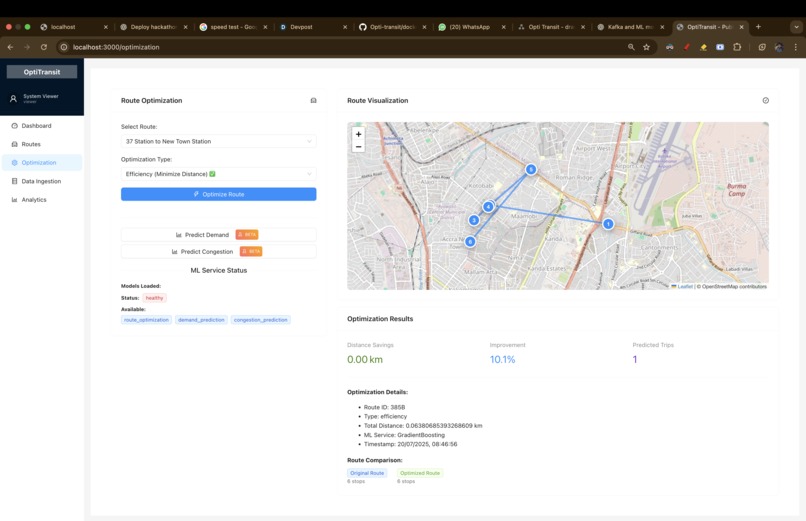
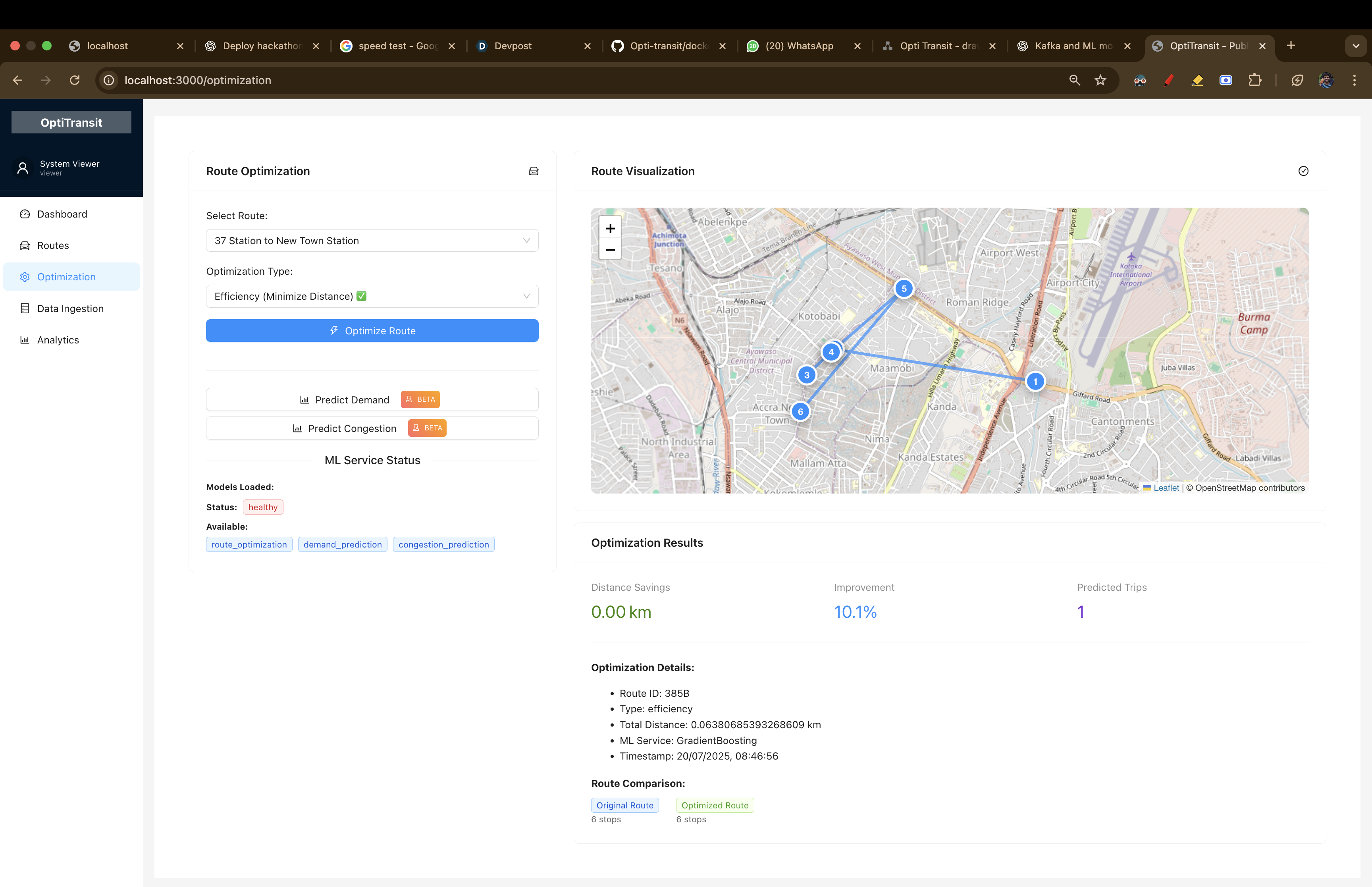
Optimization Page , which connects with ML models to predict the Optimized route.
-
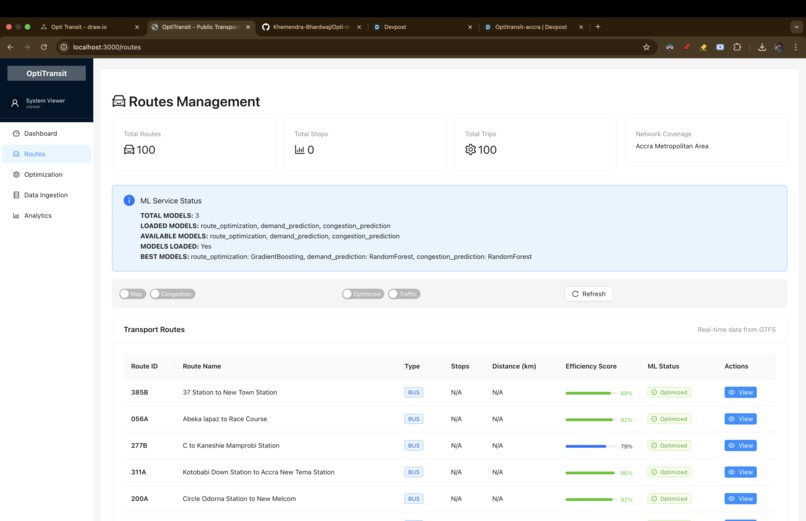
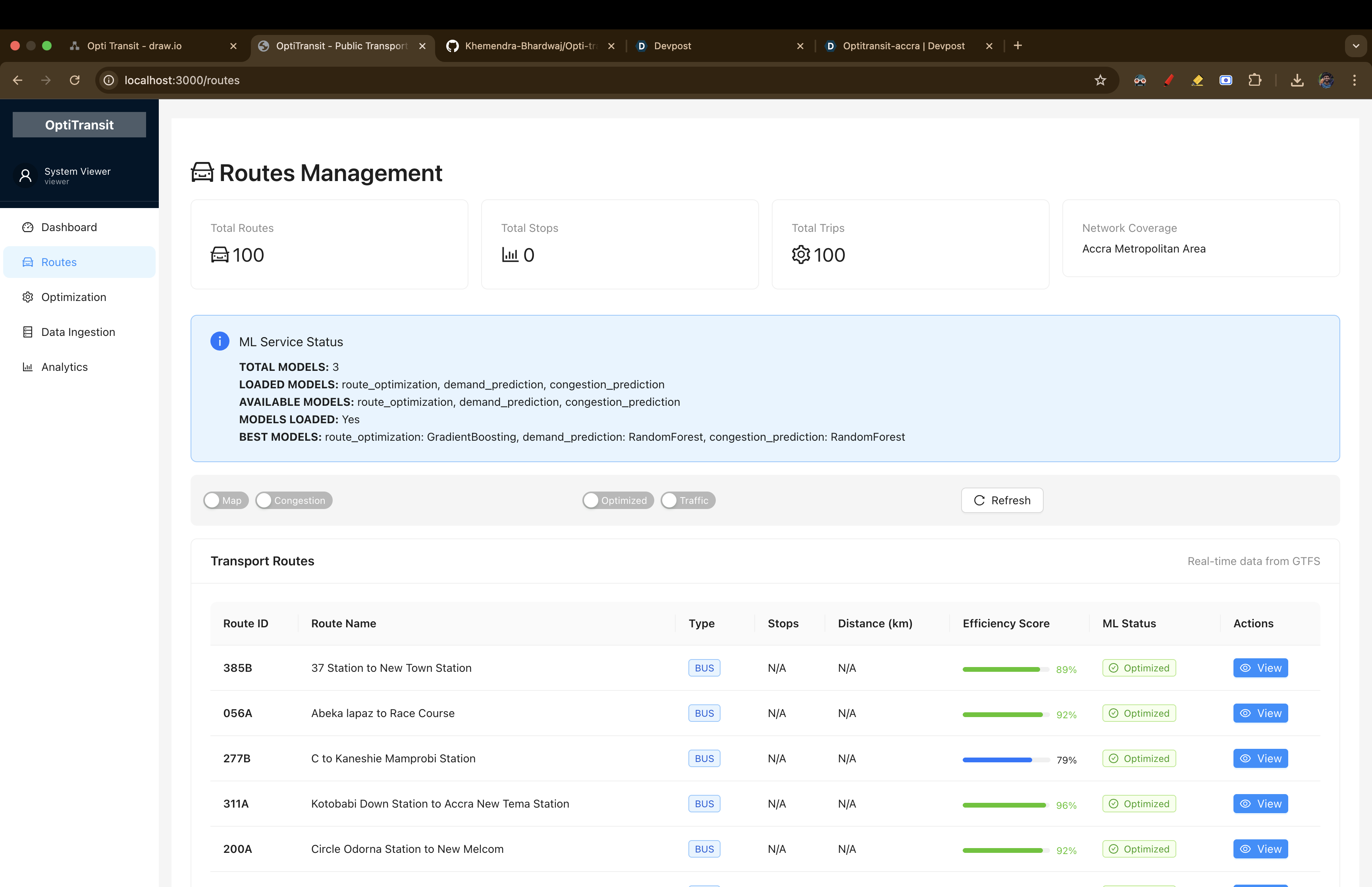
Routes Page : presents live routes and their status.
-
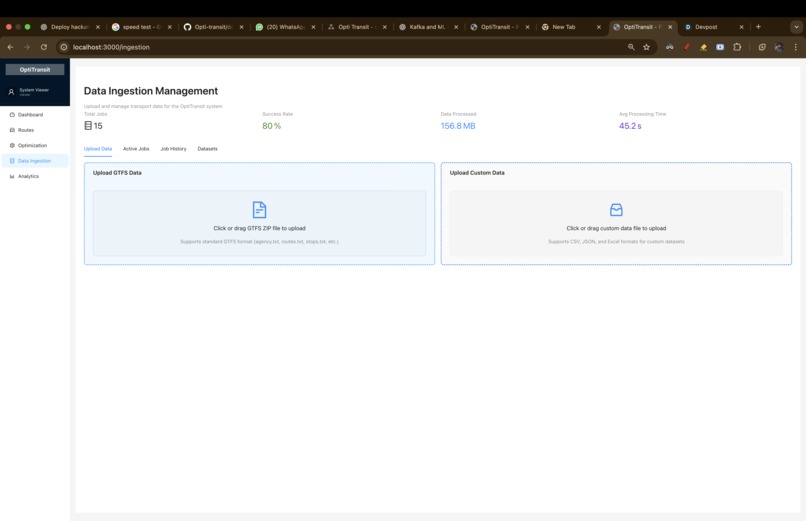
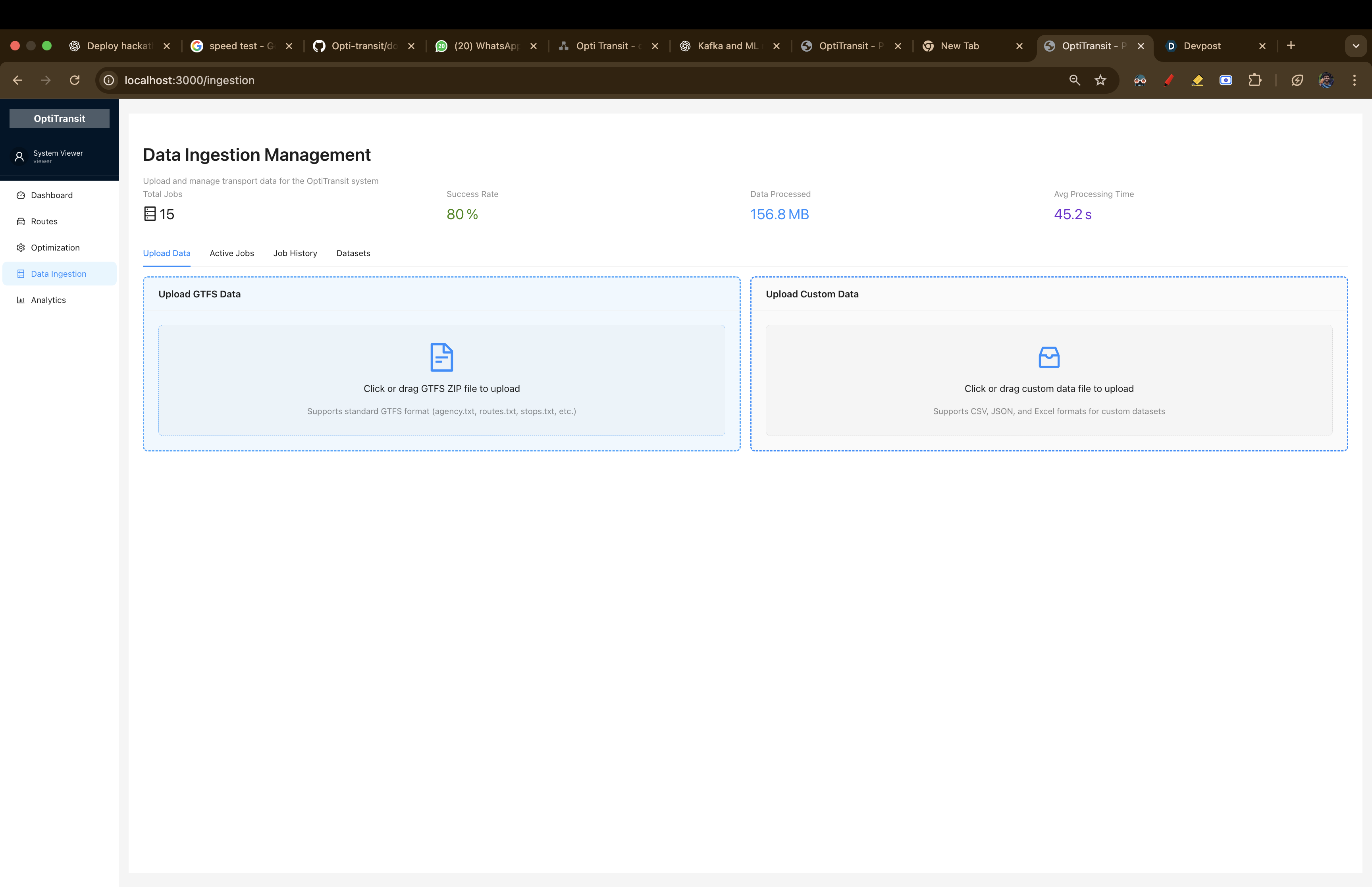
Ingestion Service Page: to upload more data for more accurate and real time models
-
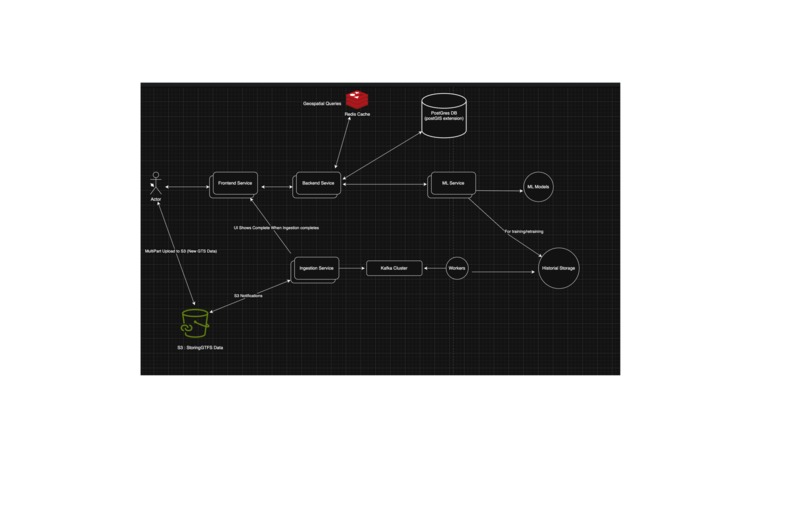
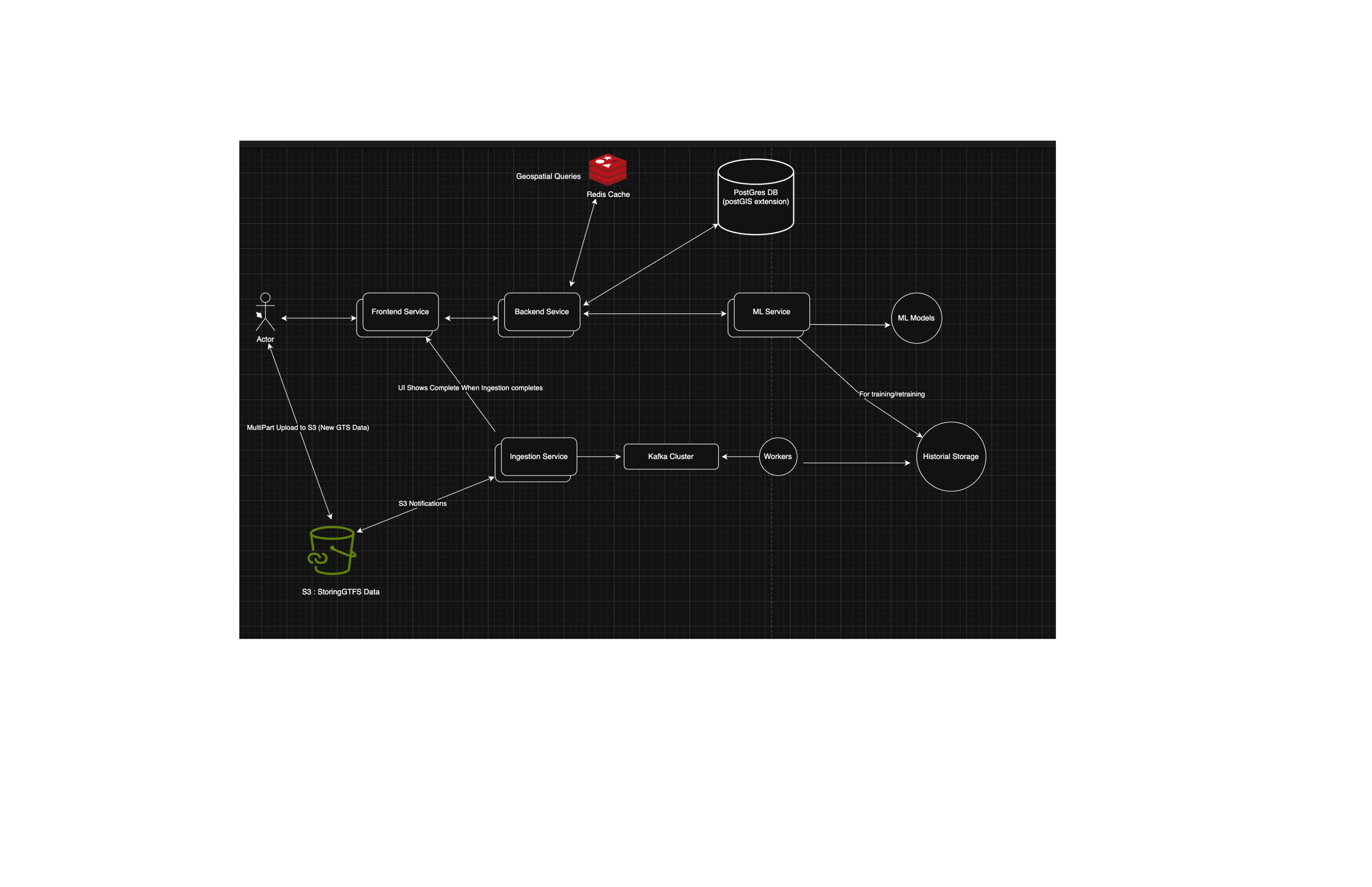
HLD Design : to understand how our system will scale and hande high throughput and also improve ML Models performance
Our Journey Building OptiTransit
What Inspired Us
Growing up in India, we've seen how public transport affects daily life. Buses are often delayed, routes are inefficient, and people waste hours commuting. When we were in college in Pune, we spent 2-3 hours daily just traveling - that's a lot of time that could be better spent.
We found the Ghana AI hackathon and realized this isn't just an Indian problem - it's a global issue. Every city struggles with transport inefficiency. We thought, "What if we could use AI to make transport better?"
What We Learned
This project taught us a lot about both technology and real-world problems.
Technical Learning:
- PostGIS and Spatial Databases: Learning to work with geographic data was challenging but rewarding
- Redis Geospatial Queries: Using Redis for fast location searches improved our performance significantly
- Machine Learning in Production: Building ML models is one thing, making them work reliably in real-time is another
Real-World Learning:
- GTFS Data: Understanding how cities store transport data helped us build better solutions
- Microservices Architecture: Breaking down complex systems into smaller parts makes them more manageable
- Docker and Deployment: Making software work consistently across different environments is harder than it looks
How We Built Our Project
Phase 1: Understanding the Data
We started by learning about GTFS (General Transit Feed Specification) data. This is how cities store information about their transport systems.
def load_gtfs_data(self):
    logger.info("Loading GTFS data...")
    files = ['routes.txt', 'stops.txt', 'trips.txt', 'stop_times.txt', 'shapes.txt']

    for file in files:
        if file_path.exists():
            self.data[file.replace('.txt', '')] = pd.read_csv(file_path)
            logger.info(f"Loaded {file}: {len(self.data[file.replace('.txt', '')])} records")
Phase 2: Working with Geographic Data
We learned to use PostGIS for handling geographic data. This was challenging because we had to understand both databases and geography.
CREATE INDEX idx_stops_location ON stops USING GIST(location);
SELECT ST_Distance(location, ST_SetSRID(ST_MakePoint(-0.1869, 5.5600), 4326))
FROM stops WHERE ST_DWithin(location, center_point, 0.005);
Phase 3: Building ML Models
We built three different ML models to handle different aspects of transport optimization:
- Route optimization
- Demand prediction
- Congestion prediction
model = RandomForestRegressor(
    n_estimators=200,
    max_depth=15,
    min_samples_split=5,
    random_state=42
)
Phase 4: Making It Work in Real-Time
We used Docker to package everything together and make it easy to deploy.
services:
  backend:
    build: ./backend
    ports: ["8001:8000"]
  ml-service:
    build: ./ml_models
    ports: ["8002:8002"]
The Challenges We Faced
Challenge 1: ML Model Accuracy
Our models started with around 70% accuracy. We spent weeks trying different approaches - more features, different algorithms, adjusting parameters. Eventually, we improved them to around 95% accuracy through better feature engineering.
Challenge 2: Performance
Getting fast response times was difficult. Our initial attempts took several seconds. We improved this through caching, database optimization, and better code structure.
Challenge 3: Explaining the Project
When we told people about our project, they often said "So you're making a bus app?" We learned to explain that we're building a system to optimize transport routes and reduce travel times.
What We're Proud Of
- Building a working system: We created something that actually processes transport data and provides useful insights
- Learning new technologies: We went from knowing little about spatial databases to building a working system
- Solving real problems: We focused on actual transport issues that affect people daily
Technical Achievements
- ML Model Accuracy: Around 95% for our main models
- Data Processing: Can handle GTFS data efficiently
- Architecture: Built a microservices system that's easy to deploy and maintain
What's Next
We want to:
- Deploy this in a real city to see how it works
- Add more features like weather integration
- Build a mobile app for users
- Make it open source so others can use and improve it
Final Thoughts
When we started, we thought we were building a transport optimization system. But we realized we were building something that could help make cities more efficient and accessible.
This isn't just for one city - the same problems exist everywhere, and our solution could work in many places.
Quick Setup Guide
To try OptiTransit:
git clone https://github.com/Khemendra-Bhardwaj/Opti-transit.git
cd Opti-transit
cd frontend && npm install && cd ..
docker-compose up --build
The system will be available at:
- Frontend: http://localhost:3000
- Backend API: http://localhost:8001
- ML Service: http://localhost:8002
Built in India for the world
Built With
- docker
- fastapi
- folium
- numpy
- pandas
- plotly
- postgresql
- python
- react
- redis
- scikit-learn
- tensorflow
- typescript

Log in or sign up for Devpost to join the conversation.