





Inspiration
Every day, 500M+ people open ChatGPT or Gemini and start typing descriptions of things they could just show. A parent tries to describe a rash. A student photographs a math problem but gets no visual analysis. A homeowner stares at a leaking pipe, phone in one hand, frantically typing with the other.
I kept thinking: what if AI could just see what you see, in real-time, and talk you through it like an expert standing right beside you? Not a chatbot you upload images to. A live visual companion that watches, thinks out loud, and guides you with voice while your hands stay free.
When I found the Gemini Multimodal Live API, I realized this was finally possible.
What it does
Opticia AI is a real-time multimodal AI platform. You point your camera (or share your screen), speak naturally, and the AI:
- Sees live video through your camera or screen share
- Talks back naturally with full-duplex voice (you can interrupt it, and it adapts)
- Shows its reasoning with a visible thinking chain as it processes what it sees
- Searches the web when it needs current info like medication interactions, product reviews, or compatibility details
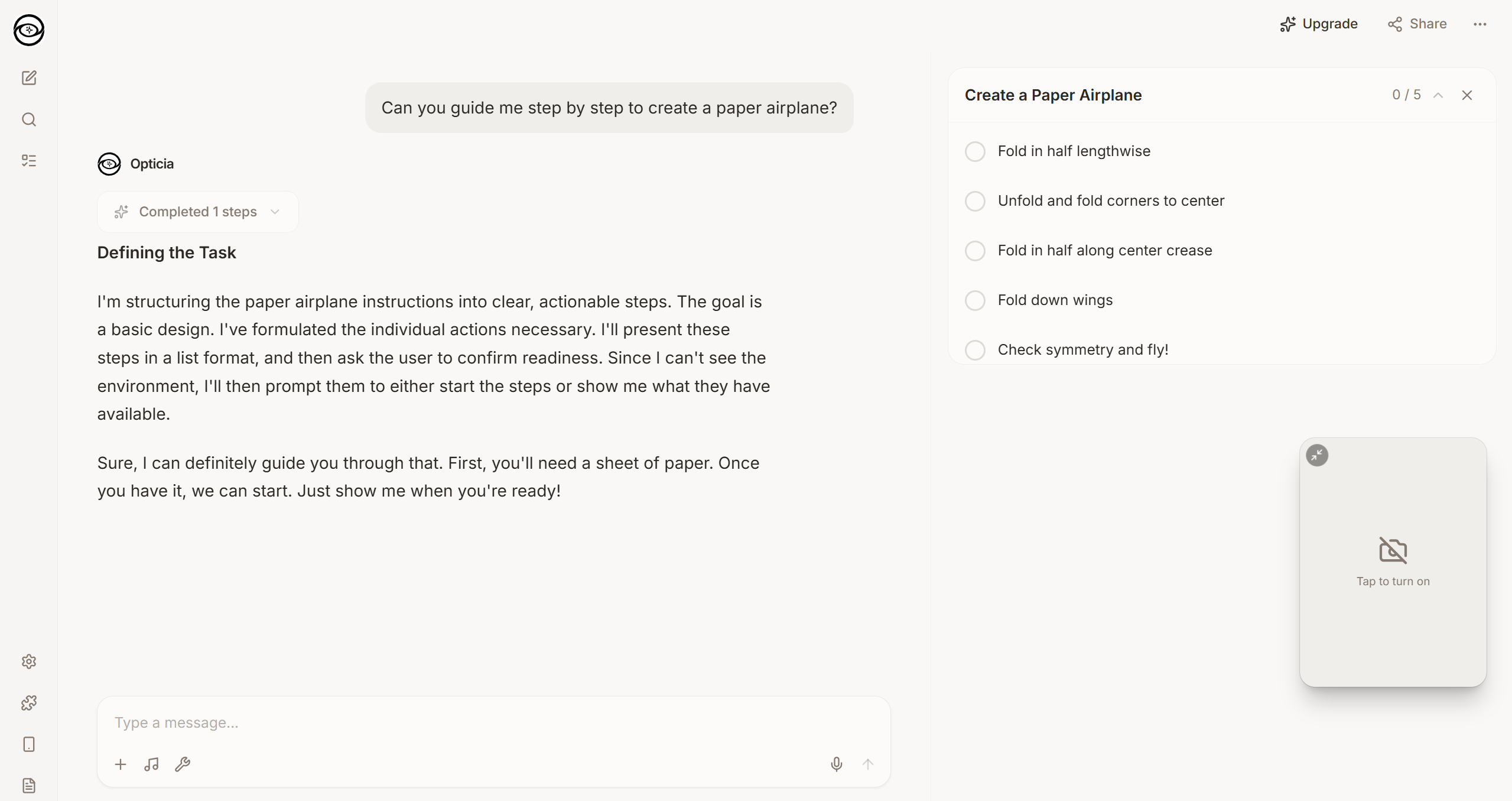
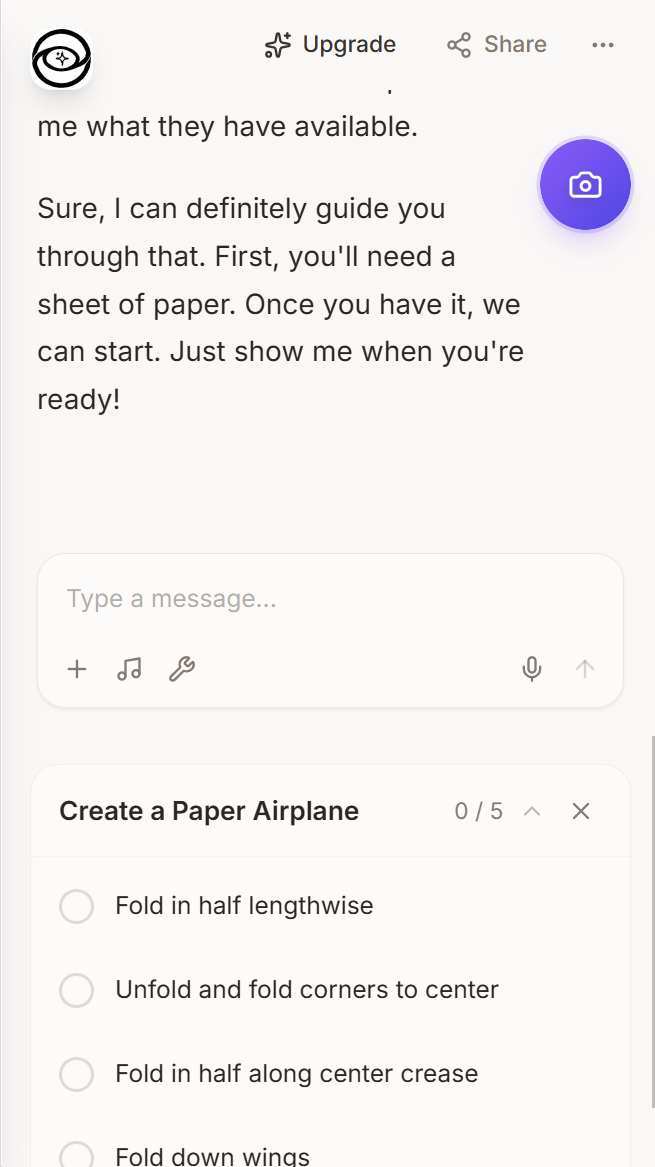
- Guides you through tasks with a structured step-by-step mode that tracks your progress visually
- Generates reports like medication summaries or analysis docs, created in the background while the conversation keeps going
- Never loses context, even across Gemini's 2-minute session limits. It reconnects seamlessly and picks up right where it left off
How I built it
Architecture: Next.js 15 frontend with a Python FastAPI backend, connected over WebSocket for real-time two-way communication. The backend manages Gemini Live API sessions and relays audio, video, and text between the browser and the model.
Gemini Integration: The app uses multiple Gemini models through the google-genai SDK. Real-time voice and video runs on the Multimodal Live API (gemini-2.5-flash-native-audio-preview), which is currently the only model supporting bidirectional audio/video streaming. For web search grounding and report generation, I use gemini-3-flash-preview through the standard text API. The browser captures camera frames and mic audio (PCM 16-bit, 16kHz), streams them over WebSocket to the backend, which forwards everything to Gemini. AI audio responses (24kHz PCM) stream back in real-time.
Context Engineering: This was a big one. Inspired by Manus AI's context engineering patterns, I built:
- Stable system prompts for KV-cache optimization (this alone gives a 10x cost reduction)
- Append-only context history with automatic summarization
- Proactive session reconnection: a timer fires before the 2-minute limit hits, rebuilds context from conversation history, and reconnects transparently
- Running summaries to prevent goal drift across session boundaries
Web Search: Native audio mode doesn't support function calling when video is active. So I engineered a text-pattern workaround: the AI outputs [SEARCH: query] markers in its text, the backend catches them, runs the search through Gemini 3 Flash with Google Search grounding, and sends results back as context.
Task Mode & Reports: Same pattern-detection idea. The AI outputs structured [TASK: {...}] markers that the frontend picks up and renders as interactive step trackers. Reports get generated asynchronously through Gemini 3 Flash's text API, rendered as rich markdown, and can be exported as DOCX.
Deployment: Dockerized and running on Google Cloud Run with GitHub Actions CI/CD.
Challenges I ran into
Gemini's 2-minute session limit was by far the biggest challenge. I had to build an entire context preservation and proactive reconnection system that captures both AI responses and user voice transcriptions, builds rich handoff messages, and reconnects before timeout. The goal was simple: users should never notice the seam. And they don't.
No function calling with video input. In native audio mode, adding any tools (even Google Search) completely breaks video processing. This forced me to invent the text-pattern approach for web search, task mode, and report generation. The AI communicates structured intent through its text output instead of formal tool calls.
Voice transcription garbles JSON. When the AI outputs something like
[TASK: {"title": "..."}], the transcription layer sometimes introduces smart quotes, drops quotes from keys, or adds trailing commas. I ended up building a multi-layer JSON sanitizer with regex fallback parsing to handle all the weird edge cases.Browser audio limits. Turns out you can't just create unlimited AudioContexts in the browser. It silently fails. I had to set up a shared audio context for all PCM decoding and carefully manage the audio pipeline lifecycle.
Coordinating three async systems (browser media capture, WebSocket relay, and Gemini's bidirectional streaming) while keeping everything responsive and handling random disconnections. This took a lot of careful async design with background receive loops and fire-and-forget send patterns.
Accomplishments that I'm proud of
- It actually works. You open the app, allow camera and mic, and within seconds you're in a live conversation with an AI that can see what your camera sees. No uploads, no waiting, no typing.
- Session continuity is invisible. The 2-minute Gemini limit is completely abstracted away. Conversations just keep flowing for as long as you need.
- The thinking chain gives users real confidence in the AI's reasoning. You can see each step of the analysis happening on screen.
- Report generation while talking. The AI can generate a detailed document in the background without interrupting the voice conversation.
- It looks and feels like a real product. Responsive design, dark/light themes, polished UI. Not a hackathon prototype.
What I learned
- Context engineering is the real moat. The same model behaves completely differently depending on how you manage its context window. Stable prefixes, append-only history, and proactive summarization made the difference between a choppy demo and a smooth experience.
- Constraints force better solutions. Not being able to use function calling with video pushed me to invent the text-pattern approach, which honestly turned out more flexible and resilient than formal tool calling would have been.
- Gemini's native audio mode is seriously impressive. The voice quality, responsiveness, and ability to handle visual input at the same time is a real platform leap.
- "Show don't tell" is a fundamentally different UX. People who try it just get it immediately. You don't have to explain why this is better than typing. The interaction sells itself.
What's next for Opticia AI
- MCP (Model Context Protocol) integrations to connect with Gmail, Google Drive, Slack, and Calendar so the AI can actually take actions, not just give advice
- Specialized vertical modes for home repair, cooking, caregiving, and education with domain-specific knowledge
- Native mobile apps for iOS and Android with optimized camera pipelines
- Per-session pricing ($4.99 for urgent situations) alongside monthly subscriptions
- Developer API so other companies can embed visual AI guidance into their own products
- Professional validation network to connect users with real experts when AI confidence is low
Built With
- docker
- duckduckgo-search-api
- fastapi
- gemini-api
- gemini-multimodal-live-api
- gemini3
- github-actions
- google-cloud-run
- google-genai-sdk
- next.js
- pydantic
- python
- python-docx
- react
- tailwind-css
- typescript
- websocket

Log in or sign up for Devpost to join the conversation.