Inspiration
Musicians, guitarists, piano students, and audio creators store thousands of photographed sheet music pages, guitar tablature screenshots, chord charts, and PDF songbooks on their NAS alongside large FLAC and MP3 collections. Yet visual scores and audio libraries sit in disconnected silos. When you snap a photo of a piece of sheet music or a guitar tab you want to practice, finding the matching reference recording in a multi-thousand-track NAS library, checking your PDF songbooks for capo or tuning notes, and configuring slowed-down practice playback requires tedious manual searching across multiple apps.
I built Optical Music Practice Studio (optical-music-practice-studio) to bridge visual scores, PDF songbook binders, voice memos, and the NAS music player into a single interactive practice companion[cite: 3, 8].
What it does
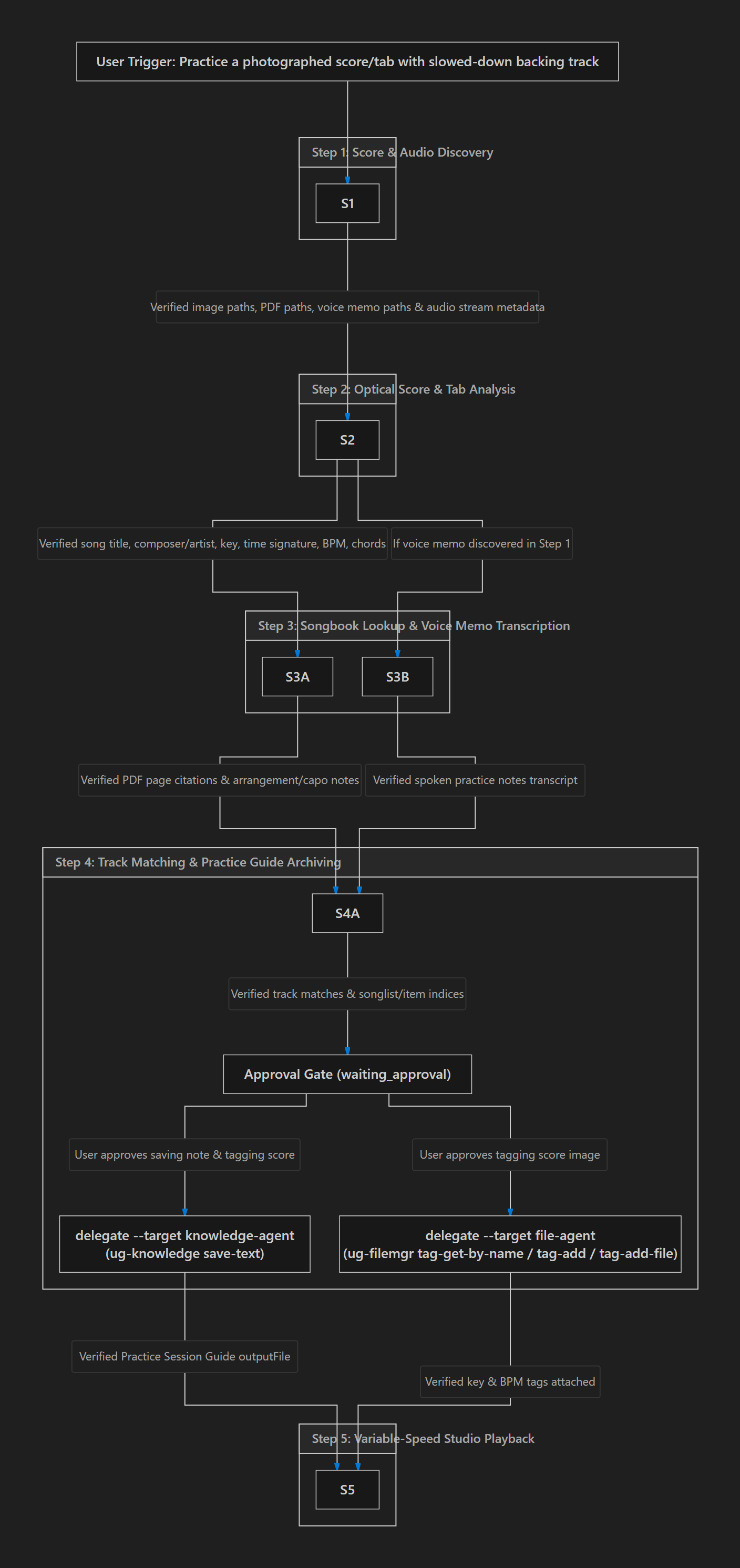
Given a practice directory or a photographed score on a UGREEN AI NAS, the Skill orchestrates five specialized Uliya Expert Agents[cite: 3, 4]:
- Score, Songbook & Audio Discovery (
file-agent): Scans the authorized practice folder for sheet music images, PDF songbooks, and voice memos (ug-filesystemfind) while inspecting audio container specs (ug-filemgrmediainfo)[cite: 1, 3, 8]. - Optical Score & Tablature Analysis (
photo-agent): Extracts printed song titles, composer/artist credits, tempo markings, lyrics, and tablature numbers viaug-photovision-ocr, and analyzes the score layout viaug-photovision-vlmto determine the musical key, time signature, original BPM, and visible chord progression[cite: 3, 6, 8]. - Songbook Lookup & Voice Memo Transcription (
document-agent&knowledge-agent): Cross-references PDF songbooks for arrangement, capo, or tuning notes with exact page citations (ug-documentmetadataandqa) and transcribes spoken practice voice memos (ug-knowledgeaudio-transcription)[cite: 3, 8]. - Music Library Matching & Unified Preview (
media-agent,knowledge-agent&file-agent): Searches the NAS music library (ug-musicsearch) for matching reference or backing tracks without starting playback yet, then presents a single Practice Session Preview table[cite: 3, 5, 6]. Upon user confirmation, it saves a structured Markdown Practice Session Guide (ug-knowledgesave-text) and attaches color-coded musical key and tempo tags (Key-<Key>,Tempo-<BPM>BPM) to the score image (ug-filemgrtag-add,tag-add-file)[cite: 3, 5]. - Variable-Speed Studio Playback (
media-agent): Launches the confirmed track (ug-musicsearch --play) and configures rehearsal controls (ug-musiccontrol) including slowed-down tempo (set-speed), section seeking in milliseconds (seek), loop mode (set-playback-mode), volume (set-volume), and a practice stop timer (set-stop-timer)[cite: 3, 5, 8].
How I built it
The Skill is built strictly to the Uliya Skill Development Standard (v2.0.0) using the official uliya-skill-kit (v0.7.3)[cite: 1, 4]. It is structured around a root SKILL.md orchestrator and three progressive-disclosure reference specifications[cite: 3, 8]:
references/practice-session-schema.md: Defines the optical extraction rules, strict non-fabrication (unknown) fallbacks, the Unified Practice Session Preview table, and the Markdown Practice Session Guide template[cite: 3, 6].references/playback-and-tagging-rules.md: Specifies parameter constraints forug-music(searchandcontrol) andug-filemgrtag formatting[cite: 3, 5]. When both the score's original tempo ((\text{BPM}{\text{score}})) and the user's target practice tempo ((\text{BPM}{\text{target}})) are known, the playback speed multiplier is calculated as[cite: 5]: $$\text{speed} = \text{round}\left(\frac{\text{BPM}{\text{target}}}{\text{BPM}{\text{score}}},\ 2\right)$$ clamped strictly within the catalog range ((0.10,\ 2.00])[cite: 5].references/disclosures.md: Documents hackathon compliance, safety boundaries, and tool disclosures[cite: 3, 4].
Challenges I ran into
- Cross-Modal Handoff Without Hallucination: Because child Expert Agents do not share memory across turns, the parent
SKILL.mdmust pass only verified outputs (real file paths, extracted titles, BPM values, and playable track indices) from upstream steps into downstream delegations while halting gracefully if discovery returns anempty result[cite: 1, 3, 8]. - Strict Static Linter Hygiene: Passing
check-skill.mjswithstatic-pass(0 errors, 0 warnings) required adhering to exact section header patterns, Unicode arrow capability mappings (→), single-quoted delegation instructions free of unresolved placeholders, and explicit handling of all five state tokens (completed,failed,cancelled,waiting_user,waiting_approval)[cite: 1, 2, 3, 8].
What I learned
Digging deeply into capability-catalog.json revealed how powerful UGREEN's native CLI ecosystem becomes when you chain overlooked domain actions together—specifically pairing ug-photo vision-vlm and vision-ocr with ug-music control (set-speed, seek, set-stop-timer) and ug-filemgr tagging to create a hands-free creative workflow that keeps private media libraries 100% local[cite: 1, 3, 5, 8].
What's next for Optical Music Practice Studio
In Round 2, I plan to validate the end-to-end workflow live on the UGREEN AI NAS iDX6011 Pro, testing multi-page PDF fakebook indexing, real-time VLM chord extraction across diverse sheet music and guitar tab layouts, and live variable-speed backing track playback[cite: 8].
