-
-
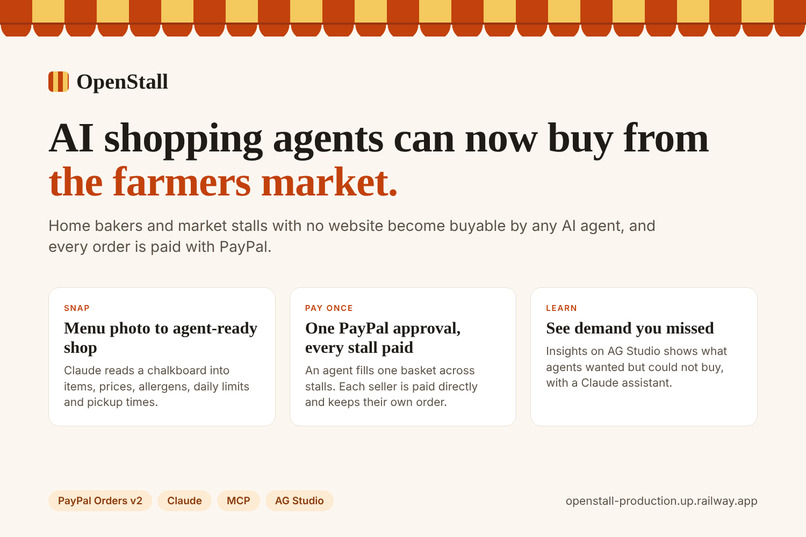
OpenStall: AI shopping agents can now buy from the farmers market
-
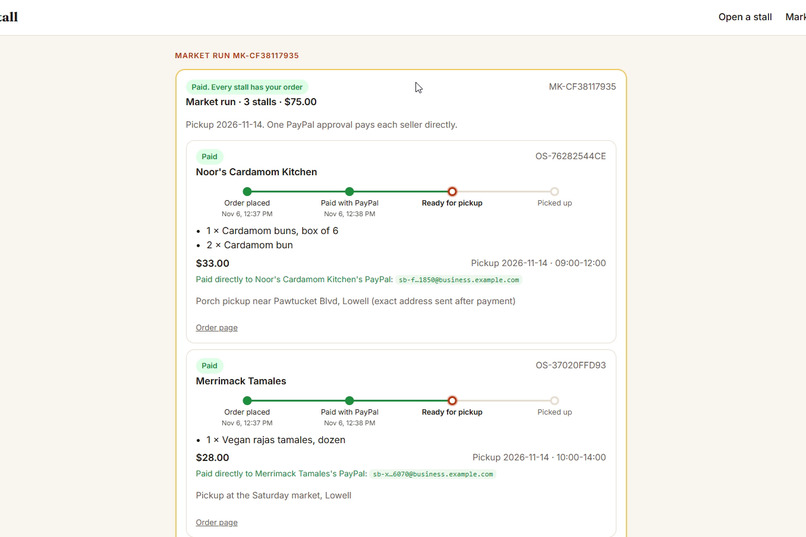
One PayPal approval, each seller paid into their own PayPal account
-
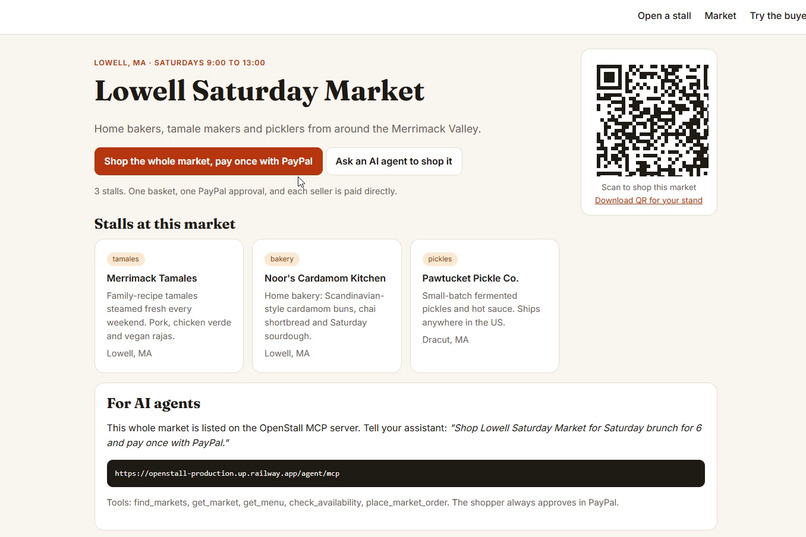
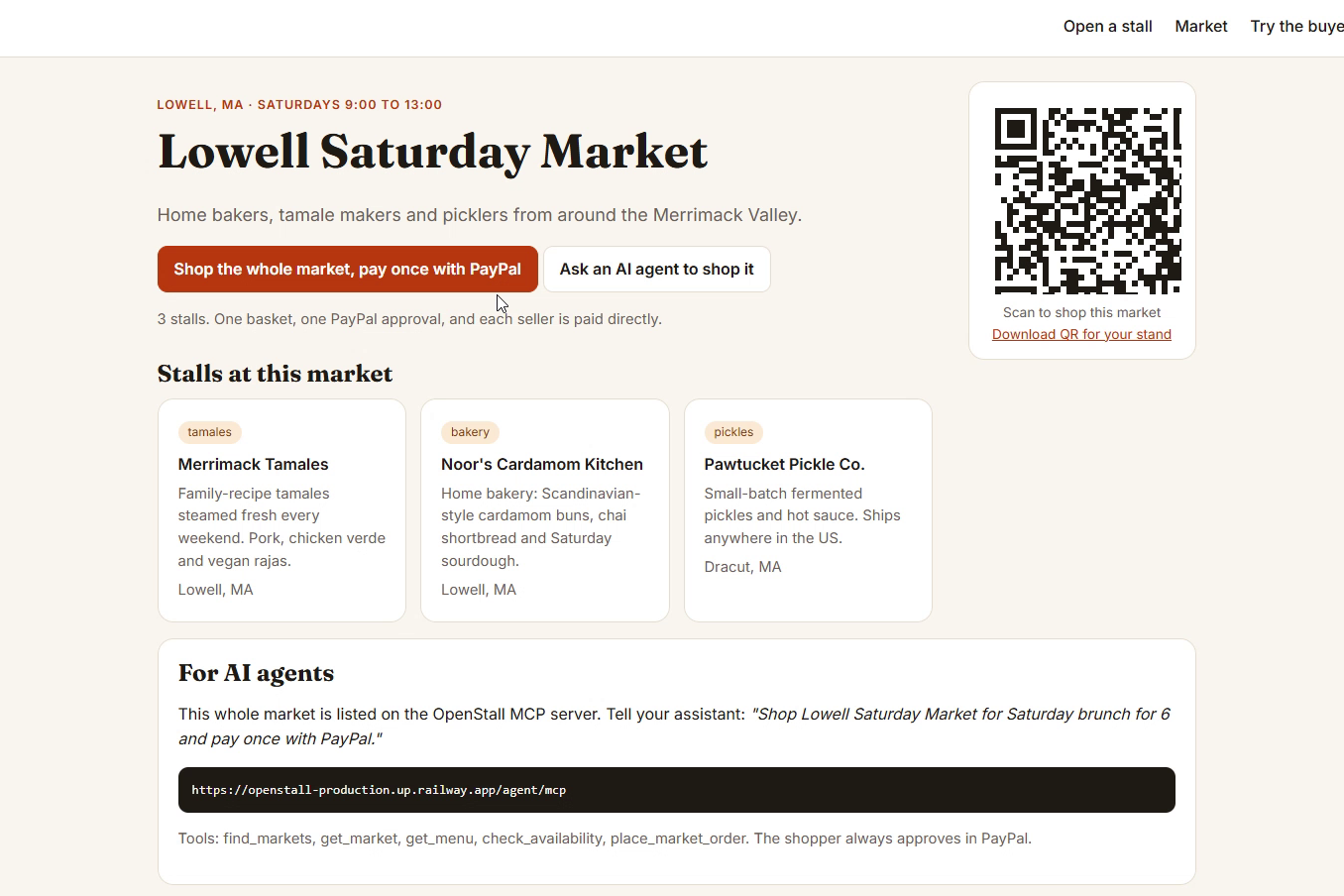
The market page with a QR code for the stand and an MCP listing for agents
-
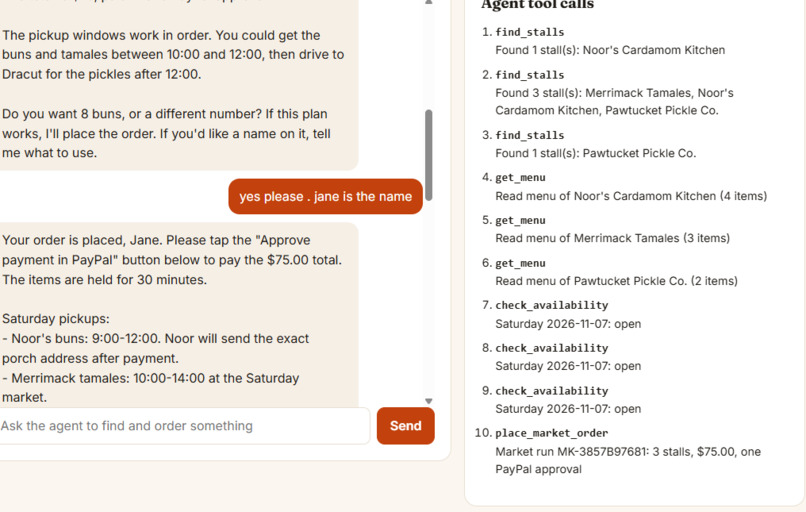
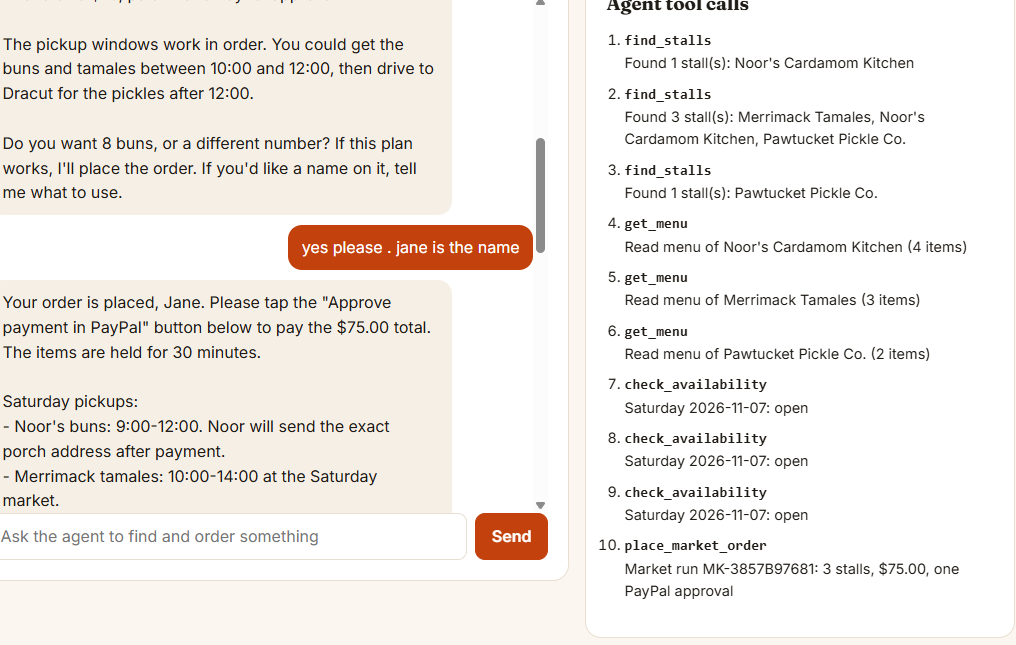
The buyer agent shops the market with the same MCP tools any agent gets
-
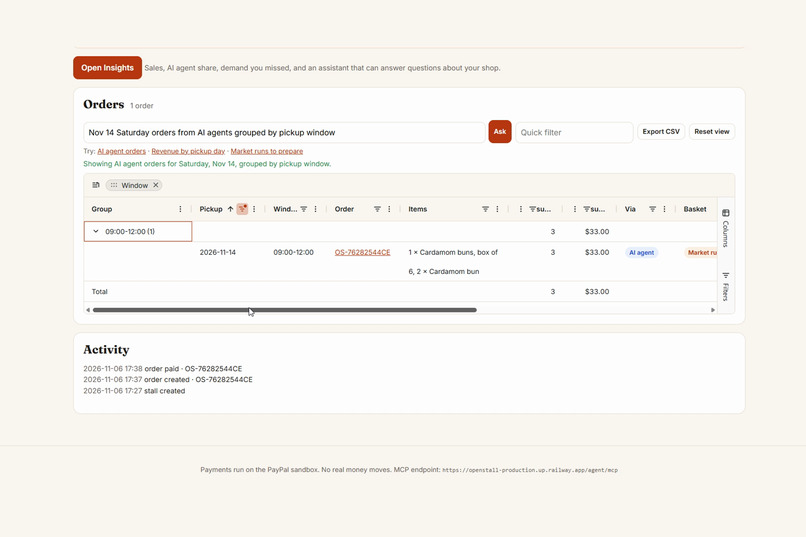
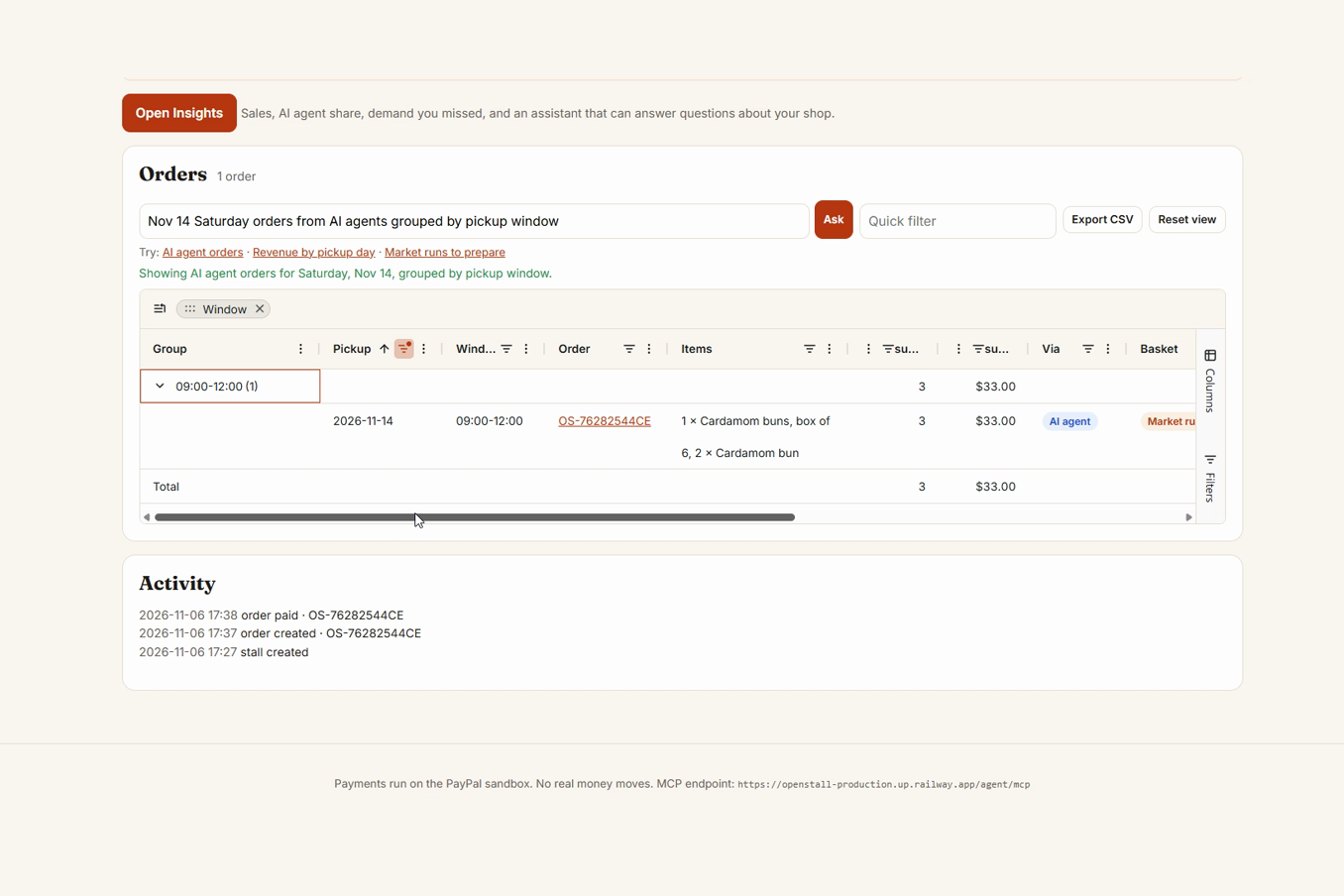
Seller orders on AG Grid, set in plain words through the AG Grid AI Toolkit
-
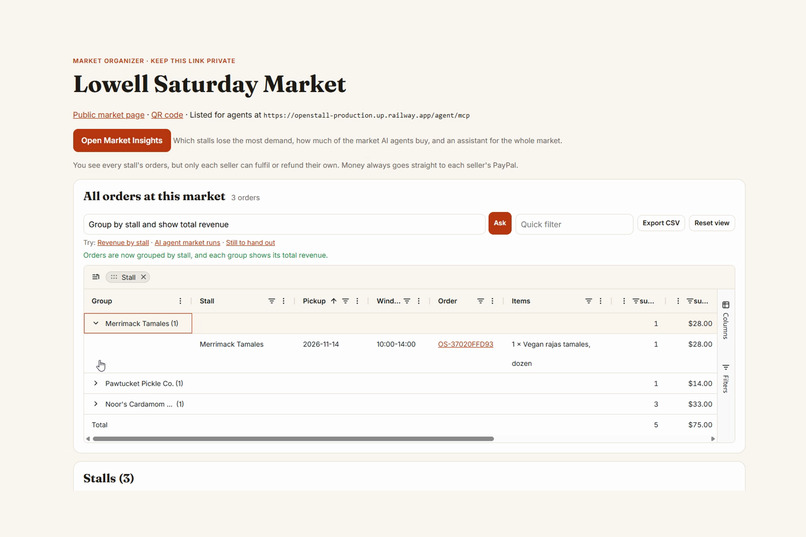
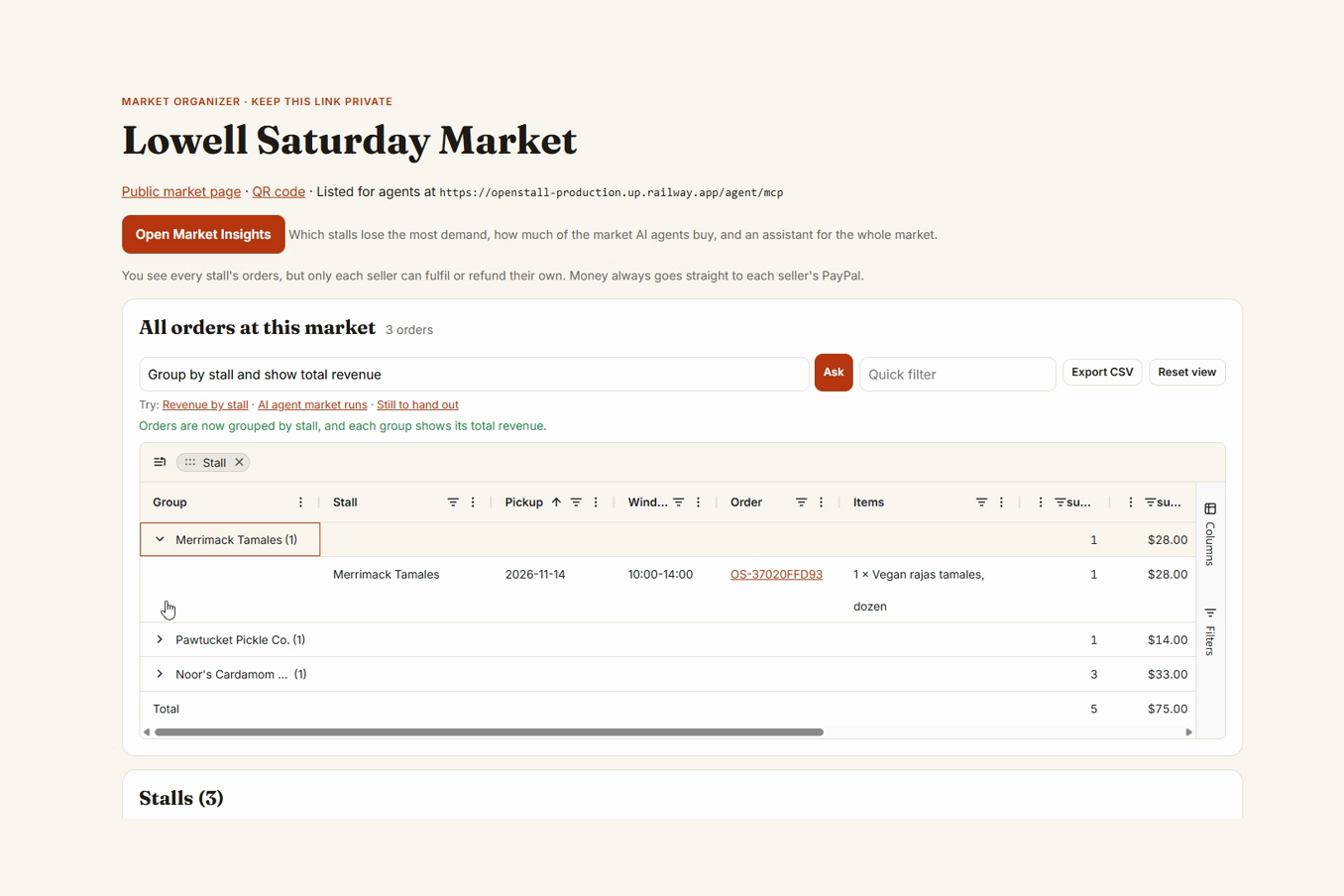
The organizer sees every stall's orders, grouped by stall, but never touches the money
-
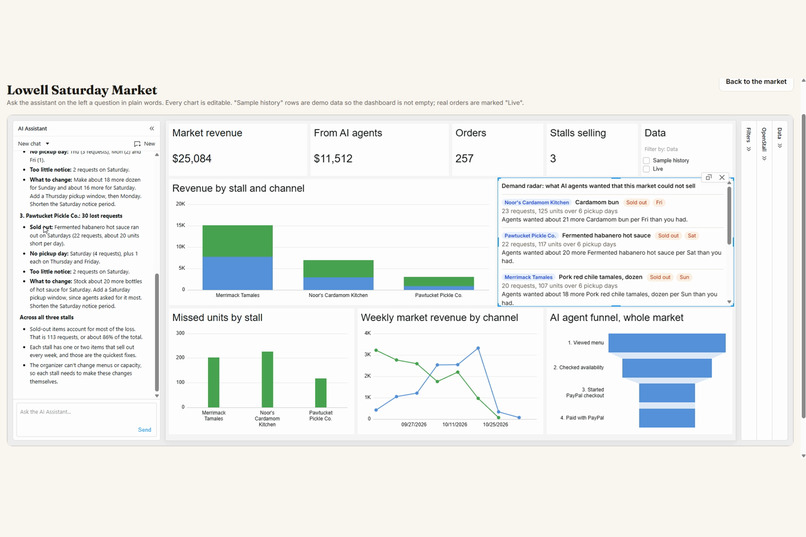
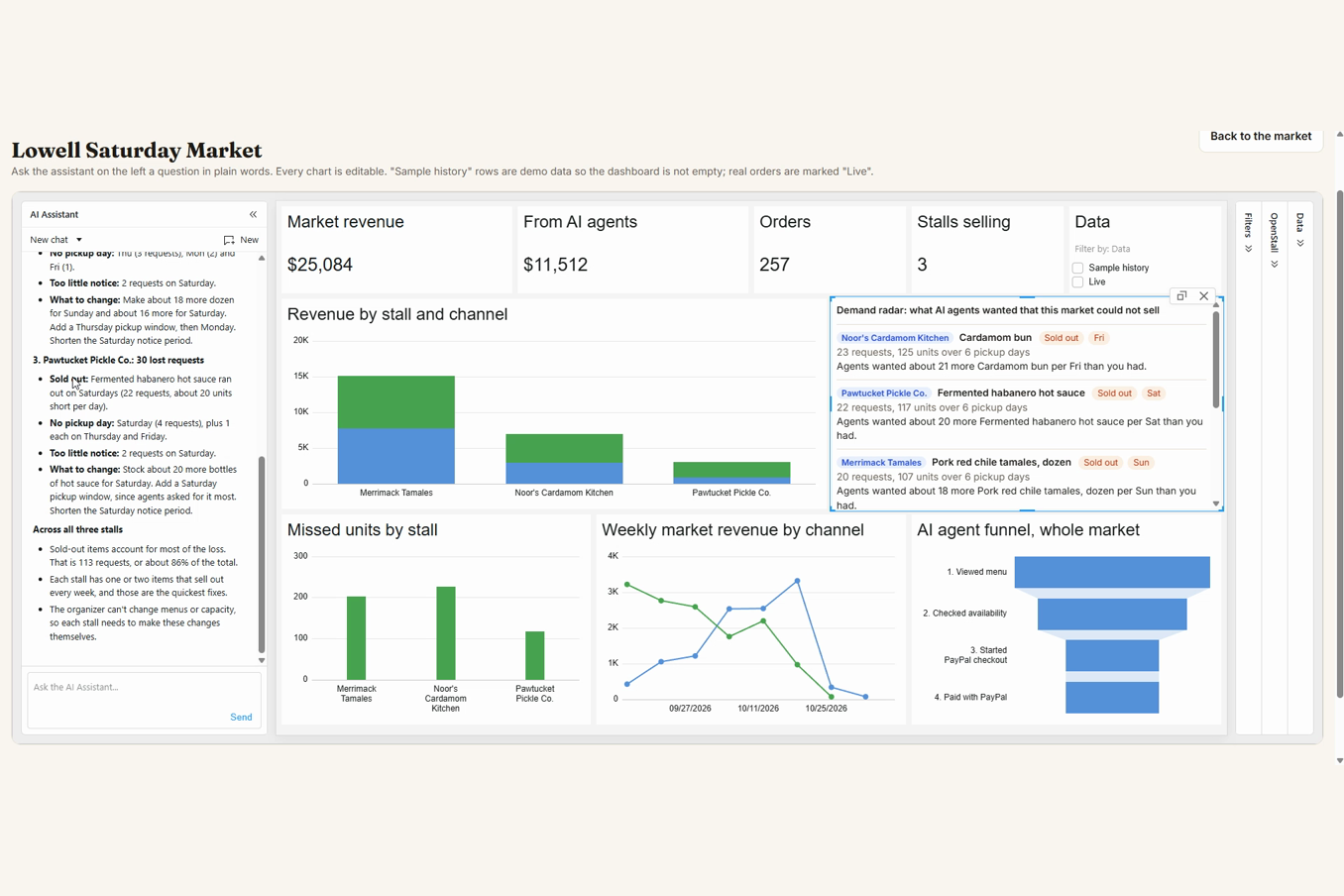
Market Insights on AG Studio with the market-wide demand radar
-
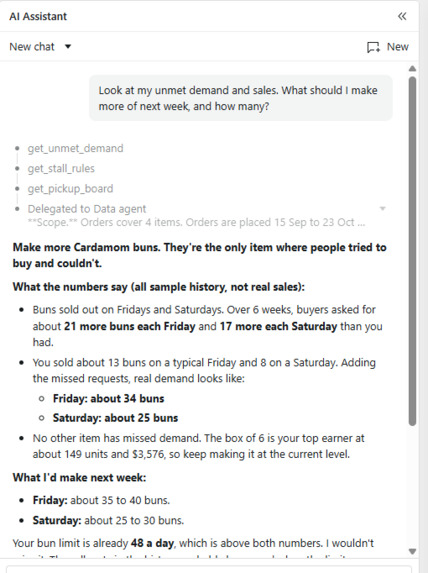
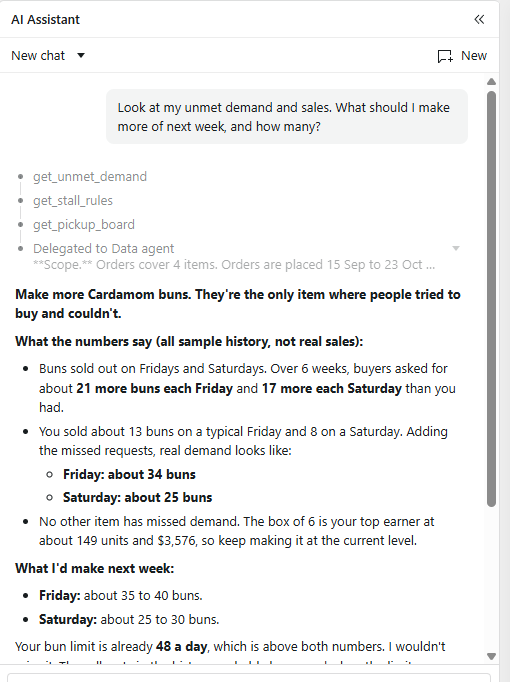
The Claude assistant answers from demand agents could not buy
-
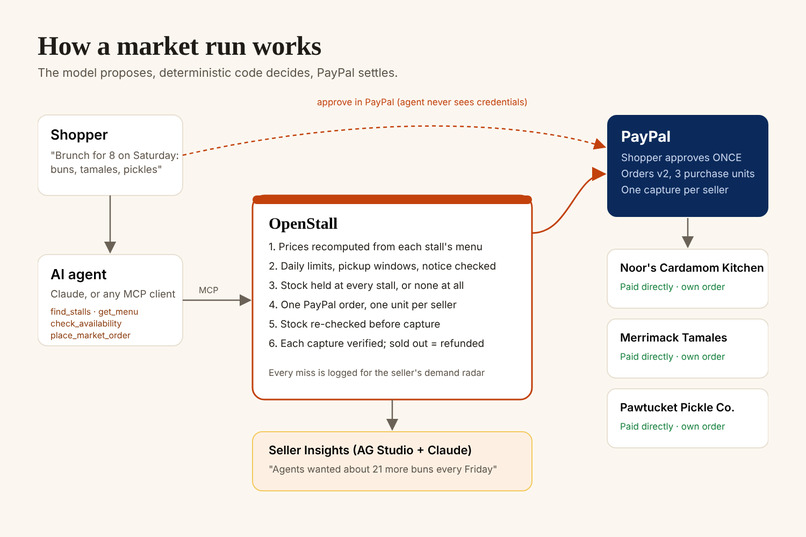
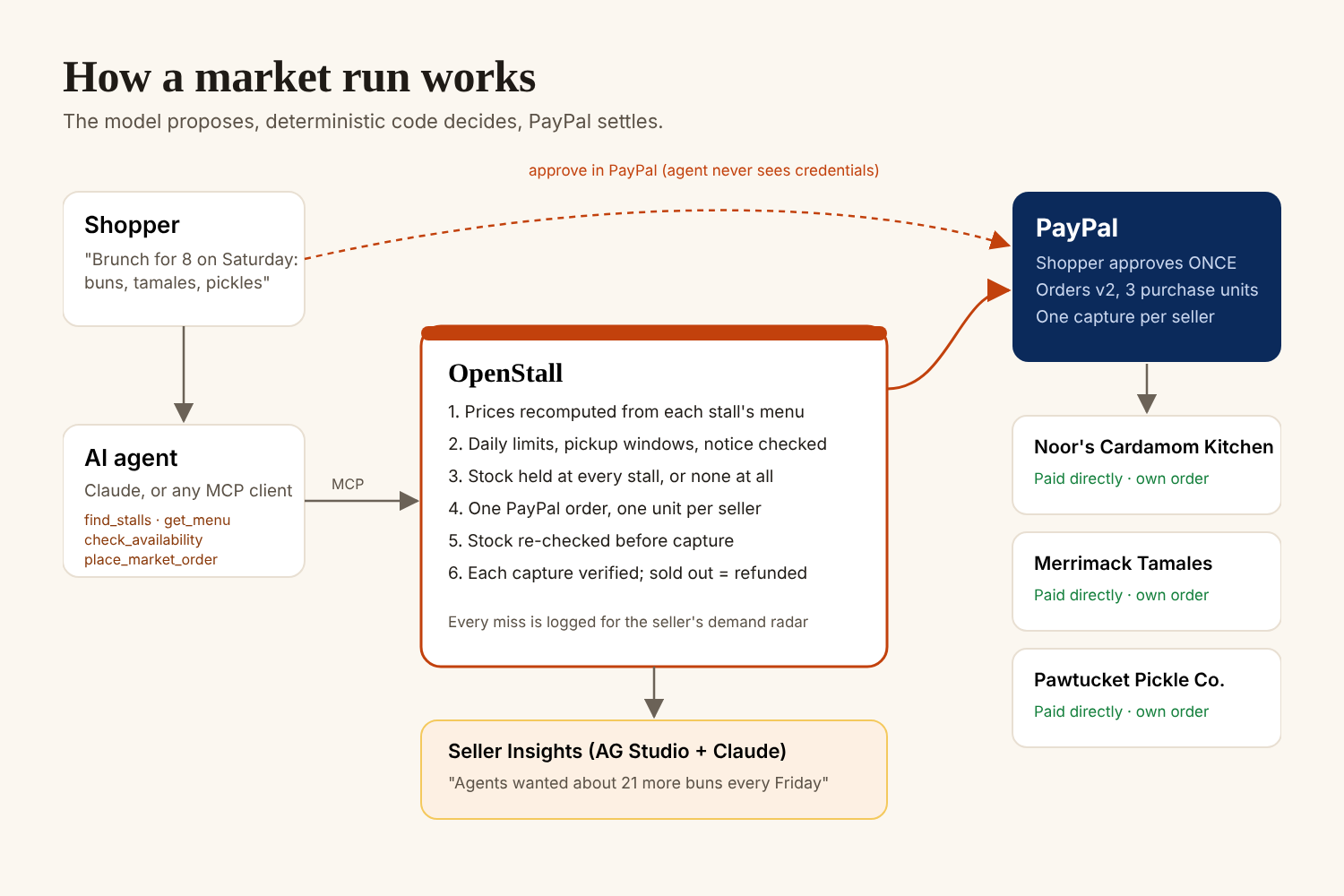
How a market run works: the model proposes, the code decides, PayPal settles
-
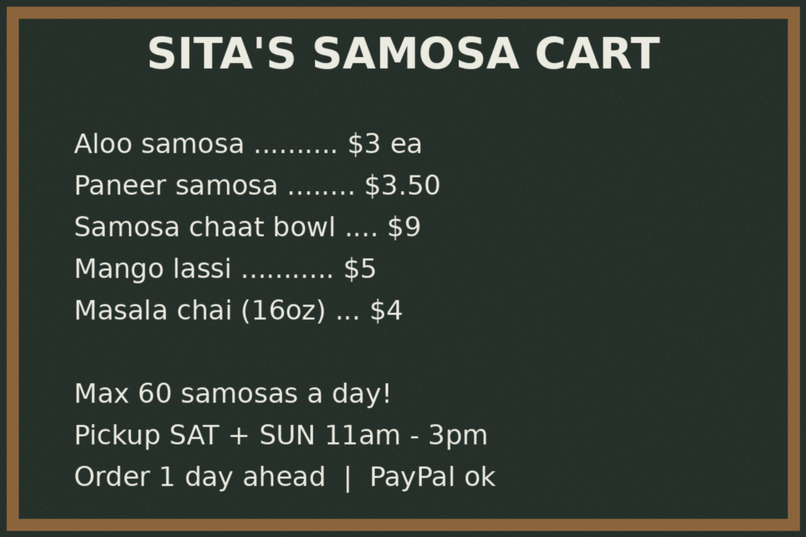
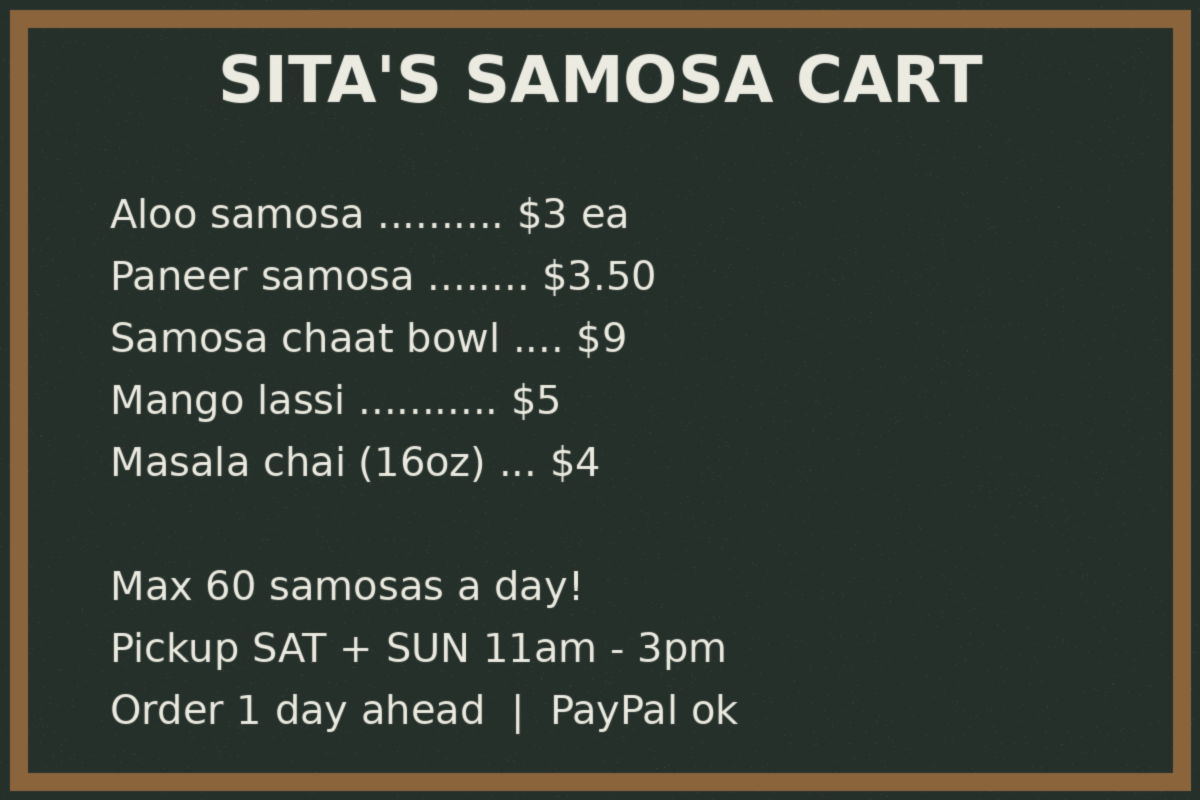
Snap a chalkboard menu and Claude turns it into a catalog
Inspiration
Picture a home baker who sells the best cardamom buns in town. Her whole "store" is an Instagram account, a chalkboard menu, and a PayPal link she pastes into DMs. Next to her at the Saturday market: a tamale stand and a pickle maker, run the same way.
Shopping is moving into AI assistants. Adobe reports that AI-referred traffic to US retailers grew 393% year over year in Q1 2026. Big platforms are racing to make their merchants visible to agents: Shopify Agentic Storefronts, Square sellers in ChatGPT and Claude, and PayPal Store Sync for merchants on Wix, BigCommerce and Shopware.
But market sellers have no platform, no catalog and no API. When someone asks an agent for "brunch for eight on Saturday: buns, tamales and pickles from the Lowell market," none of them exist. Even if an agent found them, it would mean three separate checkouts.
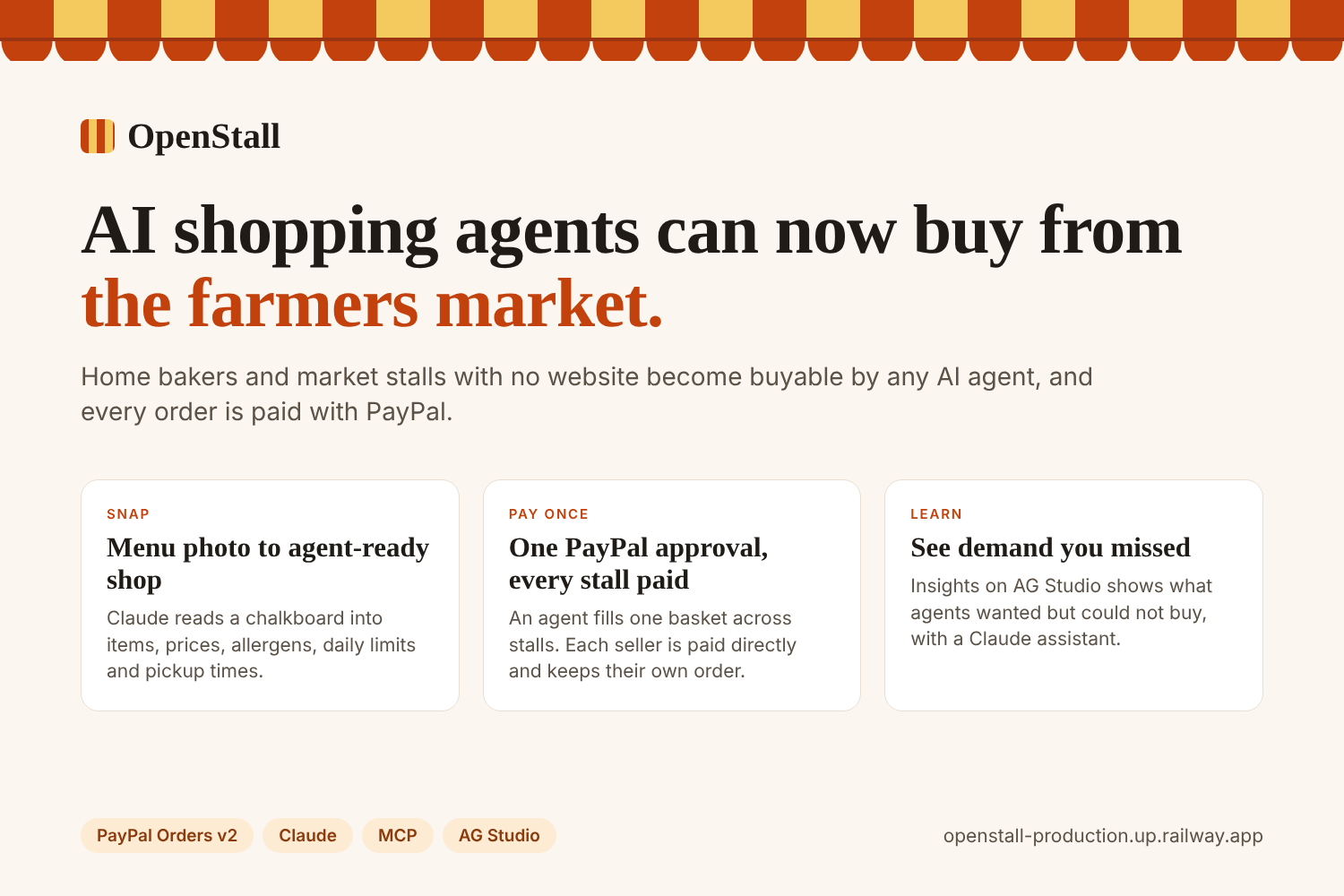
OpenStall makes a whole farmers market agent-ready: one page and one QR code for the market, one PayPal approval that pays every seller into their own account, and insights that show each seller and the organizer the demand they are missing.
What it does
One PayPal approval, three different sellers paid
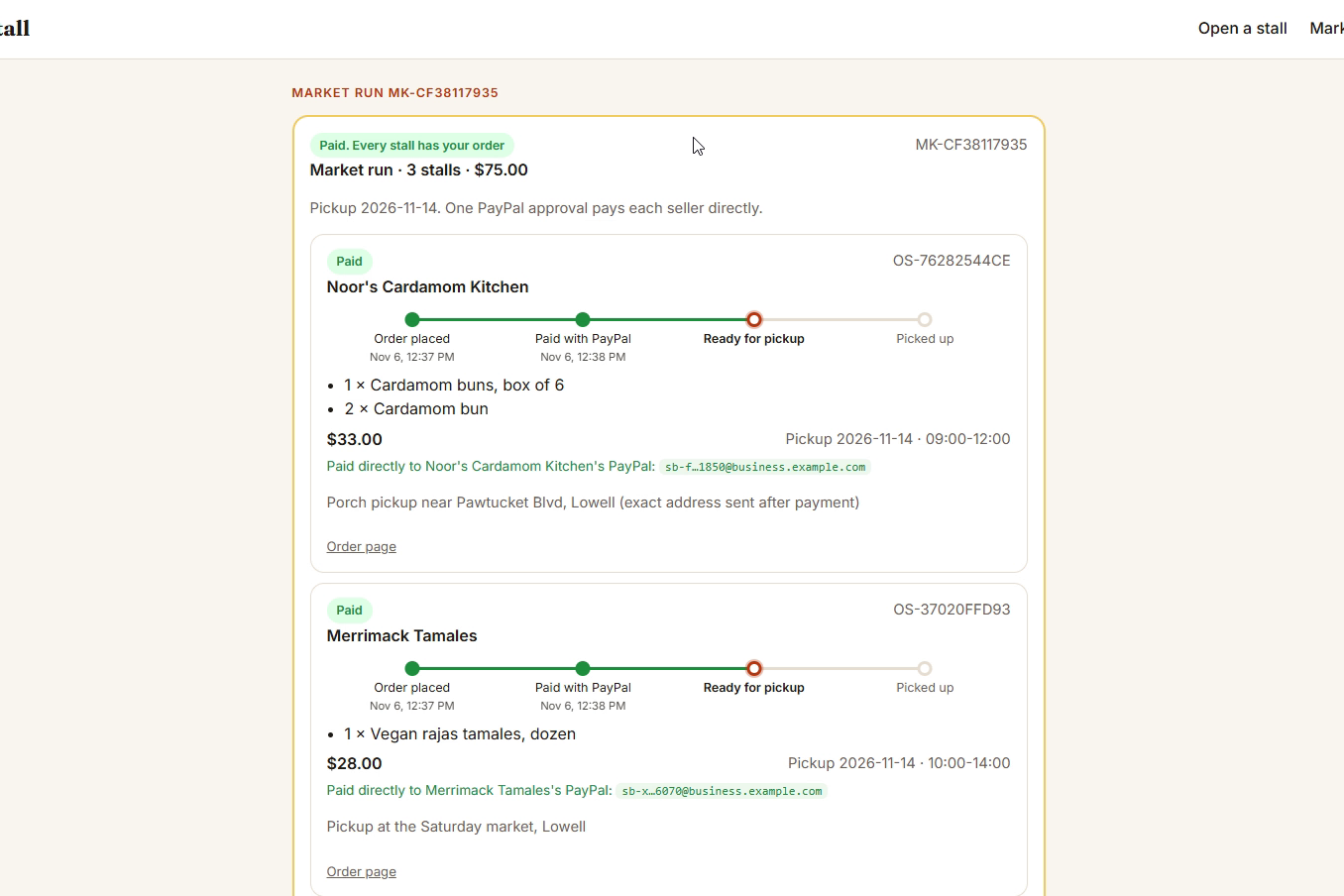
An agent (or a person) fills one basket from several stalls for the same pickup day. The buyer approves one PayPal payment, and each seller is paid into their own PayPal account. It is one PayPal Orders v2 order with one purchase unit per seller, each with its own payee, so every seller gets their own capture, order, pickup window and refunds.
In the live demo the three stalls are three different sandbox business accounts. After paying, every stall card shows "Paid directly to [stall]'s PayPal" with the payee PayPal returned on that capture, so you can see the money split, not just read about it.
- All or nothing: if any stall can't fill its part, nothing is held and nothing is charged, and the error names that stall so the agent can fix it.
- Sold out at the last second? Only that stall is refunded; the rest stay paid.
- If PayPal ever refuses a multi-seller order, OpenStall falls back to one checkout per stall automatically.
Market organizers: a whole market goes agent-ready at once
A market organizer creates a market, adds stalls, and gets:
- A public market page with a QR code to print on the market banner, so shoppers (and their agents) can order ahead from every stall.
- A market listing on the MCP server: agents call
find_marketsandget_market, then shop the whole market in one basket. - An organizer view on AG Grid: every order across every stall, grouped and totalled, with an AI ask box. The organizer sees everything but can never move a seller's money: fulfilment and refunds stay with each seller.
- Market Insights on AG Studio: market revenue, the share bought by AI agents, revenue by stall and channel, and a market-wide demand radar showing which stall lost the most sales.
Snap a menu, go live for agents
A seller uploads a photo of a chalkboard or flyer. Claude turns it into a catalog: items, prices, allergens, daily capacity, pickup windows and notice period. The stall is published on the OpenStall MCP server, plus a public page with schema.org data and /llms.txt.
Built for food, not generic catalogs
Perishable sellers live by how many they can make and when you can pick up. OpenStall enforces daily capacity, pickup windows and notice periods in code, and reserves stock before any money moves, so a buyer is never charged for something already sold out.
Seller orders on AG Grid, driven by plain words
Each seller's orders live in an AG Grid Enterprise grid that updates live: new orders slide in and flash, with grouping, totals, set filters, CSV export and one-click Mark ready, Picked up, Tracking and Refund buttons.
Above the grid is an ask box built on the AG Grid AI Toolkit: the seller types "Saturday orders from AI agents, grouped by pickup window" and Claude returns a grid state (filters, sort, grouping, columns) that the grid applies. The grid's own structured schema is the contract, so Claude can only ask for states the grid can really show, and it is told which pickup dates actually have orders, so "Saturday" lands on the right Saturday.
Seller Insights with a demand radar (AG Studio)
Each seller gets an AG Studio dashboard: revenue, the share from AI agents, an agent funnel (viewed menu, checked availability, started PayPal checkout, paid) and a pickup board for the week.
The demand radar records what AI agents asked for that the seller could not sell (sold out, no pickup that day, too little notice) and turns it into advice, like "Agents wanted about 21 more cardamom buns every Friday." A Claude-powered Studio assistant answers plain questions, builds charts, and can raise an item's daily capacity, only after the seller confirms.
For any AI agent (Claude or any MCP client)
| Tool | What it does |
|---|---|
find_markets |
Find a farmers market near the shopper |
get_market |
List a market's stalls |
find_stalls |
Search local sellers by what you want and where you are |
get_menu |
Items, prices, allergens, pickup days |
check_availability |
Open pickup windows and stock left for a date |
place_order |
One stall: creates a PayPal order and returns the approval link |
place_market_order |
Several stalls, one PayPal approval, each seller paid directly |
get_order_status |
Payment and pickup status of one order |
get_market_order_status |
Payment status of a whole market run |
request_custom_order |
Asks the seller for a quote (cakes, catering), paid by PayPal invoice with a deposit |
The agent never touches payment credentials. It builds the order; the human approves in PayPal; the order turns Paid on the same page.
How I built it
- Backend: Python, FastAPI, SQLite on a persistent volume, deployed on Railway.
- AI: Anthropic Claude for vision menu extraction (strict JSON tool schema), a demo buyer agent that uses exactly the same tools external agents get, the AG Studio assistant, and the AG Grid AI Toolkit bridge (forced tool use whose input schema is the grid's own structured schema).
- Agent interface: an MCP server (streamable HTTP), official MCP Python SDK.
- AG Grid Enterprise 36: live seller and organizer order grids with row grouping, grand totals, set filters, side bar, transactions with cell flashing, CSV export, and the AI Toolkit (
getStructuredSchema,getState,setState). - AG Studio: seller and market Insights with custom widgets (Pickup board, Demand radar) and custom AI tools (
get_unmet_demand,get_market_stalls,get_stall_rules,get_pickup_board,set_daily_capacity). Bundled with esbuild so the Python deploy needs no Node. - PayPal (sandbox):
- OAuth 2.0 client credentials with token caching
- Orders v2 create and capture with idempotent
PayPal-Request-Id - Orders v2 multiple purchase units with a payee per seller: one approval, a separate capture per seller, including HTTP 207 partial captures, and the payee of each capture recorded and shown
- Payments v2 refunds, per seller
- Webhooks with signature verification: approved, capture completed / pending / denied / refunded / reversed, disputes
- Invoicing v2 with partial-payment deposits for custom orders
- Order tracking API for shipped goods
Payment safety design
The model proposes, deterministic code decides, PayPal settles.
- Prices are always recomputed from the catalog. An agent can never set its own price.
- Stock is reserved before capture, so a sold-out order is never charged.
- Sending the same basket twice (double click, flaky network) returns the first market run; it never creates a second charge.
- Timeouts and 5xx errors are reconciled by asking PayPal what actually happened.
PENDINGcaptures are held for review, not treated as paid.- Every capture is checked for amount and currency per seller; mismatches are refunded, and a failed refund is escalated to the seller.
- Organizers see orders but cannot fulfil or refund them. Only the seller's key can.
- Agents can only request custom orders; the seller sets the price before any invoice is sent.
- Rate limits, a cap on unpaid holds, expiring holds, and a scrubber that removes any URL an LLM tries to invent.
121 automated tests cover overselling, concurrency, price tampering, timeouts, declines, partial captures, per-seller payees, webhook replays, per-seller refunds, duplicate submissions, disputes, organizer permissions, the shared demo market, XSS and rate limits.
Honest data: the demo stalls ship with sample history so Insights isn't empty. Every sample row is labelled "Sample history", and real orders are labelled "Live". The demo stalls and market are shared by everyone trying OpenStall, and the pages say so.
Challenges I ran into
- One payment, many sellers. Paying several sellers with one approval means one capture can partly succeed. I map every capture back to its seller and handle each one on its own: paid, refunded or not charged.
- Proving who got paid. Saying "each seller is paid directly" is easy; showing it is harder. I now read the payee from every capture PayPal returns and show it on the order, masked, so anyone can check it.
- An AI agent invented a payment link. The buyer agent once wrote a PayPal API capture URL into its reply. Now every URL is stripped from agent replies, and the only payment link a shopper sees is the server-issued PayPal approval button.
- Idempotency cuts both ways. Reusing a
PayPal-Request-Idmade PayPal replay an old order. Every request id is now unique per business action. - Charge-then-refund is bad UX. My first version captured payment and refunded if stock had sold out. I redesigned it to reserve stock before money moves.
- Letting an AI drive a grid safely. Claude only returns a grid state that matches the grid's structured schema, and the grid applies it; it can never press Refund. When it read "Saturday" as the wrong week, I started sending it the pickup dates that really have orders.
Accomplishments that I'm proud of
- An agent shops three stalls and the buyer pays all of them with one PayPal approval, with three different PayPal accounts visibly paid.
- A whole farmers market goes agent-ready with one page, one QR code and one MCP listing, and the organizer gets market-wide insights without ever touching a seller's money.
- A seller learns what AI agents wanted that they couldn't sell, and can act on it in one confirmed step.
- A payment flow that stays correct under timeouts, races, retries, partial captures and misbehaving agents, backed by 121 tests.
What I learned
Designing tools for AI agents is closer to designing an API for an untrusted client than building a chatbot. Every rule that matters (price, stock, approval, who can refund) has to live in code, not in the prompt. Human approval inside a trusted wallet is a feature, not friction. And agent traffic is a new kind of signal: the orders you missed are as useful as the ones you got.
What's next for OpenStall
- Seller onboarding through PayPal's partner onboarding, so each seller connects a verified account in one click.
- Export catalogs to Google UCP and OpenAI ACP so stalls appear in more assistants.
- Venmo business profiles as one-tap onboarding, and voice-note onboarding in other languages.
- Market organizers sharing the demand radar with sellers before market day, so stalls bring enough.
Try it: openstall-production.up.railway.app · Market: Lowell Saturday Market · Code: github.com/harshinireddy2204/openstall
