-
-
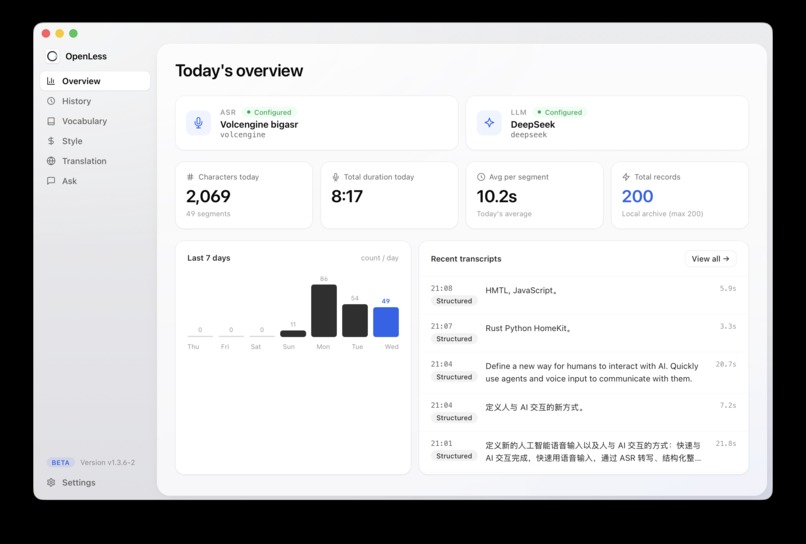
主页。
Inspiration
Typing is the biggest bottleneck between humans and AI. Every day we type long instructions to agents, switch between a dozen input boxes, and translate our thoughts into English prompts—yet speaking is 3x faster than typing. We asked ourselves: why are we still “typing” to interact with AI? Voice should be an OS-level input method, not a small feature buried inside one app. That’s how OpenLess was born—Open less windows, type less, talk more.
What it does
OpenLess redefines how humans interact with AI, built around an always-on floating voice capsule on your desktop:
• Voice-control your Agent: Press a hotkey, speak, and your command goes straight to agents like Claude Code—no window switching, no typing
• Voice into any input box: System-level text injection works in any app, any field—speak and it appears
• Voice translation: Speak Chinese, output English (or any target language)—zero-friction cross-language communication
• Voice quick questions: Ask anything in one sentence, anytime—answers appear instantly without breaking your workflow
How we built it
We built the core client on a cross-platform desktop framework, implementing a floating capsule UI with frosted-glass blur and window transparency so it lives “invisibly” on screen. For the voice pipeline, we combined real-time streaming speech recognition with LLM post-processing: ASR handles fast transcription, while the LLM removes filler words, segments text intelligently, and rewrites based on context (e.g., translation mode, prompt-optimization mode). For the text injection layer, we adapted system input events separately for macOS and Windows to ensure reliable insertion into any application.
Challenges we ran into
• Cross-platform window transparency and blur effects differ wildly—macOS and Windows each have their own pitfalls, and we spent significant time achieving a consistent visual experience
• System-level text injection has to work with countless input field types (native, web, Electron)—the edge cases far exceeded our expectations
• Balancing latency and accuracy: users expect “speak and it’s there,” so we had to carefully optimize the pipeline between streaming recognition and LLM rewriting
Accomplishments that we’re proud of
• We built a truly frictionless interaction: one hotkey, one sentence, straight into any input box or any agent
• We upgraded voice from a “transcription tool” into an “input layer that understands your intent”—it knows whether you’re writing a coding instruction, an email, or a translation
• A polished, consistent cross-platform UI—the floating capsule feels product-grade, not demo-grade
What we learned
Our biggest takeaway: a great AI product isn’t about stuffing AI into an interface—it’s about reducing the interface to almost nothing. Users don’t want to “use a voice app”; they just want things done the moment they finish speaking. We also gained deep respect for the complexity of system-level integration—the more “everywhere” you want to be, the more you must respect each operating system’s low-level details.
What’s next for OpenLess
• Deeper Agent integration: Voice won’t just input text—it will trigger entire workflows. Say one sentence, and the agent completes a multi-step task
• Personalized voice models: Learning your technical vocabulary, common phrases, and rewriting preferences
• Mobile and cross-device sync: Bringing “speak to operate” with you to every device
• An open plugin ecosystem: Letting developers define their own voice commands for OpenLess
We believe the most natural interface between humans and AI isn’t a keyboard—it’s the voice. OpenLess is making that future arrive sooner.
Built With
- rust?python?hmtl?javascript?


Log in or sign up for Devpost to join the conversation.