-
-
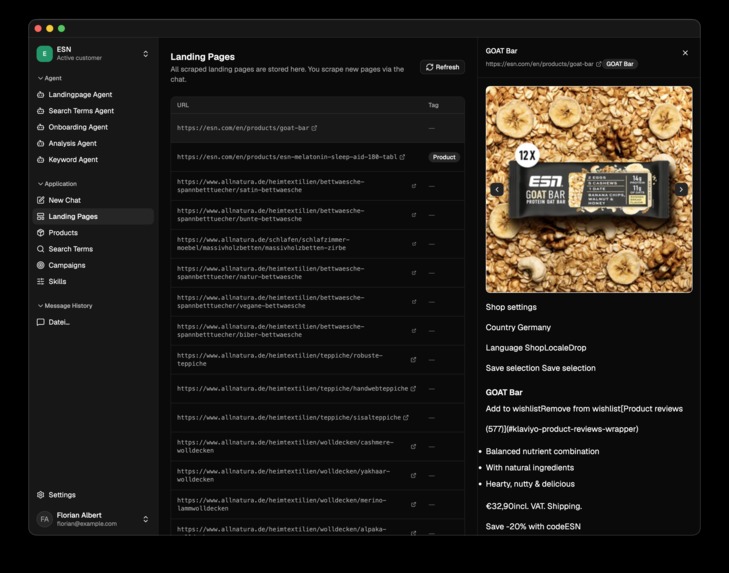
Context for Agents
-
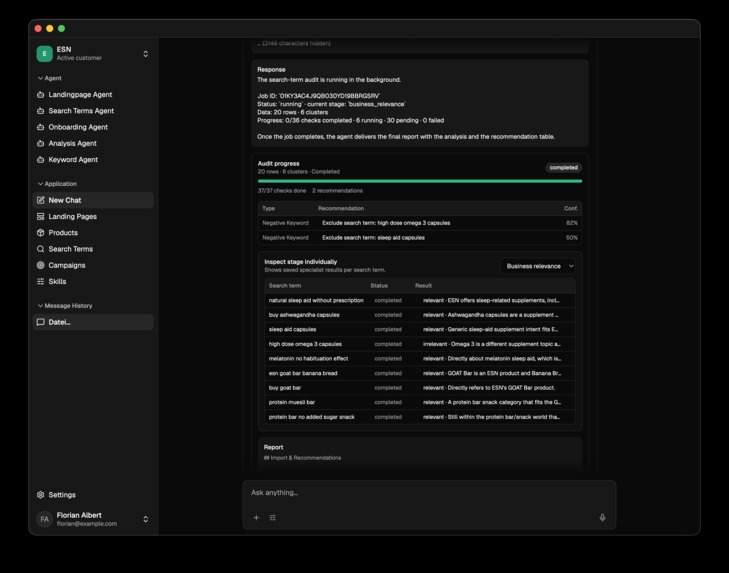
Search Terms
-
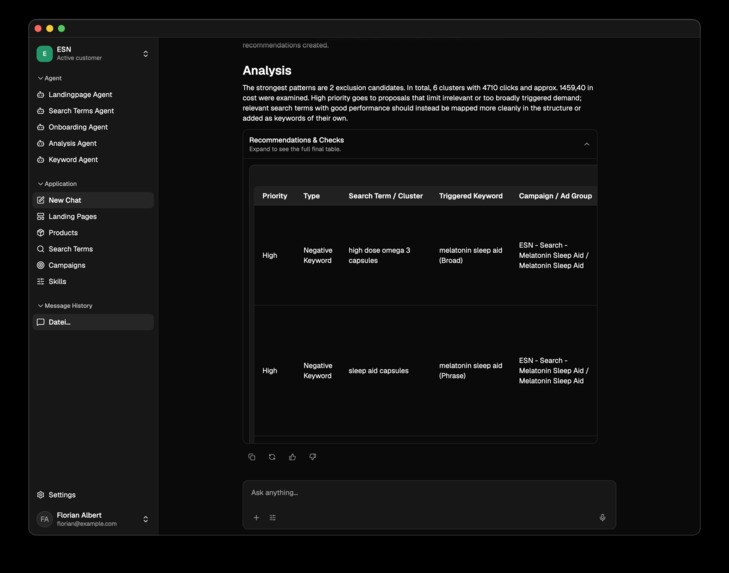
Report
-
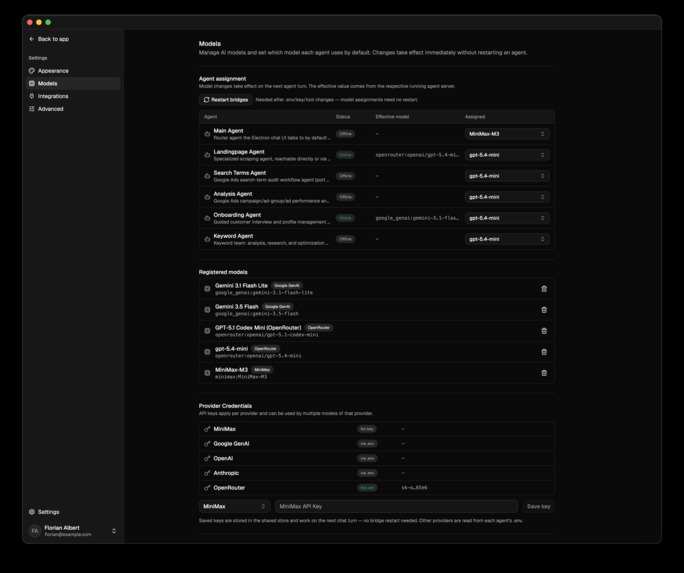
Settings
OpenGAds
About me
My name is Florian, I'm based in Germany, and I've worked in the Google Ads world for years myself. The thing that gets to me most isn't the hard problems. It's the same handful of core tasks you end up repeating over and over, because you need the context in your head, the thread connecting the account, the products, and what people are actually searching for.
And it's not just one account either: any account manager at an agency is typically running at least eight Google Ads accounts for different clients at once, and a large account can easily have 200 to 500 products in it. Here's an example: you have a huge account with hundreds of products, and search terms keep flowing in constantly.
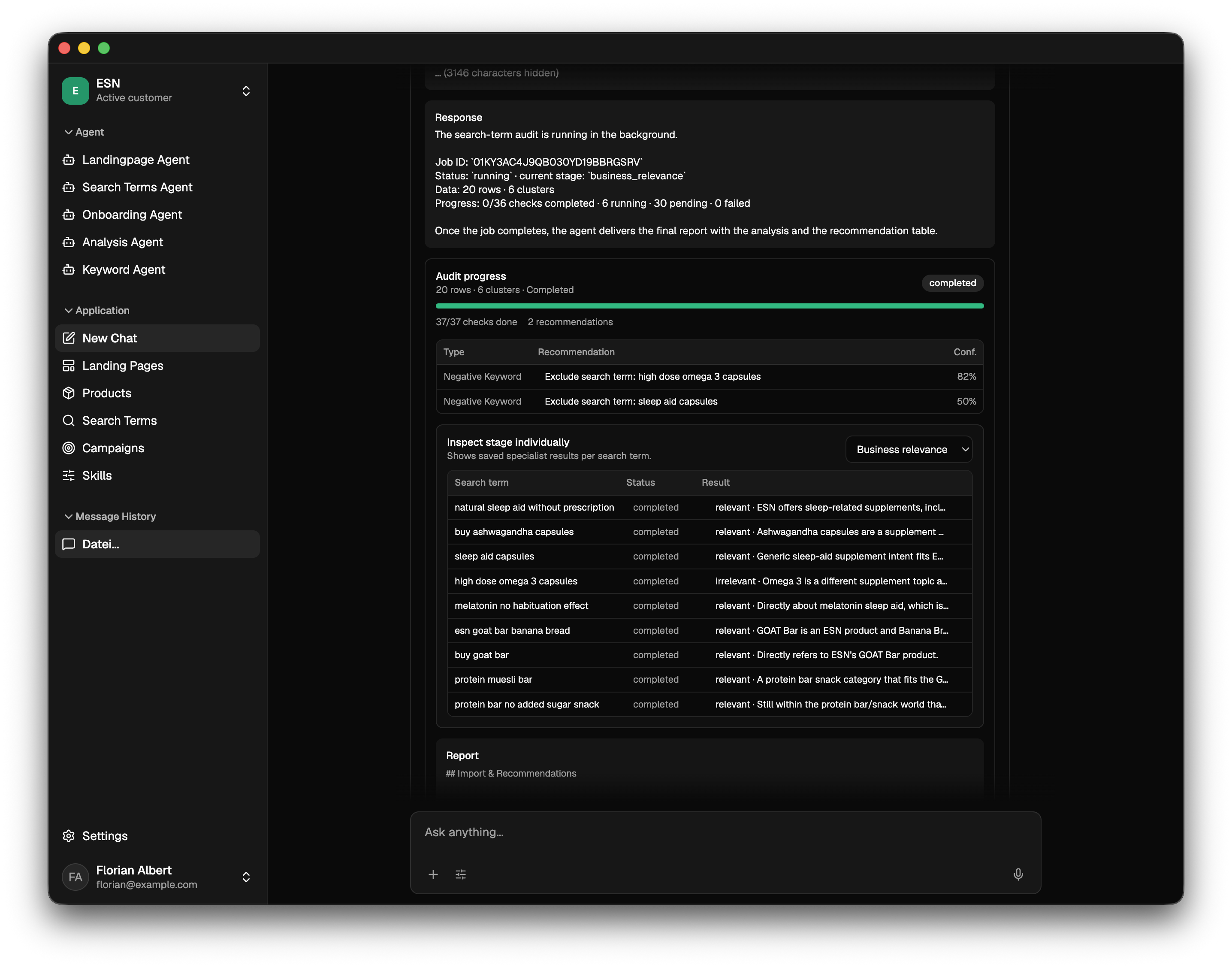
For each one, you basically need to ask the same questions, again and again: Does the search term actually match the product? Does the customer even carry that product? Is this a competitor's product instead? Otherwise you're optimizing blind. And that's just one workflow my app can help optimize.
It's not a hard task. It's just one that eats time constantly, because you can't really hand it off unless someone (or something) keeps track of the whole product range across every one of those accounts. That's exactly the kind of work I wanted to automate, not the creative decisions, but the repetitive lookup and matching that nobody actually wants to do.
Inspiration
Running a Google Ads account can feel like running a small detective agency. You dig through search terms, check landing pages, compare keywords, review settings, figure out why performance dropped, write new ads, check budgets, and then try to remember which change broke everything three Tuesdays ago.
Most AI tools handle one task at a time: write ad copy, summarize a report, suggest keywords. None of them really know the business behind the account. I wanted something closer to an actual Google Ads team, so I built OpenGAds, a desktop app that looks like ChatGPT but, instead of one general assistant, puts you in front of a set of specialized Google Ads agents.
What it does
OpenGAds is an Electron app with a chat interface. You type what you need the way you'd talk to ChatGPT. Things like:
- "Analyze my search terms from the last 30 days."
- "Find irrelevant traffic and create negative keywords."
- "Build a campaign for these products."
- "Compare my ads with the landing page."
- "Explain why performance dropped last week."
- "Create new headlines in the brand's tone of voice."
Each request gets routed to whichever agent team is suited to it. You don't need to know which agent, API, or report is involved. You describe the task, and OpenGAds figures out the rest.
More than a chatbot
This isn't a chatbot wired up to the Google Ads API. It's a harness that coordinates specialized agents around a shared business context, with tools, validation steps, exports, and account actions built in.
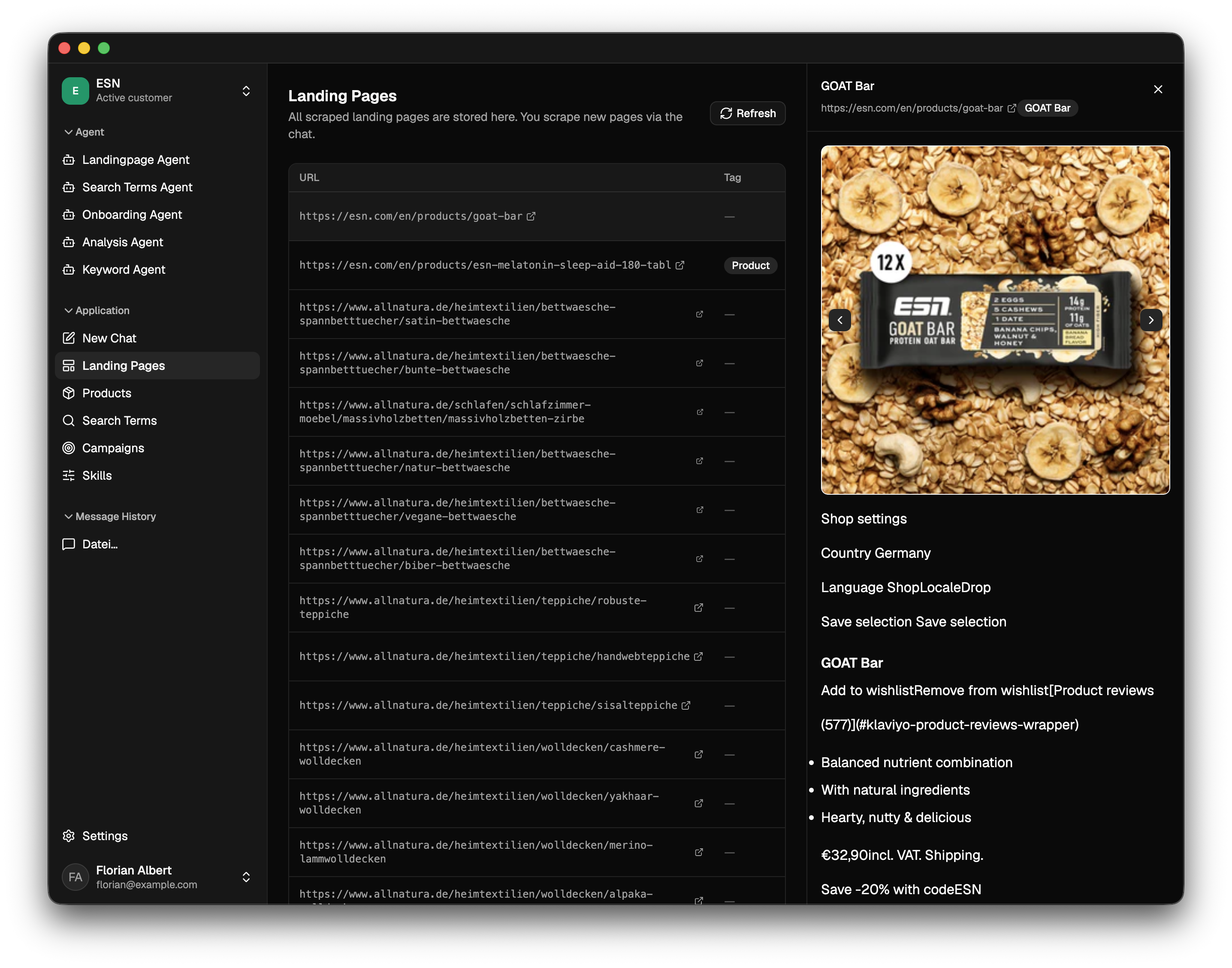
It connects to a Google Ads account and reads the advertiser's website, including landing pages, product pages, prices, offers, positioning, and tone of voice. That context feeds every agent, so a search term doesn't just get judged on clicks and cost. OpenGAds checks it against the landing page too, to see whether the person searching was actually looking for something the advertiser sells. That sounds obvious, but most Google Ads tooling doesn't do it.
Agent teams
Instead of one agent doing everything, OpenGAds splits work across small teams. Each one roughly follows the same shape: analyze, plan, create, validate, then export or deploy.
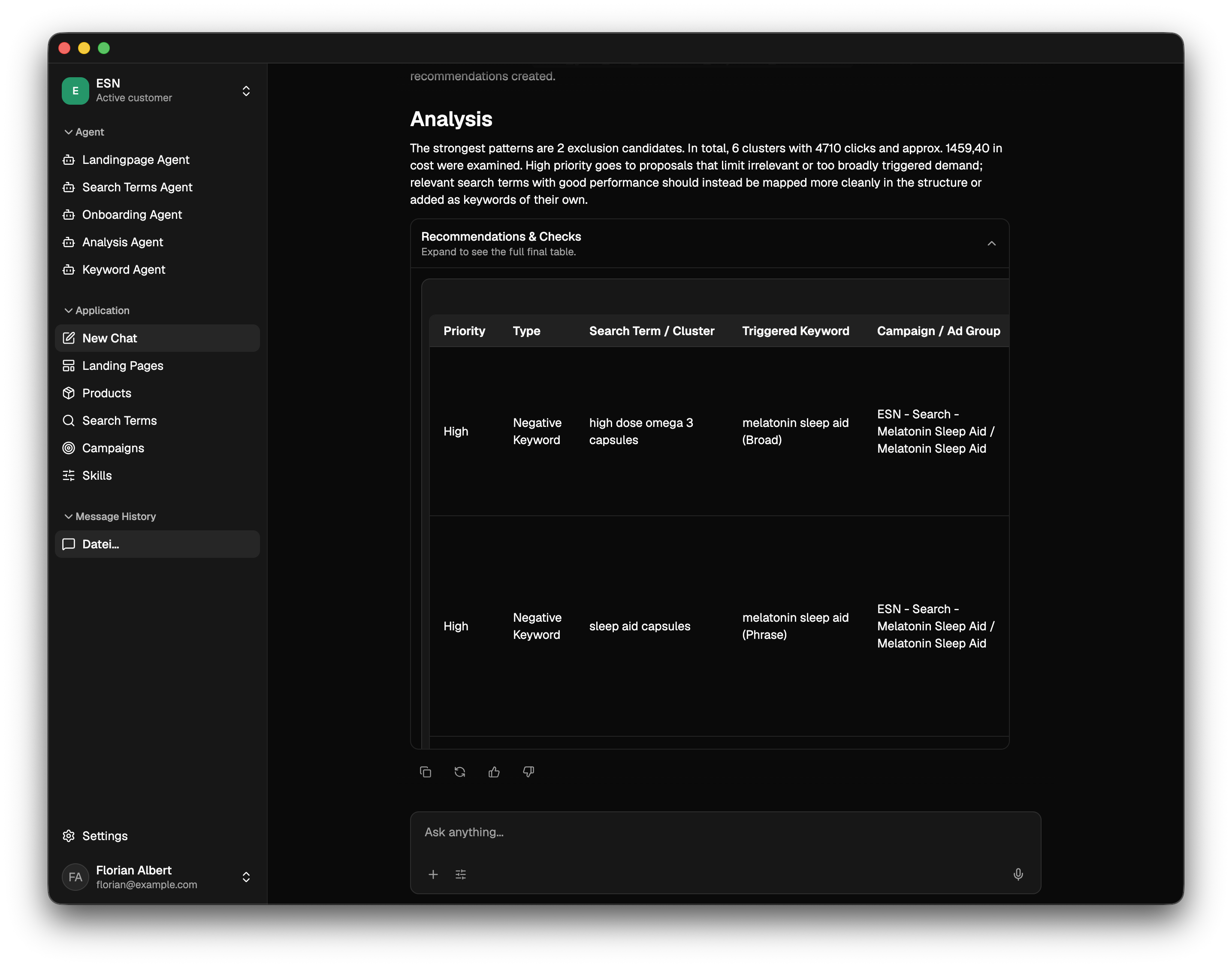
Search Term Team - Looks at real queries pulled from the account and checks relevance, intent, cost, conversions, and whether each term matches the landing page and the actual products on offer. Can then suggest negative keywords, surface new opportunities, and group terms into useful clusters.
Landing Page Team - Crawls the target page and pulls out products, prices, offers, audience, tone, and calls to action. A Message Match Agent lines this up against the keyword, search term, and ad copy, which is how you catch a keyword promising one thing, an ad saying another, and a landing page that seems to be having a different conversation altogether.
Keyword Team - Reviews existing keywords for performance, relevance, match type, and overlap; researches new opportunities from the site, products, past search terms, and search behavior; then turns all of it into concrete recommendations.
Campaign Builder Team - Builds full campaign structures, complete with ad groups, keywords, negative keywords, headlines, descriptions, assets, landing page mappings, and settings. Before any of it reaches the account, a Prelaunch Analysis Agent reviews the whole setup. An AI-built campaign still needs someone to check it over.
Copywriting Team - Reviews existing ad copy for missing messages, weak calls to action, repeated ideas, and mismatches with the landing page, then writes new headlines and descriptions in the brand's actual tone. A Brand Voice Agent makes sure the result sounds like the advertiser and not like generic ad copy.
Performance Team - Flags trends and sudden changes, digs into budgets, bids, keywords, assets, and account history to work out why, and turns the findings into a prioritized list of actions.
Change History Team - Compares account changes against later performance. Can tell you what changed right before performance dropped, which budget change caused a spend spike, whether a new bidding strategy actually helped, or whether an older change should be reverted. Basically version control for "I only changed one small setting."
Chat-first experience
You open a conversation, describe a task, OpenGAds picks the right team, and the agents pull in account and website context before the results show up in the chat. From there you can refine them, approve them, export them, or push them live.
The agents also explain their findings in plain language instead of handing back a spreadsheet. So instead of a red arrow next to your CPC, you get something like: your campaign got more expensive because broad-match traffic increased after the bidding change, and most of the extra spend came from informational searches that don't match the product page.
Exportable results
Every team produces structured output you can export to Excel, including the entity involved, its performance data, the problem found, business context, recommended action, suggested new value, priority, risk level, and approval status. Easy to review, share with a client, or plug into another workflow.
Direct Google Ads deployment
Where it's supported, OpenGAds can also set things up directly inside the connected account, full campaign structure and all. There's one hard rule, though: new campaigns are always created paused, the starting daily budget is always €1, and nothing goes live automatically. The user reviews it first, and anything high-impact needs explicit approval. Mostly this exists so an agent doesn't celebrate its first successful campaign by spending the whole month's budget before breakfast.
Safety by default
Dedicated Guardrail, Risk Analysis, Validation, and Approval agents check campaign status, budget limits, account permissions, proposed bid changes, existing campaign impact, required approvals, policy issues, and whether the setup is actually complete, all before anything deploys. I wasn't chasing maximum autonomy here. I wanted autonomy with real limits attached.
How I built it
OpenGAds pairs an Electron chat interface with a multi-agent backend. An Orchestrator takes each request and decides which team handles it. A Context Agent pulls together relevant information from Google Ads, landing pages, product pages, the website, past analyses, brand info, and whatever the user just said. The specialist agents do the analysis, produce structured output, and pass it through validation before anything happens. Responsibilities are split across analysis, research, strategy, creation, validation, guardrail, and execution agents, which keeps the whole thing easier to test and reason about.
How I used OpenAI
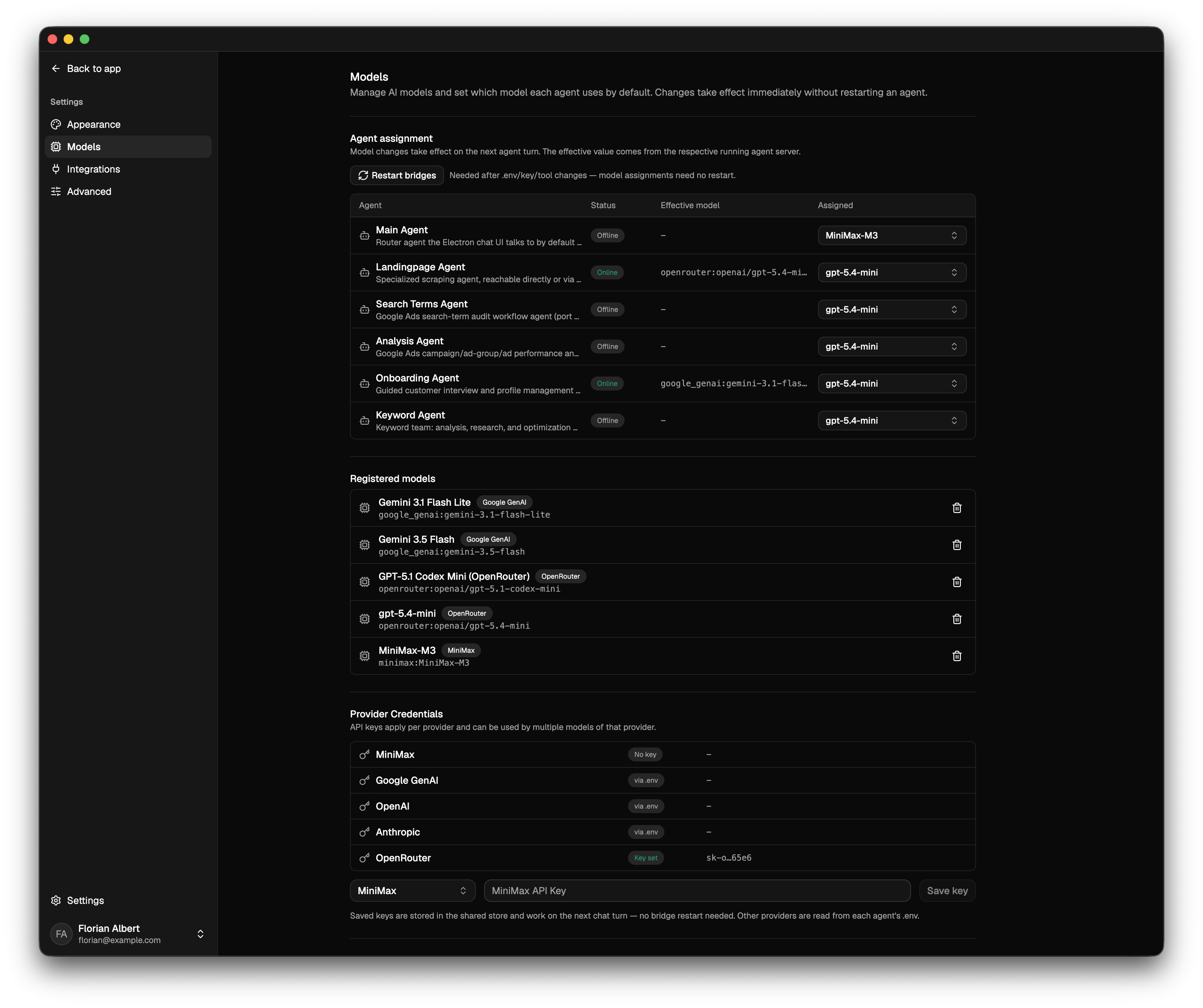
OpenAI models handle the reasoning, planning, classification, analysis, and content generation across every team. Agents share context rather than treating each task as a blank slate, which shows up in search-intent classification, evaluating search terms, reading landing pages, planning campaigns, clustering keywords, writing copy, explaining performance shifts, root-cause analysis, prioritizing recommendations, and generating structured output. The model isn't just writing text here. It's the reasoning layer connecting account data, website context, user instructions, and whatever action comes next.
How I used Codex
Codex is what actually got this built. I used it to develop and iterate on the Electron interface, the agent workflows, integrations, output formats, exports, and safety logic. It was especially good for turning a new agent idea into something testable fast, which meant less time fighting boilerplate and more time deciding whether "cheap" counts as commercial search intent.
Challenges I faced
Every agent needs the same picture of the business. The Keyword Agent, Copywriter, Campaign Builder, and Landing Page Agent can't each be inventing their own version of the product or the brand voice, so I built one shared context layer that feeds all of them consistently.
Structured output was its own problem. "Improve the campaign" isn't something Google Ads can act on. The agents have to produce exact entities, values, relationships, match types, and structures, and getting flexible model reasoning to land reliably on that kind of output was one of the harder parts of the build.
Safety mattered because connecting agents to a live ad account isn't risk-free. A hallucinated sentence is annoying. A hallucinated €20,000 campaign is a different kind of problem, so safety is part of the core architecture rather than a setting you toggle on.
And simplicity was its own challenge too. There's a lot happening underneath, many agents, tools, and workflows, and none of that should be visible. Someone should be able to type one sentence and get something useful back without knowing anything about what's running underneath it.
What I'm proud of
- Building a ChatGPT-style experience around specialized agents instead of one general one
- Connecting Google Ads data to real website and product context
- Coordinating small teams rather than relying on one agent to do everything
- Producing structured output people can actually act on
- Supporting both Excel exports and direct account setup
- Defaulting new campaigns to paused with a €1 safety budget
- Making complex account analysis reachable through an ordinary sentence
What I learned
AI gets a lot more useful once it has context behind the data. You can't judge a search term without understanding the product behind it, can't evaluate an ad without reading the landing page it points to, and can't explain a performance drop without checking what changed in the account recently.
I also found that a handful of specialized agents produce more transparent, controllable results than one agent trying to be analyst, copywriter, strategist, and media buyer at once. And safety features are a lot easier to build before the first accidental campaign launch than after it happens.
What's next
More executable actions directly in Google Ads, scheduled performance monitoring, automatic anomaly detection, multi-account workflows for agencies, reusable campaign templates, approval roles for teams and clients, learning from which recommendations get accepted or rejected, stronger experiment workflows, Performance Max and product feed support, and full decision histories.
Longer term, I want people to be able to talk to their Google Ads account directly, hand off the complicated parts to specialized agents, review what comes back, and turn the good recommendations into action, without an agent quietly doing something nobody asked for.

Log in or sign up for Devpost to join the conversation.