Certainly! Here's the updated version with the text changed to reflect that you did the project alone:
Inspiration
The TME-EDU-GAME project was inspired by my desire to make learning electronics and other STEM subjects more engaging and accessible to students. I recognized that traditional teaching methods sometimes fail to capture the interest of young learners, and gamifying the learning process can provide both motivation and excitement. The interactive quiz game using Arduino components was conceived to enhance educational experiences by merging hands-on learning with technology and fun.
The project aimed to encourage active participation, foster competition, and offer a rewarding learning environment. By incorporating real-time feedback, the game helps students retain information while enjoying themselves. Additionally, the flexibility of this project allows for easy adaptation to various educational topics, making it a versatile tool for educators.
What it does
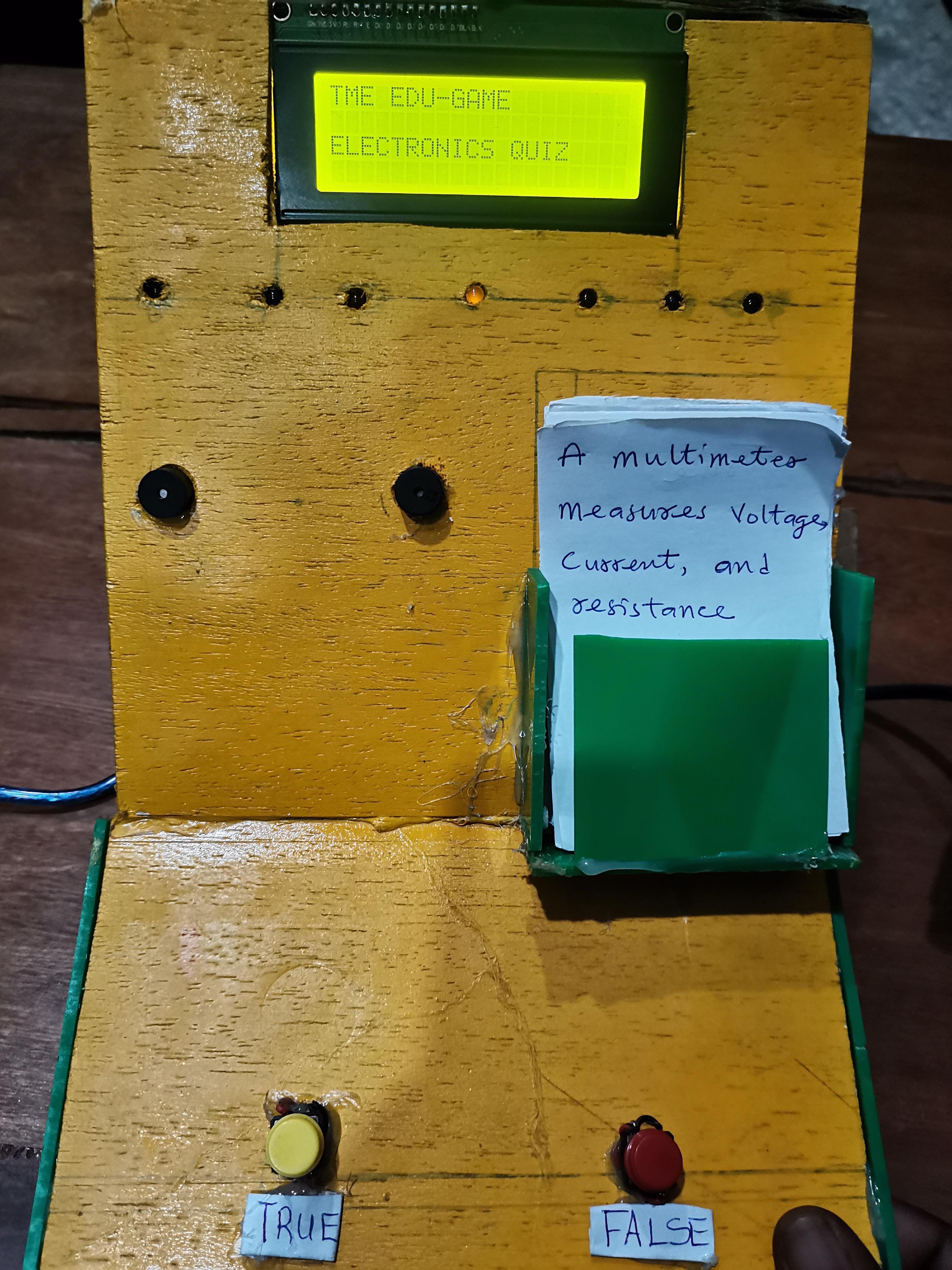
The TME-EDU-GAME is an interactive quiz game that helps students test their knowledge in electronics, programming, and other subjects. The game utilizes an Arduino board, an LCD display, buttons, LEDs, and a buzzer to create a fun and dynamic quiz experience.
Key Features:
- Question and Answer Display: Students are shown questions on the LCD and respond by pressing "True" or "False" buttons.
- Feedback Mechanism: Immediate feedback is provided via LEDs and buzzer sounds to indicate whether the answer is correct or incorrect.
- Score Tracking: The game tracks the score throughout the quiz, displaying it after each set of questions.
- Celebration for High Scores: When the combined score exceeds a predefined threshold, LEDs light up in a celebratory pattern, and a congratulatory message is displayed.
- Customizability: Educators can easily upload new question sets to the Arduino, allowing the game to cover various subjects and difficulty levels.
The game combines learning with gamification, making it both educational and enjoyable for students.
How I built it
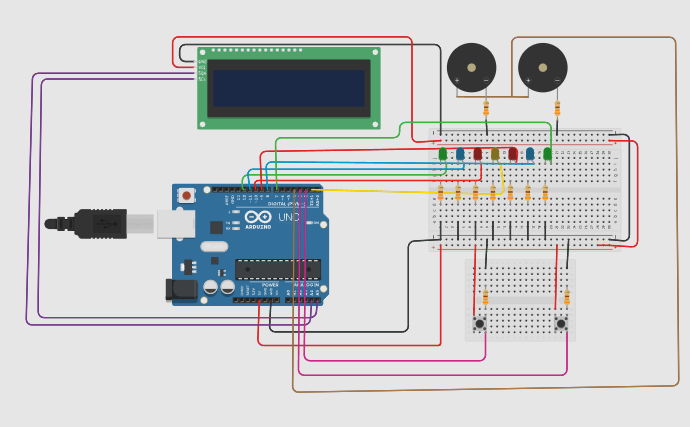
I built the TME-EDU-GAME using a combination of hardware and software components:
Hardware:
- Arduino Uno: The heart of the project, controlling the logic and interactions.
- 16x2 LCD Display with I2C: Used to display the quiz questions, answers, and feedback.
- Push Buttons: Two buttons for answering each question (True and False).
- RGB LEDs: Provide visual feedback based on the student's response and celebratory effects for high scores.
- Buzzer: Provides sound feedback to indicate whether the answer was correct or incorrect.
- Resistors, Breadboard, and Jumper Wires: Used for wiring the components and making connections.
Software:
- Arduino IDE: The code was written in C++ using the Arduino IDE, which processes the input and controls the game flow.
- Code Structure: The game logic is structured to store questions and answers in arrays or structures. It also includes functions for displaying questions, checking answers, and controlling LEDs and buzzer for feedback.
- Customizability: I designed the code to allow for easy modification of question sets, enabling teachers to input new questions and adjust the game based on their needs.
Challenges I ran into
Limited Space for Questions:
The 16x2 LCD has limited space for displaying long questions or answers. I had to creatively format the text to fit within the small screen and ensure readability.Button Debouncing:
When the user pressed the buttons, multiple inputs could be registered in a single press due to bouncing. I solved this by incorporating a debounce function to prevent false inputs.Score Tracking:
Managing and displaying the scores dynamically between question sets and ensuring proper transitions between stages of the game was initially tricky. It required careful planning of the game flow.Power Supply Issues:
Powering the entire setup from a single power supply sometimes led to unstable performance. I solved this by ensuring proper grounding and current management.
Accomplishments that I’m proud of
Engaging Learning Tool:
I’ve created a project that turns traditional learning into an interactive and fun experience. The game has the potential to make subjects like electronics more accessible to students of all ages.Customizable for Multiple Subjects:
The game can be easily customized with new sets of questions. This makes it a versatile tool that can be used in various educational settings, from basic electronics to more advanced topics like physics and mathematics.Real-time Feedback:
The real-time feedback via LEDs and buzzers encourages students to actively participate, helping them stay engaged and learn more effectively.Easy to Scale:
The design is scalable. As I move forward, I can add more question sets, integrate multiplayer modes, and even explore mobile app integration to increase its versatility.
What I learned
Importance of Interactive Learning:
I’ve learned that students learn better when they are actively involved in the process. The interactive quiz format has proven to be an effective way to enhance student engagement and retention.Working with Hardware and Software:
This project provided me with valuable experience in combining hardware components with software logic to create a fully functional system. I learned how to interface the LCD with buttons, manage inputs, and output results.User Experience Matters:
The project reinforced the importance of good user experience design. For example, the buttons had to be responsive, and the LCD screen needed to present information clearly and legibly.Flexibility in Education Tools:
I learned how to design educational tools that can be easily adapted to various learning environments. This project shows how a simple interactive game can be used across subjects and age groups.
What's next for TME-EDU-GAME
Expanding Question Sets:
I plan to expand the question database to include more subjects, such as programming, physics, mathematics, and general knowledge. Teachers can easily upload new sets for their classes.Mobile App Integration:
I am exploring the possibility of integrating the game with a mobile app. Students could participate via their smartphones, track their progress, and share results with peers or teachers.Multiplayer Mode:
Adding a multiplayer feature would make the quiz more exciting. Multiple students can compete or work together to answer questions, enhancing the social aspect of learning.Leaderboard and Cloud Integration:
I am considering adding a cloud-based feature that tracks scores over time. This could allow for a global leaderboard where students can compare their scores with others, adding a competitive element.Advanced Feedback Mechanisms:
I’m exploring options for incorporating voice feedback and hints for incorrect answers, which could improve the learning experience further.
The TME-EDU-GAME project is just the beginning of what could become a versatile and engaging educational tool. With the potential to grow and evolve, it offers exciting opportunities for the future of learning through gamification and technology.


Log in or sign up for Devpost to join the conversation.