-
-
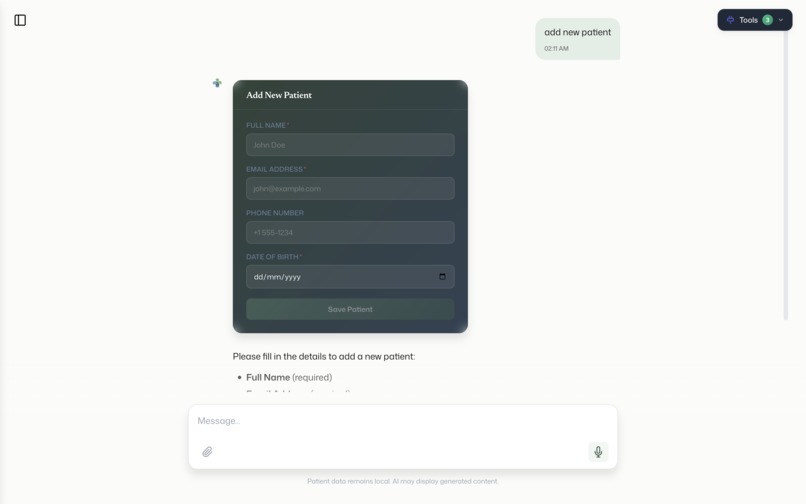
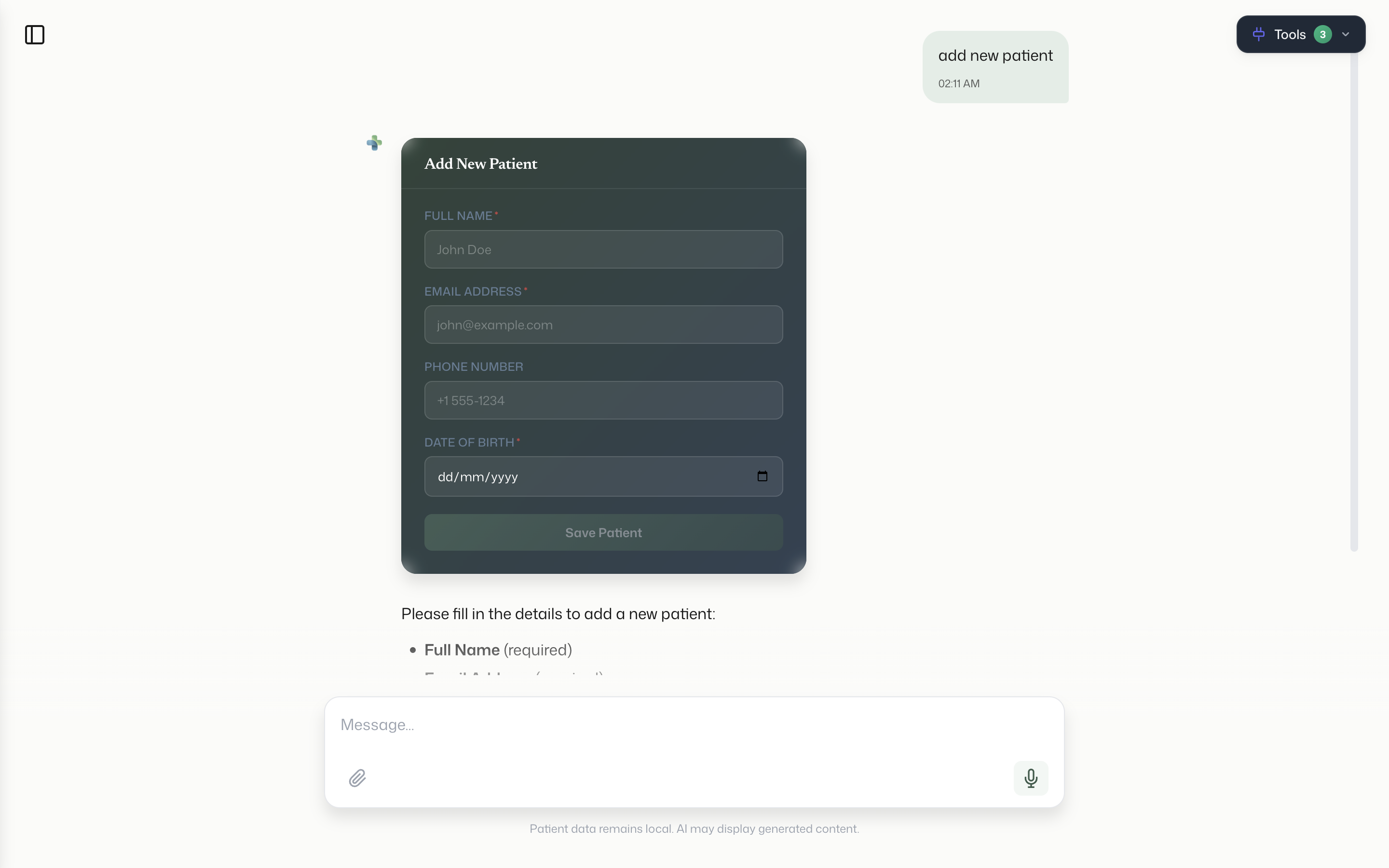
patient form by filling rendered form in chat ui
-
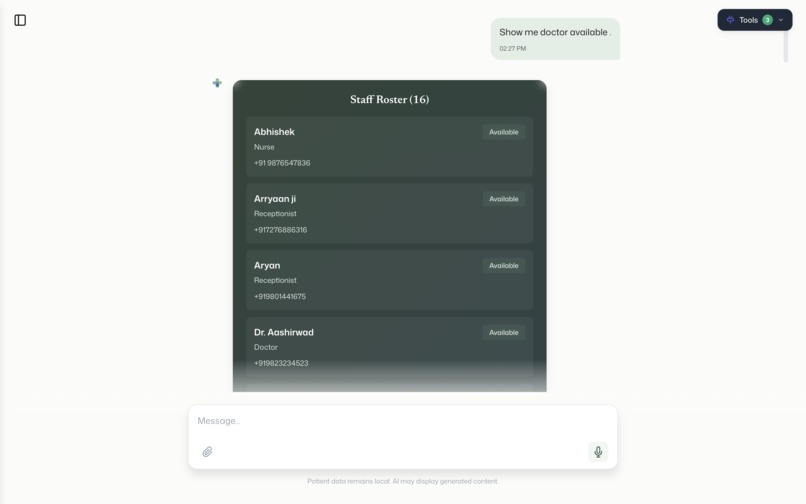
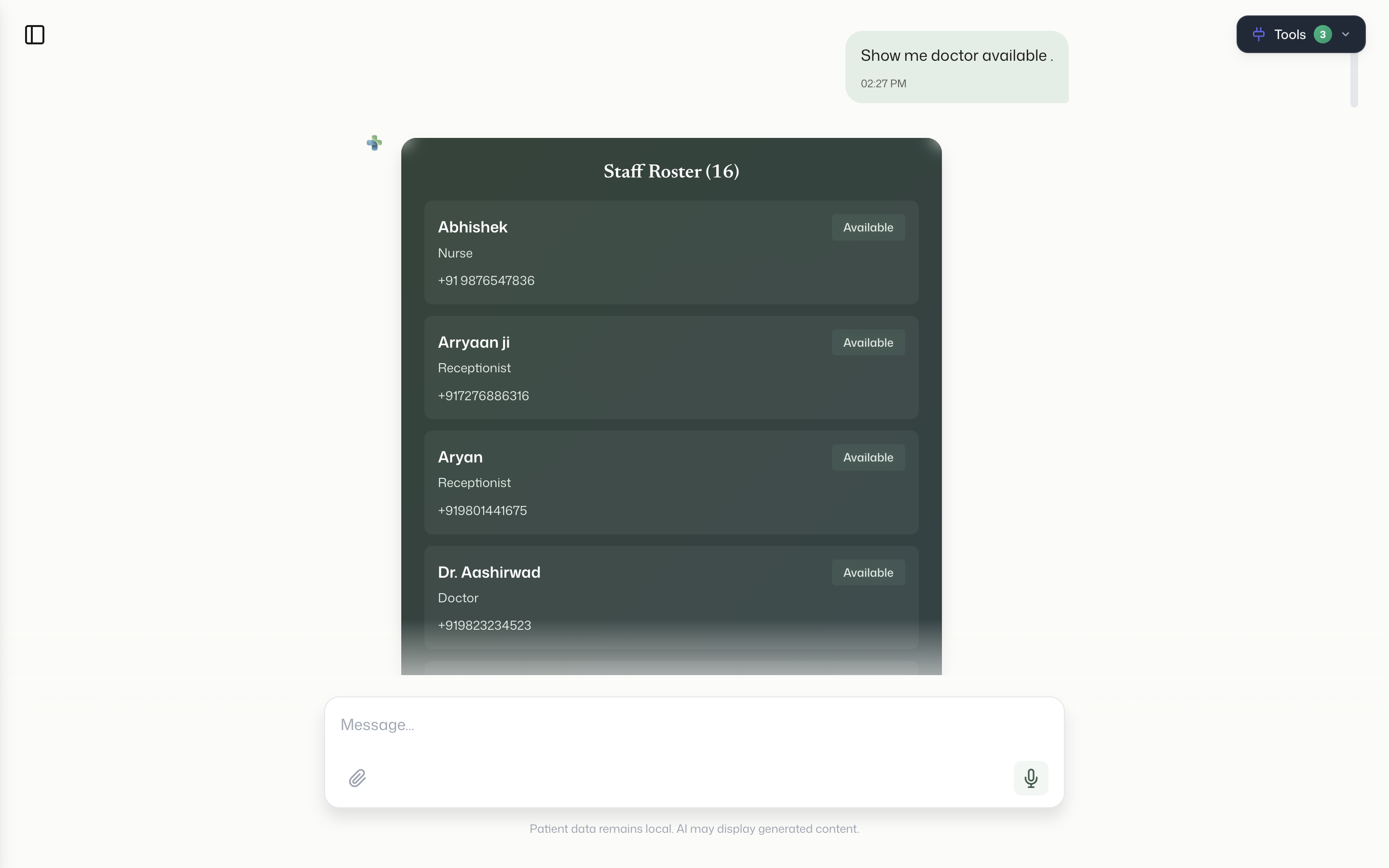
show_doctor_staffs_and all
-
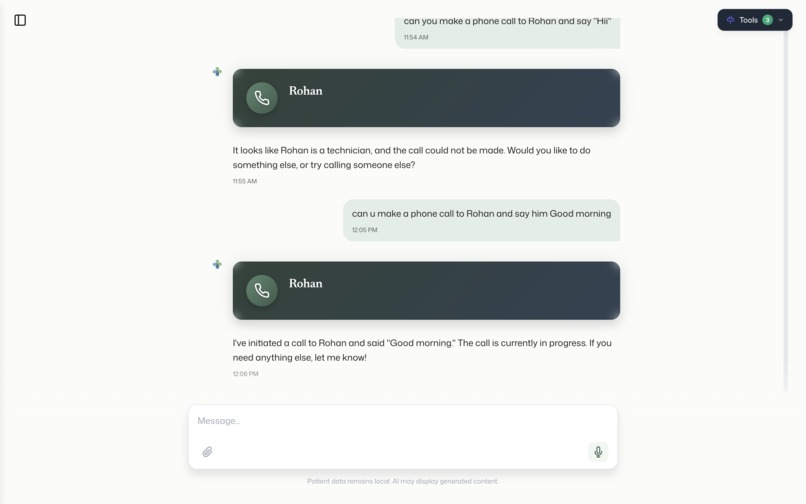
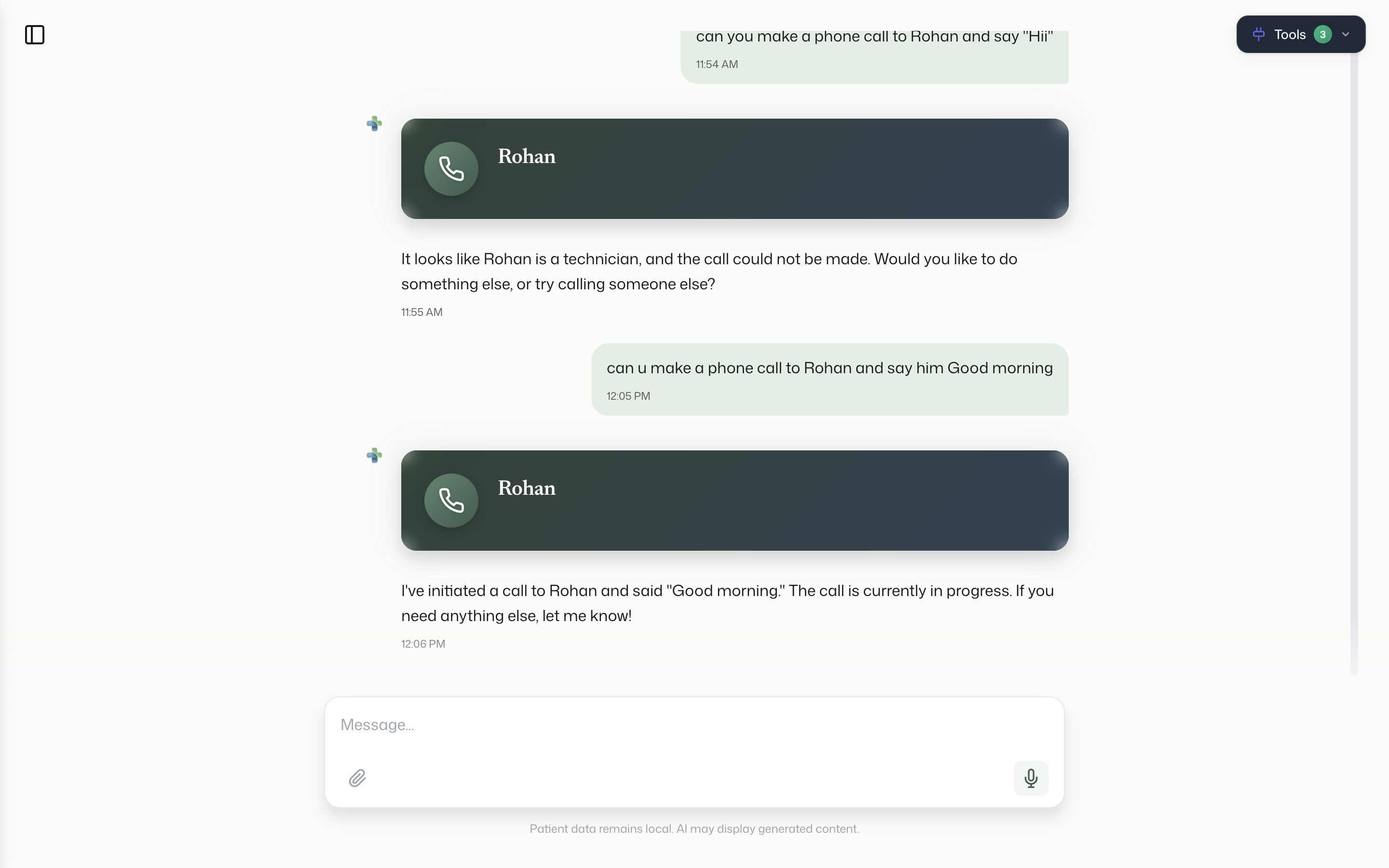
make phone calls to staffs for assigning work
-
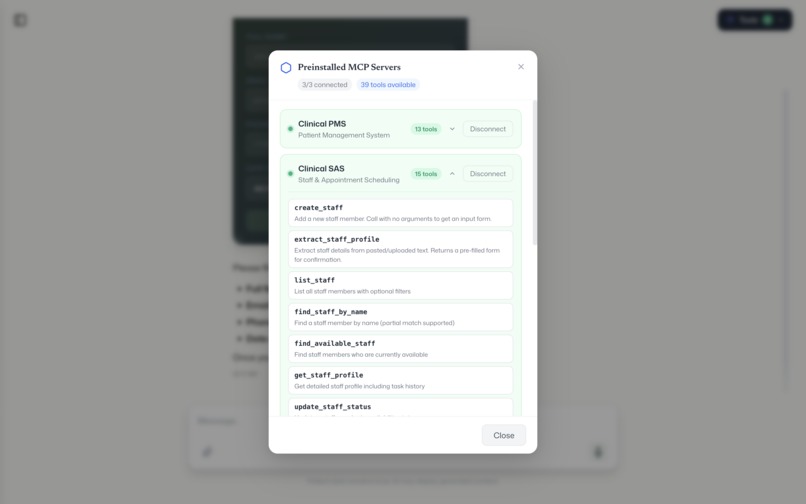
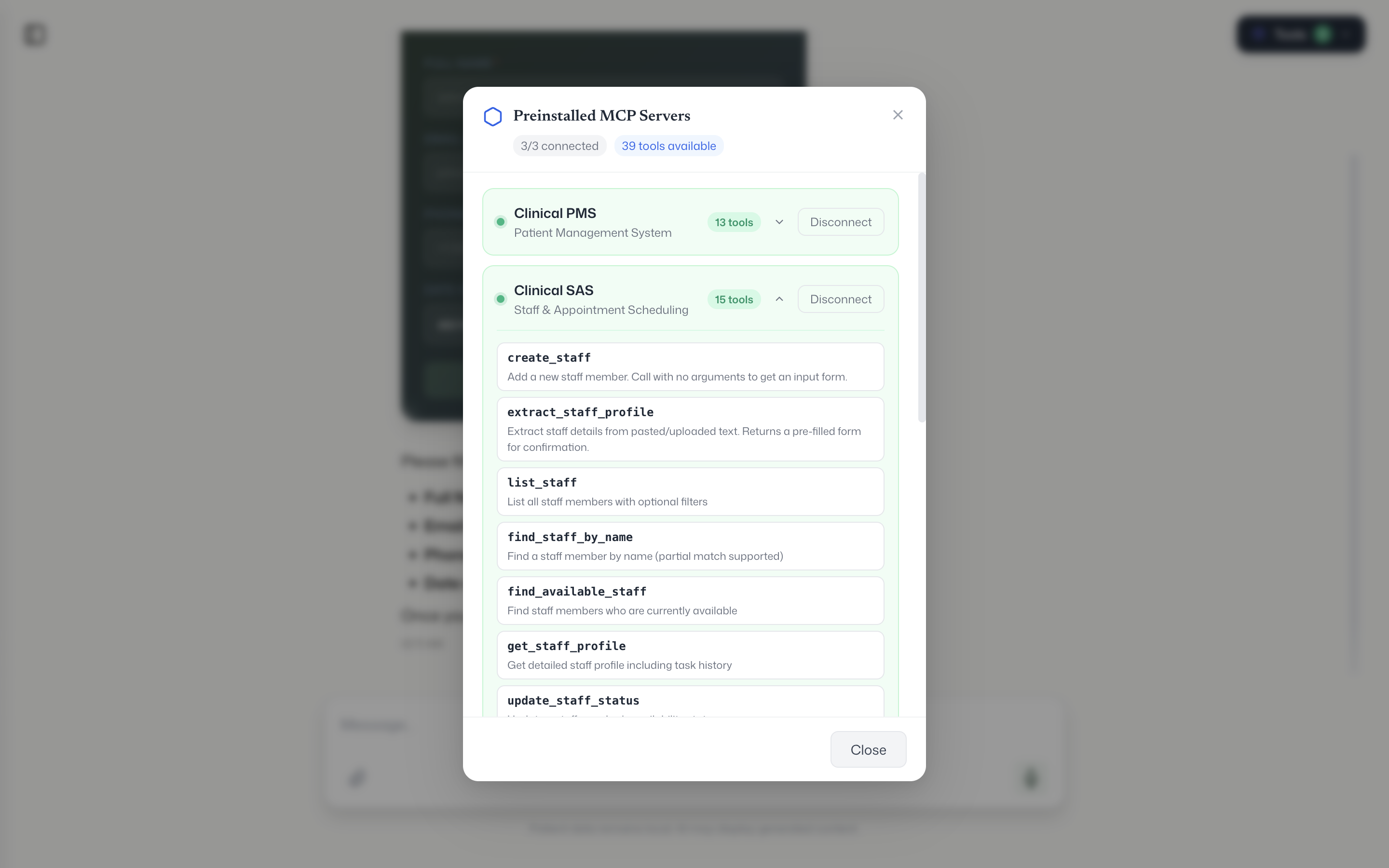
pre-Installed mcp servers for basic clinical work.
Inspiration
we watched doctors during their shifts. they spend almost 3 hours every day just switching between apps one for patient records, another for scheduling, a different one for lab results, another for pharmacy, another for staff lookup. six or seven disconnected systems. these are the smartest, most overworked people in any building, and they're stuck doing data entry. We thought what if a doctor could just say what they need in plain English and the right system responds? No tabs, no logins, no copy-paste. Just one conversation.
what it does
Opax is a desktop app (Mac and Windows) where doctors interact with all their hospital systems through a single chat interface.
You type "show me today's appointments" Opax calls the hospital's scheduling system and shows you appointment cards. You type "get lab results for patient 42" it pulls from the lab system and shows results with abnormal values highlighted in red. You say "order a CBC for patient Manish, urgent" instead of creating the record directly, it shows you a form with all the fields pre-filled. The AI completely freezes until the doctor reviews everything and hits submit. Nothing gets written without human confirmation.
It supports 11 different card types : patient profiles, staff lists, lab results, call banners, dynamic forms, and more.
The backend server decides which card to show, so we never need to update the app when a new data type comes in.
You can also tap the mic and speak. Opax transcribes your voice locally on the device using Whisper — no audio goes to any cloud.
All conversations are saved locally. You can switch between sessions, pick up old ones, delete them. If the local database ever gets corrupted, the app detects it and rebuilds automatically.
First time you open it, a welcome screen asks your name. Your profile shows up in the sidebar. You configure your AI provider (OpenAI or Google Gemini) in settings, pick a model, and you're running.
How we built it
Opax is an Electron app. The frontend is React with TypeScript. The AI chat uses the Vercel AI SDK with streaming responses — you see the AI thinking and tool calls happening in real time.
The core architecture is built around Model Context Protocol (MCP). MCP is basically a standard way for AI to talk to external tools. Instead of hardcoding integrations for every hospital system, we let hospitals wrap their systems as MCP servers. Opax connects to them — either locally via stdio (for Python/Node scripts) or over the network via StreamableHTTP (for cloud-hosted servers). The AI automatically discovers what tools are available and uses them.
We built three clinical MCP servers ourselves — Patient Management, Staff Administration, and Lab Tests — hosted on Vercel. These come preinstalled so you can try the app immediately.
The card rendering is server-driven. Every MCP tool response includes a metadata field called componentType. Opax reads that field and renders the matching card. For creation operations (like ordering a lab test), the server sends back a form schema instead of a result. Opax renders a dynamic form from that schema and pauses the AI until the doctor submits.
Voice input uses Whisper (whisper.cpp) running in the Electron main process. All transcription happens on-device.
Conversations are stored in RxDB with IndexedDB — fully local, no server. We added corruption detection and auto-recovery because IndexedDB can break if the app crashes mid-write.
Challenges we ran into
the mcp servers we built only support POST requests, but the MCP SDK's StreamableHTTP transport tries to send a GET request first to check if the server is alive. That kept failing silently. We had to write a custom fetch wrapper that intercepts GET requests and returns a 405 so the SDK falls back to POST-only mode.
production builds showed a blank white screen. Turned out our "is this development mode?" check was wrong it used process.env.NODE_ENV which isn't set in packaged Electron apps, so the production build thought it was in dev mode and tried to load localhost:5173. We fixed it to just check app.isPackaged.
IndexedDB corruption was a recurring headache. If the app crashed or if someone accidentally opened two instances, the database would lock up with LevelDB LOCK errors. We added a single-instance lock at the Electron level and a try-catch around database initialization that wipes and rebuilds if it detects corruption.
the human-in-the-loop form system was architecturally tricky. When the AI encounters a form-card response, we needed to literally pause the AI's processing loop — not just the UI, but the actual promise chain in the main process — and resume it only when the doctor submits the form from the renderer. We did this with a pending Promise that gets resolved via IPC when the form is submitted.
Accomplishments that we're proud of
the whole thing works end to end. A doctor can open Opax, type a question in plain English, and get back a rich visual card from a real hospital system — with the AI figuring out which system to call, what arguments to pass, and which card to render. That full loop — natural language to tool call to server-driven UI — actually works.
the human-in-the-loop form system is something we're really proud of. The AI genuinely pauses. It doesn't hallucinate a response or try to continue. It waits for the doctor. In healthcare, that matters.
we ship on both Mac and Windows from a single codebase. The DMG and the exe installer both work. We have a GitHub Release with both attached.
the server-driven card architecture means we can add support for entirely new hospital systems without touching the Opax frontend. Just build an MCP server that returns the right metadata, and Opax renders it. That's a genuinely scalable pattern.
And everything is local-first. Chat history, voice transcription, API keys — nothing leaves the device unless the doctor explicitly sends a message to the AI provider. For healthcare, that's not a nice-to-have, it's a requirement.
What we learned
MCP is powerful but young. The SDK has rough edges — the StreamableHTTP transport assumptions, error messages that don't tell you much, limited documentation for edge cases. But the core idea is solid. A standard protocol for AI-to-tool communication is going to be huge.
server-driven UI is underrated. Letting the backend decide what the frontend renders — through metadata, not through API versioning or feature flags — makes the system way more flexible than we expected. Adding a new card type is just a React component and a string match.
Electron gets a bad rap but it's genuinely good for this use case. We need access to the filesystem (Whisper models), native audio (mic capture), and local databases — all while running a modern React UI. Electron gives us all of that. The security model (context isolation, preload scripts, CSP) is solid if you actually use it.
Healthcare software doesn't need to be ugly or slow. Doctors deserve good design too. Our sage green and slate blue palette, spring animations, and card-based UI prove you can make clinical software that feels modern without sacrificing clarity.
What's next for Opax
We've already fully designed a Jarvis Voice Agent Spec— a full-screen voice interaction mode where doctors speak naturally and hear responses back. It uses Deepgram's real-time voice API with an animated sphere that reacts to conversation state (listening, thinking, speaking). The AI can execute MCP tool calls mid-conversation while talking. The spec, design, and implementation plan are complete. That's the next build.
After that, AgentBox — an automation engine for clinical workflows. Think cron jobs but for healthcare. Monitor lab results overnight, flag critical values, notify the right doctor before their shift starts. Event-driven, rule-based, fully autonomous.
We also want to add offline LLM support so the app works without any internet connection at all. A small on-device model for basic queries, with cloud models for complex reasoning.
And the big picture: we want Opax to become the standard clinical desktop — the one app every doctor opens at the start of their shift, regardless of which hospital they're at or which systems that hospital uses. MCP makes that possible. We just need to keep building.
Built With
- electron
- express.js
- gemini
- mcp
- node.js
- openai
- prisma
- react
- supabase
- typescript


Log in or sign up for Devpost to join the conversation.