-
-
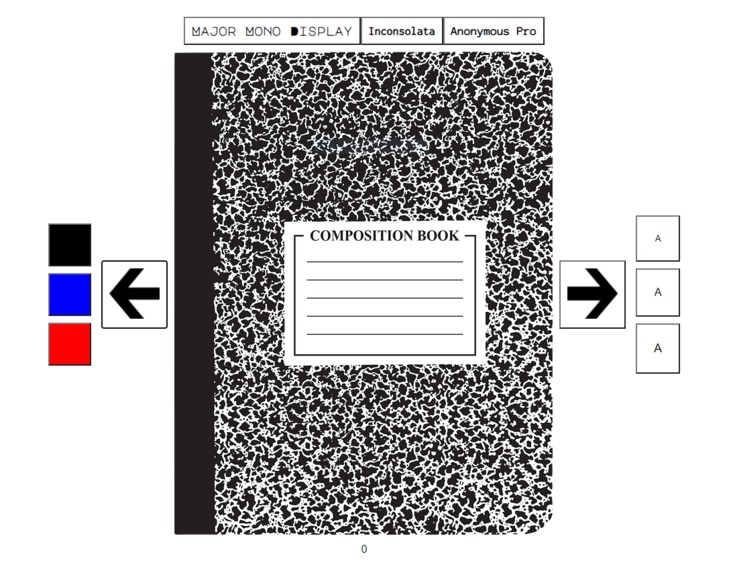
Cover Image

Inspiration
I was inspired to create a free, publicly available online composition notebook by the amazing teachers who were paying out of pocket for school supplies and the nostalgia I had for having a notebook in front of me in this period of learning online. In the recent period of learning online, I tried various note-taking apps to create and organize my notes online, but I found that I was not as connected to them as when I had to write in my notebook - and thus had a harder time retaining information. I decided to create the Online Composition Notebook project in order to recreate the experience of writing in a notebook; the notebook has a simple, elegant design and a typing method that forces you to carefully consider what you are writing because you can't just insert a character as you please. Most importantly however, this project provides an alternative to purchasing school supplies in an environment that students who are already learning online will have access to - enhancing their education.
What it does
The Online Composition Notebook allows people to type and store notes online. Each notebook contains a cover and 50 pages, and the user is able to modify the content of each of the pages. The typed content that the user can add to each page is saved as they flip through the pages. The user is also given the option to change how a page appears on their screen, with three different color choices on the left, three different font options in the middle and three different font sizes on the right. The notebook has a traditional feel, providing an outlet for nostalgia and a sense of normalcy in this crazy time.
How I built it
I built this project by using the glitch.com IDE. HTML is used to create the different elements on the page, CSS is utilized to set the general styling rules and JavaScript is used to add interactivity. The information on each page is stored by having an array for each type of data that is stored, and the buttons and typing are done by using different event listeners.
Challenges I ran into
The biggest challenge that I ran into was learning how to create this project with minimal experience in the coding languages that were used. I had not been exposed to any of the languages before for more than a few hours, so it was difficult to figure out where too begin. Each time I wanted to implement a new feature, I had to plan the semantics of what I was going to implement, search the internet using carefully chosen keywords and then learn the syntax for the code.
Accomplishments that I'm proud of
I am very proud of how I was able to make the entire notebook have a comfortable, traditional feel. I have missed having notebooks and being able to see the pages in front of me, so this aspect was very important to me. I am also proud of how I was able to create arrays to store data, because it was not something that I was previously able to do and it allowed me to create new pages with very little additional coding.
What I learned
The majority of the code in Online Composition Notebook is something that I had to learn as I was trying to create the project, so I learned a lot of new syntax creating the work. In particular, I learned how to use JavaScript to change text styling, how to use JavaScript arrays, how to allow a user to create text, how to use JavaScript logical operators, and how to create loops in JavaScript. I am very grateful that I was given this opportunity to learn, and I want to thank Chris A. for being there if I had a specific question.
What's next for Online Composition Notebook
As the hackathon comes to a close, I hope to continue working on Online Composition Notebook. My goal is to create unique URLs for each notebook so that a user will be able to open the same notebook on different devices, and to continue to implement new features. I want this project to remain free and publicly available, so that everyone can have access to free online school supplies.


Log in or sign up for Devpost to join the conversation.