-
-
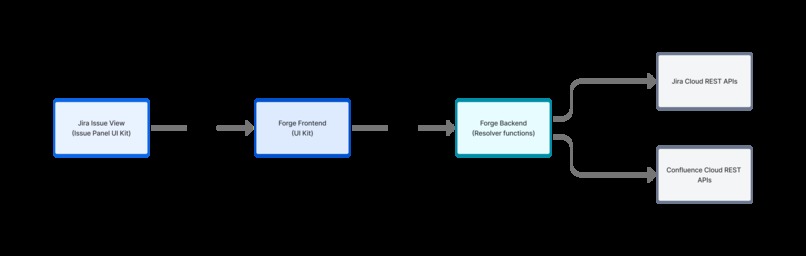
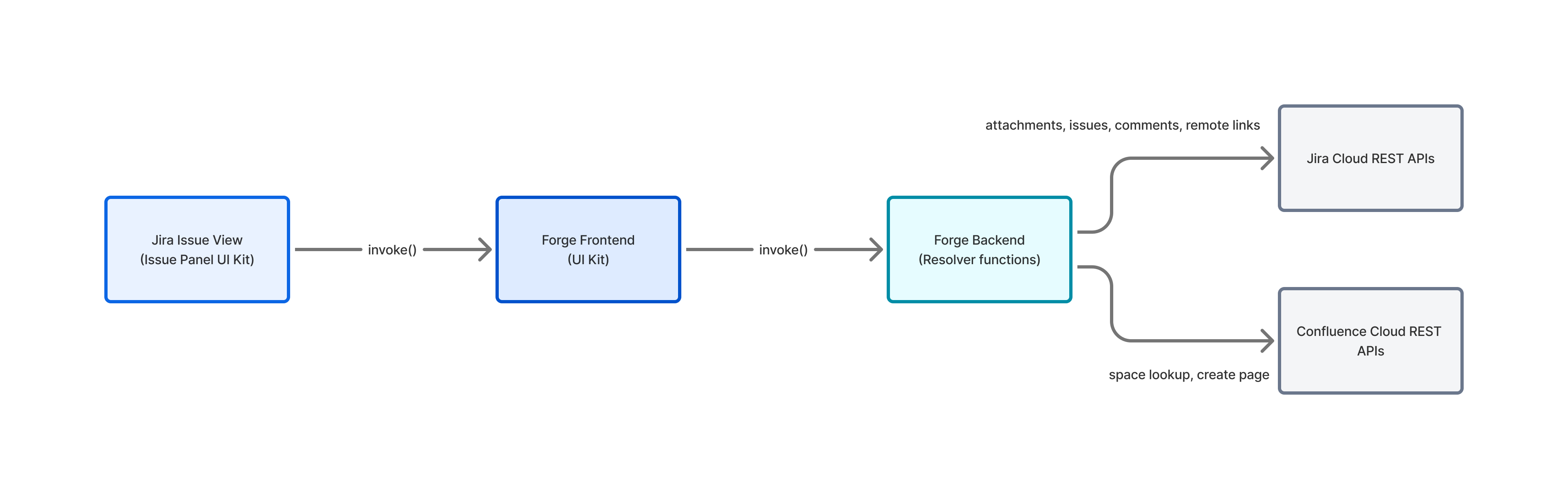
OncoTrack Architecture
-
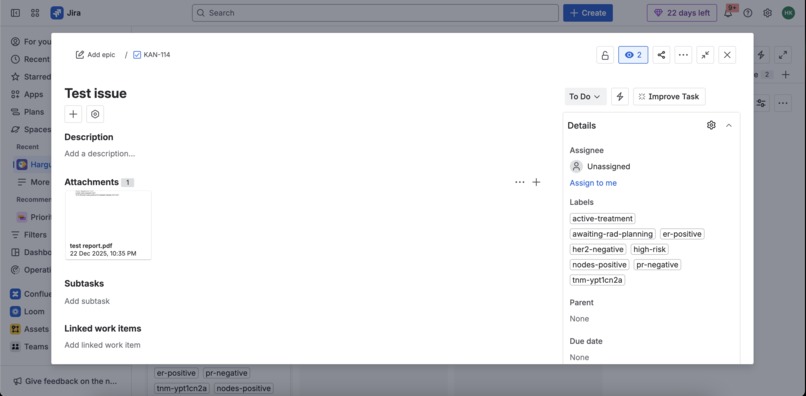
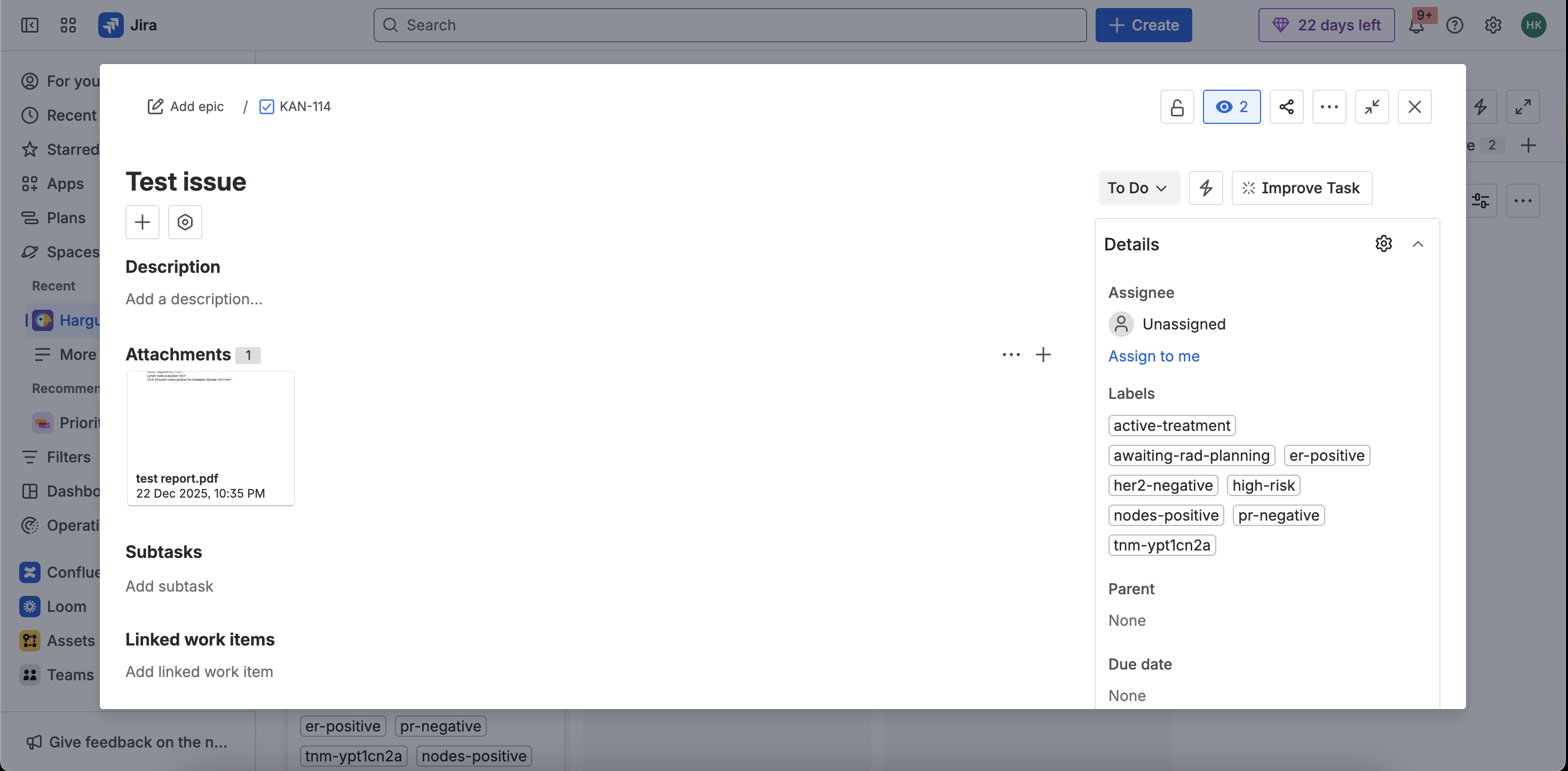
Test Issue on Jira
-
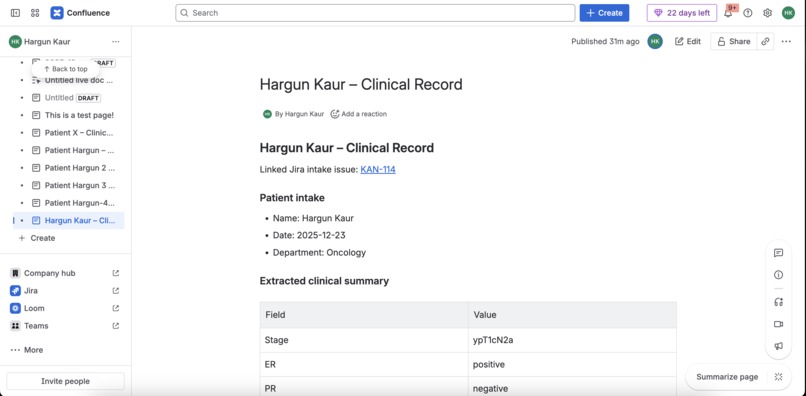
Sample Confluence Document
-
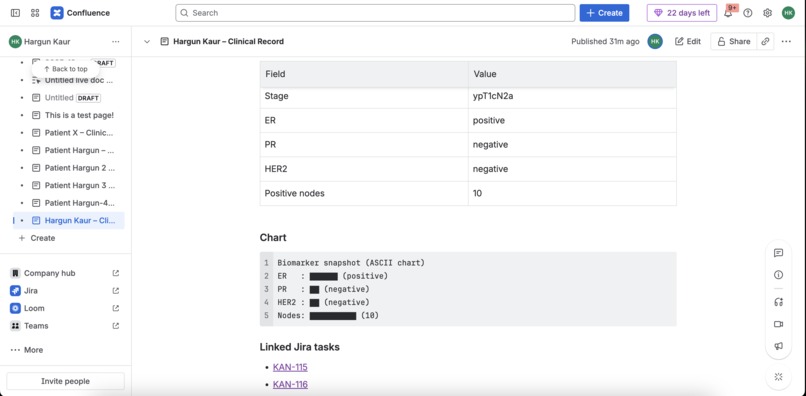
Sample Confluence Document
-
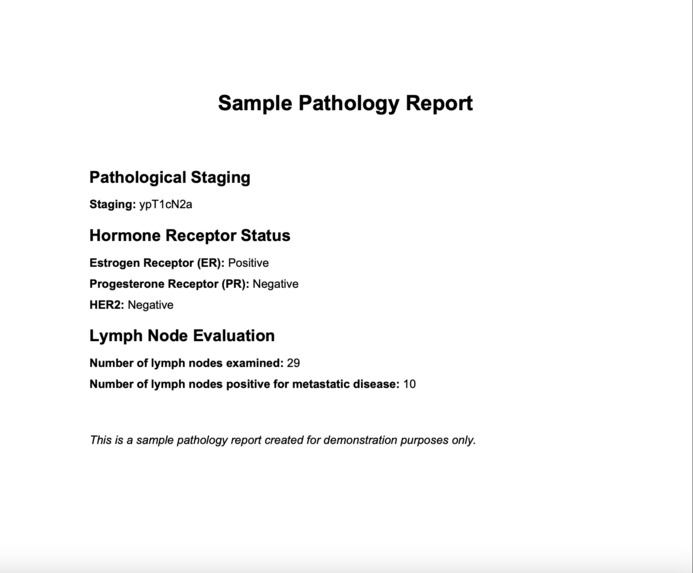
Sample Pathology Report (for demonstration purpose only)


Inspiration
The inspiration came from a personal experience in which one of my family member’s oncology reports was misunderstood due to documentation issues and miscommunication among doctors. This incident became a turning point in my life, and since then I have been deeply intrigued by building healthcare solutions. Through this experience, I realized that documentation failures are among the most common “silent” drivers of critical problems in healthcare.
- In global healthcare, a meaningful fraction of patients are harmed during care, and a large share of adverse events are preventable.
- In oncology specifically, medication/order errors, diagnostic delays, and incomplete referral packets are well-documented.
What stood out most for product design:
- The source of truth is often a PDF.
- The work happens across teams (med onc, rad onc, radiology, nursing coordination).
- The system needs an audit trail (who extracted what, from which attachment, and when).
So the core “industry app” idea was:
Build a healthcare‑native workflow inside Atlassian tools that reduces cognitive load and coordination delays by making clinical intake data structured and actionable.
What it does
1) Jira Issue Panel: “OncoTrack”
Installed as a Jira issue panel, the app becomes available directly on an intake issue.
The UI supports a primary flow:
Click “Extract from attachments”
- Reads the current issue context (issue key)
- Calls a Forge resolver that downloads the most relevant attachment (PDF/DOCX supported on the webtrigger path; PDF supported on the UI path)
- Converts the attachment to text (PDF parsing via
pdf-parse, DOCX parsing viamammoth) - Runs deterministic regex extraction to return structured clinical fields
After successful extraction, click “Create Jira tickets + Confluence patient page”
- Creates a treatment plan as Jira Tasks
- Creates a Confluence clinical record page
- Links everything bidirectionally (Jira ↔ Confluence)
The panel also lets you enter patient intake metadata that goes into Confluence:
- Patient name
- Department
- Visit date
- Freeform patient details / notes
2) Deterministic clinical field extraction (regex-first)
Instead of using generative AI for core parsing, the app uses regex patterns to extract:
- Pathological TNM stage (examples:
ypT1cN2a,pT2N0) - ER status
- PR status
- HER2 status (supports “equivocal”)
- Positive lymph node count (from patterns like “10 of 29 lymph nodes”)
This is designed to be:
- Fast and predictable
- Auditable (you can reproduce outputs on the same input)
- Safer for clinical contexts where hallucinations are unacceptable
3) Jira workflow automation: structured plan creation
From extracted markers, the app creates a standard care coordination plan:
- “Chemotherapy planning” task
- “Radiation oncology planning” task
- “Endocrine / targeted therapy assessment” task
- “Follow-up & survivorship plan” task
- “Imaging workup” task
- Optional: “Cardiac monitoring” if HER2 is positive
Each task is tagged with labels derived from clinical data, e.g.:
er-positive,pr-negative,her2-equivocaltnm-ypt1cn2a(sanitized)nodes-positive- A coarse heuristic stage group label like
stage-iiiin certain TNM patterns - Coordination labels like
active-treatment,rad-planning,awaiting-rad-planning
Labels are deliberately chosen because they unlock immediate Jira value:
- Dashboards (counts by stage group, queues for high-risk)
- Filters/JQL (e.g., find all “HER2-positive + nodes-positive” cases)
- Automation rules (assign, notify, escalate)
The app also writes Jira comments for traceability:
- “Extracted from : Stage=… ER=… PR=… HER2=… Nodes=…”
- “Created treatment plan issues: …”
4) Confluence clinical record page (ADF) with chart + checklist
When a patient case is created, the app generates a Confluence page in a configured space:
- A structured clinical summary (table)
- An ASCII “biomarker snapshot” chart (renders everywhere, avoids macro dependency)
- A checklist of workflow steps
- Smart links (where possible) to Jira intake issue + created Jira tasks
This gives the team a durable documentation artifact that works well for:
- Tumor board preparation
- Cross-team coordination
- Patient record summarization for non-EMR contexts
5) Jira ↔ Confluence linking (two-way)
To reduce “lost in the tool” navigation:
The Confluence page includes links to:
- The intake Jira issue
- Each created Jira task
Jira is updated to include:
- A remote link from the intake issue → the Confluence patient page
- Comments on each created task linking back to the Confluence page
How we built it
Atlassian Forge modules
- Jira Issue Panel (UI Kit / native render): the interactive UI used inside a Jira issue
- Resolvers (Forge functions): backend functions invoked by the UI to call Jira/Confluence APIs
- Webtrigger: endpoint to run extraction from attachments and optionally write labels/custom fields
Backend (Forge functions)
Core logic is in src/index.js:
Attachment retrieval and parsing
- Jira attachment download via
/rest/api/3/attachment/content/{id}?redirect=false - PDF to text using
pdf-parse - DOCX to text using
mammoth(webtrigger path)
- Jira attachment download via
Deterministic extraction
- Regex extraction with normalization (e.g.
+→positive)
- Regex extraction with normalization (e.g.
Jira plan creation
- Creates Tasks via
/rest/api/3/issue - Updates labels on intake issue via
/rest/api/3/issue/{key} - Adds comments via
/rest/api/3/issue/{key}/comment
- Creates Tasks via
Confluence page creation
- Resolves spaceId via Confluence REST v2
/wiki/api/v2/spaces - Creates a page via
/wiki/api/v2/pagesusingatlas_doc_format(ADF)
- Resolves spaceId via Confluence REST v2
Cross-linking
- Adds Jira remote link via
/rest/api/3/issue/{key}/remotelink - Posts back-links to each created Jira Task using Jira comments
- Adds Jira remote link via
Frontend (UI Kit)
Core UI is in src/frontend/index.jsx:
- Uses Forge UI Kit components to keep the app native inside Jira
- Uses
@forge/bridge:view.getContext()to find the current issueinvoke()to call backend resolvers
The UI is intentionally minimal: it’s designed for a clinical ops workflow where speed matters.
Challenges we ran into
1) Rovo AI integration
We originally planned a “Rovo-first” extraction pipeline where an agent would summarize reports and produce structured JSON. But, we weren't able to access the Rovo Agent.
That pivot is why the app contains a clear “regex-based documentation extractor” path.
2) Healthcare documentation is messy
Real pathology reports vary wildly:
- Different headings, different abbreviations
- Values embedded in narrative text
- Scanned PDFs with no extractable text
So we designed for graceful failure:
- Fast validation (check PDF header)
- Clear error messages and hints in the UI
- “Best effort” behavior for comments and linking
Accomplishments that we're proud of
- End-to-end workflow: attach report → extract markers → create plan → create patient page → link everything
- Auditability: comments written back to Jira make extraction and plan creation traceable
- Healthcare-native information design: Structured fields (stage/biomarkers/nodes) A “chart” that does not rely on Confluence macro availability A checklist on the patient page to support real team workflows
- Immediate Jira value via labels: dashboards/queues can be built instantly without custom infrastructure
- Minimal external dependencies: no external LLM calls or egress for the core workflow
What we learned
- In safety-sensitive domains, “AI everywhere” is not the answer—determinism and traceability matter.
- Atlassian’s platform primitives (issues, labels, Confluence pages, links) are surprisingly powerful when mapped to real industry workflows.
- Building cross-product experiences is about careful API choices:
- Jira writes often work best as the app
- Confluence writes should usually be user-authorized
- Data modeling via labels is underrated: if labels are well-designed, Jira becomes a flexible workflow engine.
What's next for OncoTrack
- Improve extraction quality
- Add more robust patterns for common pathology formats
- Detect and handle scanned PDFs (OCR path) if the platform allows it
- Expand beyond breast cancer to other oncology pathways
- Safer structured data in Jira
- Formalize custom fields (stage/ER/PR/HER2/nodes) and map extracted data into them consistently
- Build JQL dashboards and saved filters as recommended setup steps
- Rovo-powered safety operations
- Build the agent to produce operational dashboards and incident-style summaries
- Add analysis by label taxonomy (e.g., high-risk, awaiting-rad-planning) and time trends
- Team workflows
- Add role-based assignment defaults via environment configuration
- Add a lightweight “handoff checklist” that moves tasks through statuses

Log in or sign up for Devpost to join the conversation.